display VOLVO S80 2016 Owner´s Manual
[x] Cancel search | Manufacturer: VOLVO, Model Year: 2016, Model line: S80, Model: VOLVO S80 2016Pages: 380, PDF Size: 9.45 MB
Page 333 of 380
10 Maintenance and servicing
10
}}
331
CAUTION
The infotainment system's energy-saving feature may not function correctly or at all,and/or a message may be displayed if abattery charger or jumper cables are notconnected properly.
• The negative terminal on the battery must
never be used to connect a
jumper cable or a battery charger.Only the ground point on the chassismay be used.
See Jump starting (p. 237) for an illustra- tion and additional information.
WARNING
• Never expose the battery to open flame or electric spark.
• Do not smoke near the battery.
• Battery fluid contains sulfuric acid. Donot allow battery fluid to contact eyes,skin, fabrics or painted surfaces. Ifcontact occurs, flush the affected areaimmediately with water. Obtain medi-cal help immediately if eyes are affec-ted.
NOTE
The life of the battery is shortened if it becomes discharged repeatedly.
Related information
•
Battery – changing (p. 332)
• Battery – maintenance (p. 331)
• Battery – symbols (p. 330)
Battery – maintenance
Proper battery maintenance can help prolong its service life.
Maintenance
• Use a screw driver to open the caps or cover and a flashlight to inspect the level.
• If necessary, add distilled water. The levelshould never be above the indicator.
• The fluid level should be checked if thebattery has been recharged.
• After inspection, be sure the cap overeach battery cell or the cover is securelyin place.
• Check that the battery cables are cor-rectly connected and properly tightened.
• Never disconnect the battery when theengine is running, or when the key is inthe ignition. This could damage the vehi-cle's electrical system.
• The battery should be disconnected fromthe vehicle when a battery charger isused directly on the battery.
• To help keep the battery in good condi-tion, the vehicle should be driven for atleast 15 minutes a week or connected toa charger with an automatic chargingfunction.
• If the battery is fully discharged a numberof times, this may shorten its service life.Keeping the battery fully charged helpsprolong its service life.
Page 342 of 380
||
10 Maintenance and servicing
10
340* Option/accessory, for more information, see Introduction.
PosFunctionA
Controls in left rear passeng- er's door20
Keyless drive*20
Power driver's seat*20
Power front passenger's seat*20
-
Infotainment system display5
Infotainment system: amplifier, SiriusXM ™ satellite radio*10
Sensus control module15
Bluetooth hands-free system5
-
Power moonroof* Courtesy lighting, climate sys- tem sensor5
12-volt sockets in tunnel con- sole15
Heated rear seat* (passenger's side)15
Heated rear seat* (driver's side)15
PosFunctionA
-
Heated front passenger's seat*15
Heated driver's seat*15
Park assist*5
All Wheel Drive* control mod- ule15
Active chassis system*10
Positions: fusebox B
PosFunctionA
-
-
Front courtesy lighting, driv- er's door power window con-trols, power seat(s)*,7.5
Instrument panel5
Adaptive cruise control/colli- sion warning*10
Courtesy lighting, rain sen- sor*, HomeLInk ®
Wireless
Control System*7.5
PosFunctionA
Steering wheel module7.5
Cental locking: fuel filler door10
-
Windshield washers15
Trunk open10
Electrical folding rear seat outboard head restraints*10
Fuel pump20
Climate system control panel5
-
Alarm, On-board diagnostic system5
Satellite radio *, audio system amplifier10
Airbag system, occupant weight sensor10
Collision warning system*5
Accelerator pedal sensor, auto-dim mirror function,heated rear seats*7.5
Page 366 of 380
11 Specifications
11
364
Symbols – general information
The following tables list the most common warning and indicator lights and symbols anda reference to where more detailed informa-tion can be found.
IntroductionThe symbols in the vehicle's various displaysare divided into three main categories:• Warning symbols
• Indicator symbols
• Information symbols
The following tables list the most commonsymbols, their meaning and the pages in thismanual that provide more detailed informa-tion.
NOTE
Not all of the symbols shown in the related articles are available in all models or on allmarkets. Local variations may occur.
Warning symbol
: The red warning symbol illuminates to
indicate a problem related to safety and/or drivability. A message will also appear in themain instruments panel's display.
Information symbol
: The information symbol illuminates and
a text message is displayed to provide the driver with necessary information about one of the vehicle's systems.
Related information
•
Information displays – indicator symbols (p. 66)
• Information displays – warning symbols(p. 68)
• Information display – messages (p. 107)
Warning symbols
The following tables list the most common warning and indicator lights and symbols anda reference to where more detailed informa-tion can be found.
: The red warning symbol illuminates to
indicate a problem related to safety and/or drivability. A message will also appear in themain instruments panel's display.
: The information symbol illuminates and
a text message is displayed to provide the driver with necessary information about oneof the vehicle's systems.
Page 367 of 380
11 Specifications
11
* Option/accessory, for more information, see Introduction.365
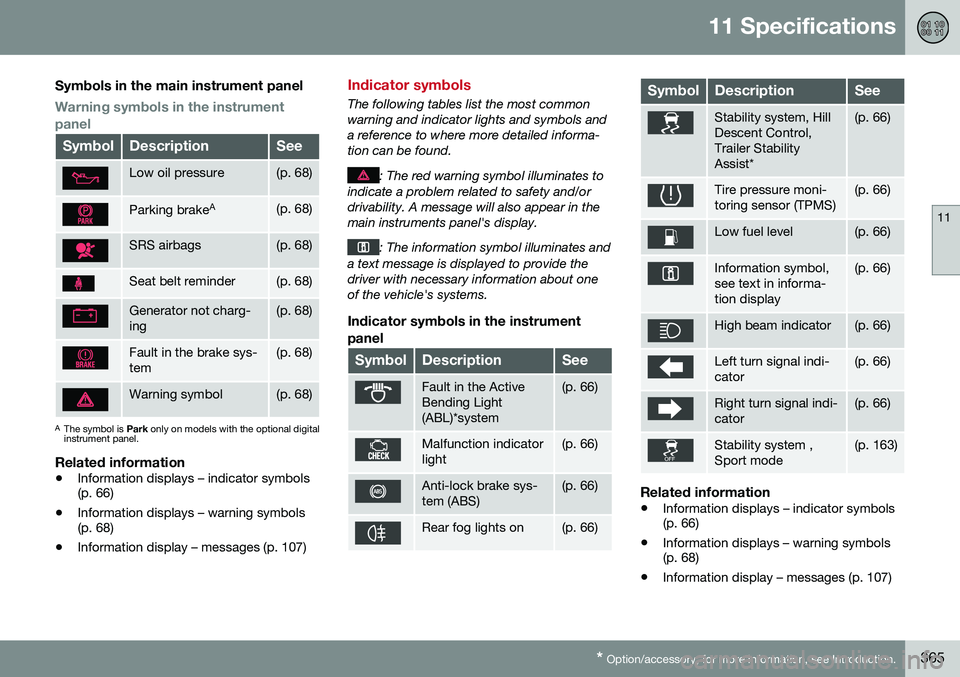
Symbols in the main instrument panel
Warning symbols in the instrument panel
SymbolDescriptionSee
Low oil pressure(p. 68)
Parking brake A(p. 68)
SRS airbags(p. 68)
Seat belt reminder(p. 68)
Generator not charg- ing(p. 68)
Fault in the brake sys- tem(p. 68)
Warning symbol(p. 68)
A
The symbol is Park only on models with the optional digital
instrument panel.
Related information
• Information displays – indicator symbols (p. 66)
• Information displays – warning symbols(p. 68)
• Information display – messages (p. 107)
Indicator symbols
The following tables list the most common warning and indicator lights and symbols anda reference to where more detailed informa-tion can be found.
: The red warning symbol illuminates to
indicate a problem related to safety and/or drivability. A message will also appear in themain instruments panel's display.
: The information symbol illuminates and
a text message is displayed to provide the driver with necessary information about oneof the vehicle's systems.
Indicator symbols in the instrument
panel
SymbolDescriptionSee
Fault in the Active Bending Light(ABL)*system(p. 66)
Malfunction indicator light(p. 66)
Anti-lock brake sys- tem (ABS)(p. 66)
Rear fog lights on(p. 66)
SymbolDescriptionSee
Stability system, Hill Descent Control,Trailer StabilityAssist*(p. 66)
Tire pressure moni- toring sensor (TPMS)(p. 66)
Low fuel level(p. 66)
Information symbol, see text in informa-tion display(p. 66)
High beam indicator(p. 66)
Left turn signal indi- cator(p. 66)
Right turn signal indi- cator(p. 66)
Stability system , Sport mode(p. 163)
Related information
• Information displays – indicator symbols (p. 66)
• Information displays – warning symbols(p. 68)
• Information display – messages (p. 107)
Page 368 of 380
11 Specifications
11
366* Option/accessory, for more information, see Introduction.
Information symbols
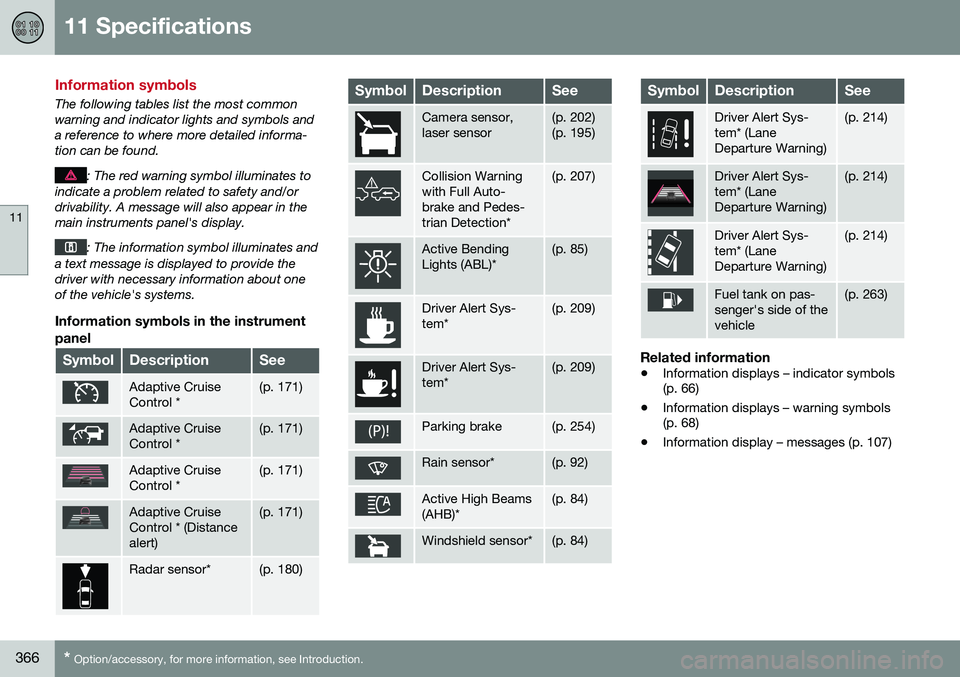
The following tables list the most common warning and indicator lights and symbols anda reference to where more detailed informa-tion can be found.
: The red warning symbol illuminates to
indicate a problem related to safety and/or drivability. A message will also appear in themain instruments panel's display.
: The information symbol illuminates and
a text message is displayed to provide the driver with necessary information about oneof the vehicle's systems.
Information symbols in the instrument
panel
SymbolDescriptionSee
Adaptive Cruise Control *(p. 171)
Adaptive Cruise Control *(p. 171)
Adaptive Cruise Control *(p. 171)
Adaptive Cruise Control * (Distancealert)(p. 171)
Radar sensor*(p. 180)
SymbolDescriptionSee
Camera sensor, laser sensor(p. 202) (p. 195)
Collision Warning with Full Auto-brake and Pedes-trian Detection*(p. 207)
Active Bending Lights (ABL)*(p. 85)
Driver Alert Sys- tem*(p. 209)
Driver Alert Sys- tem*(p. 209)
Parking brake(p. 254)
Rain sensor*(p. 92)
Active High Beams (AHB)*(p. 84)
Windshield sensor*(p. 84)
SymbolDescriptionSee
Driver Alert Sys- tem* (LaneDeparture Warning)(p. 214)
Driver Alert Sys- tem* (LaneDeparture Warning)(p. 214)
Driver Alert Sys- tem* (LaneDeparture Warning)(p. 214)
Fuel tank on pas- senger's side of thevehicle(p. 263)
Related information
• Information displays – indicator symbols (p. 66)
• Information displays – warning symbols(p. 68)
• Information display – messages (p. 107)
Page 369 of 380
11 Specifications
11
* Option/accessory, for more information, see Introduction.367
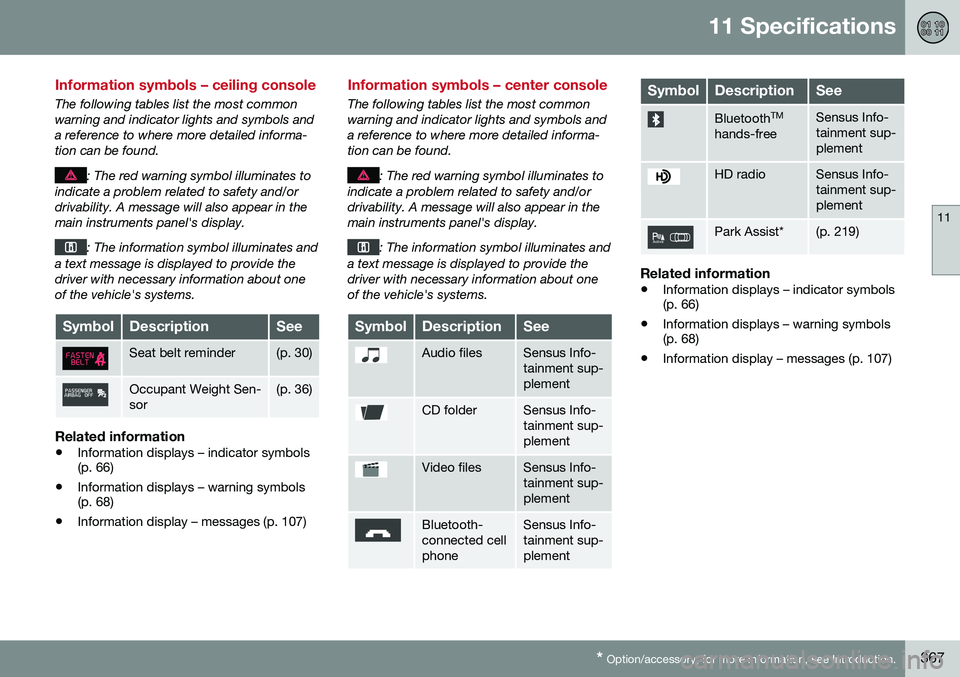
Information symbols – ceiling console
The following tables list the most common warning and indicator lights and symbols anda reference to where more detailed informa-tion can be found.
: The red warning symbol illuminates to
indicate a problem related to safety and/or drivability. A message will also appear in themain instruments panel's display.
: The information symbol illuminates and
a text message is displayed to provide the driver with necessary information about oneof the vehicle's systems.
SymbolDescriptionSee
Seat belt reminder(p. 30)
Occupant Weight Sen- sor(p. 36)
Related information
• Information displays – indicator symbols (p. 66)
• Information displays – warning symbols(p. 68)
• Information display – messages (p. 107)
Information symbols – center console
The following tables list the most common warning and indicator lights and symbols anda reference to where more detailed informa-tion can be found.
: The red warning symbol illuminates to
indicate a problem related to safety and/or drivability. A message will also appear in themain instruments panel's display.
: The information symbol illuminates and
a text message is displayed to provide the driver with necessary information about oneof the vehicle's systems.
SymbolDescriptionSee
Audio filesSensus Info- tainment sup-plement
CD folderSensus Info- tainment sup-plement
Video filesSensus Info- tainment sup-plement
Bluetooth- connected cellphoneSensus Info- tainment sup-plement
SymbolDescriptionSee
Bluetooth TM
hands-freeSensus Info- tainment sup-plement
HD radioSensus Info- tainment sup-plement
Park Assist*(p. 219)
Related information
• Information displays – indicator symbols (p. 66)
• Information displays – warning symbols(p. 68)
• Information display – messages (p. 107)