light VOLVO S80 2016 Owner´s Manual
[x] Cancel search | Manufacturer: VOLVO, Model Year: 2016, Model line: S80, Model: VOLVO S80 2016Pages: 380, PDF Size: 9.45 MB
Page 297 of 380
09 Wheels and tires
09
}}
295
Tire Monitor - introduction
Tire Monitor uses the rotational speed of the tires in combination with signal analysis of theABS sensor signals to determine if they areproperly inflated. When a tire is under-inflated, its diameter (and consequently also its rotational speed)changes. By comparing the individual tireswith each other it is possible to determine ifone or more tires are under inflated. When low inflation pressure is detected or if the system is not functioning properly, TireMonitor will light up the tire pressure warning light (
) (also referred to as a telltale) in
the instrument panel and will display one of the following messages in the text window, for example:
Tire pressure low Check rear
right tire5 or Tire press. syst Service
required.
If two or more tires have low pressure or if the system cannot determine which tire has low pressure, a general text (
Tire pressure low
Check tires) will be displayed.
NOTE
If a malfunction occurs in the system, the tire pressure warning light will flash forapproximately 1 minute and then remain illuminated.
Tire press. syst Service
required will be displayed.
NOTE
The system indicates low tire pressure but does not replace normal tire maintenance.For information on correct tire pressure,please refer to the tire inflation pressuretable (see Tire inflation – pressure table(p. 285)), the tire inflation pressure placardlocated on the driver's side B-pillar (thestructural member at the side of the vehi-cle, at the rear of the driver's door open-ing) or consult your Volvo retailer.
Related information
• Tire pressure monitoring - introduction (p. 290)
Calibrating Tire Monitor
In order for Tire Monitor to work correctly, tire pressure reference values must be set. Thismust be done each time wheels or tire pres-sures are changed.
Calibration1. Switch off the engine.
2. Inflate the tires to the desired pressure
(consult tire pressure placard located on the driver's side B-pillar (the structuralmember at the side of the vehicle) andput the ignition in mode II, see Ignition
modes (p. 73).
3. Press the MY CAR button on the center
console control panel and select
Settings
Car settingsTire monitoring.
4. Press OK/MENU , select
Calibrate tire
pressure and press OK/MENU again.
5. Drive away. > The calibration process will be comple-ted while driving and will be interrupted if the vehicle is parked and the engineis switched off. Calibration continuesautomatically when driving resumes.The system will not give any confirma-tion when calibration is finishedalthough it will state if calibration fails.
5That last part of this message varies, depending on the tire(s) effected.
Page 310 of 380
10 Maintenance and servicing
10
308
Maintenance – owner maintenance
Periodic maintenance requirements and inter- vals are described in your vehicle's Warrantyand Service Records Information booklet. The following points can be carried out between the normally scheduled maintenanceservices.
Owner maintenance
Each time the car is refueled:
•Check the engine oil level.
• Clean the windshield, windshield wipers, headlights, and taillights.
Monthly:
• Check cold tire pressure in all tires. Inspect the tires for wear.
• Check that engine coolant and other fluidlevels are between the indicated "min"and "max" markings.
• Clean interior glass surfaces with a glasscleaner and soft paper towels.
• Wipe driver information displays with asoft cloth.
• Visually inspect battery terminals for cor-rosion. Corrosion may indicate a looseterminal connector, or a battery near theend of its useful service life. Consult yourVolvo retailer for additional information.
As needed:Wash the car, including the undercarriage, to reduce wear that can be caused by a buildup of dirt, and corrosion that can be caused bysalt residues. Clean leaves and twigs from air intake vents at the base of the windshield, and from otherplaces where they may collect.
NOTE
Complete service information for qualified technicians is available online for purchaseor subscription at www.volvotechinfo.com.
Related information
•
Maintenance – opening/closing hood (p. 312)
• Engine compartment – overview (p. 313)
• Engine compartment – coolant (p. 316)
• Engine compartment – engine oil (p. 314)
• Engine compartment – power steeringfluid (p. 318)
• Engine compartment – washer fluid(p. 329)
• Cleaning the interior (p. 347)
• Washing the car (p. 345)
• Tire inflation – checking pressure (p. 282)
• Tires – tread wear indicator (p. 275)
Page 312 of 380
10 Maintenance and servicing
10
310* Option/accessory, for more information, see Introduction.
Onboard Diagnostic System
OBD II is part of your vehicle's computerized engine management system. It stores diag-nostic information about your vehicle's emis-sion controls. It can light the Check Enginelight (MIL) if it detects an emission control"fault." A "fault" is a component or systemthat is not performing within an expectedrange. A fault may be permanent or tempo-rary. OBD II will store a message about anyfault.
Emission inspection readiness
How do states use OBD II for emission inspections?
Many states connect a computer directly to a vehicle's OBD II system. The inspector canthen read "faults." In some states, this type ofinspection has replaced the tailpipe emissiontest.
How can my vehicle fail OBD II emission
inspection?
Your vehicle can fail OBD II emission inspec- tion for any of the following reasons.
• If your Check Engine (MIL) light is lit, your vehicle may fail inspection.
• If your vehicle's Check Engine light waslit, but went out without any action onyour part, OBD II will still have a recordedfault. Your vehicle may pass or fail,depending on the inspection practices inyour area. •
If you had recent service that requireddisconnecting the battery, OBD II diag-nostic information may be incompleteand "not ready" for inspection. A vehiclethat is not ready may fail inspection.
How can I prepare for my next OBD II
emission inspection?
• If your Check Engine (MIL) light is lit – or was lit but went out without service, haveyour vehicle diagnosed and, if necessary,serviced by a qualified Volvo technician.
• If you recently had service for a lit CheckEngine light, or if you had service thatrequired disconnecting the battery, aperiod of driving is necessary to bring theOBD II system to "ready" for inspection.Two half-hour trips of mixed stop-and-go/highway driving are typically neededto allow OBD II to reach readiness. YourVolvo retailer can provide you with moreinformation on planning a trip.
• Maintain your vehicle in accordance withyour vehicle's maintenance schedule.
Booking service and repairs
Connected Service Booking (CSB) makes set- ting up a time for service, maintenance and/orrepairs directly from the vehicle quick andconvenient.
Prerequisites
• The owner (primary driver) must have a valid Volvo ID. See Volvo ID (p. 21) foradditional information.
• The vehicle must be connected to the Internet using a paired Bluetooth ®
cell
phone. See your Sensus Infotainment supplement for information on pairing acell phone. On models equipped withVolvo On Call (VOC)*, you can connect tothe Internet using your separate VOCdata plan. Refer to your separate VolvoOn Call manual.
• By default, the retailer where you pur-chased your vehicle will be your preferred(primary) retailer/Volvo authorized work-shop who will perform service and repairson your vehicle. To change the preferredretailer, go to Dealer Locator atvolvocars.com and select a retailer, clickon Service Scheduler and book anappointment at the new preferred retailer.
• In order to be guided through the on-screen steps, the menu alternative
Display notifications must be activated.
CSB menu accessOnce the prerequisites have been estab- lished, all CSB-related menus can be
Page 313 of 380
10 Maintenance and servicing
10
}}
311
accessed in
MY CAR by pressing OK/MENU
and then selecting
Maintenance & repair.
Booking information and data from the vehicle
If you request an appointment from your vehi- cle, with your consent, booking information and data about your vehicle 1
will be transmit-
ted to your preferred retailer.
Using the serviceOnce the prerequisites have been estab- lished, all CSB-related menus can beaccessed in MY CAR by pressing OK/MENU
and then selecting
Maintenance & repair.
If the time for the next regularly scheduled service is approaching, if the vehicle requirescertain types of repairs or if a system needsto be checked, a message will be displayed.You will then by guided through the stepsrequired to book service or repairs.
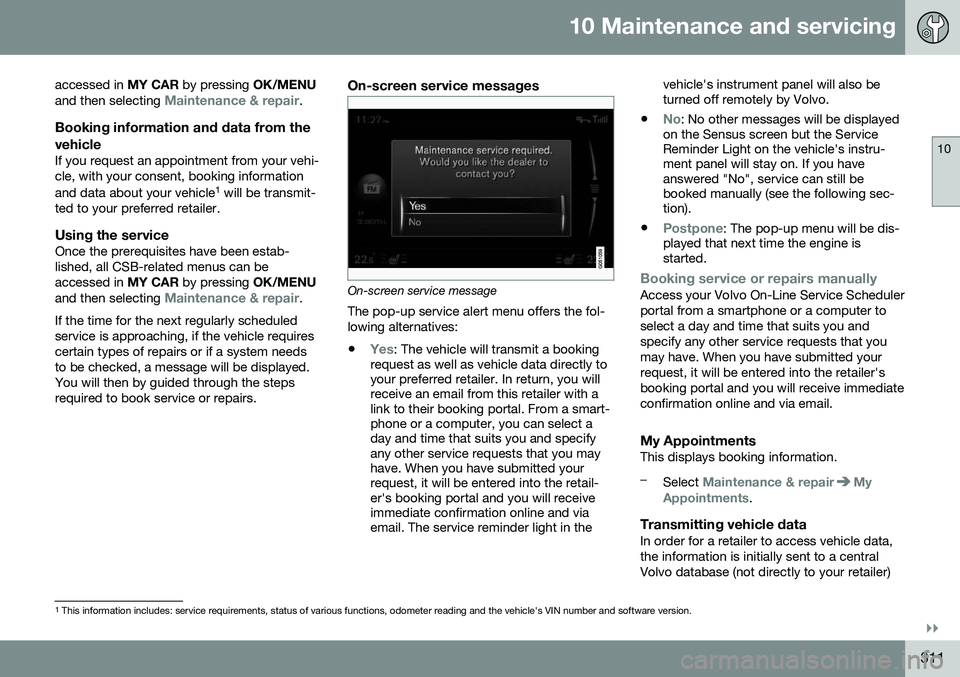
On-screen service messages
On-screen service message The pop-up service alert menu offers the fol- lowing alternatives:
•
Yes: The vehicle will transmit a booking
request as well as vehicle data directly to your preferred retailer. In return, you willreceive an email from this retailer with alink to their booking portal. From a smart-phone or a computer, you can select aday and time that suits you and specifyany other service requests that you mayhave. When you have submitted yourrequest, it will be entered into the retail-er's booking portal and you will receiveimmediate confirmation online and viaemail. The service reminder light in the vehicle's instrument panel will also beturned off remotely by Volvo.
•
No: No other messages will be displayed
on the Sensus screen but the Service Reminder Light on the vehicle's instru-ment panel will stay on. If you haveanswered "No", service can still bebooked manually (see the following sec-tion).
•
Postpone: The pop-up menu will be dis-
played that next time the engine is started.
Booking service or repairs manuallyAccess your Volvo On-Line Service Scheduler portal from a smartphone or a computer toselect a day and time that suits you andspecify any other service requests that youmay have. When you have submitted yourrequest, it will be entered into the retailer'sbooking portal and you will receive immediateconfirmation online and via email.
My AppointmentsThis displays booking information.
–Select Maintenance & repairMy
Appointments.
Transmitting vehicle dataIn order for a retailer to access vehicle data, the information is initially sent to a centralVolvo database (not directly to your retailer)
1 This information includes: service requirements, status of various functions, odometer reading and the vehicle's VIN number and software version.
Page 314 of 380
||
10 Maintenance and servicing
10
312
where any retailer can access or search for this information using your vehicle's VIN num-ber. This number can be found in your war-ranty booklet or on the dashboard at thelower left corner of the windshield.
–Select Maintenance & repairSend
vehicle data.
Booking information and vehicle dataWhen you opt to book service from your vehi- cle, booking information and vehicle data willbe transmitted. Vehicle data consists of anumber of parameters in the following areas:
• Service requirements
• Function status
• Fluid levels
• Odometer reading (mileage)
• Vehicle Identification Number (VIN)
• The vehicle's software version
Related information
•Volvo ID (p. 21)
Maintenance – opening/closing hood
The hood is opened by first releasing the lock from the passenger compartment and thenpressing the release control.
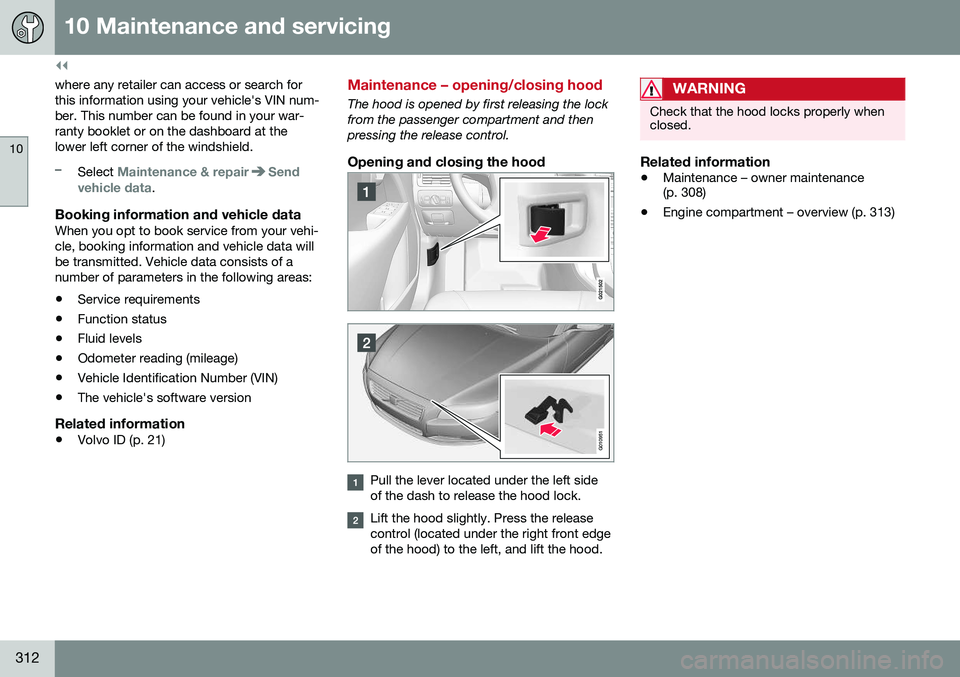
Opening and closing the hood
G010951
Pull the lever located under the left side of the dash to release the hood lock.
Lift the hood slightly. Press the release control (located under the right front edgeof the hood) to the left, and lift the hood.
WARNING
Check that the hood locks properly when closed.
Related information
•Maintenance – owner maintenance (p. 308)
• Engine compartment – overview (p. 313)
Page 321 of 380
10 Maintenance and servicing
10
}}
319
CAUTION
Keep the area around the power steering fluid reservoir clean when checking.
Bulbs – introduction
Certain bulbs can be replaced by the vehicle's owner. However, the bulbs on the followinglist should only be replaced by a trained andqualified Volvo service technician. All bulb specifications are listed in Bulbs – specifications (p. 326).• Active Bending Lights
• Front parking lights
• Daytime running lights
• Turn signals in the door mirrors
• Approach lighting in the door mirrors
• Interior lighting
• Rear parking lights
• Rear side marker lights
• Brake lights
• LED bulbsNOTE
•For information regarding any bulbs not mentioned in this section, pleasecontact your Volvo retailer or a trainedand authorized Volvo service techni-cian.
• Always switch off the ignition beforestarting to replace a bulb.
• If an error message remains in the dis-play after a faulty bulb has beenreplaced, contact an authorized Volvoworkshop.
• Condensation may form temporarily onthe inside of the lenses of exteriorlights such as headlights, fog lights, ortaillights. This is normal and the lightsare designed to withstand moisture.Normally, condensation will dissipateafter the lights have been on for ashort time.
• The optional Active Bending Lightbulbs contain trace amounts of mer-cury. These bulbs should always bedisposed of by a trained and qualifiedVolvo service technician.
Page 322 of 380
||
10 Maintenance and servicing
10
320* Option/accessory, for more information, see Introduction.
CAUTION
Never touch the glass of bulbs with your fingers. Grease and oils from your fingersvaporize in the heat and will leave adeposit on the reflector, which will damageit.
WARNING
• The engine should not be running when changing bulbs.
• If the engine has been running justprior to replacing bulbs in the head-light housing, please keep in mind thatcomponents in the engine compart-ment will be hot.
WARNING
•
Active Bending Lights* – due to the high voltage used by these headlights,these bulbs should only be replacedby a trained and qualified Volvo serv-ice technician.
• Turn off the lights and remove theremote key from the ignition beforechanging any bulbs.
Related information
•
Bulbs – headlight housing (p. 320)
• Bulbs – taillight housing (p. 324)
• Bulbs – vanity mirror lighting (p. 326)
• Bulbs – license plate lighting (p. 325)
Bulbs – headlight housing
The entire headlight housing must be lifted out when replacing all front bulbs.
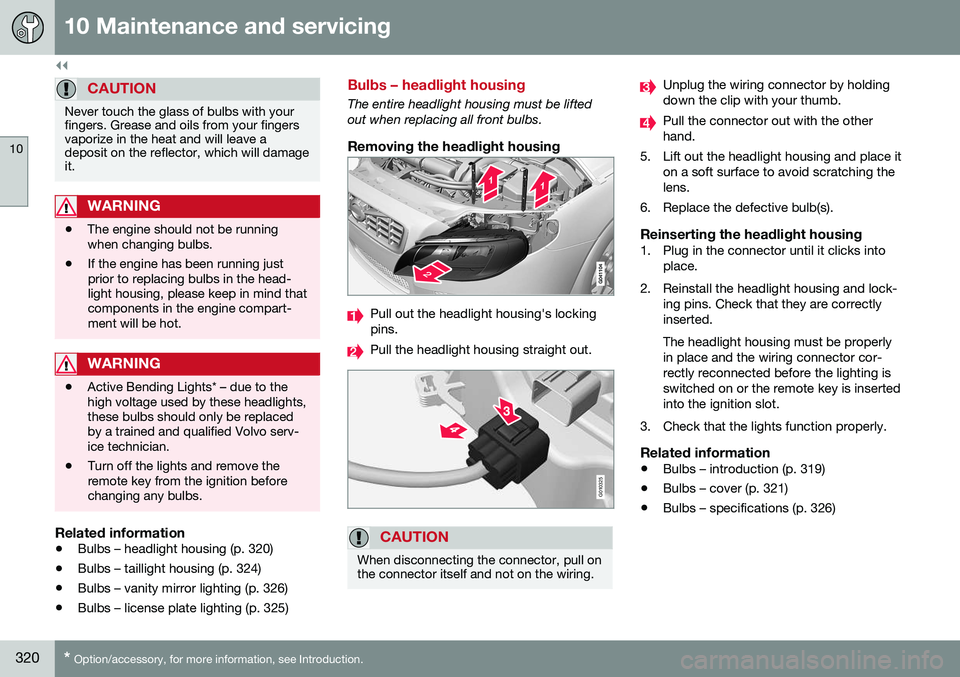
Removing the headlight housing
Pull out the headlight housing's locking pins.
Pull the headlight housing straight out.
G010325
CAUTION
When disconnecting the connector, pull on the connector itself and not on the wiring.
Unplug the wiring connector by holding down the clip with your thumb.
Pull the connector out with the other hand.
5. Lift out the headlight housing and place it on a soft surface to avoid scratching thelens.
6. Replace the defective bulb(s).
Reinserting the headlight housing1. Plug in the connector until it clicks into place.
2. Reinstall the headlight housing and lock- ing pins. Check that they are correctlyinserted. The headlight housing must be properly in place and the wiring connector cor-rectly reconnected before the lighting isswitched on or the remote key is insertedinto the ignition slot.
3. Check that the lights function properly.
Related information
• Bulbs – introduction (p. 319)
• Bulbs – cover (p. 321)
• Bulbs – specifications (p. 326)
Page 323 of 380
10 Maintenance and servicing
10
321
Bulbs – cover
The larger cover has to be removed in order to change the high/low beam headlight bulbs.
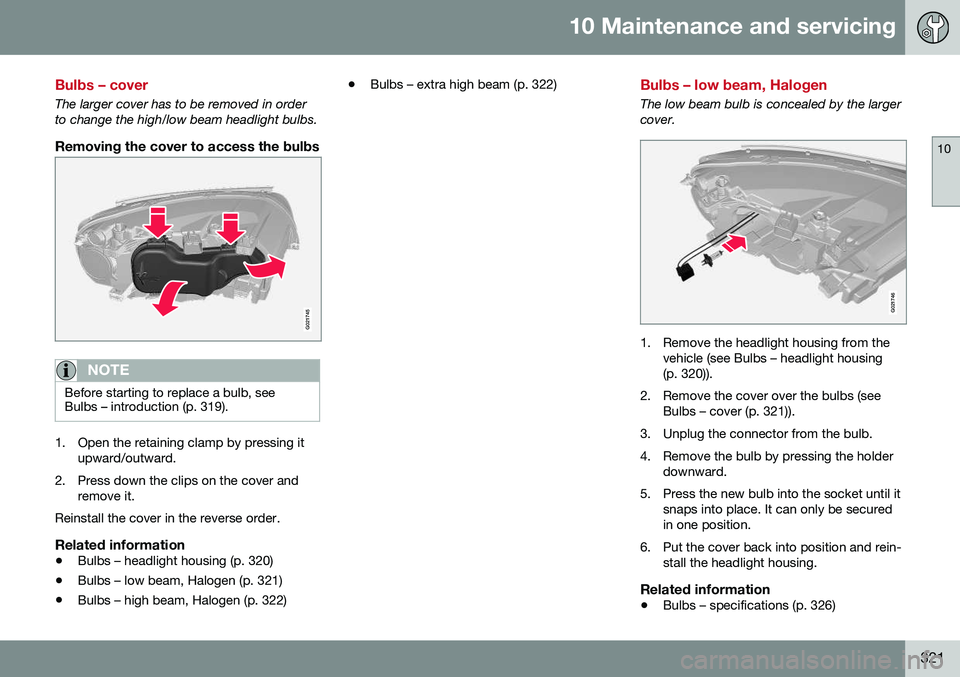
Removing the cover to access the bulbs
G021745
NOTE
Before starting to replace a bulb, see Bulbs – introduction (p. 319).
1. Open the retaining clamp by pressing itupward/outward.
2. Press down the clips on the cover and remove it.
Reinstall the cover in the reverse order.
Related information
• Bulbs – headlight housing (p. 320)
• Bulbs – low beam, Halogen (p. 321)
• Bulbs – high beam, Halogen (p. 322) •
Bulbs – extra high beam (p. 322)
Bulbs – low beam, Halogen
The low beam bulb is concealed by the larger cover.
G021746
1. Remove the headlight housing from the
vehicle (see Bulbs – headlight housing (p. 320)).
2. Remove the cover over the bulbs (see Bulbs – cover (p. 321)).
3. Unplug the connector from the bulb.
4. Remove the bulb by pressing the holder downward.
5. Press the new bulb into the socket until it snaps into place. It can only be secured in one position.
6. Put the cover back into position and rein- stall the headlight housing.
Related information
• Bulbs – specifications (p. 326)
Page 324 of 380
10 Maintenance and servicing
10
322
Bulbs – high beam, Halogen
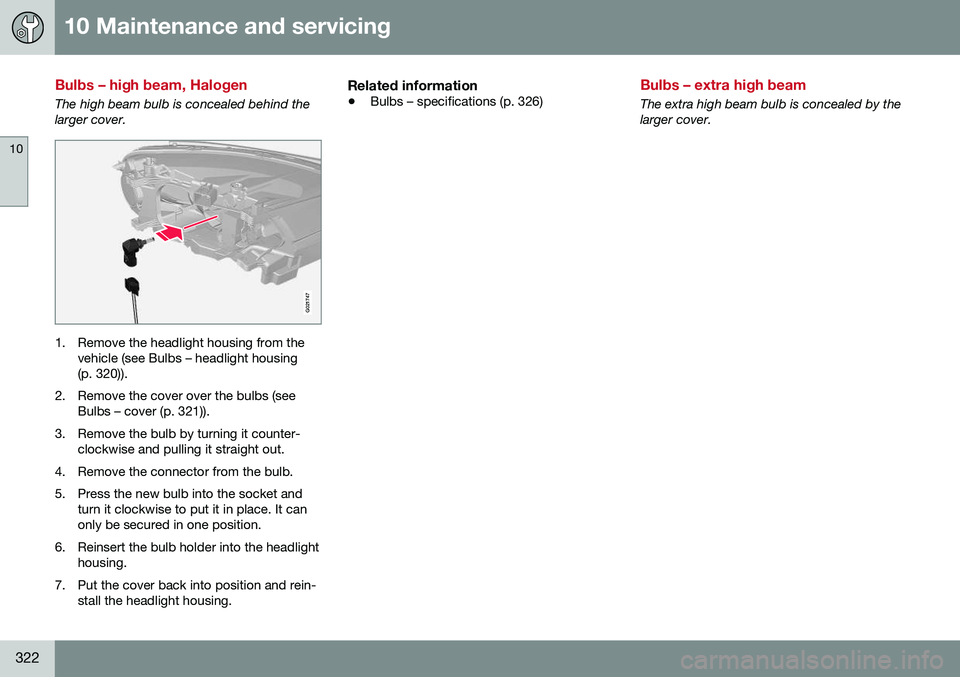
The high beam bulb is concealed behind the larger cover.
G021747
1. Remove the headlight housing from thevehicle (see Bulbs – headlight housing (p. 320)).
2. Remove the cover over the bulbs (see Bulbs – cover (p. 321)).
3. Remove the bulb by turning it counter- clockwise and pulling it straight out.
4. Remove the connector from the bulb.
5. Press the new bulb into the socket and turn it clockwise to put it in place. It can only be secured in one position.
6. Reinsert the bulb holder into the headlight housing.
7. Put the cover back into position and rein- stall the headlight housing.
Related information
• Bulbs – specifications (p. 326)
Bulbs – extra high beam
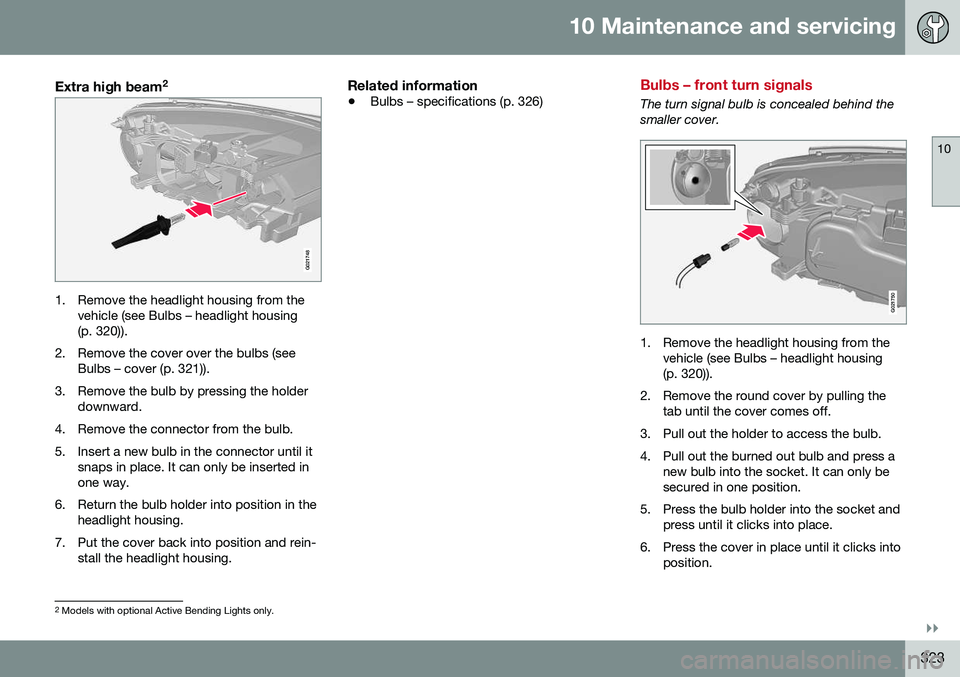
The extra high beam bulb is concealed by the larger cover.
Page 325 of 380
10 Maintenance and servicing
10
}}
323
Extra high beam2
G021748
1. Remove the headlight housing from the
vehicle (see Bulbs – headlight housing (p. 320)).
2. Remove the cover over the bulbs (see Bulbs – cover (p. 321)).
3. Remove the bulb by pressing the holder downward.
4. Remove the connector from the bulb.
5. Insert a new bulb in the connector until it snaps in place. It can only be inserted in one way.
6. Return the bulb holder into position in the headlight housing.
7. Put the cover back into position and rein- stall the headlight housing.
Related information
• Bulbs – specifications (p. 326)
Bulbs – front turn signals
The turn signal bulb is concealed behind the smaller cover.
G021750
1. Remove the headlight housing from the
vehicle (see Bulbs – headlight housing (p. 320)).
2. Remove the round cover by pulling the tab until the cover comes off.
3. Pull out the holder to access the bulb.
4. Pull out the burned out bulb and press a new bulb into the socket. It can only be secured in one position.
5. Press the bulb holder into the socket and press until it clicks into place.
6. Press the cover in place until it clicks into position.
2Models with optional Active Bending Lights only.