battery VOLVO S80 2016 Owner´s Manual
[x] Cancel search | Manufacturer: VOLVO, Model Year: 2016, Model line: S80, Model: VOLVO S80 2016Pages: 380, PDF Size: 9.45 MB
Page 149 of 380
06 Locks and alarm
06
}}
147
G021084
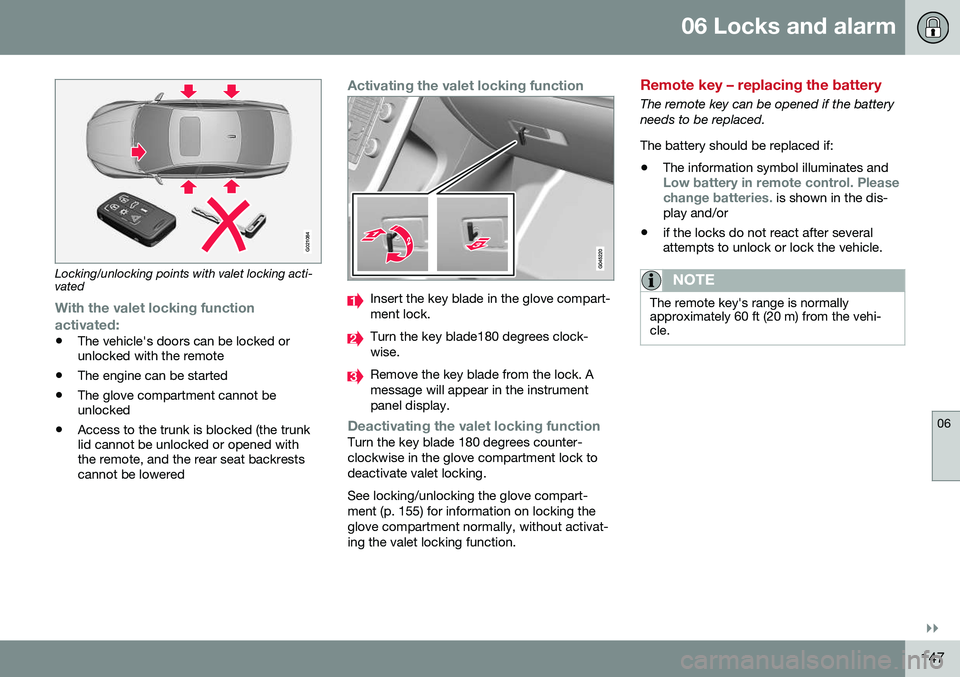
Locking/unlocking points with valet locking acti- vated
With the valet locking function
activated:
• The vehicle's doors can be locked or unlocked with the remote
• The engine can be started
• The glove compartment cannot beunlocked
• Access to the trunk is blocked (the trunklid cannot be unlocked or opened withthe remote, and the rear seat backrestscannot be lowered
Activating the valet locking function
Insert the key blade in the glove compart- ment lock.
Turn the key blade180 degrees clock- wise.
Remove the key blade from the lock. A message will appear in the instrumentpanel display.
Deactivating the valet locking functionTurn the key blade 180 degrees counter- clockwise in the glove compartment lock todeactivate valet locking. See locking/unlocking the glove compart- ment (p. 155) for information on locking theglove compartment normally, without activat-ing the valet locking function.
Remote key – replacing the battery
The remote key can be opened if the battery needs to be replaced. The battery should be replaced if:
• The information symbol illuminates and
Low battery in remote control. Please change batteries. is shown in the dis-
play and/or
• if the locks do not react after several attempts to unlock or lock the vehicle.
NOTE
The remote key's range is normally approximately 60 ft (20 m) from the vehi-cle.
Page 150 of 380
||
06 Locks and alarm
06
148
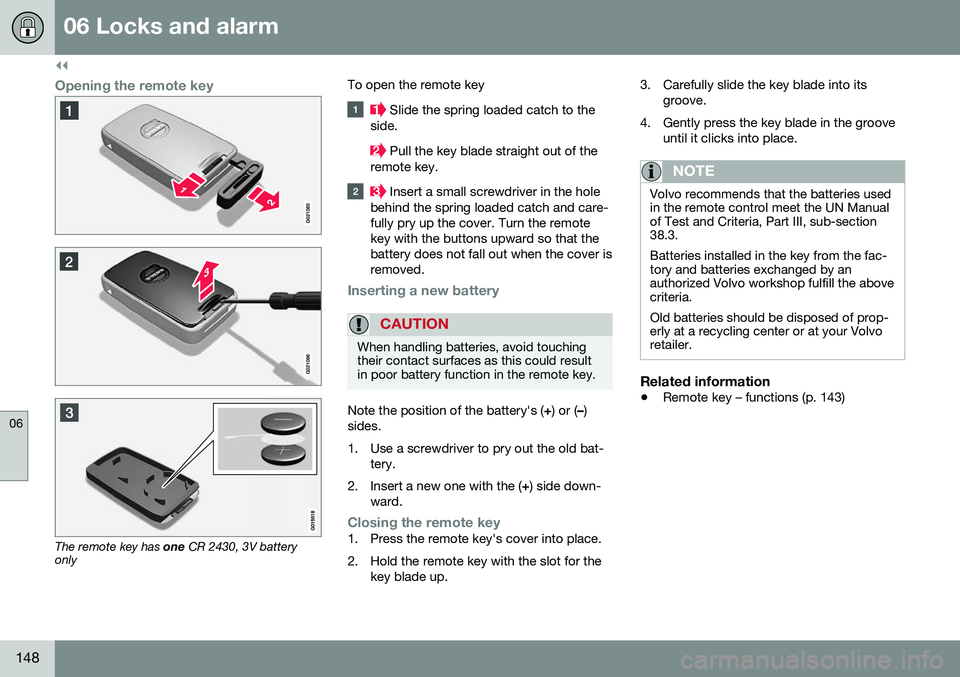
Opening the remote key
The remote key has one CR 2430, 3V battery
only To open the remote key
Slide the spring loaded catch to the
side.
Pull the key blade straight out of the
remote key.
Insert a small screwdriver in the hole
behind the spring loaded catch and care- fully pry up the cover. Turn the remotekey with the buttons upward so that thebattery does not fall out when the cover isremoved.
Inserting a new battery
CAUTION
When handling batteries, avoid touching their contact surfaces as this could resultin poor battery function in the remote key.
Note the position of the battery's ( +) or ( –)
sides.
1. Use a screwdriver to pry out the old bat- tery.
2. Insert a new one with the ( +) side down-
ward.
Closing the remote key1. Press the remote key's cover into place.
2. Hold the remote key with the slot for the key blade up. 3. Carefully slide the key blade into its
groove.
4. Gently press the key blade in the groove until it clicks into place.
NOTE
Volvo recommends that the batteries used in the remote control meet the UN Manualof Test and Criteria, Part III, sub-section38.3. Batteries installed in the key from the fac- tory and batteries exchanged by anauthorized Volvo workshop fulfill the abovecriteria. Old batteries should be disposed of prop- erly at a recycling center or at your Volvoretailer.
Related information
• Remote key – functions (p. 143)
Page 152 of 380
06 Locks and alarm
06
150* Option/accessory, for more information, see Introduction.
Keyless drive* – unlocking with key blade
If the remote key does not function normally (weak battery, etc.), the vehicle can beunlocked with the detachable key blade.
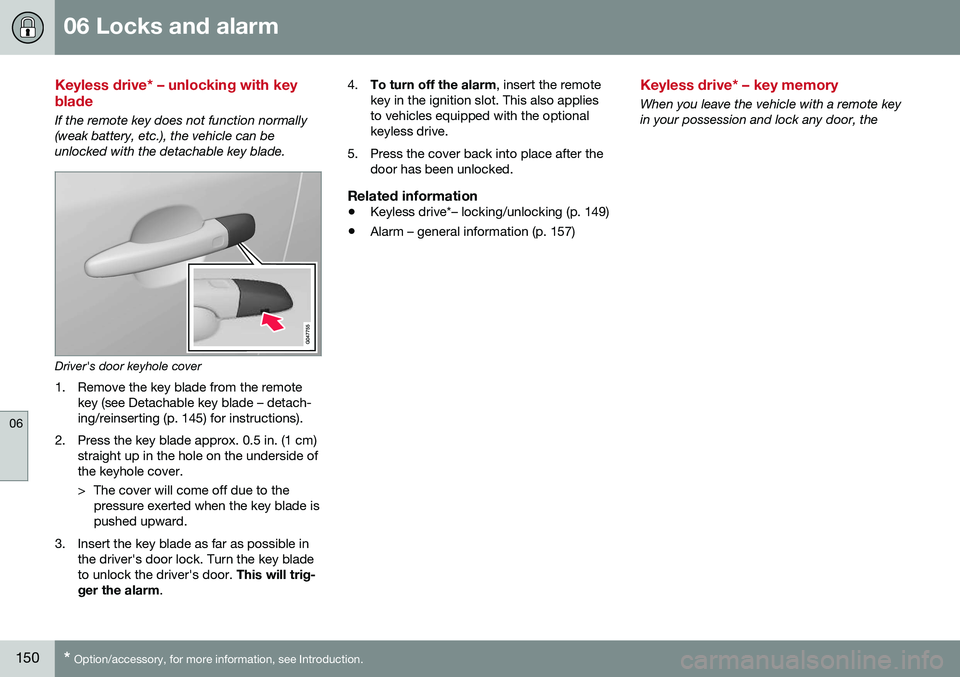
Driver's door keyhole cover
1. Remove the key blade from the remote key (see Detachable key blade – detach- ing/reinserting (p. 145) for instructions).
2. Press the key blade approx. 0.5 in. (1 cm) straight up in the hole on the underside ofthe keyhole cover.
> The cover will come off due to thepressure exerted when the key blade is pushed upward.
3. Insert the key blade as far as possible in the driver's door lock. Turn the key bladeto unlock the driver's door. This will trig-
ger the alarm . 4.
To turn off the alarm , insert the remote
key in the ignition slot. This also appliesto vehicles equipped with the optionalkeyless drive.
5. Press the cover back into place after the door has been unlocked.
Related information
• Keyless drive*– locking/unlocking (p. 149)
• Alarm – general information (p. 157)
Keyless drive* – key memory
When you leave the vehicle with a remote key in your possession and lock any door, the
Page 155 of 380
06 Locks and alarm
06
* Option/accessory, for more information, see Introduction.153
WARNING
People with implanted pacemakers should not allow the pacemaker to come closerthan 9 inches (22 cm) to any of the keylessdrive system's antennas. This is to helpprevent interference between the pace-maker and the keyless drive system.
Related information
• Keyless drive*– locking/unlocking (p. 149)
Locking/unlocking – from the outside
The remote key (p. 140) is used to lock/unlock all of the doors and the trunk at the sametime. Different settings for unlocking the vehi-cle can be selected, see Remote key – func-tions (p. 143). Before the vehicle can be locked from the outside with the remote key, the driver's doormust be closed. If the trunk or any other dooris open, it will be locked and the alarm will bearmed.
NOTE
Be sure the remote key is outside of the vehicle before the other doors/trunk areclosed to help avoid locking the remoteinside the vehicle.
If the vehicle is equipped with the optional keyless drive system, all doors/trunk must beclosed before the vehicle can be locked. The first press on the unlock button unlocks the driver's door and a second press unlocksthe other doors and the trunk (see alsoremote key and key blade (p. 140)). This set-ting can be changed in the menu system. SeeMY CAR
(p. 70) for a description.
If the locks repeatedly do not react when theunlock button is pressed, it may be necessaryto replace the battery in the remote, seeRemote key – replacing the battery (p. 147). In this case the vehicle can be unlocked withthe detachable key blade (p. 146).
Related information
•
Locking/unlocking – from inside (p. 154)
Page 156 of 380
06 Locks and alarm
06
154
Manual locking
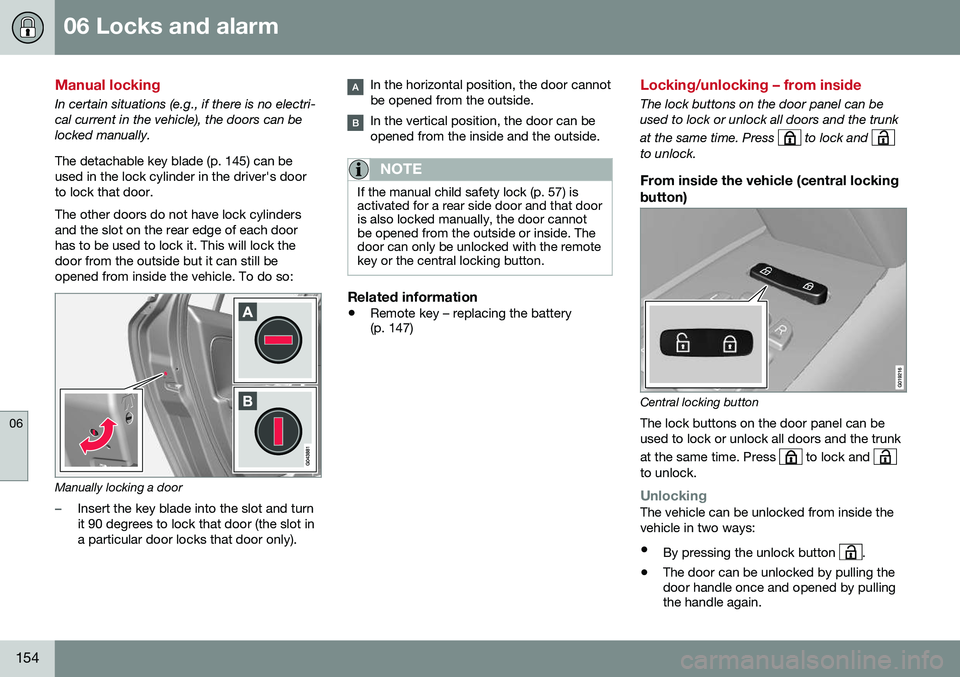
In certain situations (e.g., if there is no electri- cal current in the vehicle), the doors can belocked manually. The detachable key blade (p. 145) can be used in the lock cylinder in the driver's doorto lock that door. The other doors do not have lock cylinders and the slot on the rear edge of each doorhas to be used to lock it. This will lock thedoor from the outside but it can still beopened from inside the vehicle. To do so:
Manually locking a door
–Insert the key blade into the slot and turn it 90 degrees to lock that door (the slot ina particular door locks that door only).
In the horizontal position, the door cannot be opened from the outside.
In the vertical position, the door can be opened from the inside and the outside.
NOTE
If the manual child safety lock (p. 57) is activated for a rear side door and that dooris also locked manually, the door cannotbe opened from the outside or inside. Thedoor can only be unlocked with the remotekey or the central locking button.
Related information
•Remote key – replacing the battery (p. 147)
Locking/unlocking – from inside
The lock buttons on the door panel can be used to lock or unlock all doors and the trunk at the same time. Press
to lock and to unlock.
From inside the vehicle (central locking button)
Central locking button
The lock buttons on the door panel can be used to lock or unlock all doors and the trunk at the same time. Press
to lock and to unlock.
UnlockingThe vehicle can be unlocked from inside the vehicle in two ways:
• By pressing the unlock button
.
• The door can be unlocked by pulling the door handle once and opened by pullingthe handle again.
Page 159 of 380
06 Locks and alarm
06
}}
157
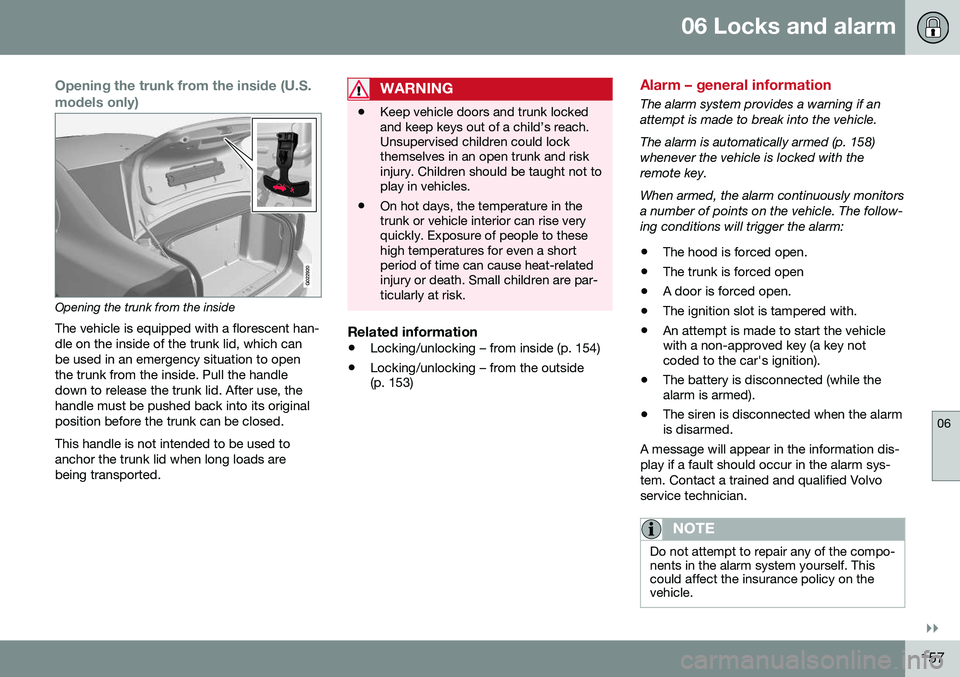
Opening the trunk from the inside (U.S. models only)
G022920
Opening the trunk from the insideThe vehicle is equipped with a florescent han- dle on the inside of the trunk lid, which canbe used in an emergency situation to openthe trunk from the inside. Pull the handledown to release the trunk lid. After use, thehandle must be pushed back into its originalposition before the trunk can be closed. This handle is not intended to be used to anchor the trunk lid when long loads arebeing transported.
WARNING
• Keep vehicle doors and trunk locked and keep keys out of a child’s reach.Unsupervised children could lockthemselves in an open trunk and riskinjury. Children should be taught not toplay in vehicles.
• On hot days, the temperature in thetrunk or vehicle interior can rise veryquickly. Exposure of people to thesehigh temperatures for even a shortperiod of time can cause heat-relatedinjury or death. Small children are par-ticularly at risk.
Related information
•
Locking/unlocking – from inside (p. 154)
• Locking/unlocking – from the outside (p. 153)
Alarm – general information
The alarm system provides a warning if an attempt is made to break into the vehicle. The alarm is automatically armed (p. 158) whenever the vehicle is locked with theremote key. When armed, the alarm continuously monitors a number of points on the vehicle. The follow-ing conditions will trigger the alarm:
• The hood is forced open.
• The trunk is forced open
• A door is forced open.
• The ignition slot is tampered with.
• An attempt is made to start the vehicle with a non-approved key (a key notcoded to the car's ignition).
• The battery is disconnected (while thealarm is armed).
• The siren is disconnected when the alarmis disarmed.
A message will appear in the information dis- play if a fault should occur in the alarm sys-tem. Contact a trained and qualified Volvoservice technician.
NOTE
Do not attempt to repair any of the compo- nents in the alarm system yourself. Thiscould affect the insurance policy on thevehicle.
Page 161 of 380
06 Locks and alarm
06
159
Disarming the alarm–Press the Unlock button on the remote key.
> Two short flashes from the car's direc-tion indicators confirm that the alarm has been deactivated and that alldoors are unlocked.
Related information
• Alarm indicator (p. 158)
• Alarm signal (p. 159)
• Alarm – turning off (p. 159)
• Alarm-related functions (p. 160)
Alarm signal
An audible (p. 157) signal is given by a battery powered siren. The alarm cycle lasts for30 seconds. The visual alarm signal is given by flashing all turn signals for approximately 5 minutes oruntil the alarm is turned off.
Related information
•Alarm indicator (p. 158)
• Alarm – arming/disarming (p. 158)
• Alarm – turning off (p. 159)
Alarm – turning off
The alarm system provides a warning if an attempt is made to break into the vehicle. If the alarm is sounding, it can be stopped by pressing the Unlock button on the remote keyor by inserting the remote key in the ignitionslot. Two short flashes from the car's turn sig-nals confirm that the alarm has been turnedoff.
Related information
• Alarm indicator (p. 158)
• Alarm – arming/disarming (p. 158)
• Remote key – replacing the battery (p. 147)
Page 235 of 380
08 Starting and driving
08
}}
* Option/accessory, for more information, see Introduction.233
Starting the engine
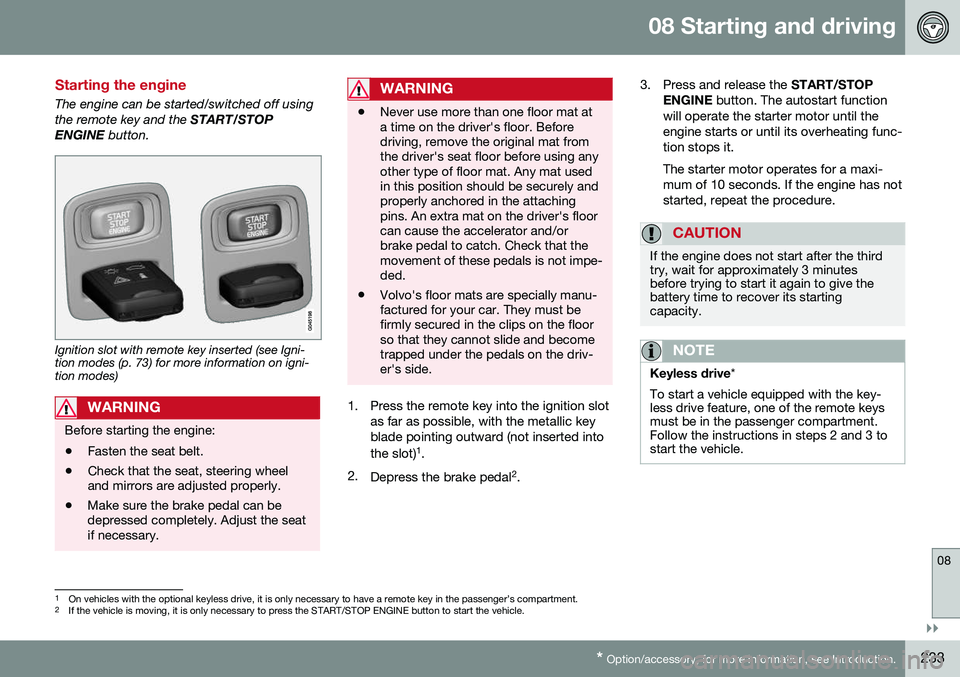
The engine can be started/switched off using the remote key and the START/STOP
ENGINE button.
Ignition slot with remote key inserted (see Igni- tion modes (p. 73) for more information on igni-tion modes)
WARNING
Before starting the engine:
• Fasten the seat belt.
• Check that the seat, steering wheel and mirrors are adjusted properly.
• Make sure the brake pedal can bedepressed completely. Adjust the seatif necessary.
WARNING
•Never use more than one floor mat at a time on the driver's floor. Beforedriving, remove the original mat fromthe driver's seat floor before using anyother type of floor mat. Any mat usedin this position should be securely andproperly anchored in the attachingpins. An extra mat on the driver's floorcan cause the accelerator and/orbrake pedal to catch. Check that themovement of these pedals is not impe-ded.
• Volvo's floor mats are specially manu-factured for your car. They must befirmly secured in the clips on the floorso that they cannot slide and becometrapped under the pedals on the driv-er's side.
1. Press the remote key into the ignition slot
as far as possible, with the metallic key blade pointing outward (not inserted into the slot) 1
.
2. Depress the brake pedal 2
. 3. Press and release the
START/STOP
ENGINE button. The autostart function
will operate the starter motor until the engine starts or until its overheating func-tion stops it. The starter motor operates for a maxi- mum of 10 seconds. If the engine has notstarted, repeat the procedure.
CAUTION
If the engine does not start after the third try, wait for approximately 3 minutesbefore trying to start it again to give thebattery time to recover its startingcapacity.
NOTE
Keyless drive *
To start a vehicle equipped with the key- less drive feature, one of the remote keysmust be in the passenger compartment.Follow the instructions in steps 2 and 3 tostart the vehicle.
1 On vehicles with the optional keyless drive, it is only necessary to have a remote key in the passenger’s compartment.
2 If the vehicle is moving, it is only necessary to press the START/STOP ENGINE button to start the vehicle.
Page 237 of 380
08 Starting and driving
08
* Option/accessory, for more information, see Introduction.235
Switching off the engine
Switch off the engine by pressing the START/
STOP ENGINE button.
If the gear selector is not in the P position or
if the vehicle is moving, press the START/
STOP ENGINE button twice or press and
hold it in until the engine switches off.
Related information
• Ignition modes (p. 73)
Engine Remote Start (ERS)* – introduction
ERS is a feature that makes it possible to remotely start the engine using the remotekey to cool or heat the passenger compart-ment before driving. The climate/ and infotainment systems will start using the same settings as when theengine was switched off. When the engine is started using ERS, it will run for a maximum of 15 minutes beforeautomatically switching off again. After 2 ERSstarts, the engine must be started in the nor-mal way before ERS can be used again.
NOTE
•Always adhere to applicable State, Province and/or Local laws regardingengine idling when using ERS.
• The service life of the remote key'sbattery is affected by ERS use. If thisfeature is used frequently, the batteryshould be replaced once a year, seeRemote key – replacing the battery(p. 147).
WARNING
Keep the following in mind before using ERS:
• The vehicle should be in view.
• The vehicle should be unoccupied.
• The vehicle must not be parked indoors or in an enclosed area.Exhaust fumes are harmful to thehealth.
Related information
•
Engine Remote Start (ERS)* – starting the engine (p. 236)
• Engine Remote Start (ERS)* – switchingoff the engine (p. 236)
Page 239 of 380
08 Starting and driving
08
237
Jump starting
Follow these instructions to jump start your vehicle's dead battery or to jump start anothervehicle's dead battery using your vehicle.
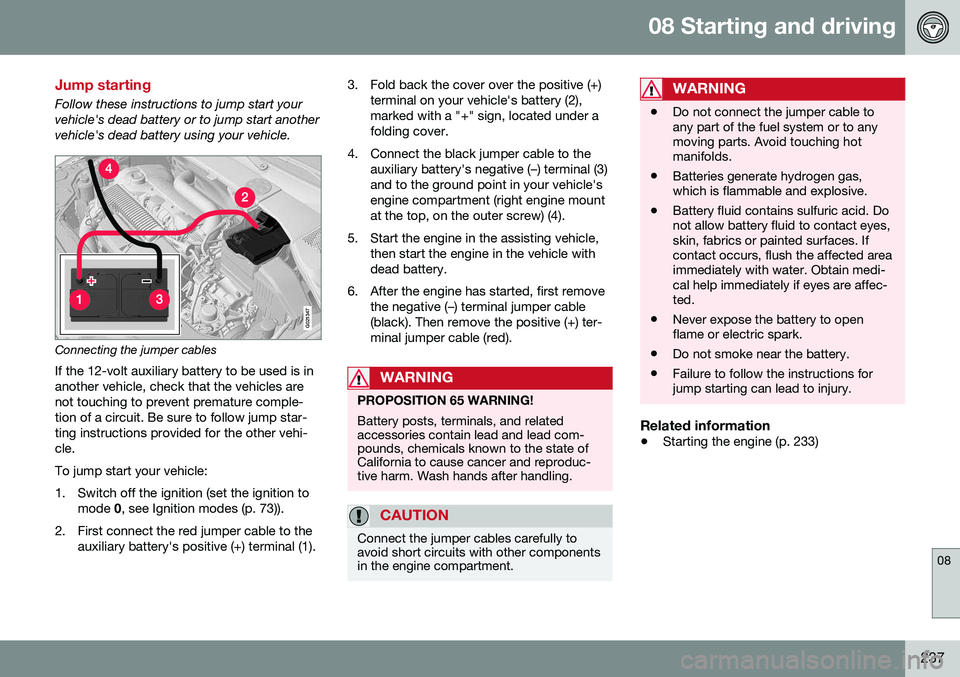
G021347
Connecting the jumper cablesIf the 12-volt auxiliary battery to be used is in another vehicle, check that the vehicles arenot touching to prevent premature comple-tion of a circuit. Be sure to follow jump star-ting instructions provided for the other vehi-cle. To jump start your vehicle:
1. Switch off the ignition (set the ignition to mode 0, see Ignition modes (p. 73)).
2. First connect the red jumper cable to the auxiliary battery's positive (+) terminal (1). 3. Fold back the cover over the positive (+)
terminal on your vehicle's battery (2), marked with a "+" sign, located under afolding cover.
4. Connect the black jumper cable to the auxiliary battery's negative (–) terminal (3)and to the ground point in your vehicle'sengine compartment (right engine mountat the top, on the outer screw) (4).
5. Start the engine in the assisting vehicle, then start the engine in the vehicle withdead battery.
6. After the engine has started, first remove the negative (–) terminal jumper cable(black). Then remove the positive (+) ter-minal jumper cable (red).
WARNING
PROPOSITION 65 WARNING! Battery posts, terminals, and related accessories contain lead and lead com-pounds, chemicals known to the state ofCalifornia to cause cancer and reproduc-tive harm. Wash hands after handling.
CAUTION
Connect the jumper cables carefully to avoid short circuits with other componentsin the engine compartment.
WARNING
•Do not connect the jumper cable to any part of the fuel system or to anymoving parts. Avoid touching hotmanifolds.
• Batteries generate hydrogen gas,which is flammable and explosive.
• Battery fluid contains sulfuric acid. Donot allow battery fluid to contact eyes,skin, fabrics or painted surfaces. Ifcontact occurs, flush the affected areaimmediately with water. Obtain medi-cal help immediately if eyes are affec-ted.
• Never expose the battery to openflame or electric spark.
• Do not smoke near the battery.
• Failure to follow the instructions forjump starting can lead to injury.
Related information
•
Starting the engine (p. 233)