park assist VOLVO S80 2016 Owner´s Manual
[x] Cancel search | Manufacturer: VOLVO, Model Year: 2016, Model line: S80, Model: VOLVO S80 2016Pages: 380, PDF Size: 9.45 MB
Page 225 of 380
07 Driver support
07
223
Park assist – troubleshooting
Faults in the systemIf the information symbol illuminates andPark assist syst Service required is shown
on the information display, this indicates that the system is not functioning properly andhas been disengaged. Consult a trained andqualified Volvo service technician.
CAUTION
In certain circumstances, the park assist system may give unexpected warning sig-nals that can be caused by external soundsources that use the same ultrasound fre-quencies as the system. This may includesuch things as the horns of other vehicles,wet tires on asphalt, pneumatic brakes,motorcycle exhaust pipes, etc. This doesnot indicate a fault in the system.
Related information
• Park assist – introduction (p. 219)
• Park assist – limitations (p. 222)
• Park assist – function (p. 219)
• Park assist – operation (p. 221)
• Rear Park Assist Camera (PAC) – function (p. 224)
Rear Park Assist Camera (PAC) – introduction
The Park Assist Camera is designed to pro- vide the driver with a view of the area behindthe vehicle when backing up.
IntroductionPAC uses the display in the center console toshow the area behind the car while you arebacking up. PAC also shows guiding lines in the on- screen image to indicate the direction that thevehicle will take as it moves rearward, whichhelps simplify parallel parking, backing into atight space or when attaching a trailer to thevehicle. The images of vehicles in this section are generic and may not depict your specificmodel.
NOTE
A trailer hitch whose wiring is integrated with the vehicle's electrical system will beincluded in the measurement of the availa-ble space behind the vehicle.
WARNING
• PAC is designed to be a supplemen- tary aid when parking the vehicle. It isnot, however, intended to replace thedriver’s attention and judgment.
• The camera has blind spots where itcannot detect objects or peoplebehind the vehicle.
• Pay particular attention to people oranimals that are close to the vehicle.
• Objects seen on the screen may becloser than they appear to be.
Related information
•
Rear Park Assist Camera (PAC) – opera- tion (p. 224)
• Rear Park Assist Camera (PAC) – limita-tions (p. 227)
Page 226 of 380
07 Driver support
07
224
Rear Park Assist Camera (PAC) – function
Function
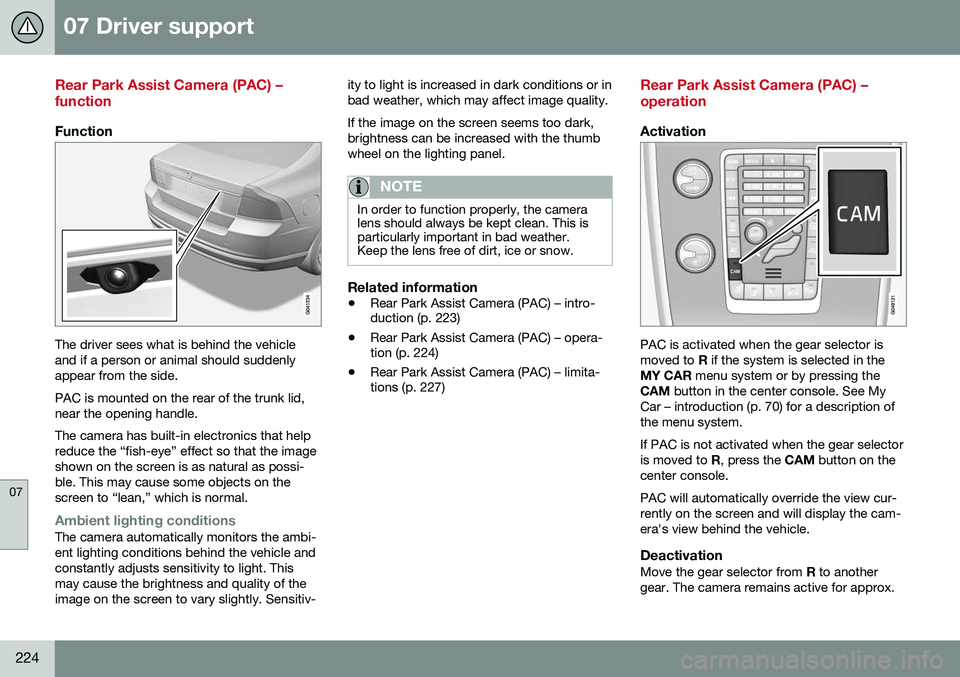
The driver sees what is behind the vehicle and if a person or animal should suddenlyappear from the side. PAC is mounted on the rear of the trunk lid, near the opening handle. The camera has built-in electronics that help reduce the “fish-eye” effect so that the imageshown on the screen is as natural as possi-ble. This may cause some objects on thescreen to “lean,” which is normal.
Ambient lighting conditionsThe camera automatically monitors the ambi- ent lighting conditions behind the vehicle andconstantly adjusts sensitivity to light. Thismay cause the brightness and quality of theimage on the screen to vary slightly. Sensitiv-ity to light is increased in dark conditions or inbad weather, which may affect image quality. If the image on the screen seems too dark, brightness can be increased with the thumbwheel on the lighting panel.
NOTE
In order to function properly, the camera lens should always be kept clean. This isparticularly important in bad weather.Keep the lens free of dirt, ice or snow.
Related information
•
Rear Park Assist Camera (PAC) – intro- duction (p. 223)
• Rear Park Assist Camera (PAC) – opera-tion (p. 224)
• Rear Park Assist Camera (PAC) – limita-tions (p. 227)
Rear Park Assist Camera (PAC) – operation
Activation
PAC is activated when the gear selector is moved to
R if the system is selected in the
MY CAR menu system or by pressing the
CAM button in the center console. See My
Car – introduction (p. 70) for a description ofthe menu system. If PAC is not activated when the gear selector is moved to R, press the CAM button on the
center console. PAC will automatically override the view cur- rently on the screen and will display the cam-era's view behind the vehicle.
DeactivationMove the gear selector from R to another
gear. The camera remains active for approx.
Page 227 of 380
07 Driver support
07
}}
* Option/accessory, for more information, see Introduction.225
5 seconds after the gear selector has been moved from
R or until the vehicle's forward
speed exceeds 6 mph/10 km/h(21 mph/35 km/h in reverse). The screen willthen revert to the view that was displayedbefore R was selected.
NOTE
If any button on the center console control panel is pressed, the camera image willdisappear from the display. Pressing CAM
will return the camera image to the display.
SettingsBy default, PAC is set to activate when the gear selector is moved to R
To change PAC settings when a camera viewis displayed:
1. Press OK/MENU when a camera view is
on the screen. A menu will be displayed.
2. Turn TUNE to scroll to the desired set-
ting.
3. Press OK/MENU to make the setting and
exit the menu by pressing EXIT.
Summary
•Pressing
CAM will activate the camera
even if the gear selector is not in Reverse.
• If there are two cameras installed on the vehicle*, turn
TUNE or press CAM to tog-
gle between the cameras.
Related information
• Park assist – introduction (p. 219)
• Park assist – function (p. 219)
• Park assist – troubleshooting (p. 223)
• Park assist – limitations (p. 222)
• Rear Park Assist Camera (PAC) – intro-duction (p. 223)
Rear Park Assist Camera (PAC) – guiding and marker lines
Guiding lines
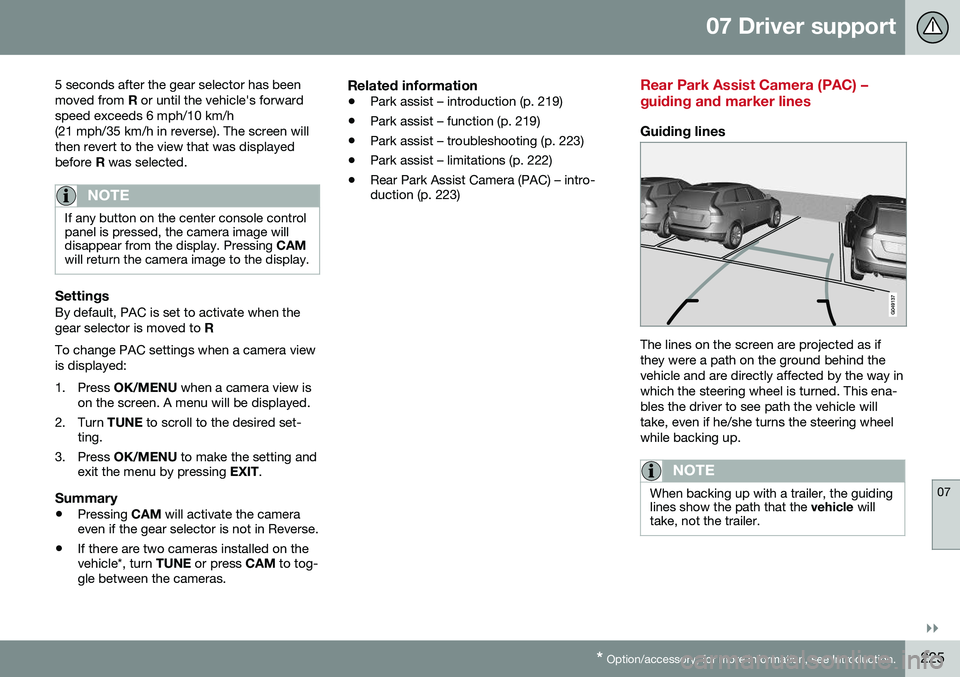
The lines on the screen are projected as if they were a path on the ground behind thevehicle and are directly affected by the way inwhich the steering wheel is turned. This ena-bles the driver to see path the vehicle willtake, even if he/she turns the steering wheelwhile backing up.
NOTE
When backing up with a trailer, the guiding lines show the path that the
vehicle will
take, not the trailer.
Page 228 of 380
||
07 Driver support
07
226
WARNING
Keep in mind that the image on the screen only shows the area behind the vehicle.The driver must always watch for people,animals, other vehicles, etc., near the sidesof the vehicle when turning while backingup.
Marker lines
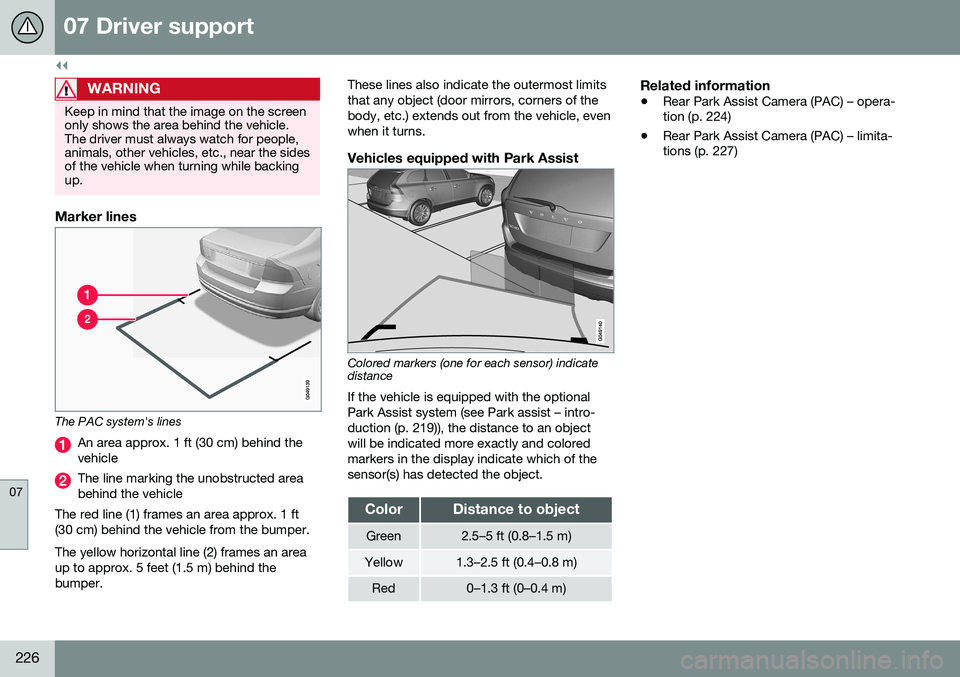
The PAC system's lines
An area approx. 1 ft (30 cm) behind the vehicle
The line marking the unobstructed area behind the vehicle
The red line (1) frames an area approx. 1 ft(30 cm) behind the vehicle from the bumper. The yellow horizontal line (2) frames an area up to approx. 5 feet (1.5 m) behind thebumper. These lines also indicate the outermost limitsthat any object (door mirrors, corners of thebody, etc.) extends out from the vehicle, evenwhen it turns.
Vehicles equipped with Park Assist
Colored markers (one for each sensor) indicate distance If the vehicle is equipped with the optional Park Assist system (see Park assist – intro-duction (p. 219)), the distance to an objectwill be indicated more exactly and coloredmarkers in the display indicate which of thesensor(s) has detected the object.
ColorDistance to object
Green2.5–5 ft (0.8–1.5 m)
Yellow1.3–2.5 ft (0.4–0.8 m)
Red0–1.3 ft (0–0.4 m)
Related information
•
Rear Park Assist Camera (PAC) – opera- tion (p. 224)
• Rear Park Assist Camera (PAC) – limita-tions (p. 227)
Page 229 of 380
07 Driver support
07
}}
* Option/accessory, for more information, see Introduction.227
Rear Park Assist Camera (PAC) – limitations
LimitationsEven if a fairly small section of the screen image appears to be obstructed, this maymean that a relatively large area behind thevehicle is hidden and objects there may notbe detected until they are very near the vehi-cle.
NOTE
Bicycle carriers or other accessories mounted on the trunk may obstruct thecamera's field of view.
Keep in mind
• Keep the camera's lens free of dirt, ice and snow. Remove ice and snow care-fully to avoid scratching the lens.
• Clean the lens regularly with warm waterand a suitable car washing detergent.
Related information
•Rear Park Assist Camera (PAC) – intro-duction (p. 223)
• Rear Park Assist Camera (PAC) – opera-tion (p. 224)
• Park assist – introduction (p. 219)
BLIS* – introduction
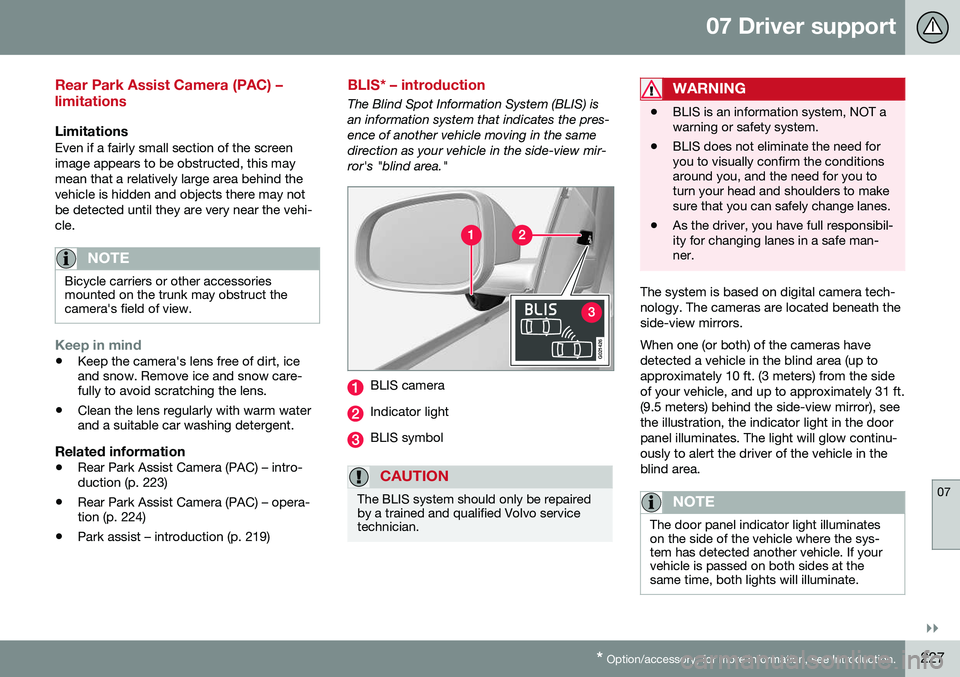
The Blind Spot Information System (BLIS) is an information system that indicates the pres-ence of another vehicle moving in the samedirection as your vehicle in the side-view mir-ror's "blind area."
G021426
BLIS camera
Indicator light
BLIS symbol
CAUTION
The BLIS system should only be repaired by a trained and qualified Volvo servicetechnician.
WARNING
• BLIS is an information system, NOT a warning or safety system.
• BLIS does not eliminate the need foryou to visually confirm the conditionsaround you, and the need for you toturn your head and shoulders to makesure that you can safely change lanes.
• As the driver, you have full responsibil-ity for changing lanes in a safe man-ner.
The system is based on digital camera tech- nology. The cameras are located beneath theside-view mirrors. When one (or both) of the cameras have detected a vehicle in the blind area (up toapproximately 10 ft. (3 meters) from the sideof your vehicle, and up to approximately 31 ft.(9.5 meters) behind the side-view mirror), seethe illustration, the indicator light in the doorpanel illuminates. The light will glow continu-ously to alert the driver of the vehicle in theblind area.
NOTE
The door panel indicator light illuminates on the side of the vehicle where the sys-tem has detected another vehicle. If yourvehicle is passed on both sides at thesame time, both lights will illuminate.
Page 239 of 380
08 Starting and driving
08
237
Jump starting
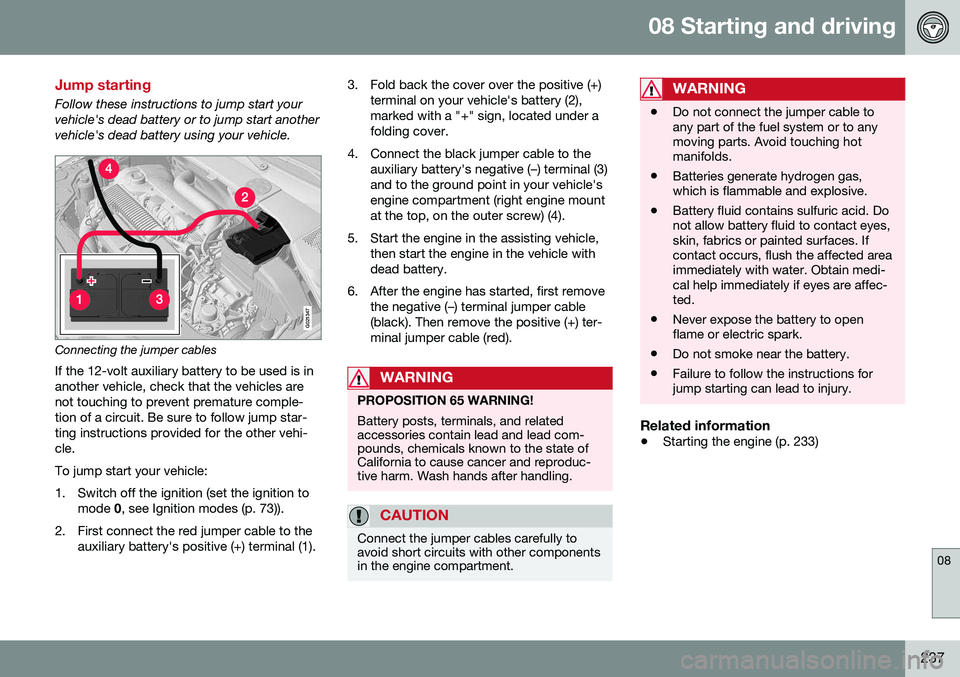
Follow these instructions to jump start your vehicle's dead battery or to jump start anothervehicle's dead battery using your vehicle.
G021347
Connecting the jumper cablesIf the 12-volt auxiliary battery to be used is in another vehicle, check that the vehicles arenot touching to prevent premature comple-tion of a circuit. Be sure to follow jump star-ting instructions provided for the other vehi-cle. To jump start your vehicle:
1. Switch off the ignition (set the ignition to mode 0, see Ignition modes (p. 73)).
2. First connect the red jumper cable to the auxiliary battery's positive (+) terminal (1). 3. Fold back the cover over the positive (+)
terminal on your vehicle's battery (2), marked with a "+" sign, located under afolding cover.
4. Connect the black jumper cable to the auxiliary battery's negative (–) terminal (3)and to the ground point in your vehicle'sengine compartment (right engine mountat the top, on the outer screw) (4).
5. Start the engine in the assisting vehicle, then start the engine in the vehicle withdead battery.
6. After the engine has started, first remove the negative (–) terminal jumper cable(black). Then remove the positive (+) ter-minal jumper cable (red).
WARNING
PROPOSITION 65 WARNING! Battery posts, terminals, and related accessories contain lead and lead com-pounds, chemicals known to the state ofCalifornia to cause cancer and reproduc-tive harm. Wash hands after handling.
CAUTION
Connect the jumper cables carefully to avoid short circuits with other componentsin the engine compartment.
WARNING
•Do not connect the jumper cable to any part of the fuel system or to anymoving parts. Avoid touching hotmanifolds.
• Batteries generate hydrogen gas,which is flammable and explosive.
• Battery fluid contains sulfuric acid. Donot allow battery fluid to contact eyes,skin, fabrics or painted surfaces. Ifcontact occurs, flush the affected areaimmediately with water. Obtain medi-cal help immediately if eyes are affec-ted.
• Never expose the battery to openflame or electric spark.
• Do not smoke near the battery.
• Failure to follow the instructions forjump starting can lead to injury.
Related information
•
Starting the engine (p. 233)
Page 240 of 380
08 Starting and driving
08
238
Transmission – general information
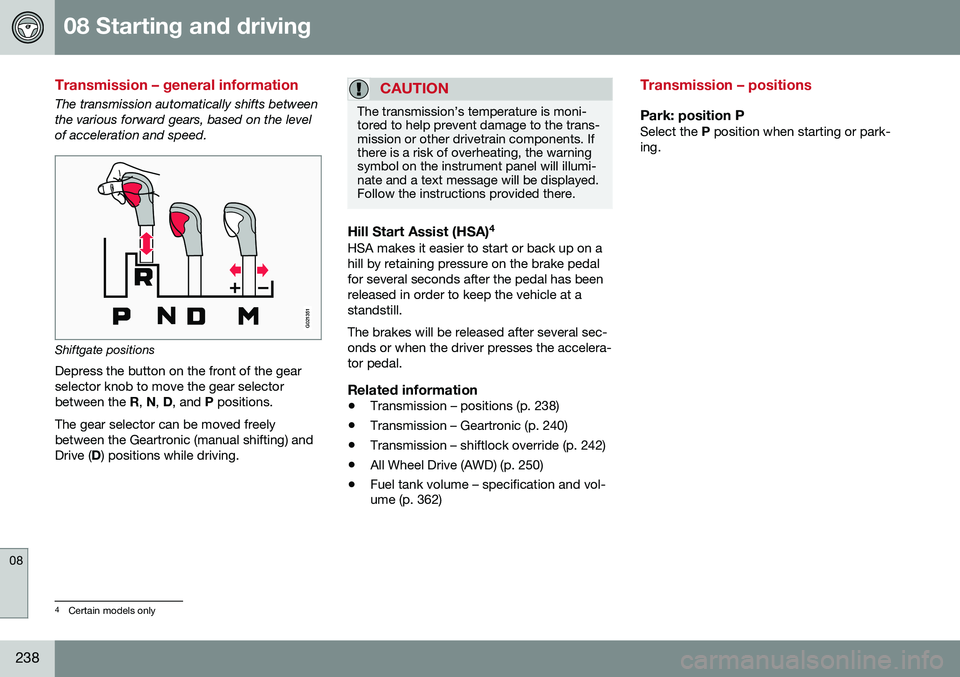
The transmission automatically shifts between the various forward gears, based on the levelof acceleration and speed.
G021351
Shiftgate positions
Depress the button on the front of the gear selector knob to move the gear selectorbetween the R, N , D , and P positions.
The gear selector can be moved freelybetween the Geartronic (manual shifting) andDrive ( D) positions while driving.
CAUTION
The transmission’s temperature is moni- tored to help prevent damage to the trans-mission or other drivetrain components. Ifthere is a risk of overheating, the warningsymbol on the instrument panel will illumi-nate and a text message will be displayed.Follow the instructions provided there.
Hill Start Assist (HSA) 4HSA makes it easier to start or back up on a hill by retaining pressure on the brake pedalfor several seconds after the pedal has beenreleased in order to keep the vehicle at astandstill. The brakes will be released after several sec- onds or when the driver presses the accelera-tor pedal.
Related information
•
Transmission – positions (p. 238)
• Transmission – Geartronic (p. 240)
• Transmission – shiftlock override (p. 242)
• All Wheel Drive (AWD) (p. 250)
• Fuel tank volume – specification and vol- ume (p. 362)
Transmission – positions
Park: position PSelect the
P position when starting or park-
ing.
4 Certain models only
Page 253 of 380
08 Starting and driving
08
}}
* Option/accessory, for more information, see Introduction.251
Brake pad inspectionOn vehicles equipped with a jack*, the condi- tion of the brake pads can be checked byraising the vehicle (see Changing a wheel –removing wheel (p. 276) for informationabout using the jack and removing a wheel)and performing a visual inspection of thebrake pads.
WARNING
• If the vehicle has been driven immedi- ately prior to a brake pad inspection,the wheel hub, brake components,etc., will be very hot. Allow time forthese components to cool before car-rying out the inspection.
• Apply the parking brake and put thegear selector in the Park (
P) position.
• Block the wheels standing on theground, use rigid wooden blocks orlarge stones.
WARNING
•Use the jack intended for the vehicle when changing a tire. For any otherjob, use stands to support the vehicle.
• The jack should be kept well-greasedand clean, and should not be dam-aged.
• Be sure the jack is on a firm, level,non-slippery surface.
• No objects should be placed betweenthe base of jack and the ground, orbetween the jack and the attachmentbar on the vehicle.
• The jack must correctly engage thejack attachment.
• Never allow any part of your body tobe extended under a vehicle suppor-ted by a jack.
Power brakes function only when the engine is running
The power brakes utilize vacuum pressure which is only created when the engine is run-ning. Never let the vehicle roll to a stop withthe engine switched off. If the power brakes are not working, consid- erably higher pressure will be required on thebrake pedal to compensate for the lack ofpower assistance. This can happen for exam-ple when towing your vehicle or if the engineis switched off when the vehicle is rolling. Thebrake pedal feels harder than usual.
Water on brake discs and brake pads affects braking
Driving in rain and slush or passing through an automatic car wash can cause water tocollect on the brake discs and pads. This willcause a delay in braking effect when thepedal is depressed. To avoid such a delaywhen the brakes are needed, depress thepedal occasionally when driving through rain,slush, etc. This will remove the water from thebrakes. Check that brake application feelsnormal. This should also be done after wash-ing or starting in very damp or cold weather.
Severe strain on the brake systemThe brakes will be subject to severe strainwhen driving in mountains or hilly areas, orwhen towing a trailer. Vehicle speed is usuallyslower, which means that the cooling of thebrakes is less efficient than when driving onlevel roads. To reduce the strain on thebrakes, shift into a lower gear and let theengine help with the braking. Do not forgetthat if you are towing a trailer, the brakes willbe subjected to a greater than normal load.
Cleaning the brake discsCoatings of dirt and water on the brake discsmay result in delayed brake function. Thisdelay is minimized by cleaning the brake lin-ings. Cleaning the brake pads is advisable in wet weather, prior to long-term parking, and afterthe vehicle has been washed. Do this by
Page 254 of 380
||
08 Starting and driving
08
252
braking gently for a short period while the vehicle is moving.
Related information
•Parking brake – general information (p. 254)
• Emergency Brake Assistance (EBA)(p. 253)
• Brakes – general (p. 250)
• Anti-lock braking system (ABS) (p. 252)
Brakes – symbols
Symbols in the instrument panel
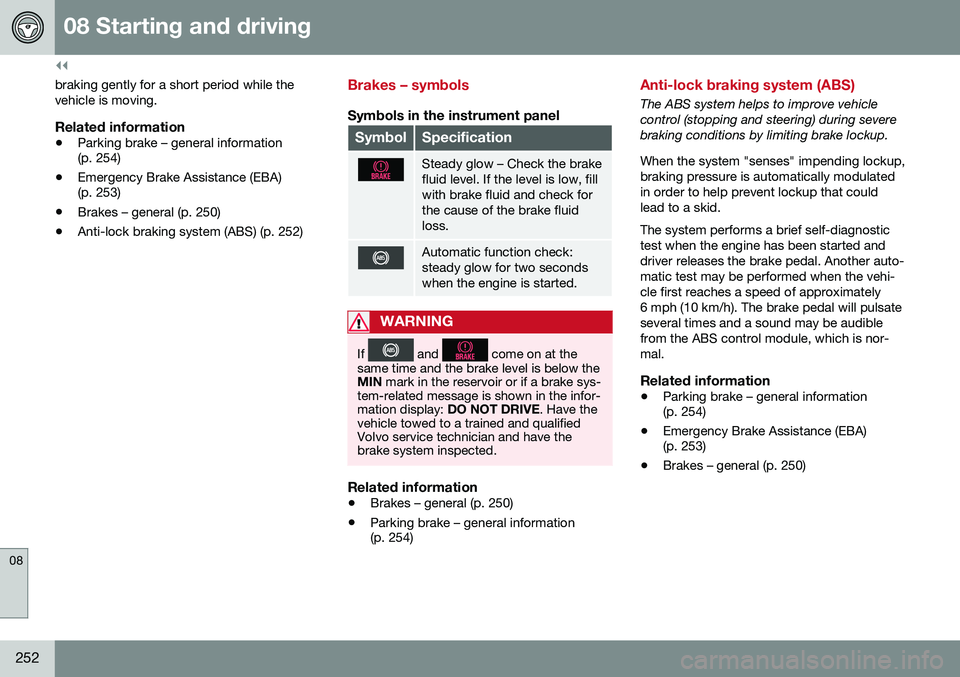
SymbolSpecification
Steady glow – Check the brake fluid level. If the level is low, fillwith brake fluid and check forthe cause of the brake fluidloss.
Automatic function check: steady glow for two secondswhen the engine is started.
WARNING
If and come on at the
same time and the brake level is below the MIN mark in the reservoir or if a brake sys-
tem-related message is shown in the infor-mation display: DO NOT DRIVE . Have the
vehicle towed to a trained and qualifiedVolvo service technician and have thebrake system inspected.
Related information
• Brakes – general (p. 250)
• Parking brake – general information (p. 254)
Anti-lock braking system (ABS)
The ABS system helps to improve vehicle control (stopping and steering) during severebraking conditions by limiting brake lockup. When the system "senses" impending lockup, braking pressure is automatically modulatedin order to help prevent lockup that couldlead to a skid. The system performs a brief self-diagnostic test when the engine has been started anddriver releases the brake pedal. Another auto-matic test may be performed when the vehi-cle first reaches a speed of approximately6 mph (10 km/h). The brake pedal will pulsateseveral times and a sound may be audiblefrom the ABS control module, which is nor-mal.
Related information
• Parking brake – general information (p. 254)
• Emergency Brake Assistance (EBA)(p. 253)
• Brakes – general (p. 250)
Page 255 of 380
08 Starting and driving
08
253
Brake lights
The brake lights come on automatically when the brakes are applied.
Adaptive brake lightsThe adaptive brake lights activate in the event of sudden braking or if the ABS system isactivated. This function causes an additionaltaillight on each side of the vehicle to illumi-nate to help alert vehicles traveling behind. The adaptive brake lights activate if: •The ABS system activates for more than approximately a half second
• In the event of sudden braking while thevehicle is moving at speeds aboveapproximately 6 mph (10 km/h).
When the vehicle has come to a stop, the brake lights and additional taillights remain onfor as long as the brake pedal is depressed oruntil braking force on the vehicle is reduced.
Related information
• Brakes – general (p. 250)
• Parking brake – general information (p. 254)
Emergency Brake Assistance (EBA)
EBA is designed to provide full brake effect immediately in the event of sudden, hardbraking.
Emergency Brake AssistanceThe EBA system is activated by the speedwith which the brake pedal is depressed. When the EBA system is activated, the brake pedal will go down and pressure in the brakesystem immediately increases to the maxi-mum level. Maintain full pressure on thebrake pedal in order to utilize the systemcompletely. EBA is automatically deactivatedwhen the brake pedal is released.
NOTE
• When the EBA system is activated, the brake pedal will go down and pressurein the brake system immediatelyincreases to the maximum level. Youmust maintain full pressure on thebrake pedal in order to utilize the sys-tem completely. There will be no brak-ing effect if the pedal is released. EBAis automatically deactivated when thebrake pedal is released.
• When the vehicle has been parked forsome time, the brake pedal may sinkmore than usual when the engine isstarted. This is normal and the pedalwill return to its usual position when itis released.
Related information
•
Parking brake – general information (p. 254)
• Brakes – general (p. 250)
• Anti-lock braking system (ABS) (p. 252)