sport mode VOLVO S80 2016 Owner´s Manual
[x] Cancel search | Manufacturer: VOLVO, Model Year: 2016, Model line: S80, Model: VOLVO S80 2016Pages: 380, PDF Size: 9.45 MB
Page 243 of 380
08 Starting and driving
08
}}
* Option/accessory, for more information, see Introduction.241
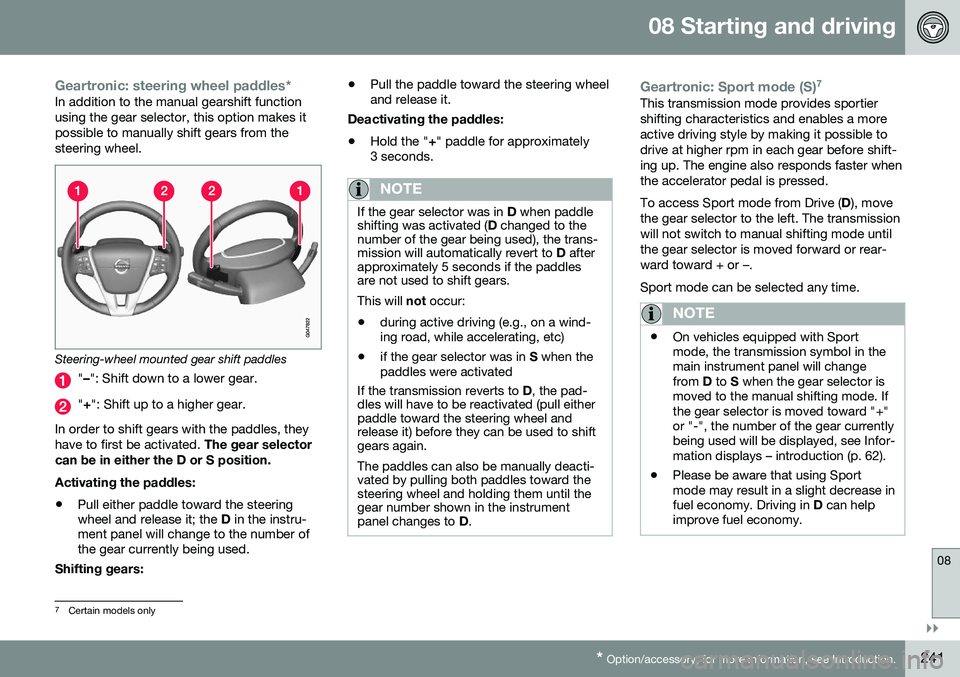
Geartronic: steering wheel paddles*In addition to the manual gearshift function using the gear selector, this option makes itpossible to manually shift gears from thesteering wheel.
Steering-wheel mounted gear shift paddles
" – ": Shift down to a lower gear.
"+ ": Shift up to a higher gear.
In order to shift gears with the paddles, they have to first be activated. The gear selector
can be in either the D or S position. Activating the paddles:
• Pull either paddle toward the steering wheel and release it; the
D in the instru-
ment panel will change to the number ofthe gear currently being used.
Shifting gears: •
Pull the paddle toward the steering wheeland release it.
Deactivating the paddles: • Hold the "
+" paddle for approximately
3 seconds.
NOTE
If the gear selector was in D when paddle
shifting was activated ( D changed to the
number of the gear being used), the trans- mission will automatically revert to D after
approximately 5 seconds if the paddlesare not used to shift gears. This will not occur:
• during active driving (e.g., on a wind- ing road, while accelerating, etc)
• if the gear selector was in
S when the
paddles were activated
If the transmission reverts to D, the pad-
dles will have to be reactivated (pull either paddle toward the steering wheel andrelease it) before they can be used to shiftgears again. The paddles can also be manually deacti- vated by pulling both paddles toward thesteering wheel and holding them until thegear number shown in the instrumentpanel changes to D.
Geartronic: Sport mode (S) 7This transmission mode provides sportier shifting characteristics and enables a moreactive driving style by making it possible todrive at higher rpm in each gear before shift-ing up. The engine also responds faster whenthe accelerator pedal is pressed. To access Sport mode from Drive (
D), move
the gear selector to the left. The transmission will not switch to manual shifting mode untilthe gear selector is moved forward or rear-ward toward + or –. Sport mode can be selected any time.
NOTE
• On vehicles equipped with Sport mode, the transmission symbol in themain instrument panel will changefrom
D to S when the gear selector is
moved to the manual shifting mode. Ifthe gear selector is moved toward "+"or "-", the number of the gear currentlybeing used will be displayed, see Infor-mation displays – introduction (p. 62).
• Please be aware that using Sportmode may result in a slight decrease infuel economy. Driving in
D can help
improve fuel economy.
7 Certain models only
Page 247 of 380
08 Starting and driving
08
}}
* Option/accessory, for more information, see Introduction.245
Condition/situation
The driver is turning the steering wheel hard.
The road's incline is very steep.
A trailer's electrical system is connected to the vehicle.
The hood has been opened A
.
The transmission has not reached its nor- mal operating temperature.
Atmospheric pressure is below a level equivalent to an altitude of approx. 4,900–8,200 ft (1500–2500 m) above sea level.The actual pressure is also affected by cur-rent weather conditions.
The Adaptive Cruise Control's* Queue Assist feature is activated.
The gear selector is in the SB
or " +/–" posi-
tion.
A Certain engines only
B Sport mode (where applicable)
Related information
• Start/Stop – introduction (p. 243)
• Start/Stop – function (p. 243)
• Start/Stop – settings (p. 246)
• Start/Stop – Auto-start exceptions (p. 245) •
Start/Stop – Hill Start Assist (HSA)(p. 243)
• Start/Stop – symbols and messages(p. 247)
Start/Stop – Auto-start exceptions
In certain situations or conditions, the engine may auto-start
even though the driver is still
pressing the brake pedal, such as if:
Condition/situation
Condensation forms on the windows.
The climate system cannot keep the desired settings in the passenger compart-ment.
Electrical current consumption is tempo- rarily high or the main battery's charge isbelow the minimum level.
The brake pedal is pumped repeatedly.
The hood has been opened A
.
The vehicle begins to move or increases speed slightly (if the engine auto-stoppedbefore the vehicle was at a standstill (seeECO* (p. 248))).
The driver unbuckles his/her seat belt while the gear selector is in the D or N positions.
The steering wheel is turned A
.
Page 248 of 380
||
08 Starting and driving
08
246
Condition/situation
The gear selector is moved from D to SB
, R
or " +/–".
The driver's door is opened with the gear selector in D – an audible signal and a text
message will inform the driver thatStart/Stop is active.
A Certain engines only
B Sport mode (where applicable)
WARNING
Do not open the hood if the engine has auto-stopped. The engine could suddenlyauto-start. Before opening the hood:
• Switch off the ignition using the START/STOP ENGINE
button.
• Be aware that if the engine has beenrunning, components in the enginecompartment will be very hot.
If the engine does not auto-start, this could be due to
:
• The driver's seat belt is not fastened
• The gear selector is in
P and the driver's
door is opened
In these cases, the driver will have to restart the engine by pressing the START/STOP
ENGINE button.
Related information
•Start/Stop – introduction (p. 243)
• Start/Stop – function (p. 243)
• Start/Stop – settings (p. 246)
• Start/Stop – Auto-stop exceptions (p. 244)
• Start/Stop – Hill Start Assist (HSA)(p. 243)
• Start/Stop – symbols and messages(p. 247)
Start/Stop – settings
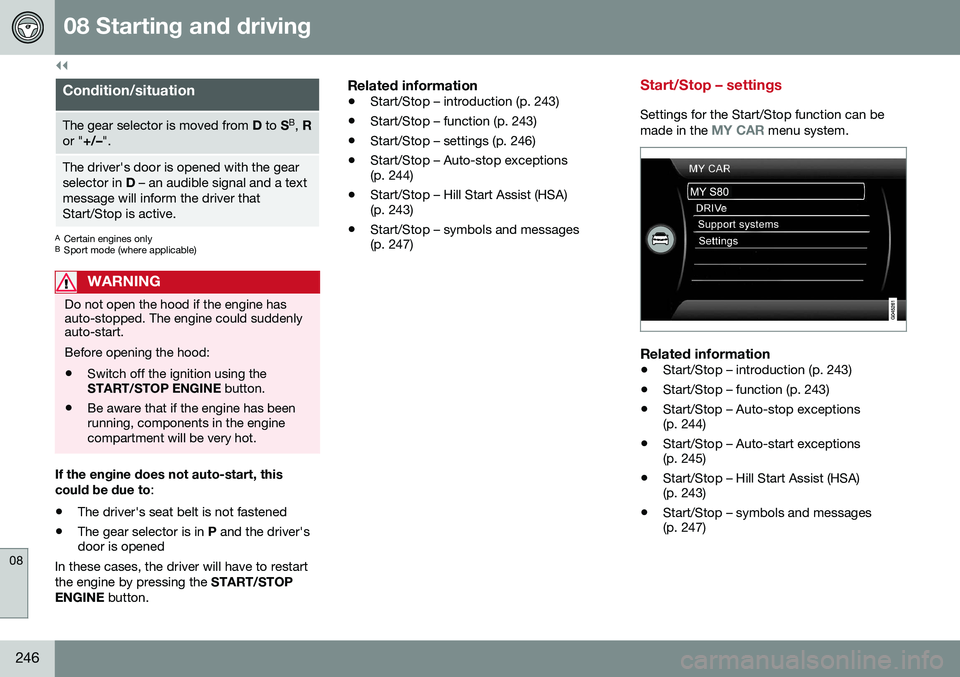
Settings for the Start/Stop function can be
made in the MY CAR menu system.
Related information
• Start/Stop – introduction (p. 243)
• Start/Stop – function (p. 243)
• Start/Stop – Auto-stop exceptions (p. 244)
• Start/Stop – Auto-start exceptions(p. 245)
• Start/Stop – Hill Start Assist (HSA)(p. 243)
• Start/Stop – symbols and messages(p. 247)
Page 276 of 380
09 Wheels and tires
09
274
Tires – storage and age
When storing complete wheels (tires mounted on rims), they should be suspended off thefloor or placed on their sides on the floor.
New Tires
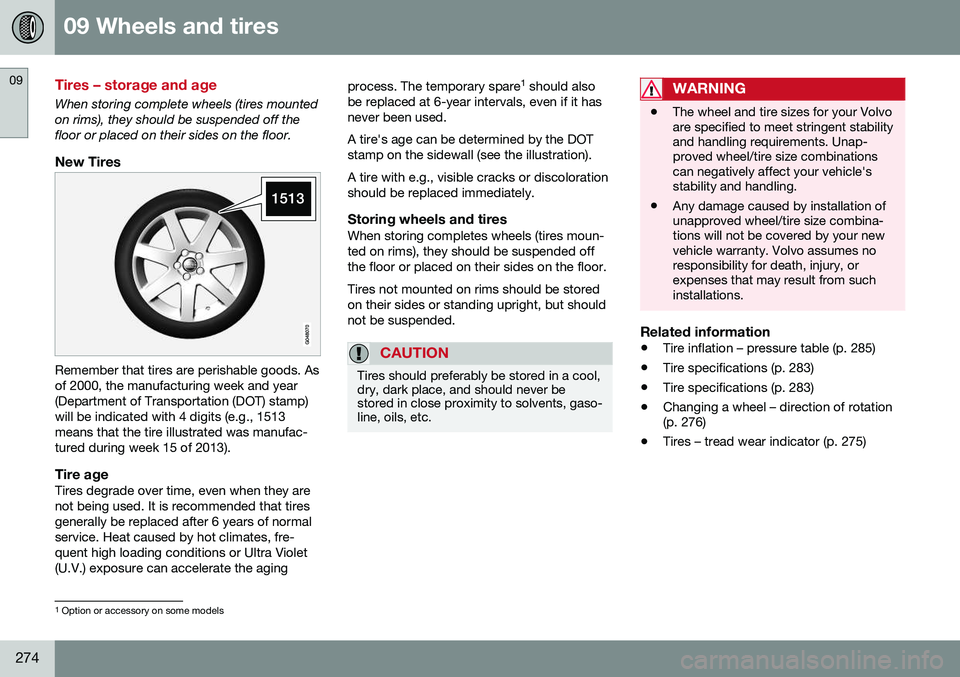
Remember that tires are perishable goods. Asof 2000, the manufacturing week and year(Department of Transportation (DOT) stamp)will be indicated with 4 digits (e.g., 1513means that the tire illustrated was manufac-tured during week 15 of 2013).
Tire ageTires degrade over time, even when they are not being used. It is recommended that tiresgenerally be replaced after 6 years of normalservice. Heat caused by hot climates, fre-quent high loading conditions or Ultra Violet(U.V.) exposure can accelerate the agingprocess. The temporary spare
1
should also
be replaced at 6-year intervals, even if it hasnever been used. A tire's age can be determined by the DOT stamp on the sidewall (see the illustration). A tire with e.g., visible cracks or discoloration should be replaced immediately.
Storing wheels and tiresWhen storing completes wheels (tires moun-ted on rims), they should be suspended offthe floor or placed on their sides on the floor. Tires not mounted on rims should be stored on their sides or standing upright, but shouldnot be suspended.
CAUTION
Tires should preferably be stored in a cool, dry, dark place, and should never bestored in close proximity to solvents, gaso-line, oils, etc.
WARNING
• The wheel and tire sizes for your Volvo are specified to meet stringent stabilityand handling requirements. Unap-proved wheel/tire size combinationscan negatively affect your vehicle'sstability and handling.
• Any damage caused by installation ofunapproved wheel/tire size combina-tions will not be covered by your newvehicle warranty. Volvo assumes noresponsibility for death, injury, orexpenses that may result from suchinstallations.
Related information
•
Tire inflation – pressure table (p. 285)
• Tire specifications (p. 283)
• Tire specifications (p. 283)
• Changing a wheel – direction of rotation (p. 276)
• Tires – tread wear indicator (p. 275)
1
Option or accessory on some models
Page 287 of 380
09 Wheels and tires
09
285
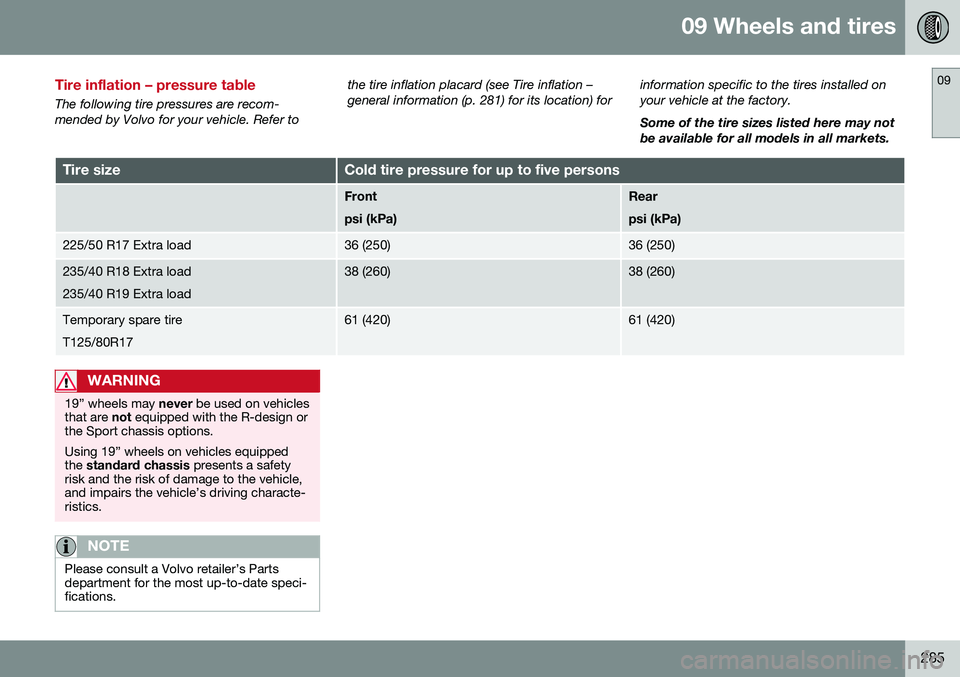
Tire inflation – pressure table
The following tire pressures are recom- mended by Volvo for your vehicle. Refer tothe tire inflation placard (see Tire inflation –general information (p. 281) for its location) for
information specific to the tires installed onyour vehicle at the factory. Some of the tire sizes listed here may not be available for all models in all markets.
Tire sizeCold tire pressure for up to five persons
Front psi (kPa)Rear psi (kPa)
225/50 R17 Extra load36 (250)36 (250)
235/40 R18 Extra load 235/40 R19 Extra load38 (260)38 (260)
Temporary spare tire T125/80R1761 (420)61 (420)
WARNING
19” wheels may
never be used on vehicles
that are not equipped with the R-design or
the Sport chassis options. Using 19” wheels on vehicles equipped the standard chassis presents a safety
risk and the risk of damage to the vehicle,and impairs the vehicle’s driving characte-ristics.
NOTE
Please consult a Volvo retailer’s Parts department for the most up-to-date speci-fications.
Page 295 of 380
09 Wheels and tires
09
* Option/accessory, for more information, see Introduction.293
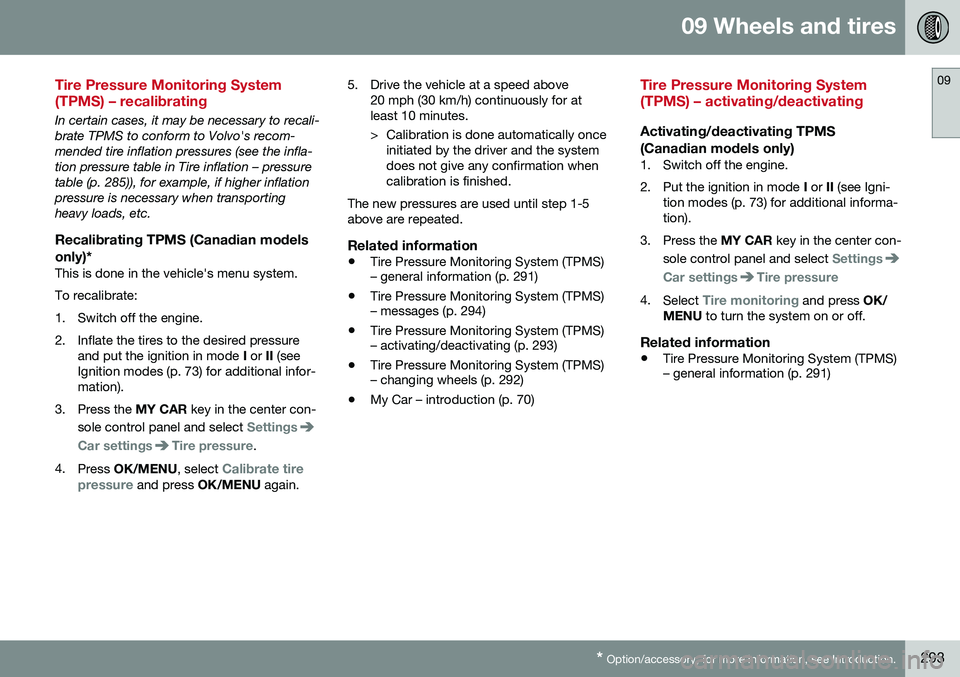
Tire Pressure Monitoring System (TPMS) – recalibrating
In certain cases, it may be necessary to recali- brate TPMS to conform to Volvo's recom-mended tire inflation pressures (see the infla-tion pressure table in Tire inflation – pressuretable (p. 285)), for example, if higher inflationpressure is necessary when transportingheavy loads, etc.
Recalibrating TPMS (Canadian models
only)*
This is done in the vehicle's menu system. To recalibrate:
1. Switch off the engine.
2. Inflate the tires to the desired pressure and put the ignition in mode I or II (see
Ignition modes (p. 73) for additional infor- mation).
3. Press the MY CAR key in the center con-
sole control panel and select
Settings
Car settingsTire pressure.
4. Press OK/MENU , select
Calibrate tire
pressure and press OK/MENU again. 5. Drive the vehicle at a speed above
20 mph (30 km/h) continuously for at least 10 minutes.
> Calibration is done automatically onceinitiated by the driver and the system does not give any confirmation whencalibration is finished.
The new pressures are used until step 1-5above are repeated.
Related information
• Tire Pressure Monitoring System (TPMS) – general information (p. 291)
• Tire Pressure Monitoring System (TPMS)– messages (p. 294)
• Tire Pressure Monitoring System (TPMS)– activating/deactivating (p. 293)
• Tire Pressure Monitoring System (TPMS)– changing wheels (p. 292)
• My Car – introduction (p. 70)
Tire Pressure Monitoring System (TPMS) – activating/deactivating
Activating/deactivating TPMS
(Canadian models only)
1. Switch off the engine.
2. Put the ignition in mode I or II (see Igni-
tion modes (p. 73) for additional informa- tion).
3. Press the MY CAR key in the center con-
sole control panel and select
Settings
Car settingsTire pressure
4. Select Tire monitoring and press OK/
MENU to turn the system on or off.
Related information
•Tire Pressure Monitoring System (TPMS) – general information (p. 291)
Page 356 of 380
||
11 Specifications
11
354
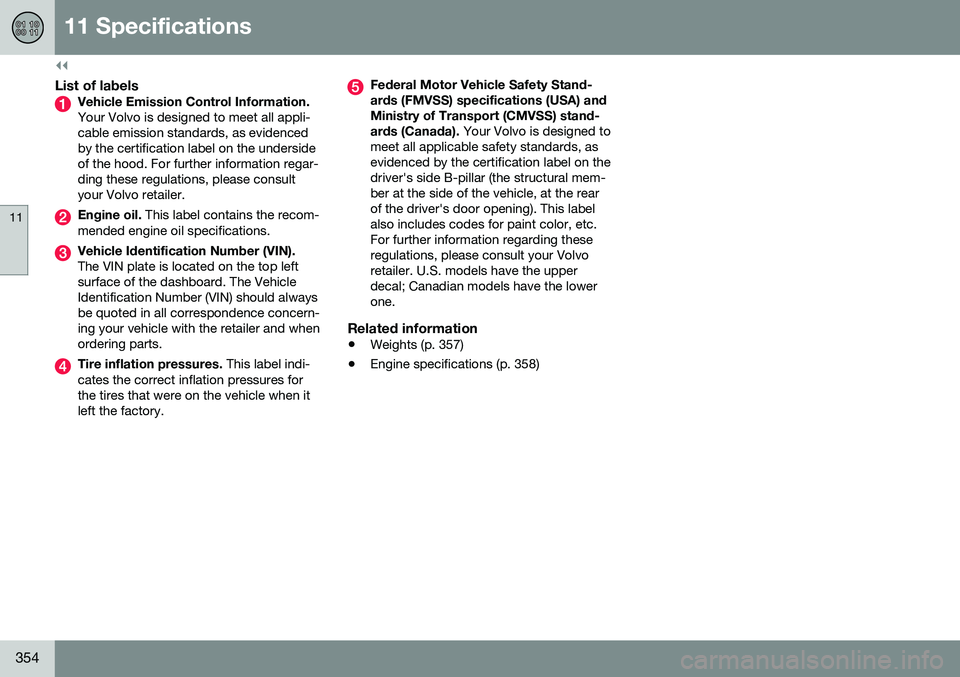
List of labelsVehicle Emission Control Information. Your Volvo is designed to meet all appli- cable emission standards, as evidencedby the certification label on the undersideof the hood. For further information regar-ding these regulations, please consultyour Volvo retailer.
Engine oil. This label contains the recom-
mended engine oil specifications.
Vehicle Identification Number (VIN). The VIN plate is located on the top left surface of the dashboard. The VehicleIdentification Number (VIN) should alwaysbe quoted in all correspondence concern-ing your vehicle with the retailer and whenordering parts.
Tire inflation pressures. This label indi-
cates the correct inflation pressures for the tires that were on the vehicle when itleft the factory.
Federal Motor Vehicle Safety Stand- ards (FMVSS) specifications (USA) andMinistry of Transport (CMVSS) stand- ards (Canada). Your Volvo is designed to
meet all applicable safety standards, as evidenced by the certification label on thedriver's side B-pillar (the structural mem-ber at the side of the vehicle, at the rearof the driver's door opening). This labelalso includes codes for paint color, etc.For further information regarding theseregulations, please consult your Volvoretailer. U.S. models have the upperdecal; Canadian models have the lowerone.
Related information
• Weights (p. 357)
• Engine specifications (p. 358)
Page 358 of 380
||
11 Specifications
11
356
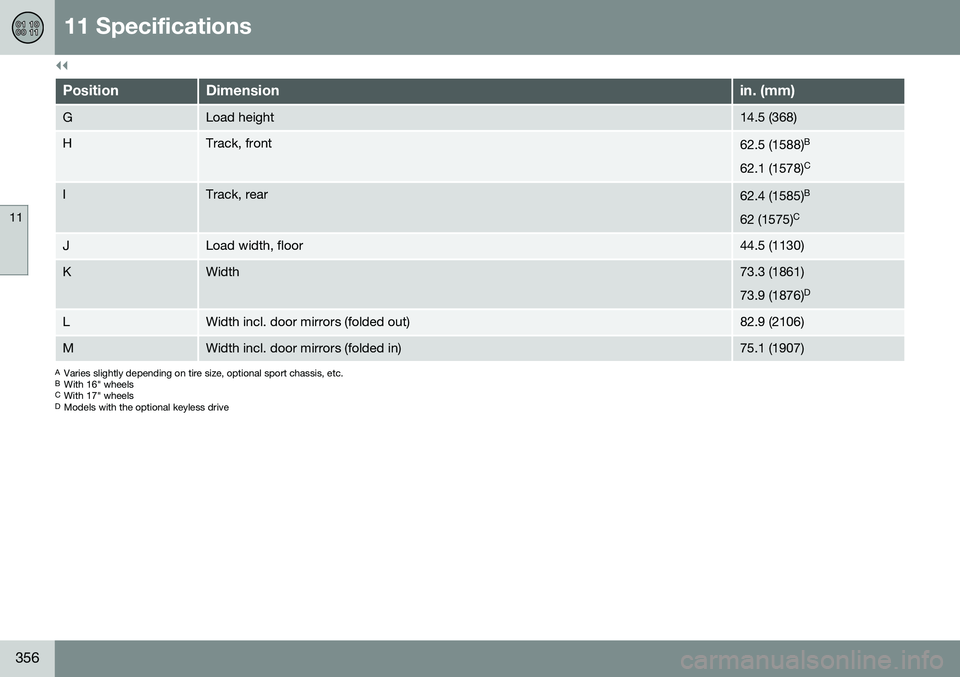
PositionDimensionin. (mm)
GLoad height14.5 (368)
HTrack, front62.5 (1588)B
62.1 (1578) C
ITrack, rear62.4 (1585)B
62 (1575) C
JLoad width, floor44.5 (1130)
KWidth73.3 (1861) 73.9 (1876) D
LWidth incl. door mirrors (folded out)82.9 (2106)
MWidth incl. door mirrors (folded in)75.1 (1907)
A
Varies slightly depending on tire size, optional sport chassis, etc.
B With 16" wheels
C With 17" wheels
D Models with the optional keyless drive
Page 367 of 380
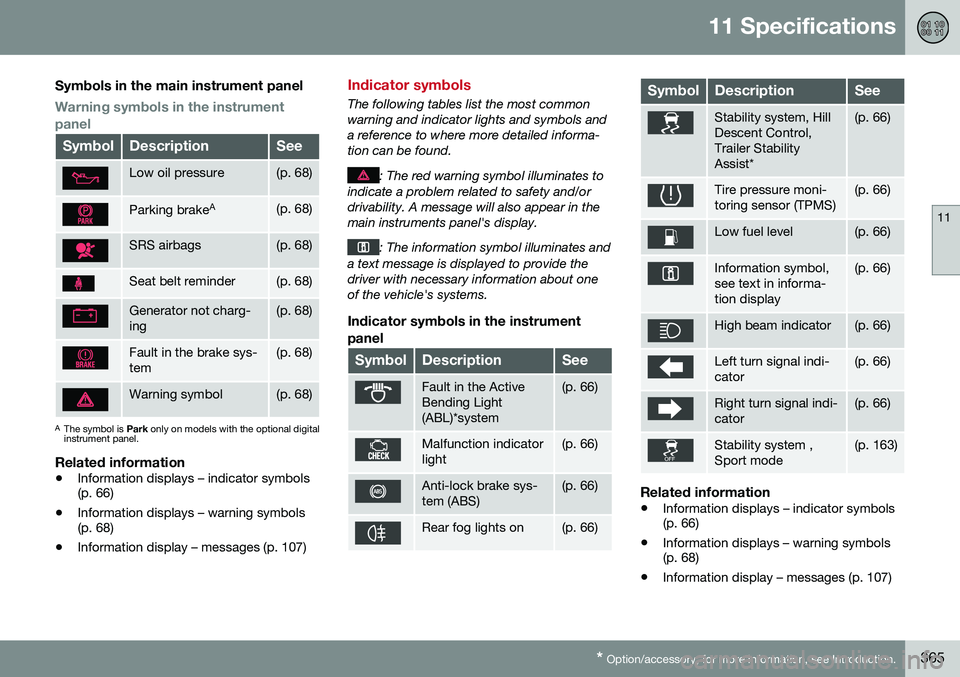
11 Specifications
11
* Option/accessory, for more information, see Introduction.365
Symbols in the main instrument panel
Warning symbols in the instrument panel
SymbolDescriptionSee
Low oil pressure(p. 68)
Parking brake A(p. 68)
SRS airbags(p. 68)
Seat belt reminder(p. 68)
Generator not charg- ing(p. 68)
Fault in the brake sys- tem(p. 68)
Warning symbol(p. 68)
A
The symbol is Park only on models with the optional digital
instrument panel.
Related information
• Information displays – indicator symbols (p. 66)
• Information displays – warning symbols(p. 68)
• Information display – messages (p. 107)
Indicator symbols
The following tables list the most common warning and indicator lights and symbols anda reference to where more detailed informa-tion can be found.
: The red warning symbol illuminates to
indicate a problem related to safety and/or drivability. A message will also appear in themain instruments panel's display.
: The information symbol illuminates and
a text message is displayed to provide the driver with necessary information about oneof the vehicle's systems.
Indicator symbols in the instrument
panel
SymbolDescriptionSee
Fault in the Active Bending Light(ABL)*system(p. 66)
Malfunction indicator light(p. 66)
Anti-lock brake sys- tem (ABS)(p. 66)
Rear fog lights on(p. 66)
SymbolDescriptionSee
Stability system, Hill Descent Control,Trailer StabilityAssist*(p. 66)
Tire pressure moni- toring sensor (TPMS)(p. 66)
Low fuel level(p. 66)
Information symbol, see text in informa-tion display(p. 66)
High beam indicator(p. 66)
Left turn signal indi- cator(p. 66)
Right turn signal indi- cator(p. 66)
Stability system , Sport mode(p. 163)
Related information
• Information displays – indicator symbols (p. 66)
• Information displays – warning symbols(p. 68)
• Information display – messages (p. 107)