drive belt VOLVO S80 2016 Owner´s Manual
[x] Cancel search | Manufacturer: VOLVO, Model Year: 2016, Model line: S80, Model: VOLVO S80 2016Pages: 380, PDF Size: 9.45 MB
Page 181 of 380
07 Driver support
07
179
The driver will then have to reactivate ACC in one of the following ways:
• By pressing
•By accelerating up to at least 3 mph (4 km/h). ACC will then resume followingthe vehicle ahead.
Your vehicle will then resume following the vehicle ahead at the set time interval.
NOTE
ACC can remain active and keep your vehicle at a standstill for up to 4 minutes.After 4 minutes have elapsed, the parkingbrake will be engaged and ACC will go intostandby mode. To reactivate ACC, the driver must release the parking brake (see Parking brake –general information (p. 254)).
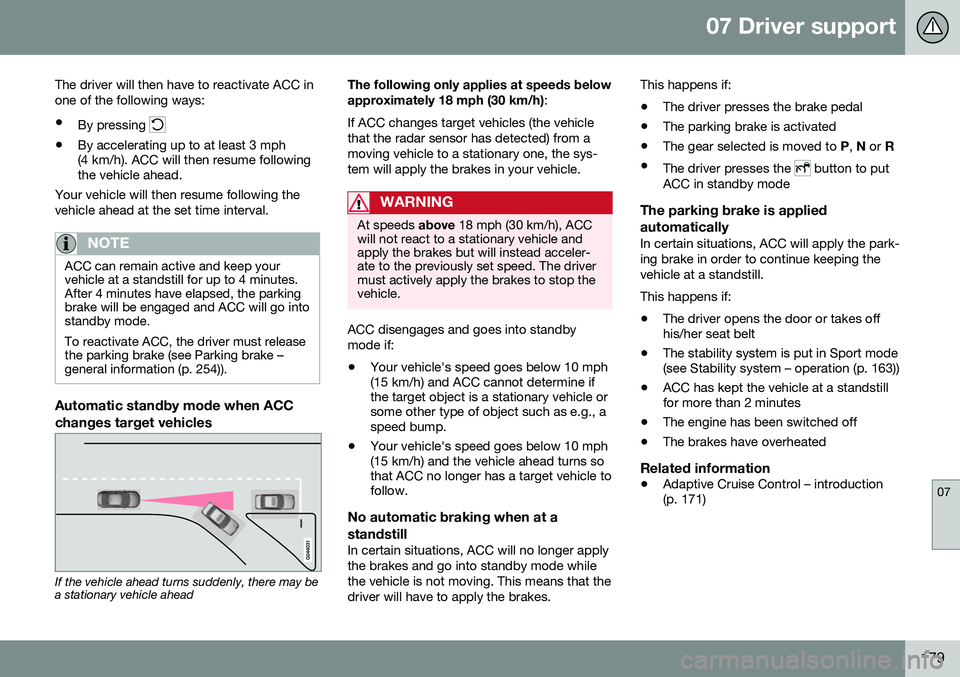
Automatic standby mode when ACC changes target vehicles
If the vehicle ahead turns suddenly, there may be a stationary vehicle ahead The following only applies at speeds below approximately 18 mph (30 km/h)
:
If ACC changes target vehicles (the vehicle that the radar sensor has detected) from amoving vehicle to a stationary one, the sys-tem will apply the brakes in your vehicle.
WARNING
At speeds above 18 mph (30 km/h), ACC
will not react to a stationary vehicle and apply the brakes but will instead acceler-ate to the previously set speed. The drivermust actively apply the brakes to stop thevehicle.
ACC disengages and goes into standby mode if:
• Your vehicle's speed goes below 10 mph (15 km/h) and ACC cannot determine ifthe target object is a stationary vehicle orsome other type of object such as e.g., aspeed bump.
• Your vehicle's speed goes below 10 mph(15 km/h) and the vehicle ahead turns sothat ACC no longer has a target vehicle tofollow.
No automatic braking when at a standstill
In certain situations, ACC will no longer apply the brakes and go into standby mode whilethe vehicle is not moving. This means that thedriver will have to apply the brakes. This happens if:
• The driver presses the brake pedal
• The parking brake is activated
• The gear selected is moved to
P, N or R
• The driver presses the
button to put
ACC in standby mode
The parking brake is applied automatically
In certain situations, ACC will apply the park- ing brake in order to continue keeping thevehicle at a standstill. This happens if:
• The driver opens the door or takes off his/her seat belt
• The stability system is put in Sport mode(see Stability system – operation (p. 163))
• ACC has kept the vehicle at a standstillfor more than 2 minutes
• The engine has been switched off
• The brakes have overheated
Related information
•
Adaptive Cruise Control – introduction(p. 171)
Page 235 of 380
08 Starting and driving
08
}}
* Option/accessory, for more information, see Introduction.233
Starting the engine
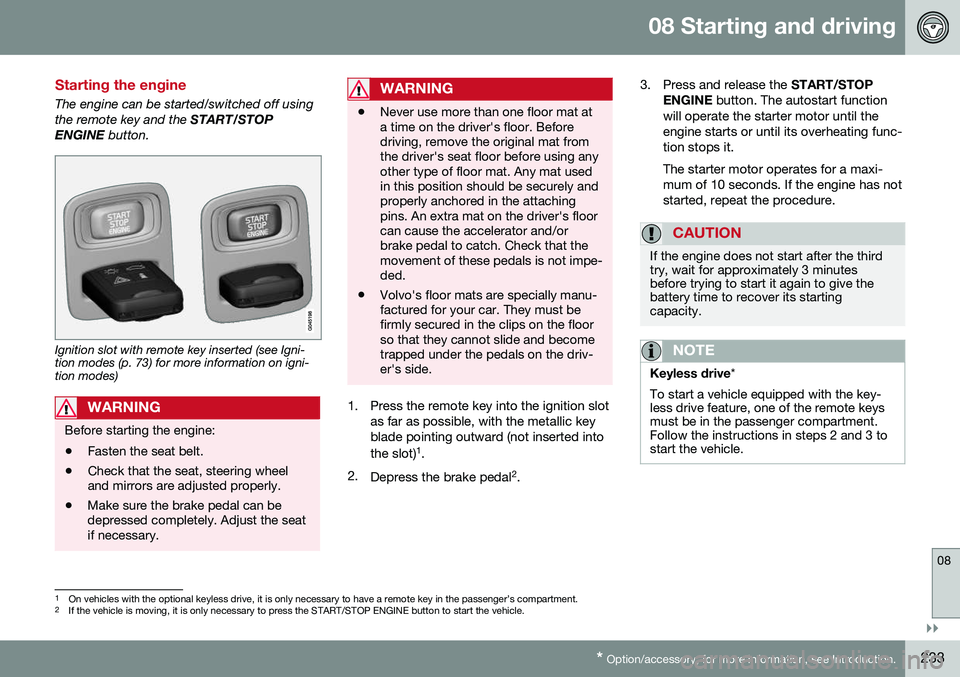
The engine can be started/switched off using the remote key and the START/STOP
ENGINE button.
Ignition slot with remote key inserted (see Igni- tion modes (p. 73) for more information on igni-tion modes)
WARNING
Before starting the engine:
• Fasten the seat belt.
• Check that the seat, steering wheel and mirrors are adjusted properly.
• Make sure the brake pedal can bedepressed completely. Adjust the seatif necessary.
WARNING
•Never use more than one floor mat at a time on the driver's floor. Beforedriving, remove the original mat fromthe driver's seat floor before using anyother type of floor mat. Any mat usedin this position should be securely andproperly anchored in the attachingpins. An extra mat on the driver's floorcan cause the accelerator and/orbrake pedal to catch. Check that themovement of these pedals is not impe-ded.
• Volvo's floor mats are specially manu-factured for your car. They must befirmly secured in the clips on the floorso that they cannot slide and becometrapped under the pedals on the driv-er's side.
1. Press the remote key into the ignition slot
as far as possible, with the metallic key blade pointing outward (not inserted into the slot) 1
.
2. Depress the brake pedal 2
. 3. Press and release the
START/STOP
ENGINE button. The autostart function
will operate the starter motor until the engine starts or until its overheating func-tion stops it. The starter motor operates for a maxi- mum of 10 seconds. If the engine has notstarted, repeat the procedure.
CAUTION
If the engine does not start after the third try, wait for approximately 3 minutesbefore trying to start it again to give thebattery time to recover its startingcapacity.
NOTE
Keyless drive *
To start a vehicle equipped with the key- less drive feature, one of the remote keysmust be in the passenger compartment.Follow the instructions in steps 2 and 3 tostart the vehicle.
1 On vehicles with the optional keyless drive, it is only necessary to have a remote key in the passenger’s compartment.
2 If the vehicle is moving, it is only necessary to press the START/STOP ENGINE button to start the vehicle.
Page 246 of 380
||
08 Starting and driving
08
244* Option/accessory, for more information, see Introduction.
Auto-stopping the engineNormally, when Start/Stop is activated and the brakes are applied until the vehicle comesto a standstill, the engine will auto-stop auto-matically if the driver keeps the brake pedal
depressed .
To remind the driver that the enginehas been auto-stopped, theStart/Stop symbol will illuminate inthe instrument panel and remain on
until the engine restarts.
If the ECO function* (ECO* (p. 248)) is activated, theengine may auto-stop beforethe vehicle comes to a com-plete standstill.
Auto-starting the engineThe engine restarts as soon as the driver releases the brake pedal.
Deactivating Start/StopIn certain situations (e.g., driving in heavy, stop-and-gotraffic), it may be preferableto deactivate Start/Stop. This is done by pressing the button in the center console.
The indicator light in the button will go out. Start/Stop will remain deactivated until the button is pressed again or until the engine isswitched off and restarted by the driver.
Related information
• Start/Stop – introduction (p. 243)
• Start/Stop – settings (p. 246)
• Start/Stop – Auto-stop exceptions (p. 244)
• Start/Stop – Auto-start exceptions(p. 245)
• Start/Stop – Hill Start Assist (HSA)(p. 243)
• Start/Stop – symbols and messages(p. 247)
Start/Stop – Auto-stop exceptions
In certain situations or conditions, the engine may not auto-stop
when the vehicle comes
to a standstill, such as if:
Condition/situation
The vehicle's speed has not reached a speed of approx. 5 mph (8 km/h) after themost recent auto-start or after the driverhas started the engine.
The driver unbuckles his/her seat belt.
The main battery's charge is below the minimum level.
The engine has not reached its normal operating temperature.
The ambient temperature is below approx. 25°F (-4°C) or above approx. 85°F (30°C).
The windshield's heating function* is acti- vated.
The climate system cannot keep the desired settings in the passenger compart-ment; the blower will operate at highspeed.
The vehicle is backing up.
The main battery's temperature is below freezing or too high.
Page 247 of 380
08 Starting and driving
08
}}
* Option/accessory, for more information, see Introduction.245
Condition/situation
The driver is turning the steering wheel hard.
The road's incline is very steep.
A trailer's electrical system is connected to the vehicle.
The hood has been opened A
.
The transmission has not reached its nor- mal operating temperature.
Atmospheric pressure is below a level equivalent to an altitude of approx. 4,900–8,200 ft (1500–2500 m) above sea level.The actual pressure is also affected by cur-rent weather conditions.
The Adaptive Cruise Control's* Queue Assist feature is activated.
The gear selector is in the SB
or " +/–" posi-
tion.
A Certain engines only
B Sport mode (where applicable)
Related information
• Start/Stop – introduction (p. 243)
• Start/Stop – function (p. 243)
• Start/Stop – settings (p. 246)
• Start/Stop – Auto-start exceptions (p. 245) •
Start/Stop – Hill Start Assist (HSA)(p. 243)
• Start/Stop – symbols and messages(p. 247)
Start/Stop – Auto-start exceptions
In certain situations or conditions, the engine may auto-start
even though the driver is still
pressing the brake pedal, such as if:
Condition/situation
Condensation forms on the windows.
The climate system cannot keep the desired settings in the passenger compart-ment.
Electrical current consumption is tempo- rarily high or the main battery's charge isbelow the minimum level.
The brake pedal is pumped repeatedly.
The hood has been opened A
.
The vehicle begins to move or increases speed slightly (if the engine auto-stoppedbefore the vehicle was at a standstill (seeECO* (p. 248))).
The driver unbuckles his/her seat belt while the gear selector is in the D or N positions.
The steering wheel is turned A
.
Page 248 of 380
||
08 Starting and driving
08
246
Condition/situation
The gear selector is moved from D to SB
, R
or " +/–".
The driver's door is opened with the gear selector in D – an audible signal and a text
message will inform the driver thatStart/Stop is active.
A Certain engines only
B Sport mode (where applicable)
WARNING
Do not open the hood if the engine has auto-stopped. The engine could suddenlyauto-start. Before opening the hood:
• Switch off the ignition using the START/STOP ENGINE
button.
• Be aware that if the engine has beenrunning, components in the enginecompartment will be very hot.
If the engine does not auto-start, this could be due to
:
• The driver's seat belt is not fastened
• The gear selector is in
P and the driver's
door is opened
In these cases, the driver will have to restart the engine by pressing the START/STOP
ENGINE button.
Related information
•Start/Stop – introduction (p. 243)
• Start/Stop – function (p. 243)
• Start/Stop – settings (p. 246)
• Start/Stop – Auto-stop exceptions (p. 244)
• Start/Stop – Hill Start Assist (HSA)(p. 243)
• Start/Stop – symbols and messages(p. 247)
Start/Stop – settings
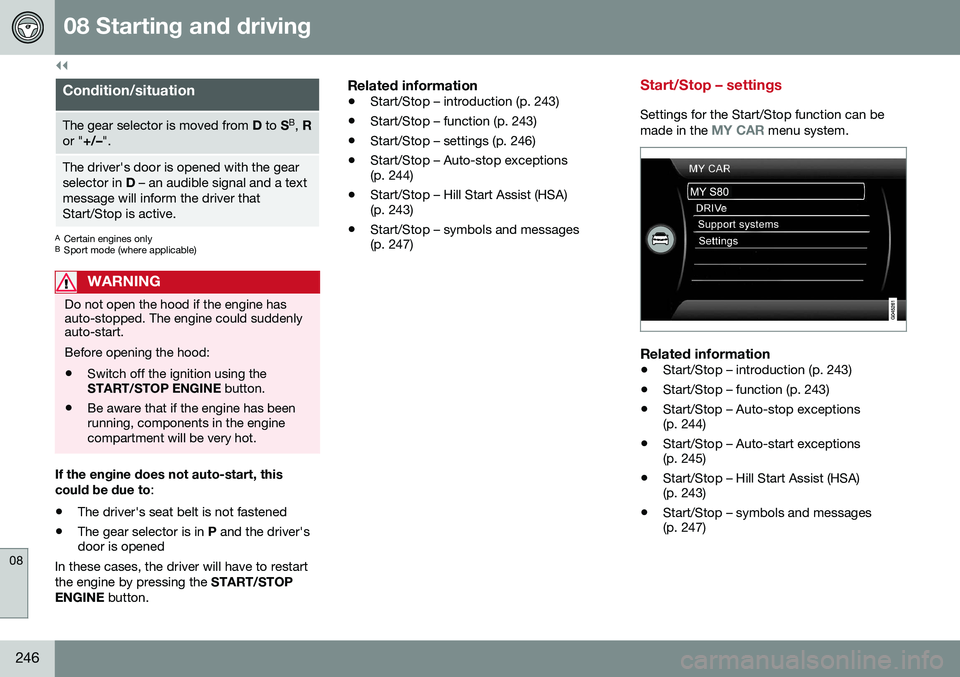
Settings for the Start/Stop function can be
made in the MY CAR menu system.
Related information
• Start/Stop – introduction (p. 243)
• Start/Stop – function (p. 243)
• Start/Stop – Auto-stop exceptions (p. 244)
• Start/Stop – Auto-start exceptions(p. 245)
• Start/Stop – Hill Start Assist (HSA)(p. 243)
• Start/Stop – symbols and messages(p. 247)
Page 257 of 380
08 Starting and driving
08
}}
255
NOTE
•In an emergency the parking brake can be applied when the vehicle is movingby holding in the control. Braking willbe interrupted when the acceleratorpedal is depressed or the control isreleased.
• An audible signal will sound during thisprocedure if the vehicle is moving atspeeds above 6 mph (10 km/h).
Related information
•
Parking brake – general information (p. 254)
• Parking brake – releasing (p. 255)
• Parking brake – symbols and messages(p. 257)
• Brakes – general (p. 250)
Parking brake – releasing
Releasing the electric parking brake
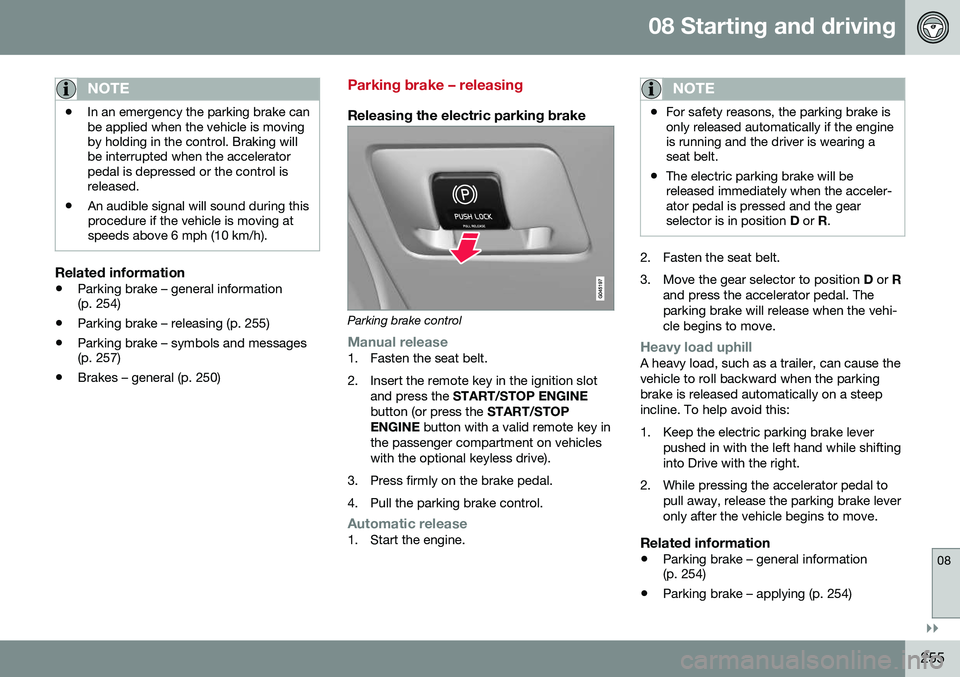
Parking brake control
Manual release1. Fasten the seat belt.
2. Insert the remote key in the ignition slot
and press the START/STOP ENGINE
button (or press the START/STOP
ENGINE button with a valid remote key in
the passenger compartment on vehicles with the optional keyless drive).
3. Press firmly on the brake pedal.
4. Pull the parking brake control.
Automatic release1. Start the engine.
NOTE
• For safety reasons, the parking brake is only released automatically if the engineis running and the driver is wearing aseat belt.
• The electric parking brake will bereleased immediately when the acceler-ator pedal is pressed and the gearselector is in position
D or R.
2. Fasten the seat belt.
3. Move the gear selector to position D or R
and press the accelerator pedal. The parking brake will release when the vehi-cle begins to move.
Heavy load uphillA heavy load, such as a trailer, can cause the vehicle to roll backward when the parkingbrake is released automatically on a steepincline. To help avoid this:
1. Keep the electric parking brake lever pushed in with the left hand while shifting into Drive with the right.
2. While pressing the accelerator pedal to pull away, release the parking brake leveronly after the vehicle begins to move.
Related information
• Parking brake – general information (p. 254)
• Parking brake – applying (p. 254)
Page 261 of 380
08 Starting and driving
08
}}
259
Engine and cooling system
Under special conditions, for example when driving in hilly terrain, extreme heat or withheavy loads, there is a risk that the engine andcooling system will overheat. Proceed as follows to avoid overheating the engine. •Maintain a low speed when driving with a trailer up long, steep hills. For informa-tion, see Towing a trailer (p. 267)
• Do not turn the engine off immediatelywhen stopping after a hard drive.
WARNING
The cooling fan may start or continue to operate (for up to 6 minutes) after theengine has been switched off.
•
Remove any auxiliary lights from in front of the grille when driving in hot weatherconditions.
• Do not exceed engine speeds of4500 rpm if driving with a trailer in hillyterrain. The oil temperature could becometoo high.
Conserving electrical current
Keep the following in mind to help minimize battery drain:
• When the engine is not running, avoid using ignition mode
II. Many electrical
systems (the audio system, the optionalnavigation system, power windows, etc)will function in ignition modes 0 and I.
These modes reduce drain on the battery.
• Please keep in mind that using systems,accessories, etc., that consume a greatdeal of current when the engine is notrunning could result in the battery beingcompletely drained. Driving or having theengine running for approximately15 minutes will help keep the batterycharged.
• The optional 12-volt socket in thetrunk (p. 135) area provides electrical cur-rent even with the ignition switched off,which drains the battery.
Before a long distance trip
It is always worthwhile to have your vehicle checked by a trained and qualified Volvo serv-ice technician before driving long distances.Your retailer will also be able to supply youwith bulbs, fuses, spark plugs and wiperblades for your use in the event that problemsoccur. As a minimum, the following items should be checked before any long trip:
• Check that engine runs smoothly and that fuel consumption is normal.
• Check for fuel, oil, and fluid leakage.
• Have the transmission oil level (p. 362)checked.
• Check condition of drive belts.
• Check state of the battery's charge.
• Examine tires carefully (the spare tire aswell), and replace those that areworn (p. 275). Check tire pres-sure (p. 282).
• The brakes, front wheel alignment, andsteering gear should be checked by atrained and qualified Volvo service techni-cian only.
• Check all lights, including high beams.
• Reflective warning triangles are legallyrequired in some states/provinces.
• Have a word with a trained and qualifiedVolvo service technician if you intend to
Page 367 of 380
11 Specifications
11
* Option/accessory, for more information, see Introduction.365
Symbols in the main instrument panel
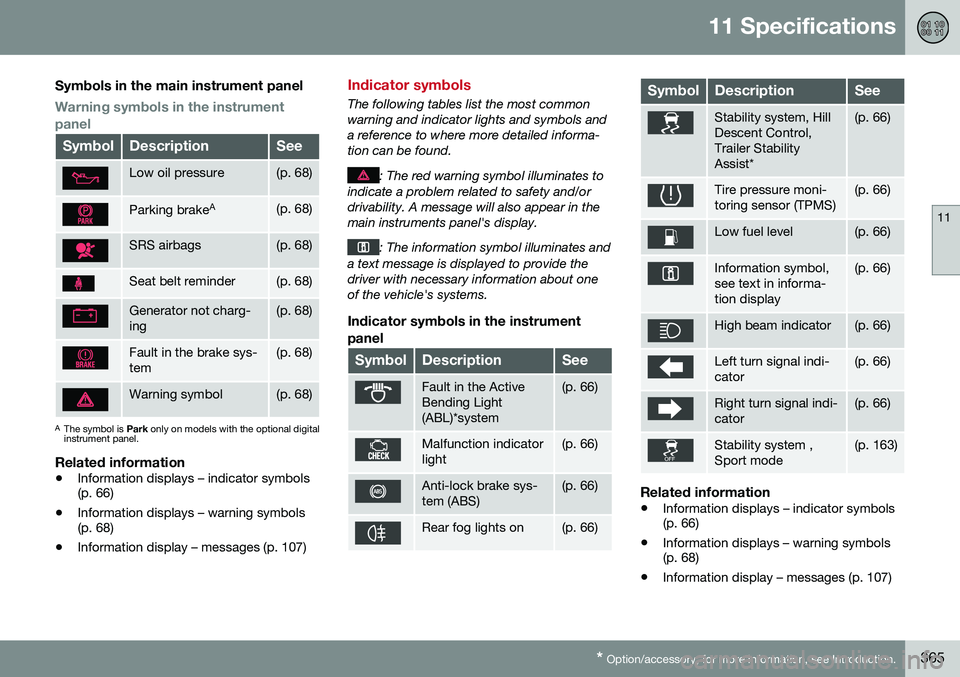
Warning symbols in the instrument panel
SymbolDescriptionSee
Low oil pressure(p. 68)
Parking brake A(p. 68)
SRS airbags(p. 68)
Seat belt reminder(p. 68)
Generator not charg- ing(p. 68)
Fault in the brake sys- tem(p. 68)
Warning symbol(p. 68)
A
The symbol is Park only on models with the optional digital
instrument panel.
Related information
• Information displays – indicator symbols (p. 66)
• Information displays – warning symbols(p. 68)
• Information display – messages (p. 107)
Indicator symbols
The following tables list the most common warning and indicator lights and symbols anda reference to where more detailed informa-tion can be found.
: The red warning symbol illuminates to
indicate a problem related to safety and/or drivability. A message will also appear in themain instruments panel's display.
: The information symbol illuminates and
a text message is displayed to provide the driver with necessary information about oneof the vehicle's systems.
Indicator symbols in the instrument
panel
SymbolDescriptionSee
Fault in the Active Bending Light(ABL)*system(p. 66)
Malfunction indicator light(p. 66)
Anti-lock brake sys- tem (ABS)(p. 66)
Rear fog lights on(p. 66)
SymbolDescriptionSee
Stability system, Hill Descent Control,Trailer StabilityAssist*(p. 66)
Tire pressure moni- toring sensor (TPMS)(p. 66)
Low fuel level(p. 66)
Information symbol, see text in informa-tion display(p. 66)
High beam indicator(p. 66)
Left turn signal indi- cator(p. 66)
Right turn signal indi- cator(p. 66)
Stability system , Sport mode(p. 163)
Related information
• Information displays – indicator symbols (p. 66)
• Information displays – warning symbols(p. 68)
• Information display – messages (p. 107)
Page 369 of 380
11 Specifications
11
* Option/accessory, for more information, see Introduction.367
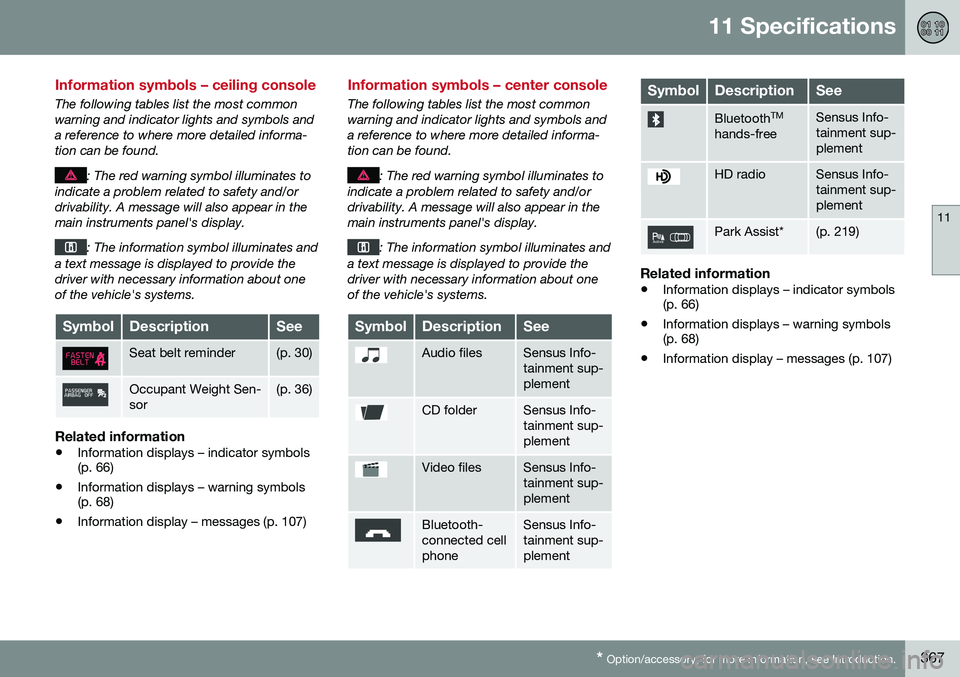
Information symbols – ceiling console
The following tables list the most common warning and indicator lights and symbols anda reference to where more detailed informa-tion can be found.
: The red warning symbol illuminates to
indicate a problem related to safety and/or drivability. A message will also appear in themain instruments panel's display.
: The information symbol illuminates and
a text message is displayed to provide the driver with necessary information about oneof the vehicle's systems.
SymbolDescriptionSee
Seat belt reminder(p. 30)
Occupant Weight Sen- sor(p. 36)
Related information
• Information displays – indicator symbols (p. 66)
• Information displays – warning symbols(p. 68)
• Information display – messages (p. 107)
Information symbols – center console
The following tables list the most common warning and indicator lights and symbols anda reference to where more detailed informa-tion can be found.
: The red warning symbol illuminates to
indicate a problem related to safety and/or drivability. A message will also appear in themain instruments panel's display.
: The information symbol illuminates and
a text message is displayed to provide the driver with necessary information about oneof the vehicle's systems.
SymbolDescriptionSee
Audio filesSensus Info- tainment sup-plement
CD folderSensus Info- tainment sup-plement
Video filesSensus Info- tainment sup-plement
Bluetooth- connected cellphoneSensus Info- tainment sup-plement
SymbolDescriptionSee
Bluetooth TM
hands-freeSensus Info- tainment sup-plement
HD radioSensus Info- tainment sup-plement
Park Assist*(p. 219)
Related information
• Information displays – indicator symbols (p. 66)
• Information displays – warning symbols(p. 68)
• Information display – messages (p. 107)
Page 375 of 380
12 Index
12
373
locking the vehicle.............................. 143
replacing the battery........................... 148
unlocking the vehicle.......................... 143
Reporting safety defects............................ 27
Roadside Assistance................................. 24
Road sign information (RSI)..................... 166
Roof loads............................................... 137
S
Safety, occupant........................................ 26
Safety defects, reporting........................... 27
Safety mode.............................................. 44Seat belt reminder................................................ 30
Seat belts Automatic locking retractor/Emer-
gency locking retractor......................... 47
buckling................................................ 29
maintenance......................................... 29
pretensioners........................................ 28
reminder................................................ 30
reminder warning light.......................... 68
securing child restraint systems.... 49,51, 53
unbuckling............................................ 29 use during pregnancy........................... 30
using..................................................... 28
Seats, front.......................................... 74, 75
Sensus..................................................... 105Service connected service booking................ 310
Shiftlock..................................................... 14 override............................................... 242
Side door mirrors................................. 96, 97
Side impact airbags................................... 39
Side marker lights, changing bulbs......... 324
Sign information (RSI).............................. 166
Snow chains............................................ 289
Snow tires........................................ 289, 290
Spare tire................................................. 279
Spin control..................................... 162, 163
SRS............................................................ 31
Stability system....................... 162, 163, 164 indicator light........................................ 67
Start/Stop (engine function)..... 243, 244, 245, 246, 247
Starting the engine.................................. 233 remote start........................................ 235
with keyless drive............................... 233
Starting the vehicle after a crash (crash mode).............. 44, 45 Start inhibitor (immobilizer)...................... 142 Steering wheel
adjusting............................................... 81
heated................................................... 82
horn....................................................... 81
keypad.................................................. 81
Steering wheel paddles............................. 81
Stone chips, touching up......................... 349
Storage spaces........................................ 132
Studded tires................................... 289, 290
Sunroof (moonroof).......................... 100, 101
Sun shade............................................ 94, 95
Supplemental restraint system.................. 31 warning light......................................... 68
Symbols, overview................................... 364
T
Tailgate wiper/washer........................................ 93
Temperature sensor ambient................................................. 71
Temporary spare tire............................... 279
Three-way catalytic converter................. 265
Tire designations..................................... 283
Tire inflation pressure.............................. 285