power steering VOLVO S80 2016 Owner´s Manual
[x] Cancel search | Manufacturer: VOLVO, Model Year: 2016, Model line: S80, Model: VOLVO S80 2016Pages: 380, PDF Size: 9.45 MB
Page 5 of 380
Contents
* Option/accessory, for more information, see Introduction.3
03
03 Instruments and controls
Instrument overview ................................. 59
Information displays – introduction........... 62
Eco Guide* and Power Meter*.................. 65
Information displays – indicator symbols. 66
Information displays – warning symbols... 68
My Car – introduction............................... 70Information displays – ambient tempera-
ture sensor................................................ 71 Information displays – trip odometer and
clock......................................................... 72
Inserting/removing remote key................. 72
Ignition modes.......................................... 73
Front seats................................................ 74
Front seats – folding backrest*................. 75
Front seats – power seat.......................... 75Key memory – power driver's seat* and
door mirrors.............................................. 77
Rear seats – head restraints..................... 78
Rear seats – folding backrest................... 80
Steering wheel.......................................... 81
Electrically heated* steering wheel........... 82
Lighting panel........................................... 82
High/low beam headlights........................ 83
Active high beams (AHB)*......................... 84
03
Tunnel detection (models with the rain
sensor* only)............................................. 85
Active Bending Lights (ABL)*.................... 85
Auxiliary lights*.......................................... 86
Instrument and "theater" lighting.............. 86
Parking lights............................................ 87
Rear fog lights........................................... 87
Hazard warning flashers........................... 88
Turn signals............................................... 88
Front interior lighting................................. 89
Rear interior lighting.................................. 90
Home safe lighting.................................... 90
Approach lighting...................................... 91
Windshield wipers..................................... 91
Rain sensor*.............................................. 92
Windshield washer.................................... 92
Tailgate wiper/washer............................... 93
Power windows......................................... 94
Sun shades*.............................................. 95
Power door mirrors................................... 96Power door mirrors – automatic tilting/
retraction................................................... 97 Heated windshield*, rear window and
door mirror defrosters............................... 98
03
Interior rearview mirror.............................. 98
Digital compass*....................................... 99
Power moonroof – introduction.............. 100
Power moonroof – operation.................. 101 HomeLink ®
Wireless Control System* –
introduction............................................. 102HomeLink ®
Wireless Control System* –
programming........................................... 103
Volvo Sensus.......................................... 105
Information display – menu controls....... 106
Information display – menu overview..... 107
Information display – messages............. 107
Trip computer – introduction ................. 109Trip computer – functions, analog instru-
ment panel.............................................. 110 Trip computer – functions, digital instru-
ment panel.............................................. 113 Trip computer – Supplementary informa-
tion.......................................................... 115
Trip computer – Trip statistics................ 116
Page 10 of 380
Contents
8
10
10 Maintenance and servicing
Maintenance – introduction.................... 307
Maintenance – owner maintenance........ 308
Maintenance – hoisting........................... 309
Onboard Diagnostic System................... 310
Booking service and repairs .................. 310
Maintenance – opening/closing hood..... 312
Engine compartment – overview............ 313
Engine compartment – engine oil........... 314
Engine compartment – coolant............... 316
Engine compartment – brake fluid.......... 317Engine compartment – power steering
fluid......................................................... 318
Bulbs – introduction................................ 319
Bulbs – headlight housing....................... 320
Bulbs – cover.......................................... 321
Bulbs – low beam, Halogen.................... 321
Bulbs – high beam, Halogen................... 322
Bulbs – extra high beam......................... 322
Bulbs – front turn signals........................ 323
Bulbs – front side marker lights.............. 324
Bulbs – taillight housing.......................... 324
Bulbs – license plate lighting.................. 325
Bulbs – trunk lighting.............................. 326
Bulbs – vanity mirror lighting.................. 326
10
Bulbs – specifications............................. 326
Wiper blades – service position.............. 327
Wiper blades – windshield...................... 328
Engine compartment – washer fluid....... 329
Battery – symbols................................... 330
Battery – handling................................... 330
Battery – maintenance............................ 331
Battery – changing.................................. 332
Fuses – introduction............................... 333
Fuses – engine compartment................. 335
Fuses – glove compartment................... 339
Fuses – cargo area/trunk........................ 342Fuses – engine compartment cold zone
(Start/Stop only)...................................... 343
Washing the car...................................... 345
Automatic car wash................................ 346
Polishing and waxing.............................. 346
Cleaning the interior................................ 347
Touching up paintwork........................... 349
11
11 Specifications
Label information.................................... 352
Dimensions............................................. 355
Weights................................................... 357
Engine specifications.............................. 358
Oil specifications..................................... 359
Oil volume............................................... 360
Coolant – specification and volume........ 361Transmission oil – specification and vol-
umes....................................................... 361
Brake fluid – specification and volume... 361
Power steering – specification................ 362Fuel tank volume – specification and vol-
ume......................................................... 362 Air conditioning – specification and vol-
ume......................................................... 362
Battery specifications............................. 363
Symbols – general information............... 364
Warning symbols.................................... 364
Indicator symbols.................................... 365
Information symbols............................... 366
Information symbols – ceiling console.... 367
Information symbols – center console.... 367
Page 63 of 380
03 Instruments and controls
03
* Option/accessory, for more information, see Introduction.61
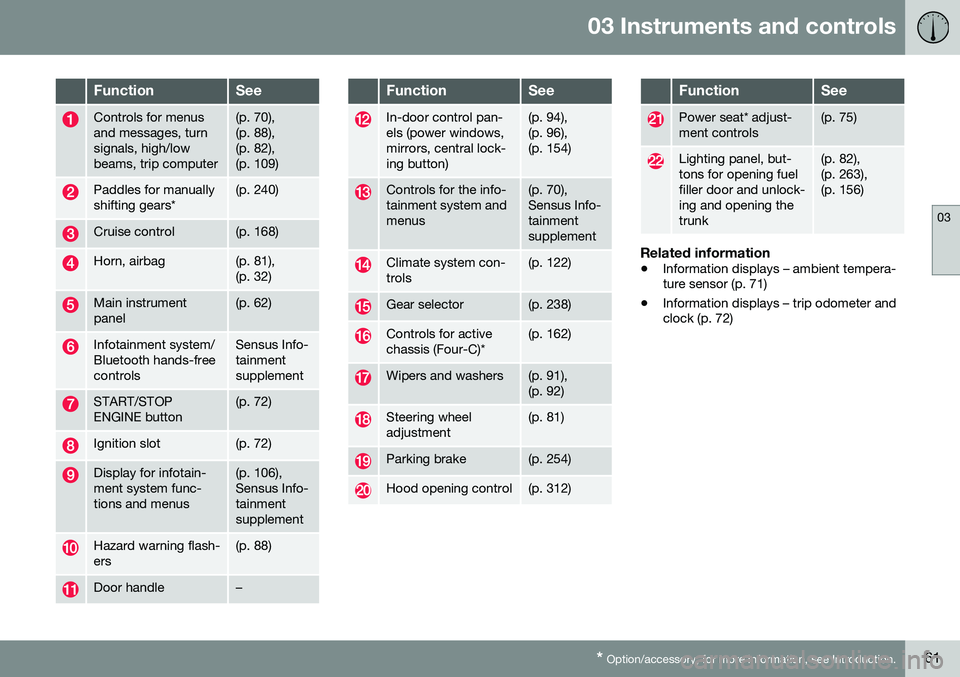
FunctionSee
Controls for menus and messages, turnsignals, high/lowbeams, trip computer(p. 70), (p. 88),(p. 82),(p. 109)
Paddles for manually shifting gears*(p. 240)
Cruise control(p. 168)
Horn, airbag(p. 81), (p. 32)
Main instrument panel(p. 62)
Infotainment system/ Bluetooth hands-freecontrolsSensus Info- tainmentsupplement
START/STOP ENGINE button(p. 72)
Ignition slot(p. 72)
Display for infotain- ment system func-tions and menus(p. 106), Sensus Info-tainmentsupplement
Hazard warning flash- ers(p. 88)
Door handle–
FunctionSee
In-door control pan- els (power windows,mirrors, central lock-ing button)(p. 94), (p. 96),(p. 154)
Controls for the info- tainment system andmenus(p. 70), Sensus Info-tainmentsupplement
Climate system con- trols(p. 122)
Gear selector(p. 238)
Controls for active chassis (Four-C)*(p. 162)
Wipers and washers(p. 91), (p. 92)
Steering wheel adjustment(p. 81)
Parking brake(p. 254)
Hood opening control(p. 312)
FunctionSee
Power seat* adjust- ment controls(p. 75)
Lighting panel, but- tons for opening fuelfiller door and unlock-ing and opening thetrunk(p. 82), (p. 263),(p. 156)
Related information
• Information displays – ambient tempera- ture sensor (p. 71)
• Information displays – trip odometer andclock (p. 72)
Page 83 of 380
03 Instruments and controls
03
* Option/accessory, for more information, see Introduction.81
Steering wheel
The steering wheel can be adjusted to various positions and has controls for the horn, cruisecontrol*, menus, the infotainment system and Bluetooth
®-connected cell phone.
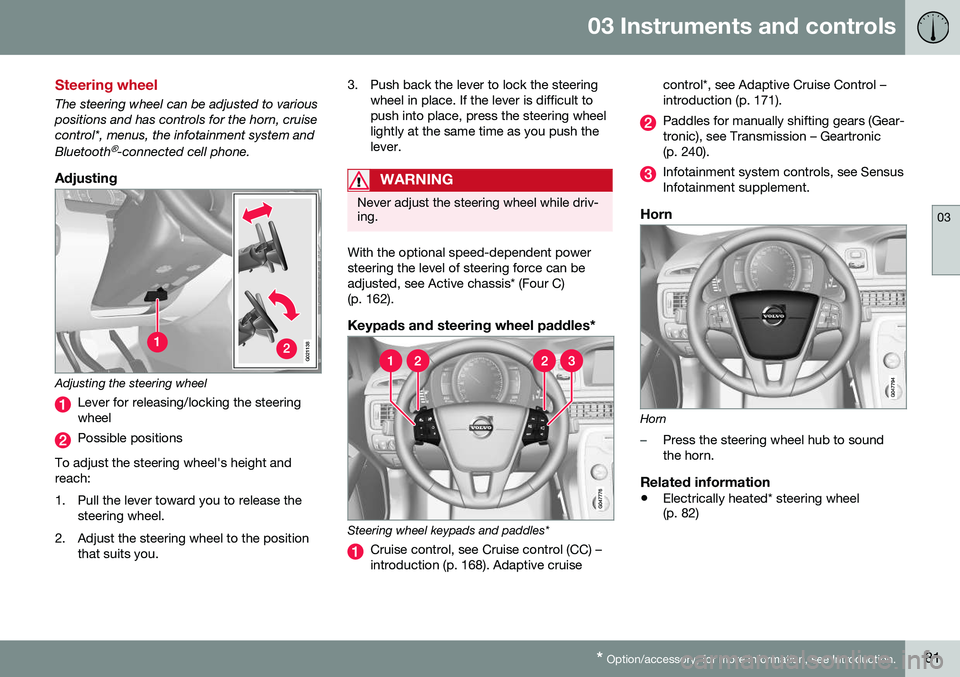
Adjusting
G021138
Adjusting the steering wheel
Lever for releasing/locking the steering wheel
Possible positions
To adjust the steering wheel's height and reach:
1. Pull the lever toward you to release the steering wheel.
2. Adjust the steering wheel to the position that suits you. 3. Push back the lever to lock the steering
wheel in place. If the lever is difficult to push into place, press the steering wheellightly at the same time as you push thelever.
WARNING
Never adjust the steering wheel while driv- ing.
With the optional speed-dependent power steering the level of steering force can beadjusted, see Active chassis* (Four C)(p. 162).
Keypads and steering wheel paddles*
Steering wheel keypads and paddles*
Cruise control, see Cruise control (CC) – introduction (p. 168). Adaptive cruise control*, see Adaptive Cruise Control –introduction (p. 171).
Paddles for manually shifting gears (Gear- tronic), see Transmission – Geartronic(p. 240).
Infotainment system controls, see Sensus Infotainment supplement.
Horn
Horn
–Press the steering wheel hub to sound the horn.
Related information
•
Electrically heated* steering wheel (p. 82)
Page 164 of 380
07 Driver support
07
162* Option/accessory, for more information, see Introduction.
Active chassis* (Four C)
Active chassis, Four-C (Continuously Controlled Chassis Concept), regulates thecharacteristics of the shock absorbers so thatthe vehicle's driving characteristics can beadjusted. There are three settings: Comfort,Sport and Advanced.
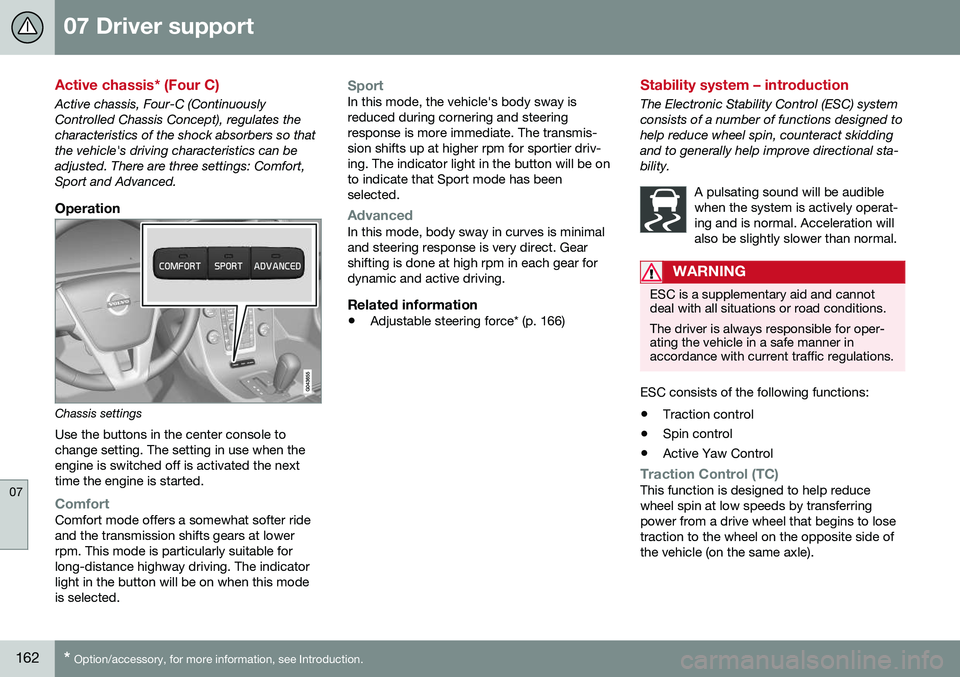
Operation
Chassis settings
Use the buttons in the center console to change setting. The setting in use when theengine is switched off is activated the nexttime the engine is started.
ComfortComfort mode offers a somewhat softer ride and the transmission shifts gears at lowerrpm. This mode is particularly suitable forlong-distance highway driving. The indicatorlight in the button will be on when this modeis selected.
SportIn this mode, the vehicle's body sway is reduced during cornering and steeringresponse is more immediate. The transmis-sion shifts up at higher rpm for sportier driv-ing. The indicator light in the button will be onto indicate that Sport mode has beenselected.
AdvancedIn this mode, body sway in curves is minimal and steering response is very direct. Gearshifting is done at high rpm in each gear fordynamic and active driving.
Related information
• Adjustable steering force* (p. 166)
Stability system – introduction
The Electronic Stability Control (ESC) system consists of a number of functions designed tohelp reduce wheel spin, counteract skiddingand to generally help improve directional sta-bility.
A pulsating sound will be audiblewhen the system is actively operat-ing and is normal. Acceleration willalso be slightly slower than normal.
WARNING
ESC is a supplementary aid and cannot deal with all situations or road conditions. The driver is always responsible for oper- ating the vehicle in a safe manner inaccordance with current traffic regulations.
ESC consists of the following functions:
• Traction control
• Spin control
• Active Yaw Control
Traction Control (TC)This function is designed to help reduce wheel spin at low speeds by transferringpower from a drive wheel that begins to losetraction to the wheel on the opposite side ofthe vehicle (on the same axle).
Page 168 of 380
07 Driver support
07
166* Option/accessory, for more information, see Introduction.
Adjustable steering force*
Steering force increases with the speed of the vehicle to give the driver enhanced sense ofcontrol and stability. At low speed the vehicleis easy to steer in order to facilitate parking,etc.
Adjustable steering force*Steering force can be changed under MY
CAR
Car settingsSteering wheel
force
. Select Low, Medium or High. For a
description of the menu system, My Car – introduction (p. 70).
NOTE
This steering force level menu function cannot be accessed when the vehicle is inmotion.
NOTE
In certain situations, the power steering may become too warm and will have to betemporarily cooled down. While this ishappening, the power steering effect willbe reduced slightly and somewhat moreeffort may be required to turn the steeringwheel. If this occurs, a message will be displayed in the instrument panel.
Related information
• Active chassis* (Four C) (p. 162)
Road Sign Information (RSI)* – introduction
RSI is a feature that helps the driver see road signs with the posted speed limit.
Introduction
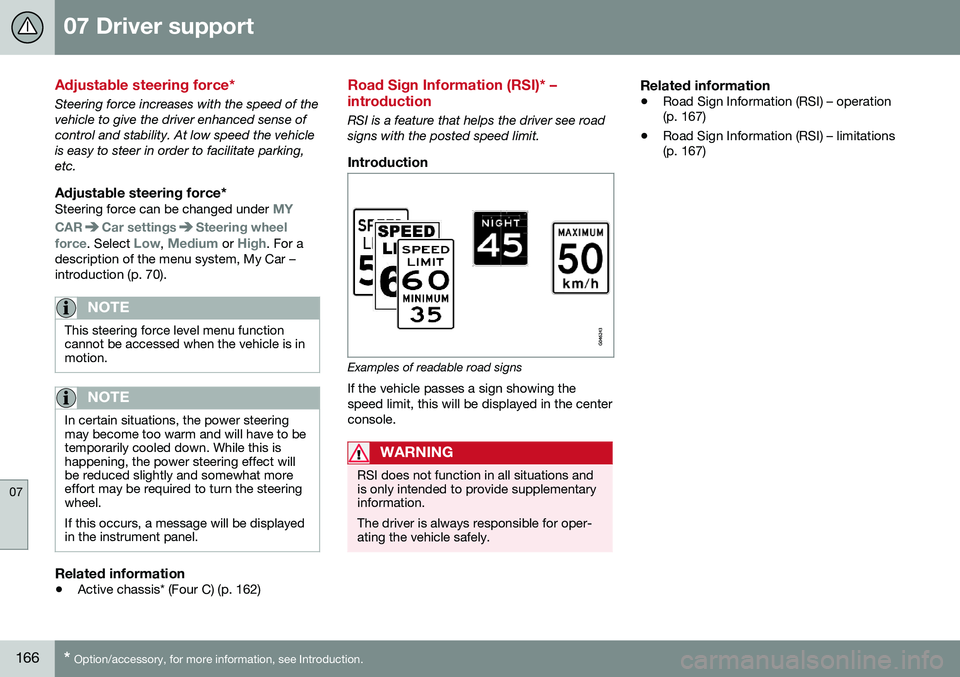
Examples of readable road signs If the vehicle passes a sign showing the speed limit, this will be displayed in the centerconsole.
WARNING
RSI does not function in all situations and is only intended to provide supplementaryinformation. The driver is always responsible for oper- ating the vehicle safely.
Related information
•Road Sign Information (RSI) – operation (p. 167)
• Road Sign Information (RSI) – limitations(p. 167)
Page 261 of 380
08 Starting and driving
08
}}
259
Engine and cooling system
Under special conditions, for example when driving in hilly terrain, extreme heat or withheavy loads, there is a risk that the engine andcooling system will overheat. Proceed as follows to avoid overheating the engine. •Maintain a low speed when driving with a trailer up long, steep hills. For informa-tion, see Towing a trailer (p. 267)
• Do not turn the engine off immediatelywhen stopping after a hard drive.
WARNING
The cooling fan may start or continue to operate (for up to 6 minutes) after theengine has been switched off.
•
Remove any auxiliary lights from in front of the grille when driving in hot weatherconditions.
• Do not exceed engine speeds of4500 rpm if driving with a trailer in hillyterrain. The oil temperature could becometoo high.
Conserving electrical current
Keep the following in mind to help minimize battery drain:
• When the engine is not running, avoid using ignition mode
II. Many electrical
systems (the audio system, the optionalnavigation system, power windows, etc)will function in ignition modes 0 and I.
These modes reduce drain on the battery.
• Please keep in mind that using systems,accessories, etc., that consume a greatdeal of current when the engine is notrunning could result in the battery beingcompletely drained. Driving or having theengine running for approximately15 minutes will help keep the batterycharged.
• The optional 12-volt socket in thetrunk (p. 135) area provides electrical cur-rent even with the ignition switched off,which drains the battery.
Before a long distance trip
It is always worthwhile to have your vehicle checked by a trained and qualified Volvo serv-ice technician before driving long distances.Your retailer will also be able to supply youwith bulbs, fuses, spark plugs and wiperblades for your use in the event that problemsoccur. As a minimum, the following items should be checked before any long trip:
• Check that engine runs smoothly and that fuel consumption is normal.
• Check for fuel, oil, and fluid leakage.
• Have the transmission oil level (p. 362)checked.
• Check condition of drive belts.
• Check state of the battery's charge.
• Examine tires carefully (the spare tire aswell), and replace those that areworn (p. 275). Check tire pres-sure (p. 282).
• The brakes, front wheel alignment, andsteering gear should be checked by atrained and qualified Volvo service techni-cian only.
• Check all lights, including high beams.
• Reflective warning triangles are legallyrequired in some states/provinces.
• Have a word with a trained and qualifiedVolvo service technician if you intend to
Page 270 of 380
||
08 Starting and driving
08
268
CAUTION
The maximum trailer weights listed are only applicable for altitudes up to 3,280 ft(1000 m) above sea level. With increasingaltitude the engine power and thereforethe car's climbing ability are impairedbecause of the reduced air density, so themaximum trailer weight has to be reducedaccordingly. The weight of the vehicle andtrailer must be reduced by 10% for everyfurther 3,280 ft (1000 m) (or part thereof).When towing 5,950 lbs (2,700kg) hill incli-nation is restricted to 14%.
WARNING
•Bumper-attached trailer hitches must not be used on Volvos, nor shouldsafety chains be attached to thebumper.
• Trailer hitches attaching to the vehiclerear axle must not be used.
• Never connect a trailer's hydraulicbrake system directly to the vehiclebrake system, nor a trailer's lightingsystem directly to the vehicle lightingsystem. Consult your nearest author-ized Volvo retailer for correct installa-tion.
• When towing a trailer, the trailer'ssafety chains or wire must be correctlyfastened to the attachment points pro-vided in the trailer hitch on the vehicle.The safety chain or wire must never befastened to or wound around the tow-ing ball.
Trailer cableAn adapter is required if the vehicle's trailer hitch has a 13-pin connector and the trailerhas 7 pins. Use an adapter cable approvedby Volvo. Make sure the cable does not dragon the ground.
Related information
•
Loading – general (p. 136)
Trailer Stability Assist (TSA)
Trailer Stability Assist is a system designed to help stabilize a vehicle that is towing a trailerwhen the vehicle and trailer have begun tosway and is part of the stability system. Forinformation on the stability system, see Stabil-ity system – introduction (p. 162)
FunctionA vehicle towing a trailer may begin to swayfor various reasons. Normally this only occursat high speeds but, for example, if the traileris overloaded or if the load is unevenly dis-tributed in the trailer, there is risk of swayingat speeds between approximately 45-55 mph(70-90 km/h). Swaying may be caused by factors such as: •
The vehicle and trailer are hit by a sud- den, strong crosswind
• The vehicle and trailer are traveling on anuneven road surface or drive over a bump
• Sudden movements of the steering wheel
Facts about TSA
• TSA intervenes at speeds above approxi-mately 40 mph (60 km/h)
• The stability system symbol in the instru-ment panel will flash when TSA is working
• If the driver switches off the stability sys-tem's Spin Control function, TSA will also
Page 271 of 380
08 Starting and driving
08
}}
269
be switched off (but will be on again the next time the engine is started)
• TSA may not intervene when the vehicleand trailer begin to sway if the driver triesto compensate for the swaying motion bymoving the steering wheel rapidly
How TSA worksOnce swaying has begun, it can be very diffi- cult to stop, which makes it difficult to controlthe vehicle and trailer. The TSA system continuously monitors the vehicle's movements, particularly lateralmovement. If the system detects a tendencyto sway, the brakes are applied individuallyon the front wheels, which has a stabilizingeffect on the vehicle and trailer. This is oftenenough to enable the driver to regain controlof the vehicle. If this is not adequate to stop the swaying motion, the brakes are applied to all of thewheels on the vehicle and on the trailer if it isequipped with brakes, and engine power istemporarily reduced. As the swaying motionbegins to decrease and the vehicle-trailerhave once again become stable, TSA will nowstop regulating the brakes/engine power andthe driver regains control of the vehicle.
Related information
• Towing a trailer (p. 267)
• Loading – general (p. 136)
Towing the vehicle
Always check with state and local authorities before attempting to tow another vehiclebecause this type of towing is subject to reg-ulations regarding maximum towing speed,length and type of towing device, lighting, etc.
1. With the remote key fully pressed into the
ignition slot 15
, press START/STOP
ENGINE for approximately 2 seconds to
activate ignition mode II. 2. The remote key must remain in the igni-
tion slot 16
for the entire time that the vehi-
cle is being towed.
3. Keep the tow rope taut when the towing vehicle slows down by applying light pressure on the brake pedal. This willhelp prevent jarring movements of thevehicle being towed.
4. Be prepared to apply the brakes to stop the vehicle being towed.
15Not necessary in vehicles with the optional keyless drive.
Page 273 of 380
08 Starting and driving
08
* Option/accessory, for more information, see Introduction.271
WARNING
• When the vehicle is being towed, the ignition should be in mode
II (in mode
I , all of the vehicle's airbags are deac-
tivated). For more information, seeIgnition modes (p. 73)
• Never remove the remote key from theignition slot when the vehicle is beingtowed. For vehicles with keyless drive,the remote key must remain inside thevehicle.
• The power brakes and power steeringwill not function when the engine is notrunning. Approximately 5 times morepressure will be required on the brakepedal and the steering wheel will beconsiderably harder to turn.
• The towing eyelets must not be usedfor pulling the vehicle out of a ditch orfor any similar purpose involvingsevere strain.
Related information
•
Towing the vehicle (p. 269)
• Towing by tow truck (p. 271)
Towing by tow truck
When necessary, call for professional help from an authorized towing company. Volvorecommends the use of flat bed equipment.
CAUTION
In certain conditions, the towing eyelet may be used to pull the vehicle onto aflatbed tow truck.
• The vehicle's position and ground clearance determine if it can be pulledup onto a flatbed tow truck using thetowing eyelet.
• If the angle of the tow truck’s ramp istoo steep or the ground clearanceunder the vehicle is insufficient, dam-age could occur by attempting to pullthe vehicle using the towing eyelet.
• If necessary, lift the vehicle using thetow truck’s lifting device.
WARNING
No person or object should be behind the tow truck while the vehicle is being pulledup onto the flatbed.
CAUTION
• The vehicle should always be towed in the forward direction.
• Vehicles with All Wheel Drive (AWD)*that are being towed with the frontwheels off the ground should not betowed at a speed above approx.45 mph (70 km/h) and should not betowed farther than 30 miles (50 km).
Related information
•
Towing eyelet (p. 270)