remote start VOLVO S80 2016 Owner´s Manual
[x] Cancel search | Manufacturer: VOLVO, Model Year: 2016, Model line: S80, Model: VOLVO S80 2016Pages: 380, PDF Size: 9.45 MB
Page 6 of 380
Contents
4* Option/accessory, for more information, see Introduction.
04
04 Climate
Climate – general information................. 118
Climate – sensors................................... 119
Air quality................................................ 119
Interior Air Quality System (IAQS)*.......... 120
Climate – menu settings......................... 120
Air distribution – general......................... 121
Electronic climate control (ECC)............. 122
Heated seats........................................... 123
Ventilated seats....................................... 124
Temperature and blower control............ 124
Automatic climate control....................... 125
Air conditioning....................................... 125Max. defroster and electrically heated
windshield*.............................................. 126
Air distribution – function........................ 127
Air distribution – recirculation................. 128
Air distribution – table............................. 129
05
05 Loading and storage
Storage spaces....................................... 132
Tunnel console........................................ 134
Tunnel console – 12-volt sockets........... 134
Glove compartment................................ 135
Vanity mirror............................................ 135
12-volt socket in the trunk*..................... 135
Loading – general................................... 136
Ski hatch................................................. 136
Loading – roof load carriers.................... 137
Load anchoring eyelets........................... 138
Grocery bag holder................................. 138
06
06 Locks and alarm
Remote key and key blade..................... 140
Remote key – loss................................... 140
Key memory............................................ 141
Locking/unlocking confirmation.............. 141
Immobilizer (start inhibitor)...................... 142
Remote key – functions.......................... 143
Remote key – range................................ 144Detachable key blade – general informa-
tion.......................................................... 145 Detachable key blade – detaching/rein-
serting..................................................... 145
Detachable key blade – unlocking.......... 146
Valet locking............................................ 146
Remote key – replacing the battery........ 147
Keyless drive*– locking/unlocking.......... 149Keyless drive* – unlocking with key
blade....................................................... 150
Keyless drive* – key memory.................. 150
Keyless drive* – messages..................... 151
Keyless drive* – antenna locations......... 152
Locking/unlocking – from the outside..... 153
Manual locking........................................ 154
Locking/unlocking – from inside............. 154
Locking/unlocking – glove compartment 155
Page 8 of 380
Contents
6* Option/accessory, for more information, see Introduction.
07
Collision warning* – limitations............... 202
The camera’s limitations......................... 204
Collision warning – troubleshooting........ 205Collision warning – symbols and mes-
sages....................................................... 207
Driver Alert System................................. 209
Driver Alert Control (DAC) – introduction 209
Driver Alert Control (DAC) – operation.... 210
Driver Alert Control (DAC) – function...... 210
Driver Alert Control (DAC) – limitations... 211Driver Alert Control (DAC) – symbols and
messages................................................ 212 Lane Departure Warning (LDW) – intro-
duction.................................................... 214 Lane Departure Warning (LDW) – opera-
tion.......................................................... 214 Lane Departure Warning (LDW) - limita-
tions........................................................ 216 Lane Departure Warning (LDW) – sym-
bols and messages................................. 217
Park assist – introduction....................... 219
Park assist – function.............................. 219
Park assist – operation........................... 221
Park assist – limitations.......................... 222
Park assist – troubleshooting.................. 223
07
Rear Park Assist Camera (PAC) – intro-
duction.................................................... 223 Rear Park Assist Camera (PAC) – func-
tion.......................................................... 224 Rear Park Assist Camera (PAC) – opera-
tion.......................................................... 224 Rear Park Assist Camera (PAC) – guiding
and marker lines...................................... 225 Rear Park Assist Camera (PAC) – limita-
tions........................................................ 227
BLIS* – introduction................................ 227
BLIS* – function...................................... 228
BLIS* – operation.................................... 229
BLIS* – limitations................................... 229
BLIS* – messages................................... 230
08
08 Starting and driving
Starting the engine.................................. 233
Switching off the engine......................... 235Engine Remote Start (ERS)* – introduc-
tion.......................................................... 235 Engine Remote Start (ERS)* – starting the
engine..................................................... 236 Engine Remote Start (ERS)* – switching
off the engine.......................................... 236
Jump starting.......................................... 237
Transmission – general information........ 238
Transmission – positions........................ 238
Transmission – Geartronic...................... 240
Transmission – shiftlock override........... 242
Start/Stop – Hill Start Assist (HSA)......... 243
Start/Stop – introduction........................ 243
Start/Stop – function............................... 243
Start/Stop – Auto-stop exceptions......... 244
Start/Stop – Auto-start exceptions......... 245
Start/Stop – settings............................... 246
Start/Stop – symbols and messages...... 247
ECO*....................................................... 248
All Wheel Drive (AWD)............................. 250
Brakes – general..................................... 250
Brakes – symbols ................................... 252
Page 34 of 380
||
02 Safety
02
32
WARNING
•If the SRS warning light stays on after the engine has started or if it illumi-nates while you are driving, have thevehicle inspected by a trained andqualified Volvo service technician assoon as possible.
• Never try to repair any component orpart of the SRS yourself. Any interfer-ence in the system could cause mal-function and serious injury. All work onthese systems should be performed bya trained and qualified Volvo servicetechnician.
WARNING
If your vehicle has become flood-damaged in any way (e.g., soaked carpeting/stand-ing water on the floor of the vehicle), donot attempt to start the vehicle or insertthe remote key into the ignition slot beforedisconnecting the battery (see below). Thismay cause airbag deployment which couldresult in serious injury. Have the vehicletowed to a trained and qualified Volvoservice technician for repairs. Before attempting to tow the vehicle:
1. Switch off the ignition for at least
10 minutes and disconnect the bat- tery.
2. Follow the instructions for manually overriding the shiftlock system Trans-mission – shiftlock override (p. 242).
Related information
• Crash mode – general information (p. 44)
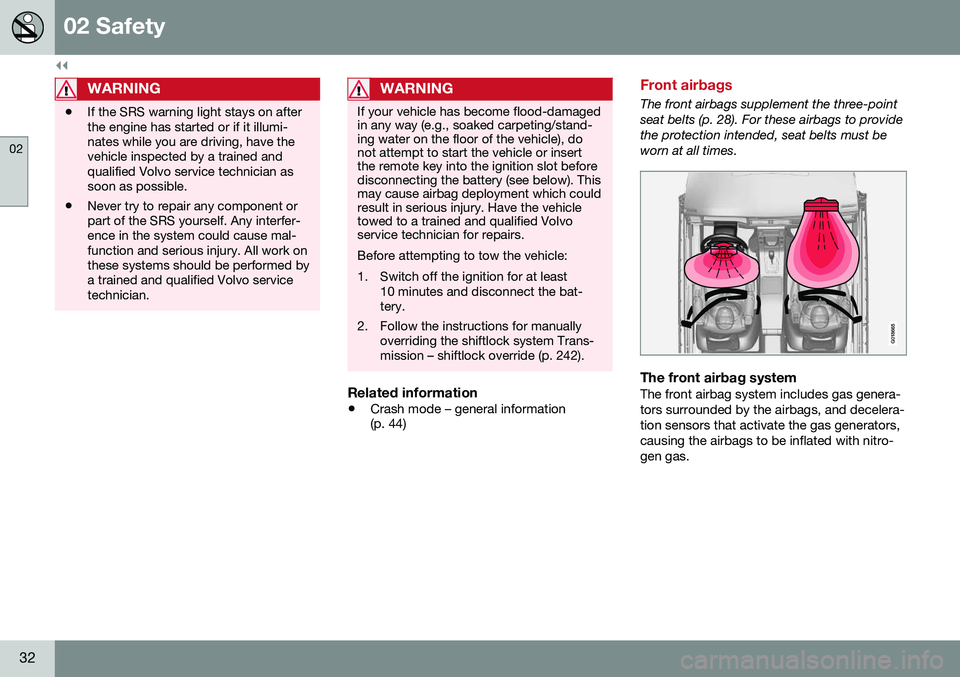
Front airbags
The front airbags supplement the three-point seat belts (p. 28). For these airbags to providethe protection intended, seat belts must beworn at all times.
G018665
The front airbag systemThe front airbag system includes gas genera- tors surrounded by the airbags, and decelera-tion sensors that activate the gas generators,causing the airbags to be inflated with nitro-gen gas.
Page 47 of 380
02 Safety
02
}}
45
Crash mode – starting the vehicle
If Crash mode has been set Crash mode (p. 44)) and damage to the vehicle isminor and there is no fuel leakage, you mayattempt to start the engine. To do so:
1. Remove the remote key from the ignitionslot and open the driver's door. If a mes- sage is displayed that the ignition is on,press the start button.
2. Close the driver's door and reinsert the remote key in the ignition slot.
3. Try to start the vehicle.
WARNING
If the message Safety mode See manualis still displayed, the vehicle should not be driven and must be towed. Concealedfaults may make the vehicle difficult tocontrol.
Related information
• Crash mode – general information (p. 44)
• Crash mode – moving the vehicle (p. 45)
Crash mode – moving the vehicle
If the message Normal mode appears after
an attempt has been made to start the engine, Starting the vehicle after a crash (p. 45), thevehicle may be moved carefully from its pres-ent position, if for example, it is blocking traf-fic. It should, however, not be moved fartherthan is absolutely necessary.
WARNING
Even if the vehicle appears to be drivable after Crash mode has been set, it shouldnot be driven or towed (pulled by anothervehicle). There may be concealed damagethat could make it difficult or impossible tocontrol. The vehicle should be transportedon a flatbed tow truck to a trained andqualified Volvo service technician forinspection/repairs.
Related information
• Crash mode – general information (p. 44)
Child safety
Children should always be seated safely when traveling in the vehicle.
General informationVolvo recommends the proper use of restraintsystems (p. 47) for all occupants includingchildren. Remember that, regardless of ageand size, a child should always be properlyrestrained in a vehicle. Your vehicle is also equipped with ISOFIX/ LATCH attachments (p. 54), which make itmore convenient to install child seats. Some restraint systems for children are designed to be secured in the vehicle by lapbelts or the lap portion of a lap-shoulder belt.Such child restraint systems can help protectchildren in vehicles in the event of an acci-dent only if they are used properly. However,children could be endangered in a crash if thechild restraints are not properly secured in thevehicle. Failure to follow the installationinstructions for your child restraint can resultin your child striking the vehicle's interior in asudden stop. Holding a child in your arms is NOT a suitable substitute for a child restraint system. In anaccident, a child held in a person's arms canbe crushed between the vehicle's interior andan unrestrained person. The child could alsobe injured by striking the interior, or by beingejected from the vehicle during a suddenmaneuver or impact. The same can also hap-
Page 74 of 380
03 Instruments and controls
03
72* Option/accessory, for more information, see Introduction.
Information displays – trip odometer and clock
The trip odometers T1 and T2 and clock are
displayed in the instrument panel.
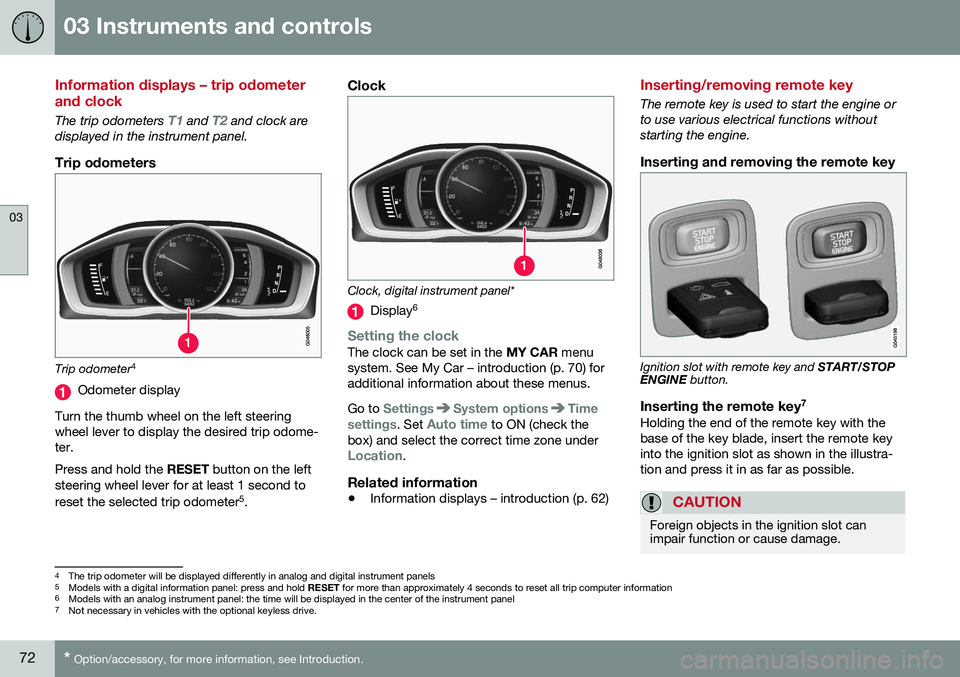
Trip odometers
Trip odometer 4
Odometer display
Turn the thumb wheel on the left steering wheel lever to display the desired trip odome-ter. Press and hold the RESET button on the left
steering wheel lever for at least 1 second to reset the selected trip odometer 5
.
Clock
Clock, digital instrument panel*
Display 6
Setting the clockThe clock can be set in the
MY CAR menu
system. See My Car – introduction (p. 70) for additional information about these menus. Go to
SettingsSystem optionsTime
settings
. Set Auto time to ON (check the
box) and select the correct time zone under
Location.
Related information
• Information displays – introduction (p. 62)
Inserting/removing remote key
The remote key is used to start the engine or to use various electrical functions withoutstarting the engine.
Inserting and removing the remote key
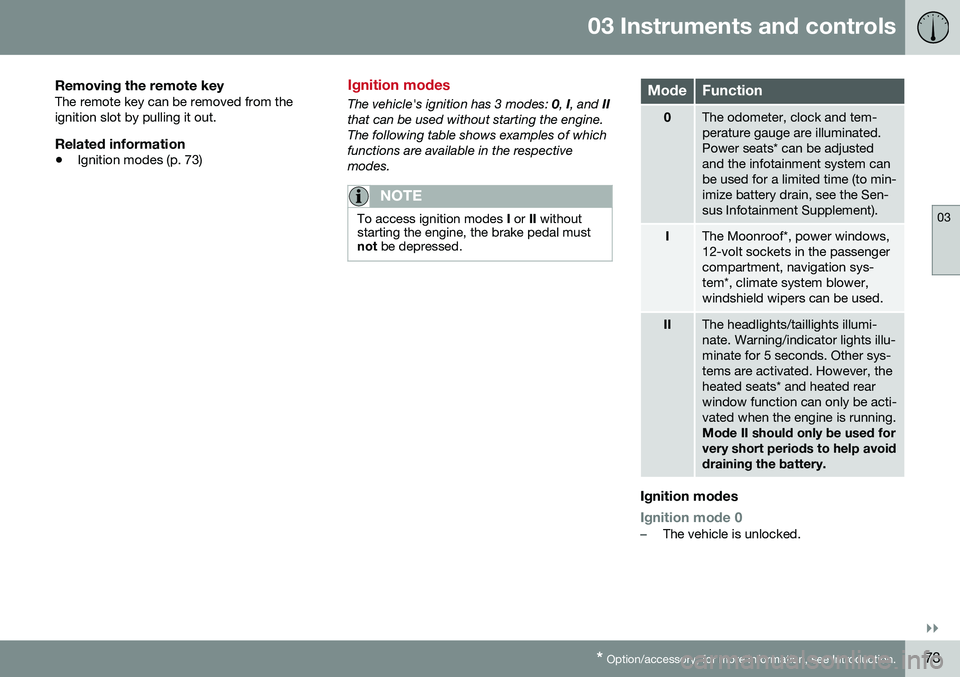
Ignition slot with remote key and
START/STOP
ENGINE button.
Inserting the remote key 7Holding the end of the remote key with the base of the key blade, insert the remote keyinto the ignition slot as shown in the illustra-tion and press it in as far as possible.
CAUTION
Foreign objects in the ignition slot can impair function or cause damage.
4
The trip odometer will be displayed differently in analog and digital instrument panels
5 Models with a digital information panel: press and hold RESET for more than approximately 4 seconds to reset all trip computer information
6 Models with an analog instrument panel: the time will be displayed in the center of the instrument panel
7
Not necessary in vehicles with the optional keyless drive.
Page 75 of 380
03 Instruments and controls
03
}}
* Option/accessory, for more information, see Introduction.73
Removing the remote keyThe remote key can be removed from the ignition slot by pulling it out.
Related information
• Ignition modes (p. 73)
Ignition modes
The vehicle's ignition has 3 modes:
0, I, and II
that can be used without starting the engine. The following table shows examples of whichfunctions are available in the respectivemodes.
NOTE
To access ignition modes I or II without
starting the engine, the brake pedal must not be depressed.
ModeFunction
0The odometer, clock and tem- perature gauge are illuminated.Power seats* can be adjustedand the infotainment system canbe used for a limited time (to min-imize battery drain, see the Sen-sus Infotainment Supplement).
IThe Moonroof*, power windows, 12-volt sockets in the passengercompartment, navigation sys-tem*, climate system blower,windshield wipers can be used.
IIThe headlights/taillights illumi- nate. Warning/indicator lights illu-minate for 5 seconds. Other sys-tems are activated. However, theheated seats* and heated rearwindow function can only be acti-vated when the engine is running. Mode II should only be used for very short periods to help avoiddraining the battery.
Ignition modes
Ignition mode 0–The vehicle is unlocked.
Page 76 of 380
||
03 Instruments and controls
03
74* Option/accessory, for more information, see Introduction.
Ignition mode I–With the remote key fully pressed into the ignition slot 8
, press START/STOP
ENGINE briefly.
Ignition mode II–With the remote key fully pressed into the ignition slot 8
, press START/STOP
ENGINE for approximately 2 seconds.
Returning to mode 0To return to mode 0 from mode II or I, press
START/STOP ENGINE briefly.
Starting and stopping the engineSee Starting the engine (p. 233) and Switch- ing off the engine (p. 235) for information onstarting the engine and switching it off.
Emergency towingSee Towing the vehicle (p. 269) for importantinformation about the remote key when thevehicle is being towed.
Related information
•Inserting/removing remote key (p. 72)
Front seats
The front seats can be adjusted in a number of ways to help provide the most comfortableseating position.
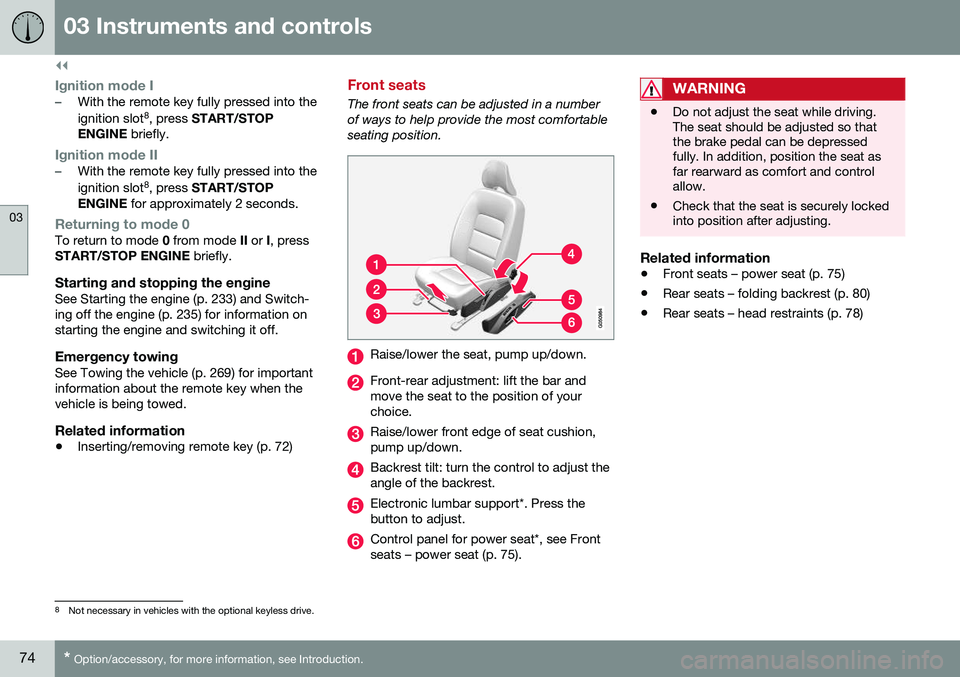
Raise/lower the seat, pump up/down.
Front-rear adjustment: lift the bar and move the seat to the position of yourchoice.
Raise/lower front edge of seat cushion, pump up/down.
Backrest tilt: turn the control to adjust the angle of the backrest.
Electronic lumbar support*. Press the button to adjust.
Control panel for power seat*, see Front seats – power seat (p. 75).
WARNING
•Do not adjust the seat while driving. The seat should be adjusted so thatthe brake pedal can be depressedfully. In addition, position the seat asfar rearward as comfort and controlallow.
• Check that the seat is securely lockedinto position after adjusting.
Related information
•
Front seats – power seat (p. 75)
• Rear seats – folding backrest (p. 80)
• Rear seats – head restraints (p. 78)
8
Not necessary in vehicles with the optional keyless drive.
Page 91 of 380
03 Instruments and controls
03
}}
* Option/accessory, for more information, see Introduction.89
NOTE
• This automatic flashing sequence can be interrupted by immediately movingthe lever in the opposite direction.
• If the turn signal indicator flashesfaster than normal, check for aburned-out turn signal bulb.
Related information
•
Hazard warning flashers (p. 88)
Front interior lighting
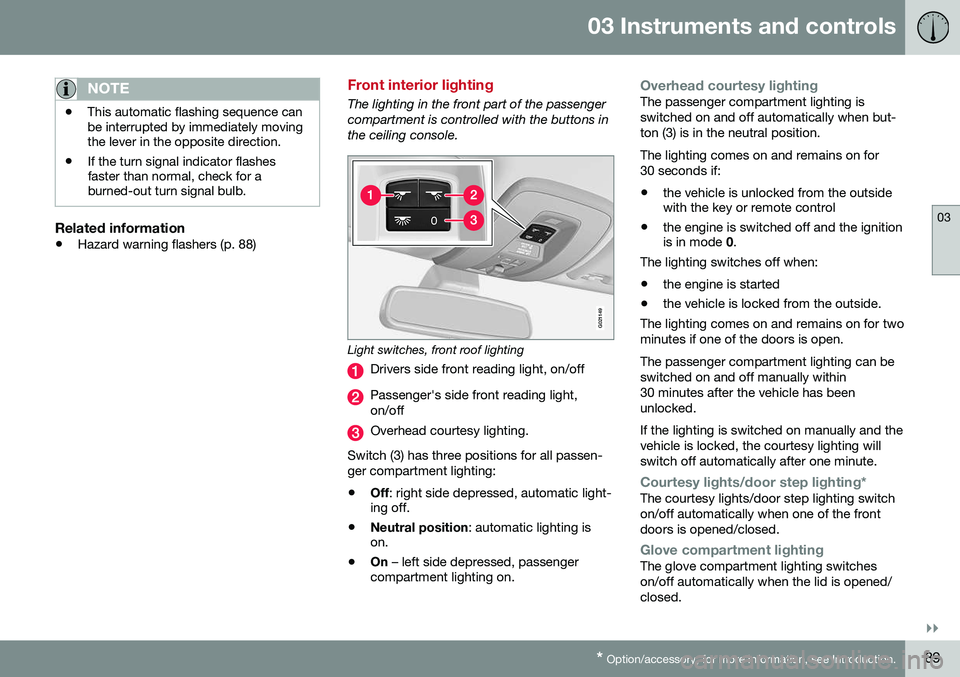
The lighting in the front part of the passenger compartment is controlled with the buttons inthe ceiling console.
G021149
Light switches, front roof lighting
Drivers side front reading light, on/off
Passenger's side front reading light, on/off
Overhead courtesy lighting.
Switch (3) has three positions for all passen- ger compartment lighting:
• Off
: right side depressed, automatic light-
ing off.
• Neutral position
: automatic lighting is
on.
• On
– left side depressed, passenger
compartment lighting on.
Overhead courtesy lightingThe passenger compartment lighting is switched on and off automatically when but-ton (3) is in the neutral position. The lighting comes on and remains on for 30 seconds if:
• the vehicle is unlocked from the outside with the key or remote control
• the engine is switched off and the ignitionis in mode
0.
The lighting switches off when:
• the engine is started
• the vehicle is locked from the outside.
The lighting comes on and remains on for two minutes if one of the doors is open. The passenger compartment lighting can be switched on and off manually within30 minutes after the vehicle has beenunlocked. If the lighting is switched on manually and the vehicle is locked, the courtesy lighting willswitch off automatically after one minute.
Courtesy lights/door step lighting*The courtesy lights/door step lighting switch on/off automatically when one of the frontdoors is opened/closed.
Glove compartment lightingThe glove compartment lighting switches on/off automatically when the lid is opened/closed.
Page 93 of 380
03 Instruments and controls
03
* Option/accessory, for more information, see Introduction.91
Approach lighting
Approach lighting activates the parking lights, door mirror lights, license plate lighting, domelighting and door step lighting when youapproach the vehicle. This function is activated by pressing the approach light button on the remote key (see
the illustration in Remote key – functions(p. 143)). The time interval for this lighting can be set by pressing MY CAR and going to
Car
settings
Light settingsApproach light
duration. See My Car – introduction (p. 70)
for a description of the menu system.
Related information
• Home safe lighting (p. 90)
Windshield wipers
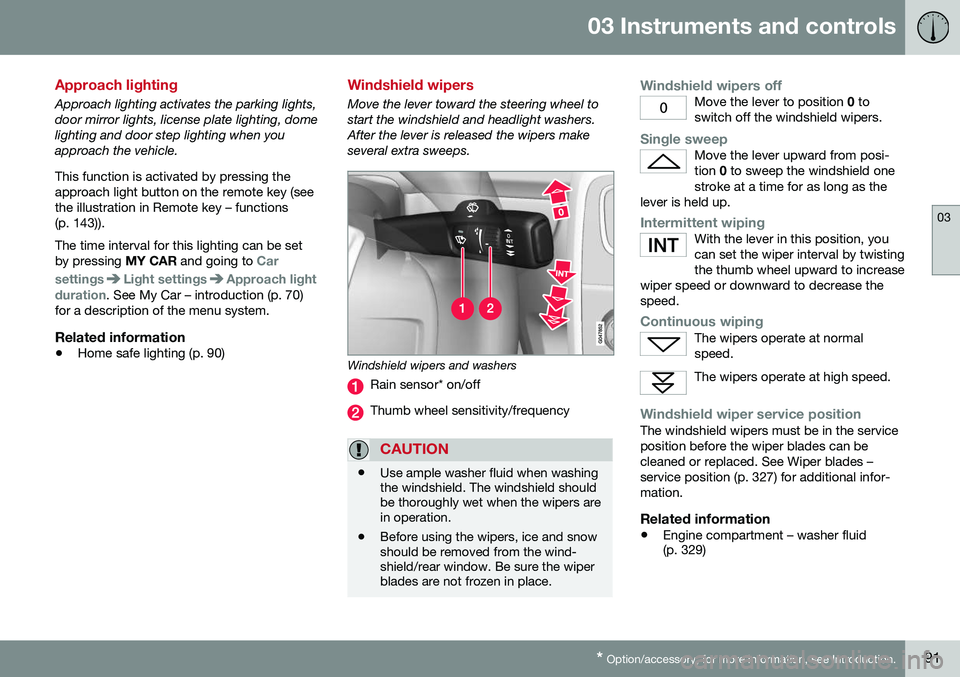
Move the lever toward the steering wheel to start the windshield and headlight washers.After the lever is released the wipers makeseveral extra sweeps.
Windshield wipers and washers
Rain sensor* on/off
Thumb wheel sensitivity/frequency
CAUTION
•Use ample washer fluid when washing the windshield. The windshield shouldbe thoroughly wet when the wipers arein operation.
• Before using the wipers, ice and snowshould be removed from the wind-shield/rear window. Be sure the wiperblades are not frozen in place.
Windshield wipers offMove the lever to position
0 to
switch off the windshield wipers.
Single sweepMove the lever upward from posi- tion 0 to sweep the windshield one
stroke at a time for as long as the
lever is held up.
Intermittent wipingWith the lever in this position, you can set the wiper interval by twistingthe thumb wheel upward to increase
wiper speed or downward to decrease thespeed.
Continuous wipingThe wipers operate at normal speed.
The wipers operate at high speed.
Windshield wiper service positionThe windshield wipers must be in the service position before the wiper blades can becleaned or replaced. See Wiper blades –service position (p. 327) for additional infor-mation.
Related information
• Engine compartment – washer fluid (p. 329)
Page 142 of 380
06 Locks and alarm
06
140
Remote key and key blade
Two remote keys are provided with your vehi- cle. They enable you to unlock the doors andtrunk, and also function as ignition keys tostart the vehicle or operate electrical compo-nents. The remote keys contain detachablemetal key blades for manually locking orunlocking the driver's door and the glovecompartment. The visible ends of these keyblades are unique to make it easier to identify"your" remote key. Up to six remotes can beprogrammed for use on the same vehicle.
WARNING
Never leave the remote key in the ignition slot if children are to remain in the vehicle.
For more information on the various ignition modes, see Ignition modes (p. 73).
Related information
•Remote key – functions (p. 143)
• Remote key – functions (p. 143)
• Remote key – range (p. 144)
Remote key – loss
If either of the remote keys (p. 140) is lost, the other should be taken with the vehicle to aVolvo retailer. As an anti-theft measure, thecode of the lost remote key must be erasedfrom the system.
NOTE
Additional or duplicate remote control keys can be obtained from any authorized Volvoretailer. You can also obtain additional or duplicate remote control keys from certain inde-pendent repair facilities and locksmithsthat are qualified to make remote controlkeys. Each key must be programmed towork with your vehicle. California Only: A list of independent repair facilities and/or locksmiths known to Volvo that can cutand code replacement keys can be found:
• on the Volvo website at http://www.volvocars.com/us/keys
• by calling Volvo Customer Care at1-800-458-1552
The number of registered keys for the vehicle can be found by pressing
MY CAR and going
into
SettingsInformationNumber of
keys. For a description of the menu system,
see My Car – introduction (p. 70). USA-5WK49264 FCC ID:KR55WK49264 + Siemens VDO 5WK49236 FCC ID:KR55WK49236, 5WK49266FCC ID:KR55WK49266 + Siemens VDO 5WK49233 FCC ID:KR55WK49233This device complies with part 15 of the FCC rules and RSS-210. Operation is subject tothe following conditions: (1) This device maynot cause harmful interference, and (2) thisdevice must accept any interferencereceived, including interference that maycause undesired operation. Canada-5WK49264IC:267T-5WK49264 + Siemens VDO 5WK49236 IC:267T-5WK49236, 5WK49266IC:267T-5WK49266 + Siemens VDO 5WK49233 IC:267T-5WK49233Operation is subject to the following condi- tions: (1) this device may not cause interfer-ence, and (2) this device must accept anyinterference, including interference that maycause undesired operation of the device.Related information
•
Remote key – functions (p. 143)