window VOLVO S80 2016 Owner´s Manual
[x] Cancel search | Manufacturer: VOLVO, Model Year: 2016, Model line: S80, Model: VOLVO S80 2016Pages: 380, PDF Size: 9.45 MB
Page 5 of 380
Contents
* Option/accessory, for more information, see Introduction.3
03
03 Instruments and controls
Instrument overview ................................. 59
Information displays – introduction........... 62
Eco Guide* and Power Meter*.................. 65
Information displays – indicator symbols. 66
Information displays – warning symbols... 68
My Car – introduction............................... 70Information displays – ambient tempera-
ture sensor................................................ 71 Information displays – trip odometer and
clock......................................................... 72
Inserting/removing remote key................. 72
Ignition modes.......................................... 73
Front seats................................................ 74
Front seats – folding backrest*................. 75
Front seats – power seat.......................... 75Key memory – power driver's seat* and
door mirrors.............................................. 77
Rear seats – head restraints..................... 78
Rear seats – folding backrest................... 80
Steering wheel.......................................... 81
Electrically heated* steering wheel........... 82
Lighting panel........................................... 82
High/low beam headlights........................ 83
Active high beams (AHB)*......................... 84
03
Tunnel detection (models with the rain
sensor* only)............................................. 85
Active Bending Lights (ABL)*.................... 85
Auxiliary lights*.......................................... 86
Instrument and "theater" lighting.............. 86
Parking lights............................................ 87
Rear fog lights........................................... 87
Hazard warning flashers........................... 88
Turn signals............................................... 88
Front interior lighting................................. 89
Rear interior lighting.................................. 90
Home safe lighting.................................... 90
Approach lighting...................................... 91
Windshield wipers..................................... 91
Rain sensor*.............................................. 92
Windshield washer.................................... 92
Tailgate wiper/washer............................... 93
Power windows......................................... 94
Sun shades*.............................................. 95
Power door mirrors................................... 96Power door mirrors – automatic tilting/
retraction................................................... 97 Heated windshield*, rear window and
door mirror defrosters............................... 98
03
Interior rearview mirror.............................. 98
Digital compass*....................................... 99
Power moonroof – introduction.............. 100
Power moonroof – operation.................. 101 HomeLink ®
Wireless Control System* –
introduction............................................. 102HomeLink ®
Wireless Control System* –
programming........................................... 103
Volvo Sensus.......................................... 105
Information display – menu controls....... 106
Information display – menu overview..... 107
Information display – messages............. 107
Trip computer – introduction ................. 109Trip computer – functions, analog instru-
ment panel.............................................. 110 Trip computer – functions, digital instru-
ment panel.............................................. 113 Trip computer – Supplementary informa-
tion.......................................................... 115
Trip computer – Trip statistics................ 116
Page 37 of 380
02 Safety
02
35
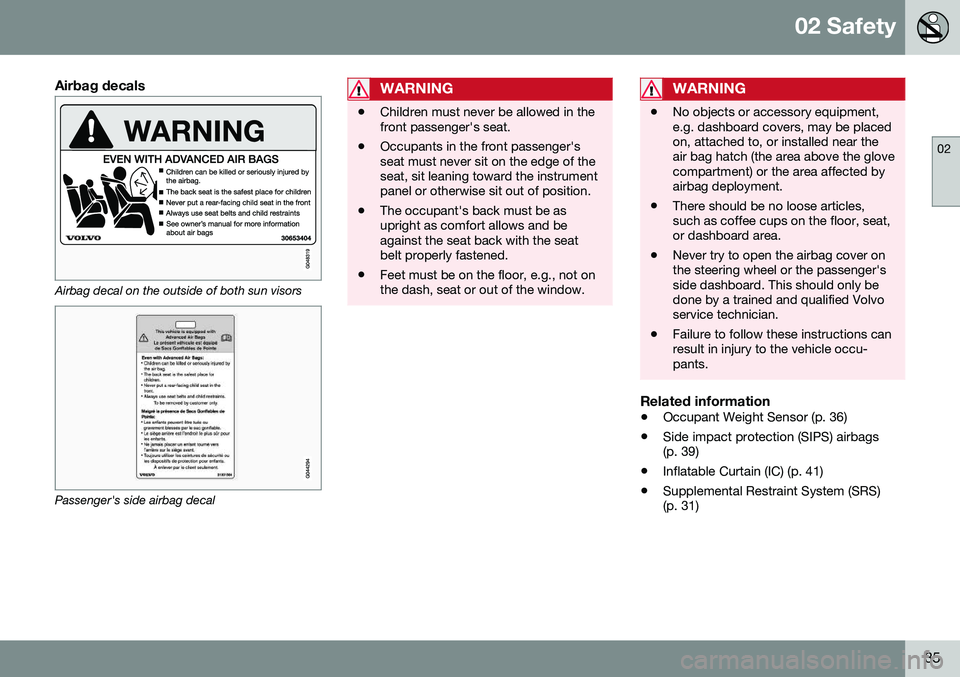
Airbag decals
Airbag decal on the outside of both sun visors
Passenger's side airbag decal
WARNING
•Children must never be allowed in the front passenger's seat.
• Occupants in the front passenger'sseat must never sit on the edge of theseat, sit leaning toward the instrumentpanel or otherwise sit out of position.
• The occupant's back must be asupright as comfort allows and beagainst the seat back with the seatbelt properly fastened.
• Feet must be on the floor, e.g., not onthe dash, seat or out of the window.
WARNING
•
No objects or accessory equipment, e.g. dashboard covers, may be placedon, attached to, or installed near theair bag hatch (the area above the glovecompartment) or the area affected byairbag deployment.
• There should be no loose articles,such as coffee cups on the floor, seat,or dashboard area.
• Never try to open the airbag cover onthe steering wheel or the passenger'sside dashboard. This should only bedone by a trained and qualified Volvoservice technician.
• Failure to follow these instructions canresult in injury to the vehicle occu-pants.
Related information
•
Occupant Weight Sensor (p. 36)
• Side impact protection (SIPS) airbags (p. 39)
• Inflatable Curtain (IC) (p. 41)
• Supplemental Restraint System (SRS)(p. 31)
Page 43 of 380
02 Safety
02
41
Inflatable Curtain (IC)
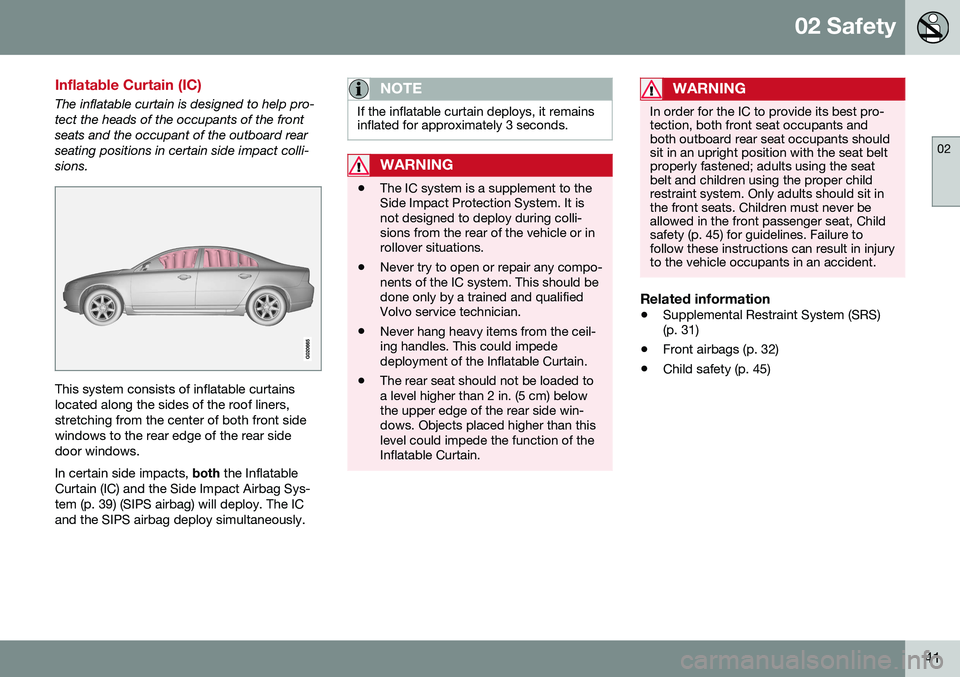
The inflatable curtain is designed to help pro- tect the heads of the occupants of the frontseats and the occupant of the outboard rearseating positions in certain side impact colli-sions.
This system consists of inflatable curtains located along the sides of the roof liners,stretching from the center of both front sidewindows to the rear edge of the rear sidedoor windows. In certain side impacts, both the Inflatable
Curtain (IC) and the Side Impact Airbag Sys- tem (p. 39) (SIPS airbag) will deploy. The ICand the SIPS airbag deploy simultaneously.
NOTE
If the inflatable curtain deploys, it remains inflated for approximately 3 seconds.
WARNING
• The IC system is a supplement to the Side Impact Protection System. It isnot designed to deploy during colli-sions from the rear of the vehicle or inrollover situations.
• Never try to open or repair any compo-nents of the IC system. This should bedone only by a trained and qualifiedVolvo service technician.
• Never hang heavy items from the ceil-ing handles. This could impededeployment of the Inflatable Curtain.
• The rear seat should not be loaded toa level higher than 2 in. (5 cm) belowthe upper edge of the rear side win-dows. Objects placed higher than thislevel could impede the function of theInflatable Curtain.
WARNING
In order for the IC to provide its best pro- tection, both front seat occupants andboth outboard rear seat occupants shouldsit in an upright position with the seat beltproperly fastened; adults using the seatbelt and children using the proper childrestraint system. Only adults should sit inthe front seats. Children must never beallowed in the front passenger seat, Childsafety (p. 45) for guidelines. Failure tofollow these instructions can result in injuryto the vehicle occupants in an accident.
Related information
•
Supplemental Restraint System (SRS) (p. 31)
• Front airbags (p. 32)
• Child safety (p. 45)
Page 63 of 380
03 Instruments and controls
03
* Option/accessory, for more information, see Introduction.61
FunctionSee
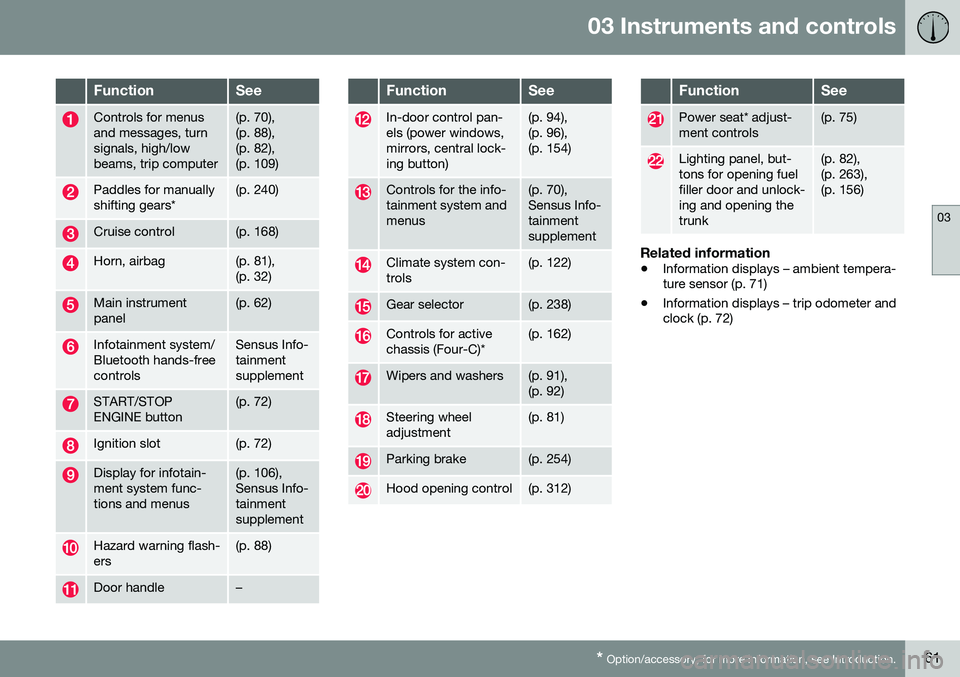
Controls for menus and messages, turnsignals, high/lowbeams, trip computer(p. 70), (p. 88),(p. 82),(p. 109)
Paddles for manually shifting gears*(p. 240)
Cruise control(p. 168)
Horn, airbag(p. 81), (p. 32)
Main instrument panel(p. 62)
Infotainment system/ Bluetooth hands-freecontrolsSensus Info- tainmentsupplement
START/STOP ENGINE button(p. 72)
Ignition slot(p. 72)
Display for infotain- ment system func-tions and menus(p. 106), Sensus Info-tainmentsupplement
Hazard warning flash- ers(p. 88)
Door handle–
FunctionSee
In-door control pan- els (power windows,mirrors, central lock-ing button)(p. 94), (p. 96),(p. 154)
Controls for the info- tainment system andmenus(p. 70), Sensus Info-tainmentsupplement
Climate system con- trols(p. 122)
Gear selector(p. 238)
Controls for active chassis (Four-C)*(p. 162)
Wipers and washers(p. 91), (p. 92)
Steering wheel adjustment(p. 81)
Parking brake(p. 254)
Hood opening control(p. 312)
FunctionSee
Power seat* adjust- ment controls(p. 75)
Lighting panel, but- tons for opening fuelfiller door and unlock-ing and opening thetrunk(p. 82), (p. 263),(p. 156)
Related information
• Information displays – ambient tempera- ture sensor (p. 71)
• Information displays – trip odometer andclock (p. 72)
Page 71 of 380
03 Instruments and controls
03
}}
69
Generator not chargingThis symbol comes on during driving if a fault has occurred in the electrical system. Contactan authorized Volvo workshop.
Engine temperatureEngine overheating can result from low oil or coolant levels, towing or hard driving at highheat and altitude, or mechanical malfunction.Engine overheating will be signaled with textand a red warning triangle in the middle of theinstrument display. The exact text will dependon the degree of overheating. It may range from
High engine temp Reduce speed toHigh engine temp Stop engine. If appropri-
ate, other messages, such as Coolant level
low, Stop safely will also be displayed. If
your engine does overheat so that you must stop the engine, always allow the engine tocool before attempting to check oil and cool-ant levels. See Engine compartment – coolant (p. 316) for more information.
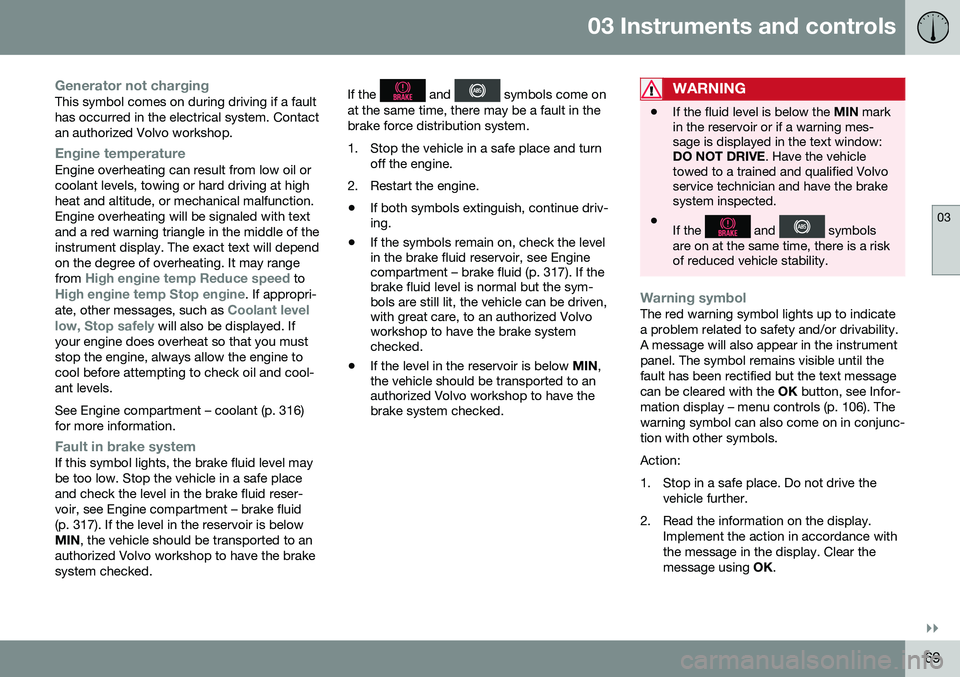
Fault in brake systemIf this symbol lights, the brake fluid level may be too low. Stop the vehicle in a safe placeand check the level in the brake fluid reser-voir, see Engine compartment – brake fluid(p. 317). If the level in the reservoir is belowMIN , the vehicle should be transported to an
authorized Volvo workshop to have the brakesystem checked. If the
and symbols come on
at the same time, there may be a fault in the brake force distribution system.
1. Stop the vehicle in a safe place and turn off the engine.
2. Restart the engine.
• If both symbols extinguish, continue driv- ing.
• If the symbols remain on, check the levelin the brake fluid reservoir, see Enginecompartment – brake fluid (p. 317). If thebrake fluid level is normal but the sym-bols are still lit, the vehicle can be driven,with great care, to an authorized Volvoworkshop to have the brake systemchecked.
• If the level in the reservoir is below
MIN,
the vehicle should be transported to anauthorized Volvo workshop to have thebrake system checked.WARNING
• If the fluid level is below the
MIN mark
in the reservoir or if a warning mes- sage is displayed in the text window:DO NOT DRIVE . Have the vehicle
towed to a trained and qualified Volvoservice technician and have the brakesystem inspected.
• If the
and symbols
are on at the same time, there is a risk of reduced vehicle stability.
Warning symbolThe red warning symbol lights up to indicate a problem related to safety and/or drivability.A message will also appear in the instrumentpanel. The symbol remains visible until thefault has been rectified but the text messagecan be cleared with the OK button, see Infor-
mation display – menu controls (p. 106). Thewarning symbol can also come on in conjunc-tion with other symbols. Action:
1. Stop in a safe place. Do not drive the vehicle further.
2. Read the information on the display. Implement the action in accordance with the message in the display. Clear themessage using OK.
Page 75 of 380
03 Instruments and controls
03
}}
* Option/accessory, for more information, see Introduction.73
Removing the remote keyThe remote key can be removed from the ignition slot by pulling it out.
Related information
• Ignition modes (p. 73)
Ignition modes
The vehicle's ignition has 3 modes:
0, I, and II
that can be used without starting the engine. The following table shows examples of whichfunctions are available in the respectivemodes.
NOTE
To access ignition modes I or II without
starting the engine, the brake pedal must not be depressed.
ModeFunction
0The odometer, clock and tem- perature gauge are illuminated.Power seats* can be adjustedand the infotainment system canbe used for a limited time (to min-imize battery drain, see the Sen-sus Infotainment Supplement).
IThe Moonroof*, power windows, 12-volt sockets in the passengercompartment, navigation sys-tem*, climate system blower,windshield wipers can be used.
IIThe headlights/taillights illumi- nate. Warning/indicator lights illu-minate for 5 seconds. Other sys-tems are activated. However, theheated seats* and heated rearwindow function can only be acti-vated when the engine is running. Mode II should only be used for very short periods to help avoiddraining the battery.
Ignition modes
Ignition mode 0–The vehicle is unlocked.
Page 93 of 380
03 Instruments and controls
03
* Option/accessory, for more information, see Introduction.91
Approach lighting
Approach lighting activates the parking lights, door mirror lights, license plate lighting, domelighting and door step lighting when youapproach the vehicle. This function is activated by pressing the approach light button on the remote key (see
the illustration in Remote key – functions(p. 143)). The time interval for this lighting can be set by pressing MY CAR and going to
Car
settings
Light settingsApproach light
duration. See My Car – introduction (p. 70)
for a description of the menu system.
Related information
• Home safe lighting (p. 90)
Windshield wipers
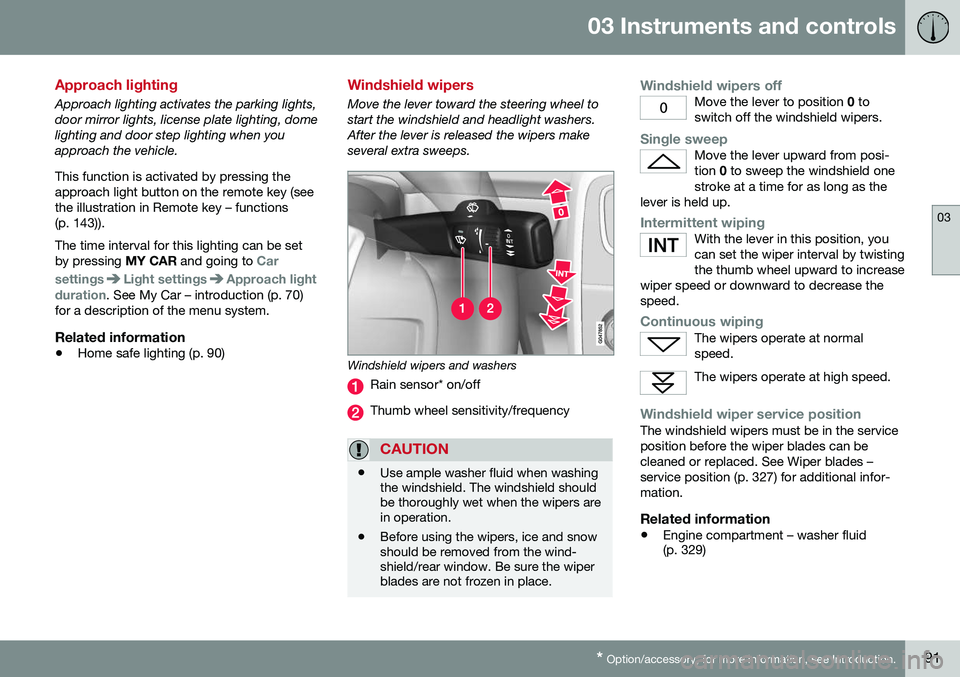
Move the lever toward the steering wheel to start the windshield and headlight washers.After the lever is released the wipers makeseveral extra sweeps.
Windshield wipers and washers
Rain sensor* on/off
Thumb wheel sensitivity/frequency
CAUTION
•Use ample washer fluid when washing the windshield. The windshield shouldbe thoroughly wet when the wipers arein operation.
• Before using the wipers, ice and snowshould be removed from the wind-shield/rear window. Be sure the wiperblades are not frozen in place.
Windshield wipers offMove the lever to position
0 to
switch off the windshield wipers.
Single sweepMove the lever upward from posi- tion 0 to sweep the windshield one
stroke at a time for as long as the
lever is held up.
Intermittent wipingWith the lever in this position, you can set the wiper interval by twistingthe thumb wheel upward to increase
wiper speed or downward to decrease thespeed.
Continuous wipingThe wipers operate at normal speed.
The wipers operate at high speed.
Windshield wiper service positionThe windshield wipers must be in the service position before the wiper blades can becleaned or replaced. See Wiper blades –service position (p. 327) for additional infor-mation.
Related information
• Engine compartment – washer fluid (p. 329)
Page 96 of 380
03 Instruments and controls
03
94
Power windows
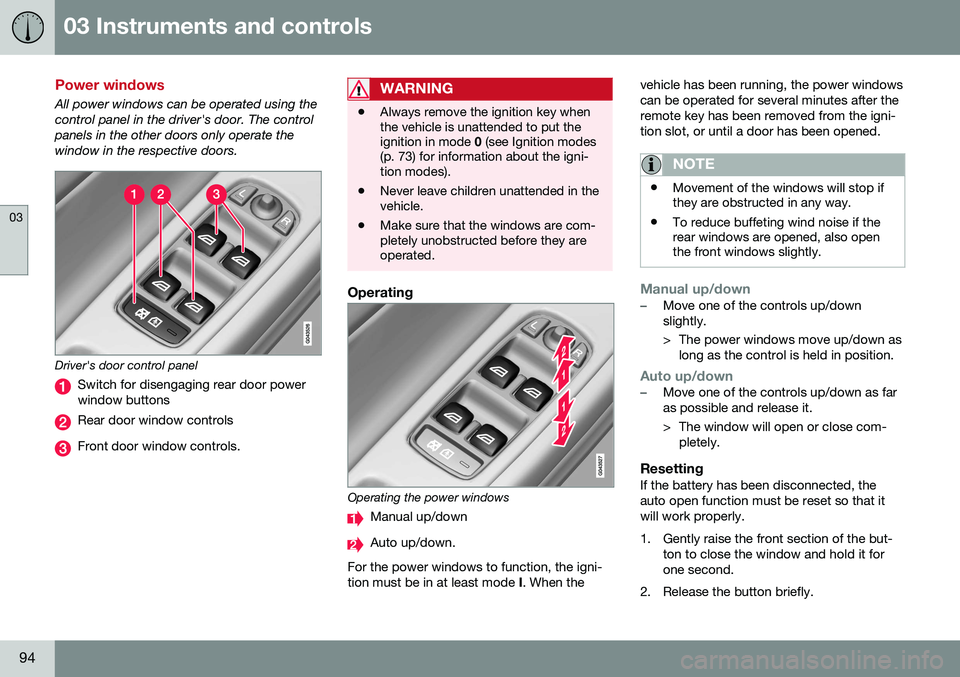
All power windows can be operated using the control panel in the driver's door. The controlpanels in the other doors only operate thewindow in the respective doors.
Driver's door control panel
Switch for disengaging rear door power window buttons
Rear door window controls
Front door window controls.
WARNING
•Always remove the ignition key when the vehicle is unattended to put theignition in mode
0 (see Ignition modes
(p. 73) for information about the igni-tion modes).
• Never leave children unattended in thevehicle.
• Make sure that the windows are com-pletely unobstructed before they areoperated.
Operating
Operating the power windows
Manual up/down
Auto up/down.
For the power windows to function, the igni- tion must be in at least mode I. When the vehicle has been running, the power windowscan be operated for several minutes after theremote key has been removed from the igni-tion slot, or until a door has been opened.
NOTE
•
Movement of the windows will stop if they are obstructed in any way.
• To reduce buffeting wind noise if therear windows are opened, also openthe front windows slightly.
Manual up/down–Move one of the controls up/down slightly.
> The power windows move up/down as
long as the control is held in position.
Auto up/down–Move one of the controls up/down as far as possible and release it.
> The window will open or close com-pletely.
ResettingIf the battery has been disconnected, the auto open function must be reset so that itwill work properly.
1. Gently raise the front section of the but- ton to close the window and hold it for one second.
2. Release the button briefly.
Page 97 of 380
03 Instruments and controls
03
* Option/accessory, for more information, see Introduction.95
3. Raise the front section of the button again
for one second.
Laminated glassThis glass is reinforced to help pro- vide protection against break-insand improved sound insulation inthe passenger compartment.
The windshield, optional moonroof and otherwindows have laminated glass.
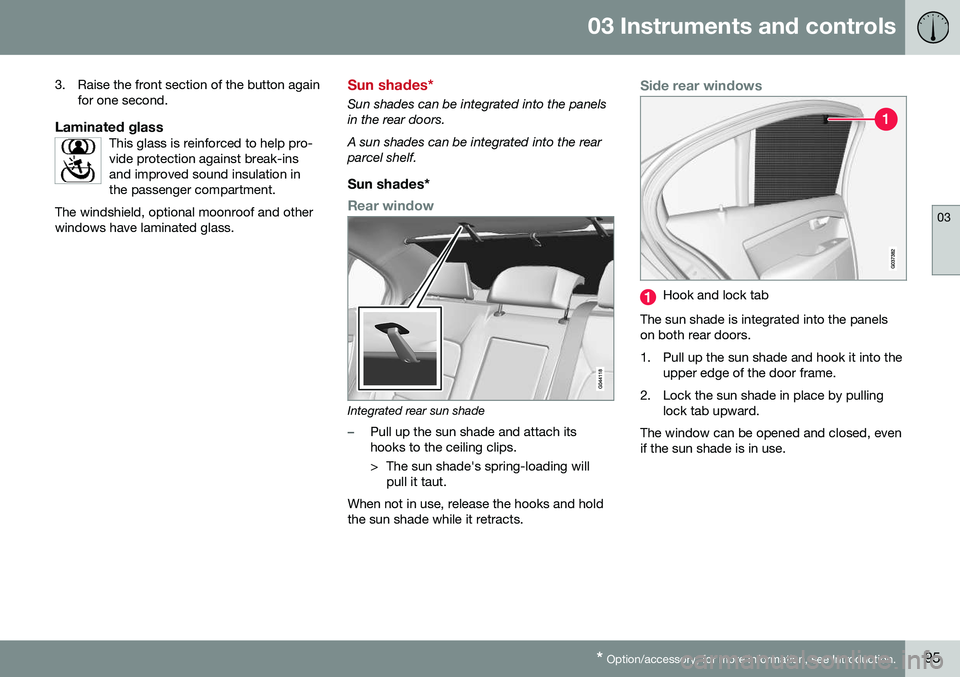
Sun shades*
Sun shades can be integrated into the panels in the rear doors. A sun shades can be integrated into the rear parcel shelf.
Sun shades*
Rear window
Integrated rear sun shade
–Pull up the sun shade and attach its hooks to the ceiling clips.
> The sun shade's spring-loading will pull it taut.
When not in use, release the hooks and hold the sun shade while it retracts.
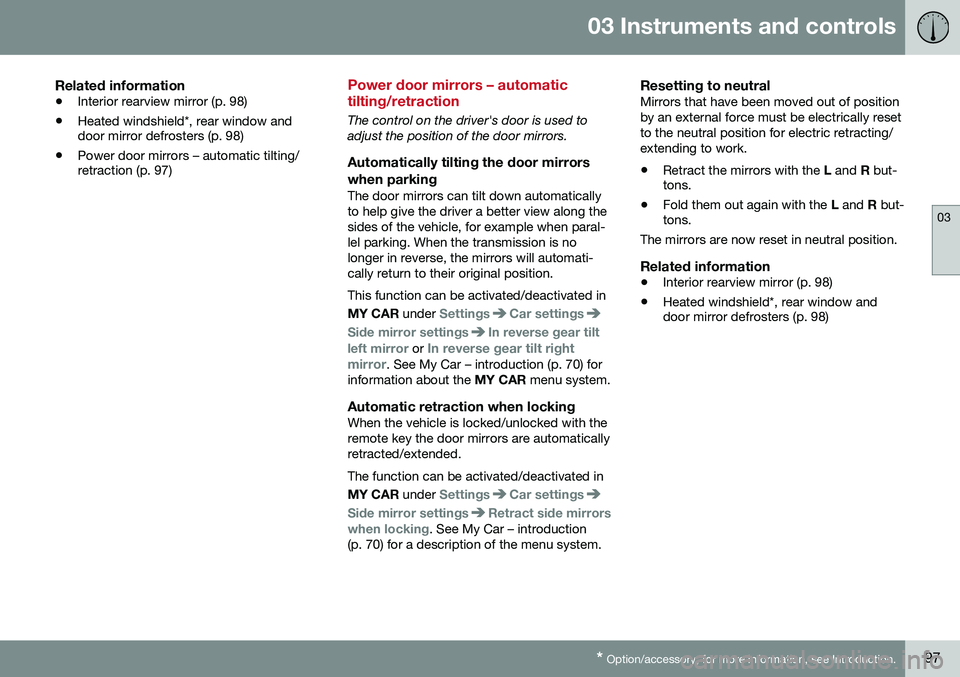
Side rear windows
Hook and lock tab
The sun shade is integrated into the panels on both rear doors.
1. Pull up the sun shade and hook it into the upper edge of the door frame.
2. Lock the sun shade in place by pulling lock tab upward.
The window can be opened and closed, even if the sun shade is in use.
Page 99 of 380
03 Instruments and controls
03
* Option/accessory, for more information, see Introduction.97
Related information
• Interior rearview mirror (p. 98)
• Heated windshield*, rear window and door mirror defrosters (p. 98)
• Power door mirrors – automatic tilting/retraction (p. 97)
Power door mirrors – automatic tilting/retraction
The control on the driver's door is used to adjust the position of the door mirrors.
Automatically tilting the door mirrors
when parking
The door mirrors can tilt down automaticallyto help give the driver a better view along thesides of the vehicle, for example when paral-lel parking. When the transmission is nolonger in reverse, the mirrors will automati-cally return to their original position. This function can be activated/deactivated in MY CAR under
SettingsCar settings
Side mirror settingsIn reverse gear tilt
left mirror
or In reverse gear tilt right
mirror. See My Car – introduction (p. 70) for
information about the MY CAR menu system.
Automatic retraction when lockingWhen the vehicle is locked/unlocked with the remote key the door mirrors are automaticallyretracted/extended. The function can be activated/deactivated in MY CAR under
SettingsCar settings
Side mirror settingsRetract side mirrors
when locking. See My Car – introduction
(p. 70) for a description of the menu system.
Resetting to neutralMirrors that have been moved out of position by an external force must be electrically resetto the neutral position for electric retracting/extending to work. • Retract the mirrors with the
L and R but-
tons.
• Fold them out again with the
L and R but-
tons.
The mirrors are now reset in neutral position.
Related information
• Interior rearview mirror (p. 98)
• Heated windshield*, rear window and door mirror defrosters (p. 98)