light VOLVO S90 2017 Owner´s Manual
[x] Cancel search | Manufacturer: VOLVO, Model Year: 2017, Model line: S90, Model: VOLVO S90 2017Pages: 548, PDF Size: 11.42 MB
Page 376 of 548
||
STARTING AND DRIVING
* Option/accessory.
374
CAUTION
• When starting in cold weather, the auto- matic transmission may shift up at slightlyhigher engine speeds than normal untilthe automatic transmission fluid reachesnormal operating temperature.
• Do not race a cold engine immediatelyafter starting. Oil flow may not reachsome lubrication points fast enough toprevent engine damage.
• The engine should be idling when youmove the gear selector. Never accelerateuntil after you feel the transmissionengage. Accelerating immediately afterselecting a gear will cause harsh engage-ment and premature transmission wear.
• Selecting
P or N when idling at a stand-
still for prolonged periods of time will helpprevent overheating of the automatictransmission fluid.
Related information
• Ignition modes (p. 370)
• Turning the engine off (p. 374)
• Changing the remote key's battery (p. 215)
• Jump starting (p. 364)
Turning the engine off
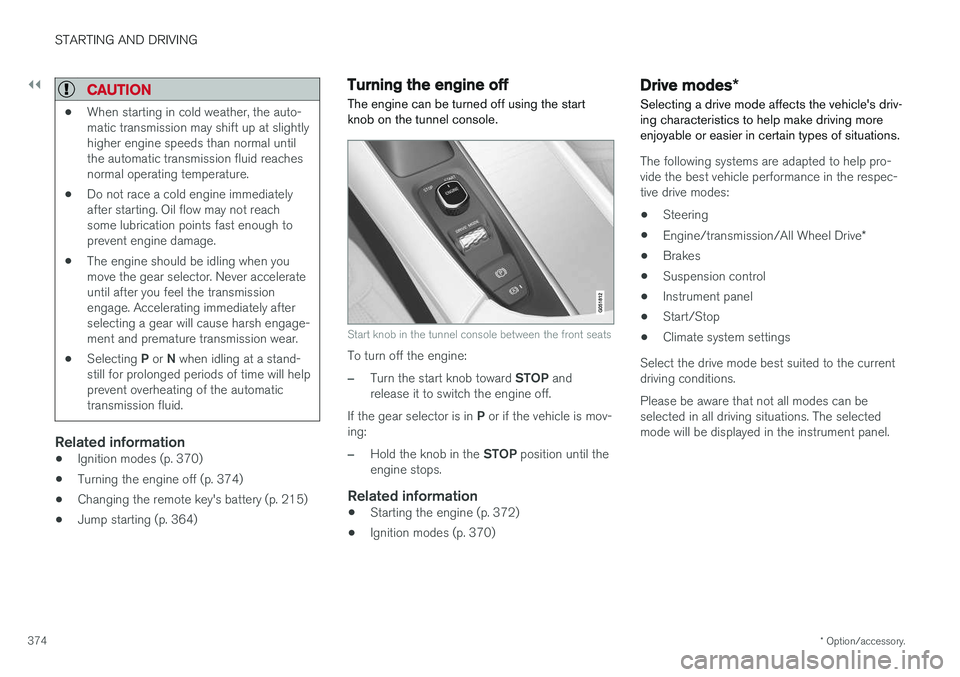
The engine can be turned off using the start knob on the tunnel console.
Start knob in the tunnel console between the front seats
To turn off the engine:
–Turn the start knob toward STOP and
release it to switch the engine off.
If the gear selector is in P or if the vehicle is mov-
ing:
–Hold the knob in the STOP position until the
engine stops.
Related information
• Starting the engine (p. 372)
• Ignition modes (p. 370)
Drive modes
*
Selecting a drive mode affects the vehicle's driv- ing characteristics to help make driving moreenjoyable or easier in certain types of situations.
The following systems are adapted to help pro- vide the best vehicle performance in the respec-tive drive modes: • Steering
• Engine/transmission/All Wheel Drive
*
• Brakes
• Suspension control
• Instrument panel
• Start/Stop
• Climate system settings
Select the drive mode best suited to the current driving conditions. Please be aware that not all modes can be selected in all driving situations. The selectedmode will be displayed in the instrument panel.
Page 377 of 548
STARTING AND DRIVING
}}
375
Selecting a drive mode
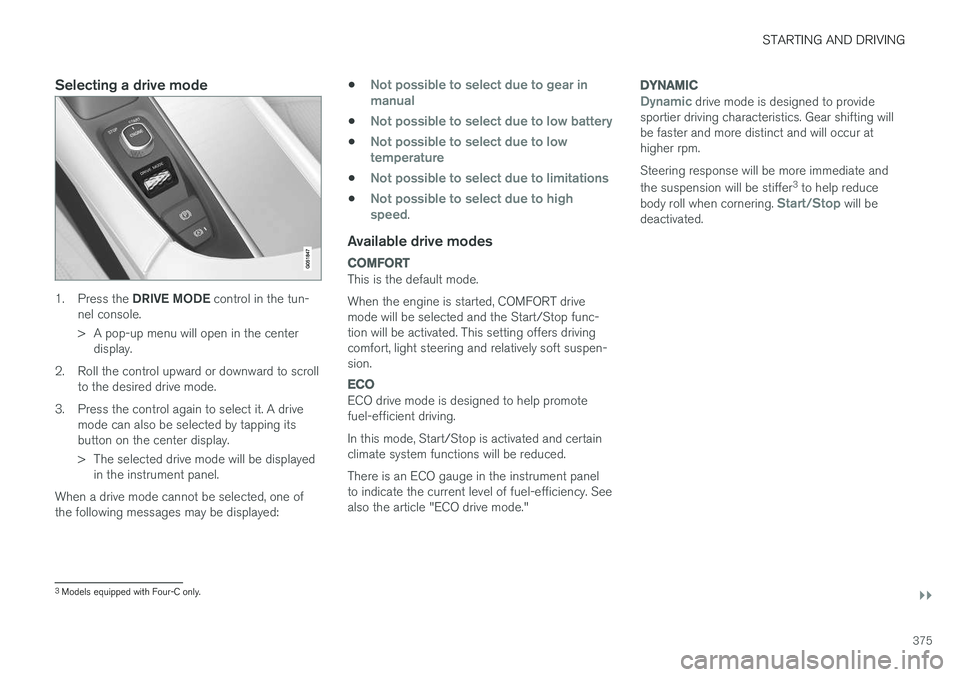
1.Press the DRIVE MODE control in the tun-
nel console.
> A pop-up menu will open in the center display.
2. Roll the control upward or downward to scroll to the desired drive mode.
3. Press the control again to select it. A drive mode can also be selected by tapping its button on the center display.
> The selected drive mode will be displayedin the instrument panel.
When a drive mode cannot be selected, one of the following messages may be displayed: •
Not possible to select due to gear in manual
•Not possible to select due to low battery
•Not possible to select due to low temperature
•Not possible to select due to limitations
•Not possible to select due to high speed.
Available drive modes
COMFORT
This is the default mode. When the engine is started, COMFORT drive mode will be selected and the Start/Stop func-tion will be activated. This setting offers drivingcomfort, light steering and relatively soft suspen-sion.
ECO
ECO drive mode is designed to help promote fuel-efficient driving. In this mode, Start/Stop is activated and certain climate system functions will be reduced. There is an ECO gauge in the instrument panel to indicate the current level of fuel-efficiency. Seealso the article "ECO drive mode."
DYNAMIC
Dynamic drive mode is designed to provide
sportier driving characteristics. Gear shifting will be faster and more distinct and will occur athigher rpm. Steering response will be more immediate and the suspension will be stiffer 3
to help reduce
body roll when cornering.
Start/Stop will be
deactivated.
3 Models equipped with Four-C only.
Page 379 of 548
STARTING AND DRIVING
}}
* Option/accessory.377
ECO drive mode
The Eco drive mode is a function designed to give the driver the opportunity to drive more eco-nomically and to help reduce fuel consumption.
When this mode is activated, the following cha- racteristics are modified:
• The automatic transmission's shifting points
• The engine management system and accel-erator pedal response
• Eco Coast functionality is activated: enginebraking is disabled at speeds betweenapprox. 40 and 87 mph(65 and 140 km/h)
• Climate system settings: certain functionswill be temporarily reduced or deactivated
• Information is shown in an ECO gauge in theinstrument panel to help promote more eco-nomical driving
NOTE
When Eco is activated, several climate system parameters are changed and the function ofcertain current-consuming systems will bereduced. Some of these functions can be restarted manually but full functionality will not berestored until Eco is deactivated.
Selecting ECO modeWhen the engine is switched off, ECO mode is deactivated and must be reactivated each time the engine is started.
ECO will appear in the
instrument panel when the function is activated.
Via Function view
Tap the button in the center display's Function view. An indi-cator light in the button showsthat the function is activated.
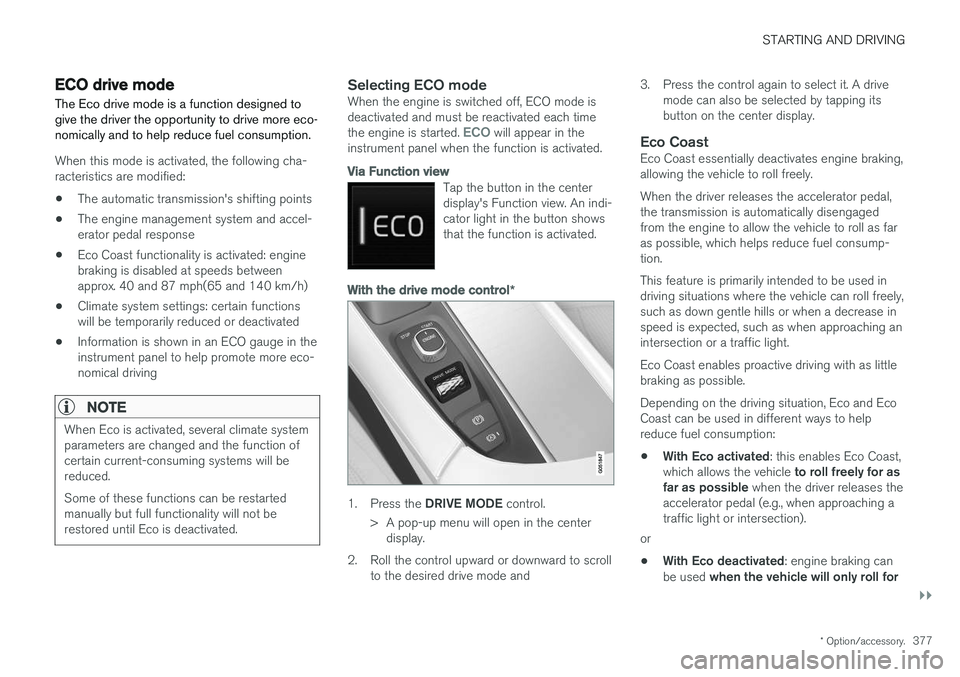
With the drive mode control *
1.
Press the DRIVE MODE control.
> A pop-up menu will open in the center display.
2. Roll the control upward or downward to scroll to the desired drive mode and 3. Press the control again to select it. A drive
mode can also be selected by tapping its button on the center display.
Eco CoastEco Coast essentially deactivates engine braking,allowing the vehicle to roll freely. When the driver releases the accelerator pedal, the transmission is automatically disengagedfrom the engine to allow the vehicle to roll as faras possible, which helps reduce fuel consump-tion. This feature is primarily intended to be used in driving situations where the vehicle can roll freely,such as down gentle hills or when a decrease inspeed is expected, such as when approaching anintersection or a traffic light. Eco Coast enables proactive driving with as little braking as possible. Depending on the driving situation, Eco and Eco Coast can be used in different ways to helpreduce fuel consumption: • With Eco activated
: this enables Eco Coast,
which allows the vehicle to roll freely for as
far as possible when the driver releases the
accelerator pedal (e.g., when approaching a traffic light or intersection).
or
• With Eco deactivated
: engine braking can
be used when the vehicle will only roll for
Page 381 of 548
STARTING AND DRIVING
}}
* Option/accessory.379
•
A low reading in the green area indicates economical driving.
• A higher reading indicates higher fuel con-sumption.
The ECO gauge also has an indicator showinghow a "reference" driver would drive in the samesituation. This is indicated by a diamond in thegauge.
Eco climate
In the Eco drive mode, eco climate is automati-
cally activated in the passenger compartment to help minimize energy consumption. To restart the climate system functions that may have been reduced, press the
AUTO or defroster
buttons. In order to return to full functionality for all of the systems that may have been reduced to helpimprove economical driving, select another drivemode or adapt the climate system functions using the
Individual mode to full functionality.
Related information
• Driving economically (p. 354)
• Drive modes
* (p. 374)
• Start/Stop (p. 379)
Start/Stop
Start/Stop is a function that temporarily switches off the engine when the vehicle is not moving,for instance in heavy traffic or at a traffic light, tohelp reduce fuel consumption. The engine startsagain automatically when the brake pedal isreleased.
Start/Stop is one of several fuel-conserving fea- tures that also help reduce emissions. This feature helps make it possible to drive more economically by allowing the engine to auto-stopin certain situations.
Related information
• Conditions for Start/Stop (p. 381)
• Using the Start/Stop function (p. 379)
• ECO drive mode (p. 377)
Using the Start/Stop function Start/Stop is a function that temporarily switches off the engine when the vehicle is not moving,for instance in heavy traffic or at a traffic light, tohelp reduce fuel consumption. The engine startsagain automatically when the brake pedal isreleased.
Start/Stop is available when the engine has been started. The instrument panel will indicate if thefunction is available/unavailable/active. All of the vehicle's normal systems such as light- ing, infotainment, etc., function normally when theengine has auto-stopped. However, certain func-tions, such as climate system blower speed orvery high infotainment system volume, will betemporarily reduced.
Auto-stopThe following conditions must be met for theengine to auto-stop:
• Stop the vehicle by applying the brakes andkeep the brake pedal depressed. The engine will auto-stop. If the COMFORT 5
or ECO driv-
ing modes are activated, the engine can auto-stop before the vehicle has come to astandstill.
If the
Adaptive cruise or Pilot Assist functions
are activated, the engine will auto-stop after
5 The default driving mode.
Page 382 of 548
||
STARTING AND DRIVING
380approx. 3 seconds. See also the article "Condi- tions for Start/Stop."
Auto-startThe following conditions must be met for theengine to auto-start:
• Release the brake pedal; the engine willautomatically restart. When starting on anuphill incline, the Hill Start Assist (HSA)function will be activated to help prevent thevehicle from rolling backward.
• When the brake system's Auto Hold functionis activated, the engine will not auto-startuntil the accelerator pedal is pressed.
• When
Adaptive cruise or Pilot Assist are
activated, the engine will auto-start when the accelerator pedal is pressed or if the
button is pressed on the left-side steering wheel keypad.
• Keep the brake pedal depressed but pressthe accelerator pedal. The engine will auto-start.
• On a downhill incline, release the brake pedalso that the vehicle begins to roll. The enginewill auto-start after a slight increase in speed.
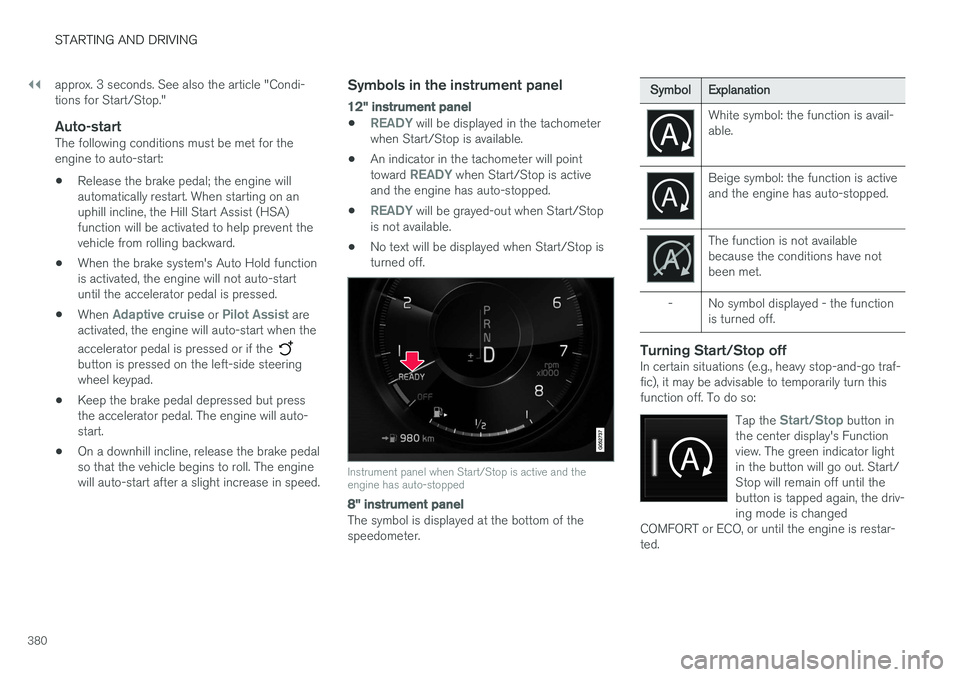
Symbols in the instrument panel
12" instrument panel
•READY will be displayed in the tachometer
when Start/Stop is available.
• An indicator in the tachometer will point toward
READY when Start/Stop is active
and the engine has auto-stopped.
•
READY will be grayed-out when Start/Stop
is not available.
• No text will be displayed when Start/Stop is turned off.
Instrument panel when Start/Stop is active and the engine has auto-stopped
8" instrument panel
The symbol is displayed at the bottom of the speedometer.
Symbol
Explanation
White symbol: the function is avail- able.
Beige symbol: the function is active and the engine has auto-stopped.
The function is not available because the conditions have notbeen met.
- No symbol displayed - the function is turned off.
Turning Start/Stop offIn certain situations (e.g., heavy stop-and-go traf- fic), it may be advisable to temporarily turn thisfunction off. To do so:
Tap the
Start/Stop button in
the center display's Function view. The green indicator lightin the button will go out. Start/Stop will remain off until thebutton is tapped again, the driv-ing mode is changed
COMFORT or ECO, or until the engine is restar-ted.
Page 384 of 548
||
STARTING AND DRIVING
382•
condensation forms on the inside of the win- dows.
• the climate system cannot keep the desiredsettings in the passenger compartment.
• electrical current consumption is temporarilyhigh or the main battery's charge is belowthe minimum level.
• the brake pedal is pumped repeatedly.
• the hood is opened.
• the vehicle begins to move or increasesspeed slightly (if the engine auto-stoppedbefore the vehicle was at a standstill).
• the driver's seat belt is unbuckled while the gear selector is in the
D or N positions.
• the gear selector is moved from
D to R or ±.
• the driver's door is opened with the gearselector in
D: an audible signal and a text
message will inform the driver that the igni- tion is on.
WARNING
Do not open the hood if the engine has auto- stopped. The engine could suddenly auto-start. Before opening the hood:
• Switch off the ignition by turning the start knob in the tunnel console toward
STOP.
• Be aware that if the engine has been run- ning, components in the engine compart-ment will be very hot.
Related information
• Using the Start/Stop function (p. 379)
Automatic transmission
The automatic transmission has 8 forward gears and shifts up or down based on the level ofacceleration, speed and engine speed (meas-ured in revolutions per minute - rpm). Manualshifting is also possible. The gear indicator in theinstrument panel shows the gear currently beingused or gear shift mode.
CAUTION
The transmission
Page 470 of 548
MAINTENANCE AND SERVICING
468
Volvo's service program
Periodic maintenance and service performed at the intervals specified in your Warranty andService Records Information booklet will helpkeep your vehicle running well.
IntroductionThe maintenance services contain several checks that require special instruments and tools andtherefore must be performed by a qualified tech-nician. To keep your Volvo in top condition, spec-ify time-tested and proven Genuine Volvo Partsand Accessories.
The Federal Clean Air Act – U.S.
The Federal Clean Air Act requires vehicle manu- facturers to furnish written instructions to the ulti-mate purchaser to assure the proper servicingand function of the components that controlemissions. These services, which are listed in the"Warranty and Service Records Information"booklet, are not covered by the warranty. You willbe required to pay for labor and material used.
Maintenance
Your Volvo passed several major inspections before it was delivered to you, in accordance withVolvo specifications. The maintenance proce-dures outlined in the Warranty and ServiceRecords Information booklet, many of which willpositively affect your vehicle's emissions, shouldbe performed as indicated. It is recommendedthat receipts for vehicle emission maintenance beretained in case questions arise concerning maintenance. Inspection and maintenance shouldalso be performed anytime a malfunction isobserved or suspected.
Applicable warranties – U.S./Canada
In accordance with applicable U.S. and Canadian regulations, the following list of warranties is pro-vided.
• New Vehicle Limited Warranty
• Parts and Accessories Limited Warranty
• Corrosion Protection Limited Warranty
• Seat Belt and Supplemental Restraint Sys-tems Limited Warranty
• Emission Design and Defect Warranty
• Emission Performance Warranty
These are the federal warranties; other warran-ties are provided as required by state/provinciallaw. Refer to your separate Warranty and ServiceRecords Information booklet for detailed informa-tion concerning each of the warranties.
Periodic maintenance helps minimize emissions
NOTE
• Refer to your Warranty and Service Records Information booklet for a com-prehensive service and maintenanceschedule up to 150,000 miles (240,000km). This program contains inspectionsand services necessary for the properfunction of your vehicle and includescomponents that affect vehicle emis-sions.
• The Warranty and Service Records Infor-mation booklet also contains detailedinformation concerning the warrantiesthat apply to your vehicle.
On-board Diagnostic SystemOBD II is part of your vehicle's computerized engine management system. It stores diagnosticinformation about your vehicle's emission con-trols. It can light the Check Engine light (MIL) if itdetects an emission control "fault." A "fault" is acomponent or system that is not performingwithin an expected range. A fault may be perma-nent or temporary. OBD II will store a messageabout any fault.
Page 471 of 548
MAINTENANCE AND SERVICING
}}
469
Emission inspection readiness
How do states use OBD II for emission
inspections?
Many states connect a computer directly to a vehicle's OBD II system. The inspector can thenread "faults." In some states, this type of inspec-tion has replaced the tailpipe emission test.
How can my vehicle fail OBD II emission
inspection?
Your vehicle can fail OBD II emission inspection for any of the following reasons.
• If your Check Engine (MIL) light is lit, yourvehicle may fail inspection.
• If your vehicle's Check Engine light was lit,but went out without any action on your part,OBD II will still have a recorded fault. Yourvehicle may pass or fail, depending on theinspection practices in your area.
• If you had recent service that required dis-connecting the battery, OBD II diagnosticinformation may be incomplete and "notready" for inspection. A vehicle that is notready may fail inspection.
How can I prepare for my next
OBD II
emission inspection?
• If your Check Engine (MIL) light is lit – or was lit but went out without service, have your vehicle diagnosed and, if necessary, servicedby a qualified Volvo technician.
• If you recently had service for a lit CheckEngine light, or if you had service thatrequired disconnecting the battery, a periodof driving is necessary to bring the OBD IIsystem to "ready" for inspection. Two half-hour trips of mixed stop-and-go/highwaydriving are typically needed to allow OBD II toreach readiness. Your Volvo retailer can pro-vide you with more information on planning atrip.
• Maintain your vehicle in accordance with yourvehicle's maintenance schedule.
Owner maintenancePeriodic maintenance requirements and intervalsare described in your vehicle's Warranty andService Records Information booklet. The following points can be carried out between the normally scheduled maintenance services.
Each time the car is refueled:
•Check the engine oil level.
• Clean the windshield, windshield wipers, headlights, and taillights.
Monthly:
• Check cold tire pressure in all tires. Inspect the tires for wear.
• Check that engine coolant and other fluidlevels are between the indicated "min" and"max" markings.
• Clean interior glass surfaces with a glasscleaner and soft paper towels.
• Wipe driver information displays with a softcloth.
• Visually inspect battery terminals for corro-sion. Corrosion may indicate a loose terminalconnector, or a battery near the end of itsuseful service life. Consult your Volvo retailerfor additional information.
As needed:
Wash the car, including the undercarriage, to reduce wear that can be caused by a buildup ofdirt, and corrosion that can be caused by salt res-idues. Clean leaves and twigs from air intake vents at the base of the windshield, and from other placeswhere they may collect.
NOTE
Complete service information for qualified technicians is available online for purchase orsubscription at www.volvotechinfo.com.
Page 476 of 548
||
MAINTENANCE AND SERVICING
474
Viewing workshop information
1.Open the Car status app in the center dis-
play's App view.
2. Tap
Appointments.
3. Under
Appointments, tap Workshop
information.
> A window with retailer information will appear.
4. If you prefer, call the retailer, or select an address or GPS coordinates to activate the navigation system.
Appointments and vehicle informationWhen you make an appointment or send vehicleinformation from your vehicle, this information will be sent using the Internet connection 2
. Informa-
tion about the vehicle includes:
• service requirements
• time since service was last performed
• function status
• fluid levels •
mileage (odometer reading)
• VIN (Vehicle Identification Number)
• The vehicle's software version
• Diagnostic information
Related information
•Internet connected vehicle (p. 427)
• Volvo ID (p. 27)
Wi-Fi connection to a workshop The time a vehicle is in a workshop for service or repairs can be reduced by transmitting trouble-shooting information as soon as the car reachesthe workshop. This is done most conveniently by selecting
Automatically connect when I arrive in the
center display's Settings menu.
Each time the vehicle slows down to a sufficiently low speed, it begins searching for a Wi-Fi net-work. If an authorized Volvo network (at a retaileror workshop) is found, a message will be dis-played or a pop-up window will open in the cen-ter display (this applies to manual connections,see the section "Manually connecting to a work-shop" below).
2 There will be a slight charge for sending this information via the vehicle's Internet connection, depending on your service plan.
Page 477 of 548
MAINTENANCE AND SERVICING
475
Automatically connecting to a workshop
Without driver confirmation
This is the most convenient way to transmit trou- ble-shooting data. The driver does not need toconfirm that the vehicle will establish a connec-tion. If the vehicle stops at a workshop and the engine is switched off using the start knob, a messagewill appear above the status bar in the center dis-play. The vehicle will be automatically connectedwhen the driver's door is opened if the driver does not tap the
Cancel button in the message.
To help prevent the driver from being disturbed by unwanted requests to connect (e.g., if thevehicle is often parked near a workshop with anauthorized Volvo network), the vehicle will switchto manual connection if the driver cancels a con-nection request twice within 5 days.
With driver confirmation
With this alternative, the driver must confirm a connection. If the vehicle stops at a workshop and the engine is switched off using the start knob, a pop-upwindow will open in the center display. The vehi-cle will be automatically connected when the driv- er's door is opened if the driver taps
Connect in
the pop-up window. If the driver does nothing or taps the pop-up window's
Abort button, no
attempt will be made to establish a connection.
NOTE
To help prevent the driver from being distur- bed by unwanted requests to connect (e.g., ifthe vehicle is often parked near a workshopwith an authorized Volvo network), the vehiclewill switch to manual connection if the drivercancels a connection request twice within5 days.
Manually connecting to a workshopManual connections are handled by the service technician.
Changing the way a connection is madeThe type of connection (manual or automatic)can be changed in the center display's Settingsmenu.
1. Pull down the center display's Top view and
tap
Settings.
2. Tap
CommunicationVolvo Service
Networks.
3. Select
Automatically connect when I
arrive, Ask before connecting or Never
connect and never ask (manual connec-
tions).
Related information
• Internet connected vehicle (p. 427)
• Settings view (p. 109)
Climate system service
Service and repairs on the air conditioning sys- tem should only be done by a trained and quali-fied Volvo service technician.
Troubleshooting and repairsThe air conditioning system contains a floures- cent tracer substance. Ultraviolet light is used tosearch for leaks in the system.
Refrigerant R134a
WARNING
The air conditioning system contains the refrigerant R134a under pressure. Serviceand repairs on the system should only bedone by a trained and qualified Volvo servicetechnician.
Related information
• Climate control system (p. 178)