warning VOLVO S90 2017 Owner´s Manual
[x] Cancel search | Manufacturer: VOLVO, Model Year: 2017, Model line: S90, Model: VOLVO S90 2017Pages: 548, PDF Size: 11.42 MB
Page 352 of 548
STARTING AND DRIVING
350
Emergency brake lightsThe emergency brake lights activate in the event of hard braking/rapid deceleration at most nor-mal driving speeds or if the ABS system is acti-vated. This function causes an additional taillighton each side of the vehicle to illuminate to helpalert vehicles traveling behind.
Once the emergency brake lights have been acti- vated, if the driver releases the brake pedal, thebrake lights will return to their normal function.
Related information
• Brakes (p. 346)
• Hazard warning flashers (p. 146)
• Brake lights (p. 146)
Hill Start Assist
Hill Start Assist (HSA) helps prevent the vehicle from rolling backwards when starting up a hill. Ifyou are backing up a hill, HSA helps prevent thevehicle from rolling forward.
HSA makes it easier to start or back up on a hill by retaining pressure on the brake pedal for sev-eral seconds after the pedal has been released inorder to keep the vehicle at a standstill. The brakes will be released after several seconds or when the driver presses the accelerator pedal. HSA is available even if the Auto-hold braking function is turned off.
Related information
• Brake functions (p. 348)
• Auto-hold brake function (p. 348)
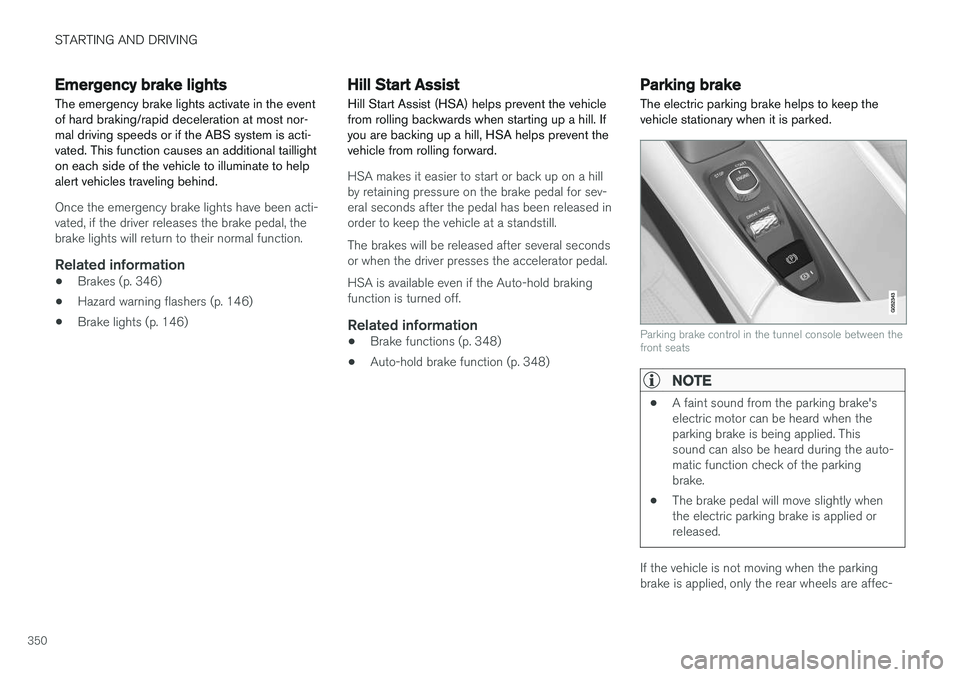
Parking brake The electric parking brake helps to keep the vehicle stationary when it is parked.
Parking brake control in the tunnel console between the front seats
NOTE
•A faint sound from the parking brake's electric motor can be heard when theparking brake is being applied. Thissound can also be heard during the auto-matic function check of the parkingbrake.
• The brake pedal will move slightly whenthe electric parking brake is applied orreleased.
If the vehicle is not moving when the parking brake is applied, only the rear wheels are affec-
Page 354 of 548
||
STARTING AND DRIVING
352
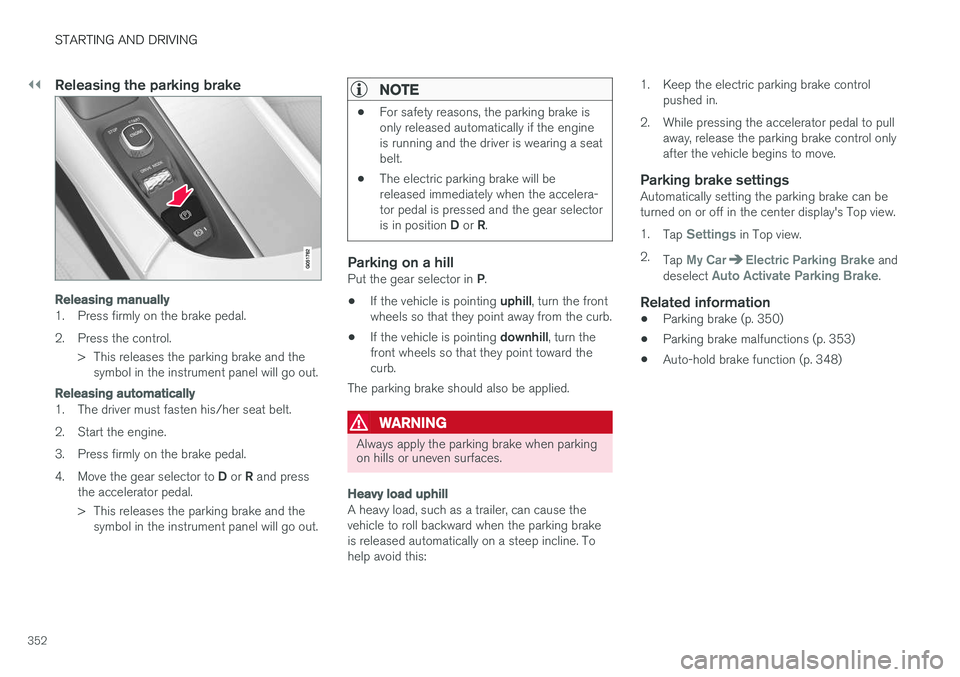
Releasing the parking brake
Releasing manually
1. Press firmly on the brake pedal.
2. Press the control.> This releases the parking brake and thesymbol in the instrument panel will go out.
Releasing automatically
1. The driver must fasten his/her seat belt.
2. Start the engine.
3. Press firmly on the brake pedal.4. Move the gear selector to D or R and press
the accelerator pedal.
> This releases the parking brake and the symbol in the instrument panel will go out.
NOTE
• For safety reasons, the parking brake is only released automatically if the engineis running and the driver is wearing a seatbelt.
• The electric parking brake will bereleased immediately when the accelera-tor pedal is pressed and the gear selector is in position
D or R.
Parking on a hillPut the gear selector in P.
• If the vehicle is pointing
uphill, turn the front
wheels so that they point away from the curb.
• If the vehicle is pointing
downhill, turn the
front wheels so that they point toward the curb.
The parking brake should also be applied.
WARNING
Always apply the parking brake when parking on hills or uneven surfaces.
Heavy load uphill
A heavy load, such as a trailer, can cause the vehicle to roll backward when the parking brakeis released automatically on a steep incline. Tohelp avoid this: 1. Keep the electric parking brake control
pushed in.
2. While pressing the accelerator pedal to pull away, release the parking brake control onlyafter the vehicle begins to move.
Parking brake settingsAutomatically setting the parking brake can beturned on or off in the center display's Top view. 1.Tap
Settings in Top view.
2. Tap
My CarElectric Parking Brake and
deselect Auto Activate Parking Brake.
Related information
• Parking brake (p. 350)
• Parking brake malfunctions (p. 353)
• Auto-hold brake function (p. 348)
Page 355 of 548

STARTING AND DRIVING
}}
353
Parking brake malfunctions
If it has not been possible to apply or release the parking brake after several attempts, consult atrained and authorized Volvo service technicianor retailer.
An audible signal will sound if the parking brake is applied when the vehicle is being driven. If thevehicle must be parked while the parking brake isnot functioning properly: • Put the gear selector in
P.
• If the vehicle is pointing
uphill, turn the front
wheels so that they point away from the curb.
• If the vehicle is pointing
downhill, turn the
front wheels so that they point toward the curb.
• Put the gear selector in
P.
Low battery charge levelIf the battery is discharged, the parking brakecannot be operated. Connect an auxiliary batteryto the vehicle.
Replacing brake padsThe rear brake pads have to be replaced by atrained and authorized Volvo service techniciandue to the design of the electric parking brake.
Symbols in the instrument panel
Symbol Explanation
A
BIf the symbol flashes, a parking brake fault has been detected.See the message in the instru-ment panel.
A
B
Fault in the brake system.
A
US models
B Canadian models
Related information
• Using the parking brake (p. 351)
• Using the parking brake (p. 351)
• Brake functions (p. 348)
• Jump starting (p. 364)
Before a long distance trip
It is always worthwhile to have your vehicle checked by a trained and qualified Volvo servicetechnician before driving long distances. Yourretailer will also be able to supply you with bulbs,fuses, spark plugs and wiper blades for your usein the event that problems occur.
As a minimum, the following items should be checked before any long trip:
• Check that engine runs smoothly and thatfuel consumption and the oil level are normal.
• Check for fuel, oil, and fluid leakage.
• Check condition of drive belts.
• Check state of the battery's charge.
• Examine tires carefully (including the sparetire where applicable), and replace those thatare worn. Also, check tire inflation pressure.
• The brakes, front wheel alignment, and steer-ing gear should be checked by a trained andqualified Volvo service technician only.
• Check all lights, including high beams.
• Reflective warning triangles are legallyrequired in some states/provinces.
• Have a word with a trained and qualifiedVolvo service technician if you intend to drive
Page 357 of 548
STARTING AND DRIVING
}}
355
capacity weight or maximum permissible axle loads are not exceeded.
• At the specified curb weight your vehicle hasa tendency to understeer, which means thatthe steering wheel has to be turned morethan might seem appropriate for the curva-ture of a bend. This ensures good stabilityand reduces the risk of rear wheel skid.Remember that these properties can alterwith the vehicle load. The heavier the load inthe cargo compartment, the less the ten-dency to understeer.
Related information
•ECO drive mode (p. 377)
• Tire inflation pressure table (p. 532)
• Volvo and the environment (p. 15)
Driving through standing water
The vehicle should be driven with extreme cau- tion if it is necessary to drive through standingwater.
The vehicle can be driven through water up to a depth of approximately 9 in. (25 cm) at walkingspeed. Be particularly careful when drivingthrough flowing water. • Take particular care when driving through flowing water.
• After driving through water, apply the brakesand check that they are functioning correctly.
• Clean the electrical connections for trailerwiring after driving in mud or water.
• When driving through water, maintain lowspeed and do not stop in the water.
• Avoid driving through salt water if at all pos-sible to help avoid the risk of corrosion.
CAUTION
• Engine damage will occur if water is drawn into the air cleaner.
• Damage to any components, the engine,transmission, turbo-charger, differential orits internal components caused by flood-ing, vapor lock or insufficient oil is notcovered under warranty.
• Do not allow the vehicle to stand in waterup to the door sills longer than absolutelynecessary. This could result in electricalmalfunctions.
• If the engine has been stopped while thevehicle is in water, do not attempt torestart it. Have the vehicle towed out ofthe water.
WARNING
•
Avoid driving through standing or rushing water. Doing so can be dangerous and itmay also be difficult to determine theactual depth of the water.
• If water cannot be avoided, after drivingthrough the water, press lightly on thebrake pedal to ensure that the brakes arefunctioning normally. Water or mud canmake the brake linings slippery, resultingin delayed braking effect.
Page 358 of 548
||
STARTING AND DRIVING
356
Related information
•Towing recommendations (p. 359)
Overheating the engine and transmission
In demanding driving conditions, such as when transporting heavy loads, driving in mountainousareas or in very hot weather there is a risk ofoverheating the engine or transmission.
• The engine's output may be slightly limited if there is a risk of overheating.
• Remove e.g., auxiliary lights mounted in frontof the grille in hot weather.
• If the temperature of the engine coolantbecomes too high, the warning symbol will illuminate and the message
Engine
temperature/Stop safely will be displayed.
Stop the vehicle as soon as possible in a safe place and let the engine idle for severalminutes.
• If the message
Engine temperature/High
temperature Turn off engine or Engine
coolant/Stop safely is displayed, stop
safely and turn off the engine.
• If the transmission begins to overheat, an alternative gear shifting program will beselected. An integrated protective functionwill also by activated, the warning symbol will illuminate and the message
Transmission
warmHigh temperature Reduce speed
or Transmission warmStop safely, wait
for cooling will be displayed in the instru-
ment panel. •
The air conditioning may be switched off temporarily.
• After a prolonged period of driving, do notturn off the engine immediately after stop-ping.
• The engine cooling fan commonly continuesto run for several minutes after the enginehas been turned off.
WARNING
The cooling fan (located at the front of the engine compartment, behind the radiator) maystart or continue to operate (for up to6 minutes) after the engine has beenswitched off.
Related information
•
Driving with a trailer (p. 366)
• Before a long distance trip (p. 353)
Page 361 of 548
STARTING AND DRIVING
}}
359
Towing recommendations
Always check with state and local authorities before attempting to tow another vehiclebecause this type of towing is subject to regula-tions regarding maximum towing speed, lengthand type of towing device, lighting, etc.
Towing your vehicle behind another vehicle
1. After securely attaching the towing line to both vehicles, put the gear selector in posi- tion N and release the parking brake.
2. Put the ignition in mode II by turning the
start knob to START (without depressing
the brake pedal) and hold it in this position
for approx. 4 seconds. Release the knob.
3. Put the gear selector in position N and
release the parking brake.
4. The towing vehicle can now begin driving.
5. Keep the tow rope taut when the towing vehicle slows down by applying light pressure on the brake pedal. This will help prevent jar-ring movements of the vehicle being towed.
6. Be prepared to apply the brakes to stop the vehicle being towed.
CAUTION
General towing precautions:
• If the vehicle's battery is dead, an auxiliary battery will be necessary to provide cur-rent for releasing the electric parkingbrake and to move the gear selector from the
P position to N. If this is not possible,
use the shiftlock override procedure tomanually release the gear selector from P
and move it to N.
• Maximum speed: 50 mph (80 km/h). Do not exceed the maximum allowable tow-ing speed.
• Maximum distance with front wheels onground: 50 miles (80 km).
• The vehicle should only be towed in theforward direction.
WARNING
• When the vehicle is being towed, the igni- tion should be in mode
II (in mode I, all of
the vehicle's airbags are deactivated).
• The remote key must remain inside the vehicle.
• The power brakes and power steering willnot function when the engine is not run-ning. Approximately 5 times more pres-sure will be required on the brake pedaland the steering wheel will be considera-bly harder to turn.
• The towing eyelets must not be used forpulling the vehicle out of a ditch or forany similar purpose involving severestrain.
Page 367 of 548
STARTING AND DRIVING
365
2.
If the 12-volt auxiliary battery to be used is
in another vehicle, switch off that vehicle's ignition while the jumper cables are beingattached. Be sure to follow jump startinginstructions provided for the other vehicle.
CAUTION
Connect the jumper cables carefully to avoid short circuits with other components in theengine compartment.
3. Connect one of the red jumper cable's clamps to the auxiliary battery's positive (+) terminal (1)
4. Fold back the cover over the positive (+) jump start terminal on your vehicle's battery(2).
5. Connect the red jumper cable's other clamp to your vehicle's positive (+) jump start termi-nal (2).
6. Connect one of the black jumper cable's clamps to the auxiliary battery's negative (–)terminal (3).
7. Connect the black jumper cable's other clamp to your vehicle's negative ground point(4).
8. Check that the jumper cables are securely attached. 9. Start the engine in the assisting vehicle and
run it at approx. 1,500 rpm.
10. Start the engine in the vehicle with dead bat- tery.
11. After the engine has started, carefully remove the negative (–) terminal jumpercable (black). Then remove the positive (+)terminal jumper cable (red).
WARNING
PROPOSITION 65 WARNING! Battery posts, terminals, and related accesso- ries contain lead and lead compounds, chemi-cals known to the state of California to causecancer and reproductive harm. Wash handsafter handling.
WARNING
• Do not connect the jumper cable to any part of the fuel system or to any movingparts. Avoid touching hot manifolds.
• Batteries generate hydrogen gas, whichis flammable and explosive.
• Battery fluid contains sulfuric acid. Do notallow battery fluid to contact eyes, skin,fabrics or painted surfaces. If contactoccurs, flush the affected area immedi-ately with water. Obtain medical helpimmediately if eyes are affected.
• Never expose the battery to open flameor electric spark.
• Do not smoke near the battery.
• Failure to follow the instructions for jumpstarting can lead to injury.
Related information
•
Ignition modes (p. 370)
• Starting the engine (p. 372)
• Turning the engine off (p. 374)
• Start battery (p. 476)
• Opening and closing the hood (p. 503)
Page 369 of 548
STARTING AND DRIVING
}}
367
CAUTION
The maximum trailer weights listed are only applicable for altitudes up to 3,280 ft(1000 m) above sea level. With increasingaltitude the engine power and therefore thecar's climbing ability are impaired because ofthe reduced air density, so the maximumtrailer weight has to be reduced accordingly.The weight of the vehicle and trailer must bereduced by 10% for every further 3,280 ft(1,000 m) (or part thereof). When towing5,000 lbs (2,250 kg) hill inclination is restric-ted to 14%.
WARNING
•Bumper-attached trailer hitches must not be used on Volvos, nor should safetychains be attached to the bumper.
• Trailer hitches attaching to the vehiclerear axle must not be used.
• Never connect a trailer's hydraulic brakesystem directly to the vehicle brake sys-tem, nor a trailer's lighting system directlyto the vehicle lighting system. Consultyour nearest authorized Volvo retailer forcorrect installation.
• When towing a trailer, the trailer's safetychains or wire must be correctly fastenedto the attachment points provided in thetrailer hitch on the vehicle. The safetychain or wire must never be fastened toor wound around the towing ball.
Trailer turn signals and brake lightsIf one (or more) of the bulbs on a trailer is defec-tive, a symbol and a message will be displayed inthe instrument panel. The other lights on the trailer must be checked manually by the driver before the vehicle is driven.See the subsection "Manual check" in the follow-ing section "Trailer lamp check".
Symbol
Message
•Trailer turn indicator Right
turn indicator malfunction
•Trailer turn indicator Left
turn indicator malfunction
•Trailer brake light Malfunc-
tion
If one of the trailer's turn signal bulbs is defective, the turn signal symbol in the instrument panel forthe respective sides of the vehicle will also flashfaster than normal.
Page 371 of 548
STARTING AND DRIVING
}}
369
3. Align the hole in the ball holder with the one
in the hitch assembly.
4. Slide the locking bolt through the hitch assembly/ball holder.
5. Insert the cotter pin in the hole at the end of the locking bolt.
WARNING
• Be sure the towbar is securely locked in position before attaching anything to it.
• Always attach the trailer's safety wiresecurely to the towbar's safety wireattachment bracket.
Removing the ball holder1. Remove the cotter pin from the locking bolt
and slide the locking bolt out of the ballholder/hitch assembly.
2. Pull the ball holder out of the hitch assembly.
NOTE
A cover for the hitch assembly is also included in the kit.
Stowing the ball holder
WARNING
When not in use, the detachable trailer hitch should always be properly stowed under thefloor of the trunk.
Related information
• Driving with a trailer (p. 366)
• Trailer Stability Assist (TSA) (p. 369)
Trailer Stability Assist (TSA)
Trailer Stability Assist is a system designed to help stabilize a vehicle that is towing a trailerwhen the vehicle and trailer have begun to swayand is part of the Electronic Stability Control sys-tem.
FunctionA vehicle towing a trailer may begin to sway for various reasons. Normally this only occurs at highspeeds but, for example, if the trailer is overloa-ded or if the load is unevenly distributed in thetrailer, there is risk of swaying. Swaying may be caused by factors such as:
• The vehicle and trailer are hit by a sudden, strong crosswind
• The vehicle and trailer are traveling on anuneven road surface or drive over a bump
• Sudden movements of the steering wheel
Facts about TSA
• The stability system symbol in the instrumentpanel will flash when TSA is working
• If the driver switches off the stability system'sSpin Control function, TSA will also beswitched off (but will be on again the nexttime the engine is started)
• TSA may not intervene when the vehicle andtrailer begin to sway if the driver tries to com-pensate for the swaying motion by movingthe steering wheel rapidly
Page 373 of 548
STARTING AND DRIVING
* Option/accessory.371
ModeFunctions available
0 •The odometer, clock and tem- perature gauge are illuminated
• Power seats
* can be adjusted
• The power windows can be oper-ated
• The 12-volt socket in the cargocompartment can be used
• The center display is activatedand can be used
• The infotainment system can beused for a limited time
In this mode, certain functions canonly be used for a limited time to helpminimize battery drain
I •The moonroof
*, power seats */
windows,12-volt sockets in thepassenger compartment, Blue- tooth, navigation system *, climate
system blower, windshield wipers can be operated
• The infotainment system will start(if it was started when the ignitionwas switched off)Mode
Functions available
II •The headlights illuminate
• Warning/indicator lights illumi- nate for 5 seconds
• A number of other functions willalso be activated. However, the heated seats
* and heated rear
window functions can only be activated when the engine is run-ning.
This mode should only be used forvery short periods to help avoiddraining the battery.
Selecting an ignition mode
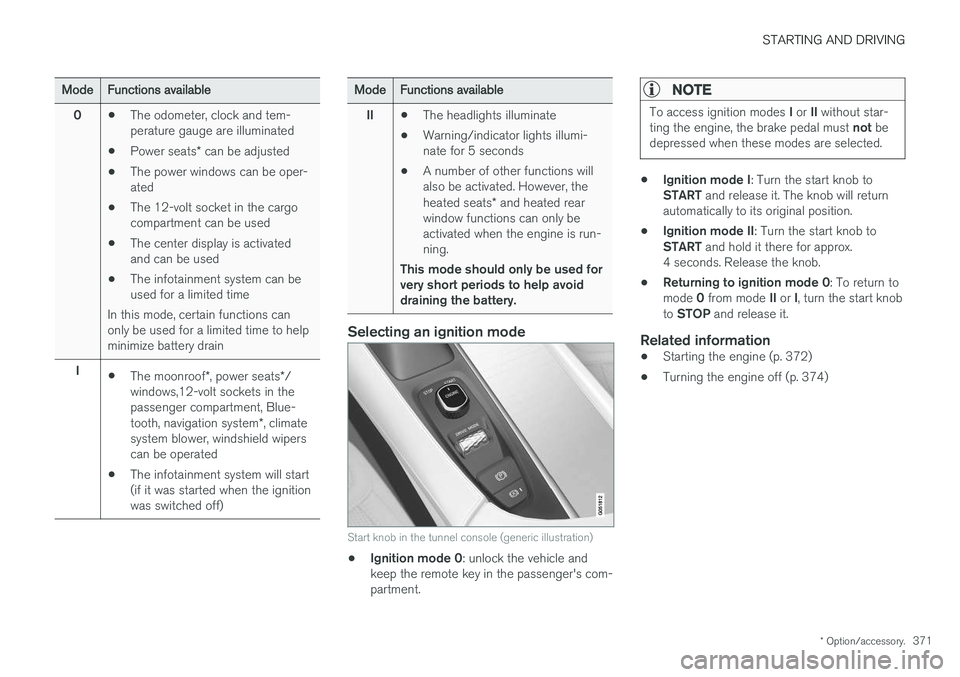
Start knob in the tunnel console (generic illustration)
• Ignition mode 0
: unlock the vehicle and
keep the remote key in the passenger's com- partment.
NOTE
To access ignition modes I or II without star-
ting the engine, the brake pedal must not be
depressed when these modes are selected.
• Ignition mode I
: Turn the start knob to
START and release it. The knob will return
automatically to its original position.
• Ignition mode II
: Turn the start knob to
START and hold it there for approx.
4 seconds. Release the knob.
• Returning to ignition mode 0
: To return to
mode 0 from mode II or I, turn the start knob
to STOP and release it.
Related information
•Starting the engine (p. 372)
• Turning the engine off (p. 374)