park assist VOLVO S90 2017 Owner´s Manual
[x] Cancel search | Manufacturer: VOLVO, Model Year: 2017, Model line: S90, Model: VOLVO S90 2017Pages: 548, PDF Size: 11.42 MB
Page 287 of 548
DRIVER SUPPORT
}}
* Option/accessory.285
–The driver will then have to reactivate Pilot Assist in one of the following ways:
• Press the
button on the left-side
steering wheel keypad
• Press the accelerator pedal
> Pilot Assist will resume following the vehi- cle ahead (target vehicle) if it begins to move within approx. 6 seconds.
NOTE
Pilot Assist can keep the vehicle at a stand- still for up to 5 minutes, after which the park-ing brake will be set and Pilot Assist will gointo standby mode. The parking brake has to be released before Pilot Assist can be reactivated.
Deactivation of the auto-hold brake function
In certain situations, auto-hold will be deactivated when the vehicle is at a standstill and Pilot Assistwill go into standby mode. This means that the brakes will be released and the vehicle can begin to roll. The driver must actively apply the brakes to keep the vehicle at a standstill. This can occur in the following situations: • the driver presses the brake pedal
• the parking brake is set •
the gear selector is moved to the
P, N or R
positions
• the driver puts Pilot Assist in standby mode
Automatically setting the parking brakeIn certain situations, the parking brake is set automatically to help keep the vehicle at a stand-still. This occurs if Pilot Assist keeps the vehicle at a standstill with the brakes and:
• the driver unbuckles the seat belt or opensthe door
• Pilot Assist has kept the vehicle at a stand-still for more than approx. 5 minutes
• the engine is turned off
• the brakes overheat
Related information
•
Pilot Assist
* (p. 275)
• Starting and activating Pilot Assist (p. 278)
• Changing Pilot Assist speed (p. 280)
• Setting a Pilot Assist time interval (p. 281)
• Deactivating/resuming Pilot Assist (p. 282)
• Passing Assistance with Adaptive CruiseControl or Pilot Assist (p. 268)
• Pilot Assist limitations (p. 285)
• Pilot Assist symbols and messages (p. 287)
Pilot Assist limitations
Pilot Assist functionality may be limited in certain situations.
Pilot Assist is designed to help the driver in a number of situations. However, the driver alwayshas the primary responsibility for maintaining asafe distance to other vehicles and for keepingthe vehicle in its proper traffic lane.
Page 293 of 548
DRIVER SUPPORT
* Option/accessory.291
CAUTION
•Service and maintenance on City Safety may only be carried out by a trained andqualified Volvo service technician.
• If a crack, scratch or stone chip shouldoccur in the section of the windshield infront the camera/radar sensor, contact atrained and qualified Volvo service techni-cian to repair or replace the windshield.Failing to do so may result in reducedCity Safety functionality.
• This can also result in certain functionsbeing reduced or disabled, or they mayrespond incorrectly.
To help avoid the risk of incorrect, reduced ordisabled functionality for driver support sys-tems using the camera or radar sensors:
• Volvo recommends that cracks, scratchesor stone chips on the windshield in front of the camera/radar sensor should
not
be repaired; in such cases, the entire windshield should be replaced.
• Before the windshield is replaced, con-tact a Volvo retailer to ensure that thecorrect windshield is ordered and instal-led. If the wrong type of windshield isused, this may cause City Safety to func-tion improperly or not at all.
• Volvo recommends the use of only Genu-ine Volvo Replacement Windshields.
• When replacing windshield wipers, use the same type or ones approved by Volvo.
After the windshield has been replaced, thecamera/radar sensor will have to be recalibra-ted by a trained and qualified Volvo servicetechnician to help ensure proper function ofall of the vehicle's camera-/radar-based sys-tems.
MaintenanceIn order for camera and radar sensor to function properly, the area of the windshield must be keptfree of dirt, ice, snow, etc. and should be washedregularly with a suitable car washing detergent.
NOTE
Dirt, ice and/or snow covering the camera and radar sensors reduce functionality andmay disable the vehicle's camera-/radar-based systems. This can also result in certain functions being reduced or disabled, or they may respond incorrectly.
Related information
• Driver support system radar sensor (p. 288)
• Camera limitations (p. 293)
• Pilot Assist limitations (p. 285)
• City Safety limitations (p. 304) •
City Safety limitations (p. 304)
• Road Sign Information (RSI)
* limitations
(p. 318)
• Park Assist Pilot (PAP)
* limitations (p. 342)
Page 297 of 548
DRIVER SUPPORT
* Option/accessory.295
MaintenanceIn order for camera and radar sensor to function properly, the area of the windshield must be keptfree of dirt, ice, snow, etc. and should be washedregularly with a suitable car washing detergent.
NOTE
Dirt, ice and/or snow covering the camera and radar sensors reduce functionality andmay disable the vehicle's camera-/radar-based systems. This can also result in certain functions being reduced or disabled, or they may respondincorrectly.
Related information
•Driver support system camera (p. 292)
• Radar sensor limitations (p. 289)
• Driving lane assistance (p. 320)
• Driver Alert Control limitations (p. 320)
• Pilot Assist limitations (p. 285)
• City Safety limitations (p. 304)
• Road Sign Information (RSI)
* limitations
(p. 318)
• Park Assist Pilot (PAP)
* limitations (p. 342)
Page 314 of 548
||
DRIVER SUPPORT
* Option/accessory.
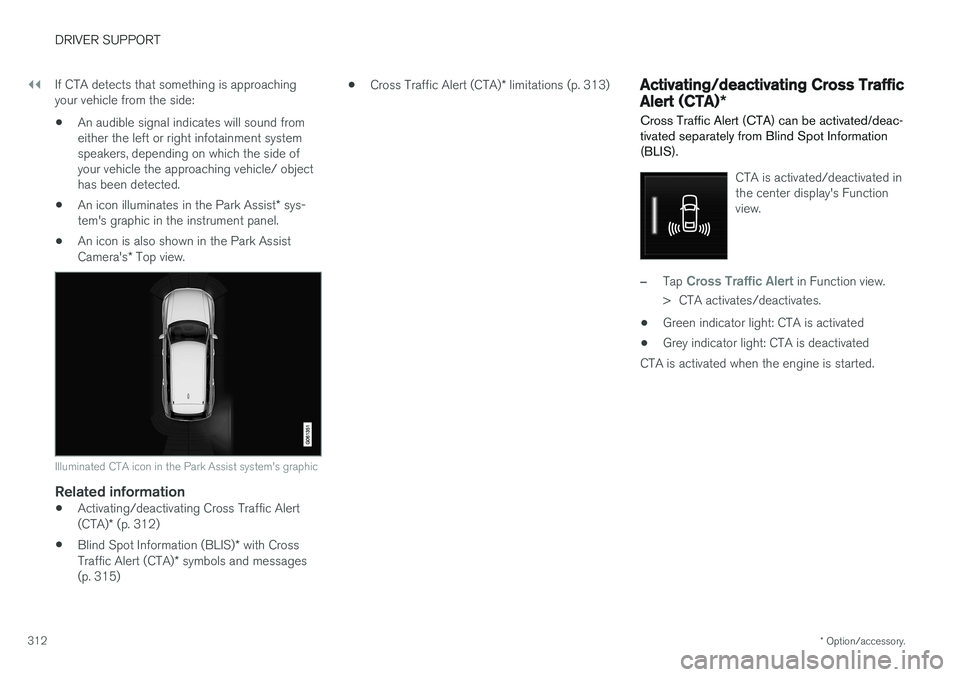
312 If CTA detects that something is approaching your vehicle from the side:
• An audible signal indicates will sound fromeither the left or right infotainment systemspeakers, depending on which the side ofyour vehicle the approaching vehicle/ objecthas been detected.
• An icon illuminates in the Park Assist
* sys-
tem's graphic in the instrument panel.
• An icon is also shown in the Park Assist Camera's
* Top view.
Illuminated CTA icon in the Park Assist system's graphic
Related information
• Activating/deactivating Cross Traffic Alert (CTA)
* (p. 312)
• Blind Spot Information (BLIS)
* with Cross
Traffic Alert (CTA) * symbols and messages
(p. 315) •
Cross Traffic Alert (CTA)
* limitations (p. 313)
Activating/deactivating Cross Traffic Alert (CTA) *
Cross Traffic Alert (CTA) can be activated/deac- tivated separately from Blind Spot Information(BLIS).
CTA is activated/deactivated in the center display's Functionview.
–Tap Cross Traffic Alert in Function view.
> CTA activates/deactivates.
• Green indicator light: CTA is activated
• Grey indicator light: CTA is deactivated
CTA is activated when the engine is started.
Page 330 of 548

DRIVER SUPPORT
* Option/accessory.
328
Park Assist *
The Park Assist system is designed to assist you
when driving into parking spaces, garages, etc. An audible signal and symbols in the instrumentpanel and center display indicate the distance tothe object.
Display view showing object zones and sensor sectors
The center display shows an overview of the vehi- cle in relation to objects that have been detected. The highlighted sector shows which of the sen- sors has detected the object. The closer thehighlighted sector is to the vehicle symbol, thecloser the actual object is to your vehicle. The Park Assist system uses an intermittent tone that pulses faster as you come closer to anobject. Sound from the infotainment system willbe temporarily turned down. The audible signals for objects in front of and tothe sides are active while the vehicle is movingand will stop after the vehicle has been stoppedfor approx. 2 seconds. The audible signals forobjects behind the vehicle are active even whenthe vehicle has stopped moving. The audible signal becomes constant when you are within approximately 1 ft (30 cm) of an objectand the highlighted sensor field is filled in. While an audible signal is being given, its volume level can be raised/lowered using the
>II control
in the center console or can be adjusted in the center displays Top view under
Settings.
NOTE
Audible alerts will only be provided for objects that are directly in the vehicle's path.
WARNING
Park Assist is an information system, NOT a safety system. This system is designed to bea supplementary aid when parking the vehicle.It is not, however, intended to replace the driv-er's attention and judgement.
Rear park assist
The system's rear sensors are activated automat- ically when the engine is started and are active ifthe vehicle rolls rearward with the gear selector in N or if R has been selected.
The distance monitored behind the vehicle is approximately 5 ft (1.5 m). The audible signalcomes from the rear speakers. The rear sensors will be deactivated automatically when towing a trailer if Volvo genuine trailer wir-ing is used. If a non-Volvo trailer hitch is beingused, it may be necessary to switch off the sys-tem manually.
Page 331 of 548

DRIVER SUPPORT
* Option/accessory.329
Side park assist
The system's side sensors are activated automat- ically when the engine is started and are active atspeeds below approximately 6 mph (10 km/h). The distance monitored along the sides of the vehicle is approximately 1 ft (30 cm). The audiblesignal comes from the side speakers.
Front park assist
The system's front sensors are activated auto- matically when the engine is started and areactive at speeds below approximately 6 mph(10 km/h). The distance monitored in front of the vehicle is approximately 2.5 ft (80 cm). The audible signalcomes from the front speakers. Front Park Assist is deactivated if the parking brake is applied or if the gear selector is put in P.
When installing auxiliary headlights, be sure that they do not obstruct the front sensors. Otherwise,these lights could trigger a Park Assist warning.
Related information
• Activating/deactivating Park Assist (p. 329)
• Park Assist limitations (p. 330)
• Park assist symbols and messages (p. 331)
Activating/deactivating Park Assist
The Park Assist system can be turned on or off.
On/OffPark Assist's front and side sensors are activated automatically when the engine is started. Therear sensors activate if the vehicle rolls rearward in N or if R is selected.
This function can be activated/ deactivated in the center dis-play's Function view.
–Tap the Park Assist button.
> Green indicator: the function is active. Gray indicator: the function is deactivated.
Related information
• Park Assist
* (p. 328)
• Park Assist limitations (p. 330)
• Park assist symbols and messages (p. 331)
Page 332 of 548
DRIVER SUPPORT
* Option/accessory.
330
Park Assist limitations
The Park Assist system has certain limitations.
NOTE
A trailer hitch whose wiring is integrated with the vehicle's electrical system will be takeninto account when measuring the availablespace behind the vehicle.
NOTE
• The system will not detect high objects, such as a loading dock, etc.
• Certain materials or fabrics may not bedetected by the sensors. Objects made ofthese materials or people wearing cloth-ing made of these fabrics may not bedetected.
• Children or animals near the vehicle maynot always be detected.
• Objects such as chains, thin shiny polesor low objects may temporarily not bedetected by the system. This may resultin the pulsing tone unexpectedly stoppinginstead of changing to a constant tone asthe vehicle approaches the object. Insuch cases, use caution when backing upor stop the vehicle to help avoid damage.
• In certain circumstances, the park assistsystem may give unexpected warning sig-nals that can be caused by externalsound sources that use the same ultra-sound frequencies as the system. Thismay include such things as the horns ofother vehicles, wet tires on asphalt, pneu-matic brakes, motorcycle exhaust pipes,other vehicles with similar ultrasound sys-tems, etc. This does not indicate a fault inthe system.
Cleaning the sensors
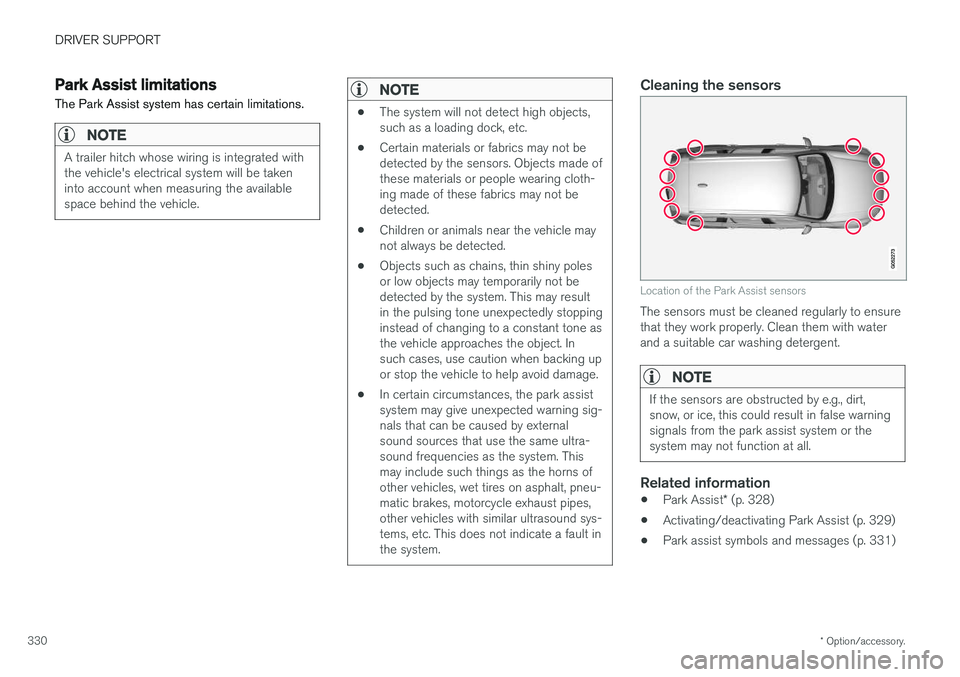
Location of the Park Assist sensors
The sensors must be cleaned regularly to ensure that they work properly. Clean them with waterand a suitable car washing detergent.
NOTE
If the sensors are obstructed by e.g., dirt, snow, or ice, this could result in false warningsignals from the park assist system or thesystem may not function at all.
Related information
•
Park Assist
* (p. 328)
• Activating/deactivating Park Assist (p. 329)
• Park assist symbols and messages (p. 331)
Page 333 of 548
DRIVER SUPPORT
* Option/accessory.331
Park assist symbols and messages
A number of messages relating to Park Assist will appear in the instrument panel.
The following table provides some examples.
Message Explanation
Park Assist System Unavailable Service requiredThe system is not functioning properly. Contact a trained and qualified Volvo service technician.
Park Assist System Sensors blocked, cleaning neededOne or more of the system's sensors are blocked. Check and clean the sensors as soon as possible.
A text message can be erased by briefly pressing the O button on the right-side steering wheel
keypad. If the message recurs, contact a trained and authorized Volvo service technician orretailer.
Related information
• Park Assist limitations (p. 330)
• Park Assist
* (p. 328)
• Activating/deactivating Park Assist (p. 329)
Page 334 of 548
DRIVER SUPPORT
* Option/accessory.
332
Park Assist Camera (PAC) *
The Park Assist Camera system is designed to provide the driver with a view of the area aroundthe vehicle in the form of a camera image andgraphics in the center display.
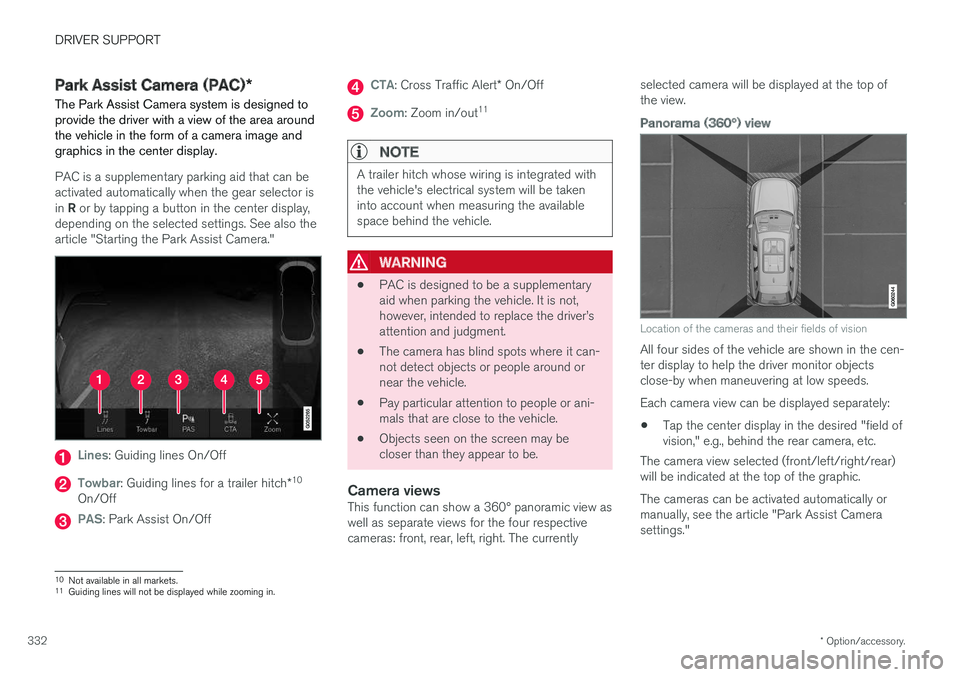
PAC is a supplementary parking aid that can be activated automatically when the gear selector is in R or by tapping a button in the center display,
depending on the selected settings. See also the article "Starting the Park Assist Camera."
Lines: Guiding lines On/Off
Towbar: Guiding lines for a trailer hitch *10
On/Off
PAS: Park Assist On/Off
CTA: Cross Traffic Alert * On/Off
Zoom: Zoom in/out 11
NOTE
A trailer hitch whose wiring is integrated with the vehicle's electrical system will be takeninto account when measuring the availablespace behind the vehicle.
WARNING
•
PAC is designed to be a supplementary aid when parking the vehicle. It is not,however, intended to replace the driver
Page 335 of 548
DRIVER SUPPORT
}}
* Option/accessory.333
Backing up
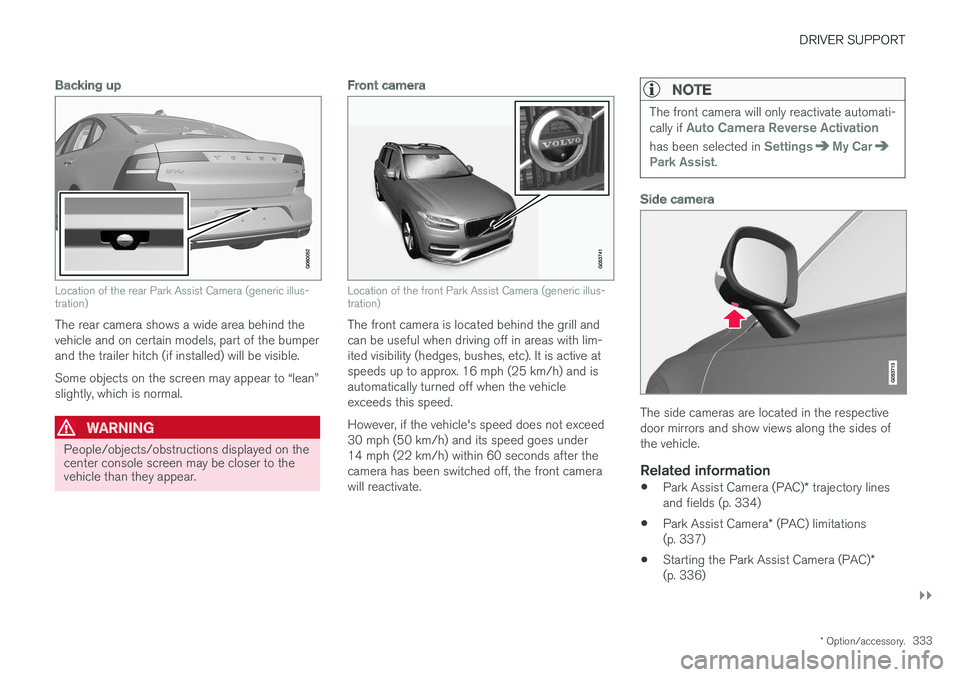
Location of the rear Park Assist Camera (generic illus- tration)
The rear camera shows a wide area behind the vehicle and on certain models, part of the bumperand the trailer hitch (if installed) will be visible. Some objects on the screen may appear to “lean” slightly, which is normal.
WARNING
People/objects/obstructions displayed on the center console screen may be closer to thevehicle than they appear.
Front camera
Location of the front Park Assist Camera (generic illus- tration)
The front camera is located behind the grill and can be useful when driving off in areas with lim-ited visibility (hedges, bushes, etc). It is active atspeeds up to approx. 16 mph (25 km/h) and isautomatically turned off when the vehicleexceeds this speed. However, if the vehicle's speed does not exceed 30 mph (50 km/h) and its speed goes under14 mph (22 km/h) within 60 seconds after thecamera has been switched off, the front camerawill reactivate.
NOTE
The front camera will only reactivate automati- cally if Auto Camera Reverse Activation
has been selected in SettingsMy CarPark Assist.
Side camera
The side cameras are located in the respective door mirrors and show views along the sides ofthe vehicle.
Related information
•Park Assist Camera (PAC)
* trajectory lines
and fields (p. 334)
• Park Assist Camera
* (PAC) limitations
(p. 337)
• Starting the Park Assist Camera (PAC)
*
(p. 336)