transmission VOLVO S90 2017 Owner´s Manual
[x] Cancel search | Manufacturer: VOLVO, Model Year: 2017, Model line: S90, Model: VOLVO S90 2017Pages: 548, PDF Size: 11.42 MB
Page 389 of 548
STARTING AND DRIVING
* Option/accessory.387
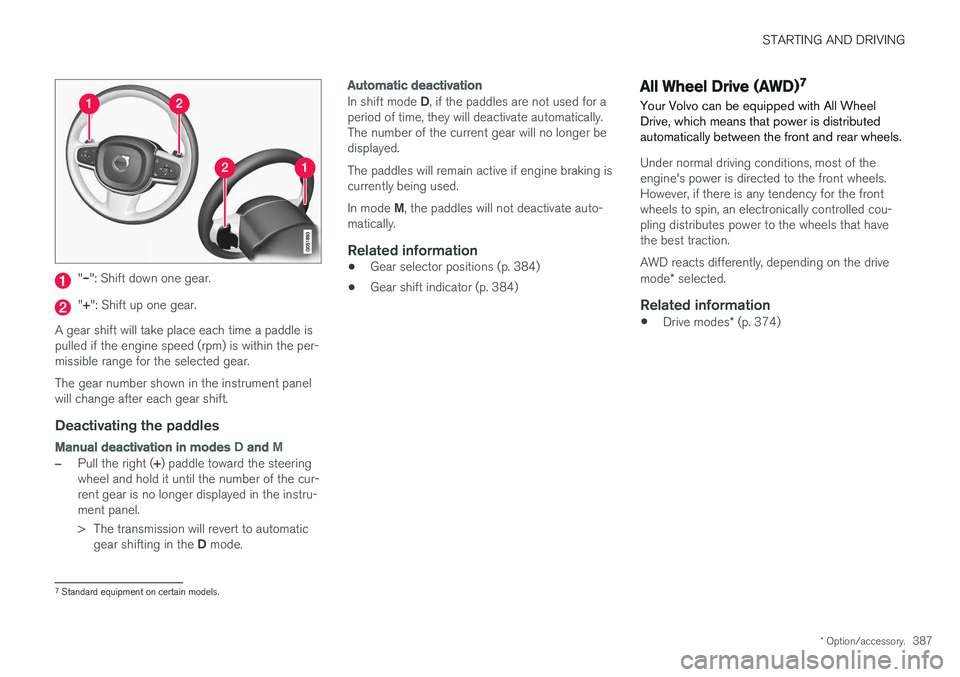
"– ": Shift down one gear.
"+ ": Shift up one gear.
A gear shift will take place each time a paddle is pulled if the engine speed (rpm) is within the per-missible range for the selected gear. The gear number shown in the instrument panel will change after each gear shift.
Deactivating the paddles
Manual deactivation in modes D and M
–Pull the right ( +) paddle toward the steering
wheel and hold it until the number of the cur- rent gear is no longer displayed in the instru-ment panel.
> The transmission will revert to automatic
gear shifting in the D mode.
Automatic deactivation
In shift mode D, if the paddles are not used for a
period of time, they will deactivate automatically. The number of the current gear will no longer bedisplayed. The paddles will remain active if engine braking is currently being used. In mode M, the paddles will not deactivate auto-
matically.
Related information
• Gear selector positions (p. 384)
• Gear shift indicator (p. 384)
All Wheel Drive (AWD) 7
Your Volvo can be equipped with All Wheel Drive, which means that power is distributedautomatically between the front and rear wheels.
Under normal driving conditions, most of the engine's power is directed to the front wheels.However, if there is any tendency for the frontwheels to spin, an electronically controlled cou-pling distributes power to the wheels that havethe best traction. AWD reacts differently, depending on the drive mode * selected.
Related information
• Drive modes
* (p. 374)
7
Standard equipment on certain models.
Page 432 of 548
||
INFOTAINMENT
4303.
Select
Install to start downloading the app. It
will remain in the list and a new download can be initiated if necessary.
> Download status will be indicated while it is in progress. A message will be displayed if a download cannot be started immediately. The appwill remain in the list and a new downloadcan be initiated if necessary.
Cancelling (aborting) a download
–Tap Abort to cancel a download that is cur-
rently underway.
Only a download can be cancelled. If the installa-
tion phase has begun, it cannot be interrupted.
Updating appsIf an app is being used while an update is in pro- gress, it will be restarted to complete the update.
Update (install) all
1. Open the Download Center app.
2. Select
Install all.
> The update will begin.
Updating certain apps
1. Open the Download Center app.
2. Select
Application updates to open a list
of available updates.
3. Find the desired app and select
Install.
> The update will begin.
Uninstalling an appAn app being used must be closed before it can be uninstalled. 1. Open the
Download Center app.
2. Select
Application updates to open a list
of apps that have been installed.
3. Find the desired app and select
Uninstall to
begin uninstalling the app.
> When the app has been uninstalled, it will be removed from the list.
Related information
• Internet connected vehicle (p. 427)
• Media player (p. 415)
• System updates (p. 470)
Internet connection troubleshooting The following are factors that may affect the vehicle's Internet connection.
The amount of data being transmitted depends on the services or apps that are currently in use.For example, streaming audio requires a greatdeal of data to be transmitted, which requires agood connection and a strong signal.
Cell phone to the vehicleConnection speed may vary depending on thelocation of the cell phone in the vehicle. Move thephone closer to the center display to increasesignal strength. Be sure that there are noobstructing/screening objects between thephone and the screen.
Cell phone to the network operatorThe speed of the mobile network may varydepending on coverage/reception in the vehicle'slocation. Reception is generally poorer in tunnels,in mountainous areas, in deep valleys or indoors.Connection speed may also depend on the typeof subscription that you have with the serviceprovider. Contact your service provider in the event of data transmission problems.
Restarting the phone
If you experience problems making a connection, it may to help to restart the phone.
Page 475 of 548
MAINTENANCE AND SERVICING
}}
473
Sending an appointment request
1.Open the Car status app in the center dis-
play's App view.
2. Tap
Appointments.
3. Under
Appointments, tap Request
appoint..
4. Check that your
Volvo ID is correct.
5. Check that the correct preferred retailer is listed. If you prefer, simply tap the button to initiate a call to the retailer.
6. Tap
Send appointment request. Your
request and vehicle data will be sent to your retailer through the vehicle's Internet con-nection.
> Volvo will send a booking invitation to your email address with a link to your preferred workshop's On-Line Service Scheduler.
7. Open the email and click the link to book your workshop appointment at a convenienttime with your preferred service advisor. Addany additional preferences and free text toyour booking. 8. When you have submitted your workshop
booking, your appointment will be confirmedonline directly by email. The booking informa- tion will also appear in the
Car status app in
the center display after a period of time as well as in your My Volvo personal website,where you can make changes to yourappointment at any time.
9. Several days prior to your appointment, you will receive a reminder via email from yourretailer. A notification will also appear on thecenter display one day prior to the appoint-ment. You can set the interval for otherreminders (e.g., two days, three days) at yourMy Volvo personal website.
10. On the day of your appointment, a reminder will appear again on the center display andthe retailer's address can be set in your navi-gation system if you require directions to theworkshop.
Sending vehicle-related information
Information about the vehicle can be sent at any time using its Internet connection. Using this function does not send a workshop
appointment request to your retailer ; only
vehicle data will be transmitted to Volvo. This vehicle data can be accessed by any retailer ifyou call the retailer and provide your VehicleIdentification Number (VIN).
1. Open the Car status app in the center dis-
play's App view.
2. Tap
Appointments.
3. Under
Appointments, tap Send vehicle
data.
> A message confirming that vehicle infor- mation has been sent via the Internet connection will appear on the center dis-play. Transmission of the vehicle informa-tion can be cancelled at any time by tap-ping the X in the activity indicator.
Page 486 of 548
||
MAINTENANCE AND SERVICING
* Option/accessory.
484 •
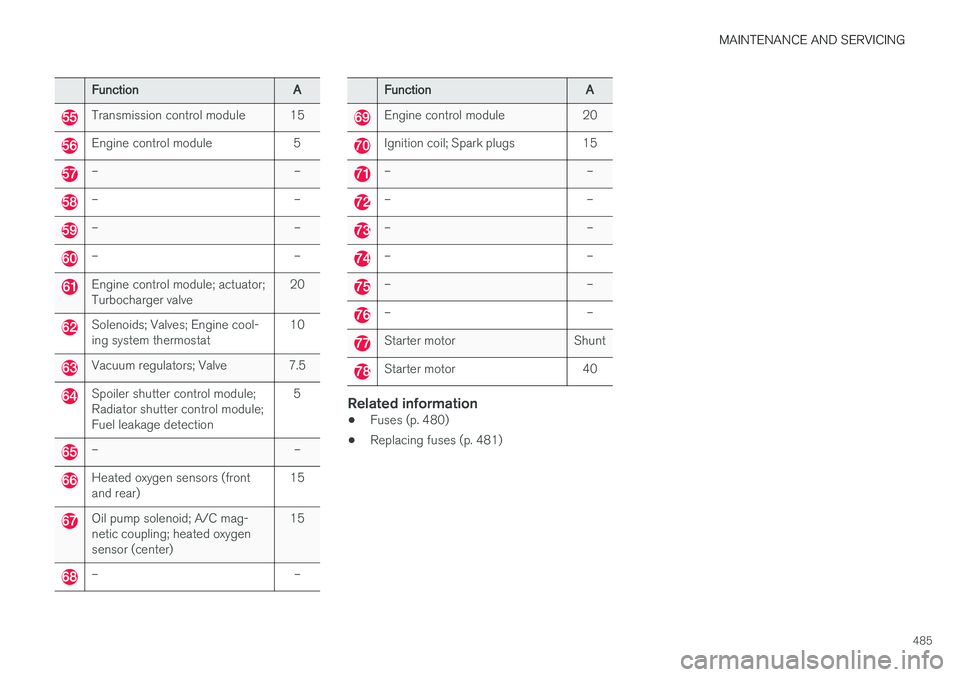
Fuses 18–30, 35–37, 46–54 and 55–70 are called "Micro".
• Fuses 31–34, 38–45 and 71–78 are called"MCase" and should only be replaced by atrained and qualified Volvo service technician.
Function
A
– –
– –
– –
– –
– –
Front USB socket* 5
12-volt socket in the front tun- nel console 15
12-volt socket on the rear side of the tunnel console15
12-volt socket in the trunk 15
– –
Driver's side headlight, certain LED models15
Passenger's side headlight, cer- tain LED models15
Function
A
– –
Heated windshield*, driver side Shunt
Heated windshield
*, driver side 40
Headlight washers
*25
Windshield washer 25
– –
Horn 20
Alarm siren 5
Brake system control module (valves, parking brake) 40
Windshield wipers 30
– –
Heated windshield
*, passenger
side 40
– –
Brake system control module (ABS pump)
40
– –
Function
A
Heated windshield*, passenger
side Shunt
Feed when ignition is switched on to: engine control module,transmission components, elec-trical power steering, centralelectrical module; Brake system control module 5
– –
Passenger side headlight Passenger's side headlight, cer- tain LED models
7.5
15
– –
– –
Battery connection control mod- ule 5
Air bags; Occupant Weight Sen- sor (OWS)5
Driver side headlight Driver's side headlight, certain LED models7.5
15
Accelerator pedal sensor 5
Page 487 of 548
MAINTENANCE AND SERVICING
485
FunctionA
Transmission control module 15
Engine control module 5
– –
– –
– –
– –
Engine control module; actuator; Turbocharger valve20
Solenoids; Valves; Engine cool- ing system thermostat10
Vacuum regulators; Valve 7.5
Spoiler shutter control module; Radiator shutter control module;Fuel leakage detection 5
– –
Heated oxygen sensors (front and rear)
15
Oil pump solenoid; A/C mag- netic coupling; heated oxygensensor (center)15
– –
Function
A
Engine control module 20
Ignition coil; Spark plugs 15
– –
– –
– –
– –
– –
– –
Starter motor Shunt
Starter motor 40
Related information
•Fuses (p. 480)
• Replacing fuses (p. 481)
Page 535 of 548
SPECIFICATIONS
533
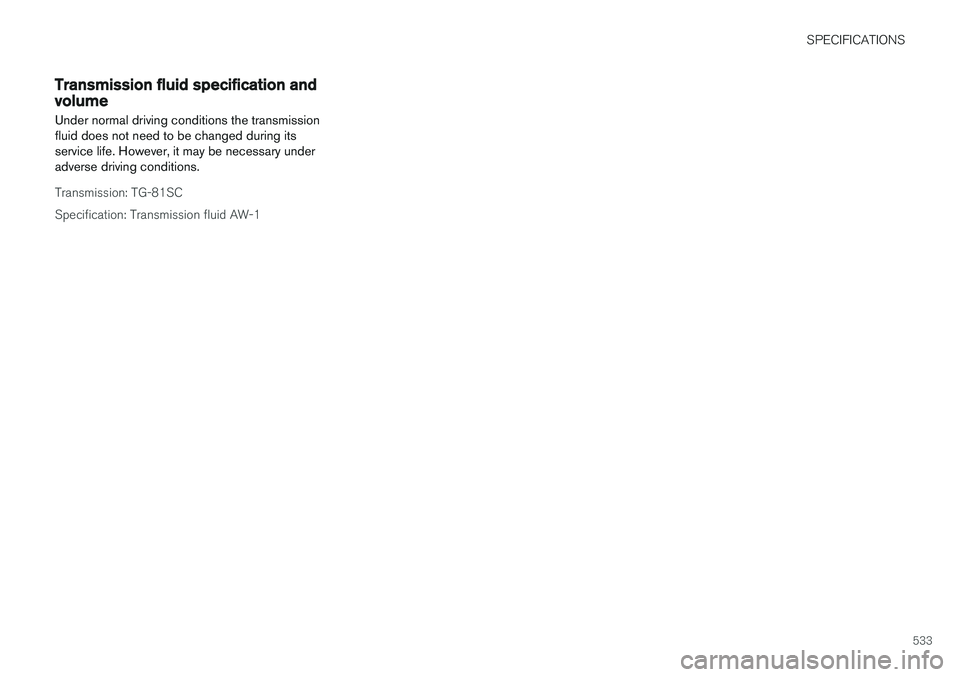
Transmission fluid specification and volume
Under normal driving conditions the transmission fluid does not need to be changed during itsservice life. However, it may be necessary underadverse driving conditions.
Transmission: TG-81SC Specification: Transmission fluid AW-1
Page 545 of 548
INDEX
543
T
Technician certification 53 Temperatureperceived 178
Temperature sensor ambient 114
Temporary spare tire 451Tethering wi-fi sharing 431
Three-way catalytic converter 364
Tire inflation pressure 532
Tire Pressure Monitoring System 455, 457 calibrating 458
Tire Pressure Monitoring System (TPMS) 458
Tires 440, 450 changing 450
changing from summer to winter 445
glossary of terms 444
improving economy 440
inflation pressure 448
inflation pressure table 532installing (mounting) a wheel on the
vehicle 454
rotation 441
snow 447
spare 451
specifications 442
storing 441
studded 447
tire pressure monitoring system 455, 457
tire sealing system 459, 461, 465
tread wear indicator 445
uniform tire quality grading 447
wheel bolts 452
Tire sealing system 459, 461, 465 Top tether anchors (child restraint sys- tems) 86
Touching up paint 516, 517
Towbar 368
Towing a trailer 366, 369 trailer hitch 368
Towing eyelet 357
Towing the vehicle 359
Traction control 243
Trailer hitch 368
Trailer towing 366, 369 trailer hitch 368
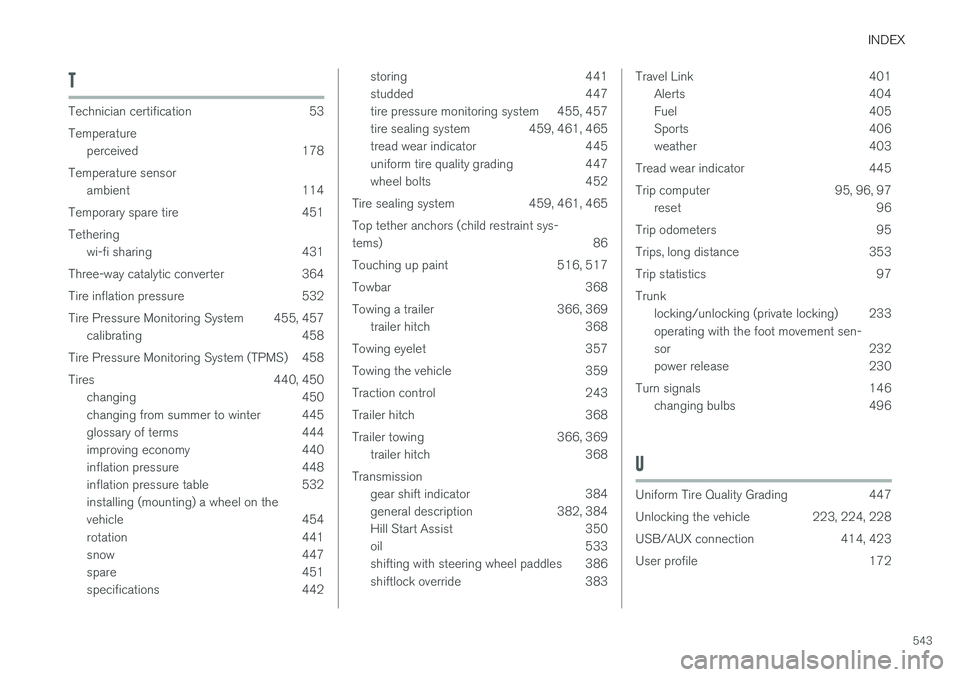
Transmission gear shift indicator 384
general description 382, 384
Hill Start Assist 350
oil 533
shifting with steering wheel paddles 386
shiftlock override 383Travel Link 401Alerts 404
Fuel 405
Sports 406
weather 403
Tread wear indicator 445
Trip computer 95, 96, 97 reset 96
Trip odometers 95
Trips, long distance 353
Trip statistics 97Trunk locking/unlocking (private locking) 233 operating with the foot movement sen-
sor 232
power release 230
Turn signals 146 changing bulbs 496
U
Uniform Tire Quality Grading 447
Unlocking the vehicle 223, 224, 228
USB/AUX connection 414, 423
User profile 172