ignition VOLVO S90 2017 Owner´s Manual
[x] Cancel search | Manufacturer: VOLVO, Model Year: 2017, Model line: S90, Model: VOLVO S90 2017Pages: 548, PDF Size: 11.42 MB
Page 487 of 548
MAINTENANCE AND SERVICING
485
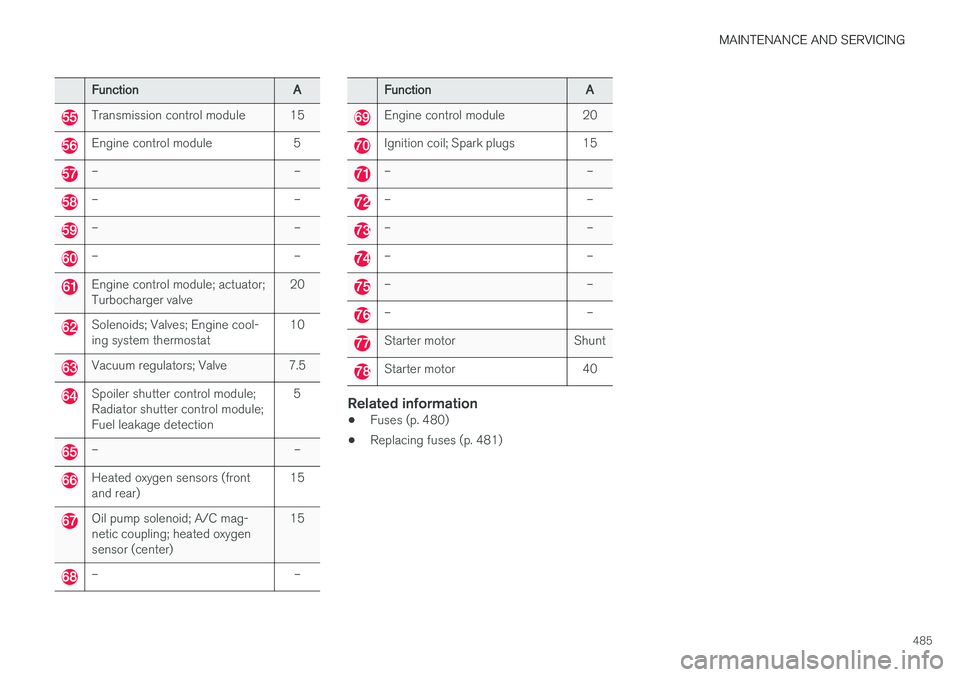
FunctionA
Transmission control module 15
Engine control module 5
– –
– –
– –
– –
Engine control module; actuator; Turbocharger valve20
Solenoids; Valves; Engine cool- ing system thermostat10
Vacuum regulators; Valve 7.5
Spoiler shutter control module; Radiator shutter control module;Fuel leakage detection 5
– –
Heated oxygen sensors (front and rear)
15
Oil pump solenoid; A/C mag- netic coupling; heated oxygensensor (center)15
– –
Function
A
Engine control module 20
Ignition coil; Spark plugs 15
– –
– –
– –
– –
– –
– –
Starter motor Shunt
Starter motor 40
Related information
•Fuses (p. 480)
• Replacing fuses (p. 481)
Page 495 of 548
MAINTENANCE AND SERVICING
}}
493
Replacing bulbs
The halogen headlight and rear fog light bulbs 3
can be replaced by the owner.
Before the halogen headlight bulbs can be replaced, that plastic covering over the headlighthousing has to be removed and the housing hasto be lifted out of the vehicle.
NOTE
Halogen headlights are not available on all models or in all markets. Consult your Volvo retailer if you are uncertain about the type of headlights in your vehicle.
The turn signal, high/low beam, Daytime Running Light and parking light bulbs will be accessiblewhen the plastic covering has been removed.
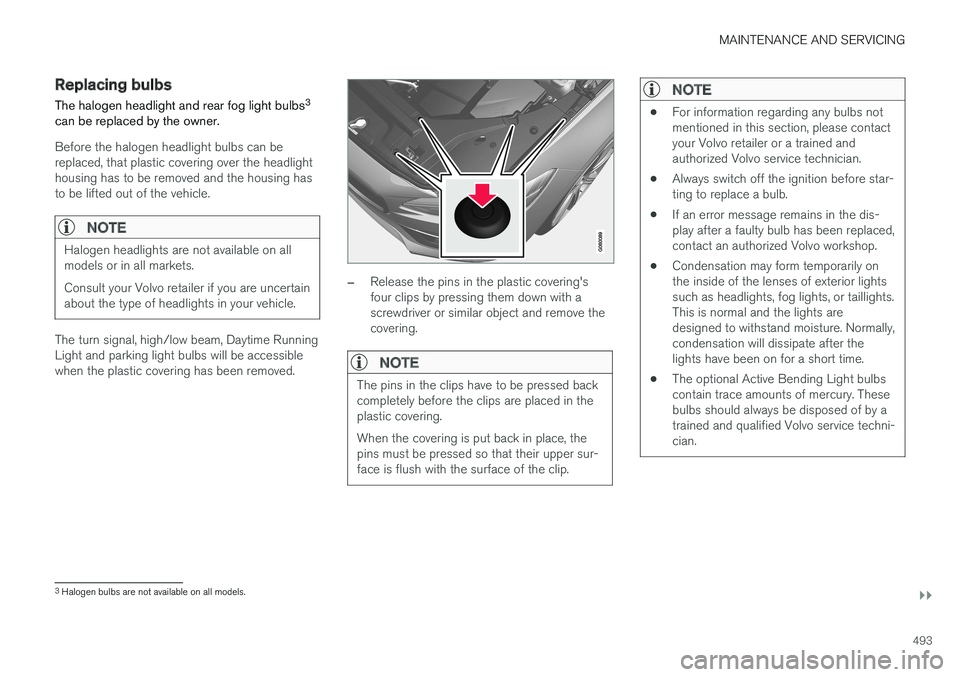
–Release the pins in the plastic covering's four clips by pressing them down with ascrewdriver or similar object and remove thecovering.
NOTE
The pins in the clips have to be pressed back completely before the clips are placed in theplastic covering. When the covering is put back in place, the pins must be pressed so that their upper sur-face is flush with the surface of the clip.
NOTE
• For information regarding any bulbs not mentioned in this section, please contactyour Volvo retailer or a trained andauthorized Volvo service technician.
• Always switch off the ignition before star-ting to replace a bulb.
• If an error message remains in the dis-play after a faulty bulb has been replaced,contact an authorized Volvo workshop.
• Condensation may form temporarily onthe inside of the lenses of exterior lightssuch as headlights, fog lights, or taillights.This is normal and the lights aredesigned to withstand moisture. Normally,condensation will dissipate after thelights have been on for a short time.
• The optional Active Bending Light bulbscontain trace amounts of mercury. Thesebulbs should always be disposed of by atrained and qualified Volvo service techni-cian.
3
Halogen bulbs are not available on all models.
Page 496 of 548
||
MAINTENANCE AND SERVICING
* Option/accessory.
494
CAUTION
Never touch the glass of bulbs with your fin- gers. Grease and oils from your fingers vapor-ize in the heat and will leave a deposit on thereflector, which will damage it.
WARNING
• The ignition should be switched off com- pletely (be in ignition mode
0) when
replacing bulbs.
• If the engine has been running just prior to replacing bulbs in the headlight hous-ing, please keep in mind that componentsin the engine compartment will be hot.
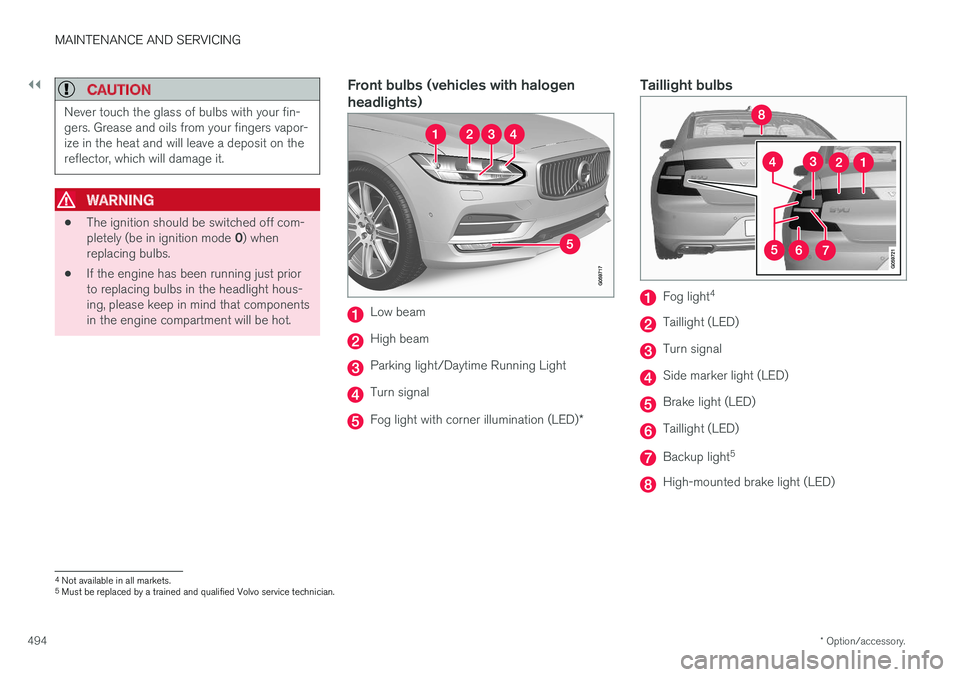
Front bulbs (vehicles with halogen headlights)
Low beam
High beam
Parking light/Daytime Running Light
Turn signal
Fog light with corner illumination (LED)
*
Taillight bulbs
Fog light4
Taillight (LED)
Turn signal
Side marker light (LED)
Brake light (LED)
Taillight (LED)
Backup light
5
High-mounted brake light (LED)
4
Not available in all markets.
5 Must be replaced by a trained and qualified Volvo service technician.
Page 497 of 548
MAINTENANCE AND SERVICING
495
Related information
•Bulb specifications (p. 500)
• Replacing front parking light bulbs (p. 497)
• Replacing front turn signal bulbs (p. 496)
• Replacing High Beam headlight bulbs (p. 496)
• Replacing low beam headlight bulbs (p. 495)
• Ignition modes (p. 370)
Replacing low beam headlight bulbs
On models with halogen headlights, the low beam headlight bulb can be replaced by theowner.
Before the bulb can be replaced, the plastic cov- ering over the headlight housing has to be removed, see the article "Replacing bulbs."
CAUTION
Never touch the glass of bulbs with your fin- gers. Grease and oils from your fingers vapor-ize in the heat and will leave a deposit on thereflector, which will damage it.
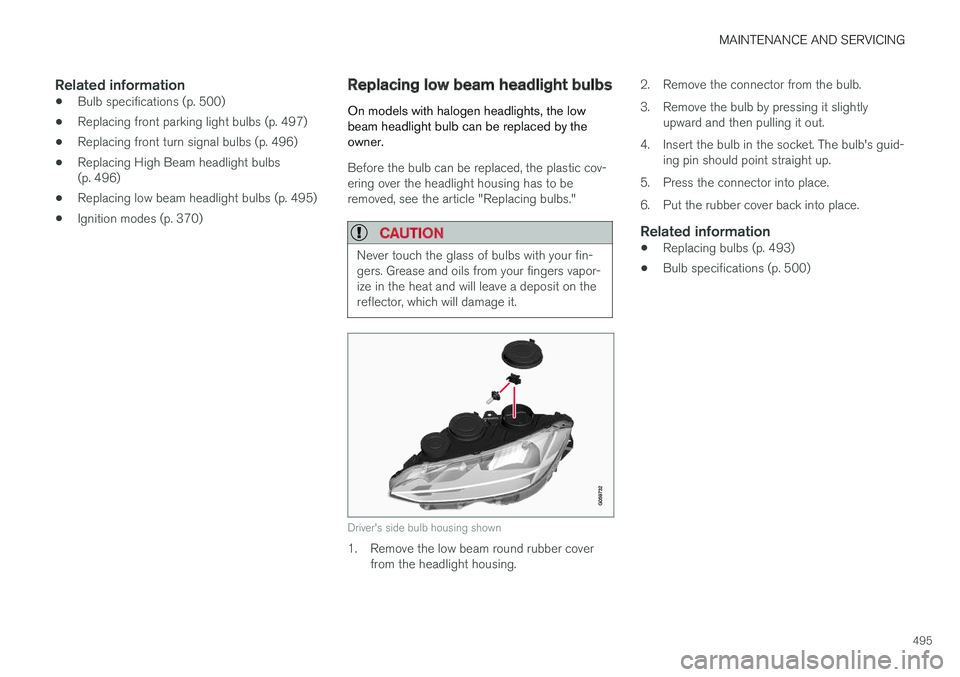
Driver's side bulb housing shown
1. Remove the low beam round rubber cover from the headlight housing. 2. Remove the connector from the bulb.
3. Remove the bulb by pressing it slightly
upward and then pulling it out.
4. Insert the bulb in the socket. The bulb's guid- ing pin should point straight up.
5. Press the connector into place.
6. Put the rubber cover back into place.
Related information
• Replacing bulbs (p. 493)
• Bulb specifications (p. 500)
Page 506 of 548

||
MAINTENANCE AND SERVICING
504
Hood completely closed
Related information
•Engine compartment overview (p. 504)
• Door and seat belt reminders (p. 64)
Engine compartment overview
The engine compartment overview shows some maintenance points.
The layout of the engine compartment may differ slightly from model to model
Coolant expansion tank
Brake fluid reservoir
Washer fluid reservoir
Relay/fuse box
Air cleaner
Engine oil filler cap
WARNING
• The cooling fan (located at the front of the engine compartment, behind the radi-ator) may start or continue to operate (forup to 6 minutes) after the engine hasbeen switched off.
• Engine cleaning should only be done by aworkshop. If engine cleaning agents areused when the engine has been running,there may a fire risk.
• Before performing any operations in theengine compartment, the ignition shouldalways be completely switched off (in mode
0) and there should be no remote
keys in the passenger compartment. Thegear selector should be in the P (park)
position. If the engine has been running, wait until it has cooled before touchingany components in the engine compart-ment.
• The distributor ignition system operatesat very high voltages. Special safety pre-cautions must be followed to preventinjury. Always turn the ignition off whenreplacing distributor ignition componentse.g. plugs, coil, etc.
• Do not touch any part of the distributorignition system while the engine is run-ning. This may result in unintended move-ments and body injury.
Page 507 of 548
MAINTENANCE AND SERVICING
505
Related information
•Ignition modes (p. 370)
• Opening and closing the hood (p. 503)
• Refilling the windshield washer fluid reservoir (p. 510)
Engine oil
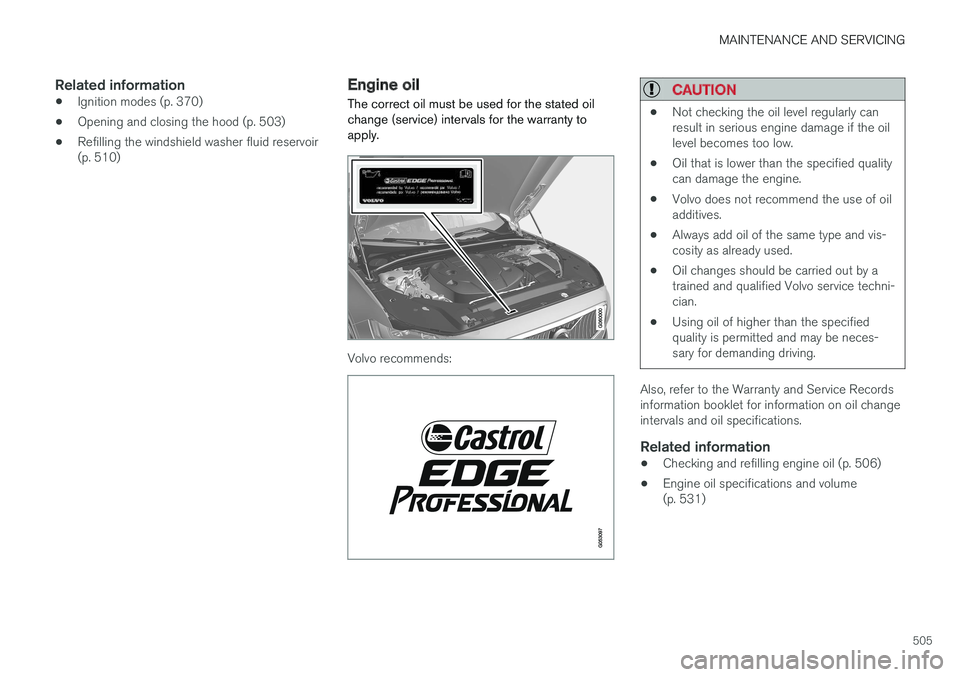
The correct oil must be used for the stated oil change (service) intervals for the warranty toapply.
Volvo recommends:
CAUTION
• Not checking the oil level regularly can result in serious engine damage if the oillevel becomes too low.
• Oil that is lower than the specified qualitycan damage the engine.
• Volvo does not recommend the use of oiladditives.
• Always add oil of the same type and vis-cosity as already used.
• Oil changes should be carried out by atrained and qualified Volvo service techni-cian.
• Using oil of higher than the specifiedquality is permitted and may be neces-sary for demanding driving.
Also, refer to the Warranty and Service Records information booklet for information on oil changeintervals and oil specifications.
Related information
•
Checking and refilling engine oil (p. 506)
• Engine oil specifications and volume(p. 531)
Page 508 of 548
MAINTENANCE AND SERVICING
506
Checking and refilling engine oil The oil level is checked electronically.
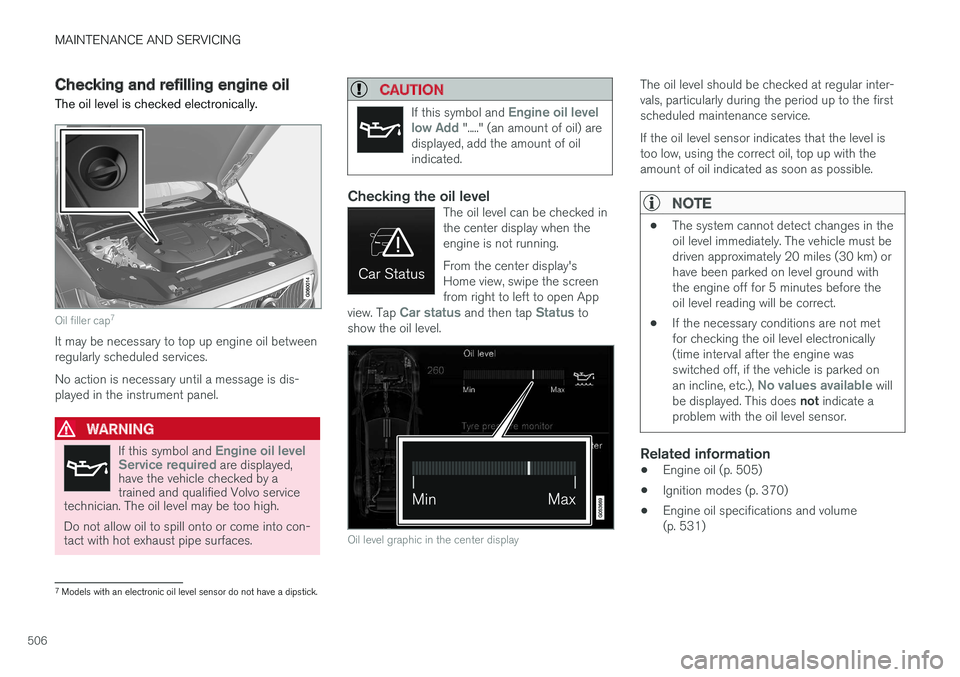
Oil filler cap7
It may be necessary to top up engine oil between regularly scheduled services. No action is necessary until a message is dis- played in the instrument panel.
WARNING
If this symbol and Engine oil level
Service required are displayed,
have the vehicle checked by a trained and qualified Volvo service
technician. The oil level may be too high. Do not allow oil to spill onto or come into con- tact with hot exhaust pipe surfaces.
CAUTION
If this symbol and Engine oil level
low Add "....." (an amount of oil) are
displayed, add the amount of oil indicated.
Checking the oil levelThe oil level can be checked in the center display when theengine is not running. From the center display's Home view, swipe the screenfrom right to left to open App
view. Tap
Car status and then tap Status to
show the oil level.
Oil level graphic in the center display
The oil level should be checked at regular inter- vals, particularly during the period up to the firstscheduled maintenance service. If the oil level sensor indicates that the level is too low, using the correct oil, top up with theamount of oil indicated as soon as possible.
NOTE
• The system cannot detect changes in the oil level immediately. The vehicle must bedriven approximately 20 miles (30 km) orhave been parked on level ground withthe engine off for 5 minutes before theoil level reading will be correct.
• If the necessary conditions are not metfor checking the oil level electronically(time interval after the engine wasswitched off, if the vehicle is parked on an incline, etc.),
No values available will
be displayed. This does not indicate a
problem with the oil level sensor.
Related information
• Engine oil (p. 505)
• Ignition modes (p. 370)
• Engine oil specifications and volume (p. 531)
7
Models with an electronic oil level sensor do not have a dipstick.
Page 514 of 548
||
MAINTENANCE AND SERVICING
512bering that it may not be as thorough as when you yourself go over the vehicle withsponge and water. Keeping the underbodyclean is most important, especially in the win-ter. Some automatic washers do not havefacilities for washing the underbody.
NOTE
Condensation may form temporarily on the inside of the lenses of exterior lights such asheadlights or taillights. This is normal and thelights are designed to withstand moisture.Normally, condensation will dissipate after thelights have been on for a short time.
CAUTION
When using an automatic car wash in which the vehicle has to be able to roll freely, theauto-hold brake function must be deactivated.If this is not done, the brakes will automati-cally be applied when the vehicle is stationary. To deactivate this function:
1. Drive the vehicle into the car wash
2. Turn off the auto-hold function using the
control on the center console
3. Turn off the parking brake's automatic function in the center display's Top view (tap
Settings, tap My CarElectric
Parking Brake and deselect Auto
Activate Parking Brake)
4. Put the gear selector in N
5. Switch off the ignition by turning the start knob to STOP and holding it in this posi-
tion for at least 4 seconds
The vehicle will then be able to roll freely.
CAUTION
• Before driving into an automatic car wash, turn off the optional rain sensor toavoid damaging the windshield wipers.
• Make sure that side view mirrors, auxiliarylamps, etc, are secure, and that anyantenna(s) are retracted or removed. Oth-erwise there is risk of the machine dis-lodging them.
• Chromed wheels:
Clean chrome-plated
wheels using the same detergents usedfor the body of the vehicle. Aggressivewheel-cleaning agents can permanentlystain chrome-plated wheels.
WARNING
• When the vehicle is driven immediately after being washed, apply the brakes,including the parking brake, several timesin order to remove any moisture from thebrake linings.
• Engine cleaning agents should not beused when the engine is warm. This con-stitutes a fire risk.
Exterior componentsVolvo recommends the use of special cleaningproducts, available at your Volvo retailer, forcleaning colored plastic, rubber, or ornamental
Page 541 of 548
INDEX
539
Head-up display 116
Heated front seats 194
Heated oxygen sensors 364
Heated steering wheel 192
High beam bulb, replacing 496
High beams 142
active 142
Hill Start Assist (HSA) 350
Hoisting the vehicle 501 HomeLink ®
Wireless Control System 98, 99
Home safe lighting 149
Hood, opening/closing 503
Horn, Keypad, Paddles, Signal 159
I
ID, Volvo 27
Ignition modes 370
Immobilizer (start inhibitor) 214
Indicator lights 135
Infant seats 78
Inflatable Curtain 73
Inflation pressure 448
Inflation pressure table 532
Information lights 135
Infotainment 437
Infotainment (Infotainment system) 390
Infotainment system 394, 396, 397 CD player 420
cell phone 407
general sound settings 391
Gracenote 424
introduction 390
media player 414, 420
media player sound settings 424
media search 422
radio 392
searching for radio stations 393
sound settings 391, 424
type approval 433
video 425
voice control 119
Inspection readiness 468
Instrument lighting 139
Instrument overview 94
Instrument panel 124 settings 126
Intellisafe 16
Interior Air Quality System 181
Interior lighting 147Internet connection 427 applications (apps) 390
bluetooth settings 429
booking service 472
establishing a connection 427
troubleshooting 430
ISOFIX/LATCH anchors 84
J
Jack 450 location of 450, 453
Jump starting 360, 364
K
Key remote 174, 217
Key blade 221, 235
Keys 220