data VOLVO S90 2017 Owner´s Manual
[x] Cancel search | Manufacturer: VOLVO, Model Year: 2017, Model line: S90, Model: VOLVO S90 2017Pages: 548, PDF Size: 11.42 MB
Page 4 of 548
2
INTRODUCTION
Contacting Volvo14
Volvo On Call Roadside Assistance 14
Additional information about your vehicle 14
Volvo and the environment 15
Owner's manual and the environment 16
IntelliSafe —driver support
16
Sensus 17
Owner's manual in mobile devices 20
Options, accessories and the On- board Diagnostic (OBDII) socket 21
Finding owner's information 23
Driver distraction 24
Volvo Structural Parts Statement 25
Crash event data 26
Volvo ID 27
Center display overview 28
Changing center display settings 30
Using the center display keyboard 31
Function view buttons 36
Navigating in the center display's views 38
Symbols in the center display status bar 43
Changing settings in different typesof apps 43
Using the center display 44
Using the owner's manual 48
On-board digital owner's manual50
Navigating in the digital owner's manual 51
Glass 53
Technician certification 53
SAFETY
General safety information56
Occupant safety 56
Reporting safety defects 57
Recall information 58
Safety during pregnancy 58
Whiplash protection system 59
Seat belts 60
Seat belt pretensioners 61
Buckling and unbuckling seat belts 62
Door and seat belt reminders 64
Airbag system 65
Driver/passenger side airbags 65
Occupant weight sensor 68
Side impact airbags 72
Inflatable curtains 73
Safety mode 73
Starting or moving a vehicle in safety mode 74
Child safety 75
Child restraints 77
Infant seats 78
Convertible seats 80
Booster cushions 83
ISOFIX/LATCH lower anchors 84
Lower child seat attachment points 85
TABLE OF CONTENTS
Page 5 of 548
3
Top tether anchors86
Integrated booster cushion *
87
Raising the integrated booster cushion *
89
Stowing the integrated booster cushion *
91
INSTRUMENTS AND CONTROLS
Instruments and controls
94
Trip computer 95
Displaying trip computer information 96
Displaying trip statistics 97
HomeLink ®
Wireless Control System *98
Programming the HomeLink ®
Wire-
less Control System * 99
Adjusting the power door mirrors 102
Moonroof *
103
Operating the moonroof *
104
Power windows 106
Operating the power windows 106
Rearview mirror 107
Using sun curtains *
108
Settings view 109
Categories in Settings view 110
Changing system settings in Set- tings view 112
Changing settings in apps 113
Resetting the settings view 113
Resetting user data when the vehiclechanges owners 114
Ambient temperature sensor 114
Clock 115
Head-up display (HUD) *
116
Voice control
119
Using voice commands 119
Voice control for cell phones 120
Voice control for radio and media 121
Climate system voice commands 122
Navigation system voice commands 123
Voice control settings 124
Instrument panel 124
Instrument panel settings 126
Indicator symbols in the instrument panel 127
Instrument panel licenses 130
Warning symbols in the instrument panel 135
Compass 136
Calibrating the compass 137
Lighting panel and controls 138
Parking lights 140
Daytime Running Lights (DRL) 140
Low beam headlights 141
High and low beam headlights 142
Active Bending Lights *
143
Front fog lights *
144
Rear fog lights (certain models only) 145
Brake lights 146
Hazard warning flashers 146
Page 11 of 548

9
Managing the phone book411
Handling text messages 412
Phone settings 413
Text message settings 414
Connecting a Bluetooth ®
device 414
Connecting a device via the AUX/USB socket 414
Media player 415
Apple CarPlay 416
Apple CarPlay settings 417
Android auto *
418
Android Auto * settings
419
CD (media) player *
420
Playing media 420
Media searches 422
Playing media through theAUX/USB sockets 423
Streaming media through a Blue-tooth connection 423
Media sound settings 424
Gracenote 424
Video 425
Media player technical data 425
Internet connected vehicle 427
Connecting to the Internet 427
Bluetooth settings429
Downloading, updating and uninstal- ling apps 429
Internet connection troubleshooting 430
Tethering (Wi-Fi sharing) 431
Deleting Wi-Fi networks 432
Wi-Fi technology and security 432
Vehicle modem settings 432
Infotainment system license information 433
Terms, conditions and confidentiality 437
WHEELS AND TIRES
Tires440
Tire sidewall designations 442
Wheel (rim) designations 443
Tire terminology 444
Tire direction of rotation 445
Tread wear indicator 445
Loading specifications 446
Uniform Tire Quality Grading 447
Snow tires and chains 447
Checking tire inflation pressure 448
Changing tires 450
Tools 450
Jack 450
Spare tire 451
Wheel bolts 452
Removing a wheel 453
Installing a wheel 454
Tire Pressure Monitoring System (TPMS) 455
Checking tire inflation pressure 456
Reinflating tires equipped with the Tire Pressure Monitoring System (TPMS) 457
Calibrating the Tire PressureMonitoring System (TPMS) 458
Tire sealing system 459
Using the tire sealing system 461
Page 28 of 548
||
INTRODUCTION
26vehicle that has been previously damaged. Although these parts may appear equivalent, it isdifficult to tell if the parts have been previouslyreplaced with non-OE parts or if the part hasbeen damaged as a result of a prior collision. Thequality of these used parts may also have beenaffected due to environmental exposure.
Related information
•
Crash event data (p. 26)
• Contacting Volvo (p. 14)
Crash event data
This vehicle is equipped with an event data recorder (EDR). The main purpose of an EDR isto record, in certain crash or near crash-like sit-uations, such as an air bag deployment or hittinga road obstacle, data that will assist in under-standing how a vehicle's systems performed.The EDR is designed to record data related tovehicle dynamics and safety systems for a shortperiod of time, typically 30 seconds or less. TheEDR in this vehicle is designed to record suchdata as:
• How various systems in your vehicle were operating;
• Whether or not the driver and passengersafety belts were buckled/fastened;
• How far (if at all) the driver was depressingthe accelerator and/or brake pedal; and,
• How fast the vehicle was traveling.
These data can help provide a better understand-ing of the circumstances in which crashes andinjuries occur. EDR data are recorded by your vehicle only if a non-trivial crash situation occurs; no data arerecorded by the EDR under normal driving condi-tions and the EDR never registers who is drivingthe vehicle or the location of a crash or a nearcrash-like situation. However, other parties, suchas law enforcement, could combine the EDR datawith the type of personally identifying data rou- tinely acquired during a crash investigation. Toread data recorded by an EDR, special equipmentis required, and access to the vehicle or the EDRis needed. Furthermore, your vehicle is equipped with a number of computers whose task is to continu-ously control and monitor the vehicle
Page 99 of 548
INSTRUMENTS AND CONTROLS
}}
* Option/accessory.97
Resetting a trip odometer
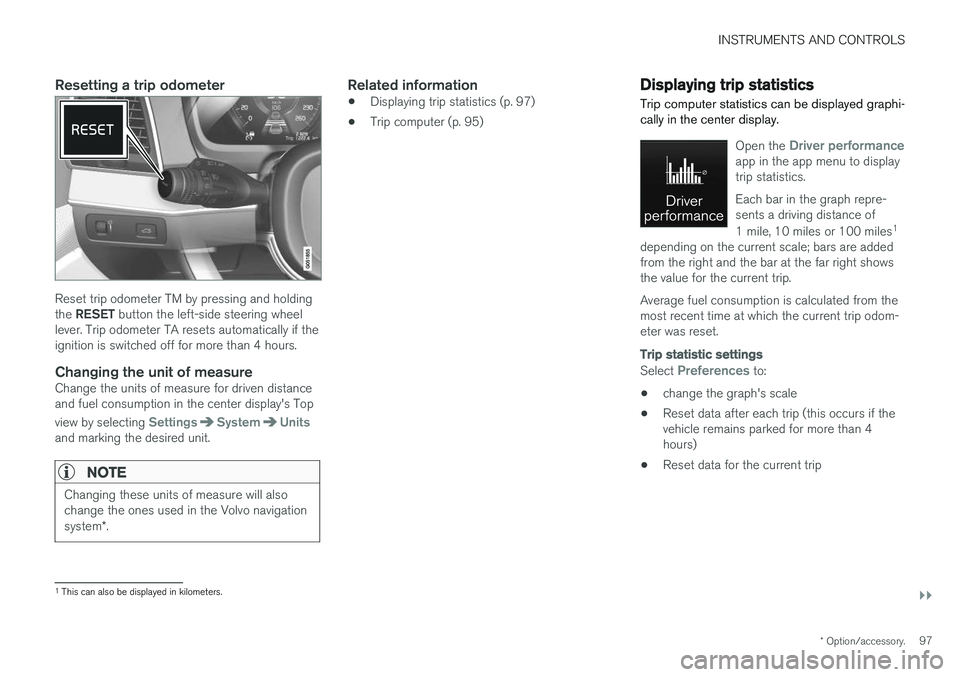
Reset trip odometer TM by pressing and holding the RESET button the left-side steering wheel
lever. Trip odometer TA resets automatically if the ignition is switched off for more than 4 hours.
Changing the unit of measureChange the units of measure for driven distanceand fuel consumption in the center display's Top view by selecting
SettingsSystemUnitsand marking the desired unit.
NOTE
Changing these units of measure will also change the ones used in the Volvo navigation system *.
Related information
• Displaying trip statistics (p. 97)
• Trip computer (p. 95)
Displaying trip statistics Trip computer statistics can be displayed graphi- cally in the center display.
Open the Driver performanceapp in the app menu to display trip statistics. Each bar in the graph repre- sents a driving distance of 1 mile, 10 miles or 100 miles 1
depending on the current scale; bars are added from the right and the bar at the far right showsthe value for the current trip. Average fuel consumption is calculated from the most recent time at which the current trip odom-eter was reset.
Trip statistic settings
Select Preferences to:
• change the graph's scale
• Reset data after each trip (this occurs if the vehicle remains parked for more than 4hours)
• Reset data for the current trip
1
This can also be displayed in kilometers.
Page 115 of 548
INSTRUMENTS AND CONTROLS
}}
113
Changing settings in apps
App view, which is one of the center display's basic views, contains all of the apps installed inthe vehicle. From Home view, navigate to Appview by swiping the screen from right to left.
Apps for integrated (basic) functionsCertain apps in your vehicle are factory-installed, such as FM, USB and CD and are part of Sen-
sus. Settings in these apps can be changed in the center display's Top view.
Changing settings for a basic app
1. Tap one of the basic apps, for example FM
radio.
2. Pull down Top view. 3. Tap
FM Radio Settings.
4. Change the desired settings and confirm.
5. Press the Home button below the center dis- play or tap the screen outside of Top view or pull up Top view to return to your originalview. See also the article "Categories in Set-tings view."
Third party appsThird party apps have to be downloaded e.g.,Volvo ID. Settings for these apps are made in
the apps themselves, not in Top view.
Related information
• Settings view (p. 109)
• Navigating in the center display's views (p. 38)
• Categories in Settings view (p. 110)
Resetting the settings view
All of the changes made under Settings view can be reset to their default values at the sametime.
Types of resetThere are three ways to reset the settings in Set- tings view under Global Reset:
•
Factory Reset: erases all data and media
and resets to the settings used when the vehicle left the factory.
•
Reset Vehicle Settings: resets all global
settings to standard ones.
•
Reset Personal Settings: erases all per-
sonal data and resets to standard settings.
Resetting
NOTE
Global Reset is only possible when the vehi-
cle is stationary.
1. Tap Settings in the center display's Top
view.
2. Tap
SystemGlobal Reset.
> A pop-up menu will appear.
Page 116 of 548
||
INSTRUMENTS AND CONTROLS
1143.
Tap
OK to confirm your choice.
For
Reset Personal Settings, tap Reset
for the active profile or Reset for all
profiles for confirmation.
> The selected settings will be reset.
Related information
• Settings view (p. 109)
• Resetting user data when the vehicle changes owners (p. 114)
• Changing system settings in Settings view(p. 112)
Resetting user data when the vehicle changes owners
When the vehicle changes owners, all user set- tings should be reset to the factory defaults.
When the vehicle changes owners, it is essential to reset all user data and system settings to theirfactory defaults, including Volvo On Call.
Related information
• Resetting the settings view (p. 113)
• Volvo ID (p. 27)
Ambient temperature sensor
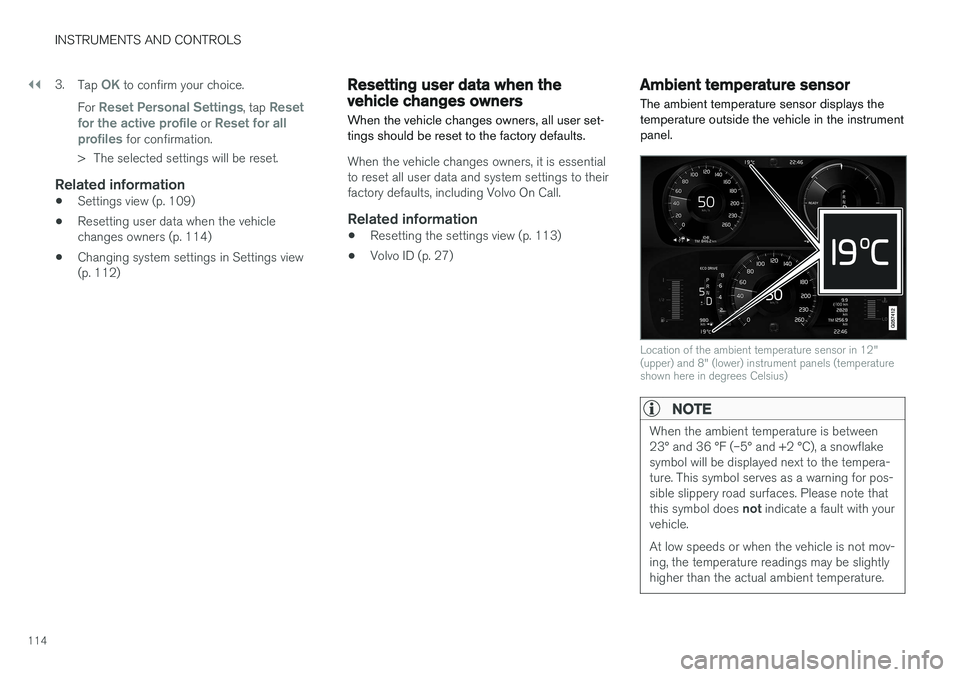
The ambient temperature sensor displays the temperature outside the vehicle in the instrumentpanel.
Location of the ambient temperature sensor in 12" (upper) and 8" (lower) instrument panels (temperatureshown here in degrees Celsius)
NOTE
When the ambient temperature is between 23° and 36 °F (–5° and +2 °C), a snowflakesymbol will be displayed next to the tempera-ture. This symbol serves as a warning for pos-sible slippery road surfaces. Please note that this symbol does not indicate a fault with your
vehicle. At low speeds or when the vehicle is not mov- ing, the temperature readings may be slightlyhigher than the actual ambient temperature.
Page 132 of 548
INSTRUMENTS AND CONTROLS
130
Instrument panel licenses
BSD 4-clause "Original" or "Old"
License
Copyright ©) 1982, 1986, 1990, 1991, 1993
The Regents of the University of California. All rights reserved. Redistribution and use in source and binary forms, with or without modification, are permittedprovided that the following conditions are met:
1. Redistributions of source code must retain the above copyright notice, this list of conditions and the following disclaimer.
2. Redistributions in binary form must reproduce the above copyright notice, this listof conditions and the following disclaimer inthe documentation and/or other materialsprovided with the distribution.
3. All advertising materials mentioning features or use of this software must display thefollowing acknowledgment: This productincludes software developed by theUniversity of California, Berkeley and itscontributors.
4. Neither the name of the University nor the names of its contributors may be used toendorse or promote products derived fromthis software without specific prior writtenpermission.
THIS SOFTWARE IS PROVIDED BY THEREGENTS AND CONTRIBUTORS ``AS IS'' AND ANY EXPRESS OR IMPLIED WARRANTIES,INCLUDING, BUT NOT LIMITED TO, THEIMPLIED WARRANTIES OF MERCHANTABILITYAND FITNESS FOR A PARTICULAR PURPOSEARE DISCLAIMED. IN NO EVENT SHALL THEREGENTS OR CONTRIBUTORS BE LIABLEFOR ANY DIRECT, INDIRECT, INCIDENTAL,SPECIAL, EXEMPLARY, OR CONSEQUENTIALDAMAGES (INCLUDING, BUT NOT LIMITED TO,PROCUREMENT OF SUBSTITUTE GOODS ORSERVICES; LOSS OF USE, DATA, OR PROFITS;OR BUSINESS INTERRUPTION) HOWEVERCAUSED AND ON ANY THEORY OF LIABILITY,WHETHER IN CONTRACT, STRICT LIABILITY,OR TORT (INCLUDING NEGLIGENCE OROTHERWISE) ARISING IN ANY WAY OUT OFTHE USE OF THIS SOFTWARE, EVEN IFADVISED OF THE POSSIBILITY OF SUCHDAMAGE.
BSD 3-clause "New" or "Revised"
License
Copyright (c) 2011-2014, Yann Collet. Redistribution and use in source and binary forms, with or without modification, are permittedprovided that the following conditions are met:
1. Redistributions of source code must retain the above copyright notice, this list of conditions and the following disclaimer.
2. Redistributions in binary form must reproduce the above copyright notice, this listof conditions and the following disclaimer in the documentation and/or other materialsprovided with the distribution.
3. Neither the name of the organisation nor the names of its contributors may be used toendorse or promote products derive from thissoftware without specific prior writtenpermission.
THIS SOFTWARE IS PROVIDED BY THECOPYRIGHT HOLDERS AND CONTRIBUTORS"AS IS" AND ANY EXPRESS OR IMPLIEDWARRANTIES, INCLUDING, BUT NOT LIMITEDTO, THE IMPLIED WARRANTIES OFMERCHANTABILITY AND FITNESS FOR APARTICULAR PURPOSE ARE DISCLAIMED. INNO EVENT SHALL THE COPYRIGHT HOLDEROR CONTRIBUTORS BE LIABLE FOR ANYDIRECT, INDIRECT, INCIDENTAL, SPECIAL,EXEMPLARY, OR CONSEQUENTIAL DAMAGES(INCLUDING, BUT NOT LIMITED TO,PROCUREMENT OF SUBSTITUTE GOODS ORSERVICES; LOSS OF USE, DATA, OR PROFITS;OR BUSINESS INTERRUPTION) HOWEVERCAUSED AND ON ANY THEORY OF LIABILITY,WHETHER IN CONTRACT, STRICT LIABILITY,OR TORT (INCLUDING NEGLIGENCE OROTHERWISE) ARISING IN ANY WAY OUT OFTHE USE OF THIS SOFTWARE, EVEN IFADVISED OF THE POSSIBILITY OF SUCHDAMAGE.
Page 133 of 548
INSTRUMENTS AND CONTROLS
}}
131
BSD 2-clause “Simplified” license
Copyright ©)
reserved. Redistribution and use in source and binary forms, with or without modification, are permittedprovided that the following conditions are met:
1. Redistributions of source code must retain the above copyright notice, this list of conditions and the following disclaimer.
2. Redistributions in binary form must reproduce the above copyright notice, this listof conditions and the following disclaimer inthe documentation and/or other materialsprovided with the distribution.
THIS SOFTWARE IS PROVIDED BY THECOPYRIGHT HOLDERS AND CONTRIBUTORS"AS IS" AND ANY EXPRESS OR IMPLIEDWARRANTIES, INCLUDING, BUT NOT LIMITEDTO, THE IMPLIED WARRANTIES OFMERCHANTABILITY AND FITNESS FOR APARTICULAR PURPOSE ARE DISCLAIMED. INNO EVENT SHALL THE COPYRIGHT OWNEROR CONTRIBUTORS BE LIABLE FOR ANYDIRECT, INDIRECT, INCIDENTAL, SPECIAL,EXEMPLARY, OR CONSEQUENTIAL DAMAGES(INCLUDING, BUT NOT LIMITED TO,PROCUREMENT OF SUBSTITUTE GOODS ORSERVICES; LOSS OF USE, DATA, OR PROFITS;OR BUSINESS INTERRUPTION) HOWEVERCAUSED AND ON ANY THEORY OF LIABILITY,WHETHER IN CONTRACT, STRICT LIABILITY, OR TORT (INCLUDING NEGLIGENCE OROTHERWISE) ARISING IN ANY WAY OUT OFTHE USE OF THIS SOFTWARE, EVEN IFADVISED OF THE POSSIBILITY OF SUCHDAMAGE. The views and conclusions contained in the software and documentation are those of theauthors and should not be interpreted asrepresenting official policies, either expressed orimplied, of the FreeBSD Project.
FreeType Project License1. 1 Copyright 1996-1999 by David Turner,
Robert Wilhelm, and Werner LembergIntroduction The FreeType Project isdistributed in several archive packages; someof them may contain, in addition to theFreeType font engine, various tools andcontributions which rely on, or relate to, theFreeType Project. This license applies to allfiles found in such packages, and which donot fall under their own explicit license. Thelicense affects thus the FreeType fontengine, the test programs, documentationand makefiles, at the very least. This licensewas inspired by the BSD, Artistic, and IJG(Independent JPEG Group) licenses, whichall encourage inclusion and use of freesoftware in commercial and freewareproducts alike. As a consequence, its mainpoints are that: o We don't promise that thissoftware works. However, we are beinterested in any kind of bug reports. (`as is' distribution) o You can use this software forwhatever you want, in parts or full form,without having to pay us. (`royalty-free'usage) o You may not pretend that you wrotethis software. If you use it, or only parts of it,in a program, you must acknowledgesomewhere in your documentation thatyou've used the FreeType code. (`credits')We specifically permit and encourage theinclusion of this software, with or withoutmodifications, in commercial products,provided that all warranty or liability claimsare assumed by the product vendor. LegalTerms 0. Definitions Throughout this license,the terms `package', `FreeType Project', and`FreeType archive' refer to the set of filesoriginally distributed by the authors (DavidTurner, Robert Wilhelm, and WernerLemberg) as the `FreeType project', be theynamed as alpha, beta or final release. `You'refers to the licensee, or person using theproject, where `using' is a generic termincluding compiling the project's source codeas well as linking it to form a `program' or`executable'. This program is referred to as `aprogram using the FreeType engine'. Thislicense applies to all files distributed in theoriginal FreeType archive, including all sourcecode, binaries and documentation, unlessotherwise stated in the file in its original,unmodified form as distributed in the originalarchive. If you are unsure whether or not aparticular file is covered by this license, you
Page 395 of 548
INFOTAINMENT
}}
393
RBDS radio
RBDS radio
RBDS (Radio Data Broadcast System) enables certain functionality 2
, such as:
• Searches for program types or new broad- casts
• Text information about currently broadcastprograms
For example, if news is broadcast, the currentlyplaying sound source will be interrupted so thatthe news can be heard. The infotainment systemwill return to the previous sound source when thenews broadcast has been completed. To cancel the announcement, press the
but-
ton on the right-side steering wheel keypad or tap
Cancel on the center display. This function
can be activated/deactivated in the center dis- play's
Settings menu.
Related information
• Radio (p. 392)
• Radio settings (p. 392)
Changing and searching for radio stations The radio automatically compiles a list of the strongest stations that it is currently receiving.
Turning the radio on1. Open an app (e.g., FM) from the center dis-
play's App view.
2. Select a station.
Changing a list in a waveband1. Tap Library.
2. Sect from
Stations, Favorites or Genres.
3. Tap the desired station in the list.
Favorites: only plays stations from the list of
favorites (see "Favorites" below).
Genres: only plays stations broadcasting the
selected genre or program type, e.g., pop, classi- cal, etc.
Changing stations in a selected list
–Tap < > under the center display or on the
right-side steering wheel keypad.
> Move step-by-step through the selected list.
The center display can also be used to change stations.
FavoritesIf a favorite station from a list is currently availa-ble, the radio will automatically tune to that sta-tion. See "Changing a list in a waveband" above for information about selecting favorites on a wave-band. See "Radio favorites" below for informationabout selecting a station among all of your favor-ites.
–Tap to add or remove a station for the
waveband's list of favorites or Radio favorites.
Radio favorites
Radio favorites shows all of the favorite stations that have beensaved for e.g., AM, FM.
1. Open the Radio favorites app in App view.
2. Tap the desired station to listen. When a station is removed, it will also be removed from the respective waveband's list offavorites.
2 Certain stations only.