run flat VOLVO S90 2018 Owner´s Manual
[x] Cancel search | Manufacturer: VOLVO, Model Year: 2018, Model line: S90, Model: VOLVO S90 2018Pages: 640, PDF Size: 11.37 MB
Page 537 of 640
WHEELS AND TIRES
535
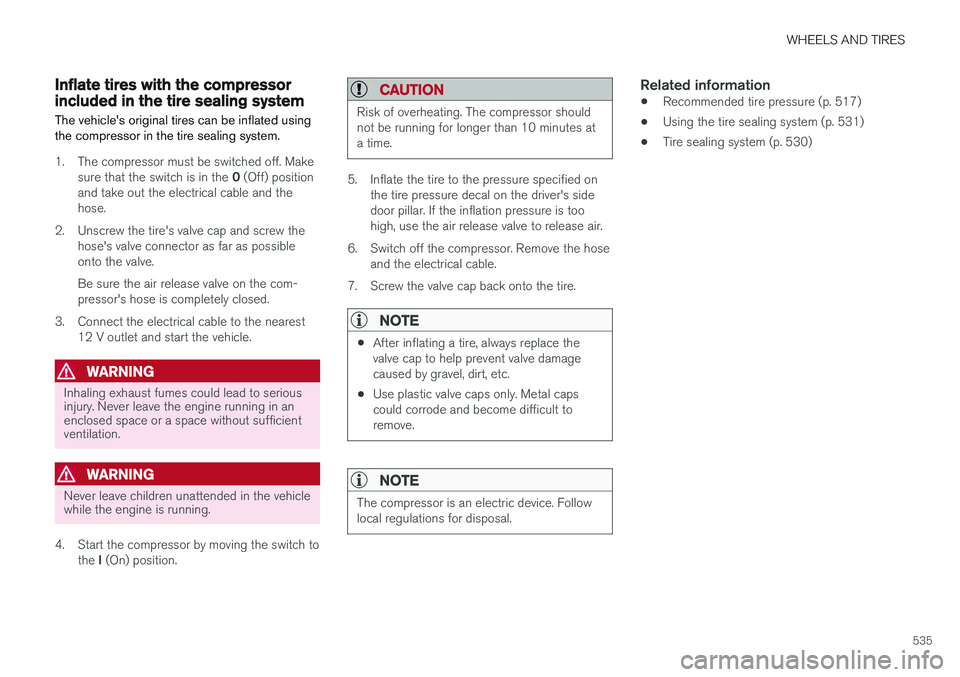
Inflate tires with the compressorincluded in the tire sealing system The vehicle's original tires can be inflated using the compressor in the tire sealing system.
1. The compressor must be switched off. Makesure that the switch is in the 0 (Off) position
and take out the electrical cable and the hose.
2. Unscrew the tire's valve cap and screw the hose's valve connector as far as possibleonto the valve. Be sure the air release valve on the com- pressor's hose is completely closed.
3. Connect the electrical cable to the nearest 12 V outlet and start the vehicle.
WARNING
Inhaling exhaust fumes could lead to serious injury. Never leave the engine running in anenclosed space or a space without sufficientventilation.
WARNING
Never leave children unattended in the vehicle while the engine is running.
4. Start the compressor by moving the switch to the I (On) position.
CAUTION
Risk of overheating. The compressor should not be running for longer than 10 minutes ata time.
5. Inflate the tire to the pressure specified on
the tire pressure decal on the driver's side door pillar. If the inflation pressure is toohigh, use the air release valve to release air.
6. Switch off the compressor. Remove the hose and the electrical cable.
7. Screw the valve cap back onto the tire.
NOTE
• After inflating a tire, always replace the valve cap to help prevent valve damagecaused by gravel, dirt, etc.
• Use plastic valve caps only. Metal capscould corrode and become difficult toremove.
NOTE
The compressor is an electric device. Follow local regulations for disposal.
Related information
• Recommended tire pressure (p. 517)
• Using the tire sealing system (p. 531)
• Tire sealing system (p. 530)
Page 545 of 640
LOADING, STORAGE AND PASSENGER COMPARTMENT
}}
* Option/accessory.543
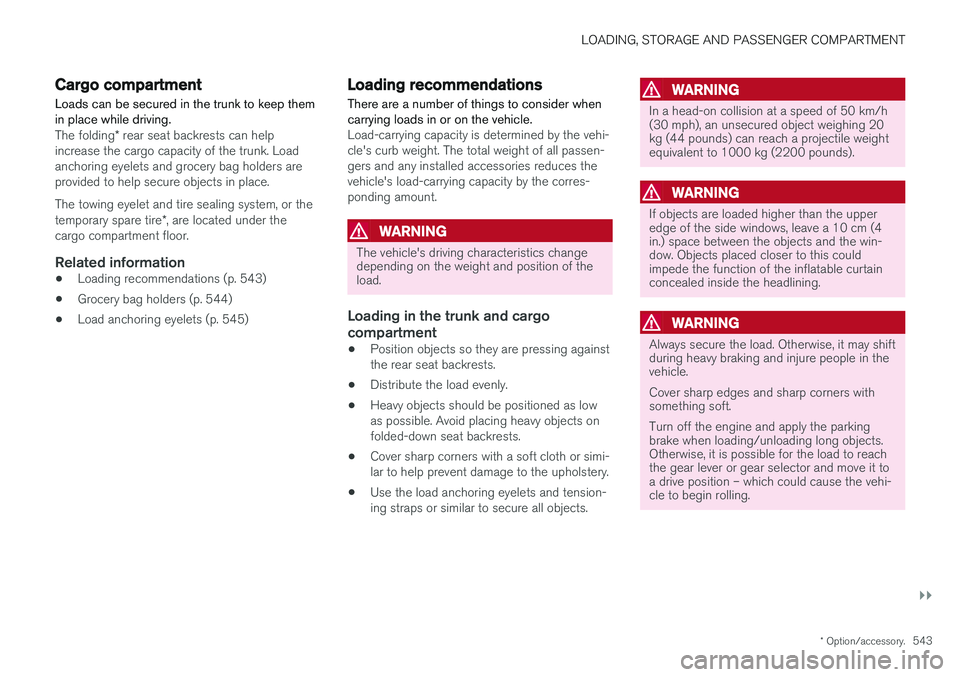
Cargo compartment Loads can be secured in the trunk to keep them in place while driving.
The folding* rear seat backrests can help
increase the cargo capacity of the trunk. Load anchoring eyelets and grocery bag holders areprovided to help secure objects in place. The towing eyelet and tire sealing system, or the temporary spare tire *, are located under the
cargo compartment floor.
Related information
• Loading recommendations (p. 543)
• Grocery bag holders (p. 544)
• Load anchoring eyelets (p. 545)
Loading recommendations
There are a number of things to consider when carrying loads in or on the vehicle.
Load-carrying capacity is determined by the vehi- cle's curb weight. The total weight of all passen-gers and any installed accessories reduces thevehicle's load-carrying capacity by the corres-ponding amount.
WARNING
The vehicle's driving characteristics change depending on the weight and position of theload.
Loading in the trunk and cargo compartment
• Position objects so they are pressing against the rear seat backrests.
• Distribute the load evenly.
• Heavy objects should be positioned as lowas possible. Avoid placing heavy objects onfolded-down seat backrests.
• Cover sharp corners with a soft cloth or simi-lar to help prevent damage to the upholstery.
• Use the load anchoring eyelets and tension-ing straps or similar to secure all objects.
WARNING
In a head-on collision at a speed of 50 km/h (30 mph), an unsecured object weighing 20kg (44 pounds) can reach a projectile weightequivalent to 1000 kg (2200 pounds).
WARNING
If objects are loaded higher than the upper edge of the side windows, leave a 10 cm (4in.) space between the objects and the win-dow. Objects placed closer to this couldimpede the function of the inflatable curtainconcealed inside the headlining.
WARNING
Always secure the load. Otherwise, it may shift during heavy braking and injure people in thevehicle. Cover sharp edges and sharp corners with something soft. Turn off the engine and apply the parking brake when loading/unloading long objects.Otherwise, it is possible for the load to reachthe gear lever or gear selector and move it toa drive position – which could cause the vehi-cle to begin rolling.
Page 554 of 640
||
MAINTENANCE AND SERVICE
* Option/accessory.
552
Canceling software download
–Tap the checkbox in the activity indicator that replaced the Install button when the down-
load began.
Note that only a download can be cancelled. An installation cannot be cancelled once it hasbegun.
Deactivating the background search for software update
Automatic background searching for softwareupdates is activated as the default factory setting,but the function can be deactivated. 1. Tap
Settings in the center display's Top
view.
2. Tap
SystemDownload Center.
3. Tap to deselect
Auto Software Update.
Related information
• Download Center (p. 551)
• Internet-connected vehicle
* (p. 487)
• Navigating in the center display's views (p. 113)
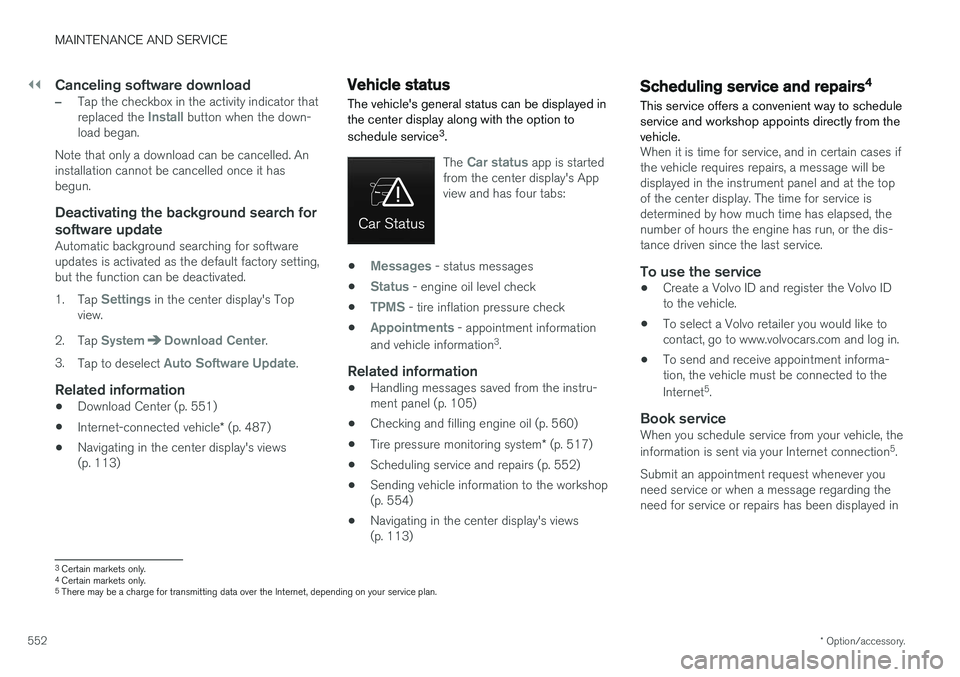
Vehicle status
The vehicle's general status can be displayed in the center display along with the option to schedule service 3
.
The Car status app is started
from the center display's App view and has four tabs:
•Messages - status messages
•
Status - engine oil level check
•
TPMS - tire inflation pressure check
•
Appointments - appointment information
and vehicle information 3
.
Related information
• Handling messages saved from the instru- ment panel (p. 105)
• Checking and filling engine oil (p. 560)
• Tire pressure monitoring system
* (p. 517)
• Scheduling service and repairs (p. 552)
• Sending vehicle information to the workshop(p. 554)
• Navigating in the center display's views(p. 113)
Scheduling service and repairs4
This service offers a convenient way to schedule service and workshop appoints directly from thevehicle.
When it is time for service, and in certain cases if the vehicle requires repairs, a message will bedisplayed in the instrument panel and at the topof the center display. The time for service isdetermined by how much time has elapsed, thenumber of hours the engine has run, or the dis-tance driven since the last service.
To use the service
• Create a Volvo ID and register the Volvo IDto the vehicle.
• To select a Volvo retailer you would like tocontact, go to www.volvocars.com and log in.
• To send and receive appointment informa-tion, the vehicle must be connected to the Internet 5
.
Book serviceWhen you schedule service from your vehicle, theinformation is sent via your Internet connection 5
.
Submit an appointment request whenever you need service or when a message regarding theneed for service or repairs has been displayed in
3 Certain markets only.
4 Certain markets only.
5 There may be a charge for transmitting data over the Internet, depending on your service plan.
Page 571 of 640
MAINTENANCE AND SERVICE
}}
569
Related information
•Location of exterior lights (p. 565)
• Removing the plastic cover to replace bulbs (p. 564)
• Bulb specifications (p. 572)
Replacing the rear fog light bulb The rear fog light bulb is located behind a panel on the inside of the trunk lid on the driver's side.
NOTE
Replacement of the rear fog light bulb should only be performed by a workshop – anauthorized Volvo workshop is recommended.
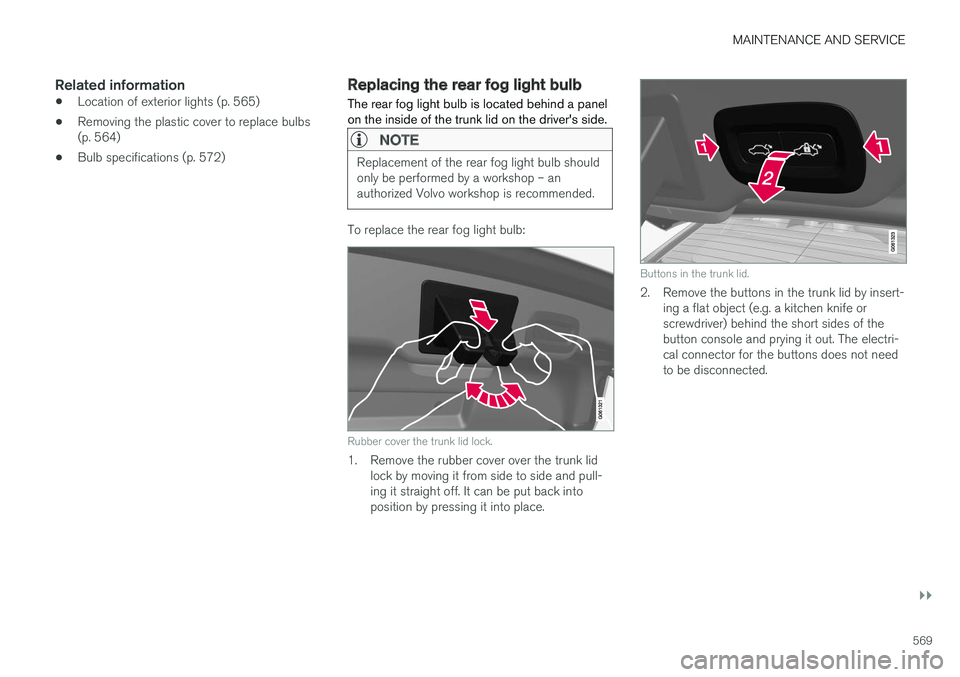
To replace the rear fog light bulb:
Rubber cover the trunk lid lock.
1. Remove the rubber cover over the trunk lid
lock by moving it from side to side and pull- ing it straight off. It can be put back intoposition by pressing it into place.
Buttons in the trunk lid.
2. Remove the buttons in the trunk lid by insert-ing a flat object (e.g. a kitchen knife or screwdriver) behind the short sides of thebutton console and prying it out. The electri-cal connector for the buttons does not needto be disconnected.
Page 572 of 640
||
MAINTENANCE AND SERVICE
570
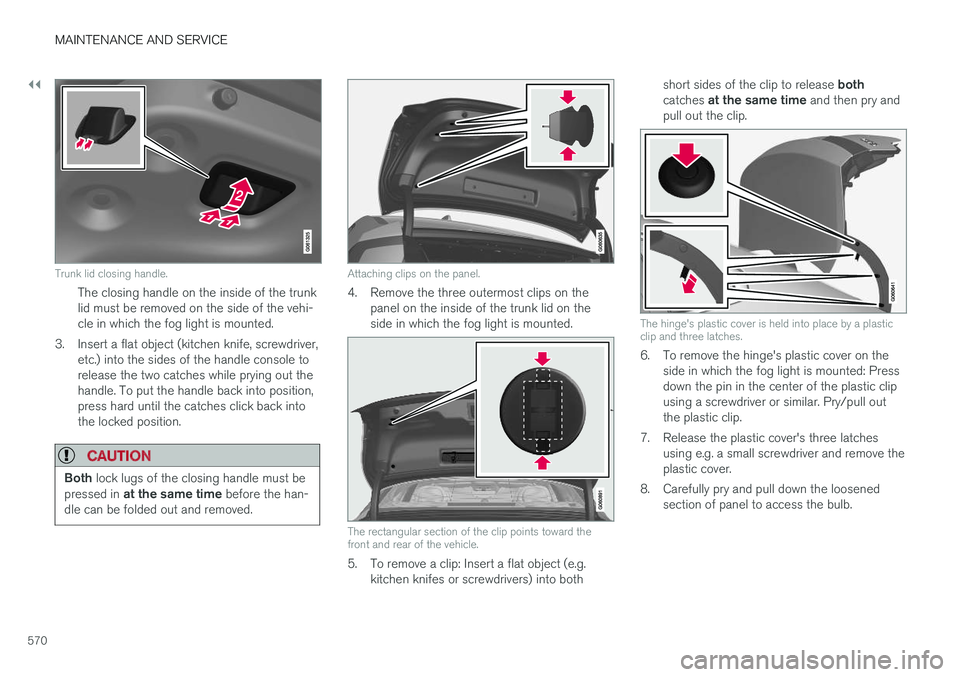
Trunk lid closing handle.
The closing handle on the inside of the trunk lid must be removed on the side of the vehi-cle in which the fog light is mounted.
3. Insert a flat object (kitchen knife, screwdriver, etc.) into the sides of the handle console torelease the two catches while prying out thehandle. To put the handle back into position,press hard until the catches click back intothe locked position.
CAUTION
Both lock lugs of the closing handle must be
pressed in at the same time before the han-
dle can be folded out and removed.
Attaching clips on the panel.
4. Remove the three outermost clips on the panel on the inside of the trunk lid on the side in which the fog light is mounted.
The rectangular section of the clip points toward the front and rear of the vehicle.
5. To remove a clip: Insert a flat object (e.g.kitchen knifes or screwdrivers) into both short sides of the clip to release
both
catches at the same time and then pry and
pull out the clip.
The hinge's plastic cover is held into place by a plastic clip and three latches.
6. To remove the hinge's plastic cover on the side in which the fog light is mounted: Press down the pin in the center of the plastic clipusing a screwdriver or similar. Pry/pull outthe plastic clip.
7. Release the plastic cover's three latches using e.g. a small screwdriver and remove theplastic cover.
8. Carefully pry and pull down the loosened section of panel to access the bulb.
Page 629 of 640
INDEX
627
F
Federal Clean Air Act 548
Ferry transport 422
Flat tire 530
Flooded road 426
Fluids, volumes 606, 620
Fluids and oils 619, 620 Fog lightsfront 157
rear 158
Four-C 422 Front seat blower 220
climate 208
heating 210, 211
temperature 222
ventilation 212
Front seat manual 184
Front seats, power 185 adjusting passenger seat from driver's
seat 191
adjusting seat 185
Lumbar support 190
massage 188, 189
memory function 186, 187
multifunction control 188, 189, 190
Side bolsters 190
Fuel 428Travel Link service 463
Fuel filling 427
Fuel gauge 85
Fuel requirements 428, 429Fuel tank volume 620
Fuse box 578Fuses below the glove compartment 583
general 578
in engine compartment 580
in trunk 586
replacing 579
G
Gasoline grade 428 Gauge
fuel gauge 85
Gear indicator 412Gear selector positions automatic transmission 408
Glass laminated/reinforced 166
Glove compartment 541
Gracenote ® 469
Grocery bag holders 544
Gross vehicle weight 615
GSI - Gear shift indicator 412
Guide lines for Park Assist Camera 377
H
Handbrake 401, 402
Hand wash 596Hard disk space 496
Hazard warning flashers 160
HD radio 452
Head-up display 140 activate and deactivate 142
cleaning 591
replacing windshield 558
settings 142
Heated washer nozzles 180 Heating Seats 210, 211
steering wheel 214, 215
windows 218, 219
high beams 154, 155
High engine temperature 431
Page 636 of 640

INDEX
634
T
Technician certification 37 Temperatureadjusting 222, 223, 224
perceived 197
Temporary spare spare tire 527
Temporary tire sealing system execution, checking 531
Inflating tires 535
location 530
overview 530
sealing compound 530
Terms and conditions services 34
users 494
Tire dimensions 512, 522
Tire pressure decal 517Tire pressure monitoring calibrating 519
Tires 508 direction of rotation 510
glossary of terms 511
inflation pressure table 621
mounting 526
pressure 621
removal 524
rotation 509
specifications 512, 621
storage 508
tire pressure monitoring 517
tire sealing 530
Tread depth 529
tread wear indicator 511
winter tires 529
Tire sealing system 531
Tire tread 511
Tools 522 Top tether anchors (child restraint sys- tems) 72
Total airing function 229, 247
Towing 434
Towing capacity and towball load 616
Towing eyelet 435
TPMS - Tire Pressure Monitoring System 517
Traction control 264
Traffic information 451
Transmission 407 automatic 408
Transmission fluid grade 619
Travel Link 460 Fuel 463
Notifications 462Sports 464
weather 461
Tread depth 511, 529
Tread wear indicator 511
Trip computer 85, 87
Trip odometer 85
Trip odometer resetting 88
Trip statistics 88Troubleshooting Adaptive Cruise Control 295
Troubleshooting the camera sensor 321 Trunk electrical outlet 539, 540
Lighting 162
Trunk lid emergency opening 249
locking/unlocking 233, 246
open/close with foot movement 254
power-operated 251
unlocking from inside 249
Tunnel detection 153
Turn off engine 396
Turn signals 156Type approval radar system 319