ECO mode VOLVO S90 2018 Owner´s Manual
[x] Cancel search | Manufacturer: VOLVO, Model Year: 2018, Model line: S90, Model: VOLVO S90 2018Pages: 640, PDF Size: 11.37 MB
Page 175 of 640
WINDOWS, GLASS AND MIRRORS
}}
* Option/accessory.173
Adjusting the door mirrors
To improve visibility to the rear, the door mirrors need to be adjusted to the driver's height andseating position. There are several automaticsettings that can also be connected to the mem- ory function buttons for the power seat *.
Controls used for door mirrors
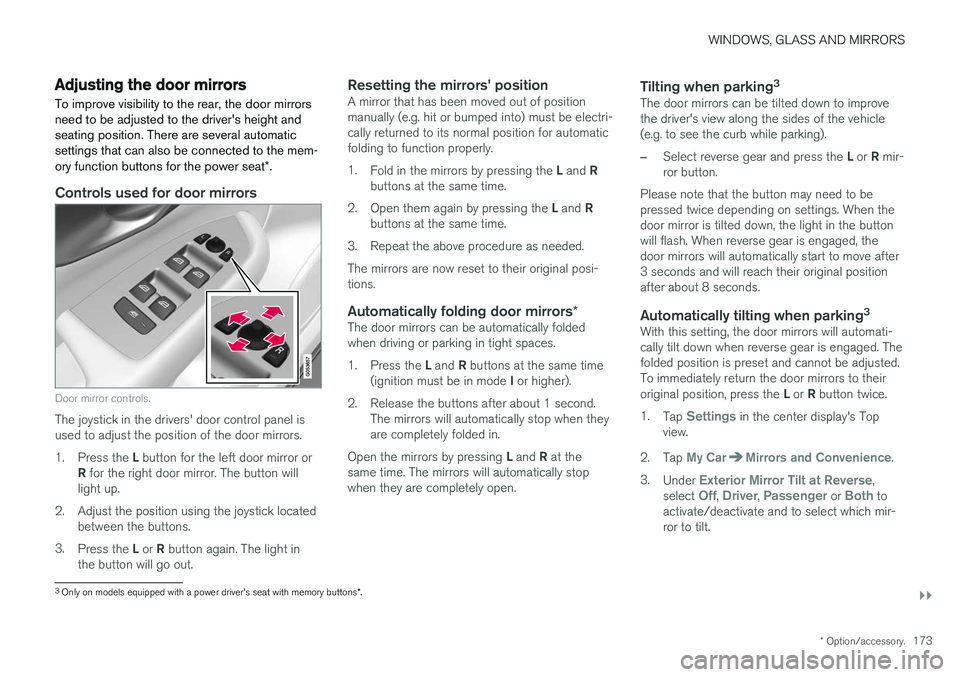
Door mirror controls.
The joystick in the drivers' door control panel is used to adjust the position of the door mirrors. 1.
Press the L button for the left door mirror or
R for the right door mirror. The button will
light up.
2. Adjust the position using the joystick located between the buttons.
3. Press the L or R button again. The light in
the button will go out.
Resetting the mirrors' positionA mirror that has been moved out of position manually (e.g. hit or bumped into) must be electri-cally returned to its normal position for automaticfolding to function properly. 1. Fold in the mirrors by pressing the L and R
buttons at the same time.
2. Open them again by pressing the L and R
buttons at the same time.
3. Repeat the above procedure as needed.The mirrors are now reset to their original posi- tions.
Automatically folding door mirrors *The door mirrors can be automatically foldedwhen driving or parking in tight spaces. 1.
Press the L and R buttons at the same time
(ignition must be in mode I or higher).
2. Release the buttons after about 1 second. The mirrors will automatically stop when they are completely folded in.
Open the mirrors by pressing L and R at the
same time. The mirrors will automatically stopwhen they are completely open.
Tilting when parking 3The door mirrors can be tilted down to improvethe driver's view along the sides of the vehicle(e.g. to see the curb while parking).
–Select reverse gear and press the
L or R mir-
ror button.
Please note that the button may need to be pressed twice depending on settings. When thedoor mirror is tilted down, the light in the buttonwill flash. When reverse gear is engaged, thedoor mirrors will automatically start to move after3 seconds and will reach their original positionafter about 8 seconds.
Automatically tilting when parking 3With this setting, the door mirrors will automati-cally tilt down when reverse gear is engaged. Thefolded position is preset and cannot be adjusted.To immediately return the door mirrors to their original position, press the
L or R button twice.
1. Tap
Settings in the center display's Top
view.
2. Tap
My CarMirrors and Convenience.
3. Under
Exterior Mirror Tilt at Reverse,
select Off, Driver, Passenger or Both to
activate/deactivate and to select which mir- ror to tilt.
3 Only on models equipped with a power driver's seat with memory buttons *.
Page 179 of 640
WINDOWS, GLASS AND MIRRORS
}}
177
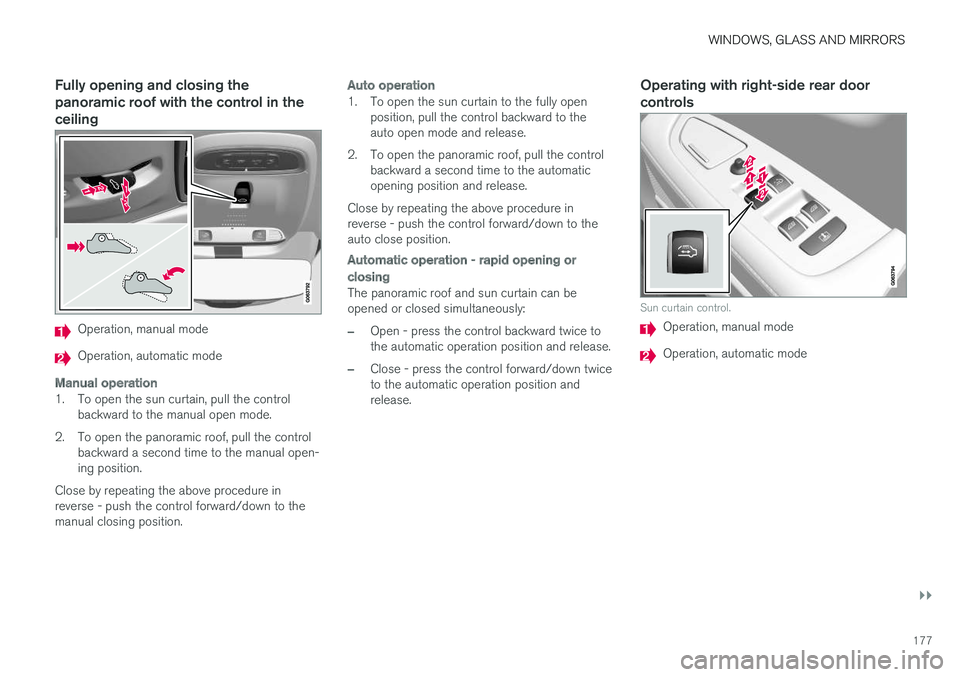
Fully opening and closing the panoramic roof with the control in theceiling
Operation, manual mode
Operation, automatic mode
Manual operation
1. To open the sun curtain, pull the controlbackward to the manual open mode.
2. To open the panoramic roof, pull the control backward a second time to the manual open- ing position.
Close by repeating the above procedure inreverse - push the control forward/down to themanual closing position.
Auto operation
1. To open the sun curtain to the fully open position, pull the control backward to the auto open mode and release.
2. To open the panoramic roof, pull the control backward a second time to the automaticopening position and release.
Close by repeating the above procedure inreverse - push the control forward/down to theauto close position.
Automatic operation - rapid opening or
closing
The panoramic roof and sun curtain can be opened or closed simultaneously:
–Open - press the control backward twice to the automatic operation position and release.
–Close - press the control forward/down twice to the automatic operation position andrelease.
Operating with right-side rear door controls
Sun curtain control.
Operation, manual mode
Operation, automatic mode
Page 180 of 640
||
WINDOWS, GLASS AND MIRRORS
* Option/accessory.
178
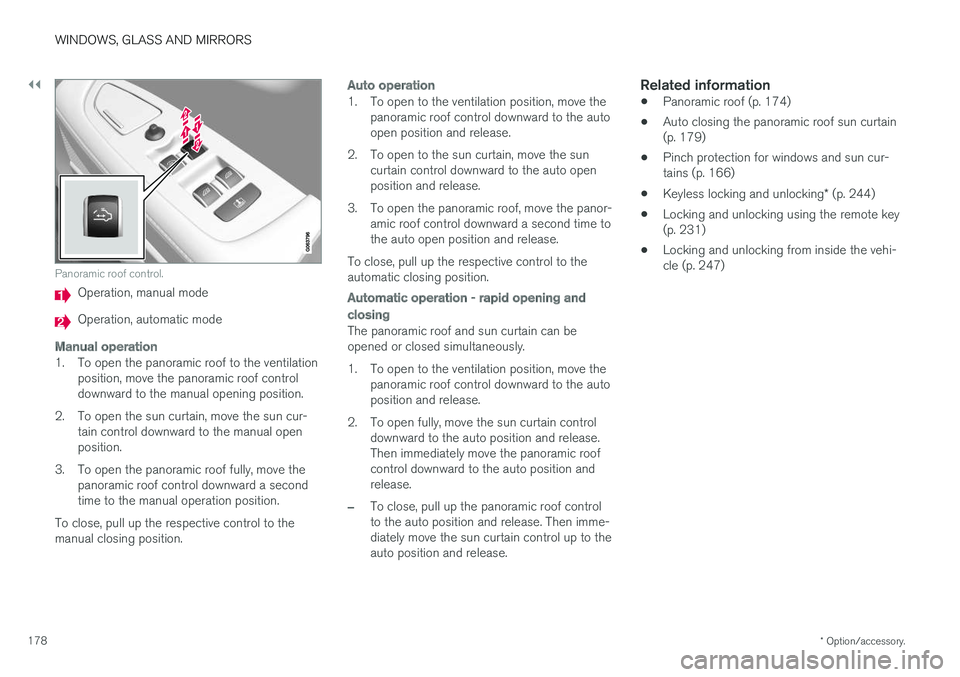
Panoramic roof control.
Operation, manual mode
Operation, automatic mode
Manual operation
1. To open the panoramic roof to the ventilation
position, move the panoramic roof control downward to the manual opening position.
2. To open the sun curtain, move the sun cur- tain control downward to the manual openposition.
3. To open the panoramic roof fully, move the panoramic roof control downward a secondtime to the manual operation position.
To close, pull up the respective control to themanual closing position.
Auto operation
1. To open to the ventilation position, move the panoramic roof control downward to the auto open position and release.
2. To open to the sun curtain, move the sun curtain control downward to the auto openposition and release.
3. To open the panoramic roof, move the panor- amic roof control downward a second time tothe auto open position and release.
To close, pull up the respective control to theautomatic closing position.
Automatic operation - rapid opening and
closing
The panoramic roof and sun curtain can be opened or closed simultaneously.
1. To open to the ventilation position, move the panoramic roof control downward to the auto position and release.
2. To open fully, move the sun curtain control downward to the auto position and release.Then immediately move the panoramic roofcontrol downward to the auto position andrelease.
–To close, pull up the panoramic roof control to the auto position and release. Then imme-diately move the sun curtain control up to theauto position and release.
Related information
• Panoramic roof (p. 174)
• Auto closing the panoramic roof sun curtain(p. 179)
• Pinch protection for windows and sun cur-tains (p. 166)
• Keyless locking and unlocking
* (p. 244)
• Locking and unlocking using the remote key(p. 231)
• Locking and unlocking from inside the vehi-cle (p. 247)
Page 235 of 640
KEY, LOCKS AND ALARM
}}
* Option/accessory.233
Unlocking the trunk lid using theremote key
The remote key can be used to unlock only the trunk lid.
Press the button on the remote key to disarm and
unlock the trunk lid.
1. Press the button on the remote key.
> The lock and alarm indicator on the dash- board will go out to indicate that the vehi- cle is no longer fully armed. The trunk lid will be unlocked but remain closed. However, the side doors willremain locked and armed. To open the trunk lid, press lightly on the rubberized pressure plate on the under-side of the trunk lid handle and open thetrunk lid. If the tailgate is not opened within 2 minutes, it will be relocked and thealarm armed.
2. With the optional power trunk lid
* -
Hold and press (about 1.5 seconds) the
button on the remote key.
> The trunk lid will unlock and open. How- ever, the side doors will remain locked and armed.
Related information
• Locking and unlocking using the remote key(p. 231)
Remote key range
In order to function correctly, the remote key must be within a certain distance from the vehi-cle.
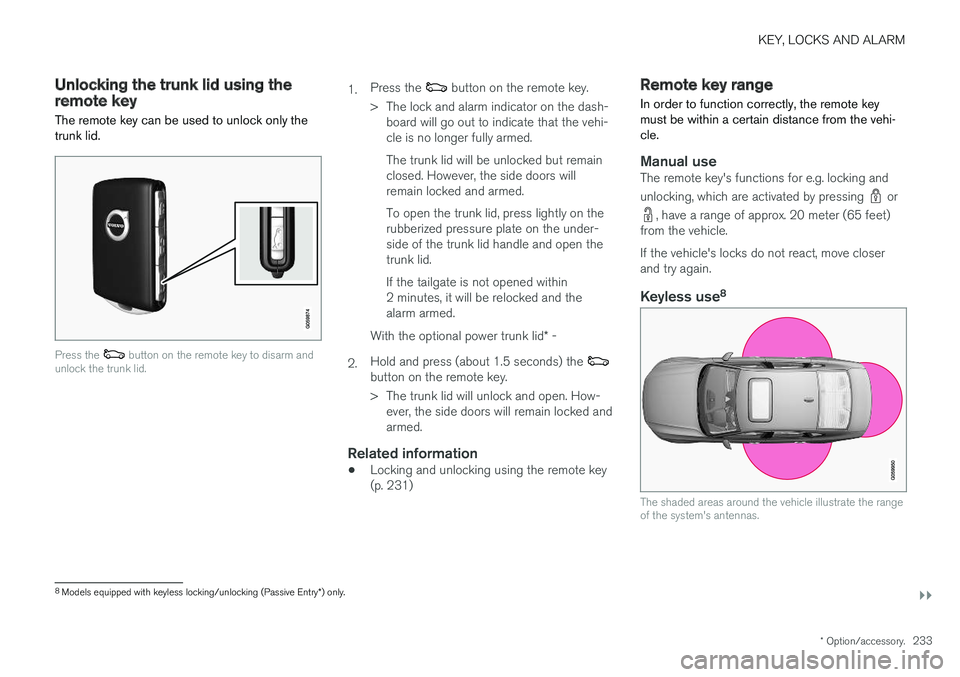
Manual useThe remote key's functions for e.g. locking and unlocking, which are activated by pressing
or
, have a range of approx. 20 meter (65 feet)
from the vehicle. If the vehicle's locks do not react, move closer and try again.
Keyless use 8
The shaded areas around the vehicle illustrate the range of the system's antennas.
8
Models equipped with keyless locking/unlocking (Passive Entry *) only.
Page 259 of 640
KEY, LOCKS AND ALARM
257
Alarm
The alarm emits sound and light signals if any- one without a valid remote key attempts to breakinto the vehicle or interferes with the start batteryor alarm siren.
When armed, the alarm will be triggered if:
• the hood, trunk lid or any door is opened.
• a battery cable is disconnected
• the alarm siren is disconnected.
Alarm signalsThe following occurs if the alarm is triggered:
• A siren will sound for 30 seconds or until the alarm is turned off.
• All turn signals will flash for 5 minutes oruntil the alarm is turned off.
If the reason the alarm was triggered is not recti- fied, the alarm cycle will repeat up to 10 times 20
.
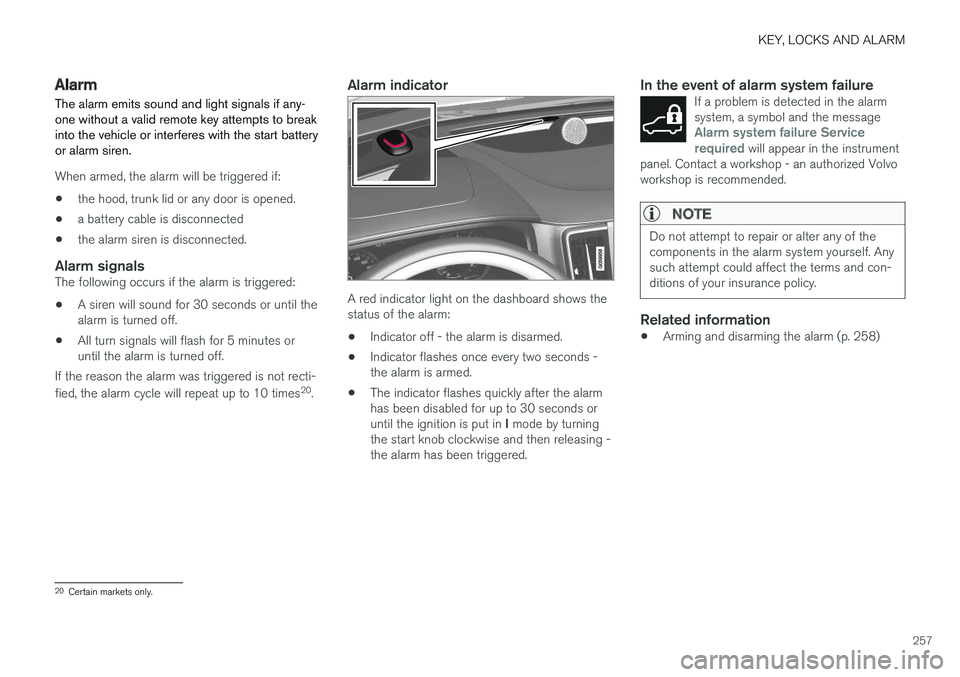
Alarm indicator
A red indicator light on the dashboard shows the status of the alarm:
• Indicator off - the alarm is disarmed.
• Indicator flashes once every two seconds -the alarm is armed.
• The indicator flashes quickly after the alarmhas been disabled for up to 30 seconds or until the ignition is put in
I mode by turning
the start knob clockwise and then releasing - the alarm has been triggered.
In the event of alarm system failureIf a problem is detected in the alarmsystem, a symbol and the message
Alarm system failure Service
required will appear in the instrument
panel. Contact a workshop - an authorized Volvo workshop is recommended.
NOTE
Do not attempt to repair or alter any of the components in the alarm system yourself. Anysuch attempt could affect the terms and con-ditions of your insurance policy.
Related information
• Arming and disarming the alarm (p. 258)
20
Certain markets only.
Page 260 of 640

KEY, LOCKS AND ALARM
* Option/accessory.
258
Arming and disarming the alarm
The alarm is armed when the vehicle is locked.
Arming the alarmLock and arm the vehicle by:
• pressing the lock button on the remote key
• touch the marked surface on the outside of the door handle or the rubberized pressure plate on the trunk lid 21
.
If the vehicle is equipped with both keyless lock- ing/unlocking * and power trunk lid, the button
on the lower edge of the trunk lid can also
be used to lock and arm the vehicle.
A red LED light on the dashboard will flash every other second when the vehicle is locked and the alarm isarmed.
Disarming the alarmUnlock and disarm the vehicle alarm by:
• pressing the unlock button on the remote key
•
grip a door handle or press the trunk lid's rubberized pressure plate 21
.
Disarming the alarm without a functioning
remote key
The vehicle can be unlocked and disarmed even if the remote key is not functioning, e.g. if thebattery is discharged.
1. Open the driver's door using the detachable
key blade.
> This will trigger the alarm.
Location of the backup key reader in the cup holder.
2. Place the remote key on the key symbol inthe backup reader in the tunnel console's cup holder. 3. Turn the start knob clockwise and release.
> The alarm will be disarmed.
Turning off a triggered alarm
–Press the unlock button on the remote key or put the ignition into mode I by turning the
start knob clockwise and then releasing it.
NOTE
• Remember that the alarm is armed when the vehicle is locked.
• The alarm will be triggered if any of thedoors is opened from the inside.
Automatically arming and disarming the alarm
Automatically arming the alarm helps prevent inadvertently leaving the vehicle without alarmprotection. If the vehicle is unlocked using the remote key (and the alarm is disarmed) but none of thedoors or trunk lid is opened within two minutes,the alarm will be automatically rearmed. The vehi-cle will also re-lock. On some markets, the alarm will be automatically armed following a slight delay after the driver'sdoor has been opened and closed without beinglocked.
21
Only vehicles with keyless locking and unlocking * (Passive Entry).
Page 268 of 640
DRIVER SUPPORT
266
Electronic Stability Control symbolsand messages
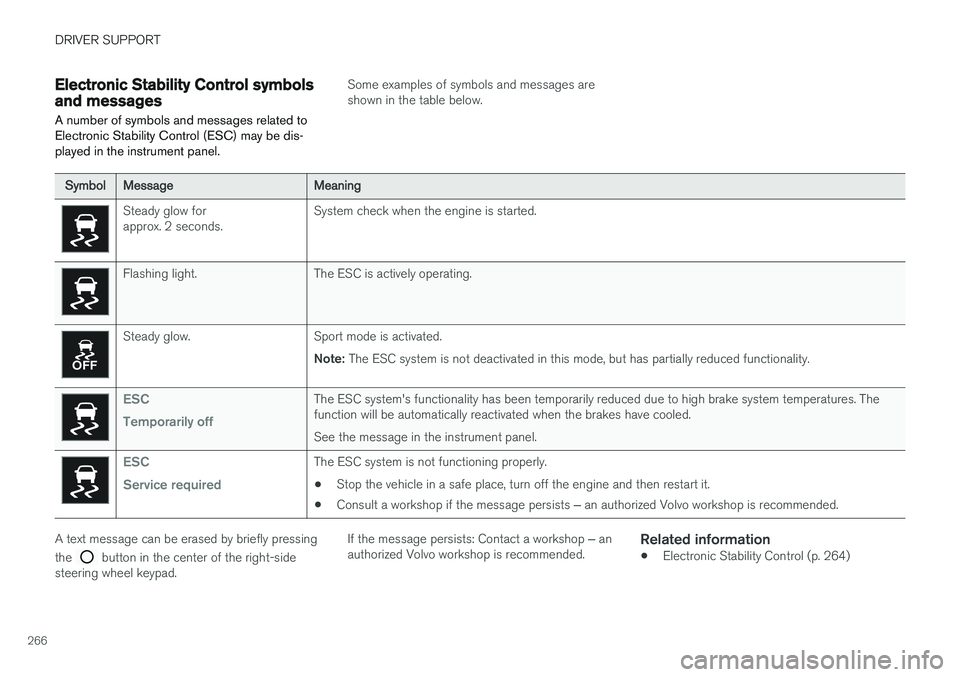
A number of symbols and messages related to Electronic Stability Control (ESC) may be dis-played in the instrument panel.
Some examples of symbols and messages are shown in the table below.
SymbolMessageMeaning
Steady glow for approx. 2 seconds. System check when the engine is started.
Flashing light. The ESC is actively operating.
Steady glow. Sport mode is activated.
Note: The ESC system is not deactivated in this mode, but has partially reduced functionality.
ESC Temporarily offThe ESC system's functionality has been temporarily reduced due to high brake system temperatures. The function will be automatically reactivated when the brakes have cooled. See the message in the instrument panel.
ESC Service requiredThe ESC system is not functioning properly.
• Stop the vehicle in a safe place, turn off the engine and then restart it.
• Consult a workshop if the message persists
‒ an authorized Volvo workshop is recommended.
A text message can be erased by briefly pressing the
button in the center of the right-side
steering wheel keypad. If the message persists: Contact a workshop
‒ an
authorized Volvo workshop is recommended.
Related information
• Electronic Stability Control (p. 264)
Page 278 of 640
DRIVER SUPPORT
276•
Reactivating Cruise Control from standby mode (p. 279)
• Switching off Cruise Control (p. 279)
Activating and starting CruiseControl
The Cruise Control (CC 25
) function must be
selected and activated in order to regulate speed.
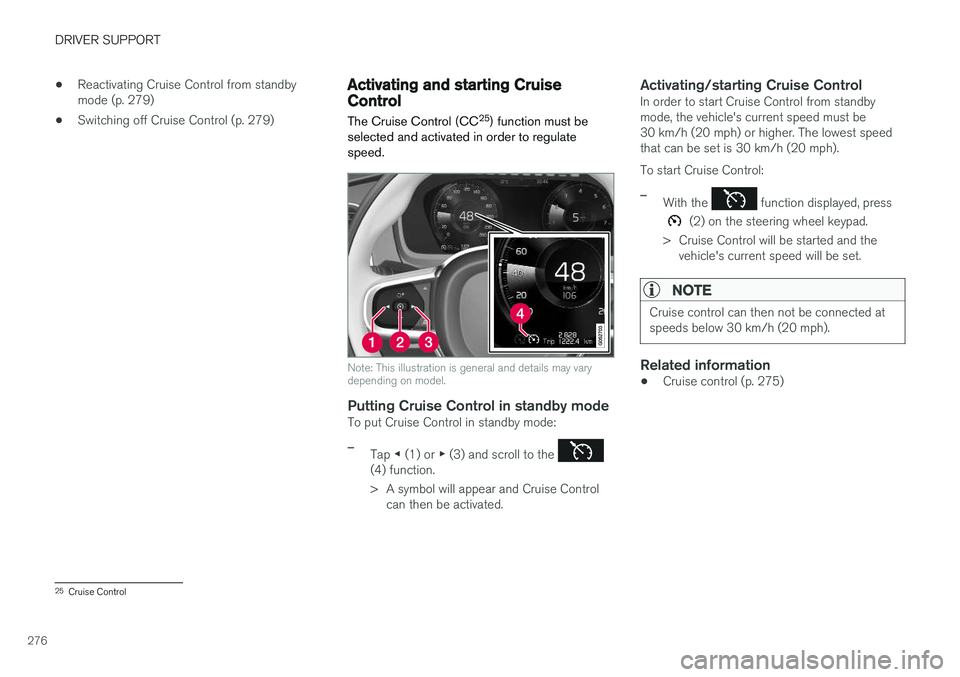
Note: This illustration is general and details may vary depending on model.
Putting Cruise Control in standby modeTo put Cruise Control in standby mode:
–Tap ◀ (1) or ▶ (3) and scroll to the (4) function.
> A symbol will appear and Cruise Control
can then be activated.
Activating/starting Cruise ControlIn order to start Cruise Control from standby mode, the vehicle's current speed must be30 km/h (20 mph) or higher. The lowest speedthat can be set is 30 km/h (20 mph). To start Cruise Control:
–With the function displayed, press
(2) on the steering wheel keypad.
> Cruise Control will be started and the vehicle's current speed will be set.
NOTE
Cruise control can then not be connected at speeds below 30 km/h (20 mph).
Related information
• Cruise control (p. 275)
25
Cruise Control
Page 280 of 640
||
DRIVER SUPPORT
278
Cruise Control Eco Cruise
In the ECO drive mode, cruise control's accelera- tion and deceleration will be smoother than inother drive modes to help provide optimal fuelefficiency and reduced environmental impact.Because of this, the vehicle's actual speed maybe slightly above or below the set speed. For more information, see "ECO drive mode" under "Eco Cruise".
Cruise Control Dynamic Cruise
With the Dynamic drive mode, cruise control's acceleration and deceleration will be faster andmore immediate than in other drive modes.
Related information
•Cruise control (p. 275)
Deactivating and putting CruiseControl in standby mode
Cruise Control (CC 28
) can be temporarily put
into standby mode and then reactivated.
Deactivating and putting Cruise Control in standby mode
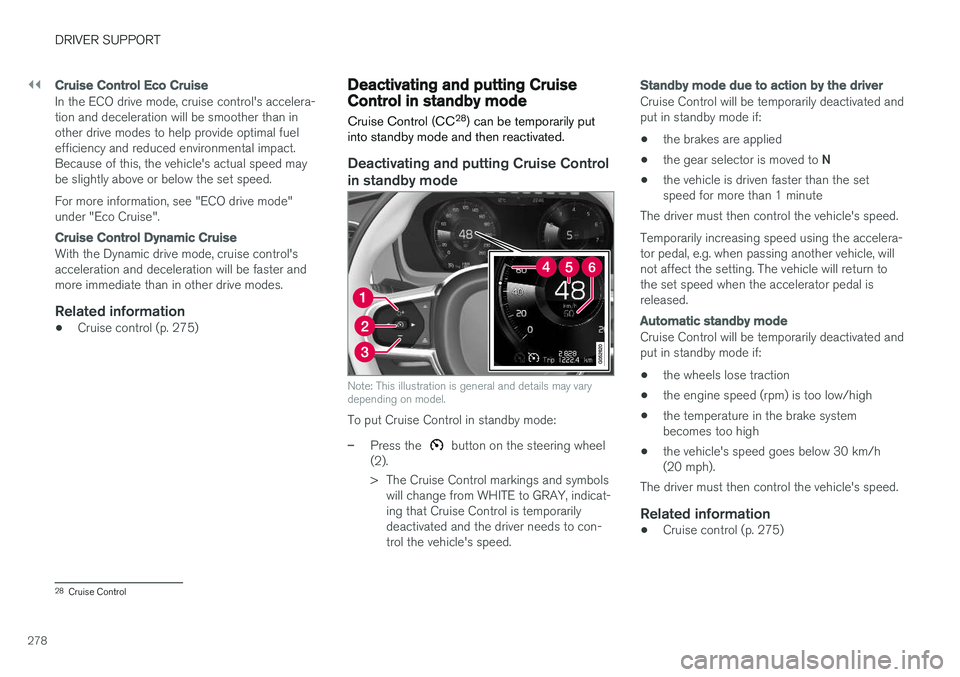
Note: This illustration is general and details may vary depending on model.
To put Cruise Control in standby mode:
–Press the button on the steering wheel
(2).
> The Cruise Control markings and symbols will change from WHITE to GRAY, indicat- ing that Cruise Control is temporarilydeactivated and the driver needs to con-trol the vehicle's speed.
Standby mode due to action by the driver
Cruise Control will be temporarily deactivated and put in standby mode if:
• the brakes are applied
• the gear selector is moved to
N
• the vehicle is driven faster than the setspeed for more than 1 minute
The driver must then control the vehicle's speed. Temporarily increasing speed using the accelera- tor pedal, e.g. when passing another vehicle, willnot affect the setting. The vehicle will return tothe set speed when the accelerator pedal isreleased.
Automatic standby mode
Cruise Control will be temporarily deactivated and put in standby mode if:
• the wheels lose traction
• the engine speed (rpm) is too low/high
• the temperature in the brake systembecomes too high
• the vehicle's speed goes below 30 km/h(20 mph).
The driver must then control the vehicle's speed.
Related information
• Cruise control (p. 275)
28
Cruise Control
Page 282 of 640

||
DRIVER SUPPORT
* Option/accessory.
280
Function buttons and symbols 30
.
To turn off Cruise Control: 1. Press the
button on the steering wheel
(2).
> Cruise Control will go into standby mode.
2. Press the
◀ (1) or ▶ (3) buttons on the
steering wheel to select another function.> The Cruise Control symbol
(4) in
the instrument panel will go out and the set speed will be erased.
3. Press the
(2) button on the steering
wheel keypad again.
> Another function will be activated.
NOTE
In vehicles equipped with Adaptive Cruise Control *, it is possible to switch between
cruise control and Adaptive Cruise Control – see the heading "Switching between CC andACC".
Related information
• Cruise control (p. 275)
Distance Alert
*
The Distance Alert 31
function can help the driver
become aware if the time interval to the vehicle in front is too short. However, the vehicle must be equipped with a head-up display in order to display the DistanceAlert, which will then be indicated by a symbolon the windshield as long as the time interval tothe vehicle ahead is shorter than the set timeinterval.
Distance Alert is active at speeds above 30 km/h (20 mph) and only reacts for vehicles ahead mov-ing in the same direction as your vehicle. No dis-tance information is provided for oncoming, slow-moving or stationary vehicles.
NOTE
• Distance Alert is only available in vehicles that can display information on the wind-shield with a head-up display.
• Distance Alert is deactivated while Adap-tive Cruise Control is active.
30
Note: This illustration is general and details may vary depending on model.
31 Distance Alert