service VOLVO S90 2018 Owner´s Manual
[x] Cancel search | Manufacturer: VOLVO, Model Year: 2018, Model line: S90, Model: VOLVO S90 2018Pages: 640, PDF Size: 11.37 MB
Page 98 of 640
||
DISPLAYS AND VOICE CONTROL
96
BSD 3-clause "New" or "Revised" License
Copyright (c) 2011-2014, Yann Collet. Redistribution and use in source and binary forms, with or without modification, are permittedprovided that the following conditions are met:
1. Redistributions of source code must retainthe above copyright notice, this list of conditions and the following disclaimer.
2. Redistributions in binary form must reproduce the above copyright notice, this listof conditions and the following disclaimer inthe documentation and/or other materialsprovided with the distribution.
3. Neither the name of the organisation nor the names of its contributors may be used toendorse or promote products derive from thissoftware without specific prior writtenpermission.
THIS SOFTWARE IS PROVIDED BY THECOPYRIGHT HOLDERS AND CONTRIBUTORS"AS IS" AND ANY EXPRESS OR IMPLIEDWARRANTIES, INCLUDING, BUT NOT LIMITEDTO, THE IMPLIED WARRANTIES OFMERCHANTABILITY AND FITNESS FOR APARTICULAR PURPOSE ARE DISCLAIMED. INNO EVENT SHALL THE COPYRIGHT HOLDEROR CONTRIBUTORS BE LIABLE FOR ANYDIRECT, INDIRECT, INCIDENTAL, SPECIAL,EXEMPLARY, OR CONSEQUENTIAL DAMAGES(INCLUDING, BUT NOT LIMITED TO,PROCUREMENT OF SUBSTITUTE GOODS OR SERVICES; LOSS OF USE, DATA, OR PROFITS;OR BUSINESS INTERRUPTION) HOWEVERCAUSED AND ON ANY THEORY OF LIABILITY,WHETHER IN CONTRACT, STRICT LIABILITY,OR TORT (INCLUDING NEGLIGENCE OROTHERWISE) ARISING IN ANY WAY OUT OFTHE USE OF THIS SOFTWARE, EVEN IFADVISED OF THE POSSIBILITY OF SUCHDAMAGE.
BSD 2-clause “Simplified” license
Copyright (c)
reserved. Redistribution and use in source and binary forms, with or without modification, are permittedprovided that the following conditions are met:
1. Redistributions of source code must retain the above copyright notice, this list of conditions and the following disclaimer.
2. Redistributions in binary form must reproduce the above copyright notice, this listof conditions and the following disclaimer inthe documentation and/or other materialsprovided with the distribution.
THIS SOFTWARE IS PROVIDED BY THECOPYRIGHT HOLDERS AND CONTRIBUTORS"AS IS" AND ANY EXPRESS OR IMPLIEDWARRANTIES, INCLUDING, BUT NOT LIMITEDTO, THE IMPLIED WARRANTIES OFMERCHANTABILITY AND FITNESS FOR APARTICULAR PURPOSE ARE DISCLAIMED. INNO EVENT SHALL THE COPYRIGHT OWNER OR CONTRIBUTORS BE LIABLE FOR ANYDIRECT, INDIRECT, INCIDENTAL, SPECIAL,EXEMPLARY, OR CONSEQUENTIAL DAMAGES(INCLUDING, BUT NOT LIMITED TO,PROCUREMENT OF SUBSTITUTE GOODS ORSERVICES; LOSS OF USE, DATA, OR PROFITS;OR BUSINESS INTERRUPTION) HOWEVERCAUSED AND ON ANY THEORY OF LIABILITY,WHETHER IN CONTRACT, STRICT LIABILITY,OR TORT (INCLUDING NEGLIGENCE OROTHERWISE) ARISING IN ANY WAY OUT OFTHE USE OF THIS SOFTWARE, EVEN IFADVISED OF THE POSSIBILITY OF SUCHDAMAGE. The views and conclusions contained in the software and documentation are those of theauthors and should not be interpreted asrepresenting official policies, either expressed orimplied, of the FreeBSD Project.
Page 105 of 640
DISPLAYS AND VOICE CONTROL
}}
103
Service messages
The following table lists a selection of important service messages and what they mean.
MessageMeaning
Stop safelyAStop and switch off the engine. Serious risk ofdamage - contact a work- shopB
.
Turn off engineA Stop and switch off the engine. Serious risk ofdamage - contact a work- shop
B
.
Service urgent Drive to work- shop
A Contact a workshop
B
to
have the vehicle inspected immediately.
Service requiredA Contact a workshop
B
to
have the vehicle inspected as soon as possible.
Regular main- tenance Book time for maintenanceTime for service - contact a workshop B
. Shown
before the next service date.
Regular main- tenance Time for main- tenanceTime for service - contact a workshop B
. Shown on
the next service date.
MessageMeaning
Regular main- tenance Maintenance overdueTime for service - contact a workshop B
. Shown when
the date for service has passed.
Temporarily offA A function has been tem- porarily deactivated andwill be reactivated auto-matically while driving orafter the engine is restar-ted.
A
Part of message, shown along with information on the location of the problem.
B An authorized Volvo workshop is recommended.
Related information
• Handling messages in the instrument panel (p. 103)
• Handling messages saved from the instru-ment panel (p. 105)
• Messages in the center display (p. 138)
Handling messages in theinstrument panel
Messages in the instrument panel are controlled using the right-side steering wheel keypad.
Page 107 of 640
DISPLAYS AND VOICE CONTROL
}}
105
Handling messages saved from theinstrument panel
Messages saved from the instrument panel and center displays are handled in the center display.
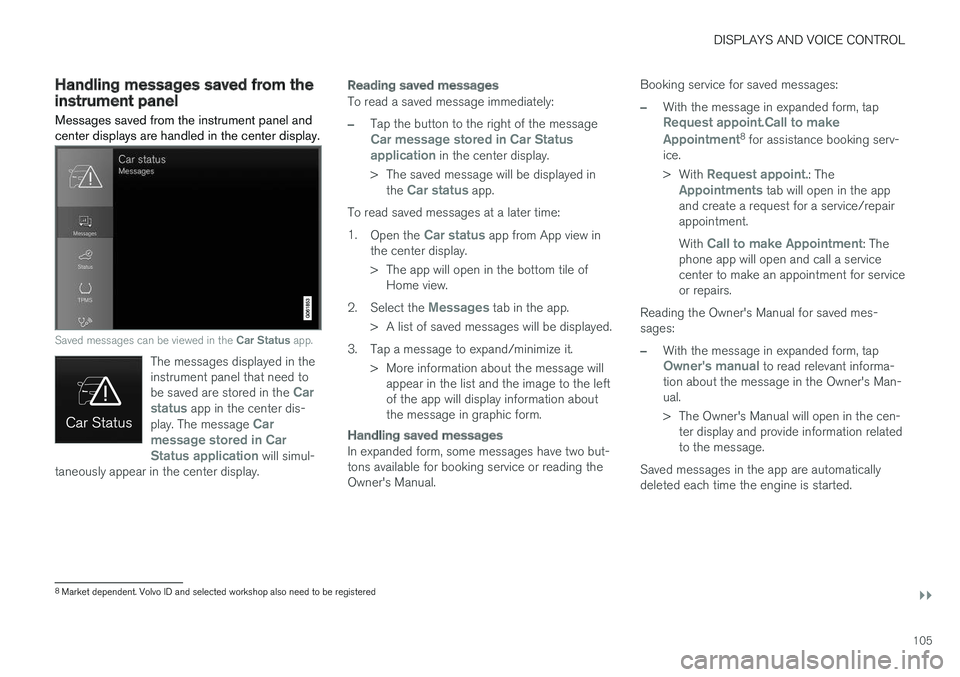
Saved messages can be viewed in the Car Status app.
The messages displayed in the instrument panel that need to be saved are stored in the
Car
status app in the center dis-
play. The message Car
message stored in Car Status application
will simul-
taneously appear in the center display.
Reading saved messages
To read a saved message immediately:
–Tap the button to the right of the messageCar message stored in Car Status application in the center display.
> The saved message will be displayed in the
Car status app.
To read saved messages at a later time: 1. Open the
Car status app from App view in
the center display.
> The app will open in the bottom tile of Home view.
2. Select the
Messages tab in the app.
> A list of saved messages will be displayed.
3. Tap a message to expand/minimize it. > More information about the message willappear in the list and the image to the left of the app will display information aboutthe message in graphic form.
Handling saved messages
In expanded form, some messages have two but- tons available for booking service or reading theOwner's Manual. Booking service for saved messages:
–With the message in expanded form, tapRequest appoint.Call to make Appointment8
for assistance booking serv-
ice. > With
Request appoint.: TheAppointments tab will open in the app
and create a request for a service/repair appointment. With
Call to make Appointment: The
phone app will open and call a service center to make an appointment for serviceor repairs.
Reading the Owner's Manual for saved mes-sages:
–With the message in expanded form, tapOwner's manual to read relevant informa-
tion about the message in the Owner's Man- ual.
> The Owner's Manual will open in the cen- ter display and provide information related to the message.
Saved messages in the app are automaticallydeleted each time the engine is started.
8 Market dependent. Volvo ID and selected workshop also need to be registered
Page 134 of 640
DISPLAYS AND VOICE CONTROL
132
Changing settings in the centerdisplay You can change
Settings and information for
many of the vehicle's functions via the center display.
1. Open Top view by tapping the tab or by drag- ging/swiping from the top of the screen downward.
2. Tap
Settings to open the Settings menu.
3. Tap one of the categories and sub-catego- ries to navigate to the desired setting.
4. Change the setting(s). Different types of set- tings are changed in different ways.
> Changes are saved immediately.
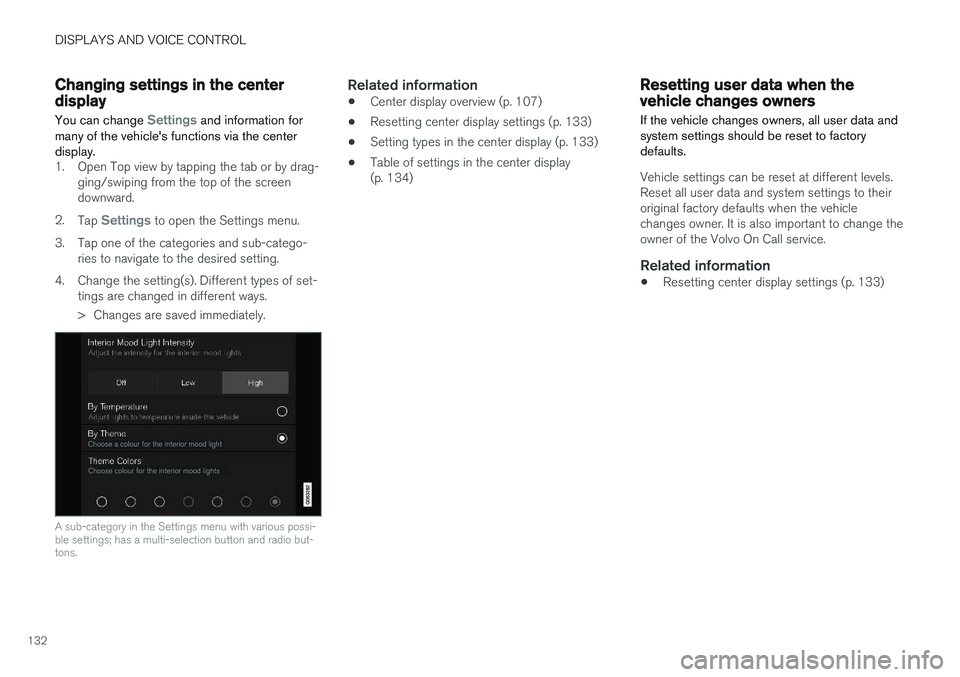
A sub-category in the Settings menu with various possi- ble settings; has a multi-selection button and radio but-tons.
Related information
• Center display overview (p. 107)
• Resetting center display settings (p. 133)
• Setting types in the center display (p. 133)
• Table of settings in the center display (p. 134)
Resetting user data when thevehicle changes owners
If the vehicle changes owners, all user data and system settings should be reset to factorydefaults.
Vehicle settings can be reset at different levels. Reset all user data and system settings to theiroriginal factory defaults when the vehiclechanges owner. It is also important to change theowner of the Volvo On Call service.
Related information
• Resetting center display settings (p. 133)
Page 137 of 640
DISPLAYS AND VOICE CONTROL
}}
* Option/accessory.135
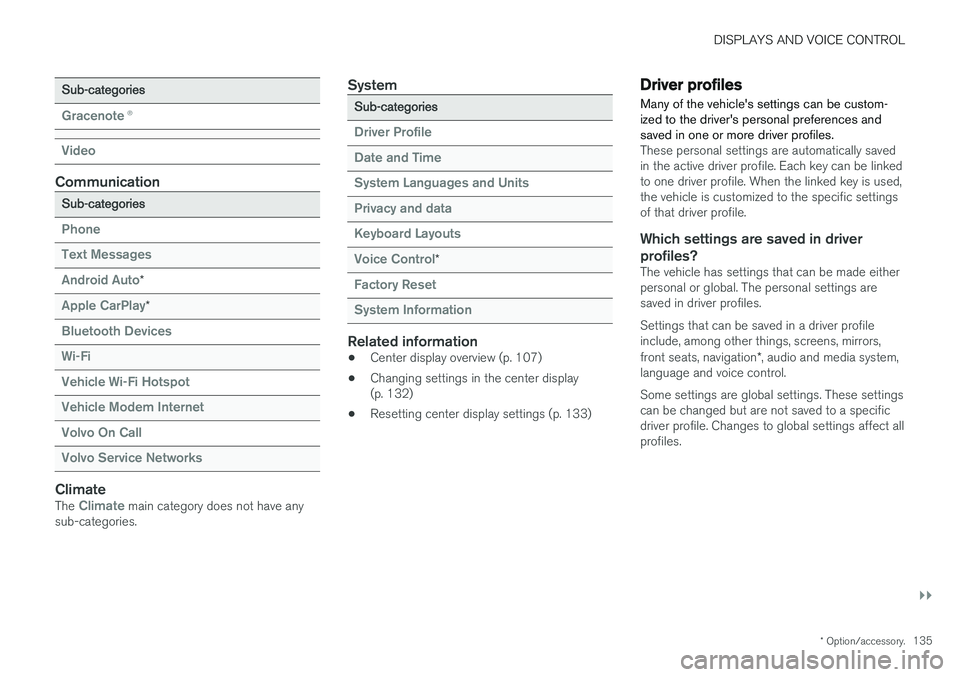
Sub-categories
Gracenote®
Video
Communication
Sub-categories
Phone Text Messages Android Auto
*
Apple CarPlay*
Bluetooth Devices Wi-FiVehicle Wi-Fi HotspotVehicle Modem Internet Volvo On Call Volvo Service Networks
ClimateThe Climate main category does not have any
sub-categories.
System
Sub-categories
Driver Profile Date and TimeSystem Languages and UnitsPrivacy and dataKeyboard Layouts Voice Control
*
Factory Reset System Information
Related information
• Center display overview (p. 107)
• Changing settings in the center display (p. 132)
• Resetting center display settings (p. 133)
Driver profiles
Many of the vehicle's settings can be custom- ized to the driver's personal preferences andsaved in one or more driver profiles.
These personal settings are automatically saved in the active driver profile. Each key can be linkedto one driver profile. When the linked key is used,the vehicle is customized to the specific settingsof that driver profile.
Which settings are saved in driver profiles?
The vehicle has settings that can be made eitherpersonal or global. The personal settings aresaved in driver profiles. Settings that can be saved in a driver profile include, among other things, screens, mirrors, front seats, navigation *, audio and media system,
language and voice control. Some settings are global settings. These settings can be changed but are not saved to a specificdriver profile. Changes to global settings affect allprofiles.
Page 182 of 640
||
WINDOWS, GLASS AND MIRRORS
* Option/accessory.
180
Continuous wipersMove the lever upward for the wipers to operate at normal speed.
Move the lever upward again for the wip- ers to operate at high speed.
CAUTION
Before activating the wipers, make sure that the wiper blades are not frozen in place andthat any snow or ice on the windshield hasbeen scraped away.
CAUTION
Use plenty of washer fluid when the wipers clean the windshield. The windshield must bewet when the windshield wipers are working.
Related information
• Using the rain sensor (p. 180)
• Using the windshield and headlight washers (p. 182)
• Heated windshield washer nozzles
* (p. 180)
• Using the rain sensor's memory function(p. 181)
• Filling washer fluid (p. 606)
• Windshield wipers in the service position(p. 605)
• Replacing windshield wiper blades (p. 604)
Heated windshield washer nozzles
*
The washer nozzles are heated automatically in cold weather to prevent the washer fluid fromfreezing.
Related information
• Using the rain sensor (p. 180)
• Using the windshield and headlight washers (p. 182)
• Using the rain sensor's memory function(p. 181)
• Filling washer fluid (p. 606)
• Windshield wipers in the service position(p. 605)
• Replacing windshield wiper blades (p. 604)
• Using the windshield wipers (p. 179)
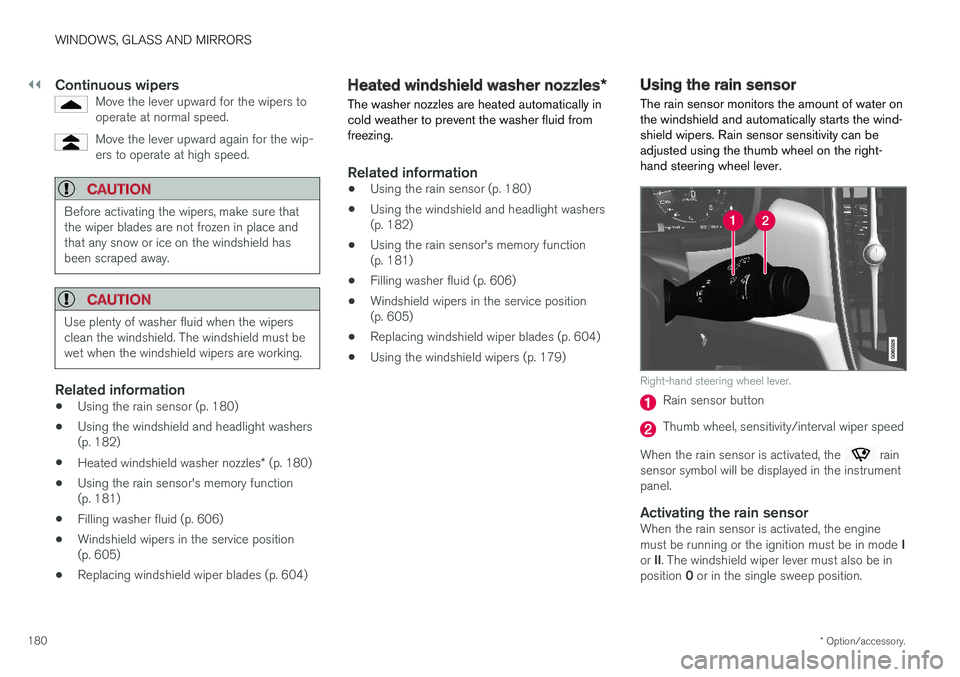
Using the rain sensor The rain sensor monitors the amount of water on the windshield and automatically starts the wind-shield wipers. Rain sensor sensitivity can beadjusted using the thumb wheel on the right-hand steering wheel lever.
Right-hand steering wheel lever.
Rain sensor button
Thumb wheel, sensitivity/interval wiper speed
When the rain sensor is activated, the
rain
sensor symbol will be displayed in the instrument panel.
Activating the rain sensorWhen the rain sensor is activated, the engine must be running or the ignition must be in mode I
or II. The windshield wiper lever must also be in
position 0 or in the single sweep position.
Page 183 of 640
WINDOWS, GLASS AND MIRRORS
* Option/accessory.181
Activate the rain sensor by pressing the rain sen- sor button
.
If the lever is pressed down, the wipers will make additional sweeps across the windshield. Turn the thumb wheel upward for increased sen- sitivity and downward for decreased sensitivity.The wipers will make one extra sweep when thethumb wheel is turned upward.
Deactivate the rain sensor
Deactivate the rain sensor by pressing the rain sensor button or moving the lever upward to another wiper mode. The rain sensor is automatically deactivated in ignition mode 0 or when the engine is switched
off. The rain sensor is also automatically deactivated when the wiper blades are put in the serviceposition. The rain sensor will reactivate whenservice mode is switched off.
CAUTION
The windshield wipers may start inadvertently and be damaged in automatic car washes.Deactivate the rain sensor when the engine is running or when the ignition is in mode I or II.
The symbol in the instrument panel will go out.
Related information
• Using the windshield and headlight washers (p. 182)
• Heated windshield washer nozzles
* (p. 180)
• Using the rain sensor's memory function(p. 181)
• Filling washer fluid (p. 606)
• Windshield wipers in the service position(p. 605)
• Replacing windshield wiper blades (p. 604)
• Using the windshield wipers (p. 179)
Using the rain sensor's memoryfunction The rain sensor monitors the amount of water on the windshield and automatically starts the wind-shield wipers.
Activating/deactivating memory function
The rain sensor's memory function can be set to activate so that the rain sensor button does notneed to be pressed each time the engine isstarted: 1.
Tap
Settings in the Top view in the center
display.
2. Tap
My CarWipers.
3. Select
Rain Sensor Memory to activate/
deactivate the memory function.
Related information
• Using the rain sensor (p. 180)
• Using the windshield and headlight washers (p. 182)
• Heated windshield washer nozzles
* (p. 180)
• Filling washer fluid (p. 606)
• Windshield wipers in the service position(p. 605)
• Replacing windshield wiper blades (p. 604)
• Using the windshield wipers (p. 179)
Page 184 of 640
WINDOWS, GLASS AND MIRRORS
* Option/accessory.
182
Using the windshield and headlightwashers
The windshield and headlight washers clean the windshield and headlights. Use the right-sidesteering wheel lever to start the windshield andheadlight washers.
Starting the windshield and headlight washers
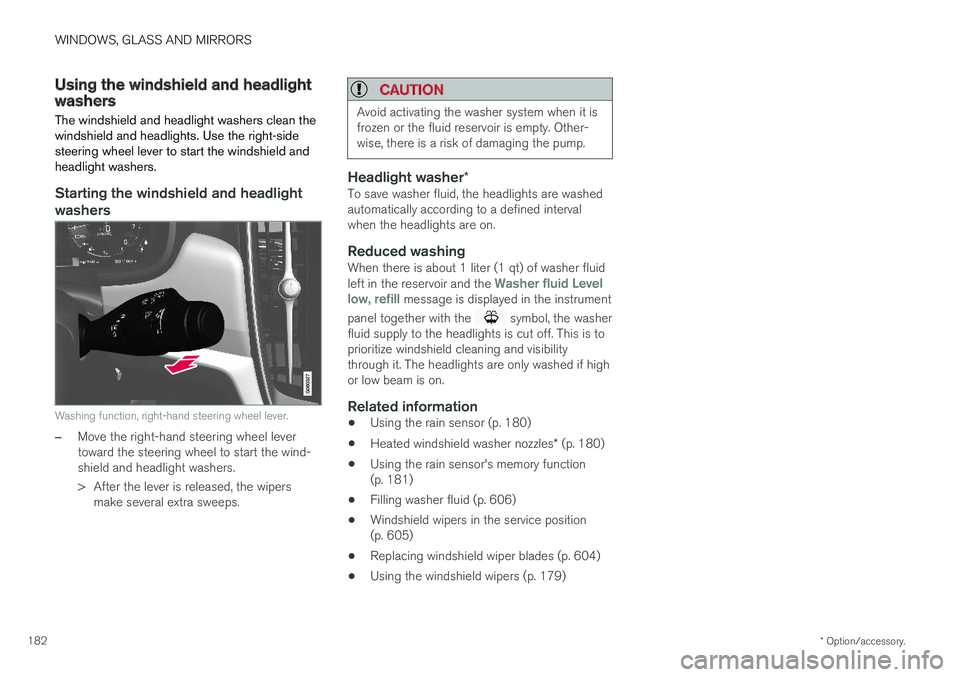
Washing function, right-hand steering wheel lever.
–Move the right-hand steering wheel lever toward the steering wheel to start the wind-shield and headlight washers.
> After the lever is released, the wipers make several extra sweeps.
CAUTION
Avoid activating the washer system when it is frozen or the fluid reservoir is empty. Other-wise, there is a risk of damaging the pump.
Headlight washer *To save washer fluid, the headlights are washed automatically according to a defined intervalwhen the headlights are on.
Reduced washingWhen there is about 1 liter (1 qt) of washer fluid left in the reservoir and the Washer fluid Level
low, refill message is displayed in the instrument
panel together with the
symbol, the washer
fluid supply to the headlights is cut off. This is to prioritize windshield cleaning and visibilitythrough it. The headlights are only washed if highor low beam is on.
Related information
• Using the rain sensor (p. 180)
• Heated windshield washer nozzles
* (p. 180)
• Using the rain sensor's memory function(p. 181)
• Filling washer fluid (p. 606)
• Windshield wipers in the service position(p. 605)
• Replacing windshield wiper blades (p. 604)
• Using the windshield wipers (p. 179)
Page 203 of 640
CLIMATE CONTROL
}}
* Option/accessory.201
Activating and deactivating the air
quality sensor *
The air quality sensor is part of the fully automa- ted Interior Air Quality System (IAQS).
The air quality sensor can be switched on or off. 1. Tap
Settings in the Top view in the center
display.
2. Tap
Climate.
3. Select
Air Quality Sensor to activate/deac-
tivate the air quality sensor.
Related information
• Interior Air Quality System
* (p. 200)
Passenger compartment air filter
All air entering the passenger compartment through the climate control system intake is fil-tered.
Replacing the passenger compartment filter
To maintain the high performance of the climate control system, the filter must be replaced regu-larly. Follow Volvo's service schedule for recom-mended replacement intervals. When driving inareas with a lot of smog, dust, etc., the filter mayneed to be changed more frequently.
NOTE
There are two types of passenger compart- ment filters. Make sure that the correct filteris installed.
Related information
• Air quality (p. 199)
• Clean Zone
* (p. 199)
• Clean Zone Interior Package
* (p. 200)
• Interior Air Quality System
* (p. 200)
Air distribution
The climate system distributes incoming air through a number of vents in the passengercompartment.
Automatic and manual air distributionWhen the auto-climate feature is on, air distribu- tion is regulated automatically. Air distribution canalso be controlled manually.
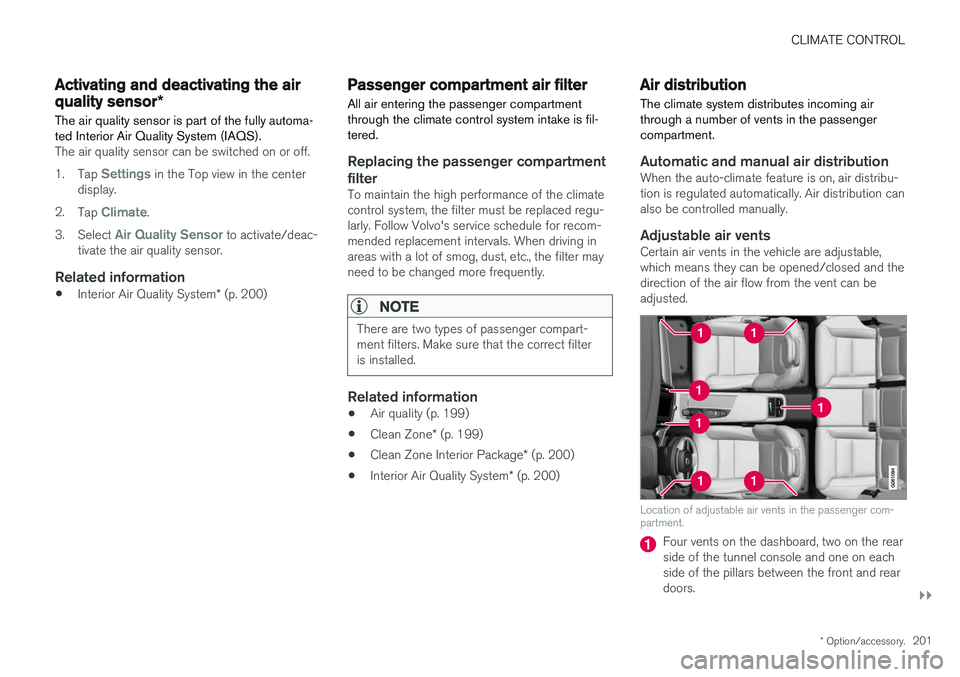
Adjustable air ventsCertain air vents in the vehicle are adjustable,which means they can be opened/closed and thedirection of the air flow from the vent can beadjusted.
Location of adjustable air vents in the passenger com- partment.
Four vents on the dashboard, two on the rear side of the tunnel console and one on eachside of the pillars between the front and reardoors.
Page 236 of 640
||
KEY, LOCKS AND ALARM
* Option/accessory.
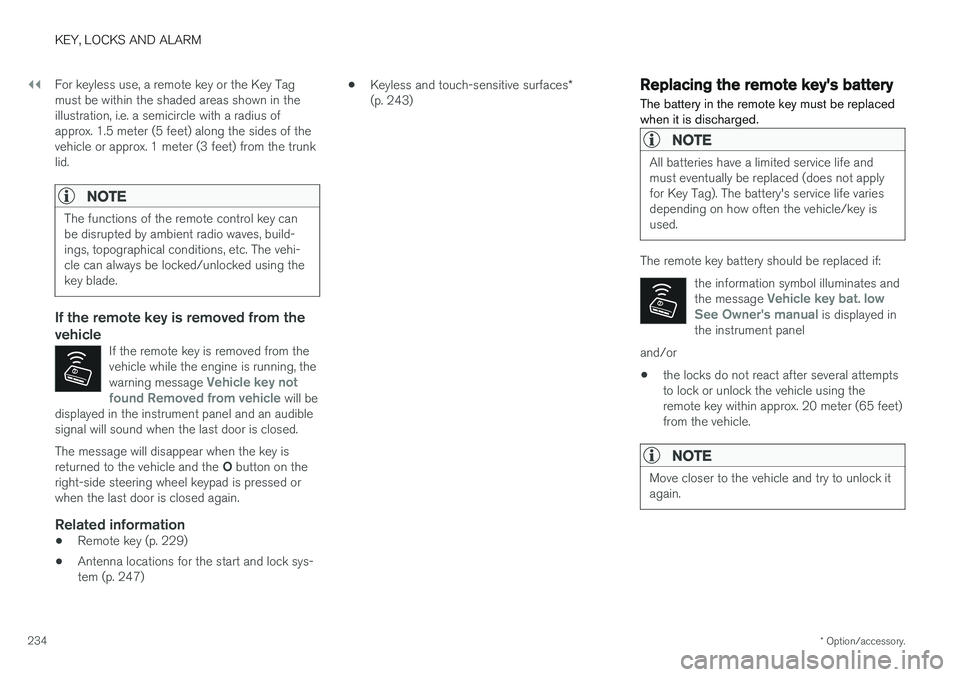
234 For keyless use, a remote key or the Key Tag must be within the shaded areas shown in theillustration, i.e. a semicircle with a radius ofapprox. 1.5 meter (5 feet) along the sides of thevehicle or approx. 1 meter (3 feet) from the trunklid.
NOTE
The functions of the remote control key can be disrupted by ambient radio waves, build-ings, topographical conditions, etc. The vehi-cle can always be locked/unlocked using thekey blade.
If the remote key is removed from the vehicle
If the remote key is removed from the vehicle while the engine is running, the warning message
Vehicle key not
found Removed from vehicle will be
displayed in the instrument panel and an audible signal will sound when the last door is closed.
The message will disappear when the key is returned to the vehicle and the O button on the
right-side steering wheel keypad is pressed or when the last door is closed again.
Related information
• Remote key (p. 229)
• Antenna locations for the start and lock sys-tem (p. 247) •
Keyless and touch-sensitive surfaces
*
(p. 243)
Replacing the remote key's battery
The battery in the remote key must be replaced when it is discharged.
NOTE
All batteries have a limited service life and must eventually be replaced (does not applyfor Key Tag). The battery's service life variesdepending on how often the vehicle/key isused.
The remote key battery should be replaced if:
the information symbol illuminates and the message
Vehicle key bat. low
See Owner's manual is displayed in
the instrument panel
and/or
• the locks do not react after several attempts to lock or unlock the vehicle using theremote key within approx. 20 meter (65 feet)from the vehicle.
NOTE
Move closer to the vehicle and try to unlock it again.