alarm VOLVO S90 2018 Owner´s Manual
[x] Cancel search | Manufacturer: VOLVO, Model Year: 2018, Model line: S90, Model: VOLVO S90 2018Pages: 640, PDF Size: 11.37 MB
Page 259 of 640
KEY, LOCKS AND ALARM
257
Alarm
The alarm emits sound and light signals if any- one without a valid remote key attempts to breakinto the vehicle or interferes with the start batteryor alarm siren.
When armed, the alarm will be triggered if:
• the hood, trunk lid or any door is opened.
• a battery cable is disconnected
• the alarm siren is disconnected.
Alarm signalsThe following occurs if the alarm is triggered:
• A siren will sound for 30 seconds or until the alarm is turned off.
• All turn signals will flash for 5 minutes oruntil the alarm is turned off.
If the reason the alarm was triggered is not recti- fied, the alarm cycle will repeat up to 10 times 20
.
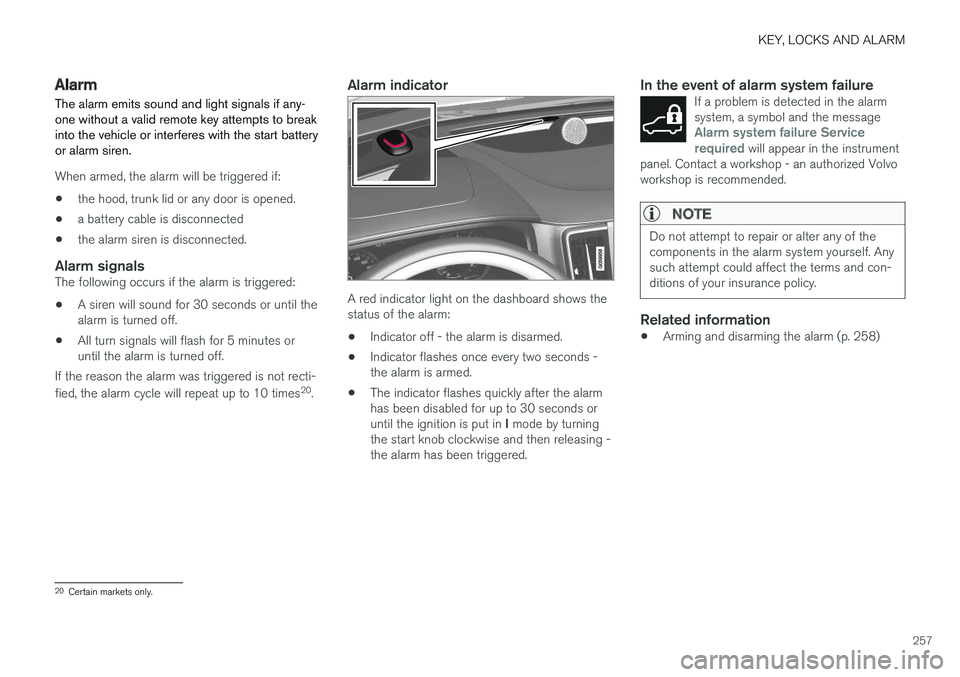
Alarm indicator
A red indicator light on the dashboard shows the status of the alarm:
• Indicator off - the alarm is disarmed.
• Indicator flashes once every two seconds -the alarm is armed.
• The indicator flashes quickly after the alarmhas been disabled for up to 30 seconds or until the ignition is put in
I mode by turning
the start knob clockwise and then releasing - the alarm has been triggered.
In the event of alarm system failureIf a problem is detected in the alarmsystem, a symbol and the message
Alarm system failure Service
required will appear in the instrument
panel. Contact a workshop - an authorized Volvo workshop is recommended.
NOTE
Do not attempt to repair or alter any of the components in the alarm system yourself. Anysuch attempt could affect the terms and con-ditions of your insurance policy.
Related information
• Arming and disarming the alarm (p. 258)
20
Certain markets only.
Page 260 of 640

KEY, LOCKS AND ALARM
* Option/accessory.
258
Arming and disarming the alarm
The alarm is armed when the vehicle is locked.
Arming the alarmLock and arm the vehicle by:
• pressing the lock button on the remote key
• touch the marked surface on the outside of the door handle or the rubberized pressure plate on the trunk lid 21
.
If the vehicle is equipped with both keyless lock- ing/unlocking * and power trunk lid, the button
on the lower edge of the trunk lid can also
be used to lock and arm the vehicle.
A red LED light on the dashboard will flash every other second when the vehicle is locked and the alarm isarmed.
Disarming the alarmUnlock and disarm the vehicle alarm by:
• pressing the unlock button on the remote key
•
grip a door handle or press the trunk lid's rubberized pressure plate 21
.
Disarming the alarm without a functioning
remote key
The vehicle can be unlocked and disarmed even if the remote key is not functioning, e.g. if thebattery is discharged.
1. Open the driver's door using the detachable
key blade.
> This will trigger the alarm.
Location of the backup key reader in the cup holder.
2. Place the remote key on the key symbol inthe backup reader in the tunnel console's cup holder. 3. Turn the start knob clockwise and release.
> The alarm will be disarmed.
Turning off a triggered alarm
–Press the unlock button on the remote key or put the ignition into mode I by turning the
start knob clockwise and then releasing it.
NOTE
• Remember that the alarm is armed when the vehicle is locked.
• The alarm will be triggered if any of thedoors is opened from the inside.
Automatically arming and disarming the alarm
Automatically arming the alarm helps prevent inadvertently leaving the vehicle without alarmprotection. If the vehicle is unlocked using the remote key (and the alarm is disarmed) but none of thedoors or trunk lid is opened within two minutes,the alarm will be automatically rearmed. The vehi-cle will also re-lock. On some markets, the alarm will be automatically armed following a slight delay after the driver'sdoor has been opened and closed without beinglocked.
21
Only vehicles with keyless locking and unlocking * (Passive Entry).
Page 261 of 640
KEY, LOCKS AND ALARM
* Option/accessory.259
To change this setting: 1.
Tap
Settings in the center display's Top
view.
2. Tap
My CarLocking.
3. Select
Passive Arming Deactivation to
temporarily deactivate the function.
Related information
• Alarm (p. 257)
Foreign Component Detection
*
The Foreign Component Detection function detects if an unknown component has beenconnected to the vehicle.
Each LED headlight * is customized for the vehi-
cle. If an unrecognized headlight is used, the message
Unknown vehicle part. Service
required, unknown part found. will be dis-
played in the instrument panel. Volvo recom- mends contacting an authorized Volvo workshop.
Related information
• Volvo's service program (p. 548)
Page 354 of 640
||
DRIVER SUPPORT
352The warnings will be repeated after a short time if driving behavior does not improve.
WARNING
•
The Driver Alert Control function is sup- plementary driver support intended tofacilitate driving and help make it safer –it cannot handle all situations in all traffic,weather and road conditions.
• Driver Alert Control must not be used toextend a period of driving. The drivershould plan in breaks at regular intervalsand make sure they are well rested.
• Driver Alert Control is not a substitute forthe driver's attention and judgment. Thedriver is always responsible for ensuringthe vehicle is driven in a safe manner, atthe appropriate speed, with an appropri-ate distance to other vehicles, and inaccordance with current traffic rules andregulations.
WARNING
An alarm from Driver Alert Control should be taken very seriously since a sleepy driver isoften not aware of their own condition. If the alarm sounds or you feel fatigued:
• Stop the vehicle safely as soon as possi- ble and rest.
Studies have shown that it is just as danger- ous to drive while tired as it is to drive underthe influence of alcohol or other stimulants.
Related information
• Activating/deactivating Driver Alert Control (p. 352)
• Selecting guidance to a rest area if theDriver Alert Control warning has been given(p. 353)
• Driver Alert Control limitations (p. 353)
Activating/deactivating Driver AlertControl
The Driver Alert Control (DAC) function can be activated/deactivated.
On/OffTo change DAC settings: 1. Tap
Settings in the center display's Top
view.
2. Select
My CarIntelliSafeDriver Alert
Control.
3. Select/deselect
Alertness Warning to acti-
vate/deactivate DAC.
Related information
• Driver Alert Control (p. 351)
Page 410 of 640
||
STARTING AND DRIVING
* Option/accessory.
408
SymbolMeaning
Information and messages related to the transmission. Follow the rec-ommendations provided.
Hot or overheated transmission. Follow the recommendations provi-ded.
Reduced performance/Acceler-
ation performance reduced
In the event of a temporary fault in the driveline, the vehicle may gointo a "limp home" mode withreduced power output to help avoiddamage to the driveline.
Related information
• Gear selector positions for automatic trans- missions (p. 408)
• Gear indicator
* (p. 412)
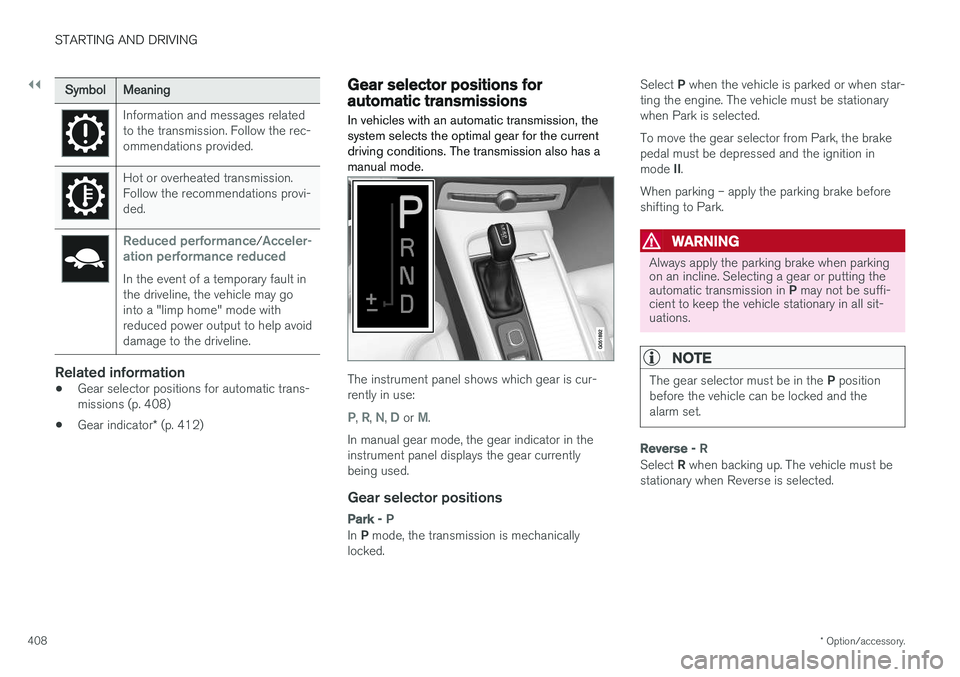
Gear selector positions forautomatic transmissions In vehicles with an automatic transmission, the system selects the optimal gear for the currentdriving conditions. The transmission also has amanual mode.
The instrument panel shows which gear is cur- rently in use:
P, R, N, D or M.
In manual gear mode, the gear indicator in the instrument panel displays the gear currentlybeing used.
Gear selector positions
Park - P
In P mode, the transmission is mechanically
locked. Select
P when the vehicle is parked or when star-
ting the engine. The vehicle must be stationary when Park is selected. To move the gear selector from Park, the brake pedal must be depressed and the ignition in mode II.
When parking – apply the parking brake before shifting to Park.
WARNING
Always apply the parking brake when parking on an incline. Selecting a gear or putting the automatic transmission in P may not be suffi-
cient to keep the vehicle stationary in all sit- uations.
NOTE
The gear selector must be in the P position
before the vehicle can be locked and the alarm set.
Reverse - R
Select R when backing up. The vehicle must be
stationary when Reverse is selected.
Page 439 of 640
STARTING AND DRIVING
}}
* Option/accessory.437
Recovery
This section refers to transporting the vehicle with a tow truck or similar vehicle.
Call a professional towing service for assistance. In certain conditions, the towing eyelet can be used to pull the vehicle onto a flatbed tow truck. For vehicles equipped with leveling control *:
If the vehicle is equipped with pneumatic suspen- sion, this feature must be turned off before thevehicle is lifted onto a tow truck. Turning off thefunction in the center display. 1. Tap
Settings in the Top view.
2. Tap
My CarParking Brake and
Suspension.
3. Select
Disable Leveling Control.
The vehicle's location and ground clearance determine if it can be lifted onto a tow truck. Ifthe incline of the tow truck is too steep or if theground clearance under the vehicle is insufficient,attempting to pull it up may result in damage. Inthis case, the vehicle should only be lifted withthe tow truck's lifting equipment.
WARNING
No person or object should be behind the tow truck when the vehicle is lifted onto the bedof the truck.
CAUTION
The towing eyelet is only intended for towing on roads, and must not be used to pull vehi-
cles from ditches or any similar purpose involving severe strain. Call a tow truck forprofessional assistance.
CAUTION
Note that the vehicle must always be towed with the wheels rolling forward.
Related information
• Attaching and removing the towing eyelet (p. 435)
HomeLink®
*9
HomeLink ®
10
is a programmable remote control,
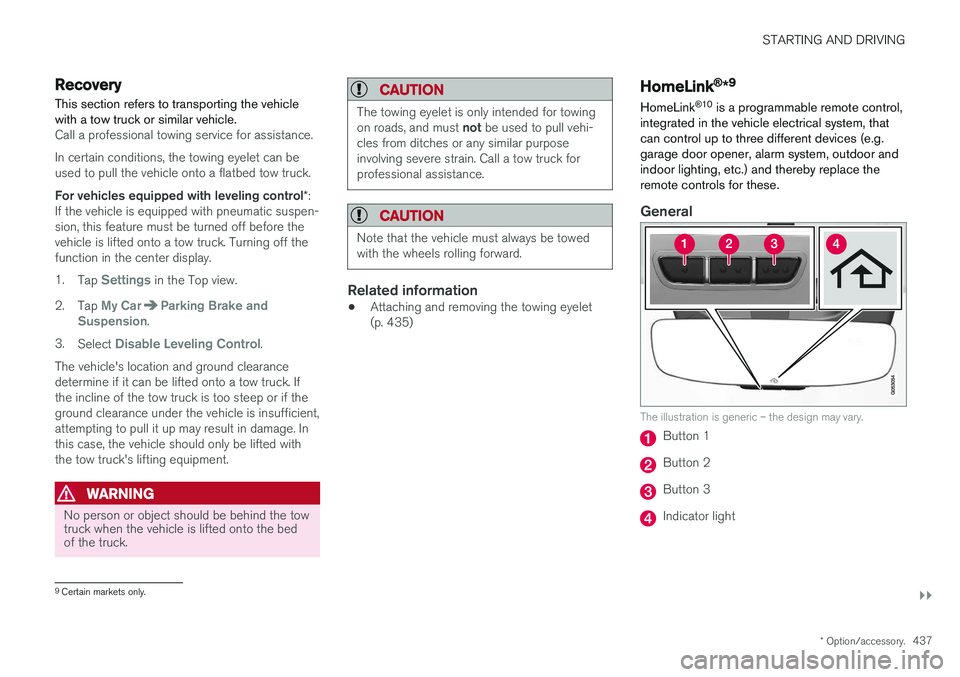
integrated in the vehicle electrical system, that can control up to three different devices (e.g.garage door opener, alarm system, outdoor andindoor lighting, etc.) and thereby replace theremote controls for these.
General
The illustration is generic – the design may vary.
Button 1
Button 2
Button 3
Indicator light
9 Certain markets only.
Page 441 of 640
STARTING AND DRIVING
}}
* Option/accessory.439
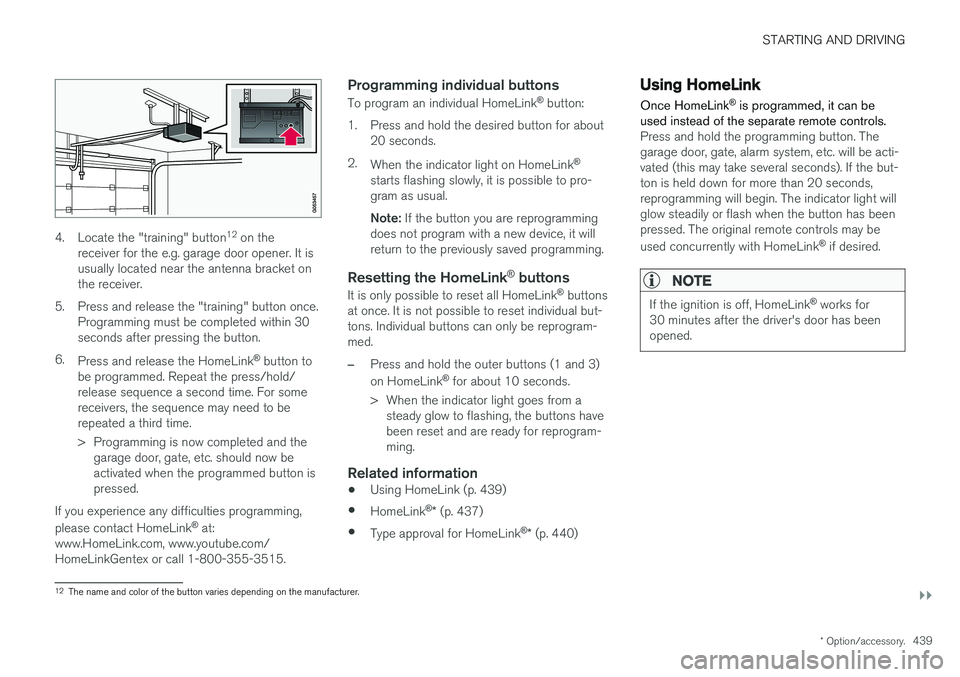
4. Locate the "training" button 12
on the
receiver for the e.g. garage door opener. It is usually located near the antenna bracket onthe receiver.
5. Press and release the "training" button once. Programming must be completed within 30seconds after pressing the button.
6. Press and release the HomeLink ®
button to
be programmed. Repeat the press/hold/release sequence a second time. For somereceivers, the sequence may need to berepeated a third time.
> Programming is now completed and the garage door, gate, etc. should now be activated when the programmed button ispressed.
If you experience any difficulties programming, please contact HomeLink ®
at:
www.HomeLink.com, www.youtube.com/ HomeLinkGentex or call 1-800-355-3515.
Programming individual buttons
To program an individual HomeLink ®
button:
1. Press and hold the desired button for about 20 seconds.
2. When the indicator light on HomeLink ®
starts flashing slowly, it is possible to pro-gram as usual. Note: If the button you are reprogramming
does not program with a new device, it will return to the previously saved programming.
Resetting the HomeLink ®
buttons
It is only possible to reset all HomeLink ®
buttons
at once. It is not possible to reset individual but-tons. Individual buttons can only be reprogram-med.
–Press and hold the outer buttons (1 and 3) on HomeLink ®
for about 10 seconds.
> When the indicator light goes from a steady glow to flashing, the buttons have been reset and are ready for reprogram-ming.
Related information
• Using HomeLink (p. 439)
• HomeLink ®
* (p. 437)
• Type approval for HomeLink ®
* (p. 440)
Using HomeLink
Once HomeLink ®
is programmed, it can be
used instead of the separate remote controls.
Press and hold the programming button. The garage door, gate, alarm system, etc. will be acti-vated (this may take several seconds). If the but-ton is held down for more than 20 seconds,reprogramming will begin. The indicator light willglow steadily or flash when the button has beenpressed. The original remote controls may be used concurrently with HomeLink ®
if desired.
NOTE
If the ignition is off, HomeLink ®
works for
30 minutes after the driver's door has been opened.
12 The name and color of the button varies depending on the manufacturer.
Page 541 of 640
LOADING, STORAGE AND PASSENGER COMPARTMENT
}}
* Option/accessory.539
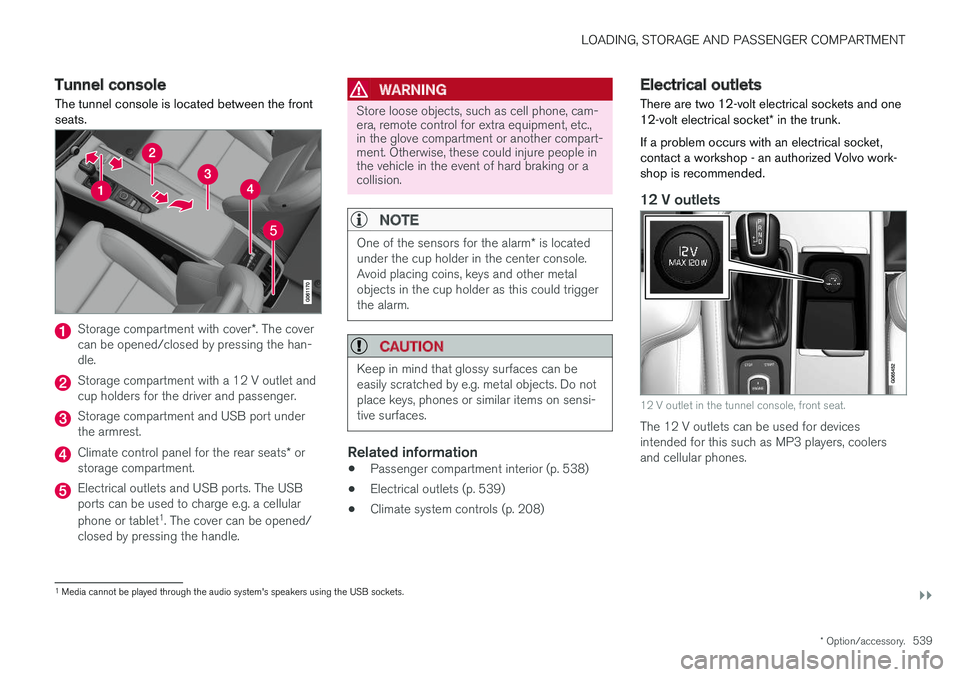
Tunnel console The tunnel console is located between the front seats.
Storage compartment with cover *. The cover
can be opened/closed by pressing the han- dle.
Storage compartment with a 12 V outlet and cup holders for the driver and passenger.
Storage compartment and USB port under the armrest.
Climate control panel for the rear seats * or
storage compartment.
Electrical outlets and USB ports. The USB ports can be used to charge e.g. a cellular phone or tablet 1
. The cover can be opened/
closed by pressing the handle.
WARNING
Store loose objects, such as cell phone, cam- era, remote control for extra equipment, etc.,in the glove compartment or another compart-ment. Otherwise, these could injure people inthe vehicle in the event of hard braking or acollision.
NOTE
One of the sensors for the alarm * is located
under the cup holder in the center console. Avoid placing coins, keys and other metalobjects in the cup holder as this could triggerthe alarm.
CAUTION
Keep in mind that glossy surfaces can be easily scratched by e.g. metal objects. Do notplace keys, phones or similar items on sensi-tive surfaces.
Related information
• Passenger compartment interior (p. 538)
• Electrical outlets (p. 539)
• Climate system controls (p. 208)
Electrical outlets
There are two 12-volt electrical sockets and one 12-volt electrical socket * in the trunk.
If a problem occurs with an electrical socket, contact a workshop - an authorized Volvo work-shop is recommended.
12 V outlets
12 V outlet in the tunnel console, front seat.
The 12 V outlets can be used for devices intended for this such as MP3 players, coolersand cellular phones.
1 Media cannot be played through the audio system's speakers using the USB sockets.
Page 584 of 640
||
MAINTENANCE AND SERVICE
* Option/accessory.
582
FunctionAA
– –
– –
Heated windshield *, left side Shunt
Heated windshield
*, left side 40
Headlight washers
*25
Windshield washer 25
Transmission control module 15
Horn 20
Alarm siren
* 5
Brake system control module (valves, parking brake) 40
Wipers 30
– –
Heated windshield
*, right side 40
– –
Brake system control module (ABS pump) 40
– –
FunctionAA
Heated windshield
*, right side Shunt
Fed when ignition is on: engine control module, transmissioncomponents, electrical powersteering, central electrical mod-ule, brake system control mod-ule 5
– –
Right-side headlight 7.5
– –
– –
Battery connection control mod- ule
5
Airbags 5
Left-side headlight 7.5
Accelerator pedal sensor 5
A
Ampere
Related information
• Fuses and fuseboxes (p. 578)
• Replacing fuses (p. 579)
Page 625 of 640
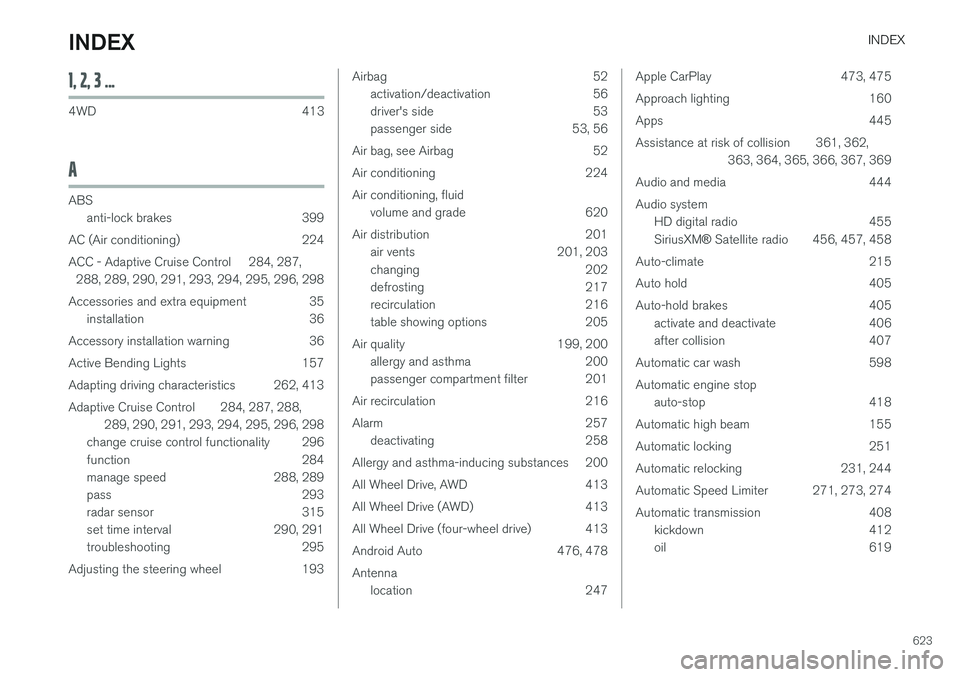
INDEX
623
1, 2, 3 ...
4WD 413
A
ABSanti-lock brakes 399
AC (Air conditioning) 224
ACC - Adaptive Cruise Control 284, 287, 288, 289, 290, 291, 293, 294, 295, 296, 298
Accessories and extra equipment 35 installation 36
Accessory installation warning 36
Active Bending Lights 157
Adapting driving characteristics 262, 413
Adaptive Cruise Control 284, 287, 288, 289, 290, 291, 293, 294, 295, 296, 298
change cruise control functionality 296
function 284
manage speed 288, 289
pass 293
radar sensor 315
set time interval 290, 291
troubleshooting 295
Adjusting the steering wheel 193
Airbag 52 activation/deactivation 56
driver's side 53
passenger side 53, 56
Air bag, see Airbag 52
Air conditioning 224Air conditioning, fluid volume and grade 620
Air distribution 201 air vents 201, 203
changing 202
defrosting 217
recirculation 216
table showing options 205
Air quality 199, 200 allergy and asthma 200
passenger compartment filter 201
Air recirculation 216
Alarm 257 deactivating 258
Allergy and asthma-inducing substances 200
All Wheel Drive, AWD 413
All Wheel Drive (AWD) 413
All Wheel Drive (four-wheel drive) 413
Android Auto 476, 478 Antenna location 247Apple CarPlay 473, 475
Approach lighting 160
Apps 445
Assistance at risk of collision 361, 362, 363, 364, 365, 366, 367, 369
Audio and media 444Audio system HD digital radio 455 SiriusXM ® Satellite radio 456, 457, 458
Auto-climate 215
Auto hold 405
Auto-hold brakes 405 activate and deactivate 406
after collision 407
Automatic car wash 598 Automatic engine stop auto-stop 418
Automatic high beam 155
Automatic locking 251
Automatic relocking 231, 244
Automatic Speed Limiter 271, 273, 274
Automatic transmission 408 kickdown 412
oil 619
INDEX