buttons VOLVO S90 2018 Owner´s Manual
[x] Cancel search | Manufacturer: VOLVO, Model Year: 2018, Model line: S90, Model: VOLVO S90 2018Pages: 640, PDF Size: 11.37 MB
Page 270 of 640

DRIVER SUPPORT
268
Activating and starting SpeedLimiterThe Speed Limiter (SL 10
) function must be
selected and activated in order to regulate speed.
Putting Speed Limiter in standby mode
Note: This illustration is general and details may vary depending on model.
–Press ◀ (1) or ▶ (3) and scroll to the Speed
Limiter function
(4).
> The symbol (4) will appear, indicating that the Speed Limiter is in standby mode.
Starting the Speed LimiterThe Speed Limiter can only be activated while the engine is running. The lowest maximumspeed that can be set is 30 km/h (20 mph).
–With the Speed Limiter in standby mode and the
symbol displayed, press the
button (2) on the steering wheel key-
pad.
> The Speed Limiter will be started and the vehicle's current speed will be set as the maximum speed.
Related information
• Speed limiter (p. 267)
Managing Speed Limiter speed The Speed Limiter (SL 11
) can be set to various
speeds.
Setting/changing set speed
Note: This illustration is general and details may vary depending on model.
–Change a set speed by pressing the (1)
or
(3) buttons briefly or by pressing and
holding them:
• Press briefly
: Press briefly: each press
changes the speed in +/- 5 mph (+/- 5 km/h) increments.
• Press
and hold: Release the button when
the set speed indicator (4) has moved tothe desired speed.
• The most recently set speed will be stored.
10
Speed Limiter
Page 272 of 640

DRIVER SUPPORT
270
Reactivating Speed Limiter fromstandby modeSpeed Limiter (SL 13
) can be reactivated after
having been temporarily deactivated and put in standby mode.
Note: This illustration is general and details may vary depending on model.
To reactivate the Speed Limiter from standby mode:
–Press the button on the steering wheel
(1).
> The speed limit markings in the instru- ment panel will change from GRAY to WHITE. The vehicle's speed will onceagain be limited to the most recently setspeed.
or
–Press the button on the steering wheel
(2).
> The speed limit markings and symbols in the instrument panel will change from GRAY to WHITE and the vehicle's currentspeed will be set as the maximum speed.
Related information
• Speed limiter (p. 267)
Turning off Cruise Control
The Speed Limiter (SL 14
) can be turned off.
Note: This illustration is general and details may vary depending on model.
1. Press the button on the steering wheel
(2).
> The Speed Limiter will go into standby mode.
2. Press the ◀ (1) or ▶ (3) buttons on the
steering wheel to select another function.
> The Speed Limiter symbol and marking (4) in the instrument panel will go out and the set maximum speed will be erased.
3. Press the
(2) button on the steering
wheel keypad again.
> Another function will be activated.
13 Speed Limiter
Page 276 of 640
DRIVER SUPPORT
* Option/accessory.
274
Changing Automatic Speed Limitertolerance The Automatic Speed Limiter (ASL 20
) can be set
to different tolerance levels.
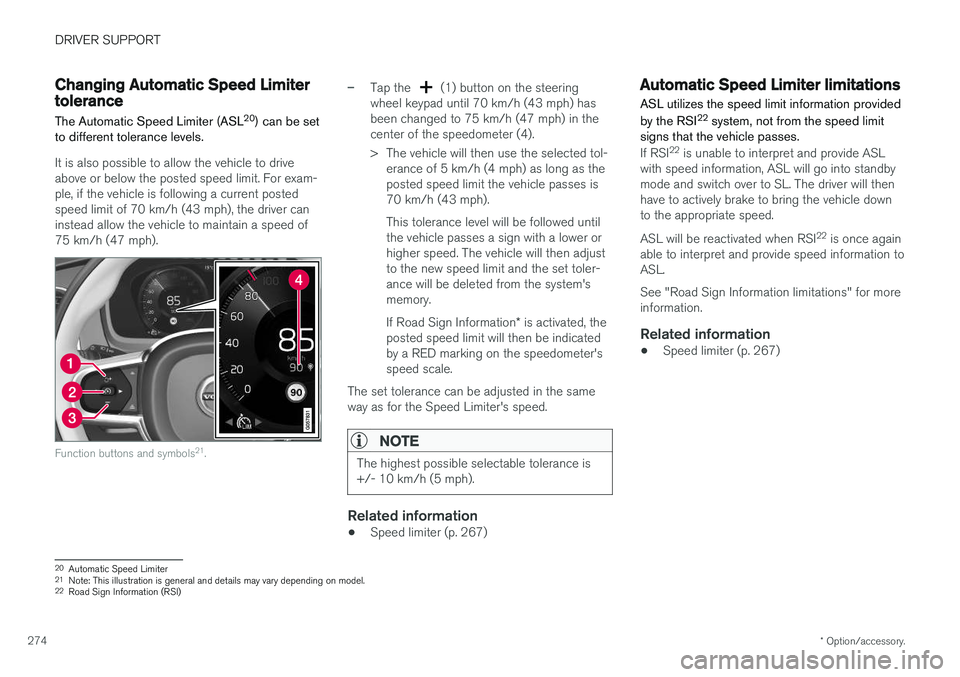
It is also possible to allow the vehicle to drive above or below the posted speed limit. For exam-ple, if the vehicle is following a current postedspeed limit of 70 km/h (43 mph), the driver caninstead allow the vehicle to maintain a speed of75 km/h (47 mph).
Function buttons and symbols 21
.
–Tap the (1) button on the steering
wheel keypad until 70 km/h (43 mph) has been changed to 75 km/h (47 mph) in thecenter of the speedometer (4).
> The vehicle will then use the selected tol- erance of 5 km/h (4 mph) as long as the posted speed limit the vehicle passes is70 km/h (43 mph). This tolerance level will be followed until the vehicle passes a sign with a lower orhigher speed. The vehicle will then adjustto the new speed limit and the set toler-ance will be deleted from the system'smemory. If Road Sign Information * is activated, the
posted speed limit will then be indicated by a RED marking on the speedometer'sspeed scale.
The set tolerance can be adjusted in the sameway as for the Speed Limiter's speed.
NOTE
The highest possible selectable tolerance is +/- 10 km/h (5 mph).
Related information
• Speed limiter (p. 267)
Automatic Speed Limiter limitations
ASL utilizes the speed limit information provided by the RSI 22
system, not from the speed limit
signs that the vehicle passes.
If RSI 22
is unable to interpret and provide ASL
with speed information, ASL will go into standby mode and switch over to SL. The driver will thenhave to actively brake to bring the vehicle downto the appropriate speed. ASL will be reactivated when RSI 22
is once again
able to interpret and provide speed information to ASL. See "Road Sign Information limitations" for more information.
Related information
• Speed limiter (p. 267)
20
Automatic Speed Limiter
21 Note: This illustration is general and details may vary depending on model.
22 Road Sign Information (RSI)
Page 277 of 640
DRIVER SUPPORT
}}
* Option/accessory.275
Cruise control
Cruise Control (CC 23
) helps the driver maintain
an even speed to provide a more relaxing driving experience on highways and long, straight roadswith even traffic flows.
Overview
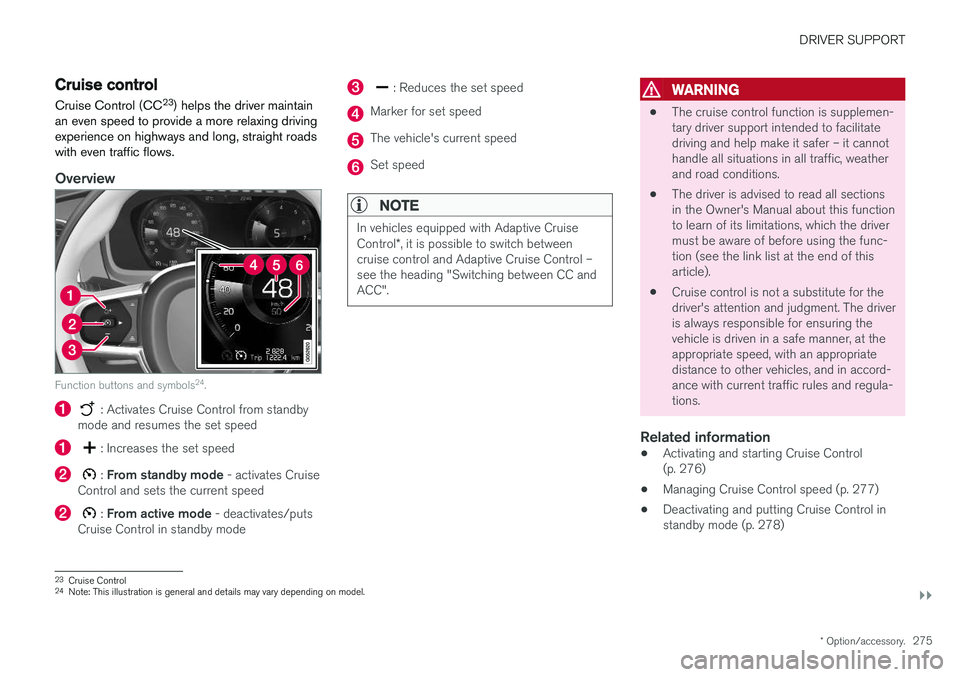
Function buttons and symbols 24
.
: Activates Cruise Control from standby
mode and resumes the set speed
: Increases the set speed
: From standby mode - activates Cruise
Control and sets the current speed
: From active mode - deactivates/puts
Cruise Control in standby mode
: Reduces the set speed
Marker for set speed
The vehicle's current speed
Set speed
NOTE
In vehicles equipped with Adaptive Cruise Control *, it is possible to switch between
cruise control and Adaptive Cruise Control – see the heading "Switching between CC andACC".
WARNING
• The cruise control function is supplemen- tary driver support intended to facilitatedriving and help make it safer – it cannothandle all situations in all traffic, weatherand road conditions.
• The driver is advised to read all sectionsin the Owner's Manual about this functionto learn of its limitations, which the drivermust be aware of before using the func-tion (see the link list at the end of thisarticle).
• Cruise control is not a substitute for thedriver's attention and judgment. The driveris always responsible for ensuring thevehicle is driven in a safe manner, at theappropriate speed, with an appropriatedistance to other vehicles, and in accord-ance with current traffic rules and regula-tions.
Related information
• Activating and starting Cruise Control(p. 276)
• Managing Cruise Control speed (p. 277)
• Deactivating and putting Cruise Control instandby mode (p. 278)
23
Cruise Control
24 Note: This illustration is general and details may vary depending on model.
Page 279 of 640
DRIVER SUPPORT
}}
277
Managing Cruise Control speedCruise Control (CC 26
) can be set to various
speeds.
Setting/changing set speed
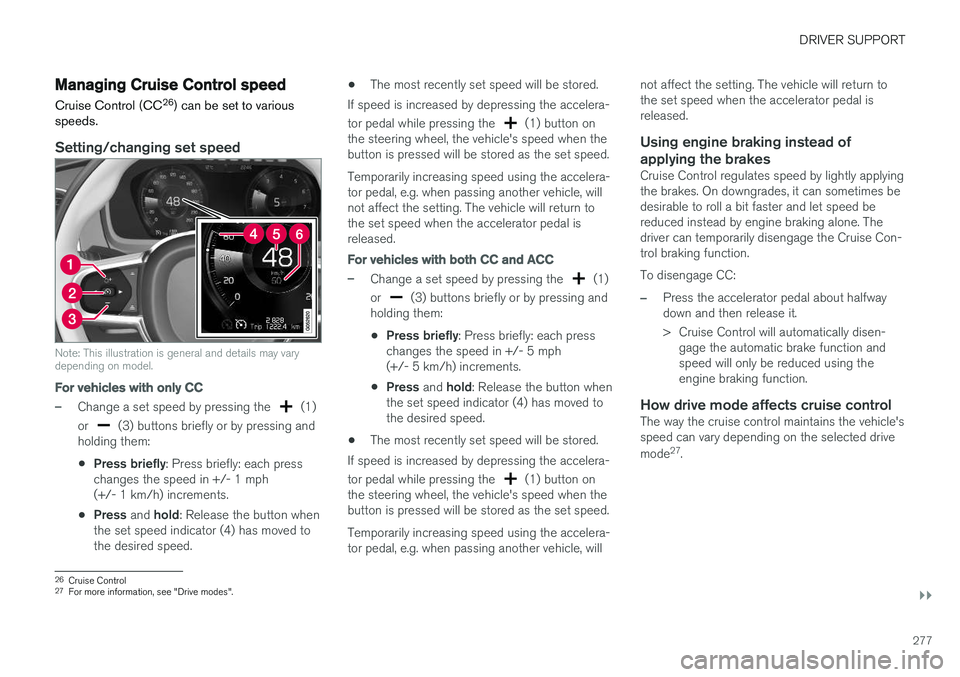
Note: This illustration is general and details may vary depending on model.
For vehicles with only CC
–Change a set speed by pressing the (1)
or
(3) buttons briefly or by pressing and
holding them:
• Press briefly
: Press briefly: each press
changes the speed in +/- 1 mph (+/- 1 km/h) increments.
• Press
and hold: Release the button when
the set speed indicator (4) has moved tothe desired speed. •
The most recently set speed will be stored.
If speed is increased by depressing the accelera- tor pedal while pressing the
(1) button on
the steering wheel, the vehicle's speed when the button is pressed will be stored as the set speed. Temporarily increasing speed using the accelera- tor pedal, e.g. when passing another vehicle, willnot affect the setting. The vehicle will return tothe set speed when the accelerator pedal isreleased.
For vehicles with both CC and ACC
–Change a set speed by pressing the (1)
or
(3) buttons briefly or by pressing and
holding them:
• Press briefly
: Press briefly: each press
changes the speed in +/- 5 mph (+/- 5 km/h) increments.
• Press
and hold: Release the button when
the set speed indicator (4) has moved tothe desired speed.
• The most recently set speed will be stored.
If speed is increased by depressing the accelera- tor pedal while pressing the
(1) button on
the steering wheel, the vehicle's speed when the button is pressed will be stored as the set speed. Temporarily increasing speed using the accelera- tor pedal, e.g. when passing another vehicle, will not affect the setting. The vehicle will return tothe set speed when the accelerator pedal isreleased.
Using engine braking instead of
applying the brakes
Cruise Control regulates speed by lightly applyingthe brakes. On downgrades, it can sometimes bedesirable to roll a bit faster and let speed bereduced instead by engine braking alone. Thedriver can temporarily disengage the Cruise Con-trol braking function. To disengage CC:
–Press the accelerator pedal about halfway down and then release it.
> Cruise Control will automatically disen- gage the automatic brake function and speed will only be reduced using theengine braking function.
How drive mode affects cruise controlThe way the cruise control maintains the vehicle'sspeed can vary depending on the selected drive mode 27
.
26 Cruise Control
27 For more information, see "Drive modes".
Page 282 of 640

||
DRIVER SUPPORT
* Option/accessory.
280
Function buttons and symbols 30
.
To turn off Cruise Control: 1. Press the
button on the steering wheel
(2).
> Cruise Control will go into standby mode.
2. Press the
◀ (1) or ▶ (3) buttons on the
steering wheel to select another function.> The Cruise Control symbol
(4) in
the instrument panel will go out and the set speed will be erased.
3. Press the
(2) button on the steering
wheel keypad again.
> Another function will be activated.
NOTE
In vehicles equipped with Adaptive Cruise Control *, it is possible to switch between
cruise control and Adaptive Cruise Control – see the heading "Switching between CC andACC".
Related information
• Cruise control (p. 275)
Distance Alert
*
The Distance Alert 31
function can help the driver
become aware if the time interval to the vehicle in front is too short. However, the vehicle must be equipped with a head-up display in order to display the DistanceAlert, which will then be indicated by a symbolon the windshield as long as the time interval tothe vehicle ahead is shorter than the set timeinterval.
Distance Alert is active at speeds above 30 km/h (20 mph) and only reacts for vehicles ahead mov-ing in the same direction as your vehicle. No dis-tance information is provided for oncoming, slow-moving or stationary vehicles.
NOTE
• Distance Alert is only available in vehicles that can display information on the wind-shield with a head-up display.
• Distance Alert is deactivated while Adap-tive Cruise Control is active.
30
Note: This illustration is general and details may vary depending on model.
31 Distance Alert
Page 287 of 640
DRIVER SUPPORT
}}
285
Adaptive Cruise Control regulates speed by accelerating and braking. It is normal for thebrakes to emit a slight sound when they arebeing used to adjust speed. Adaptive Cruise Control always attempts to regu- late speed smoothly. The driver must apply thebrakes in situations requiring immediate braking.For example, when there are great differences inspeed between vehicles or if the vehicle aheadbrakes suddenly. Due to limitations in the radarsensor, braking may occur unexpectedly or not atall. Adaptive Cruise Control is designed to follow a vehicle ahead in the same lane and maintain atime interval to that vehicle set by the driver. If theradar sensor does not detect a vehicle ahead, itwill instead maintain the speed set by the driver.This will also happen if the speed of the vehicleahead exceeds the set speed for your vehicle.
• Adaptive Cruise Control can follow anothervehicle at speeds from a standstill up to200 km/h (125 mph).
WARNING
• Adaptive Cruise Control is not a collision avoidance system. The driver is alwaysresponsible and must intervene if the sys-tem fails to detect a vehicle ahead.
• Adaptive Cruise Control does not brakefor people or animals and does not brakefor small vehicles, such as bikes andmotorcycles. Similarly, it does not brakefor low trailers, oncoming, slow-moving orstationary vehicles and objects.
• Do not use Adaptive Cruise Control indemanding situations, such as in city traf-fic, at intersections, on slippery surfaces,with a lot of water or slush on the road, inheavy rain/snow, in poor visibility, onwinding roads, or on on/off ramps.
CAUTION
Maintenance of Adaptive Cruise Control com- ponents may only be performed by a work-shop – an authorized Volvo workshop is rec-ommended.
Overview
Controls
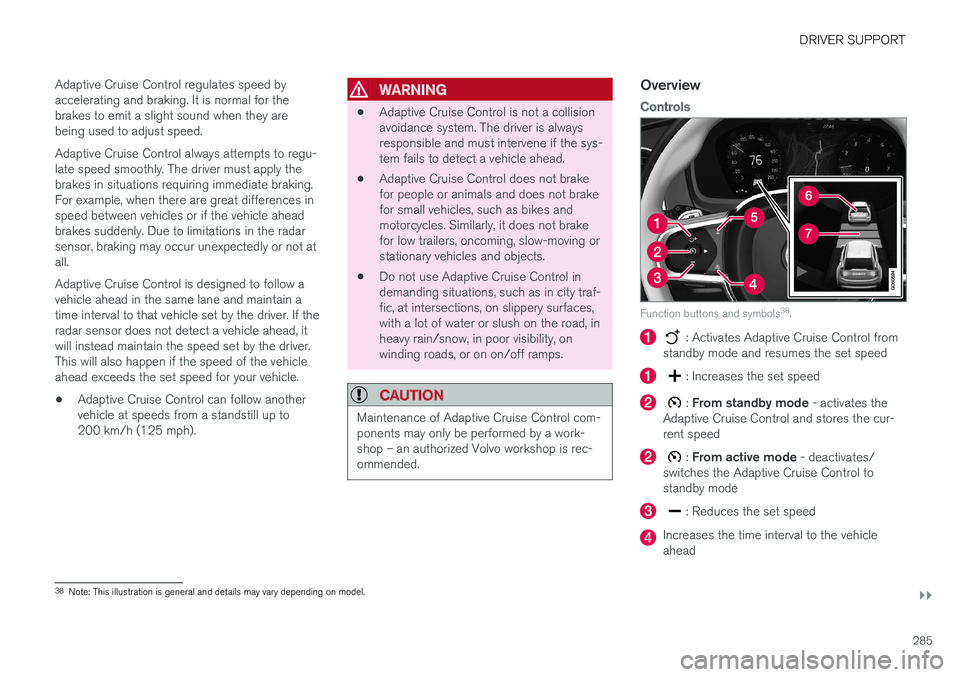
Function buttons and symbols 38
.
: Activates Adaptive Cruise Control from
standby mode and resumes the set speed
: Increases the set speed
: From standby mode - activates the
Adaptive Cruise Control and stores the cur- rent speed
: From active mode - deactivates/
switches the Adaptive Cruise Control to standby mode
: Reduces the set speed
Increases the time interval to the vehicle ahead
38 Note: This illustration is general and details may vary depending on model.
Page 291 of 640
DRIVER SUPPORT
* Option/accessory.289
Managing Adaptive Cruise Controlspeed
Adaptive Cruise Control (ACC 42
) can be set to
various speeds.
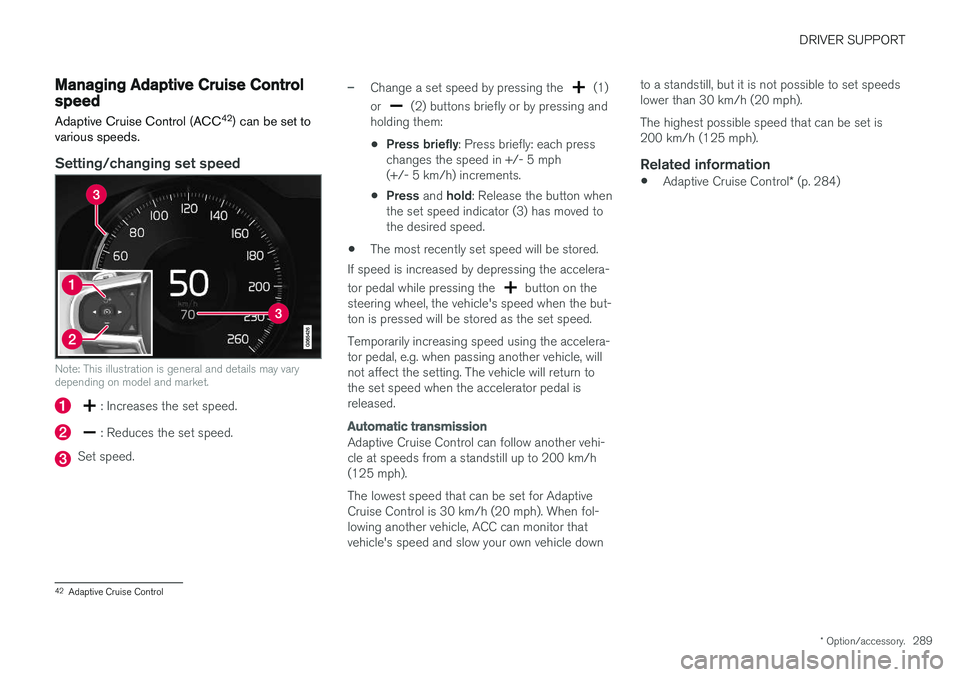
Setting/changing set speed
Note: This illustration is general and details may vary depending on model and market.
: Increases the set speed.
: Reduces the set speed.
Set speed.
–Change a set speed by pressing the (1)
or
(2) buttons briefly or by pressing and
holding them:
• Press briefly
: Press briefly: each press
changes the speed in +/- 5 mph (+/- 5 km/h) increments.
• Press
and hold: Release the button when
the set speed indicator (3) has moved tothe desired speed.
• The most recently set speed will be stored.
If speed is increased by depressing the accelera- tor pedal while pressing the
button on the
steering wheel, the vehicle's speed when the but- ton is pressed will be stored as the set speed. Temporarily increasing speed using the accelera- tor pedal, e.g. when passing another vehicle, willnot affect the setting. The vehicle will return tothe set speed when the accelerator pedal isreleased.
Automatic transmission
Adaptive Cruise Control can follow another vehi- cle at speeds from a standstill up to 200 km/h(125 mph). The lowest speed that can be set for Adaptive Cruise Control is 30 km/h (20 mph). When fol-lowing another vehicle, ACC can monitor thatvehicle's speed and slow your own vehicle down to a standstill, but it is not possible to set speedslower than 30 km/h (20 mph). The highest possible speed that can be set is 200 km/h (125 mph).
Related information
•
Adaptive Cruise Control
* (p. 284)
42
Adaptive Cruise Control
Page 304 of 640
||
DRIVER SUPPORT
302When the vehicle is approaching an off-ramp or a fork in the road, the driver should steer towardthe desired lane to indicate to Pilot Assist thedesired direction of travel.
Pilot Assist strives to keep the vehicle
in the center of the lane
When Pilot Assist provides steering assistance, itstrives to position the vehicle in the center of thelane between the lane markings. For the smooth-est driving experience possible, the driver shouldpermit the vehicle to find the optimal positioning.The driver should check that the vehicle is posi-tioned safely in the lane and can always adjustthe vehicle's position by applying more force tothe steering wheel. If Pilot Assist does not position the vehicle appro- priately in the lane, the driver should turn off PilotAssist or switch to Adaptive Cruise Control.
Overview
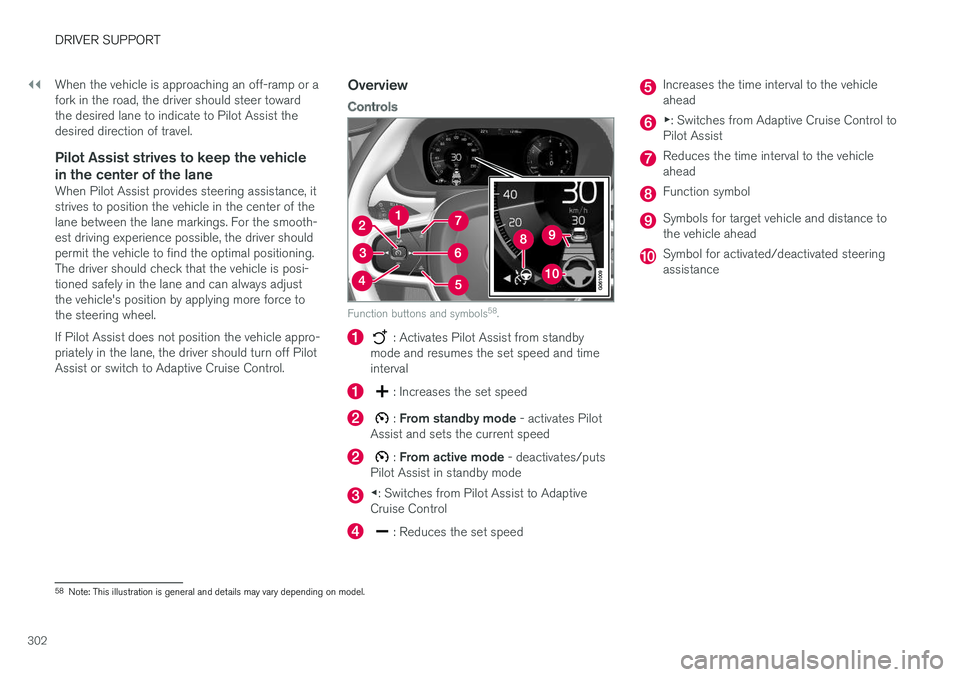
Controls
Function buttons and symbols 58
.
: Activates Pilot Assist from standby
mode and resumes the set speed and time interval
: Increases the set speed
: From standby mode - activates Pilot
Assist and sets the current speed
: From active mode - deactivates/puts
Pilot Assist in standby mode
◀ : Switches from Pilot Assist to Adaptive
Cruise Control
: Reduces the set speed
Increases the time interval to the vehicle ahead
▶ : Switches from Adaptive Cruise Control to
Pilot Assist
Reduces the time interval to the vehicle ahead
Function symbol
Symbols for target vehicle and distance to the vehicle ahead
Symbol for activated/deactivated steering assistance
58 Note: This illustration is general and details may vary depending on model.
Page 308 of 640
||
DRIVER SUPPORT
306
–Change a set speed by pressing the (1)
or
(2) buttons briefly or by pressing and
holding them:
• Press briefly
: Press briefly: each press
changes the speed in +/- 5 mph (+/- 5 km/h) increments.
• Press
and hold: Release the button when
the set speed indicator (3) has moved tothe desired speed.
• The most recently set speed will be stored.
If speed is increased by depressing the accelera- tor pedal while pressing the
button on the
steering wheel, the vehicle's speed when the but- ton is pressed will be stored as the set speed. Temporarily increasing speed using the accelera- tor pedal, e.g. when passing another vehicle, willnot affect the setting. The vehicle will return tothe set speed when the accelerator pedal isreleased.
Automatic transmission
Pilot Assist can follow another vehicle at speeds from a standstill up to 200 km/h (125 mph). The lowest speed that can be set for Pilot Assist is 30 km/h (20 mph). When following anothervehicle, ACC can monitor that vehicle's speedand slow your own vehicle down to a standstill,but it is not possible to set speeds lower than30 km/h (20 mph). The highest possible speed that can be set is200 km/h (125 mph).
Related information
•
Pilot Assist (p. 300)
Setting a time interval for PilotAssist
Pilot Assist can be set to different time intervals.
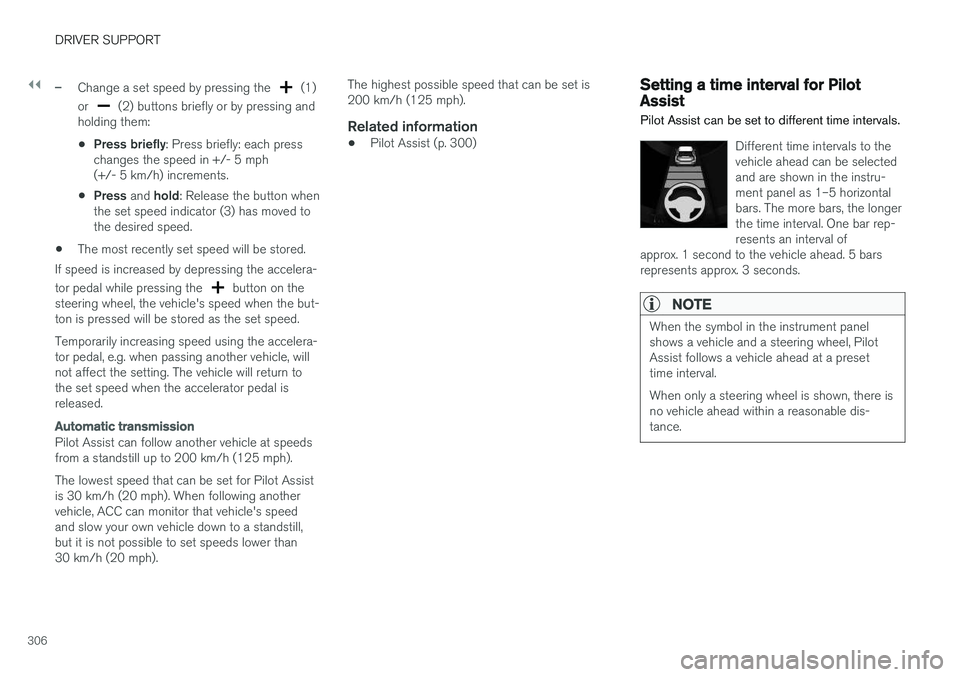
Different time intervals to the vehicle ahead can be selectedand are shown in the instru-ment panel as 1–5 horizontalbars. The more bars, the longerthe time interval. One bar rep-resents an interval of
approx. 1 second to the vehicle ahead. 5 barsrepresents approx. 3 seconds.
NOTE
When the symbol in the instrument panel shows a vehicle and a steering wheel, PilotAssist follows a vehicle ahead at a presettime interval. When only a steering wheel is shown, there is no vehicle ahead within a reasonable dis-tance.