warning VOLVO S90 2018 Owner´s Manual
[x] Cancel search | Manufacturer: VOLVO, Model Year: 2018, Model line: S90, Model: VOLVO S90 2018Pages: 640, PDF Size: 11.37 MB
Page 255 of 640
KEY, LOCKS AND ALARM
}}
* Option/accessory.253
–Press and hold the button on the dash-
board.
> The trunk lid closes automatically and an audible signal sounds - the trunk lid will remain unlocked.
–Move your foot in a kicking motion * under
the rear bumper.
> The trunk lid closes automatically and an audible signal sounds - the trunk lid will remain unlocked.
Closing and locking 18
the power trunk
lid
–Press the button on the lower edge of
the trunk lid to close and simultaneously lock both the trunk lid and doors (all doors mustbe closed in order to lock).
> The trunk lid closes automatically - the
trunk lid and doors lock, and the alarm * is
armed.
NOTE
• One of the vehicle's remote keys must be within range for locking and unlocking tobe possible.
• When the keyless locking or closing
* func-
tions are used, three audible signals willsound if the key is not detected closeenough to the tailgate.
CAUTION
When operating the trunk lid manually, open and close it slowly. If you encounter resis-tance, do not use force. This could lead todamage and loss of function.
Interrupting closingInterrupt closing by doing one of the following: •
Press the button on the dashboard.
• Press the button on the remote key.
• Press the close button on the underside of the trunk lid.
• Press the rubberized pressure plate on theunderside of the tailgate's outer handle.
• Using a foot movement
*.
The trunk lid will stop closing and return to itsfully open position. The trunk lid can then beopened or closed manually.
Pinch protectionIf anything obstructs the tailgate with enoughforce to prevent it from closing, pinch protectionwill be activated.
• When closing - the trunk lid will stop andthen return to its fully open position. A longaudible signal will sound.
WARNING
Be aware of the risk of serious injury when operating the trunk lid. Before closing, makesure that no one is in the path of the tailgatewho could be injured by its movement. Always operate the trunk lid with caution.
18
Vehicles equipped with keyless locking and unlocking (Passive Entry *) have a button for closing and a button for closing and locking.
Page 264 of 640
DRIVER SUPPORT
* Option/accessory.
262
Driver support systems
The vehicle is equipped with a number of driver support systems that can provide the driver withactive or passive assistance in various situations.
The system can, for example, help the driver maintain a set speed or a set time interval to thevehicle ahead, help prevent a collision by warningthe driver and applying the brakes, or assist thedriver while parking. Some of the systems are standard and others are options. This also varies from market to market.
Related information
• Speed-dependent steering wheel resistance(p. 262)
• Electronic Stability Control (p. 264)
• Stability system Roll Stability Control(p. 263)
• Rear Collision Warning (p. 336)
• Speed limiter (p. 267)
• Cruise control (p. 275)
• Distance Alert
* (p. 280)
• Adaptive Cruise Control
* (p. 284)
• Pilot Assist (p. 300)
• Radar sensor (p. 315)
• Camera (p. 320)
• City Safety
™ (p. 324)
• BLIS
* (p. 337) •
Cross Traffic Alert
* (p. 342)
• Road Sign Information
* (p. 346)
• Driver Alert Control (p. 351)
• Lane Keeping Aid (p. 353)
• Steering assistance at risk of collision(p. 361)
• Park Assist
* (p. 370)
• Park Assist Camera
* (p. 375)
• Park Assist Pilot
* (p. 384)
Speed-dependent steering wheelresistance
Speed-dependent power steering increases the steering wheel resistance in pace with the vehi-cle's speed to give the driver an enhanced feel-ing of control and stability.
Steering may feel stiffer on highways. When parking and at low speeds, it will be easier tomove the steering wheel.
NOTE
In some situations, the power steering may become too hot and require temporary cool-ing – during such time the power steering willwork at reduced output and the steeringwheel may feel more difficult to move. In parallel with the temporarily reduced steer- ing assistance, the driver display shows amessage as well as a STEERING WHEELsymbol.
Page 265 of 640
DRIVER SUPPORT
* Option/accessory.263
WARNING
While the power steering is working at reduced power, the driver support functionswith steering assistance are not available. In such a situation, the driver display shows the
Power steering failure or Power
Steering Assist Temporarily Reduced
message, combined with a STEERING WHEEL symbol.
Changing the level of steering wheel resistance *
To change the level of steering wheel resistance, see the description of the INDIVIDUAL optionunder "Available drive modes" in the "Drivemodes" section. On models not equipped with drive mode con- trols and the INDIVIDUAL option, steering wheelresistance can instead be set in the center dis-play's Top view under:
SettingsMy CarDrive ModesSteering force
Steering wheel resistance settings cannot be accessed when turning at speeds above10 km/h (6 mph).
Related information
•Drive modes
* (p. 413)
• Pilot Assist (p. 300) •
Lane Keeping Aid (p. 353)
• Steering assistance at risk of collision(p. 361)
• Park Assist Pilot
* (p. 384)
Stability system Roll StabilityControl
The Roll Stability Control (RSC 1
) system helps
minimize the risk of a rollover in the event of e.g. a sudden evasive maneuver or if the vehiclebegins to skid.
The RSC system monitors the lateral angle at which the vehicle is leaning and registers anychanges. Using this information, the system cal-culates the likelihood of a rollover. If there is animminent risk of a rollover, Electronic StabilityControl is activated, engine torque is reduced andbrakes are applied to one or more of the wheelsuntil the vehicle has regained stability.
WARNING
The vehicle
Page 266 of 640
DRIVER SUPPORT
264
Electronic Stability ControlThe Electronic Stability Control (ESC 2
) function
helps the driver avoid skidding and improves the vehicle's directional stability.
This symbol will be displayed in the instrument panel when theESC system is intervening. When the ESC has intervened to apply the brakes, a pulsingsound may be heard and the
vehicle may accelerate more slowly than expec-ted when the accelerator pedal is depressed.
The ESC system consists of the following sub- functions: • Stability control 3
• Spin control and active yaw control
• Engine drag control
WARNING
• The Electronic Stability Control system ESC is supplementary driver supportintended to facilitate driving and make itsafer – it cannot handle all situations inall traffic, weather and road conditions.
• ESC is not a substitute for the driver'sattention and judgment. The driver isalways responsible for ensuring the vehi-cle is driven in a safe manner, at theappropriate speed, with an appropriatedistance to other vehicles, and in accord-ance with current traffic rules and regula-tions.
Stability control 3This function helps control the driving and brak-ing force of each individual wheel in an attemptto stabilize the vehicle.
Spin control and active yaw controlThis function is active at low speeds and brakesthe wheels that are spinning to transfer additionalpower from wheels that are not spinning. This function also helps prevent the wheels from spinning while the vehicle is accelerating.
Engine drag control
Engine drag control (EDC
4
) helps prevent inad-
vertent wheel lock, e.g. after downshifting orusing engine braking when driving at low speedson a slippery surface. Inadvertent wheel lock while driving could impair the driver's ability to steer the vehicle.
Related information
• Electronic Stability Control Sport mode(p. 265)
• Activating/deactivating Sport mode in Elec-tronic Stability Control (p. 265)
• Electronic Stability Control Sport mode limi-tations (p. 265)
• Electronic Stability Control symbols and mes-sages (p. 266)
1
Roll Stability Control
2 Electronic Stability Control
3 Also called traction control.
4 Engine Drag Control
Page 269 of 640
DRIVER SUPPORT
267
Speed limiterA Speed Limiter (SL 8
) could be described as a
reverse cruise control. The driver regulates the vehicle's speed using the accelerator pedal, butis prevented by the Speed Limiter from inadver-tently exceeding a preset maximum speed.
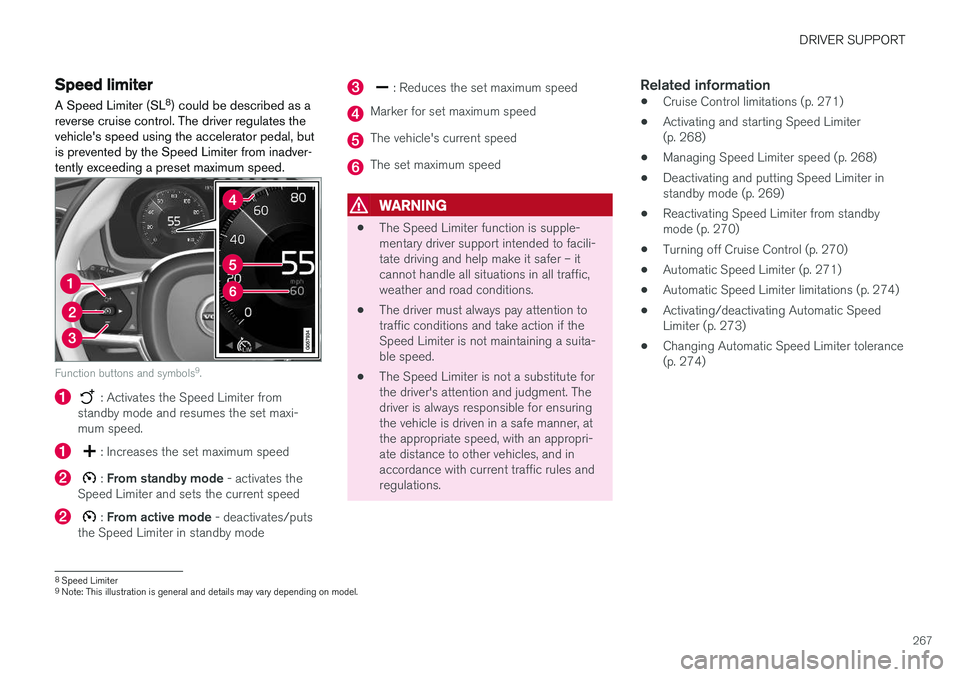
Function buttons and symbols 9
.
: Activates the Speed Limiter from
standby mode and resumes the set maxi- mum speed.
: Increases the set maximum speed
: From standby mode - activates the
Speed Limiter and sets the current speed
: From active mode - deactivates/puts
the Speed Limiter in standby mode
: Reduces the set maximum speed
Marker for set maximum speed
The vehicle's current speed
The set maximum speed
WARNING
• The Speed Limiter function is supple- mentary driver support intended to facili-tate driving and help make it safer – itcannot handle all situations in all traffic,weather and road conditions.
• The driver must always pay attention totraffic conditions and take action if theSpeed Limiter is not maintaining a suita-ble speed.
• The Speed Limiter is not a substitute forthe driver's attention and judgment. Thedriver is always responsible for ensuringthe vehicle is driven in a safe manner, atthe appropriate speed, with an appropri-ate distance to other vehicles, and inaccordance with current traffic rules andregulations.
Related information
•Cruise Control limitations (p. 271)
• Activating and starting Speed Limiter(p. 268)
• Managing Speed Limiter speed (p. 268)
• Deactivating and putting Speed Limiter instandby mode (p. 269)
• Reactivating Speed Limiter from standbymode (p. 270)
• Turning off Cruise Control (p. 270)
• Automatic Speed Limiter (p. 271)
• Automatic Speed Limiter limitations (p. 274)
• Activating/deactivating Automatic SpeedLimiter (p. 273)
• Changing Automatic Speed Limiter tolerance(p. 274)
8
Speed Limiter
9 Note: This illustration is general and details may vary depending on model.
Page 274 of 640
||
DRIVER SUPPORT
272
WARNING
•The ASL function is supplementary driver support intended to facilitate driving andhelp make it safer – it cannot handle allsituations in all traffic, weather and roadconditions.
• Even if the driver can clearly see thespeed limit sign, the speed informationfrom the Road Sign Information (RSI)function to ASL may be incorrect. In suchcases, the driver must intervene andaccelerate or brake to an appropriatespeed.
• ASL is not a substitute for the driver'sattention and judgment. The driver isalways responsible for ensuring the vehi-cle is driven in a safe manner, at theappropriate speed, with an appropriatedistance to other vehicles, and in accord-ance with current traffic rules and regula-tions.
• See also the heading "Road Sign Infor-mation limitations".
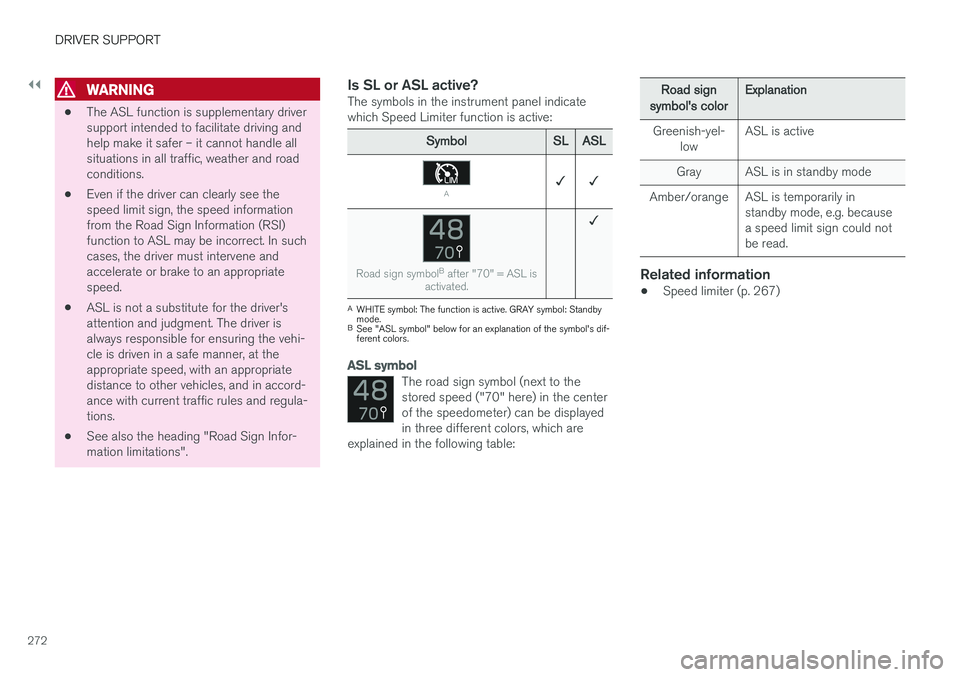
Is SL or ASL active?The symbols in the instrument panel indicatewhich Speed Limiter function is active:
SymbolSLASL
A✓ ✓
Road sign symbol B
after "70" = ASL is
activated.
✓
A WHITE symbol: The function is active. GRAY symbol: Standby mode.
B See "ASL symbol" below for an explanation of the symbol's dif-ferent colors.
ASL symbol
The road sign symbol (next to the stored speed ("70" here) in the centerof the speedometer) can be displayedin three different colors, which are
explained in the following table:
Road signsymbol's colorExplanation
Greenish-yel- low ASL is active
Gray ASL is in standby mode
Amber/orange ASL is temporarily in standby mode, e.g. because a speed limit sign could notbe read.
Related information
•Speed limiter (p. 267)
Page 275 of 640
DRIVER SUPPORT
273
Activating/deactivating AutomaticSpeed Limiter
The Automatic Speed Limiter (ASL 18
) is a sup-
plement to the Speed Limiter (SL 19
) and can be
activated/deactivated.
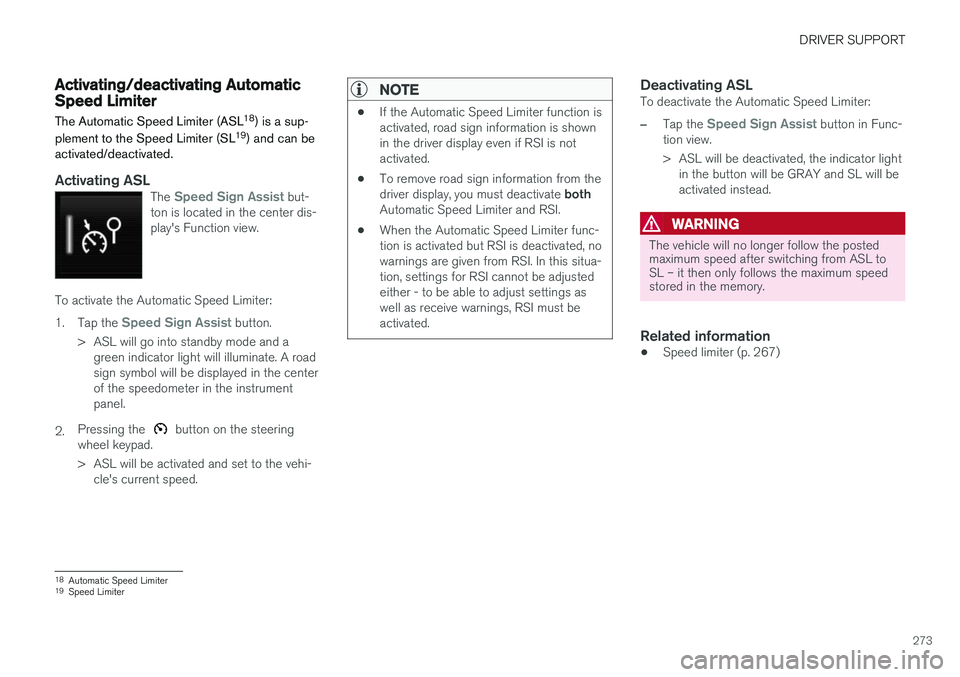
Activating ASLThe Speed Sign Assist but-
ton is located in the center dis- play's Function view.
To activate the Automatic Speed Limiter: 1. Tap the
Speed Sign Assist button.
> ASL will go into standby mode and a green indicator light will illuminate. A road sign symbol will be displayed in the centerof the speedometer in the instrumentpanel.
2. Pressing the
button on the steering
wheel keypad.
> ASL will be activated and set to the vehi- cle's current speed.
NOTE
• If the Automatic Speed Limiter function is activated, road sign information is shownin the driver display even if RSI is notactivated.
• To remove road sign information from the driver display, you must deactivate
both
Automatic Speed Limiter and RSI.
• When the Automatic Speed Limiter func- tion is activated but RSI is deactivated, nowarnings are given from RSI. In this situa-tion, settings for RSI cannot be adjustedeither - to be able to adjust settings aswell as receive warnings, RSI must beactivated.
Deactivating ASLTo deactivate the Automatic Speed Limiter:
–Tap the Speed Sign Assist button in Func-
tion view.
> ASL will be deactivated, the indicator light in the button will be GRAY and SL will be activated instead.
WARNING
The vehicle will no longer follow the posted maximum speed after switching from ASL toSL – it then only follows the maximum speedstored in the memory.
Related information
• Speed limiter (p. 267)
18
Automatic Speed Limiter
19 Speed Limiter
Page 277 of 640
DRIVER SUPPORT
}}
* Option/accessory.275
Cruise control
Cruise Control (CC 23
) helps the driver maintain
an even speed to provide a more relaxing driving experience on highways and long, straight roadswith even traffic flows.
Overview
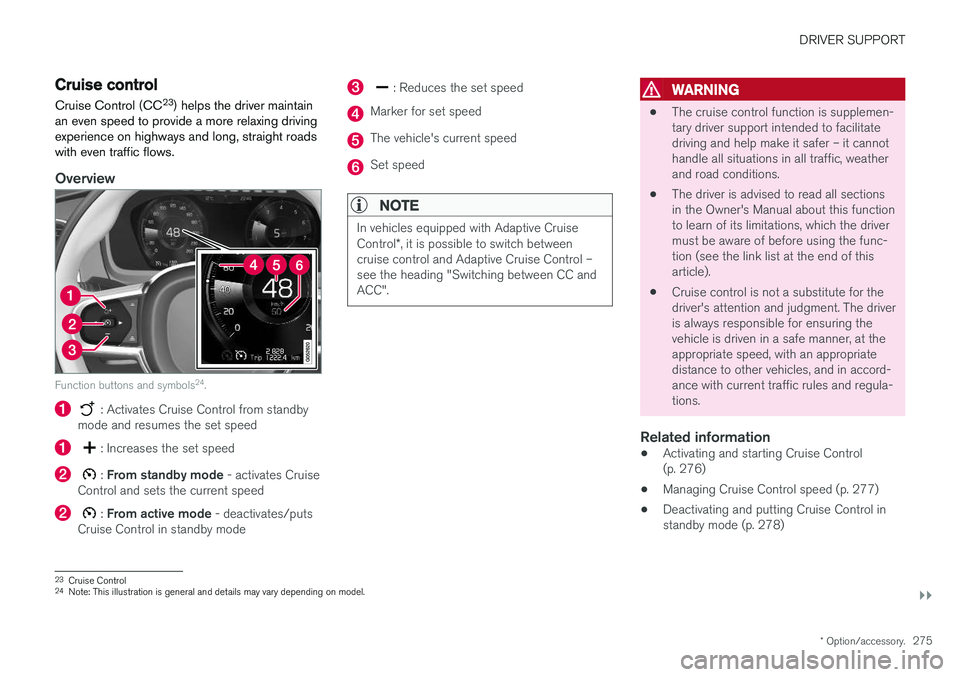
Function buttons and symbols 24
.
: Activates Cruise Control from standby
mode and resumes the set speed
: Increases the set speed
: From standby mode - activates Cruise
Control and sets the current speed
: From active mode - deactivates/puts
Cruise Control in standby mode
: Reduces the set speed
Marker for set speed
The vehicle's current speed
Set speed
NOTE
In vehicles equipped with Adaptive Cruise Control *, it is possible to switch between
cruise control and Adaptive Cruise Control – see the heading "Switching between CC andACC".
WARNING
• The cruise control function is supplemen- tary driver support intended to facilitatedriving and help make it safer – it cannothandle all situations in all traffic, weatherand road conditions.
• The driver is advised to read all sectionsin the Owner's Manual about this functionto learn of its limitations, which the drivermust be aware of before using the func-tion (see the link list at the end of thisarticle).
• Cruise control is not a substitute for thedriver's attention and judgment. The driveris always responsible for ensuring thevehicle is driven in a safe manner, at theappropriate speed, with an appropriatedistance to other vehicles, and in accord-ance with current traffic rules and regula-tions.
Related information
• Activating and starting Cruise Control(p. 276)
• Managing Cruise Control speed (p. 277)
• Deactivating and putting Cruise Control instandby mode (p. 278)
23
Cruise Control
24 Note: This illustration is general and details may vary depending on model.
Page 281 of 640
DRIVER SUPPORT
}}
279
Reactivating Cruise Control fromstandby modeCruise Control (CC 29
) can be temporarily put
into standby mode and then reactivated.
Reactivating Cruise Control from standby mode
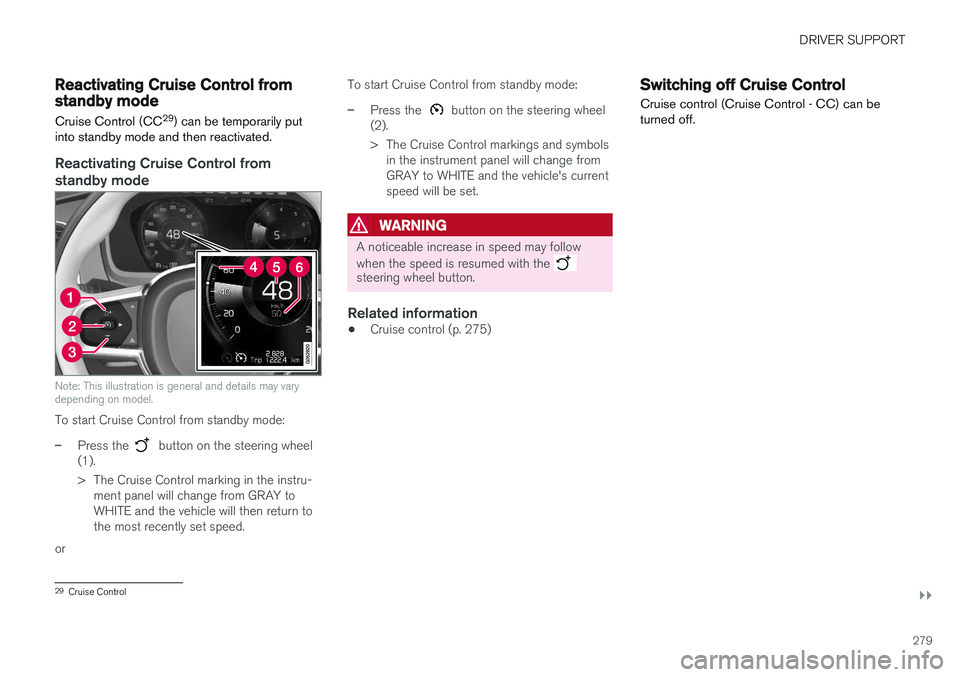
Note: This illustration is general and details may vary depending on model.
To start Cruise Control from standby mode:
–Press the button on the steering wheel
(1).
> The Cruise Control marking in the instru- ment panel will change from GRAY to WHITE and the vehicle will then return tothe most recently set speed.
or To start Cruise Control from standby mode:
–Press the button on the steering wheel
(2).
> The Cruise Control markings and symbols in the instrument panel will change from GRAY to WHITE and the vehicle's currentspeed will be set.
WARNING
A noticeable increase in speed may follow when the speed is resumed with the
steering wheel button.
Related information
• Cruise control (p. 275)
Switching off Cruise Control
Cruise control (Cruise Control - CC) can be turned off.
29 Cruise Control
Page 283 of 640
DRIVER SUPPORT
* Option/accessory.281
WARNING
Distance Alert only reacts of the time interval to the vehicle ahead is shorter than the presetvalue – vehicle speed is not affected.
NOTE
Depending on market, this function may be either Standard or Optional.
Related information
•Head-up display for Distance Alert (p. 281)
• Activating/deactivating Distance Alert (p. 282)
• Setting a time interval for Distance Alert(p. 282)
• Distance Alert limitations (p. 283)
Head-up display for Distance Alert32
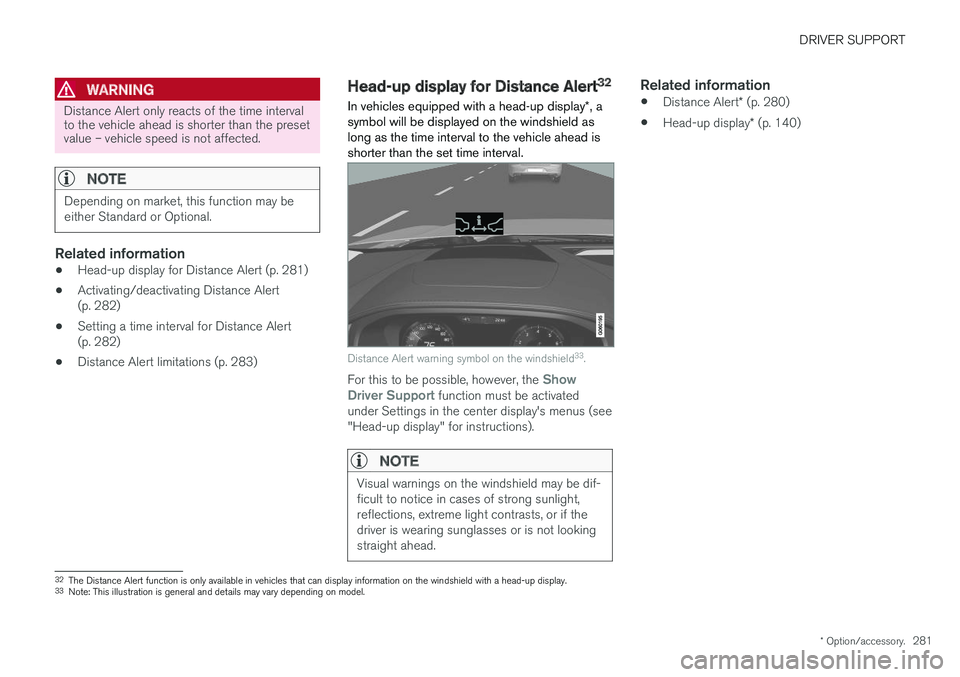
In vehicles equipped with a head-up display *, a
symbol will be displayed on the windshield as long as the time interval to the vehicle ahead isshorter than the set time interval.
Distance Alert warning symbol on the windshield 33
.
For this to be possible, however, the Show
Driver Support function must be activated
under Settings in the center display's menus (see "Head-up display" for instructions).
NOTE
Visual warnings on the windshield may be dif- ficult to notice in cases of strong sunlight,reflections, extreme light contrasts, or if thedriver is wearing sunglasses or is not lookingstraight ahead.
Related information
• Distance Alert
* (p. 280)
• Head-up display
* (p. 140)
32
The Distance Alert function is only available in vehicles that can display information on the windshield with a head-up display.
33 Note: This illustration is general and details may vary depending on model.