check engine VOLVO S90 2018 Owner´s Manual
[x] Cancel search | Manufacturer: VOLVO, Model Year: 2018, Model line: S90, Model: VOLVO S90 2018Pages: 640, PDF Size: 11.37 MB
Page 15 of 640
13
MAINTENANCE AND SERVICE
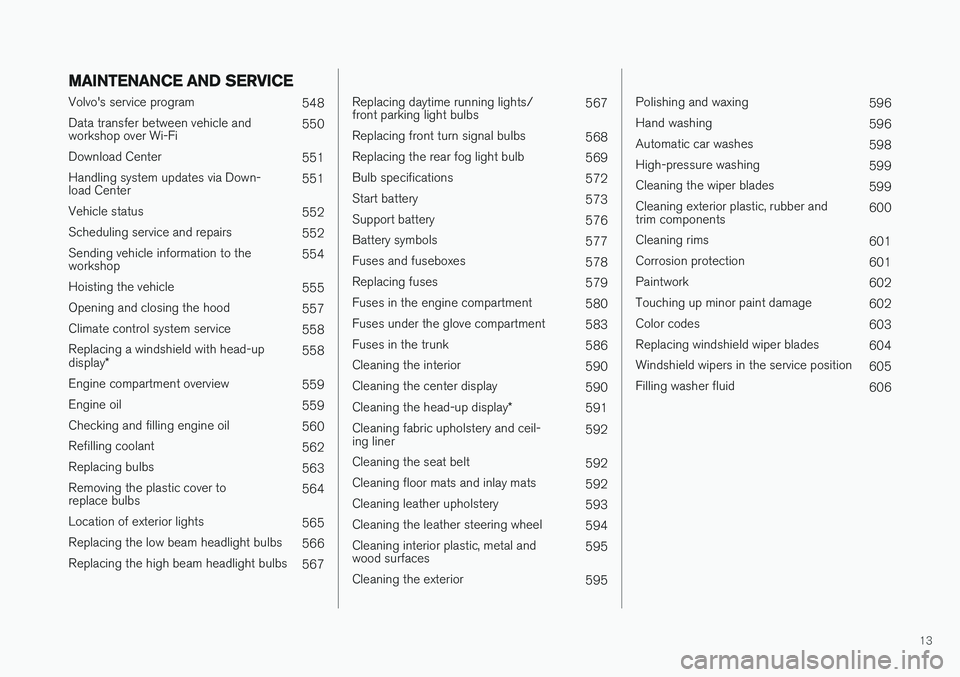
Volvo's service program548
Data transfer between vehicle and workshop over Wi-Fi 550
Download Center 551
Handling system updates via Down-load Center 551
Vehicle status 552
Scheduling service and repairs 552
Sending vehicle information to theworkshop 554
Hoisting the vehicle 555
Opening and closing the hood 557
Climate control system service 558
Replacing a windshield with head-up display * 558
Engine compartment overview 559
Engine oil 559
Checking and filling engine oil 560
Refilling coolant 562
Replacing bulbs 563
Removing the plastic cover to replace bulbs 564
Location of exterior lights 565
Replacing the low beam headlight bulbs 566
Replacing the high beam headlight bulbs 567
Replacing daytime running lights/ front parking light bulbs567
Replacing front turn signal bulbs 568
Replacing the rear fog light bulb 569
Bulb specifications 572
Start battery 573
Support battery 576
Battery symbols 577
Fuses and fuseboxes 578
Replacing fuses 579
Fuses in the engine compartment 580
Fuses under the glove compartment 583
Fuses in the trunk 586
Cleaning the interior 590
Cleaning the center display 590
Cleaning the head-up display *
591
Cleaning fabric upholstery and ceil-ing liner 592
Cleaning the seat belt 592
Cleaning floor mats and inlay mats 592
Cleaning leather upholstery 593
Cleaning the leather steering wheel 594
Cleaning interior plastic, metal andwood surfaces 595
Cleaning the exterior 595
Polishing and waxing596
Hand washing 596
Automatic car washes 598
High-pressure washing 599
Cleaning the wiper blades 599
Cleaning exterior plastic, rubber and trim components 600
Cleaning rims 601
Corrosion protection 601
Paintwork 602
Touching up minor paint damage 602
Color codes 603
Replacing windshield wiper blades 604
Windshield wipers in the service position 605
Filling washer fluid 606
Page 30 of 640
||
YOUR VOLVO
* Option/accessory.
28 goal. In addition to continuous environmental refinement of conventional gasoline-poweredinternal combustion engines, Volvo is activelylooking at advanced technology alternative-fuelvehicles. When you drive a Volvo, you become our partner in the work to lessen the vehicle's impact on theenvironment. To reduce your vehicle's environ-mental impact, you can:
• Maintain proper air pressure in your tires.Tests have shown decreased fuel economywith improperly inflated tires.
• Follow the recommended maintenanceschedule in your Warranty and ServiceRecords Information booklet.
• Drive at a constant speed whenever possible.
• See a trained and qualified Volvo servicetechnician as soon as possible for inspectionif the check engine (malfunction indicator)light illuminates, or stays on after the vehiclehas started.
• Properly dispose of any vehicle-related wastesuch as used motor oil, used batteries, brakepads, etc.
• When cleaning your vehicle, please use gen-uine Volvo car care products. All Volvo carcare products are formulated to be environ-mentally friendly.
Related information
•Economical driving (p. 424)
• Air quality (p. 199)
IntelliSafe - driver support
IntelliSafe is Volvo Cars' philosophy regarding vehicle safety. IntelliSafe consists of a number ofsystems, both standard and optional, that aredesigned to help make driving safer, preventaccidents and protect passengers and otherroad users.
SupportIntelliSafe includes driver support functions such as Adaptive cruise control * which helps the driver
to maintain an even speed combined with a pre- selected time interval to the vehicle ahead. Pilot Assist 4
helps the driver keep the vehicle in
the current traffic lane by providing steering assistance and maintaining an even speed and aset time interval to the vehicle ahead. Park Assist Pilot * helps the driver pull into and
out of parking spaces. Other examples of systems that can help the driver are the Active main beam, Cross Traffic Alert (CTA) * and Blind Spot Information (BLIS) *
systems.
PreventionCity Safety is a function intended to help prevent accidents. The function can help prevent or miti-gate a collision with pedestrians, cyclists, largeanimals or other vehicles. Light, sound and pulsa-tions in the brake pedal are provided to alert of a
4 Depending on market, this function can be either standard or optional.
Page 64 of 640
SAFETY
62
Starting and moving the vehiclewhen it is in safety mode If safety mode has been set, it may be possible to reset the system in order to start and movethe vehicle a short distance, for example, if it isblocking traffic.
Starting the vehicle when it is in safety mode
1. Check the vehicle for damage, particularly forfuel leakage. Make sure you do not detect any gasoline fumes. If the damage to the vehicle is minor and there is no fuel leakage/fumes, you mayattempt to start the engine.
WARNING
Never attempt to restart the vehicle if you smell fuel fumes when the message Safety
mode See Owner's manual is displayed in
the instrument panel. Leave the vehicle imme- diately.
2. Switch off the ignition. 3. Then try to start the vehicle.
> The vehicle's electrical system will per-form a system check and then attempt to reset to normal operating mode.
CAUTION
If the message Safety mode See Owner's
manual is still displayed, the vehicle should
not be driven or towed behind another vehi- cle. If the vehicle needs to be moved, it mustbe towed on a tow truck. Even if no damageis apparent, there may be hidden damage thatcould make the vehicle impossible to control.
Moving the vehicle when it is in safety mode
1. If the message Normal mode The vehicle
is now in normal mode is displayed after
attempting to start the engine, the vehicle may be moved carefully from its presentposition if, for example, it is blocking traffic.
2. Do not move the vehicle farther than abso- lutely necessary.
WARNING
When the vehicle is in safety mode, it should not be towed behind another vehicle. It shouldbe towed from the site on a tow truck. Volvorecommends towing the vehicle directly to anauthorized Volvo workshop.
Related information
• Safety mode (p. 61)
• Starting the vehicle (p. 394)
• Recovery (p. 437)
Page 94 of 640
||
DISPLAYS AND VOICE CONTROL
92
SymbolMeaning
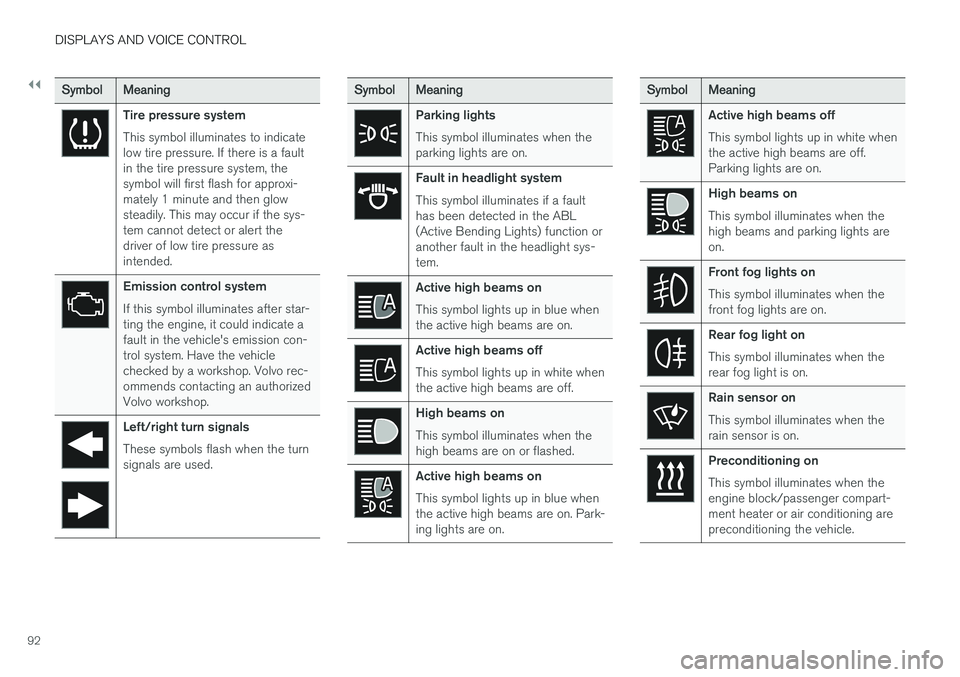
Tire pressure system This symbol illuminates to indicate low tire pressure. If there is a faultin the tire pressure system, thesymbol will first flash for approxi-mately 1 minute and then glowsteadily. This may occur if the sys-tem cannot detect or alert thedriver of low tire pressure asintended.
Emission control system If this symbol illuminates after star- ting the engine, it could indicate afault in the vehicle's emission con-trol system. Have the vehiclechecked by a workshop. Volvo rec-ommends contacting an authorizedVolvo workshop.
Left/right turn signals These symbols flash when the turn signals are used.
SymbolMeaning
Parking lights This symbol illuminates when the parking lights are on.
Fault in headlight system This symbol illuminates if a fault has been detected in the ABL(Active Bending Lights) function oranother fault in the headlight sys-tem.
Active high beams on This symbol lights up in blue when the active high beams are on.
Active high beams off This symbol lights up in white when the active high beams are off.
High beams on This symbol illuminates when the high beams are on or flashed.
Active high beams on This symbol lights up in blue when the active high beams are on. Park-ing lights are on.
SymbolMeaning
Active high beams off This symbol lights up in white when the active high beams are off.Parking lights are on.
High beams on This symbol illuminates when the high beams and parking lights areon.
Front fog lights on This symbol illuminates when the front fog lights are on.
Rear fog light on This symbol illuminates when the rear fog light is on.
Rain sensor on This symbol illuminates when the rain sensor is on.
Preconditioning on This symbol illuminates when the engine block/passenger compart-ment heater or air conditioning arepreconditioning the vehicle.
Page 96 of 640
||
DISPLAYS AND VOICE CONTROL
94
SymbolMeaning
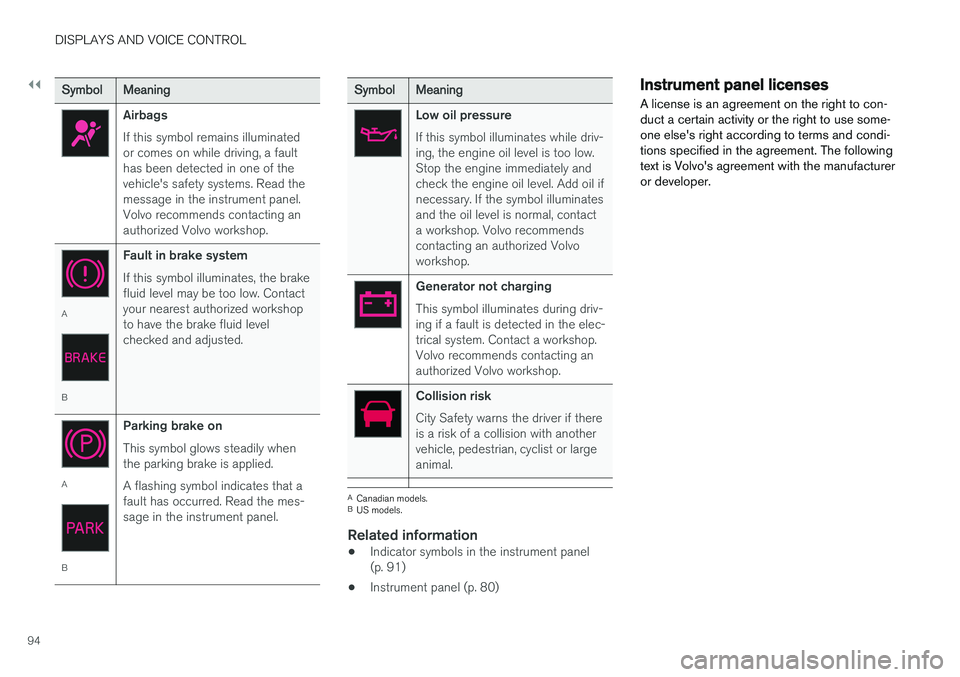
Airbags If this symbol remains illuminated or comes on while driving, a faulthas been detected in one of thevehicle's safety systems. Read themessage in the instrument panel.Volvo recommends contacting anauthorized Volvo workshop.
A
BFault in brake system If this symbol illuminates, the brake fluid level may be too low. Contactyour nearest authorized workshopto have the brake fluid levelchecked and adjusted.
A
BParking brake on This symbol glows steadily when the parking brake is applied. A flashing symbol indicates that a fault has occurred. Read the mes-sage in the instrument panel.
SymbolMeaning
Low oil pressure If this symbol illuminates while driv- ing, the engine oil level is too low.Stop the engine immediately andcheck the engine oil level. Add oil ifnecessary. If the symbol illuminatesand the oil level is normal, contacta workshop. Volvo recommendscontacting an authorized Volvoworkshop.
Generator not charging This symbol illuminates during driv- ing if a fault is detected in the elec-trical system. Contact a workshop.Volvo recommends contacting anauthorized Volvo workshop.
Collision risk City Safety warns the driver if there is a risk of a collision with anothervehicle, pedestrian, cyclist or largeanimal.
A
Canadian models.
B US models.
Related information
• Indicator symbols in the instrument panel (p. 91)
• Instrument panel (p. 80)
Instrument panel licenses
A license is an agreement on the right to con- duct a certain activity or the right to use some-one else's right according to terms and condi-tions specified in the agreement. The followingtext is Volvo's agreement with the manufactureror developer.
Page 268 of 640
DRIVER SUPPORT
266
Electronic Stability Control symbolsand messages
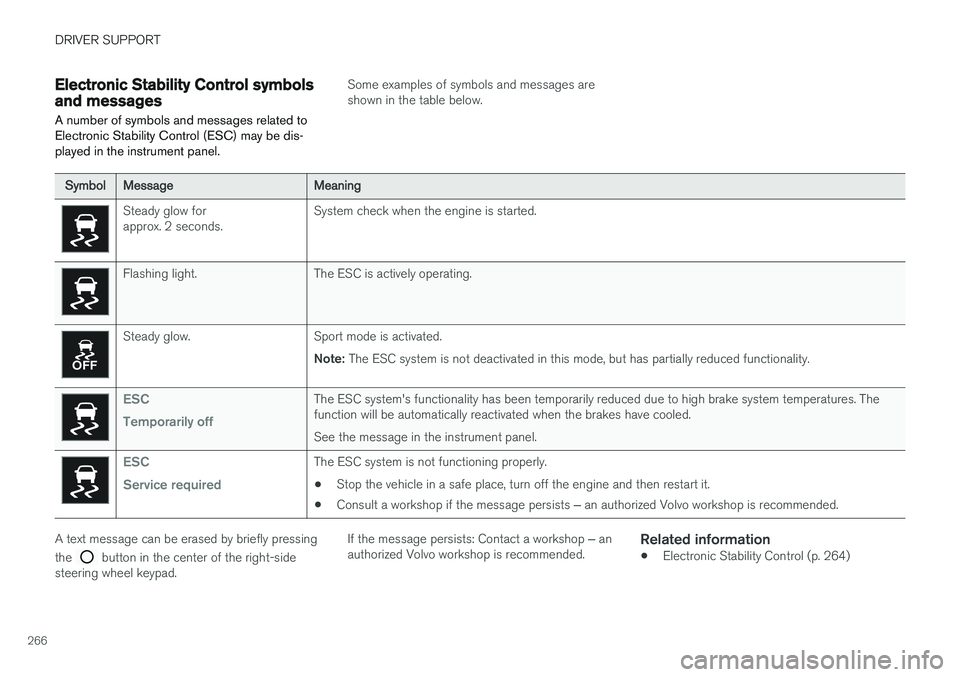
A number of symbols and messages related to Electronic Stability Control (ESC) may be dis-played in the instrument panel.
Some examples of symbols and messages are shown in the table below.
SymbolMessageMeaning
Steady glow for approx. 2 seconds. System check when the engine is started.
Flashing light. The ESC is actively operating.
Steady glow. Sport mode is activated.
Note: The ESC system is not deactivated in this mode, but has partially reduced functionality.
ESC Temporarily offThe ESC system's functionality has been temporarily reduced due to high brake system temperatures. The function will be automatically reactivated when the brakes have cooled. See the message in the instrument panel.
ESC Service requiredThe ESC system is not functioning properly.
• Stop the vehicle in a safe place, turn off the engine and then restart it.
• Consult a workshop if the message persists
‒ an authorized Volvo workshop is recommended.
A text message can be erased by briefly pressing the
button in the center of the right-side
steering wheel keypad. If the message persists: Contact a workshop
‒ an
authorized Volvo workshop is recommended.
Related information
• Electronic Stability Control (p. 264)
Page 401 of 640
STARTING AND DRIVING
}}
399
Brakes The brake pedal is used to apply the vehicle's regular brakes, which are part of the brake sys-tem.
The vehicle is equipped with two brake circuits. If one brake circuit is damaged, the brake pedal willgo down further when depressed. More pressurewill then be required from the driver for normalbraking effect. The driver's pressure on the brake pedal is enhanced by a power braking function.
WARNING
Power braking only functions if the engine is running.
If the brake pedal is used when the engine is turned off, the pedal will feel stiffer than usualand greater pressure must be applied to brakethe vehicle. In very hilly areas or when driving with a heavy load, manual gear shifting can be used to aug-ment the brakes with engine braking. Enginebraking is most effective if the same gear is usedboth uphill and downhill.
Anti-lock brakesThe vehicle is equipped with an Anti-lock BrakingSystem (ABS), which can help prevent thewheels from locking and help maintain steeringcontrol when braking. Vibrations may be felt from the brake pedal when ABS is operating, which isnormal. After the vehicle is started, a brief test of the ABS system is automatically performed when thedriver releases the brake pedal. An additionalautomatic test of the system may be performedwhen the vehicle is traveling at a low speed. Dur-ing the test, the brake pedal may feel as though itis pulsating.
Symbols in the instrument panel
SymbolMeaning
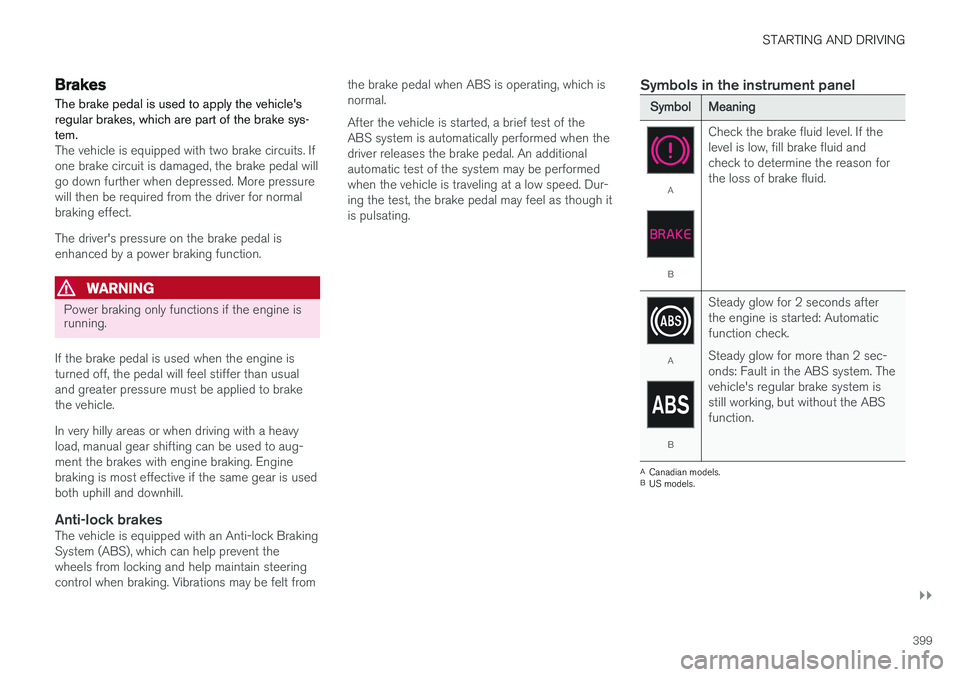
A
B
Check the brake fluid level. If the level is low, fill brake fluid andcheck to determine the reason forthe loss of brake fluid.
A
B
Steady glow for 2 seconds after the engine is started: Automaticfunction check. Steady glow for more than 2 sec- onds: Fault in the ABS system. Thevehicle's regular brake system isstill working, but without the ABSfunction.
A
Canadian models.
B US models.
Page 409 of 640
STARTING AND DRIVING
}}
* Option/accessory.407
Braking assist after a collision In a collision in which the activation level is reached for the pyrotechnic seat belt tensionersor airbags, or if a collision with a large animal isdetected, the vehicle's brakes will be automati-cally activated. This function is intended to helpprevent or reduce the effects of any subsequentcollision.
After a serious collision, it may no longer be pos- sible to control and steer the vehicle. In order toavoid or mitigate a possible further collision witha vehicle or an object in the vehicle's path, thebrake assist system is activated automatically tohelp stop the vehicle safely. The brake lights and hazard warning flashers are activated during braking. When the vehicle has stopped, the hazard warning flashers will con-tinue to flash and the parking brake will beapplied. If braking is not appropriate, e.g. if there is a risk of being hit by passing traffic, the driver can over-ride the system by depressing the acceleratorpedal. This function assumes that the brake system is intact after a collision. Brake assist is part of the Rear Collision Warning and Blind Spot Information safety systems.
Related information
•Rear Collision Warning (p. 336)
• BLIS
* (p. 337)
• Brake functions (p. 398)
Transmission The transmission is part of the vehicle's driveline (power transmission) between the engine andthe drive wheels. The function of the transmis-sion is to change gears depending on speedand power needs.
The vehicle has an 8-speed automatic transmis- sion. The number of gears allows the engine'storque and power band to be effectively utilized.Two of the gears are overdrive gears that savefuel when driving at a constant engine speed.Manual shifting is also possible. The instrumentpanel shows the gear currently in use.
CAUTION
Check the operating temperature of the transmission to help avoid damage to any ofthe drive system components. If there is a riskof overheating, a warning symbol will appearin the instrument panel and a text messagewill be displayed. Follow the recommenda-tions given.
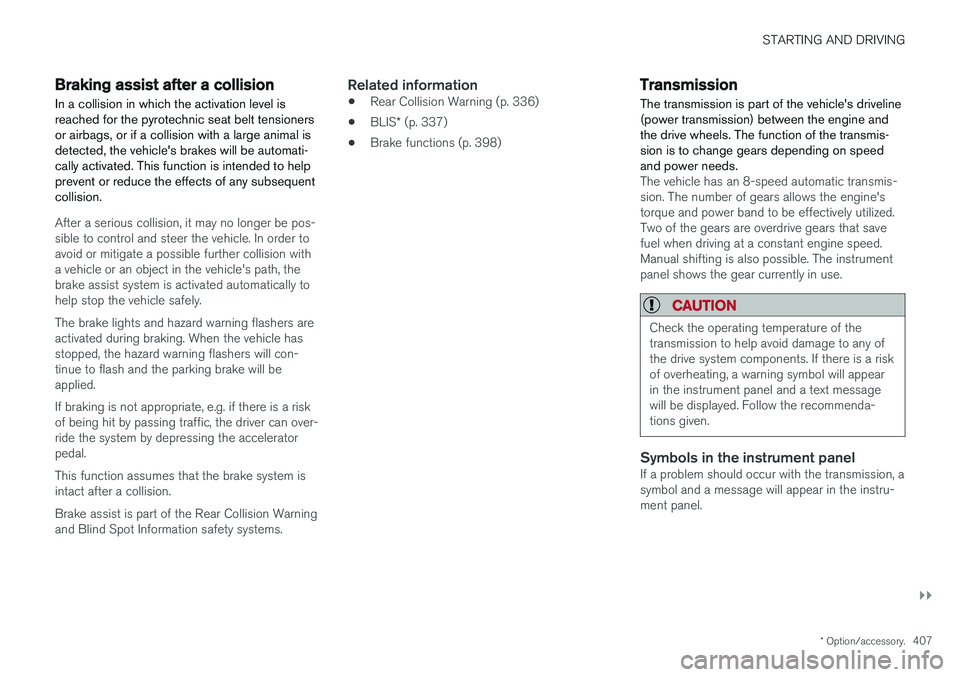
Symbols in the instrument panelIf a problem should occur with the transmission, a symbol and a message will appear in the instru-ment panel.
Page 426 of 640
STARTING AND DRIVING
* Option/accessory.
424
Leveling control settings *
Turn off leveling control before lifting the vehicle with a jack to help avoid problems with thepneumatic suspension.
Center display settings
Disable Leveling Control
In certain situations, this function must be turned off, e.g. before the vehicle is raised using a jack *.
The level difference caused by raising the vehicle with a jack could cause problems with the pneu-matic suspension. Turning off the function in the center display:1. Tap
Settings in the Top view.
2. Tap
My CarParking Brake and
Suspension.
3. Select
Disable Leveling Control.
Related information
• Leveling control
* and suspension (p. 422)
• Loading recommendations (p. 543)
Economical driving
Drive economically and environmentally con- scious by thinking ahead, avoiding rapid startsand stops and adapting driving style and speedto the current traffic conditions.
Driving economically conserves natural resources
Observe the following rules:
• Do not warm up the engine by idling. It is better to begin driving normally immediately after starting the engine. A cold engine uses more fuel than a warm engine and is subject to increased wear.
• Whenever possible, avoid using the vehicle todrive short distances. The engine does nothave time to reach a normal operating tem-perature and this leads to increased fuelconsumption.
• Maintain a steady speed and a generous fol-lowing distance to traffic ahead to minimizebraking.
• For lower fuel consumption, activate Ecodrive mode.
• Use the Eco Coast function in drive mode Eco - engine braking is deactivated, allowing the vehicle's kinetic energy to be used to rollgreater distances.
• Use gear
D as often as possible and avoid
using the kick-down function. •
Fuel consumption is increased at highspeeds - air resistance increases with speed.
• Remove unnecessary items from the vehicle- the heavier the load, the higher the fuelconsumption.
• Maintain the correct pressure in the tires andcheck pressure regularly.
• The type of tires used could affect fuel con-sumption - consult a retailer for advice onsuitable tires.
• Do not use winter tires after the winter sea-son has ended.
• Roof loads increase air resistance andincrease fuel consumption. Remove roofboxes, ski racks, etc. that are not in use.
• Avoid driving with the windows open.
• Using the trip computer's fuel consumptionindicators can help you learn how to drivemore economically.
Other factors that decrease fuel
consumption
• Dirty air cleaner.
• Dirty engine oil and clogged oil filter.
• Incorrect front-end alignment.
• Incorrect wheel alignment.
Some of the above items and others are checked as part of Volvo's standard maintenance sched-ule.
Page 427 of 640
STARTING AND DRIVING
}}
425
Related information
•Drive-E
‒ purer driving pleasure (p. 27)
• ECO drive mode (p. 415)
• Checking tire pressure (p. 515)
Preparing for a long trip
It is important to have the vehicle's systems and equipment checked carefully before driving longdistances.
Check that:
• the engine is running properly and that fuel consumption is normal
• there are no leaks (fuel, oil or other fluid)
• the brake pedal is functioning optimally
• all lights are working
‒
adjust the headlight
height if the vehicle is carrying a heavy load
• tire tread depth and air pressure are at cor-rect levels. Change to snow tires when driv-ing in areas where there is a risk of snowy oricy roads.
• the start battery is sufficiently charged
• the wiper blades are in good condition
Related information
• Checking tire pressure (p. 515)
• Filling washer fluid (p. 606)
• Winter driving (p. 425)
• Economical driving (p. 424)
• Vehicle modem settings (p. 491)
• Loading recommendations (p. 543)
• Pilot Assist (p. 300)
• Speed limiter (p. 267)
• Tire sealing system (p. 530)
Winter driving
It is important to check the vehicle before driving in cold/snowy conditions to make sure it can bedriven safely.
Before the cold season arrives:
• Make sure the engine coolant contains 50% antifreeze. This mixture helps protect theengine from frost erosion down toapprox. -35 °C (-31 °F). Do not mix differenttypes of antifreeze as this could pose ahealth risk.
• Keep the fuel tank well filled to prevent con-densation from forming.
• Check the viscosity of the engine oil. Oil withlow viscosity (thinner oil) improves cold-weather starting and reduces fuel consump-tion when driving with a cold engine.
CAUTION
Low-viscosity oil should not be used with hard driving or in hot weather.
•
Check the condition and charge level of the start battery. Cold weather places greaterdemands on the start battery and reduces itscapacity.
• Use washer fluid containing antifreeze tohelp prevent ice from forming in the washerfluid reservoir.