low beam VOLVO S90 2018 Owner´s Manual
[x] Cancel search | Manufacturer: VOLVO, Model Year: 2018, Model line: S90, Model: VOLVO S90 2018Pages: 640, PDF Size: 11.37 MB
Page 6 of 640
4
Setting types in the center display133
Table of settings in the center display 134
Driver profiles 135
Selecting a driver profile 136
Changing a driver profile's name 137
Resetting driver profile settings 137
Linking a remote key to a driver profile 137
Messages in the center display 138
Handling messages in the center display 139
Handling messages saved from the center display 140
Head-up display *
140
Activating and deactivating the head- up display * 142
Head-up display settings *
142
Voice control 143
Using voice commands 144
Voice control for cellular phones 145
Voice control for radio and media 146
Voice control settings 146
LIGHTING
Lighting panel and controls150
Adjusting light functions via the cen- ter display 151
Parking lights 152
Daytime running lights 152
Low beams 153
Using high beam 154
Active high beam 155
Using turn signals 156
Active Bending Lights *
157
Front fog lights/cornering illumination *
157
Rear fog light 158
Brake lights 159
Emergency brake lights 159
Hazard warning flashers 160
Using home safe lighting 160
Welcome Light 160
Interior Lighting 161
Adjusting interior lighting 162
WINDOWS, GLASS AND MIRRORS
Windows, glass and mirrors166
Pinch protection for windows and sun curtains 166
Reset procedure for pinch protection 167
Power windows 168
Operating the power windows 169
Using sun curtains *
170
Rearview/door mirrors 171
Adjusting the rearview mirror dim-ming function 172
Adjusting the door mirrors 173
Panoramic roof 174
Operating the panoramic roof 175
Auto closing the panoramic roof suncurtain 179
Using the windshield wipers 179
Heated windshield washer nozzles *
180
Using the rain sensor 180
Using the rain sensor's memory function 181
Using the windshield and headlightwashers 182
Page 15 of 640
13
MAINTENANCE AND SERVICE
Volvo's service program548
Data transfer between vehicle and workshop over Wi-Fi 550
Download Center 551
Handling system updates via Down-load Center 551
Vehicle status 552
Scheduling service and repairs 552
Sending vehicle information to theworkshop 554
Hoisting the vehicle 555
Opening and closing the hood 557
Climate control system service 558
Replacing a windshield with head-up display * 558
Engine compartment overview 559
Engine oil 559
Checking and filling engine oil 560
Refilling coolant 562
Replacing bulbs 563
Removing the plastic cover to replace bulbs 564
Location of exterior lights 565
Replacing the low beam headlight bulbs 566
Replacing the high beam headlight bulbs 567
Replacing daytime running lights/ front parking light bulbs567
Replacing front turn signal bulbs 568
Replacing the rear fog light bulb 569
Bulb specifications 572
Start battery 573
Support battery 576
Battery symbols 577
Fuses and fuseboxes 578
Replacing fuses 579
Fuses in the engine compartment 580
Fuses under the glove compartment 583
Fuses in the trunk 586
Cleaning the interior 590
Cleaning the center display 590
Cleaning the head-up display *
591
Cleaning fabric upholstery and ceil-ing liner 592
Cleaning the seat belt 592
Cleaning floor mats and inlay mats 592
Cleaning leather upholstery 593
Cleaning the leather steering wheel 594
Cleaning interior plastic, metal andwood surfaces 595
Cleaning the exterior 595
Polishing and waxing596
Hand washing 596
Automatic car washes 598
High-pressure washing 599
Cleaning the wiper blades 599
Cleaning exterior plastic, rubber and trim components 600
Cleaning rims 601
Corrosion protection 601
Paintwork 602
Touching up minor paint damage 602
Color codes 603
Replacing windshield wiper blades 604
Windshield wipers in the service position 605
Filling washer fluid 606
Page 30 of 640
||
YOUR VOLVO
* Option/accessory.
28 goal. In addition to continuous environmental refinement of conventional gasoline-poweredinternal combustion engines, Volvo is activelylooking at advanced technology alternative-fuelvehicles. When you drive a Volvo, you become our partner in the work to lessen the vehicle's impact on theenvironment. To reduce your vehicle's environ-mental impact, you can:
• Maintain proper air pressure in your tires.Tests have shown decreased fuel economywith improperly inflated tires.
• Follow the recommended maintenanceschedule in your Warranty and ServiceRecords Information booklet.
• Drive at a constant speed whenever possible.
• See a trained and qualified Volvo servicetechnician as soon as possible for inspectionif the check engine (malfunction indicator)light illuminates, or stays on after the vehiclehas started.
• Properly dispose of any vehicle-related wastesuch as used motor oil, used batteries, brakepads, etc.
• When cleaning your vehicle, please use gen-uine Volvo car care products. All Volvo carcare products are formulated to be environ-mentally friendly.
Related information
•Economical driving (p. 424)
• Air quality (p. 199)
IntelliSafe - driver support
IntelliSafe is Volvo Cars' philosophy regarding vehicle safety. IntelliSafe consists of a number ofsystems, both standard and optional, that aredesigned to help make driving safer, preventaccidents and protect passengers and otherroad users.
SupportIntelliSafe includes driver support functions such as Adaptive cruise control * which helps the driver
to maintain an even speed combined with a pre- selected time interval to the vehicle ahead. Pilot Assist 4
helps the driver keep the vehicle in
the current traffic lane by providing steering assistance and maintaining an even speed and aset time interval to the vehicle ahead. Park Assist Pilot * helps the driver pull into and
out of parking spaces. Other examples of systems that can help the driver are the Active main beam, Cross Traffic Alert (CTA) * and Blind Spot Information (BLIS) *
systems.
PreventionCity Safety is a function intended to help prevent accidents. The function can help prevent or miti-gate a collision with pedestrians, cyclists, largeanimals or other vehicles. Light, sound and pulsa-tions in the brake pedal are provided to alert of a
4 Depending on market, this function can be either standard or optional.
Page 80 of 640

DISPLAYS AND VOICE CONTROL
* Option/accessory.
78
Instruments and controls in left-hand drive vehicles
The overviews show the location of the vehicle's
displays and controls.
Steering wheel and dashboard
Parking lights, daytime running lights, low beams, high beams, turn signals, front fog lights/cornering illumination *, rear fog light,
trip computer reset
Steering wheel paddles for manual shifting *
Head-up display*
Instrument panel
Wipers and washers, rain sensor *
Right-side steering wheel keypad
Steering wheel adjustment
Horn
Left-side steering wheel keypad
Hood open
Display lighting, trunk lid unlock/open */
close *, halogen headlight height adjustment
Ceiling console
Front reading lights and courtesy lighting
Panoramic roof *
Ceiling console display
HomeLink®
*
Center and tunnel console
Center display
Hazard warning flashers, defrosting, media
Gear selector
Start knob
Drive modes *
Parking brake
Auto-hold brakes
Driver's door
Page 94 of 640
||
DISPLAYS AND VOICE CONTROL
92
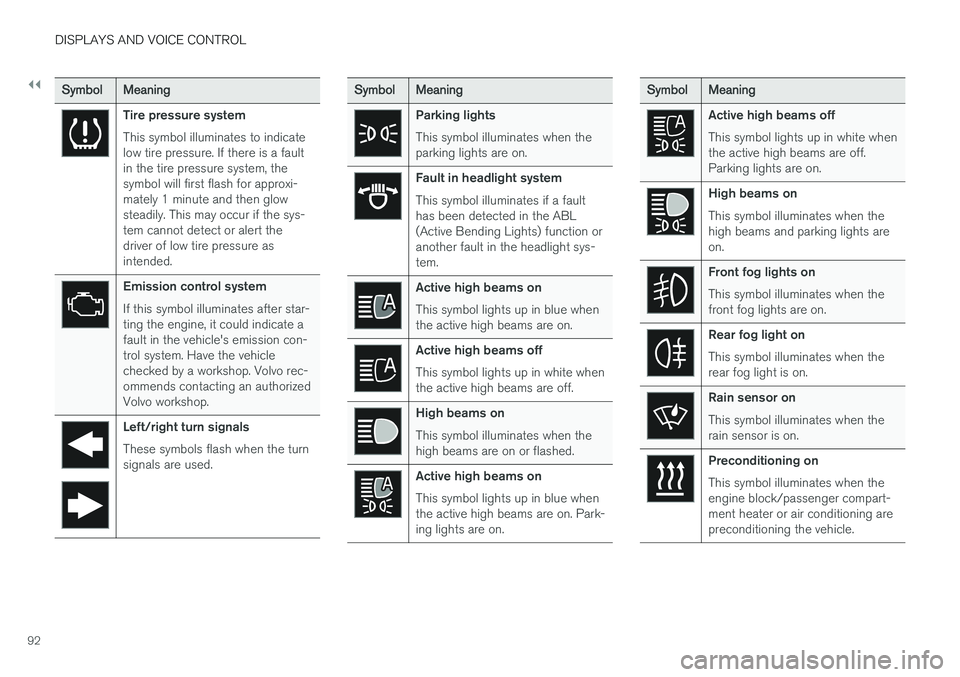
SymbolMeaning
Tire pressure system This symbol illuminates to indicate low tire pressure. If there is a faultin the tire pressure system, thesymbol will first flash for approxi-mately 1 minute and then glowsteadily. This may occur if the sys-tem cannot detect or alert thedriver of low tire pressure asintended.
Emission control system If this symbol illuminates after star- ting the engine, it could indicate afault in the vehicle's emission con-trol system. Have the vehiclechecked by a workshop. Volvo rec-ommends contacting an authorizedVolvo workshop.
Left/right turn signals These symbols flash when the turn signals are used.
SymbolMeaning
Parking lights This symbol illuminates when the parking lights are on.
Fault in headlight system This symbol illuminates if a fault has been detected in the ABL(Active Bending Lights) function oranother fault in the headlight sys-tem.
Active high beams on This symbol lights up in blue when the active high beams are on.
Active high beams off This symbol lights up in white when the active high beams are off.
High beams on This symbol illuminates when the high beams are on or flashed.
Active high beams on This symbol lights up in blue when the active high beams are on. Park-ing lights are on.
SymbolMeaning
Active high beams off This symbol lights up in white when the active high beams are off.Parking lights are on.
High beams on This symbol illuminates when the high beams and parking lights areon.
Front fog lights on This symbol illuminates when the front fog lights are on.
Rear fog light on This symbol illuminates when the rear fog light is on.
Rain sensor on This symbol illuminates when the rain sensor is on.
Preconditioning on This symbol illuminates when the engine block/passenger compart-ment heater or air conditioning arepreconditioning the vehicle.
Page 152 of 640
LIGHTING
* Option/accessory.
150
Lighting panel and controls
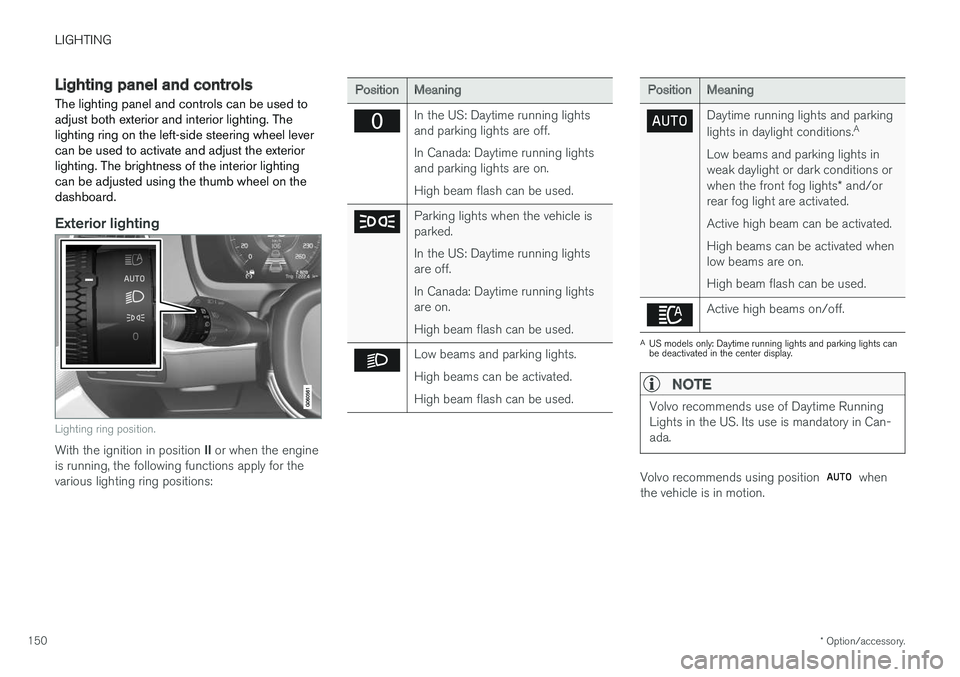
The lighting panel and controls can be used to adjust both exterior and interior lighting. Thelighting ring on the left-side steering wheel levercan be used to activate and adjust the exteriorlighting. The brightness of the interior lightingcan be adjusted using the thumb wheel on thedashboard.
Exterior lighting
Lighting ring position.
With the ignition in position II or when the engine
is running, the following functions apply for the various lighting ring positions:
PositionMeaning
In the US: Daytime running lights and parking lights are off. In Canada: Daytime running lights and parking lights are on. High beam flash can be used.
Parking lights when the vehicle is parked. In the US: Daytime running lights are off. In Canada: Daytime running lights are on. High beam flash can be used.
Low beams and parking lights. High beams can be activated.High beam flash can be used.
PositionMeaning
Daytime running lights and parking lights in daylight conditions. A
Low beams and parking lights in weak daylight or dark conditions or when the front fog lights * and/or
rear fog light are activated. Active high beam can be activated.High beams can be activated when low beams are on. High beam flash can be used.
Active high beams on/off.
A US models only: Daytime running lights and parking lights can be deactivated in the center display.
NOTE
Volvo recommends use of Daytime Running Lights in the US. Its use is mandatory in Can-ada.
Volvo recommends using position when
the vehicle is in motion.
Page 153 of 640
LIGHTING
* Option/accessory.151
WARNING
The vehicle lighting system cannot in all situa- tions determine when the daylight is too weakor not strong enough, e.g. when there is fogor rain. The driver is always responsible for driving the vehicle with lighting that is safe for the trafficconditions and as specified by applicable traf-fic regulations.
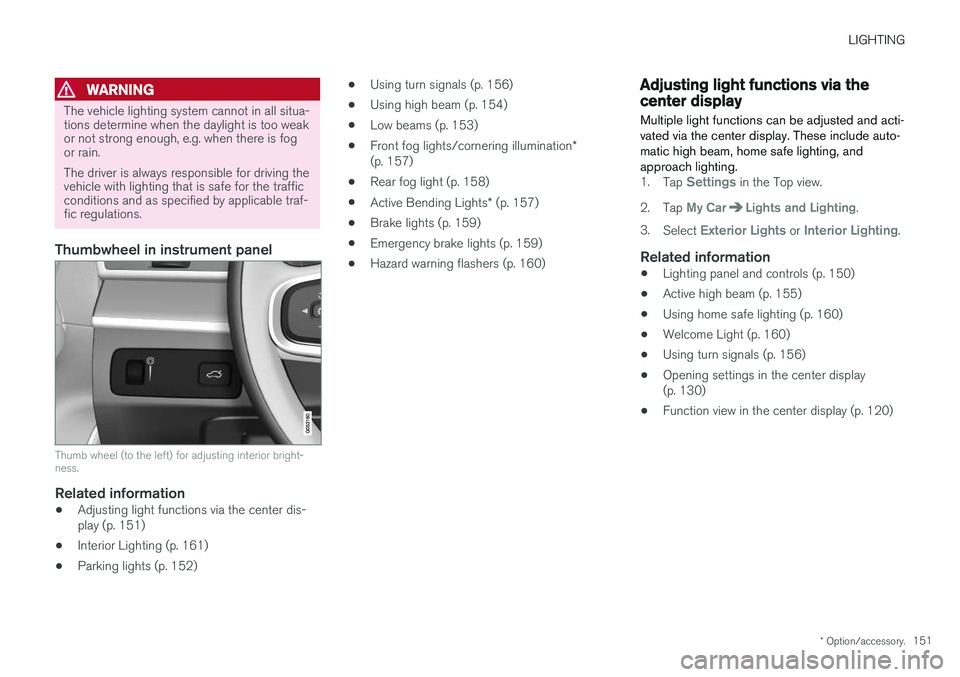
Thumbwheel in instrument panel
Thumb wheel (to the left) for adjusting interior bright- ness.
Related information
•Adjusting light functions via the center dis- play (p. 151)
• Interior Lighting (p. 161)
• Parking lights (p. 152) •
Using turn signals (p. 156)
• Using high beam (p. 154)
• Low beams (p. 153)
• Front fog lights/cornering illumination
*
(p. 157)
• Rear fog light (p. 158)
• Active Bending Lights
* (p. 157)
• Brake lights (p. 159)
• Emergency brake lights (p. 159)
• Hazard warning flashers (p. 160)
Adjusting light functions via thecenter display
Multiple light functions can be adjusted and acti- vated via the center display. These include auto-matic high beam, home safe lighting, andapproach lighting.
1. Tap Settings in the Top view.
2. Tap
My CarLights and Lighting.
3. Select
Exterior Lights or Interior Lighting.
Related information
• Lighting panel and controls (p. 150)
• Active high beam (p. 155)
• Using home safe lighting (p. 160)
• Welcome Light (p. 160)
• Using turn signals (p. 156)
• Opening settings in the center display (p. 130)
• Function view in the center display (p. 120)
Page 154 of 640
LIGHTING
152
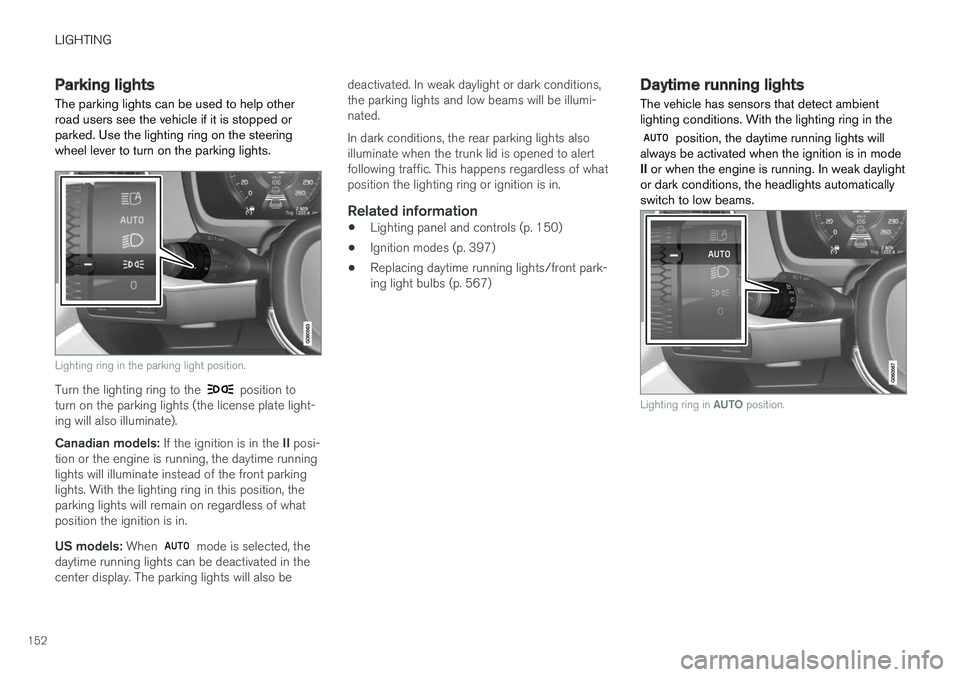
Parking lights The parking lights can be used to help other road users see the vehicle if it is stopped orparked. Use the lighting ring on the steeringwheel lever to turn on the parking lights.
Lighting ring in the parking light position.
Turn the lighting ring to the position to
turn on the parking lights (the license plate light- ing will also illuminate). Canadian models: If the ignition is in the II posi-
tion or the engine is running, the daytime running lights will illuminate instead of the front parkinglights. With the lighting ring in this position, theparking lights will remain on regardless of whatposition the ignition is in. US models: When
mode is selected, the
daytime running lights can be deactivated in the center display. The parking lights will also be deactivated. In weak daylight or dark conditions,the parking lights and low beams will be illumi-nated. In dark conditions, the rear parking lights also illuminate when the trunk lid is opened to alertfollowing traffic. This happens regardless of whatposition the lighting ring or ignition is in.
Related information
•
Lighting panel and controls (p. 150)
• Ignition modes (p. 397)
• Replacing daytime running lights/front park-ing light bulbs (p. 567)
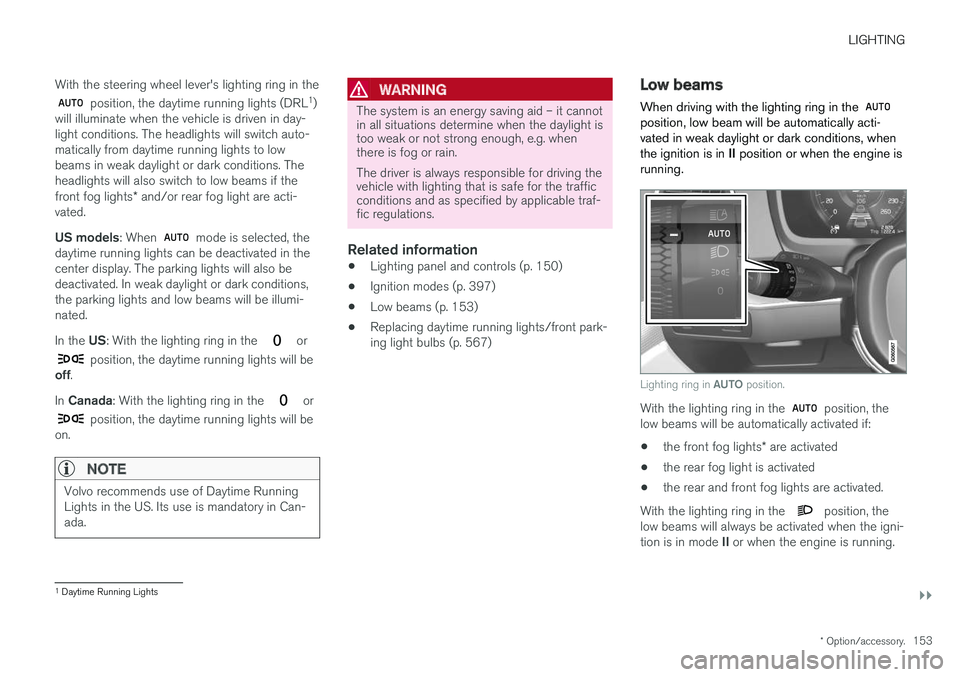
Daytime running lights The vehicle has sensors that detect ambient lighting conditions. With the lighting ring in the
position, the daytime running lights will
always be activated when the ignition is in mode II or when the engine is running. In weak daylight
or dark conditions, the headlights automaticallyswitch to low beams.
Lighting ring in AUTO position.
Page 155 of 640
LIGHTING
}}
* Option/accessory.153
With the steering wheel lever's lighting ring in the
position, the daytime running lights (DRL
1
)
will illuminate when the vehicle is driven in day- light conditions. The headlights will switch auto-matically from daytime running lights to lowbeams in weak daylight or dark conditions. Theheadlights will also switch to low beams if the front fog lights * and/or rear fog light are acti-
vated. US models : When
mode is selected, the
daytime running lights can be deactivated in the center display. The parking lights will also bedeactivated. In weak daylight or dark conditions,the parking lights and low beams will be illumi-nated. In the US: With the lighting ring in the
or
position, the daytime running lights will be
off .
In Canada : With the lighting ring in the
or
position, the daytime running lights will be
on.
NOTE
Volvo recommends use of Daytime Running Lights in the US. Its use is mandatory in Can-ada.
WARNING
The system is an energy saving aid – it cannot in all situations determine when the daylight istoo weak or not strong enough, e.g. whenthere is fog or rain. The driver is always responsible for driving the vehicle with lighting that is safe for the trafficconditions and as specified by applicable traf-fic regulations.
Related information
• Lighting panel and controls (p. 150)
• Ignition modes (p. 397)
• Low beams (p. 153)
• Replacing daytime running lights/front park- ing light bulbs (p. 567)
Low beams
When driving with the lighting ring in the
position, low beam will be automatically acti- vated in weak daylight or dark conditions, whenthe ignition is in II position or when the engine is
running.
Lighting ring in AUTO position.
With the lighting ring in the position, the
low beams will be automatically activated if:
• the front fog lights
* are activated
• the rear fog light is activated
• the rear and front fog lights are activated.
With the lighting ring in the
position, the
low beams will always be activated when the igni- tion is in mode II or when the engine is running.
1
Daytime Running Lights
Page 156 of 640
||
LIGHTING
154
Tunnel detection
The vehicle will detect if it enters a tunnel and shift from daytime running lights to low beams. Note that the left-hand steering wheel lever must be in
position for tunnel detection to work.
Related information
•Lighting panel and controls (p. 150)
• Ignition modes (p. 397)
• Daytime running lights (p. 152)
• Replacing the low beam headlight bulbs (p. 566)
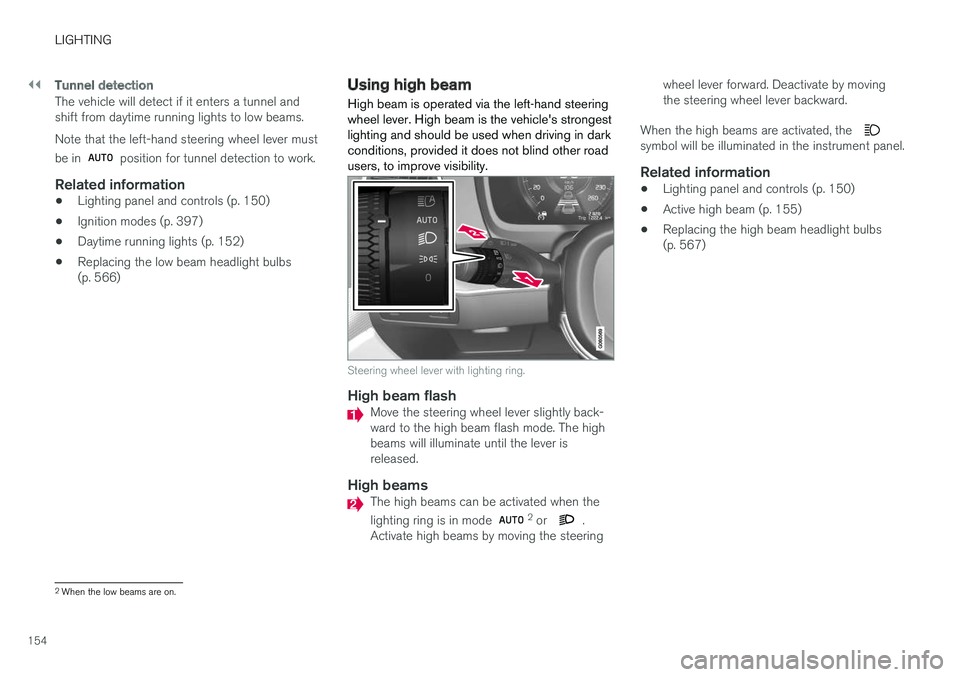
Using high beam High beam is operated via the left-hand steering wheel lever. High beam is the vehicle's strongestlighting and should be used when driving in darkconditions, provided it does not blind other roadusers, to improve visibility.
Steering wheel lever with lighting ring.
High beam flashMove the steering wheel lever slightly back- ward to the high beam flash mode. The highbeams will illuminate until the lever isreleased.
High beamsThe high beams can be activated when the lighting ring is in mode 2
or .
Activate high beams by moving the steering wheel lever forward. Deactivate by moving the steering wheel lever backward.
When the high beams are activated, the
symbol will be illuminated in the instrument panel.
Related information
• Lighting panel and controls (p. 150)
• Active high beam (p. 155)
• Replacing the high beam headlight bulbs (p. 567)
2
When the low beams are on.