airbag VOLVO S90 2020 Quick Guide
[x] Cancel search | Manufacturer: VOLVO, Model Year: 2020, Model line: S90, Model: VOLVO S90 2020Pages: 643, PDF Size: 13.68 MB
Page 82 of 643
DISPLAYS AND VOICE CONTROL
* Option/accessory.
80
Instrument panel The instrument panel displays information related to the vehicle and driving.
The instrument panel contains gauges, indica- tors and monitoring and warning symbols.What is shown in the instrument panel variesdepending on the equipment, settings andfunctions currently active. The instrument panel is activated as soon as a door is opened, i.e. in ignition mode 0. The
panel will power down after a short period oftime if it is not used. To reactivate it, do one ofthe following:
Depress the brake pedal.
Activate ignition mode
I.
Open one of the doors. The instrument panel is available in two ver- sions: 8" and 12"
*.WARNING
If the instrument panel turns off, does not activate when the ignition is switched on,or part/all of the panel cannot be read, donot drive the vehicle. Consult a workshopimmediately. Volvo recommends anauthorized Volvo workshop.
WARNING
If the instrument panel is not functioning properly, information about brakes, airbagsor other safety-related systems may not bedisplayed. The driver will then not be ableto check the status of the vehicle systemsor receive relevant warnings and informa-tion.
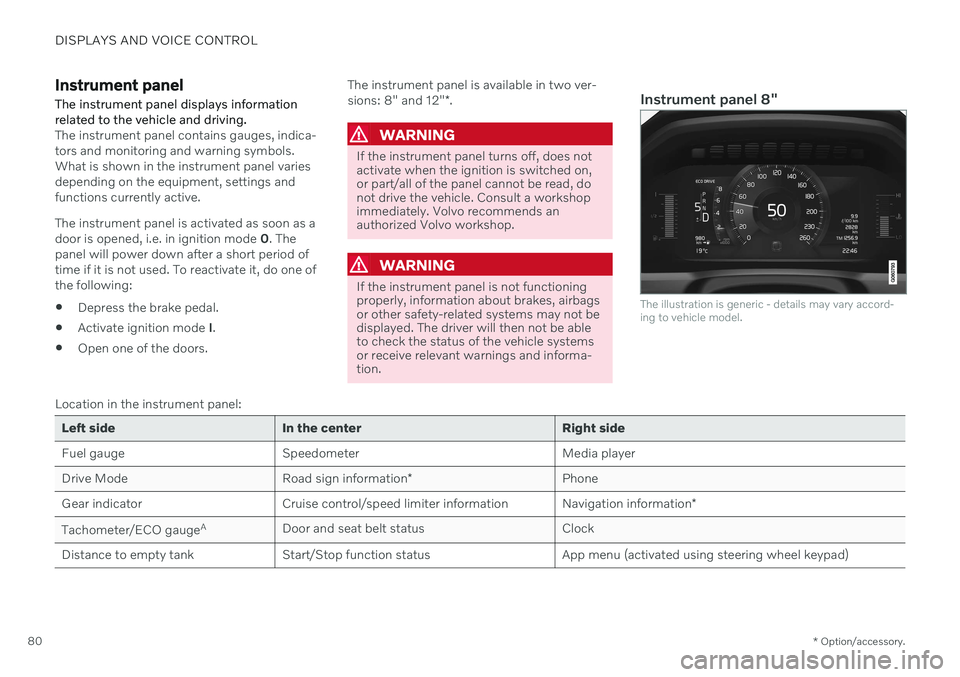
Instrument panel 8"
The illustration is generic - details may vary accord- ing to vehicle model.
Location in the instrument panel:
Left side In the center Right side
Fuel gauge Speedometer Media player Drive Mode
Road sign information* Phone
Gear indicator Cruise control/speed limiter information Navigation information*
Tachometer/ECO gauge A
Door and seat belt status Clock
Distance to empty tank Start/Stop function status App menu (activated using steering wheel keypad)
Page 96 of 643

||
DISPLAYS AND VOICE CONTROL
94
Symbol Meaning
Airbags If this symbol remains illumi- nated or comes on while driving,a fault has been detected in oneof the vehicle's safety systems.Read the message in the instru-ment panel. Volvo recommendscontacting an authorized Volvoworkshop.
A
BFault in brake system If this symbol illuminates, the brake fluid level may be too low.Contact your nearest authorizedworkshop to have the brake fluidlevel checked and adjusted.
Symbol Meaning
A
B
Parking brake on This symbol glows steadily when the parking brake is applied. A flashing symbol indicates that a fault has occurred. Read themessage in the instrument panel.
Low oil pressure If this symbol illuminates while driving when the engine oil pres-sure is too low. Stop the engineimmediately and check theengine oil level. Add oil if neces-sary. If the symbol illuminatesand the oil level is normal, con-tact a workshop. Volvo recom-mends contacting an authorizedVolvo workshop.
Generator not charging This symbol illuminates during driving if a fault is detected in theelectrical system. Contact aworkshop. Volvo recommendscontacting an authorized Volvoworkshop.
Symbol Meaning
Collision risk City Safety warns the driver if there is a risk of a collision withanother vehicle, pedestrian,cyclist or large animal.
High engine temperature The symbol will illuminate while driving when the engine tem-perature is too high. An explana-tory message will be simultane-ously displayed in the instrumentpanel.
A
Canadian models.
B US models.
Related information
Indicator symbols in the instrument panel (p. 91)
Instrument panel (p. 80)
Page 393 of 643

STARTING AND DRIVING
}}
* Option/accessory.391
Braking assist after a collision
In a collision in which the activation level is reached for the pyrotechnic seat belt tension-ers or airbags, or if a collision with a large ani-mal is detected, the vehicle's brakes will beautomatically activated. This function isintended to help prevent or reduce the effectsof any subsequent collision.
After a serious collision, it may no longer be possible to control and steer the vehicle. Inorder to avoid or mitigate a possible furthercollision with a vehicle or an object in the vehi-cle's path, the brake assist system is activatedautomatically to help stop the vehicle safely. If braking is not appropriate, e.g. if there is a risk of being hit by passing traffic, the drivercan override the system by depressing theaccelerator pedal. This function assumes that the brake system is intact after a collision.
Related information
Rear Collision Warning
* (p. 326)
BLIS
* (p. 327)
Brake functions (p. 382)
Transmission
The transmission is part of the vehicle's drive- line (power transmission) between the engineand the drive wheels. The function of thetransmission is to change gears dependingon speed and power needs.
The vehicle has an 8-speed automatic trans- mission. The number of gears allows theengine's torque and power band to be effec-tively utilized. Two of the gears are overdrivegears that save fuel when driving at a constantengine speed. Manual shifting is also possible.The instrument panel shows the gear currentlyin use.
Related information
Automatic transmission (p. 391)
Automatic transmission
In vehicles with an automatic transmission, the system selects the gear so that drivingwill be as energy-efficient as possible. Thetransmission also has a manual mode.
The transmission is available in different ver- sions. The gear selector indicates which trans-mission the vehicle has. The various gearselectors have different functions.
Overview of large gear selector and gear shift pattern in the instrument panel
4 Hill Start Assist
Page 424 of 643

STARTING AND DRIVING
422
Selecting ignition mode (p. 382)
Support battery (p. 571)
Towing using a towline
This section refers to one vehicle being towed behind another using a towline.
Before towing another vehicle, check applica- ble speed limit regulations.
Preparations and towing
CAUTION
Vehicles with the small gear selector can- not shift out of the P position when theengine is off. Contact an authorized Volvoworkshop or a professional towing com-pany for assistance towing the vehicle.
CAUTION
Note that the vehicle must always be towed with the wheels rolling forward.
Do not tow a vehicle with automatictransmission at a speed greater than80 km/h (50 mph) or for a distancegreater than 80 km (50 miles).
WARNING
Ignition mode
II must be active – all
airbags are deactivated in ignition mode I.
Always have the remote key in thevehicle when it is towed.
WARNING
The brake and steering servos do not work when the engine is off – it takesabout 5 times more pressure on the brakepedal and steering requires much moreeffort than normal.
1. Turn on the hazard warning flashers.
2. Attach the towline to the towing eyelet.
3. Put the vehicle in ignition mode II – with-
out pressing the brake pedal, turn the start knob clockwise and hold it there for about4 seconds. Release the knob, which willautomatically return to its original position.
4. Move the gear selector to neutral (N) and release the parking brake. If the battery charge level is too low, it may not be possible to release the parkingbrake. Connect an auxiliary battery to thevehicle if the battery is discharged.
> The towing vehicle can now start driv-ing.
Page 581 of 643
MAINTENANCE AND SERVICE
579
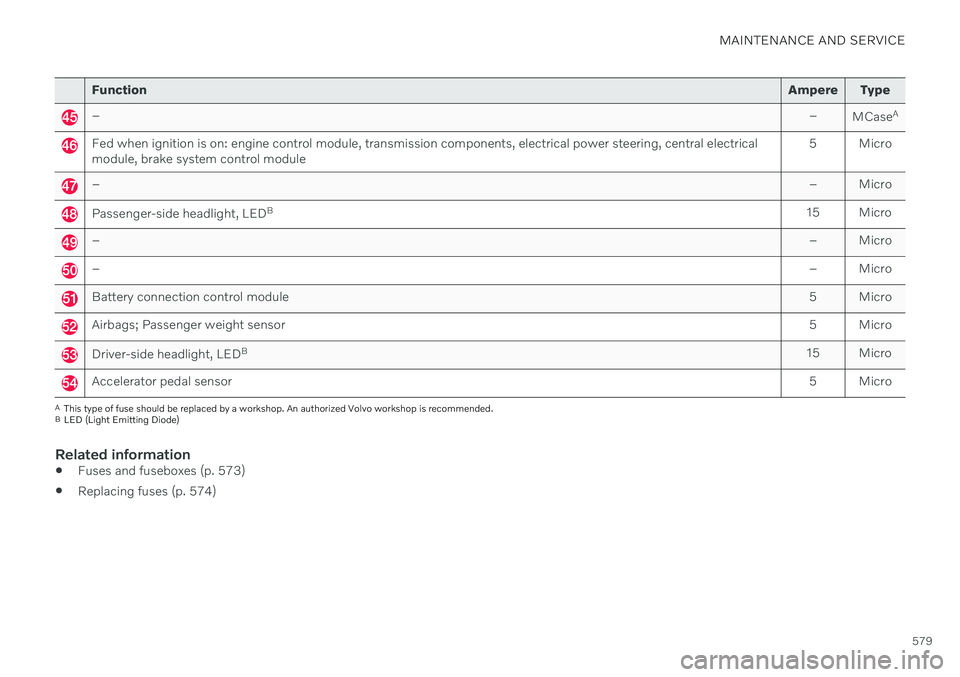
FunctionAmpere Type
– –
MCaseA
Fed when ignition is on: engine control module, transmission components, electrical power steering, central electrical module, brake system control module 5 Micro
–
– Micro
Passenger-side headlight, LEDB
15 Micro
– – Micro
–– Micro
Battery connection control module 5 Micro
Airbags; Passenger weight sensor5 Micro
Driver-side headlight, LEDB
15 Micro
Accelerator pedal sensor 5 Micro
A
This type of fuse should be replaced by a workshop. An authorized Volvo workshop is recommended.
B LED (Light Emitting Diode)
Related information
Fuses and fuseboxes (p. 573)
Replacing fuses (p. 574)
Page 585 of 643
MAINTENANCE AND SERVICE
}}
* Option/accessory.583
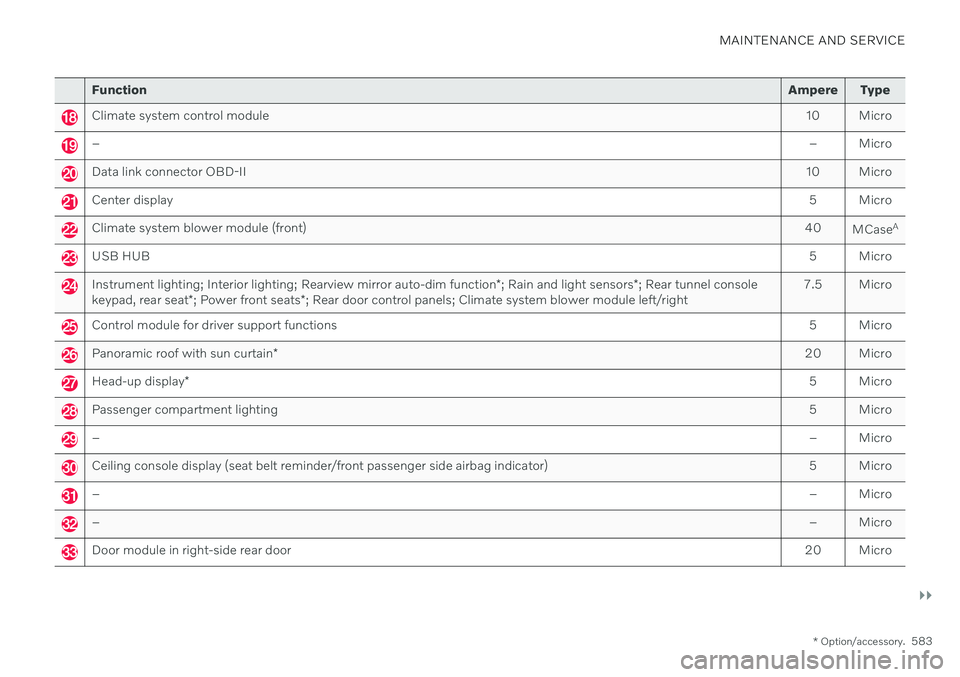
Function Ampere Type
Climate system control module 10 Micro
– – Micro
Data link connector OBD-II10 Micro
Center display 5 Micro
Climate system blower module (front)40
MCaseA
USB HUB
5 Micro
Instrument lighting; Interior lighting; Rearview mirror auto-dim function*; Rain and light sensors *; Rear tunnel console
keypad, rear seat *; Power front seats *; Rear door control panels; Climate system blower module left/right 7.5 Micro
Control module for driver support functions
5 Micro
Panoramic roof with sun curtain* 20 Micro
Head-up display
* 5 Micro
Passenger compartment lighting
5 Micro
–– Micro
Ceiling console display (seat belt reminder/front passenger side airbag indicator) 5 Micro
–– Micro
–– Micro
Door module in right-side rear door20 Micro
Page 588 of 643

MAINTENANCE AND SERVICE
* Option/accessory.
586
Fuses in the trunk The fuses in the trunk protect electrical com- ponents such as the power seats *, airbags
and seat belt tensioners.
Page 625 of 643

INDEX
623
1, 2, 3 ...
4WD 399
A
ABSanti-lock brakes 383
AC (Air conditioning) 223
Accessories and extra equipment 35 installation 36
Accessory installation warning 36, 37
Active Bending Lights 154
Adapting driving characteristics 399
Adaptive Cruise Control 276 activating 278
auto-brake 298
change cruise control functionality 282
limitations 281
manage speed 296
passing 302
set time interval 297
standby mode 280
switching target vehicles 295
Symbols and messages 283
troubleshooting 281
turn off 279
WARNING 294
Adjusting the steering wheel 193
Airbag 52
activation/deactivation 56
driver's side 53
passenger side 53, 56
Air bag, see Airbag 52
Air conditioning 223Air conditioning, fluid volume and grade 619
Air distribution 201 air vents 201, 203
changing 202
defrosting 215
recirculation 214
table showing options 204
Air quality 199, 200 allergy and asthma 200
passenger compartment filter 201
Air recirculation 214
Alarm 261 deactivating 262
Allergy and asthma-inducing sub-
stances 200
All Wheel Drive, AWD 399
All Wheel Drive (AWD) 399
All Wheel Drive (four-wheel drive) 399
Android Auto 468, 469, 470Antenna location 251
Apple CarPlay 464, 465, 467
Approach lighting 158
Apps 436Armrest folding down the rear seats 537
Assistance at risk of collision 349 activating/deactivating 350
at risk of run-off 350
during collision risks from behind 352during collision risks from oncoming
traffic 351
limitations 353
Symbols and messages 354
Audio and media 434 Audio system HD digital radio 445 SiriusXM ®
Satellite radio 446, 447,
449
Auto-climate 214
Auto hold 389
Auto-hold brakes 389 activating/deactivating 390
after collision 391
driver support 266
Automatic car wash 599
INDEX
Page 636 of 643

INDEX
634Side airbag 60
Side Impact Protection System 60
SIM card 483
SIPS (Side Impact Protection System) 60Sirius Satellite radio
Travel link 450
SiriusXM ® Satellite radio
traffic information 446, 447, 449
Ski hatch 540
Slippery conditions 412, 413
Slippery road conditions 413
Snow chains 522
Software updates 33
Sound experience 435
Sound settings 434, 477 phone 478
playing media 456, 457
text message 477
Spare tire 519 handling 520
Speed camera information 337 Speed Limiter change speed 296
Speed symbols, tires 504
Spin control 267
Stability and traction control system 267 sport mode 268
Symbols and messages 270
Stains 591, 593, 594, 595 Start/Stop deactivate 406
Driving 404
limitations 406
vehicle function 404
Start and lock system type designations 247
Start battery 420, 567 overload 419
Start engine 378 Starting the engine after a collision 62
Start the vehicle 378
Steering assistance at risk of collision 349 Steering power level, see Steering wheel
resistance 266
Steering wheel 192, 193 heating 213
keypad 192
paddle 192
steering wheel adjustment 193
Steering wheel keypad 192
Steering wheel paddles 395Steering wheel resistance, speed-
dependent 266
Stone chips and scratches 603, 604
Stop/start function 404
Storage compartments 532 center console 533
glove compartment 535
sun visor 537
Sunroof pinch protection 162
Sun shade panoramic roof 170, 175
pinch protection 162
rear door 166
rear window 166
Sun visor 537 mirror lighting 159
Support battery 571 Switching target vehicles with Adaptive Cruise Control 295
with Pilot Assist 295
Symbols dynamic 80
indicator symbols 91
warning symbols 93
Symbols and messages center display's status bar 121
parking climate 229
Page 638 of 643

INDEX
636Type approval
HomeLink ® 429
radar system 304
U
Uniform Tire Quality Grading 506
Units 129Unlocking settings 237
with key blade 245
USB socket for connecting media 462
V
Vehicle care 596, 597, 599, 600, 601,
602
leather upholstery 594
Vehicle Event Data 33 Vehicle functions in the center display 119
Vehicle key bat. low 238 Vehicle modem connecting vehicle to Internet 482
settings 483
Vehicle recovery 425
Vehicle status 546
inflation pressure 512
Vehicle upholstery 591, 593, 594, 595
Vehicle weight 615
Ventilation 201, 202, 203 Seats 211, 212
Video 460, 462 settings 461
Voice control 142 climate 198
phone 145
radio and media 145
settings 146
VOL mark 500
Volvo ID 26 create and register 27
W
Warning lightsAdaptive Cruise Control 294
airbags SRS 93
alternator does not charge 93
brake system error 93
low oil pressure 93
parking brake applied 93
Pilot Assist 294
seat belt reminder 93
stability and traction control system 267
starter battery not charging 93
system error 93
WARNING 93
Warning sound parking brake 388
warning symbols 93 Warning symbols safety 42
Warranties 542Washer Headlights 178
washer fluid, filling 607
Windshield 178
Washer fluid 176, 607
Washer nozzles, heated 176
Waxing 596Weights Curb weight 615
Wheel bolts 515 Wheels cleaning 602
mounting 518
removal 516
Snow chains 522