mirror VOLVO S90 TWIN ENGINE 2019 User Guide
[x] Cancel search | Manufacturer: VOLVO, Model Year: 2019, Model line: S90 TWIN ENGINE, Model: VOLVO S90 TWIN ENGINE 2019Pages: 669, PDF Size: 14.33 MB
Page 133 of 669
DISPLAYS AND VOICE CONTROL
}}
* Option/accessory.131
Table of settings in the centerdisplay
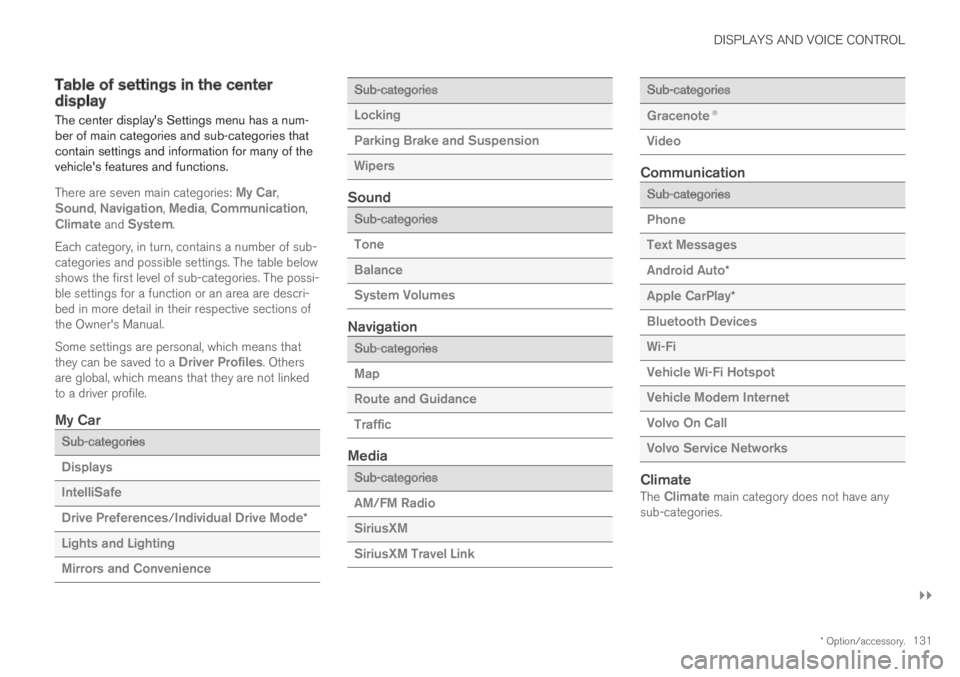
The center display's Settings menu has a num-ber of main categories and sub-categories thatcontain settings and information for many of thevehicle's features and functions.
There are seven main categories: My Car,Sound, Navigation, Media, Communication,Climate and System.
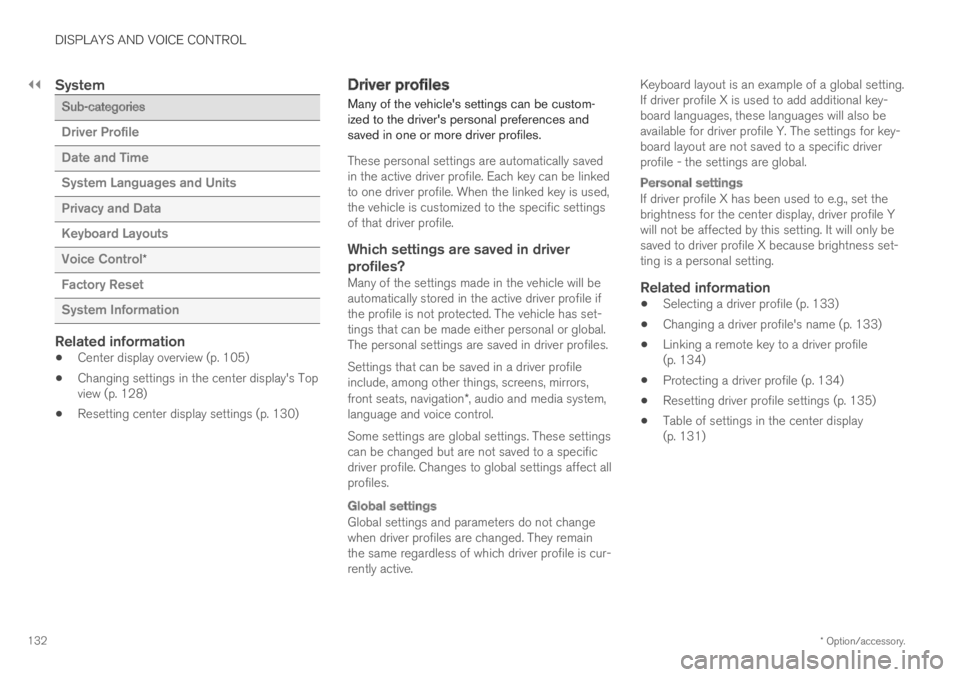
Each category, in turn, contains a number of sub-categories and possible settings. The table belowshows the first level of sub-categories. The possi-ble settings for a function or an area are descri-bed in more detail in their respective sections ofthe Owner's Manual.
Some settings are personal, which means thatthey can be saved to a Driver Profiles. Othersare global, which means that they are not linkedto a driver profile.
My Car
Sub-categories
Displays
IntelliSafe
Drive Preferences/Individual Drive Mode*
Lights and Lighting
Mirrors and Convenience
Sub-categories
Locking
Parking Brake and Suspension
Wipers
Sound
Sub-categories
Tone
Balance
System Volumes
Navigation
Sub-categories
Map
Route and Guidance
Traffic
Media
Sub-categories
AM/FM Radio
SiriusXM
SiriusXM Travel Link
Sub-categories
Gracenote®
Video
Communication
Sub-categories
Phone
Text Messages
Android Auto*
Apple CarPlay*
Bluetooth Devices
Wi-Fi
Vehicle Wi-Fi Hotspot
Vehicle Modem Internet
Volvo On Call
Volvo Service Networks
Climate
The Climate main category does not have anysub-categories.
Page 134 of 669
||
DISPLAYS AND VOICE CONTROL
* Option/accessory.132
System
Sub-categories
Driver Profile
Date and Time
System Languages and Units
Privacy and Data
Keyboard Layouts
Voice Control*
Factory Reset
System Information
Related information
Center display overview (p. 105)
Changing settings in the center display's Topview (p. 128)
Resetting center display settings (p. 130)
Driver profiles
Many of the vehicle's settings can be custom-ized to the driver's personal preferences andsaved in one or more driver profiles.
These personal settings are automatically savedin the active driver profile. Each key can be linkedto one driver profile. When the linked key is used,the vehicle is customized to the specific settingsof that driver profile.
Which settings are saved in driver
profiles?
Many of the settings made in the vehicle will beautomatically stored in the active driver profile ifthe profile is not protected. The vehicle has set-tings that can be made either personal or global.The personal settings are saved in driver profiles.
Settings that can be saved in a driver profileinclude, among other things, screens, mirrors,front seats, navigation*, audio and media system,language and voice control.
Some settings are global settings. These settingscan be changed but are not saved to a specificdriver profile. Changes to global settings affect allprofiles.
Global settings
Global settings and parameters do not changewhen driver profiles are changed. They remainthe same regardless of which driver profile is cur-rently active.
Keyboard layout is an example of a global setting.If driver profile X is used to add additional key-board languages, these languages will also beavailable for driver profile Y. The settings for key-board layout are not saved to a specific driverprofile - the settings are global.
Personal settings
If driver profile X has been used to e.g., set thebrightness for the center display, driver profile Ywill not be affected by this setting. It will only besaved to driver profile X because brightness set-ting is a personal setting.
Related information
Selecting a driver profile (p. 133)
Changing a driver profile's name (p. 133)
Linking a remote key to a driver profile(p. 134)
Protecting a driver profile (p. 134)
Resetting driver profile settings (p. 135)
Table of settings in the center display(p. 131)
Page 143 of 669

DISPLAYS AND VOICE CONTROL
}}
* Option/accessory.141
Calibrating the horizontal position
If the windshield or display unit has beenreplaced, the head-up display's horizontal posi-tion may need to be calibrated. Calibration meansthat the projected image is rotated clockwise orcounterclockwise.
1.Tap Settings in the center display's Topview.
2. Select My CarDisplaysHead-Up
Display OptionsHead-Up DisplayCalibration.
3. Calibrate the horizontal position of the imageusing the right-side steering wheel keypad.
Rotate counterclockwise
Rotate clockwise
Confirm
Related information
Head-up display* (p. 138)
Activating and deactivating the head-up dis-play* (p. 139)
Driver profiles (p. 132)
Storing positions for seats, mirrors and head-up display* (p. 182)
Voice control15
The driver can use voice commands to controlcertain functions in the media player, aBluetooth-connected phone, the climate systemand the Volvo navigation system*.
Voice commands offer extra convenience andhelp minimize distractions so drivers can concen-trate on driving and keep their attention on theroad and traffic situation.
WARNING
The driver is always responsible for ensuringthat the vehicle is operated in a safe mannerand that all applicable traffic regulations arefollowed.
Voice control microphone
Voice control is carried out as a dialog, with spo-ken commands from the user and verbal respon-
Page 160 of 669

LIGHTING
* Option/accessory.158
Interior Lighting
The interior is equipped with several differenttypes of lighting to improve the experience. Thisincludes reading lamps, glove box lighting andground lighting.
All lighting in the passenger compartment can beturned on and off manually within 5 minutesafter:
the engine has been switched off and theignition is in mode 0.
the vehicle is unlocked but the engine hasnot been started.
Front ceiling lighting
The controls in the ceiling console for the front readinglights and courtesy lighting.
Reading light left side
Passenger compartment lighting
Courtesy lighting auto switch
Reading light right side
Reading lights
The reading lights on the right and left sides areswitched on and off by briefly pressing the but-tons in the ceiling console. To adjust the bright-ness, press and hold the button.
Passenger compartment lighting
Briefly press the button in the ceiling console toswitch on or off the footwell lighting and ceilinglighting.
Courtesy lighting auto switch
Activate the auto switch by briefly pressing theAUTO button in the ceiling console. With Autoactivated, the indicator light in the button and thecourtesy lighting come on and are turned off asfollows.
The courtesy lighting:
comes on when the vehicle is unlocked andwhen the ignition is switched off
goes off when the engine is started andwhen the vehicle is locked
comes on or goes off when a side door isopened or closed
remains on for 2 minutes if any of the sidedoors are open.
Rear roof lighting
Reading lights are located in the rear section ofthe vehicle and can also be used as passengercompartment lighting.
In vehicles with panoramic roofs*, there are two lampunits, one on each side of the ceiling.
Briefly press the button on the light to turn on oroff the reading lights. To adjust the brightness,press and hold the button.
Glove compartment lighting
The glove compartment lighting comes on orgoes off when the glove compartment is openedor closed.
Vanity mirror lighting *
The vanity mirror lighting comes on or goes offwhen the cover over the mirror is opened orclosed.
Page 164 of 669

WINDOWS, GLASS AND MIRRORS
* Option/accessory.162
Windows, glass and mirrors
The vehicle is equipped with controls for win-dows, glass and mirrors. Some of the windowsin the car are laminated.
Laminated glass
The windshield has laminated glass. Laminatedglass is also available as on option for someother glass surfaces. Laminated glass is rein-forced, which provides better protection againstbreak-ins and improved soundproofing in thepassenger compartment.
The panoramic roof* also has laminated glass.
The symbol shows the windows containing laminatedglass1
Related information
Pinch protection for windows and sun cur-tains (p. 162)
Panoramic roof (p. 170)
Power windows (p. 164)
Rearview/door mirrors (p. 167)
Using sun curtains* (p. 166)
Head-up display* (p. 138)
Using the windshield wipers (p. 176)
Using the windshield and headlight washers(p. 178)
Activating and deactivating the heated wind-shield* (p. 217)
Activating and deactivating the heated rearwindow and door mirrors (p. 218)
Pinch protection for windows andsun curtains
All power windows and sun curtains* have apinch protection function that is triggered if any-thing blocks them while they are opening orclosing.
If pinch protection is activated, movement willstop and then retract automatically to approx.50 mm (2 inches) from the point at which it wasblocked (or to full ventilation position).
It is still possible to override pinch protectionwhen closing is interrupted (e.g. due to ice) bypressing and holding down the control in thesame direction.
If there is any problem with the pinch protection,a rest procedure can be tested.
WARNING
If the starter battery is disconnected, the func-tion for automatic opening and closing mustbe reset to function correctly. A reset isrequired in order for the pinch protection towork.
Related information
Reset procedure for pinch protection(p. 163)
Operating the power windows (p. 165)
1Does not apply to windshield and panoramic roof*, which are always laminated and therefore do not have this symbol.
Page 165 of 669

WINDOWS, GLASS AND MIRRORS
* Option/accessory.163
Using sun curtains* (p. 166)
Panoramic roof (p. 170)
Reset procedure for pinchprotection
If you experience any problems with the electri-cal functions for the power windows, you can tryto perform a reset.
The power sun curtains* also have a reset pro-cedure that can be tested as needed.
WARNING
If the starter battery is disconnected, the func-tion for automatic opening and closing mustbe reset to function correctly. A reset isrequired in order for the pinch protection towork.
If the problem persists or if it affects the panor-
amic roof or sunroof, contact a workshop2.
Resetting a power window
1. Start with the window in the closed position.
2. Then operate the window in manual modethree times upward toward the closed posi-tion.
> The system will be automatically initiated.
Resetting a sun curtain *
1. Begin with the sun curtain in the loweredposition.
2. Press and hold the lowering control forapprox. 15 seconds.
> The system will be automatically activated.
Related information
Pinch protection for windows and sun cur-tains (p. 162)
Operating the power windows (p. 165)
Using sun curtains* (p. 166)
2An authorized Volvo workshop is recommended.
Page 166 of 669

WINDOWS, GLASS AND MIRRORS
* Option/accessory.164
Power windows
The power windows are operated using the con-trol panels found in the doors. The driver's doorhas controls for operating all windows and foractivating the child safety locks.
The power window in left rear door can also beoperated with the control panel in the right reardoor.
Driver's door control panel.
Electric child safety locks* that deactivate thecontrols in the rear doors to prevent thedoors or windows from being opened fromthe inside.
Rear window controls.
Front window controls.
Right-hand rear door controls.
Rear window controls.
The power windows have pinch protection. Ifthere is any problem with the pinch protection, arest procedure can be tested.
WARNING
Children, other passengers or objects can betrapped by the moving parts.
Always operate the windows with caution.
Do not allow children to play with theoperating controls.
Never leave a child alone in the vehicle.
Remember to always cut the current tothe power windows by setting the vehi-cle's electrical system to ignition mode 0and then taking the remote key with youwhen leaving the vehicle.
Never stick objects or body parts outthrough the windows, even if the vehicleelectrical system is completely turned off.
Related information
Operating the power windows (p. 165)
Pinch protection for windows and sun cur-tains (p. 162)
Reset procedure for pinch protection(p. 163)
Page 167 of 669

WINDOWS, GLASS AND MIRRORS
* Option/accessory.165
Operating the power windows
All power windows can be operated using thecontrol panel in the driver's door. The controlpanels in the other doors can be used to oper-ate that particular door.
The power window in left rear door can also beoperated with the control panel in the right reardoor.
The power windows have pinch protection. Ifthere is any problem with the pinch protection, arest procedure can be tested.
WARNING
Children, other passengers or objects can betrapped by the moving parts.
Always operate the windows with caution.
Do not allow children to play with theoperating controls.
Never leave a child alone in the vehicle.
Remember to always cut the current tothe power windows by setting the vehi-cle's electrical system to ignition mode 0and then taking the remote key with youwhen leaving the vehicle.
Never stick objects or body parts outthrough the windows, even if the vehicleelectrical system is completely turned off.
Operating the power windows.
Operating manually. Move one of the controlsslightly up or down. The power windows goup or down while the control is held in posi-tion.
Operating with automatic controls. Move oneof the controls up or down to its end positionand release it. The window moves automati-cally to its fully closed/open position.
To use the power windows, the ignition must bein at least mode I or II. After the ignition hasbeen switched off, the power windows can beoperated for several minutes or until a door isopened. Only one control panel can be operatedat a time.
It can also be operated using keyless opening*with the door handle.
WARNING
Make sure that no child or other passengercomes into contact with the windows as theyare closing with keyless closing*.
NOTE
One way to reduce the pulsating wind noiseheard when the rear windows are open is toalso open the front windows slightly.
NOTE
The windows cannot be opened at speedsover approx. 180 km/h (ca112 mph), but theycan be closed.
The driver is always responsible for followingapplicable traffic regulations.
Related information
Power windows (p. 164)
Pinch protection for windows and sun cur-tains (p. 162)
Reset procedure for pinch protection(p. 163)
Keyless locking and unlocking* (p. 253)
Locking and unlocking using the remote key(p. 240)
Page 168 of 669
WINDOWS, GLASS AND MIRRORS
* Option/accessory.166
Using sun curtains*
There are integrated sun curtains in each reardoor and in the parcel shelf in the rear window.
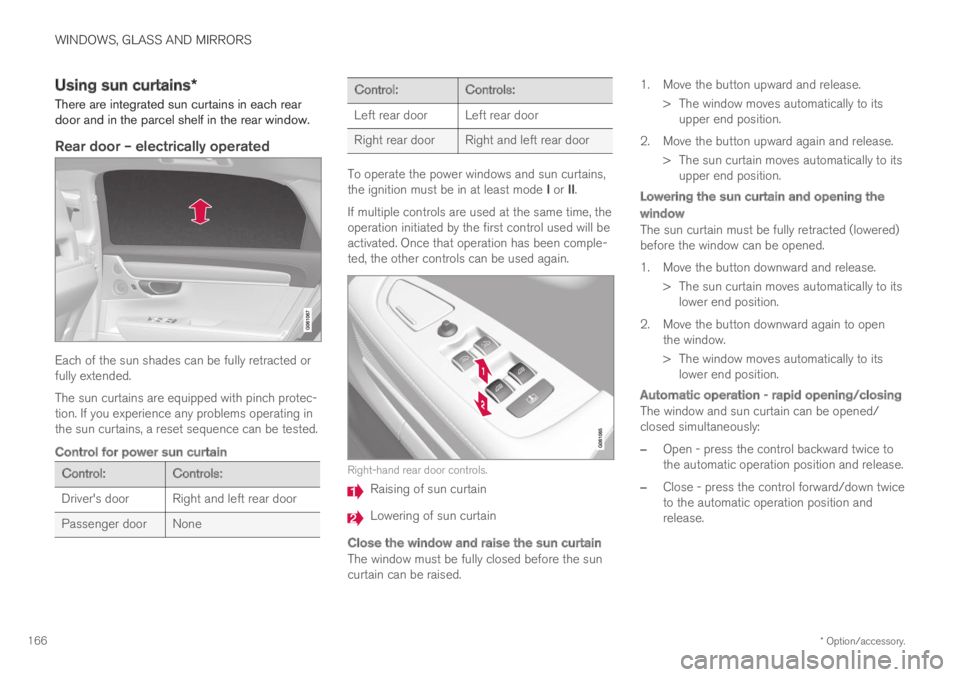
Rear door – electrically operated
Each of the sun shades can be fully retracted orfully extended.
The sun curtains are equipped with pinch protec-tion. If you experience any problems operating inthe sun curtains, a reset sequence can be tested.
Control for power sun curtain
Control:Controls:
Driver's door Right and left rear door
Passenger doorNone
Control:Controls:
Left rear door Left rear door
Right rear doorRight and left rear door
To operate the power windows and sun curtains,the ignition must be in at least mode I or II.
If multiple controls are used at the same time, theoperation initiated by the first control used will beactivated. Once that operation has been comple-ted, the other controls can be used again.
Right-hand rear door controls.
Raising of sun curtain
Lowering of sun curtain
Close the window and raise the sun curtain
The window must be fully closed before the suncurtain can be raised.
1. Move the button upward and release.
> The window moves automatically to itsupper end position.
2. Move the button upward again and release.
> The sun curtain moves automatically to itsupper end position.
Lowering the sun curtain and opening the
window
The sun curtain must be fully retracted (lowered)before the window can be opened.
1. Move the button downward and release.
> The sun curtain moves automatically to itslower end position.
2. Move the button downward again to openthe window.
> The window moves automatically to itslower end position.
Automatic operation - rapid opening/closing
The window and sun curtain can be opened/closed simultaneously:
–Open - press the control backward twice tothe automatic operation position and release.
–Close - press the control forward/down twiceto the automatic operation position andrelease.
Page 169 of 669

WINDOWS, GLASS AND MIRRORS
}}
* Option/accessory.167
Rear window shelf
An electrically operated sun curtain is integratedin the rear window shelf.
To operate the sun curtain, the ignition must bein mode II.
NOTE
It may not be possible to operate the sunshade if the temperature in the passengercompartment is low.
Operating using the center display
Tap Rear Sun Curtainin Func-tion view in the center display -the sun curtain will automati-cally move to its end position,up or down.
Operating with right-side rear door controls
Briefly press the button - the sun curtain willautomatically move to its end position, up ordown.
Related information
Pinch protection for windows and sun cur-tains (p. 162)
Reset procedure for pinch protection(p. 163)
Power windows (p. 164)
Rearview/door mirrors
The rearview mirror and door mirrors can beused to improve the driver's visibility behind thevehicle.
Rearview mirror
The rearview mirror can be easily adjusted man-ually. The rearview mirror can be equipped withHomeLink*, auto-dim* and compass*.
Door mirrors
WARNING
The door mirror on the passenger side iscurved to improve visibility. Objects in the mir-ror may appear farther away than they actuallyare.
The joystick in the drivers' door control panel isused to adjust the position of the door mirrors.There are also several automatic settings thatcan also be connected to the memory functionbuttons for the power seat*.
Related information
HomeLink®* (p. 471)
Compass* (p. 474)
Adjusting the rearview mirror dimming func-tion (p. 168)
Adjusting the door mirrors (p. 169)