park assist VOLVO S90 TWIN ENGINE 2019 User Guide
[x] Cancel search | Manufacturer: VOLVO, Model Year: 2019, Model line: S90 TWIN ENGINE, Model: VOLVO S90 TWIN ENGINE 2019Pages: 669, PDF Size: 14.33 MB
Page 322 of 669

||
DRIVER SUPPORT
320
WARNING
When Pilot Assist follows another vehicle atspeeds over approx. 30 km/h (20 mph) andchanges target vehicle – from a moving vehi-cle to a stationary one – Pilot Assist willignore the stationary vehicle and insteadaccelerate to the stored speed.
The driver must then intervene and applythe brakes.
Automatic standby mode when switching
targets
Pilot Assist disengages and goes into standbymode if:
your vehicle's speed goes below 5 km/h(3 mph) and Pilot Assist cannot determine ifthe target object is a stationary vehicle oranother object, e.g. a speed bump.
your vehicle's speed goes under 5 km/h(3 mph) and the vehicle ahead turns so thatPilot Assist no longer has a vehicle to follow.
Related information
Pilot Assist (p. 308)
Auto-hold braking with Pilot Assist
Pilot Assist has a special braking function inslow traffic and at a standstill.
Braking function in slow traffic and at a
standstill
In slow-moving, stop-and-go traffic or when stop-ped at a traffic light, driving will resume automati-cally if the vehicle is stopped for less thanapprox. 3 seconds. If it takes more than 3 sec-onds for the vehicle ahead to begin moving again,Pilot Assist will go into standby mode and theAuto-hold brake function will activate.
–Pilot Assist can be reactivated by:
Pressing the button on the steeringwheel keypad.
Pressing the accelerator pedal.
> Pilot Assist will resume following the vehi-cle ahead if it begins to move withinapprox. 6 seconds.
NOTE
Pilot Assist can keep the vehicle stationaryfor no more than 5 minutes – after that timethe parking brake is applied and the functionis deactivated.
The parking brake must be released beforePilot Assist can be reactivated.
Deactivation of the Auto-hold brake function
In certain situations, Auto-hold will be deactivatedwhen the vehicle is at a standstill and Pilot Assistwill go into standby mode. This means that thebrakes will be released and the vehicle couldbegin to roll. The driver must actively apply thebrakes to keep the vehicle stationary.
This can occur if:
the driver depresses the brake pedal
the parking brake is applied
the gear selector is moved to the P, N or Rpositions
the driver puts Pilot Assist in standby mode.
Auto Activate Parking Brake
In certain situations, the parking brake will beapplied to keep the vehicle at a standstill.
This occurs if Pilot Assist is keeping the vehiclestationary using the brakes and:
the driver opens the door or unbuckleshis/her seat belt
Pilot Assist has kept the vehicle at a stand-still for more than approx. 5 minutes
the brakes overheat
the driver switches off the engine manually.
Related information
Pilot Assist (p. 308)
Page 354 of 669

DRIVER SUPPORT
* Option/accessory.352
Cross Traffic Alert*
CTA77 is a supplementary driver support system
to BLIS78 that is intended to help the driverdetect vehicles crossing behind the vehiclewhile backing up.
CTA overview.
CTA supplements BLIS by detecting traffic cross-ing from the side, e.g. when backing out of aparking space.
CTA is primarily designed to detect vehicles, butin certain cases can also detect pedestrians orsmaller objects such as bicycles.
CTA is only active when the vehicle is movingbackward or if reverse gear is engaged.
If CTA detects that something is approachingyour vehicle from the side:
an audible signal will sound from either theleft or right speaker, depending on whichside of your vehicle the object is approachingfrom.
an icon will illuminate in the PAS79 graphicon the screen.
an icon will appear in the Park Assist Cam-era's Top view.
Illuminated CTA icon in the PAS graphic80 on thescreen.
WARNING
The Cross Traffic Alert function is supple-mentary driver support intended to facili-tate driving and make it safer – it cannothandle all situations in all traffic, weatherand road conditions.
The responsibility for reversing the vehiclesafely and using good judgment alwaysrests with the driver.
Cross Traffic Alert is not a substitute forthe driver's attention and judgment. Thedriver is always responsible for ensuringthe vehicle is driven in a safe manner, atthe appropriate speed, with an appropri-ate distance to other vehicles, and inaccordance with current traffic rules andregulations.
Related information
Activating/deactivating Cross Traffic Alert(p. 353)
Cross Traffic Alert limitations (p. 353)
Recommended maintenance for CrossTraffic Alert (p. 354)
Cross Traffic Alert messages (p. 355)
77Cross Traffic Alert78Blind Spot Information79Park Assist System: Parking assistance with reversing sensors80Note: This illustration is general and details may vary depending on model.
Page 384 of 669

DRIVER SUPPORT
* Option/accessory.382
Park Assist*
The Park Assist function can help the driverwhen maneuvering in tight spaces by indicatingdistances to obstacles using audible signals andgraphics in the center display.
Display view showing obstacle zones and sensor sec-tors.
The center display shows an overview of the vehi-cle in relation to objects that have been detected.
The marked sector indicates where the obstacleis located. The closer the vehicle symbol is to amarked sector forward/rearward, the closer thedetected obstacle is to your vehicle.
The side sectors change color as the distancebetween the vehicle and an object decreases.
The audible signals will also speed up the closerthe obstacle is to the vehicle. The volume of theaudio system will be automatically lowered.
Audible signals for obstacles in front and to thesides of the vehicle are active when the vehicle ismoving but will cease after the vehicle has beenstationary for approx. 2 seconds. Audible signalsfor obstacles behind the vehicle will remain activeeven when the vehicle is stationary.
If a detected obstacle is within approx. 30 cm(1 ft) from the front or rear of the vehicle, thetone will become constant and the active sen-sor's field closest to the vehicle symbol will befilled in.
At distances within approx. 25 cm (0.8 ft) from anobstacle to the sides of the vehicle, an rapid puls-ing signal will be given and the active sectorfields will change color from ORANGE to RED.
The volume of the Park Assist audible signalscan be adjusted while the signal is being givenusing the >II knob or in the center display's Topview under Settings.
NOTE
Besides in the sector closest to the vehi-cle symbol, audible warnings are only pro-vided for objects located directly in thevehicle's path.
WARNING
The Parking Assist function is supple-mentary driver support intended to facili-tate driving and help make it safer – itcannot handle all situations in all traffic,weather and road conditions.
The parking sensors have dead/blindspots where objects cannot be detected.
Pay particular attention to people andanimals near the vehicle.
Parking Assist is not a substitute for thedriver's attention and judgment. The driveris always responsible for ensuring thevehicle is driven in a safe manner, at theappropriate speed, with an appropriatedistance to other vehicles, and in accord-ance with current traffic rules and regula-tions.
Related information
Park Assist front, rear and sides (p. 383)
Activating/deactivating Park Assist (p. 384)
Park Assist limitations (p. 385)
Recommended maintenance for Park Assist(p. 386)
Park Assist symbols and messages (p. 387)
Page 385 of 669
DRIVER SUPPORT
}}
383
Park Assist front, rear and sides
Park Assist has different parameters dependingon which part of the vehicle is approaching anobstacle.
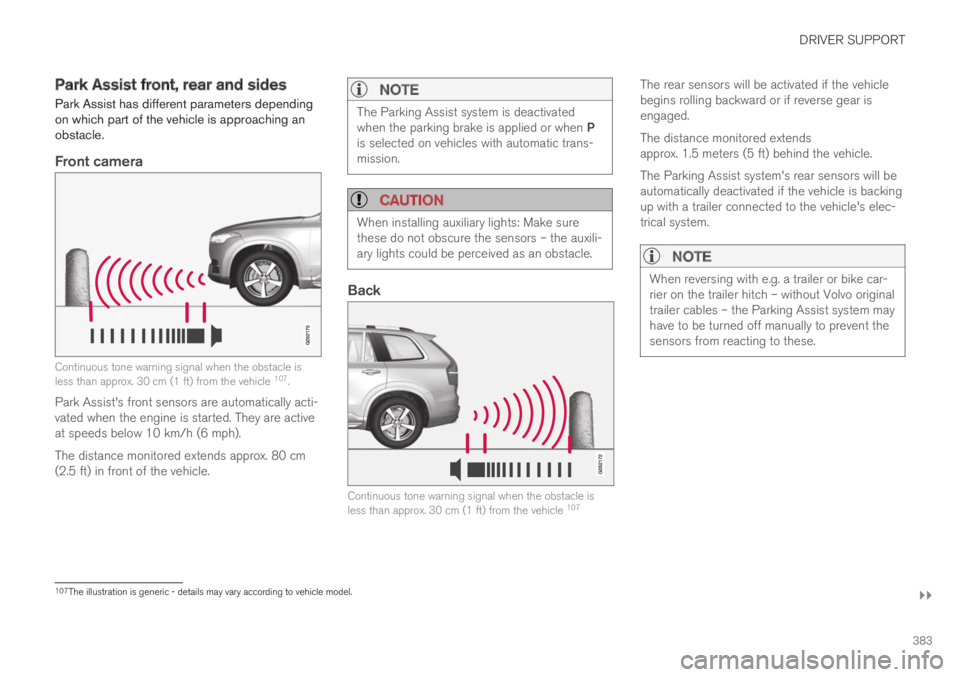
Front camera
Continuous tone warning signal when the obstacle isless than approx. 30 cm (1 ft) from the vehicle 107.
Park Assist's front sensors are automatically acti-vated when the engine is started. They are activeat speeds below 10 km/h (6 mph).
The distance monitored extends approx. 80 cm(2.5 ft) in front of the vehicle.
NOTE
The Parking Assist system is deactivatedwhen the parking brake is applied or when Pis selected on vehicles with automatic trans-mission.
CAUTION
When installing auxiliary lights: Make surethese do not obscure the sensors – the auxili-ary lights could be perceived as an obstacle.
Back
Continuous tone warning signal when the obstacle isless than approx. 30 cm (1 ft) from the vehicle 107
The rear sensors will be activated if the vehiclebegins rolling backward or if reverse gear isengaged.
The distance monitored extendsapprox. 1.5 meters (5 ft) behind the vehicle.
The Parking Assist system's rear sensors will beautomatically deactivated if the vehicle is backingup with a trailer connected to the vehicle's elec-trical system.
NOTE
When reversing with e.g. a trailer or bike car-rier on the trailer hitch – without Volvo originaltrailer cables – the Parking Assist system mayhave to be turned off manually to prevent thesensors from reacting to these.
107The illustration is generic - details may vary according to vehicle model.
Page 386 of 669

||
DRIVER SUPPORT
* Option/accessory.384
Side sensors
Rapid pulsing warning signal when the obstacle is lessthan approx. 25 cm (0.8 ft) from the vehicle 107.
Park Assist's side sensors are automatically acti-vated when the engine is started. They are activeat speeds below 10 km/h (6 mph).
The distance monitored is approx. 25 cm (0.8 ft)out from the sides.
The detection area increases significantly whenthe steering angle of the front wheels increasesand depending on the steering wheel position,obstacles up to approx. 90 cm (3 ft) directlybehind or in front of the vehicle can be detected(also see “Side sensor fields” in the section “Sen-sor field from Park Assist for Park Assist Cam-era”).
Related information
Park Assist* (p. 382)
Sensor field from Park Assist for Park AssistCamera (p. 393)
Activating/deactivating Park Assist
The Park Assist Pilot function can be activated/deactivated.
On/Off
Park Assist's front and side sensors are automat-ically activated when the engine is started. Therear sensors are activated if the vehicle is movingbackward or reverse gear is engaged.
The function can be activated/deactivated in the center dis-play's Function view.
–Tap the Park Assist button in Function view.
> The Park Assist Pilot indicator light showsthe status of the function: GREEN (on) orGRAY (off).
In vehicles equipped with Park Assist Camera,Park Assist can also be activated/deactivatedfrom the relevant camera view.
Related information
Park Assist* (p. 382)
107The illustration is generic - details may vary according to vehicle model.
Page 387 of 669

DRIVER SUPPORT
* Option/accessory.385
Park Assist limitations
Park Assist may not be able to detect all condi-tions in all situations and functionality may there-fore be limited in certain cases.
The driver should be aware of the following limi-tations for Park Assist:
WARNING
Be extra cautious whenreversing if this symbol isshown when a trailer, bikecarrier or similar is attachedand electrically connectedto the vehicle.
The symbol indicates thatthe rear parking assist sensors are deacti-vated and will not warn of any obstacles.
CAUTION
Objects such as chains, thin and glossy polesor low obstacles may end up in the "signalshadow" and then go temporarily undetectedby the sensors – the pulsating tone may thenunexpectedly stop instead of becoming aconstant tone as expected.
The sensors cannot detect high objects, suchas protruding ramps.
In such situations, pay extra attention andmaneuver/drive the vehicle very slowly orstop the current parking maneuver –there may be a high risk of damage tothe vehicle or other objects since infor-mation from the sensors is not alwaysreliable in such situations.
CAUTION
In some circumstances, the Park Assist Sys-tem may produce false warnings due to exter-nal sound sources with the same ultrasonicfrequencies as those the system works with.
Examples of such sources are horns, wet tireson asphalt, pneumatic brakes, exhaust noisefrom motorcycles, etc.
NOTE
When a trailer hitch is configured with thevehicle electrical system, the trailer hitch pro-trusion is included when the function meas-ures the distance to objects behind the vehi-cle.
Related information
Park Assist* (p. 382)
Page 388 of 669
DRIVER SUPPORT
* Option/accessory.386
Recommended maintenance forPark Assist
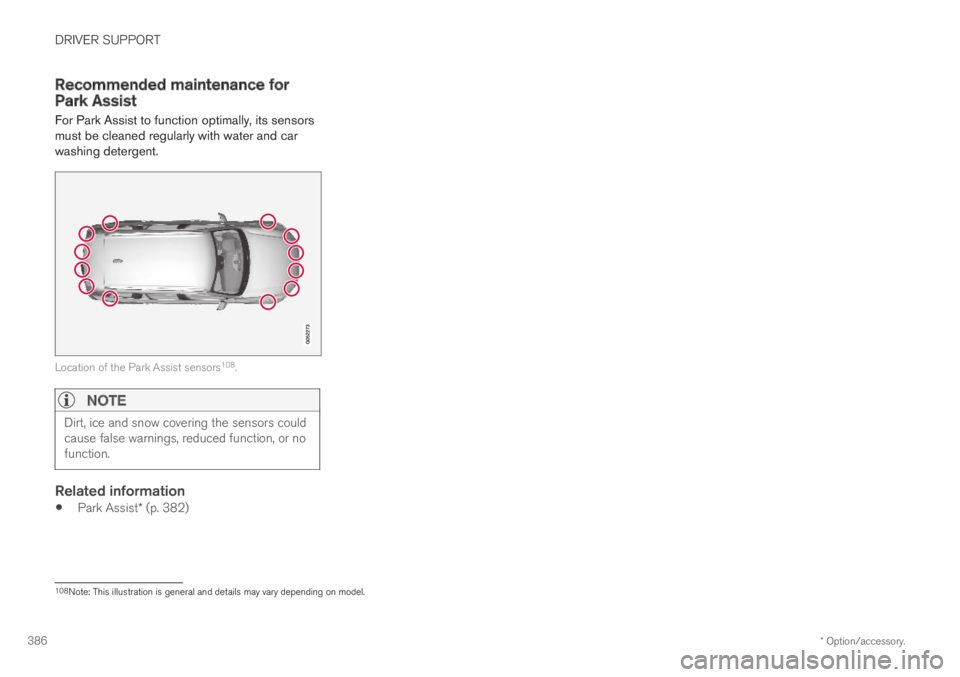
For Park Assist to function optimally, its sensorsmust be cleaned regularly with water and carwashing detergent.
Location of the Park Assist sensors108.
NOTE
Dirt, ice and snow covering the sensors couldcause false warnings, reduced function, or nofunction.
Related information
Park Assist* (p. 382)
108Note: This illustration is general and details may vary depending on model.
Page 389 of 669
DRIVER SUPPORT
* Option/accessory.387
Park Assist symbols and messages
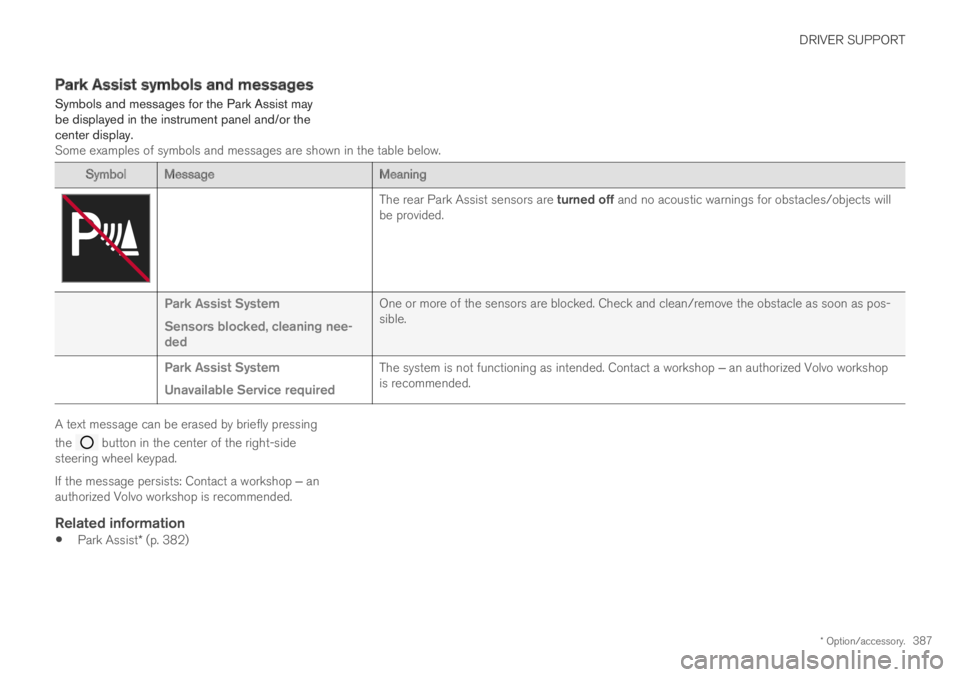
Symbols and messages for the Park Assist maybe displayed in the instrument panel and/or thecenter display.Some examples of symbols and messages are shown in the table below.
Symbol MessageMeaning
The rear Park Assist sensors are turned off and no acoustic warnings for obstacles/objects willbe provided.
Park Assist System
Sensors blocked, cleaning nee-ded
One or more of the sensors are blocked. Check and clean/remove the obstacle as soon as pos-sible.
Park Assist System
Unavailable Service required
The system is not functioning as intended. Contact a workshop ‒ an authorized Volvo workshopis recommended.
A text message can be erased by briefly pressing
the button in the center of the right-sidesteering wheel keypad.
If the message persists: Contact a workshop ‒ anauthorized Volvo workshop is recommended.
Related information
Park Assist* (p. 382)
Page 390 of 669

DRIVER SUPPORT
* Option/accessory.388
Park Assist Camera*
The Park Assist Camera can help provide thedriver when maneuvering in tight spaces by alert-ing the driver to obstacles using the camerascreen and graphics in the center display.
The Park Assist Camera is a support functionthat is automatically activated when reverse gearis engaged. It can also be started manually fromthe center display.
Example camera view109.
Zoom110 - zoom in/out
360° view* - activate/deactivate all cameras
PAS* - activate/deactivate Parking Assist
Lines - activate/deactivate trajectory lines
Towbar* - activate/deactivate trajectory lines
for towbar*111
CTA* - activate/deactivate Cross Traffic Alert
WARNING
The Parking Camera function is supple-mentary driver support intended to facili-tate driving and help make it safer – itcannot handle all situations in all traffic,weather and road conditions.
The parking cameras have dead/blindspots where objects cannot be detected.
Pay particular attention to people andanimals near the vehicle.
Objects/obstacles may be closer to thevehicle than they appear on the screen.
The parking cameras are not a substitutefor the driver's attention and judgment.The driver is always responsible forensuring the vehicle is driven in a safemanner, at the appropriate speed, with anappropriate distance to other vehicles,and in accordance with current trafficrules and regulations.
109The illustration is generic - details may vary according to vehicle model.110The trajectory lines will not be displayed when zooming in.111Not available in all markets.
Page 391 of 669
DRIVER SUPPORT
}}
* Option/accessory.389
Related information
Park Assist Camera views (p. 389)
Park Assist Camera trajectory lines (p. 391)
Sensor field from Park Assist for Park AssistCamera (p. 393)
Starting the Park Assist Camera (p. 394)
Park Assist Camera limitations (p. 395)
Recommended maintenance of the ParkAssist Camera (p. 396)
Park Assist Camera symbols and messages(p. 397)
Activating/deactivating Park Assist (p. 384)
Cross Traffic Alert* (p. 352)
Park Assist Camera views
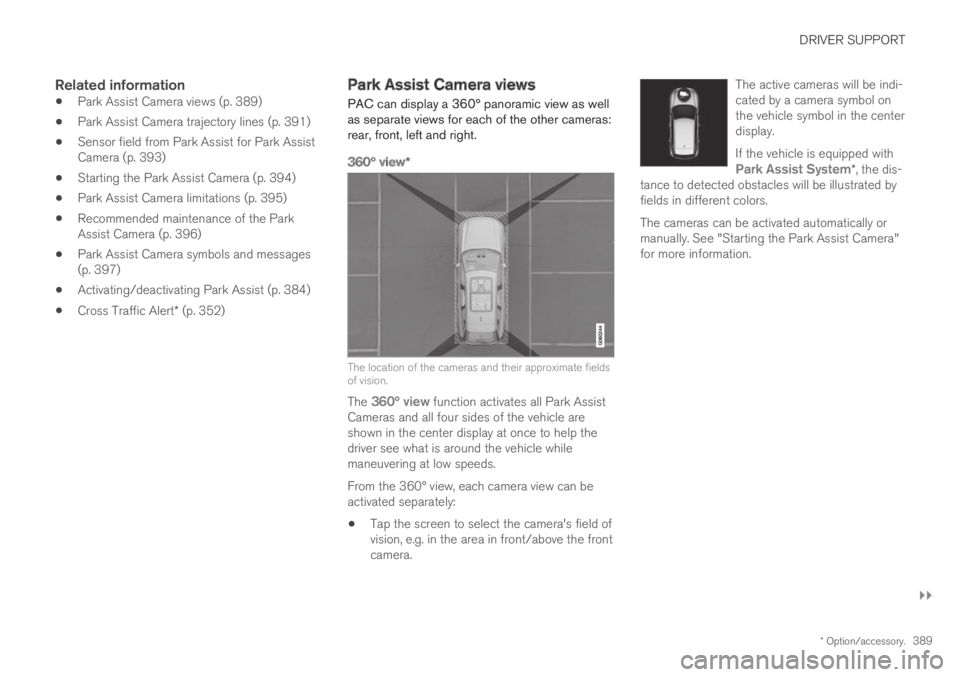
PAC can display a 360° panoramic view as wellas separate views for each of the other cameras:rear, front, left and right.
360° view *
The location of the cameras and their approximate fieldsof vision.
The 360° view function activates all Park AssistCameras and all four sides of the vehicle areshown in the center display at once to help thedriver see what is around the vehicle whilemaneuvering at low speeds.
From the 360° view, each camera view can beactivated separately:
Tap the screen to select the camera's field ofvision, e.g. in the area in front/above the frontcamera.
The active cameras will be indi-cated by a camera symbol onthe vehicle symbol in the centerdisplay.
If the vehicle is equipped withPark Assist System*, the dis-tance to detected obstacles will be illustrated byfields in different colors.
The cameras can be activated automatically ormanually. See "Starting the Park Assist Camera"for more information.