parking sensors VOLVO S90 TWIN ENGINE 2019 User Guide
[x] Cancel search | Manufacturer: VOLVO, Model Year: 2019, Model line: S90 TWIN ENGINE, Model: VOLVO S90 TWIN ENGINE 2019Pages: 669, PDF Size: 14.33 MB
Page 397 of 669
DRIVER SUPPORT
}}
395
Park Assist Camera limitations
The Park Assist Camera may not be able todetect all conditions in all situations and func-tionality may therefore be limited.
The driver should be aware of the following limi-tations for the Park Assist Camera:
WARNING
Be extra cautious whenreversing if this symbol isshown when a trailer, bikecarrier or similar is attachedand electrically connectedto the vehicle.
The symbol indicates thatthe rear parking assist sensors are deacti-vated and will not warn of any obstacles.
NOTE
A bike carrier and other accessories mountedon the rear of the vehicle can obscure thecamera's view.
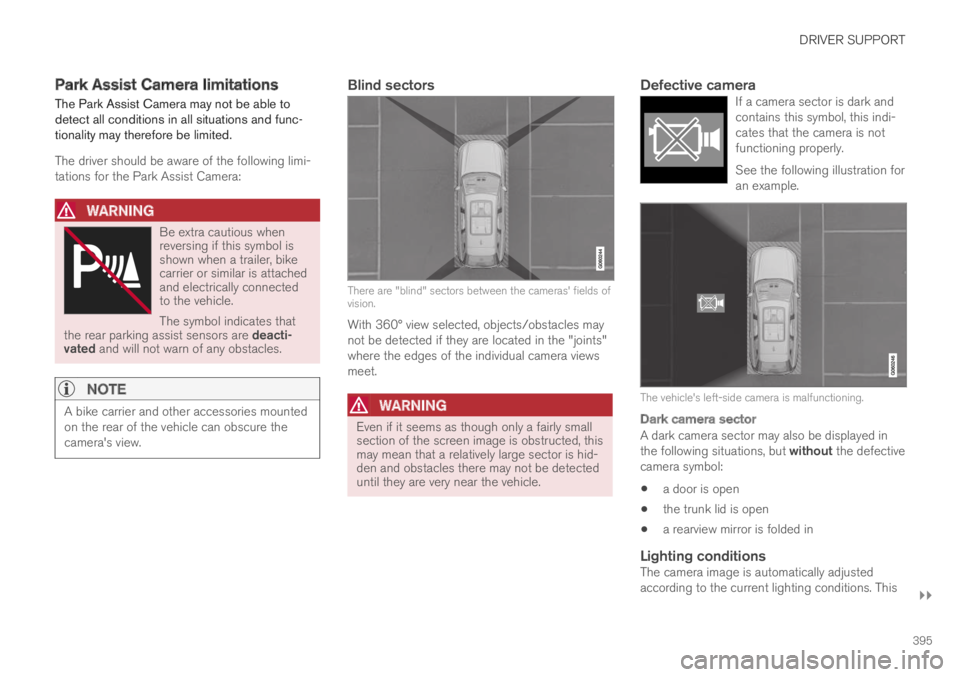
Blind sectors
There are "blind" sectors between the cameras' fields ofvision.
With 360° view selected, objects/obstacles maynot be detected if they are located in the "joints"where the edges of the individual camera viewsmeet.
WARNING
Even if it seems as though only a fairly smallsection of the screen image is obstructed, thismay mean that a relatively large sector is hid-den and obstacles there may not be detecteduntil they are very near the vehicle.
Defective camera
If a camera sector is dark andcontains this symbol, this indi-cates that the camera is notfunctioning properly.
See the following illustration foran example.
The vehicle's left-side camera is malfunctioning.
Dark camera sector
A dark camera sector may also be displayed inthe following situations, but without the defectivecamera symbol:
a door is open
the trunk lid is open
a rearview mirror is folded in
Lighting conditions
The camera image is automatically adjustedaccording to the current lighting conditions. This
Page 404 of 669
||
DRIVER SUPPORT
* Option/accessory.402
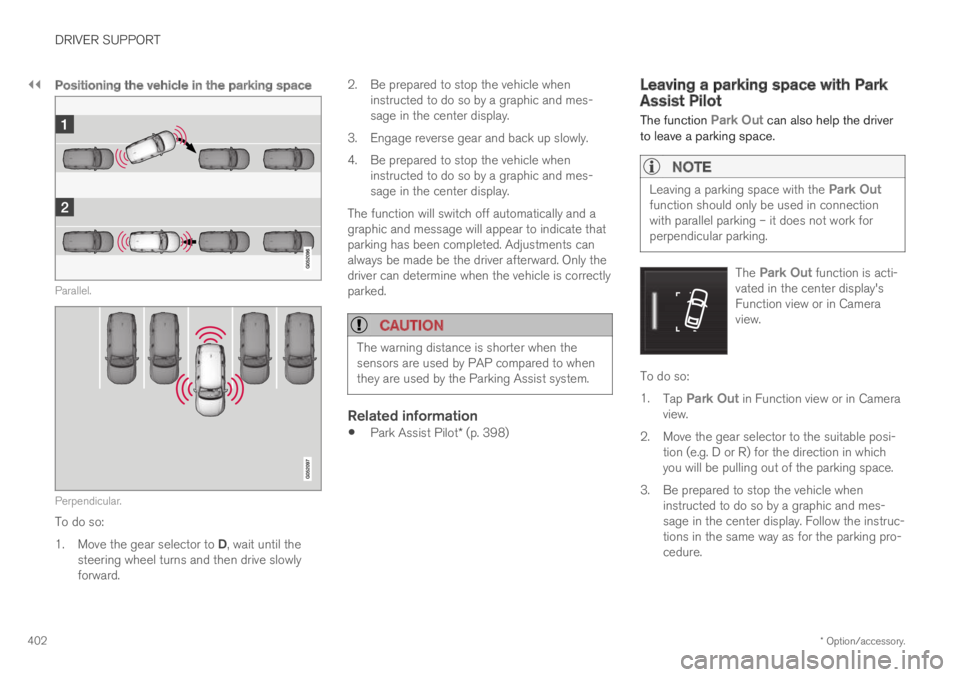
Positioning the vehicle in the parking space
Parallel.
Perpendicular.
To do so:
1.Move the gear selector to D, wait until thesteering wheel turns and then drive slowlyforward.
2.Be prepared to stop the vehicle wheninstructed to do so by a graphic and mes-sage in the center display.
3.Engage reverse gear and back up slowly.
4. Be prepared to stop the vehicle wheninstructed to do so by a graphic and mes-sage in the center display.
The function will switch off automatically and agraphic and message will appear to indicate thatparking has been completed. Adjustments canalways be made be the driver afterward. Only thedriver can determine when the vehicle is correctlyparked.
CAUTION
The warning distance is shorter when thesensors are used by PAP compared to whenthey are used by the Parking Assist system.
Related information
Park Assist Pilot* (p. 398)
Leaving a parking space with ParkAssist Pilot
The function Park Out can also help the driverto leave a parking space.
NOTE
Leaving a parking space with the Park Outfunction should only be used in connectionwith parallel parking – it does not work forperpendicular parking.
The Park Out function is acti-vated in the center display'sFunction view or in Cameraview.
To do so:
1.Tap Park Out in Function view or in Cameraview.
2. Move the gear selector to the suitable posi-tion (e.g. D or R) for the direction in whichyou will be pulling out of the parking space.
3.Be prepared to stop the vehicle wheninstructed to do so by a graphic and mes-sage in the center display. Follow the instruc-tions in the same way as for the parking pro-cedure.
Page 405 of 669

DRIVER SUPPORT
}}
* Option/accessory.403
Note that the steering wheel can "spring" backwhen the procedure is completed and the drivermay need to turn the steering wheel back to themaximum position in order to pull out of the park-ing space.
If PAP determines that the driver can pull out ofthe parking space without any extra maneuvers,the function will be deactivated, even if it seemsas though the vehicle is not completely out of theparking space.
Related information
Park Assist Pilot* (p. 398)
Park Assist Pilot* limitations
Park Assist Pilot PAP120 may not be able todetect all conditions in all situations and func-tionality may therefore be limited.
WARNING
The PAP function is supplementary driversupport intended to facilitate driving andhelp make it safer – it cannot handle allsituations in all traffic, weather and roadconditions.
Pay particular attention to people andanimals near the vehicle.
Bear in mind that the front end of thevehicle may swing out towards oncomingtraffic during the parking maneuver.
Objects situated higher than the detec-tion area of the sensors are not includedwhen the parking maneuver is calculated,which could cause PAP to swing into theparking space too early. Such parkingspaces should be avoided for this reason.
PAP is not a substitute for the driver'sattention and judgment. The driver isalways responsible for ensuring the vehi-cle is driven in a safe manner, at theappropriate speed, with an appropriatedistance to other vehicles, and in accord-ance with current traffic rules and regula-tions.
The driver should be aware of the following limi-tations for Park Assist Pilot:
120Park Assist Pilot
Page 406 of 669

||
DRIVER SUPPORT
404
The parking sequence is cancelled
A parking sequence will be cancelled if:
the driver moves the steering wheel
the vehicle's speed exceeds 7 km/h (4 mph)
the driver taps Cancel in the center display
when the anti-lock brakes or the Electronicstability control are engaged - e.g. when awheel loses grip on a slippery road
when the power steering works at reducedpower - e.g. during cooling due to overheat-ing (see section "Speed-dependent steeringforce").
A message in the center display will explain whythe parking sequence was cancelled.
CAUTION
Under certain circumstances, PAP may not beable to find parking spaces – one reason maybe that the sensors are disrupted by externalsound sources that emit the same ultrasonicfrequencies that the system works with.
Examples of such sources include horns, wettires on asphalt, pneumatic brakes, exhaustnoise from motorcycles, etc.
NOTE
Dirt, ice and snow covering the sensorsreduce their function and can make measure-ment impossible.
Driver responsibility
The driver should keep in mind that PAP is aparking aid ‒ not an infallible fully automatic sys-tem. The driver must always be prepared to takecontrol and cancel a parking sequence if neces-sary.
There are a number of things to keep in mindwhen parking, including:
The driver is always responsible for determin-ing if the space suggested by PAP is suita-ble for parking.
Do not use PAP when using snow chains ora temporary spare tire.
Do not use PAP if there are any objects pro-truding from the vehicle.
Heavy rain or snowfall may inhibit PAP's abil-ity to accurately measure a parking space.
While searching and measuring the parkingspace, PAP may be unable to detect objectslocated far into the space.
PAP may not suggest parking spaces onnarrow streets if it does not detect sufficientspace for maneuvering the vehicle.
Use approved tires121 inflated to the correcttire pressure because this affects PAP's abil-ity to provide parking assistance.
PAP's function is based on the way the vehi-cles are parked behind and in front of yourparking space. If they are, for example,parked too close to the curb, there is a riskthat your vehicle's tires or wheel rims couldbe damaged by the curb during the parkingprocedure.
Perpendicular parking spaces may not bedetected or may be suggested unnecessarilyif a parked vehicle is sticking out more thanother parked vehicles.
PAP is intended to provide parking assis-tance on straight streets, not sections ofstreet with sharp curves or bends. Alwaysmake sure that your vehicle is parallel to rel-evant parking spaces when PAP is measur-ing the parking space.
CAUTION
Switching to another approved wheel and/ortire dimension could change the tire circum-ference, which would then require the PAPsystem to be updated. Consult a workshop –an authorized Volvo workshop is recom-mended.
121"Approved tires" refers to tires of the same type and make as the vehicle's original, factory-installed tires.
Page 407 of 669
DRIVER SUPPORT
* Option/accessory.405
Related information
Park Assist Pilot* (p. 398)
Parking with Park Assist Pilot (p. 400)
Speed-dependent steering wheel resistance(p. 270)
Recommended maintenance forPark Assist Pilot
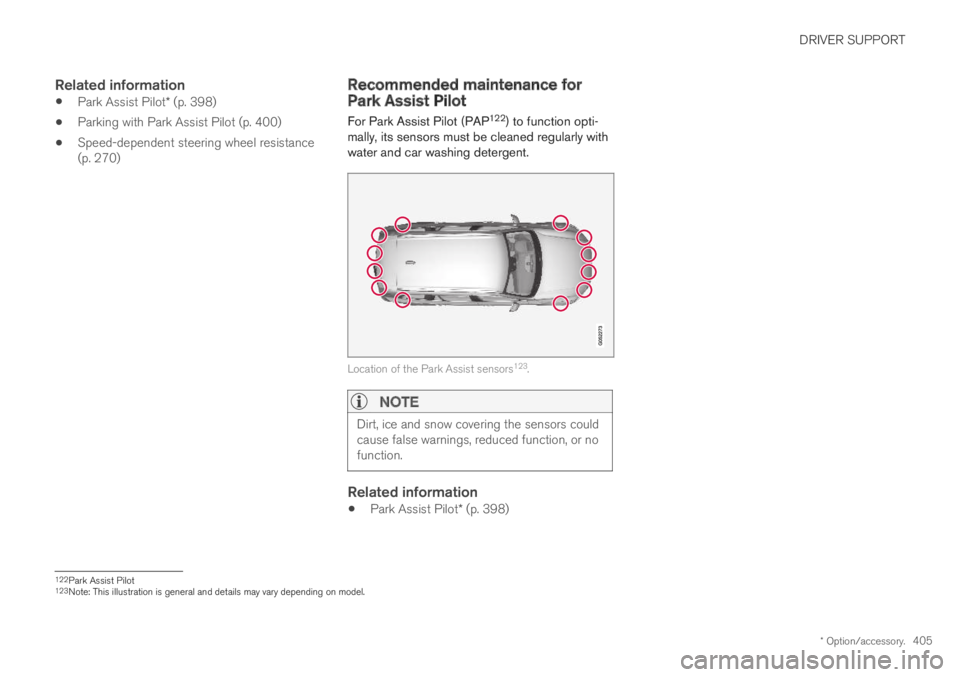
For Park Assist Pilot (PAP122) to function opti-mally, its sensors must be cleaned regularly withwater and car washing detergent.
Location of the Park Assist sensors123.
NOTE
Dirt, ice and snow covering the sensors couldcause false warnings, reduced function, or nofunction.
Related information
Park Assist Pilot* (p. 398)
122Park Assist Pilot123Note: This illustration is general and details may vary depending on model.
Page 615 of 669

MAINTENANCE AND SERVICE
}}
* Option/accessory.613
Fuse pliers are provided on the inside of the fusebox cover to assist in removing and insertingfuses.
There are also spaces for several extra fuses inthe distribution box in the engine compart-ment.
Positions
Fuses 1, 3-21, 23-36, 39-53 and 55-59 are"Micro" fuses.
Fuses 2-22, 37-38 and 54 are "MCase"fuses and should only be replaced by a work-
shop17.
FunctionAmpere
––
––
––
Movement sensor*5
Instrument panel5
Center console buttons5
Sun sensor5
FunctionAmpere
Sensus control module20
––
Steering wheel module5
Module for start knob andparking brake controls5
Heated steering wheel* mod-ule15
––
––
––
––
Climate system control mod-ule10
––
Data link connector OBD-II 10
Center display5
Climate system blower module(front)40
FunctionAmpere
USB HUB5
Instrument lighting; Interiorlighting; Rearview mirror auto-dim function*; Rain and lightsensors*; Rear tunnel consolekeypad, rear seat*; Power frontseats*; Rear door control pan-els; Climate system blowermodule left/right
7.5
Control module for driver sup-port functions5
Panoramic roof with sun cur-tain*20
Head-up display*5
Passenger compartment light-ing5
––
Ceiling console display (seatbelt reminder/front passengerside airbag indicator)
5
––
Humidity sensor5
17An authorized Volvo workshop is recommended.
Page 655 of 669
INDEX
653
Charging
hybrid battery 409
opening and closing the charging
door 414
start charging 415
Status 417, 419
stop charging 421
Charging cable 411
Charging current 411
Checking engine oil level 598
Child restraints 63, 65
booster cushions 71
convertible seats 69
infant seats 67
ISOFIX/LATCH anchors 74
lower attachment points 73
recalls and registration 65
top tether anchors 72
Child safety 63
Child safety locks 259
Circuit breaker 413
City Safety 333, 334, 336, 337, 343, 345
City Safety braking for oncoming vehicles 342
City Safety in crossing traffic 339, 340
City Safety when evasive maneuver preven-
ted341
Cleaning621, 623, 624
automatic car wash627
car wash624, 625, 627, 628, 629, 630
center display619
Seat belts621
textile upholstery619, 621, 622
upholstery 619, 621, 622, 623, 624
wheels630
Cleaning wheels630
Cleaning wiper blades628
Clean Zone199
Clean Zone Interior Package199
Climate196
auto-regulation214
blower control219, 220
parking224
perceived temperature197
Sensors196
temperature control221, 222
voice control197
zones196
Climate controls207
center display207
rear seat207
Climate system196, 207
Refrigerant648
repairs595
Clock, setting89
Collision42, 47, 52, 61
Collision warner
detection of pedestrians337
radar sensor324
Collision warning333, 346
Color code, paintwork632
Color codes632
Compass474
calibration475
Condensation in headlights625, 627,
628, 629
Connecting vehicle to Internet
No connection or poor connection 528
via a mobile device (WiFi)525
via cellular phone (Bluetooth) 525
via vehicle's modem526
Connect phone515
Contact information26
Convertible seats69
coolant647
Coolant, filling599
Cooling system
overheating465
Corner Traction Control271
Corrosion protection630
Crash, see Collision42