windshield wipers VOLVO S90 TWIN ENGINE 2019 User Guide
[x] Cancel search | Manufacturer: VOLVO, Model Year: 2019, Model line: S90 TWIN ENGINE, Model: VOLVO S90 TWIN ENGINE 2019Pages: 669, PDF Size: 14.33 MB
Page 468 of 669

STARTING AND DRIVING
466
Battery drain
The electrical functions in the vehicle drain thebattery to varying degrees. Avoid using ignitionmode II when the engine is switched off. Useignition mode I instead, as this uses less electri-cal current.
Note that certain accessories may also drainpower from the electrical system. Do not usefunctions that use a lot of electrical current whenthe engine is turned off. Examples of such func-tions are:
blower
headlights
windshield wipers
audio system (especially at high volume).
If the starter battery voltage is low, a message isshown in the driver display. The vehicle's energy-saving function will then turn off or reduce certainfunctions, such as the blower and/or the audiosystem.
–Charge the battery by starting the engineand let it run for at least 15 minutes (drivingcharges the battery faster than letting theengine idle).
Related information
Start battery (p. 601)
Ignition modes (p. 429)
Jump starting using another battery
If the start battery is discharged, current fromanother battery can be used to start the vehicle.
Jumper cable connecting points.
CAUTION
The charging point of the vehicle is onlyintended for jump starting the vehicle in ques-tion. The charging point is not intended forjump-starting another vehicle. Using thecharging point to start another vehicle couldcause a fuse to blow, which would cause thecharging point to stop working.
If a fuse has blown, 12 V Battery Fuse failureService required will be displayed in the instru-ment panel. Volvo recommends contacting anauthorized Volvo workshop.
To avoid short circuits or other damage, the fol-lowing steps are recommended when jump star-ting the battery:
Page 477 of 669

STARTING AND DRIVING
* Option/accessory.475
Calibrating the compass*
The globe is divided into 15 magnetic zones.The compass should be calibrated if the vehicleis driven from one zone to another.
To calibrate the compass:
1.Stop the vehicle in a large, open area awayfrom steel constructions and high-voltagepower lines.
2.Start the engine and switch off all electricalequipment (climate system, wipers, etc.) andmake sure all doors are closed.
NOTE
Calibration may fail or not even be initiated ifelectrical equipment is not turned off.
3. Hold the button on the bottom of the rear-view mirror pressed for about 3 seconds(using e.g. a paper clip). The number of thecurrent magnetic zone is shown.
15
14
13
12
1198
76
5
4
3
2
1
10
Magnetic zones.
4. Press the button on the underside of themirror repeatedly until the desired magneticzone (1–15) appears (see the map of mag-netic zones).
5.Wait until the display again shows C, orpress and hold the button on the undersideof the rearview mirror for approx. 6 secondsuntil C is displayed.
6. Drive slowly in a circle at a speed of no morethan 10 km/h (6 mph) until a compass direc-tion is shown in the display. This indicatesthat calibration is complete. Drive in a circletwo more times to fine-tune the calibration.
7.Vehicles with heated windshields*: If C isshown in the display when the windshieldheating function is activated, perform step 6above with the heating function on.
8. Repeat the above procedure as needed.
Related information
Compass* (p. 474)
Activating and deactivating the compass*(p. 474)
Page 587 of 669

MAINTENANCE AND SERVICE
}}
585
Periodic maintenance helps minimize
emissions
NOTE
Refer to your Service and Warranty Book-let for a comprehensive service and main-tenance schedule up to 240,000 km(150,000 miles). This program containsinspections and services necessary forthe proper function of your vehicle andincludes components that affect vehicleemissions.
The Warranty and Service Records Infor-mation booklet also contains detailedinformation concerning the warrantiesthat apply to your vehicle.
On-board Diagnostic System
OBD II is part of your vehicle's computerizedengine management system. It stores diagnosticinformation about your vehicle's emission con-trols. It can light the Check Engine light (MIL) if itdetects an emission control "fault." A "fault" is acomponent or system that is not performingwithin an expected range. A fault may be perma-nent or temporary. OBD II will store a messageabout any fault.
Emission inspection readiness
How do states use OBD II for emission
inspections?
Many states connect a computer directly to avehicle's OBD II system. The inspector can thenread "faults." In some states, this type of inspec-tion has replaced the tailpipe emission test.
How can my vehicle fail OBD II emission
inspection?
Your vehicle can fail OBD II emission inspectionfor any of the following reasons:
If your Check Engine (MIL) light is lit, yourvehicle may fail inspection.
If your vehicle's Check Engine light was lit,but went out without any action on your part,OBD II will still have a recorded fault. Yourvehicle may pass or fail, depending on theinspection practices in your area.
If you had recent service that required dis-connecting the battery, OBD II diagnosticinformation may be incomplete and "notready" for inspection. A vehicle that is notready may fail inspection.
How can I prepare for my next OBD II
emission inspection?
If your Check Engine (MIL) light is lit or waslit but went out without service, have your
vehicle diagnosed and, if necessary, servicedby a qualified Volvo technician.
If you recently had service for a lit CheckEngine light, or if you had service thatrequired disconnecting the battery, a periodof driving is necessary to bring the OBD IIsystem to "ready" for inspection. Two half-hour trips of mixed stop-and-go/highwaydriving are typically needed to allow OBD II toreach readiness. Your Volvo retailer can pro-vide you with more information on planning atrip.
Maintain your vehicle in accordance with yourvehicle's maintenance schedule.
Owner maintenance
Periodic maintenance requirements and intervalsare described in your vehicle's Warranty andService Records Information booklet.
The following points can be carried out betweenthe normally scheduled maintenance services.
Each time the car is refueled:
Check the engine oil level.
Clean the windshield, windshield wipers,headlights, and taillights.
Page 612 of 669

||
MAINTENANCE AND SERVICE
* Option/accessory.610
FunctionAmpere
12 V outlet in trunk/cargocompartment*
USB ports for iPad holders
15
––
––
––
––
Heated windshield*, left sideShunt
Heated windshield*, left side40
Headlight washers*25
Windshield washer25
––
Horn20
Alarm siren*5
Brake system control module(valves, parking brake)40
Wipers30
––
FunctionAmpere
Heated windshield*, right side40
––
Brake system control module(ABS pump)40
––
Heated windshield*, right sideShunt
Fed when ignition is on:Engine control module; trans-mission components, electricalpower steering, central electri-cal module
5
Exterior vehicle sound (certainmarkets)5
Right-side headlight7.5
Right-side headlight, some
models with LEDC15
––
––
––
Airbags5
FunctionAmpere
Left-side headlight7.5
Left-side headlight, some
models with LEDC15
Accelerator pedal sensor 5
Transmission control module;gear selector control module15
Engine control module5
––
––
––
––
Engine control module; actua-tor; throttle unit; turbo-chargervalve
20
Solenoids; valve; engine cool-ing system thermostat10
Vacuum regulators; valve 7.5
Spoiler shutter control module;radiator shutter control mod-ule
5
––
Page 635 of 669
MAINTENANCE AND SERVICE
633
Replacing windshield wiper blades
The wiper blades help remove water from thewindshield. Along with the washer fluid, theyclean the glass and help improve visibility whiledriving. The wiper blades can be replaced.
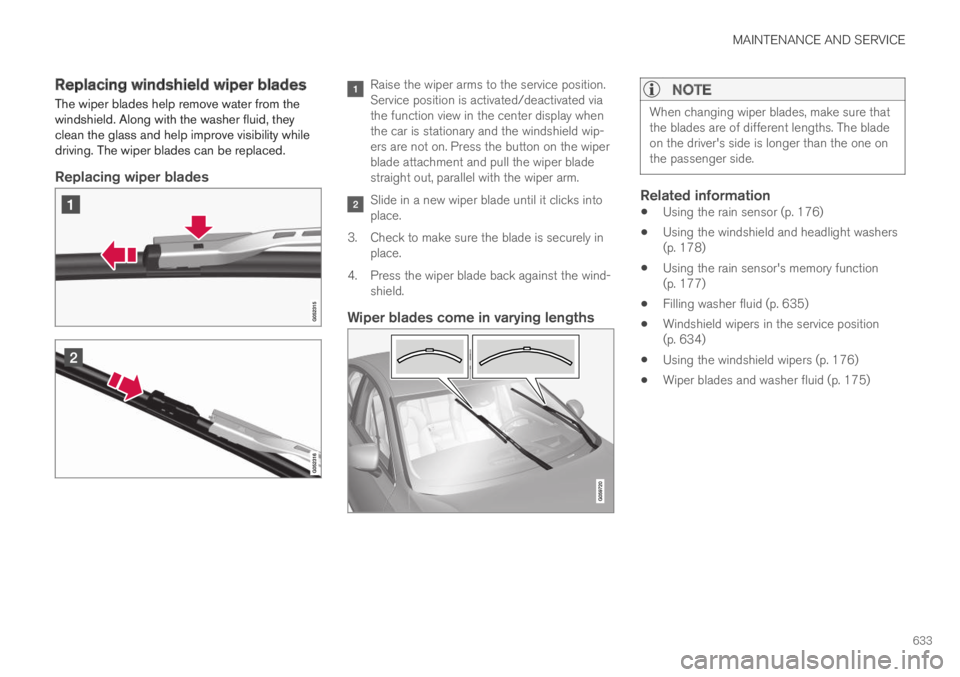
Replacing wiper blades
Raise the wiper arms to the service position.Service position is activated/deactivated viathe function view in the center display whenthe car is stationary and the windshield wip-ers are not on. Press the button on the wiperblade attachment and pull the wiper bladestraight out, parallel with the wiper arm.
Slide in a new wiper blade until it clicks intoplace.
3. Check to make sure the blade is securely inplace.
4.Press the wiper blade back against the wind-shield.
Wiper blades come in varying lengths NOTE
When changing wiper blades, make sure thatthe blades are of different lengths. The bladeon the driver's side is longer than the one onthe passenger side.
Related information
Using the rain sensor (p. 176)
Using the windshield and headlight washers(p. 178)
Using the rain sensor's memory function(p. 177)
Filling washer fluid (p. 635)
Windshield wipers in the service position(p. 634)
Using the windshield wipers (p. 176)
Wiper blades and washer fluid (p. 175)
Page 636 of 669

MAINTENANCE AND SERVICE
634
Windshield wipers in the serviceposition
The windshield wiper blades must be in the serv-ice (vertical) position for certain operations, e.g.replacing the blades.
Windshield wipers in the service position.
The windshield wipers must be in the serviceposition when replacing, washing or lifting theblades (e.g. to scrape ice or snow from the wind-shield).
CAUTION
Before placing the wipers in service position,ensure that they have not frozen to the wind-shield.
Activating/deactivating service position
The service position can be activated/deactivatedwhen the vehicle is stationary and the windshieldwipers are switched off. Service position is acti-vated/deactivated via Function view in the centerdisplay:
Tap the Wiper ServicePosition button. The indicatorlight in the button will illuminatewhen service position is acti-vated. The windshield wiperswill move to the vertical posi-tion when service position isactivated. To deactivate the service position, tapWiper Service Position once. The indicator lightin the button will go out when service position isdeactivated.
The wiper blades will also move out of serviceposition if:
The windshield wipers are turned on.
The windshield washers are turned on.
The rain sensor is activated.
The vehicle begins moving.
CAUTION
If the wiper arms in service position are raisedfrom the windshield, they must be folded backagainst the windscreen before activating wip-ing, washing or rain sensor as well as beforedeparture. This is to prevent scratching thepaint on the hood.
Related information
Using the rain sensor (p. 176)
Using the windshield and headlight washers(p. 178)
Using the rain sensor's memory function(p. 177)
Filling washer fluid (p. 635)
Replacing windshield wiper blades (p. 633)
Using the windshield wipers (p. 176)
Wiper blades and washer fluid (p. 175)
Page 637 of 669

MAINTENANCE AND SERVICE
* Option/accessory.635
Filling washer fluid
Washer fluid is used to help keep the headlightsand windshield clean. Washer fluid containinganti-freeze should be used in very cold weather(below-freezing temperatures).
Fill washer fluid into the reservoir with the bluecover. The reservoir is used for both the wind-shield washer and the headlight washer*
NOTE
When there is approximately 1 liter (1 qt) ofwasher fluid remaining, the message Washer
fluid Level low, refill and the symbolwill be displayed in the instrument panel.
Recommended grade: Washer fluid recom-mended by Volvo, with frost protection during
cold weather and temperatures below the freez-ing point.
CAUTION
Use Volvo's original washer fluid or an equiva-lent fluid with the recommended pH valuebetween 6 and 8, diluted as recommended,e.g. in a 1:1 solution with pH-neutral water.
CAUTION
Use washer fluid with anti-freeze when tem-peratures are below the freezing point to helpkeep the pump, reservoir and hoses fromfreezing.
Volume:
The washer fluid reservoir has a volume of 5.5 lit-ers (5.8 qts).
Related information
Using the rain sensor (p. 176)
Using the windshield and headlight washers(p. 178)
Using the rain sensor's memory function(p. 177)
Windshield wipers in the service position(p. 634)
Replacing windshield wiper blades (p. 633)
Using the windshield wipers (p. 176)
Wiper blades and washer fluid (p. 175)
Page 666 of 669
INDEX
664
Volvo ID 26
create and register 26
W
Warning light
Adaptive Cruise Control295
stability and traction control system271
Warning lights
airbags SRS93
alternator does not charge93
brake system error93
low oil pressure93
parking brake applied93
seat belt reminder93
starter battery not charging93
WARNING93
Warning sound
parking brake436
warning symbols93
Warning symbols
safety42
Warranties584
Washer
Headlights178
washer fluid, filling635
Windshield178
Washer fluid175, 635
Washer nozzles, heated175
Waxing625
Weights
Curb weight 643
Wheel bolts 557
locking 557
Wheels
cleaning 630
mounting 560
removal 558
Snow chains 563
Wheels and tires
Load index and speed symbol 546
Whiplash protection 46
Whiplash Protection System 46
WHIPS (Whiplash Protection System) 46
Wi-Fi
connecting vehicle to Internet 525
delete network 529
sharing Internet connection, tethering,
hotspot 527
technology and security 529
Window
sun shade 166
Windows and glass 162
Windshield
heating217
projected image138, 140
Windshield washing178
Windshield wipers176
rain sensor176, 177
Winter driving458
Winter tires563
Winter wheels563
Wiper blade175
replacing633
service position634
Wiper blade and washing fluid175