steering wheel VOLVO S90 TWIN ENGINE 2019 Owner's Guide
[x] Cancel search | Manufacturer: VOLVO, Model Year: 2019, Model line: S90 TWIN ENGINE, Model: VOLVO S90 TWIN ENGINE 2019Pages: 669, PDF Size: 14.33 MB
Page 158 of 669

||
LIGHTING
156
The rear fog light turns off automatically whenthe ignition is switched off or when the steering
wheel lever lighting ring is in position or
.
NOTE
Regulations concerning rear fog light use varyfrom country to country.
Related information
Lighting panel and controls (p. 148)
Ignition modes (p. 429)
Brake lights
The brake lights are automatically illuminatedwhen braking.
The brake lights illuminate when the brake pedalis depressed. They also illuminate when thebrakes are automatically applied by one of thedriver support systems.
Related information
Emergency brake lights (p. 156)
Brake functions (p. 430)
Emergency brake lights
The emergency brake lights are activated towarn following vehicles of hard braking.
This function causes an additional taillight oneach side of the vehicle to illuminate.
The emergency brake lights are activated in theevent of hard braking or if the ABS system isactivated and the vehicle is traveling at a highspeed.
After the driver decelerates to a low speed andthen releases the brake, the brake lights resumetheir normal brightness.
Related information
Brake lights (p. 156)
Brakes (p. 431)
Hazard warning flashers (p. 157)
Page 159 of 669

LIGHTING
* Option/accessory.157
Hazard warning flashers
Hazard warning flashers warn other road usersby all of the vehicle's turn signals being activatedat the same time. The function can be used towarn about a traffic hazard.
Hazard warning flashers button.
Press the button to activate the hazard warningflashers.
NOTE
Regulations concerning the use of hazardwarning flashers may vary from country tocountry.
Related information
Emergency brake lights (p. 156)
Using turn signals (p. 154)
Using home safe lighting
Some of the exterior lights remain on to illumi-nate the area around the vehicle. This is calledhome safe lighting.
To activate home safe lighting:
1.Switch off the ignition.
2.Push the left-side steering wheel levertoward the dashboard and release.
3. Exit the vehicle and lock the doors.
When the function is activated, a symbol will beshown in the instrument panel and the parkinglights, outer door handle lights* and the licenseplate lights will be illuminated.
The length of time home safe lighting remainsilluminated can be set in the center display.
Related information
Adjusting light functions via the center dis-play (p. 149)
Welcome Light (p. 157)
Welcome Light
Approach lighting is activated when the vehicleis unlocked and can be used to provide light asyou walk toward the vehicle.
The function is activated when the remote key isused for unlocking. The parking lights, outer doorhandle lights*, license plate lights, interior ceilinglights, footwell lighting and trunk/cargo compart-ment lighting will be illuminated. If a door isopened while the function is activated, the light-ing in the outer door handle* and the interiorlighting will remain illuminated for a longer periodof time.
This function can be activated and deactivated inthe center display.
Related information
Adjusting light functions via the center dis-play (p. 149)
Using home safe lighting (p. 157)
Remote key (p. 237)
Page 161 of 669

LIGHTING
}}
* Option/accessory.159
Ground lighting *
The ground lighting comes on or goes off when adoor is opened or closed.
Doorsill lighting
The doorsill lighting comes on or goes off when adoor is opened or closed.
Trunk lighting
The trunk lighting comes on or goes off when thetrunk lid is opened or closed.
Ambient Lighting
The ambient lighting comes on when the doorsare opened and goes out when the vehicle islocked. Ambient lighting brightness can beadjusted in the center display and also fine-tunedusing the thumb wheel in the dashboard.
Mood lighting *
The vehicle is equipped with LEDs that providefaint lighting in various colors. This lighting is onwhen the engine is running. Mood lighting can beadjusted in the center display and also fine-tunedusing the thumb wheel in the dashboard.
Lighting in the door storage
compartments
Lighting in the door storage compartmentscomes on when the doors are opened and goesout when the vehicle is locked. The brightnesscan be adjusted using the thumb wheel in thedashboard.
Lighting in the tunnel console's front
cup holder
The lighting in front console cup holdersswitches on when the vehicle is unlocked and offwhen the vehicle is locked. The brightness canbe adjusted using the thumb wheel in the dash-board.
Related information
Adjusting interior lighting (p. 159)
Lighting panel and controls (p. 148)
Ignition modes (p. 429)
Passenger compartment interior (p. 574)
Adjusting interior lighting
Illumination in the vehicle varies depending onignition mode. The interior lighting can beadjusted with a thumb wheel in the dashboardand certain light functions can also be adjustedvia the center display.
The thumb wheel on the dash-board to the left of the steeringwheel can be used to adjustthe brightness of the displaylighting, instrument lights,ambient lighting and moodlighting*.
Adjust ambient decor lighting
1.Tap Settings in the Top view in the centerdisplay.
2. Tap My CarLights and LightingInterior Lighting.
3. Choose from among the following settings:
Under Ambient Light Intensity, selectOff, Low or High.
Under Ambient Light Level, selectReduced or Full.
Adjusting mood lighting *
The vehicle is equipped with several LEDs thatprovide faint lighting in various colors. This light-ing is on when the engine is running.
Page 178 of 669

WINDOWS, GLASS AND MIRRORS
176
Using the windshield wipers
The windshield wipers clean the windshield. Theright-side steering wheel lever is used to adjustwindshield wiper settings.
Right-hand steering wheel lever.
Thumb wheel, used to set rain sensor sensi-tivity and interval wiper speed.
Single sweep
Move the lever down and release for asingle sweep.
Wipers off
Move the lever to position 0 to turn offthe windshield wipers.
Interval wipers
Set the number of sweeps per time unitwith the thumb wheel when interval wip-ers are selected.
Continuous wipers
Move the lever upward for the wipers tooperate at normal speed.
Move the lever upward again for the wip-ers to operate at high speed.
CAUTION
Before activating the wipers, make sure thatthe wiper blades are not frozen in place andthat any snow or ice on the windshield hasbeen scraped away.
CAUTION
Use plenty of washer fluid when the wipersclean the windshield. The windshield must bewet when the windshield wipers are working.
Related information
Using the rain sensor (p. 176)
Using the windshield and headlight washers(p. 178)
Wiper blades and washer fluid (p. 175)
Using the rain sensor's memory function(p. 177)
Filling washer fluid (p. 635)
Windshield wipers in the service position(p. 634)
Replacing windshield wiper blades (p. 633)
Using the rain sensor
The rain sensor monitors the amount of water onthe windshield and automatically starts the wind-shield wipers. Rain sensor sensitivity can beadjusted using the thumb wheel on the right-hand steering wheel lever.
Right-hand steering wheel lever.
Rain sensor button
Thumb wheel, sensitivity/interval wiper speed
When the rain sensor is activated, the rainsensor symbol will be displayed in the instrumentpanel.
Activating the rain sensor
When the rain sensor is activated, the enginemust be running or the ignition must be in mode Ior II. The windshield wiper lever must also be inposition 0 or in the single sweep position.
Page 180 of 669

WINDOWS, GLASS AND MIRRORS
* Option/accessory.178
Using the windshield and headlightwashers
The windshield and headlight washers clean thewindshield and headlights. Use the right-sidesteering wheel lever to start the windshield andheadlight washers.
Starting the windshield and headlight
washers
Washing function, right-hand steering wheel lever.
–Move the right-hand steering wheel levertoward the steering wheel to start the wind-shield and headlight washers.
> After the lever is released, the wipersmake several extra sweeps.
CAUTION
Avoid activating the washer system when it isfrozen or the fluid reservoir is empty. Other-wise, there is a risk of damaging the pump.
Headlight washer *
To save washer fluid, the headlights are washedautomatically according to a defined intervalwhen the headlights are on.
Reduced washing
When there is about 1 liter (1 qt) of washer fluidleft in the reservoir and the Washer fluid Levellow, refill message is displayed in the instrument
panel together with the symbol, the washerfluid supply to the headlights is cut off. This is toprioritize windshield cleaning and visibilitythrough it. The headlights are only washed if highor low beam is on.
Related information
Using the rain sensor (p. 176)
Wiper blades and washer fluid (p. 175)
Using the rain sensor's memory function(p. 177)
Filling washer fluid (p. 635)
Windshield wipers in the service position(p. 634)
Replacing windshield wiper blades (p. 633)
Using the windshield wipers (p. 176)
Page 182 of 669
SEATS AND STEERING WHEEL
* Option/accessory.180
Manual front seats
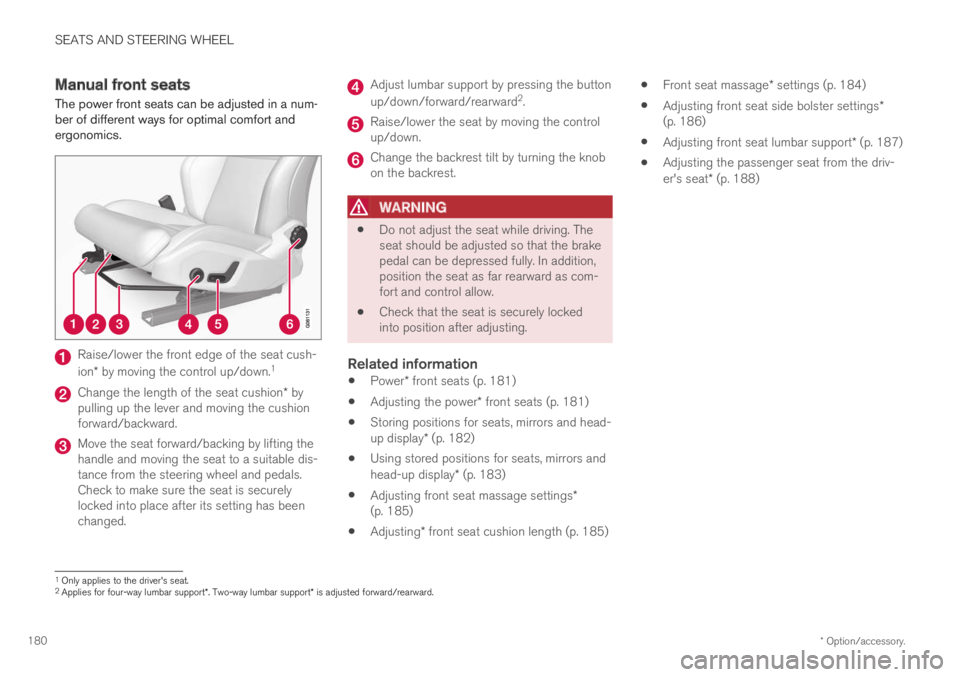
The power front seats can be adjusted in a num-ber of different ways for optimal comfort andergonomics.
Raise/lower the front edge of the seat cush-
ion* by moving the control up/down.1
Change the length of the seat cushion* bypulling up the lever and moving the cushionforward/backward.
Move the seat forward/backing by lifting thehandle and moving the seat to a suitable dis-tance from the steering wheel and pedals.Check to make sure the seat is securelylocked into place after its setting has beenchanged.
Adjust lumbar support by pressing the button
up/down/forward/rearward2.
Raise/lower the seat by moving the controlup/down.
Change the backrest tilt by turning the knobon the backrest.
WARNING
Do not adjust the seat while driving. Theseat should be adjusted so that the brakepedal can be depressed fully. In addition,position the seat as far rearward as com-fort and control allow.
Check that the seat is securely lockedinto position after adjusting.
Related information
Power* front seats (p. 181)
Adjusting the power* front seats (p. 181)
Storing positions for seats, mirrors and head-up display* (p. 182)
Using stored positions for seats, mirrors andhead-up display* (p. 183)
Adjusting front seat massage settings*(p. 185)
Adjusting* front seat cushion length (p. 185)
Front seat massage* settings (p. 184)
Adjusting front seat side bolster settings*(p. 186)
Adjusting front seat lumbar support* (p. 187)
Adjusting the passenger seat from the driv-er's seat* (p. 188)
1Only applies to the driver's seat.2Applies for four-way lumbar support*. Two-way lumbar support* is adjusted forward/rearward.
Page 183 of 669

SEATS AND STEERING WHEEL
}}
* Option/accessory.181
Power* front seats
The power front seats can be adjusted in a num-ber of different ways for optimal comfort andergonomics. The power seat can be moved for-ward/backward and up/down. The height andlength* of the seat cushion and the tilt of thebackrest can be adjusted. Lumbar support* can
be adjusted up, down, forward and backward3.
The power seats can be adjusted for a certainperiod of time after the door is unlocked withoutthe engine running. The seats can always beadjusted while the engine is running. They canalso be adjusted for a short period after theengine is turned off.
CAUTION
The power seats have an overload protectorthat is triggered if a seat is blocked by anyobject. If this occurs, remove the object andattempt to adjust the seat again.
Related information
Manual front seats (p. 180)
Adjusting the power* front seats (p. 181)
Storing positions for seats, mirrors and head-up display* (p. 182)
Using stored positions for seats, mirrors andhead-up display* (p. 183)
Adjusting front seat massage settings*(p. 185)
Adjusting* front seat cushion length (p. 185)
Front seat massage* settings (p. 184)
Adjusting front seat side bolster settings*(p. 186)
Adjusting front seat lumbar support* (p. 187)
Adjusting the passenger seat from the driv-er's seat* (p. 188)
Adjusting the power* front seats
Set the desired seating position using the con-trols on the front seat cushion. To set the con-venience functions, turn the multifunction con-
trol4 upward/downward.
The illustration shows the controls in a vehicle with four-way lumbar support*. Vehicles with two-way lumbar sup-port* do not have the rotary multifunction control.
In vehicles with four-way lumbar support*,
turn the multifunction control4 up/down toset the convenience functions. In vehicleswith two-way lumbar support*, use the roundbutton to adjust the lumbar support forward/rearward.
Raise/lower the front edge of the seat cush-ion by moving the control up/down.
3Applies for four-way lumbar support*. Two-way lumbar support* is adjusted forward/rearward.
Page 184 of 669

||
SEATS AND STEERING WHEEL
* Option/accessory.182
Raise/lower the seat by moving the controlup/down.
Move the seat forward/rearward by movingthe control forward/rearward.
Change the backrest tilt by moving the con-trol forward/backward.
Only one movement (forward/rearward/up/down) can be performed at a time.
The front seat backrests cannot be folded downcompletely.
Related information
Manual front seats (p. 180)
Power* front seats (p. 181)
Storing positions for seats, mirrors and head-up display* (p. 182)
Using stored positions for seats, mirrors andhead-up display* (p. 183)
Adjusting front seat massage settings*(p. 185)
Adjusting* front seat cushion length (p. 185)
Front seat massage* settings (p. 184)
Adjusting front seat side bolster settings*(p. 186)
Adjusting front seat lumbar support* (p. 187)
Adjusting the passenger seat from the driv-er's seat* (p. 188)
Storing positions for seats, mirrors
and head-up display*
Adjustment settings for the power* seat, doormirrors and head-up display* can be stored inthe memory buttons.
Two different positions for the power* seat, doormirrors and head-up display* can be stored usingthe memory buttons. The buttons are located onthe inside of either one or both* front doors.
Button M for storing a setting
Memory button
Memory button
Storing positions
1. Adjust the seat, door mirrors and head-updisplay to the desired position.
2.Press and hold the M button. The indicatorlight in the button will illuminate.
3.Within three seconds, press and hold the 1or 2 button.
> When the position has been stored in thememory button, an audio signal will soundand the indicator light in the M button willgo out.
If none of the memory buttons are pressed withinthree seconds, the M button will go out and noposition will be stored.
The seats, door mirrors or head-up display mustbe readjusted before a new memory position canbe set.
Related information
Manual front seats (p. 180)
Power* front seats (p. 181)
Adjusting the power* front seats (p. 181)
Using stored positions for seats, mirrors andhead-up display* (p. 183)
Adjusting front seat massage settings*(p. 185)
Adjusting* front seat cushion length (p. 185)
4Not available in vehicles with two-way lumbar support*.
Page 185 of 669

SEATS AND STEERING WHEEL
}}
* Option/accessory.183
Front seat massage* settings (p. 184)
Adjusting front seat side bolster settings*(p. 186)
Adjusting front seat lumbar support* (p. 187)
Adjusting the passenger seat from the driv-er's seat* (p. 188)
Adjusting the door mirrors (p. 169)
Head-up display settings* (p. 140)
Using stored positions for seats,
mirrors and head-up display*
If the positions for the power* seat, door mirrorsand head-up display* have been stored, they canbe easily activated using the memory buttons.
Using a stored position
A stored position can be used with the front dooropen or closed:
Front door open
–Briefly press one of the memory buttons 1
() or 2 (). The power seats, door mirrorsand head-up display will move and stop atthe positions stored in that button.
Front door closed
–Press and hold one of the memory buttons 1
() or 2 () until the seat, door mirrorsand head-up display stop in the positionsstored in that memory button.
If the memory button is released, the seat, doormirrors and head-up display will stop moving.
WARNING
This list point needs to be translatedexactly to: "Because the driver's seat canbe adjusted with the ignition off, childrenshould never be left unattended in thevehicle.
Movement of the seat can be STOPPEDat any time by pressing any button on thepower seat control panel.
Do not adjust the seat while driving.
The seat should be adjusted so that thebrake pedal can be depressed fully. Inaddition, position the seat as far rearwardas comfort and control allow.
The seat rails on the floor must not beobstructed in any way when the seat is inmotion.
Related information
Manual front seats (p. 180)
Power* front seats (p. 181)
Page 186 of 669
SEATS AND STEERING WHEEL
* Option/accessory.184
Adjusting the power* front seats (p. 181)
Storing positions for seats, mirrors and head-up display* (p. 182)
Adjusting front seat massage settings*(p. 185)
Adjusting* front seat cushion length (p. 185)
Front seat massage* settings (p. 184)
Adjusting front seat side bolster settings*(p. 186)
Adjusting front seat lumbar support* (p. 187)
Adjusting the passenger seat from the driv-er's seat* (p. 188)
Adjusting the door mirrors (p. 169)
Head-up display settings* (p. 140)
Front seat massage* settings
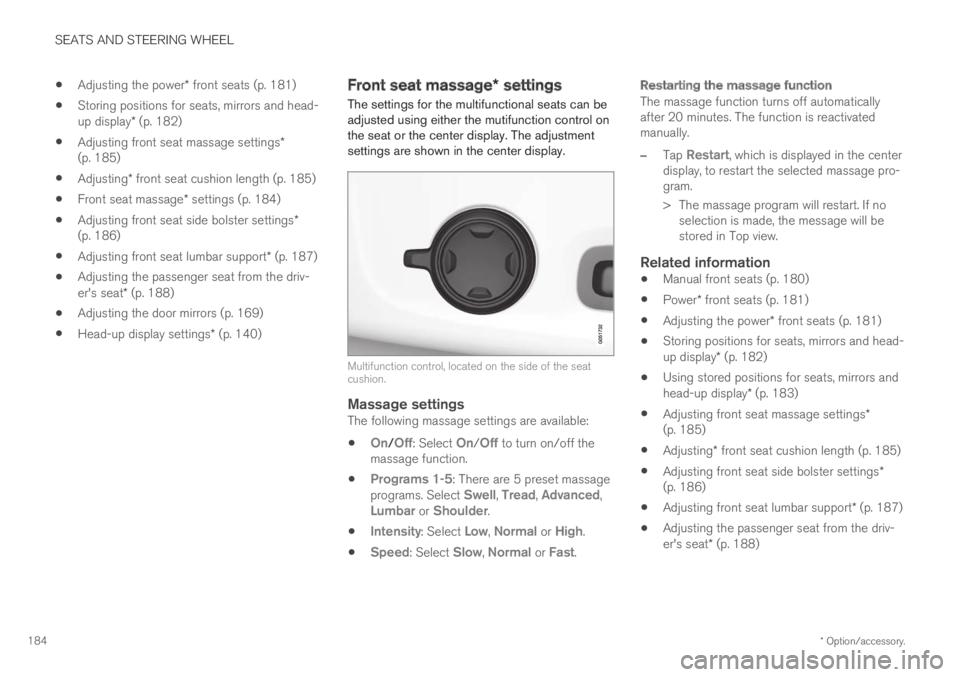
The settings for the multifunctional seats can beadjusted using either the mutifunction control onthe seat or the center display. The adjustmentsettings are shown in the center display.
Multifunction control, located on the side of the seatcushion.
Massage settings
The following massage settings are available:
On/Off: Select On/Off to turn on/off themassage function.
Programs 1-5: There are 5 preset massageprograms. Select Swell, Tread, Advanced,Lumbar or Shoulder.
Intensity: Select Low, Normal or High.
Speed: Select Slow, Normal or Fast.
Restarting the massage function
The massage function turns off automaticallyafter 20 minutes. The function is reactivatedmanually.
–Tap Restart, which is displayed in the centerdisplay, to restart the selected massage pro-gram.
> The massage program will restart. If noselection is made, the message will bestored in Top view.
Related information
Manual front seats (p. 180)
Power* front seats (p. 181)
Adjusting the power* front seats (p. 181)
Storing positions for seats, mirrors and head-up display* (p. 182)
Using stored positions for seats, mirrors andhead-up display* (p. 183)
Adjusting front seat massage settings*(p. 185)
Adjusting* front seat cushion length (p. 185)
Adjusting front seat side bolster settings*(p. 186)
Adjusting front seat lumbar support* (p. 187)
Adjusting the passenger seat from the driv-er's seat* (p. 188)