airbag VOLVO S90 TWIN ENGINE 2020 Owner's Manual
[x] Cancel search | Manufacturer: VOLVO, Model Year: 2020, Model line: S90 TWIN ENGINE, Model: VOLVO S90 TWIN ENGINE 2020Pages: 655, PDF Size: 12.54 MB
Page 82 of 655
DISPLAYS AND VOICE CONTROL
* Option/accessory.
80
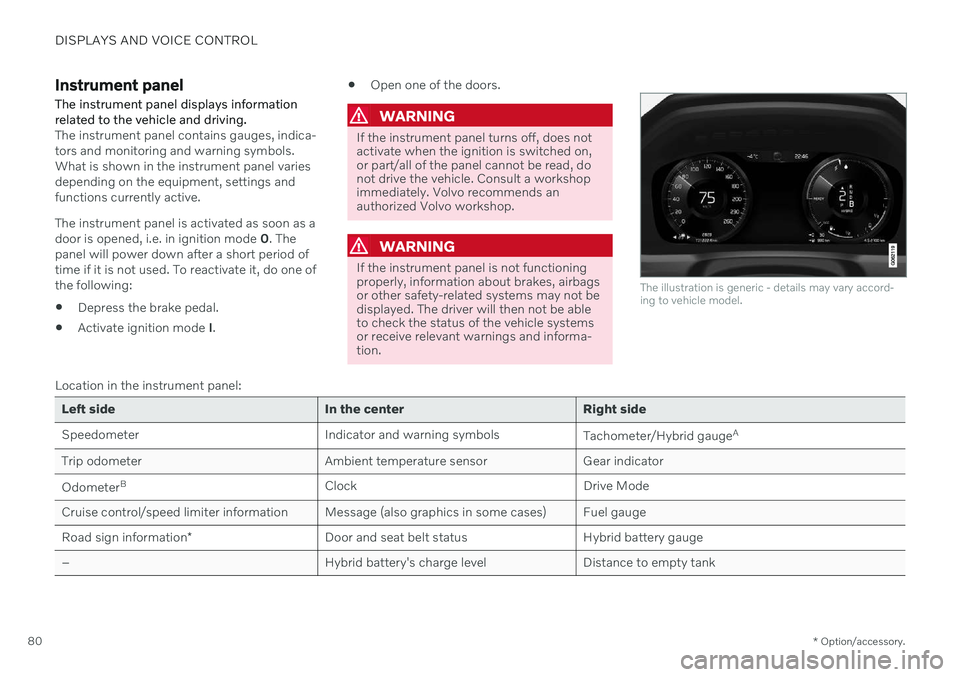
Instrument panel The instrument panel displays information related to the vehicle and driving.
The instrument panel contains gauges, indica- tors and monitoring and warning symbols.What is shown in the instrument panel variesdepending on the equipment, settings andfunctions currently active. The instrument panel is activated as soon as a door is opened, i.e. in ignition mode 0. The
panel will power down after a short period oftime if it is not used. To reactivate it, do one ofthe following:
Depress the brake pedal.
Activate ignition mode
I.
Open one of the doors.
WARNING
If the instrument panel turns off, does not activate when the ignition is switched on,or part/all of the panel cannot be read, donot drive the vehicle. Consult a workshopimmediately. Volvo recommends anauthorized Volvo workshop.
WARNING
If the instrument panel is not functioning properly, information about brakes, airbagsor other safety-related systems may not bedisplayed. The driver will then not be ableto check the status of the vehicle systemsor receive relevant warnings and informa-tion.
The illustration is generic - details may vary accord- ing to vehicle model.
Location in the instrument panel:
Left side In the center Right side
Speedometer Indicator and warning symbols
Tachometer/Hybrid gaugeA
Trip odometer Ambient temperature sensor Gear indicator Odometer B
Clock Drive Mode
Cruise control/speed limiter information Message (also graphics in some cases) Fuel gauge Road sign information * Door and seat belt status Hybrid battery gauge
– Hybrid battery's charge level Distance to empty tank
Page 96 of 655

DISPLAYS AND VOICE CONTROL
94
Warning symbols in the instrument panelThe warning symbols alert the driver that an important function is activated or that a seri-ous fault or error has occurred.
Symbol Meaning
WARNING The red warning symbol illumi- nates to indicate that a fault hasbeen detected that could affectsafety or driveability. An explana-tory message will be simultane-ously displayed in the instrumentpanel. The warning symbol mayalso illuminate in combinationwith other symbols.
Seat belt reminder This symbol will glow steadily or flash if the driver or front seatpassenger has not fastened theirseat belt or if anyone in the rearseat has removed their seat belt.
Symbol Meaning
Airbags If this symbol remains illumi- nated or comes on while driving,a fault has been detected in oneof the vehicle's safety systems.Read the message in the instru-ment panel. Volvo recommendscontacting an authorized Volvoworkshop.
A
B Fault in brake system If this symbol illuminates, the brake fluid level may be too low.Contact your nearest authorizedworkshop to have the brake fluidlevel checked and adjusted.
Symbol Meaning
A
B
Parking brake on This symbol glows steadily when the parking brake is applied. A flashing symbol indicates that a fault has occurred. Read themessage in the instrument panel.
Low oil pressure If this symbol illuminates while driving when the engine oil pres-sure is too low. Stop the engineimmediately and check theengine oil level. Add oil if neces-sary. If the symbol illuminatesand the oil level is normal, con-tact a workshop. Volvo recom-mends contacting an authorizedVolvo workshop.
Generator not charging This symbol illuminates during driving if a fault is detected in theelectrical system. Contact aworkshop. Volvo recommendscontacting an authorized Volvoworkshop.
Page 414 of 655

STARTING AND DRIVING
* Option/accessory.
412
Braking assist after a collision
In a collision in which the activation level is reached for the pyrotechnic seat belt tension-ers or airbags, or if a collision with a large ani-mal is detected, the vehicle's brakes will beautomatically activated. This function isintended to help prevent or reduce the effectsof any subsequent collision.
After a serious collision, it may no longer be possible to control and steer the vehicle. Inorder to avoid or mitigate a possible furthercollision with a vehicle or an object in the vehi-cle's path, the brake assist system is activatedautomatically to help stop the vehicle safely. If braking is not appropriate, e.g. if there is a risk of being hit by passing traffic, the drivercan override the system by depressing theaccelerator pedal. This function assumes that the brake system is intact after a collision.
Related information
Rear Collision Warning
* (p. 328)
BLIS
* (p. 329)
Brake functions (p. 403)
Transmission
The transmission is part of the vehicle's drive- line (power transmission) between the engineand the drive wheels. The function of thetransmission is to change gears dependingon speed and power needs.
The vehicle has an 8-speed automatic trans- mission and an electric motor for rear-wheeldrive. The number of gears allows the engine'storque and power band to be effectively uti-lized. Two of the gears are overdrive gears thatsave fuel when driving at a constant enginespeed. Manual shifting is also possible. Theinstrument panel shows the gear currently inuse.
Related information
Automatic transmission (p. 412)
Automatic transmission
In vehicles with an automatic transmission, the system selects the gear so that drivingwill be as energy-efficient as possible. Thetransmission also has a manual mode.
Overview of gear selector and gear shift pattern in the instrument panel
The instrument panel shows which gear is cur- rently in use: R , N , D or B. P position is electric.
For manual shifting, the gear indicator in the instrument panel displays the gear currentlybeing used.
4 Hill Start Assist
Page 593 of 655

MAINTENANCE AND SERVICE
}}
591
FunctionAmpere Type
Fed when ignition is on: Engine control module; transmission components, electrical power steering, central electrical module 5 Micro
Exterior vehicle sound (certain markets)
5 Micro
Passenger-side headlight, LED15 Micro
– – Micro
–– Micro
–– Micro
Airbags; Passenger weight sensor 5 Micro
Driver-side headlight, LED15 Micro
Accelerator pedal sensor 5 Micro
Transmission control module; gear selector control module15 Micro
Engine control module 5 Micro
–– Micro
–– Micro
–– Micro
–– Micro
Engine control module; actuator; throttle unit; turbo-charger valve20 Micro
Page 599 of 655
MAINTENANCE AND SERVICE
}}
* Option/accessory.597
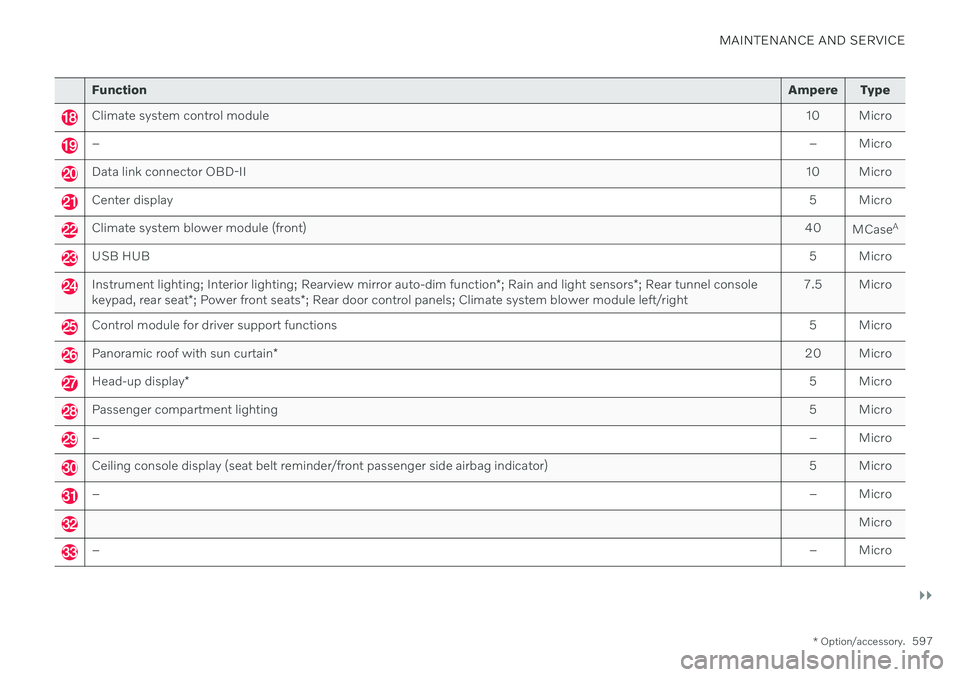
Function Ampere Type
Climate system control module 10 Micro
– – Micro
Data link connector OBD-II10 Micro
Center display 5 Micro
Climate system blower module (front)40
MCaseA
USB HUB
5 Micro
Instrument lighting; Interior lighting; Rearview mirror auto-dim function*; Rain and light sensors *; Rear tunnel console
keypad, rear seat *; Power front seats *; Rear door control panels; Climate system blower module left/right 7.5 Micro
Control module for driver support functions
5 Micro
Panoramic roof with sun curtain* 20 Micro
Head-up display
* 5 Micro
Passenger compartment lighting
5 Micro
–– Micro
Ceiling console display (seat belt reminder/front passenger side airbag indicator) 5 Micro
–– Micro
Micro
–– Micro
Page 602 of 655

MAINTENANCE AND SERVICE
* Option/accessory.
600
Fuses in the trunk The fuses in the trunk protect electrical com- ponents such as the power seats *, airbags
and seat belt tensioners.
Page 637 of 655

INDEX
635
1, 2, 3 ...
4WD 417
A
ABSanti-lock brakes 403
AC (Air conditioning) 223
Accessories and extra equipment 35 installation 36
Accessory installation warning 36, 37
Active Bending Lights 156
Adapting driving characteristics 419
Adaptive Cruise Control 278 activating 280
auto-brake 300
change cruise control functionality 284
limitations 283
manage speed 298
passing 304
set time interval 299
standby mode 282
switching target vehicles 297
Symbols and messages 285
troubleshooting 283
turn off 281
WARNING 296
Adjusting the steering wheel 195
Airbag 53
activation/deactivation 57
driver's side 53
passenger side 53, 57
Air bag, see Airbag 53
Air conditioning 223Air conditioning, fluid volume and grade 633
Air distribution 203 air vents 203, 204
changing 204
defrosting 217
recirculation 216
table showing options 206
Air quality 200, 202 allergy and asthma 201
passenger compartment filter 203
Air recirculation 216
Alarm 263 deactivating 264
Allergy and asthma-inducing sub-
stances 201
All Wheel Drive, AWD 417
All Wheel Drive (AWD) 417
All Wheel Drive (four-wheel drive) 417
Android Auto 486, 487, 488Antenna location 253
Apple CarPlay 482, 483, 485
Approach lighting 159
Apps 454Armrest folding down the rear seats 557
Assistance at risk of collision 351 activating/deactivating 352
at risk of run-off 352
during collision risks from behind 354during collision risks from oncoming
traffic 353
limitations 355
Symbols and messages 356
Audio and media 452 Audio system HD digital radio 463 SiriusXM ®
Satellite radio 464, 465,
466
Auto-climate 215
Auto hold 410
Auto-hold brakes 410 activating/deactivating 411
after collision 412
driver support 268
Automatic car wash 613
INDEX
Page 648 of 655

INDEX
646ventilation 213
whiplash protection 46
Security code 262 Sensors air quality 202
Camera unit 308
climate 198
Radar unit 305
Sensus connection and entertainment 30
Sensus Navigation Road Sign Information 339
Service position 620
Service program 562
Set time interval for Distance Alert 299settings Categories 132
contextual 130
resetting 131
Shiftlock 416
Side airbag 60
Side Impact Protection System 60, 61
SIM card 501 SIPS (Side Impact Protection Sys-
tem) 60, 61 Sirius Satellite radio Travel link 468
SiriusXM ® Satellite radio
traffic information 464, 465, 466
Ski hatch 560
Slippery conditions 432
Slippery road conditions 432
Snow chains 541
Software updates 33
Sound experience 453
Sound settings 452, 495 phone 496
playing media 474, 475
text message 495
Spare tire 539 handling 540
Speed camera information 339 Speed Limiter change speed 298
Speed symbols, tires 524
Spin control 269
Stability and traction control system 269 sport mode 270
Symbols and messages 272
Stains 605, 607, 608, 609 Start and lock system type designations 249Start battery 441, 579
overload 440
Start engine 398 Starting the engine after a collision 62
Start the vehicle 398
Steering assistance at risk of collision 351Steering power level, see Steering wheel
resistance 268
Steering wheel 194, 195 heating 214, 215
keypad 194
paddle 194
steering wheel adjustment 195
Steering wheel keypad 194
Steering wheel paddles 415Steering wheel resistance, speed-
dependent 268
Stone chips and scratches 617, 618
Storage compartments 552 center console 553
glove compartment 555
sun visor 557
Sunroof pinch protection 164
Page 650 of 655

INDEX
648Troubleshooting
Adaptive Cruise Control 283
Camera unit 309
City Safety 324
Radar unit 309
Trunk electrical outlet 554
Lighting 160
Trunk lid emergency opening 256
locking/unlocking 253
open/close with foot movement 261
power-operated 258
unlocking from inside 255
Tunnel detection 153
Turn off engine 400
Turn signals 156Twin Engine general 380
Type approval HomeLink ® 448
radar system 306
U
Uniform Tire Quality Grading 526
Units 129
Unlocking settings 239
with key blade 247
USB socket for connecting media 480
V
Vehicle care 610, 611, 613, 614, 615, 616leather upholstery 608
Vehicle Event Data 33 Vehicle functions in the center display 119
Vehicle key bat. low 240Vehicle modem connecting vehicle to Internet 500
settings 501
Vehicle recovery 444
Vehicle status 567 inflation pressure 532
Vehicle upholstery 605, 607, 608, 609
Vehicle weight 629
Ventilation 203, 204 Seats 213
Video 478, 480 settings 479
Voice control 142
climate 199
phone 145
radio and media 146
settings 147
VOL mark 520
Volvo ID 26 create and register 27
W
Warning lightsAdaptive Cruise Control 296
airbags SRS 94
alternator does not charge 94
brake system error 94
low oil pressure 94
parking brake applied 94
Pilot Assist 296
seat belt reminder 94
stability and traction control system 269
starter battery not charging 94
system error 94
WARNING 94
Warning sound parking brake 409
warning symbols 94