lights VOLVO S90 TWIN ENGINE 2020 Workshop Manual
[x] Cancel search | Manufacturer: VOLVO, Model Year: 2020, Model line: S90 TWIN ENGINE, Model: VOLVO S90 TWIN ENGINE 2020Pages: 655, PDF Size: 12.54 MB
Page 444 of 655

||
STARTING AND DRIVING
44211. Start your vehicle's engine. If the engine
does not start, allow an additional 10 minutes of charging time and then try tostart the engine again.
NOTE
When the engine is started under normal conditions, the vehicle's electrical drivemotor is prioritized – the gasoline engineremains off. This means that after the startknob has been turned clockwise, the elec-tric motor has "started" and the vehicle isready to be driven. Start of the electricmotor is indicated by the indicator lights onthe instrument panel going out and its pre-selected theme illuminating.
CAUTION
Do not touch the connections between the cable and the vehicle during the startattempt. Risk of sparking.
12. Remove the jumper cables in the reverseorder ‒ first the black cables and then the
red cables. Make sure that none of the clamps of the black jumper cables come into contactwith either vehicle's positive (+) jump startterminals or either of the red jumpercable's connected clamps.
WARNING
PROPOSITION 65 WARNING! Battery
posts, terminals, and related accessories contain lead and lead compounds, chemi-cals known to the state of California tocause cancer and reproductive harm. Washhands after handling.
WARNING
Batteries generate hydrogen gas, which is flammable and explosive.
Do not connect the jumper cable toany part of the fuel system or to anymoving parts. Avoid touching hotmanifolds.
Battery fluid contains sulfuric acid. Donot allow battery fluid to contact eyes,skin, fabrics or painted surfaces.
If contact occurs, flush the affectedarea immediately with water. Obtainmedical help immediately if eyes areaffected.
Never expose the battery to open flameor electric spark. Do not smoke nearthe battery. Failure to follow theinstructions for jump starting can leadto injury.
NOTE
The vehicle cannot be started if the hybrid battery is discharged.
Related information
Starting the vehicle (p. 398)
Ignition modes (p. 401)
Adjusting the steering wheel (p. 195)
Selecting ignition mode (p. 402)
Page 566 of 655

||
MAINTENANCE AND SERVICE
564
How can I prepare for my next OBD II
emission inspection?
If your Check Engine (MIL) light is lit or was lit but went out without service, haveyour vehicle diagnosed and, if necessary,serviced by a qualified Volvo technician.
If you recently had service for a lit CheckEngine light, or if you had service thatrequired disconnecting the battery, aperiod of driving is necessary to bring theOBD II system to "ready" for inspection.Two half-hour trips of mixed stop-and-go/highway driving are typically needed toallow OBD II to reach readiness. YourVolvo retailer can provide you with moreinformation on planning a trip.
Maintain your vehicle in accordance withyour vehicle's maintenance schedule.
Owner maintenancePeriodic maintenance requirements and inter-vals are described in your vehicle's Warrantyand Service Records Information booklet. The following points can be carried out between the normally scheduled maintenance services.
Each time the vehicle is refueled:
Check the engine oil level.
Clean the windshield, windshield wipers, headlights, and taillights.
Monthly:
Check cold tire pressure in all tires. Inspect the tires for wear.
Check that engine coolant and other fluidlevels are between the indicated "min"and "max" markings.
Clean interior glass surfaces with a glasscleaner and soft paper towels.
Wipe driver information displays with asoft cloth.
Visually inspect battery terminals for cor-rosion. Corrosion may indicate a loose ter-minal connector, or a battery near the endof its useful service life. Consult your Volvoretailer for additional information.
As needed:
Wash the vehicle, including the undercarriage, to reduce wear that can be caused by abuildup of dirt, and corrosion that can becaused by salt residues. Clean leaves and twigs from air intake vents at the base of the windshield, and from other pla-ces where they may collect.
NOTE
Complete service information for qualified technicians is available online for purchaseor subscription at www.volvotechinfo.com.
Related information
Vehicle status (p. 567)
Scheduling service and repairs (p. 567)
Connecting equipment to the vehicle's data link connector (p. 37)
Technician certification (p. 38)
Climate control system service (p. 571)
Maintenance of the brake system (p. 406)
Engine compartment overview (p. 573)
Page 580 of 655

MAINTENANCE AND SERVICE
* Option/accessory.
578
Replacing bulbs
This vehicle is equipped with only LED 16
lights, which means it does not have any replaceable bulbs. Contact a workshop 15
if
you experience any problems with the light- ing. If there is a problem with an LED 16
light, the
entire lamp unit will normally need to be replaced.
NOTE
For information on lights not mentioned in the Owner's Manual, contact a Volvodealer or a certified Volvo service techni-cian.
NOTE
Exterior lighting such as headlights and taillights may develop temporary conden-sation on the inside of the lens. This is nor-mal. All exterior lighting is designed toresist this. Condensation is normally ven-ted out of the lamp housing once the lighthas been lit for some period of time.
NOTE
Bulbs for active curve lighting * contain
traces of mercury and should therefore always be submitted to a certified Volvoservice technician.
16 LED (Light Emitting Diode)
15 An authorized Volvo workshop is recommended.
Page 614 of 655

||
MAINTENANCE AND SERVICE
612
Wash using a sponge, car washing deter- gent and plenty of lukewarm water.
Clean the wiper blades with lukewarmsoap solution or car washing detergent.
Dry the vehicle using a clean, soft chamoisor a squeegee. Try not to let drops ofwater dry in strong sunlight. This couldcause water drying stains that may needto be polished out.
In areas with heavy industrial emissions,more frequent washing of the vehicle'sexterior is recommended.
Tar spots from asphalt may remain evenafter washing. Use a tar remover toremove these spots.
WARNING
Always entrust engine washing to a work- shop. If the engine is hot, there is a risk offire.
CAUTION
Dirty headlights do not work as well. Clean them regularly, e.g. when refueling. Do not use corrosive cleaners. Use water and a non-abrasive sponge.
NOTE
Exterior lighting such as headlights and taillights may develop temporary conden-sation on the inside of the lens. This is nor-mal. All exterior lighting is designed toresist this. Condensation is normally ven-ted out of the lamp housing once the lighthas been lit for some period of time.
CAUTION
Make sure that the panoramic roof and sun shade are closed before washingthe vehicle.
Never use abrasive polishing agents onthe panoramic roof.
Never use wax on the rubber sealsaround the panoramic roof.
CAUTION
Remember to remove dirt from the drain holes in the doors and sills after washingthe vehicle.
Related information
Cleaning the exterior (p. 610)
Polishing and waxing (p. 610)
Automatic car washes (p. 613)
High-pressure washing (p. 614)
Cleaning the wiper blades (p. 614)
Cleaning exterior plastic, rubber and trim components (p. 615)
Cleaning rims (p. 616)
Corrosion protection (p. 616)
Settings for automatically activating theparking brake (p. 408)
Page 615 of 655

MAINTENANCE AND SERVICE
}}
* Option/accessory.613
Automatic car washes
The vehicle should be washed as soon as it becomes dirty. The longer the dirt remains,the more difficult it will be to keep the vehicleclean. It could also lead to paint damage.
Washing your vehicle in an automatic car wash is a fast and easy way to keep your vehi-cle clean, but it does not reach all areas of thevehicle. Volvo recommends washing yourvehicle by hand or supplementing automaticcar washes with a hand wash.
NOTE
Volvo recommends not washing the vehi- cle in an automatic car wash during thefirst few months; the paintwork on newvehicles takes some time to fully harden.
CAUTION
Before driving the vehicle into a car wash, deactivate the Automatic Braking whenStationary and Automatic Parking BrakeApplication functions. If the functions arenot deactivated, the brake system willseize when the vehicle is stationary and thevehicle will not be able to roll.
CAUTION
For automatic car washes in which the vehicle is pulled forward on rolling wheels:
1. Before washing the vehicle, make sure that the automatic rain sensor is deac- tivated. If it is not deactivated andinadvertently starts, the wiper armscould be damaged.
2. To help prevent damage from the auto- matic car wash machinery, make surethat the door mirrors are folded in,antennas retracted or removed, andany auxiliary lights secured.
3. Drive into the automatic car wash.
4. Turn off the "Automatic Braking when Stationary" function using the
but-
ton in the tunnel console.
5. Turn off the "Automatic Parking Brake Application" function in the center dis- play's Top view.
6. Turn off the engine by turning the start knob in the tunnel console clockwise.Hold the knob in position for at least2 seconds.
The vehicle is now ready for the automaticcar wash.
CAUTION
The system will automatically change to P
mode if the above steps are not followed. In P mode, the wheels are locked, which
they should not be when the vehicle isbeing washed in a car wash.
NOTE
Keep in mind that if the vehicle is equipped with the keyless locking and unlocking function *, the doors and tailgate/trunk lid
may open when washing the vehicle if the remote key is within range.
Related information
Cleaning the exterior (p. 610)
Polishing and waxing (p. 610)
Hand washing (p. 611)
High-pressure washing (p. 614)
Cleaning the wiper blades (p. 614)
Cleaning exterior plastic, rubber and trim components (p. 615)
Cleaning rims (p. 616)
Corrosion protection (p. 616)
Auto-hold brakes (p. 410)
Page 623 of 655
MAINTENANCE AND SERVICE
}}
* Option/accessory.621
The wiper blades will also move out of the service position if:
The windshield wipers are turned on.
The windshield washers are turned on.
The rain sensor is activated.
The vehicle begins moving.
CAUTION
If the wiper arms in service position are raised from the windshield, they must befolded back against the windscreen beforeactivating wiping, washing or rain sensoras well as before departure. This is to pre-vent scratching the paint on the hood.
Related information
Using the rain sensor (p. 179)
Using the windshield and headlight wash- ers (p. 180)
Using the rain sensor's memory function(p. 180)
Filling washer fluid (p. 621)
Replacing windshield wiper blades(p. 619)
Using the windshield wipers (p. 178)
Wiper blades and washer fluid (p. 178)
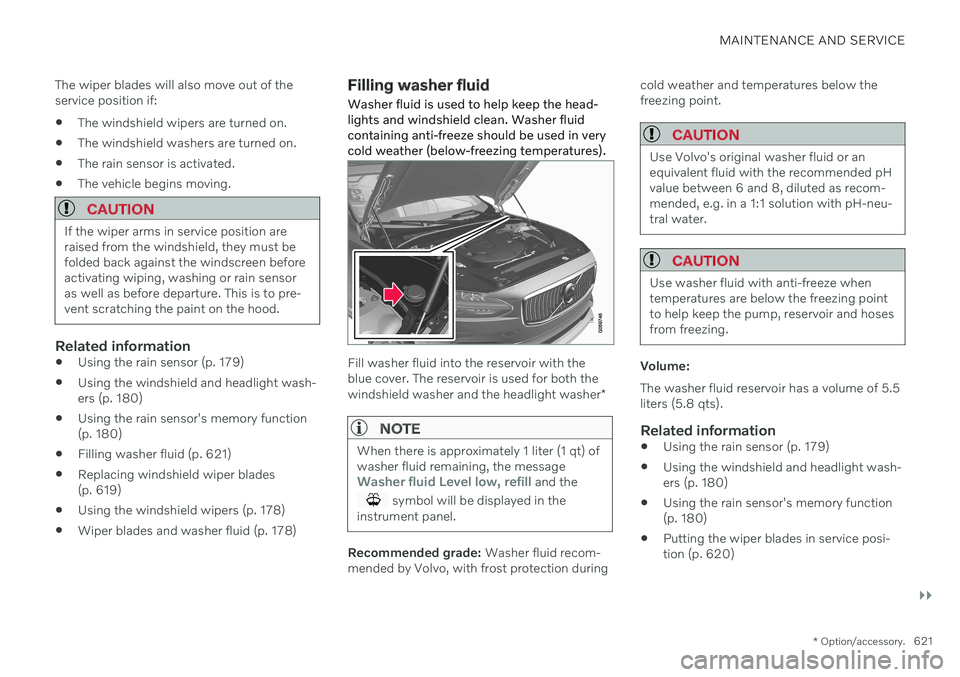
Filling washer fluid Washer fluid is used to help keep the head- lights and windshield clean. Washer fluidcontaining anti-freeze should be used in verycold weather (below-freezing temperatures).
Fill washer fluid into the reservoir with the blue cover. The reservoir is used for both the windshield washer and the headlight washer
*
NOTE
When there is approximately 1 liter (1 qt) of washer fluid remaining, the message
Washer fluid Level low, refill and the
symbol will be displayed in the
instrument panel.
Recommended grade: Washer fluid recom-
mended by Volvo, with frost protection during cold weather and temperatures below the freezing point.
CAUTION
Use Volvo's original washer fluid or an equivalent fluid with the recommended pHvalue between 6 and 8, diluted as recom-mended, e.g. in a 1:1 solution with pH-neu-tral water.
CAUTION
Use washer fluid with anti-freeze when temperatures are below the freezing pointto help keep the pump, reservoir and hosesfrom freezing.
Volume: The washer fluid reservoir has a volume of 5.5 liters (5.8 qts).
Related information
Using the rain sensor (p. 179)
Using the windshield and headlight wash-ers (p. 180)
Using the rain sensor's memory function(p. 180)
Putting the wiper blades in service posi-tion (p. 620)
Page 637 of 655

INDEX
635
1, 2, 3 ...
4WD 417
A
ABSanti-lock brakes 403
AC (Air conditioning) 223
Accessories and extra equipment 35 installation 36
Accessory installation warning 36, 37
Active Bending Lights 156
Adapting driving characteristics 419
Adaptive Cruise Control 278 activating 280
auto-brake 300
change cruise control functionality 284
limitations 283
manage speed 298
passing 304
set time interval 299
standby mode 282
switching target vehicles 297
Symbols and messages 285
troubleshooting 283
turn off 281
WARNING 296
Adjusting the steering wheel 195
Airbag 53
activation/deactivation 57
driver's side 53
passenger side 53, 57
Air bag, see Airbag 53
Air conditioning 223Air conditioning, fluid volume and grade 633
Air distribution 203 air vents 203, 204
changing 204
defrosting 217
recirculation 216
table showing options 206
Air quality 200, 202 allergy and asthma 201
passenger compartment filter 203
Air recirculation 216
Alarm 263 deactivating 264
Allergy and asthma-inducing sub-
stances 201
All Wheel Drive, AWD 417
All Wheel Drive (AWD) 417
All Wheel Drive (four-wheel drive) 417
Android Auto 486, 487, 488Antenna location 253
Apple CarPlay 482, 483, 485
Approach lighting 159
Apps 454Armrest folding down the rear seats 557
Assistance at risk of collision 351 activating/deactivating 352
at risk of run-off 352
during collision risks from behind 354during collision risks from oncoming
traffic 353
limitations 355
Symbols and messages 356
Audio and media 452 Audio system HD digital radio 463 SiriusXM ®
Satellite radio 464, 465,
466
Auto-climate 215
Auto hold 410
Auto-hold brakes 410 activating/deactivating 411
after collision 412
driver support 268
Automatic car wash 613
INDEX
Page 638 of 655
INDEX
636Automatic high beam 155
Automatic locking 258
Automatic relocking 238, 251
Automatic transmission 412, 413
kickdown 417
oil 632
Auxiliary heater 231
B
Backrest front seat, adjusting 184, 185, 188, 189 , 190, 191
rear seat, adjusting 194
Battery Hybrid 583
jump-start 441
Maintenance 579
recycling 584
start 579
symbols on the battery 584
BLIS 329 activating/deactivating 330
limitations 331
Symbols and messages 332
Bloweradjusting 219
air distribution 204
air vents 204
Bluetooth connect 479
connecting vehicle to Internet 499
phone 489
settings 497
Book service and repair 567
Booster cushions 72 Brake assist after collision 412
Brake energy 403, 418Brake fluid grade 632
Brake functions 403
Brake position 413
Brakes 403 anti-lock brakes, ABS 403
automatic when stationary 410
Brake Assist System, BAS 405
brake lights 158
brake system 403
emergency brake lights 158
Maintenance 406
on salted roads 406on wet roads 405
parking brake 406
brake system fluid 632
C
Camera sensor
see Camera 308
Camera unit 308 limitations 309
maintenance and cleaning 313
Capacity weight 548, 629
Cargo compartment 558 attachment points 560
Car wash 610, 611, 613, 614, 615, 616
Catalytic converter 439 recovery 443
CD player 477
Cell phone, see Phone 490
Center console 553 Center display change appearance 128
cleaning 605
climate controls 209
Function view 119
keyboard 123
Page 640 of 655

INDEX
638Compass 449
calibration 450
Condensation in headlights 611, 613, 614, 615
Connecting vehicle to Internet No connection or poor connection 503
via a mobile device (WiFi) 499
via cellular phone (Bluetooth) 499
via vehicle's modem 500
Connect phone 490
Contact information 26
Convertible seats 70
coolant 632 filling 576
Cooling system overheating 439
Cornering assistance 302 activating/deactivating 303
limitations 303
Corner Traction Control 269
Corrosion protection 616
Crash, see Collision 42
Crash event data 33
Cross Traffic Alert 333 activating/deactivating 334
limitations 334
messages 336
Cruise control 275
activating 276
manage speed 298
standby mode 277
turn off 277
Curb weight 629
Customer Privacy Policy 35
CZIP (Clean Zone Interior Package) 201
D
Data recording 33 transferring between vehicle and
workshop 565
Data sharing 504, 505
Daytime running lights 152 Decals location 624
Defrosting 217 Detecting obstacles City Safety 318
Dimensions 627
Dipstick, electronic 575
Direction of rotation 522
Display driver information 80
Display lighting 161
Distance Alert 273 activating/deactivating 274
limitations 274
Set time interval 299
DivX ®
478
Door mirrors 170 compass 449, 450
dimming 170
outer 170
power folding 171
resetting 171
store position 186, 187
Download Center 565 use 566
Driveline transmission 412
Drive mode 419 changing 423
driver support 301
Driver Alert Control 342 activating/deactivating 343
limitations 344
rest stop guidance 343
Driver performance 88 settings 89
Page 641 of 655

INDEX
639
Driver profile 133
edit 134, 135, 137
select 134
Driver support system 268 Drive mode 301
Drive systems 418 Driving cooling system 439
Driving economy 428
Driving through standing water 433
E
Economical driving 428
Electrical outlet 554 use 554
Electrical system 579 Electric drive motor specifications 630
electric motor 418 Range 429
Electric parking brake 406
Electronic immobilizer 248
emergency brake lights 158
Emission inspection readiness 562
Energy distribution using map data 424
Engine automatic start and stop of combus-
tion engine 419
overheating 439
start 398
turn off 400
Engine braking 403, 413 Engine compartment coolant 576
engine oil 574
overview 573
Engine drag control 269
Engine oil 574 filling 575
filter 574
grade and volume 631
Engine shutdown 400
Engine specifications 630Engine temperature high 439
Environment 28 Ethanol content max. 10% by volume 436
Exterior dimensions 627
Extra heater (Auxiliary heater) 231F
Federal Clean Air Act 562
Ferry transport 425
Flooded road 433
Fluids, volumes 621, 633
Fluids and oils 632, 633Fog lights rear 157
Four-C 425Front seat blower 219
climate 209
heating 211
temperature 221
ventilation 213
Front seat manual 184
Front seats, power 185 adjusting passenger seat from driv-
er's seat 193
adjusting seat 185
Lumbar support 191
massage 188, 189, 190
multifunction control 188, 189, 190, 191
Side bolsters 191
store position 186, 187
Fuel 436 Travel Link service 471