homelink VOLVO S90 TWIN ENGINE 2020 Owners Manual
[x] Cancel search | Manufacturer: VOLVO, Model Year: 2020, Model line: S90 TWIN ENGINE, Model: VOLVO S90 TWIN ENGINE 2020Pages: 655, PDF Size: 12.54 MB
Page 12 of 655

10
Using the steering wheel paddles*
to shift 415
Shiftlock 416
The kickdown function 417
All Wheel Drive (AWD) 417
Drive systems 418
Starting and stopping the com- bustion engine in Twin Enginevehicles 419
Drive modes 419
Changing drive mode 423
Energy distribution in hybrid mode using map data *424
Leveling control * and suspension
425
Leveling control settings *
428
Economical driving 428
Factors affecting electric motor range 429
Hold and Charge functions 431
Preparing for a long trip 432
Winter driving 432
Driving through standing water 433
Opening/closing the fuel filler door 434
Refueling 435
Fuel 436
Octane rating 437
Emission controls 439
Overheating of engine and trans- mission439
Battery drain 440
Jump starting using another battery 441
Towing using a towline 443
Attaching and removing the tow-ing eyelet 443
Recovery 444
HomeLink ®
* 445
Programming HomeLink ®
* 446
Using HomeLink ®
* 448
Type approval for HomeLink ®
* 448
Compass *
449
Activating and deactivating the compass * 449
Calibrating the compass *
450
AUDIO, MEDIA AND INTERNET
Audio, media and Internet
452
Sound settings 452
Sound experience *
453
Apps 454
Download apps 455
Updating apps 455
Deleting apps 456
Radio 456
Starting the radio 457
Changing waveband and radio station 458
Searching for a radio station 458
Storing radio channels in the Radio favorites app 459
Radio settings 460
RBDS 460
HD Radio ™
461
Activating and deactivating the HDRadio ™ 462
HD Radio ™ sub-channels
462
HD Radio ™ limitations
463
SiriusXM ®
Satellite radio *
464
Using SiriusXM ®
Satellite radio *
465
Settings for SiriusXM ®
Satellite radio *
466
SiriusXM Travel Link ®
* 468
SiriusXM Travel Link ®
* - Weather
469
Page 80 of 655
DISPLAYS AND VOICE CONTROL
* Option/accessory.
78
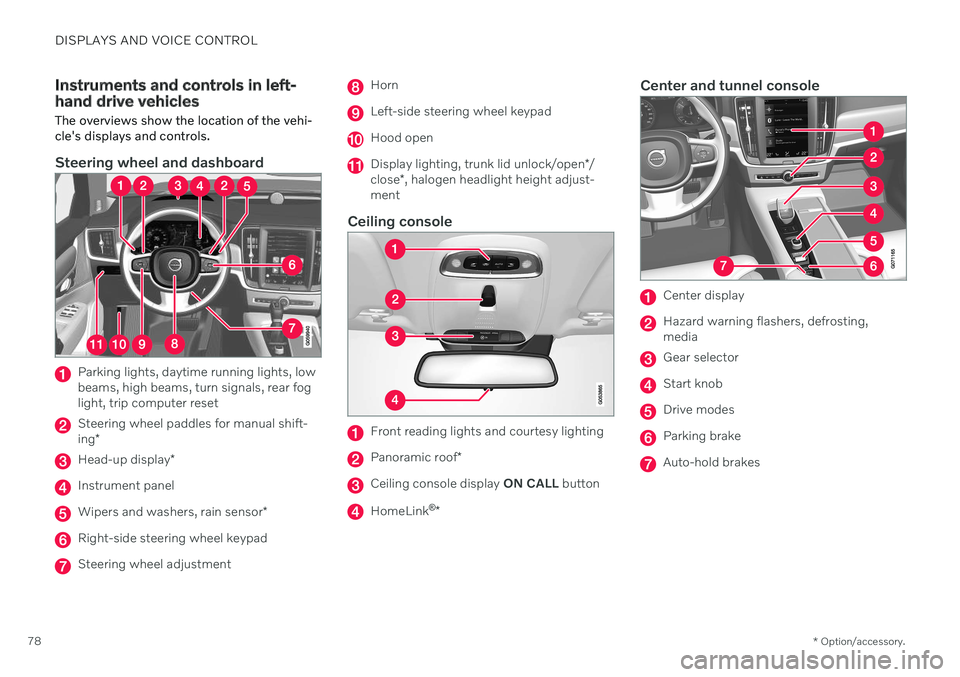
Instruments and controls in left- hand drive vehicles The overviews show the location of the vehi- cle's displays and controls.
Steering wheel and dashboard
Parking lights, daytime running lights, low beams, high beams, turn signals, rear foglight, trip computer reset
Steering wheel paddles for manual shift- ing *
Head-up display *
Instrument panel
Wipers and washers, rain sensor *
Right-side steering wheel keypad
Steering wheel adjustment
Horn
Left-side steering wheel keypad
Hood open
Display lighting, trunk lid unlock/open */
close *, halogen headlight height adjust-
ment
Ceiling console
Front reading lights and courtesy lighting
Panoramic roof *
Ceiling console display ON CALL button
HomeLink ®
*
Center and tunnel console
Center display
Hazard warning flashers, defrosting, media
Gear selector
Start knob
Drive modes
Parking brake
Auto-hold brakes
Page 172 of 655

WINDOWS, GLASS AND MIRRORS
* Option/accessory.
170
Rearview/door mirrors
The rearview mirror and door mirrors can be used to improve the driver's visibility behindthe vehicle.
Rearview mirrorThe rearview mirror can be adjusted manually. The rearview mirror is equipped with Home- Link *, auto-dim * and compass *.
Door mirrors
WARNING
The door mirror on the passenger side is curved to improve visibility. Objects in themirror may appear farther away than theyactually are.
The joystick in the drivers' door control panel is used to adjust the position of the door mir-rors. There are also several automatic settingsthat can also be connected to the memory function buttons for the power seat *.
Related information
HomeLink ®
* (p. 445)
Compass
* (p. 449)
Adjusting the rearview mirror dimming function (p. 170)
Adjusting the door mirrors (p. 171)
Storing positions for seats, mirrors and head-up display
* (p. 186)
Activating and deactivating the heated rear window and door mirrors (p. 218)
Adjusting the rearview mirror dimming function
Bright light entering the vehicle from behind, e.g. from the headlights of following vehicles,could reflect in the rearview mirror and doormirrors and cause a glare. Use the dimmingfunction when light from behind is distract-ing.
Auto-dimIf bright light enters the vehicle from behind, the door mirrors will automatically dim. Auto-dim is always active when the engine is run-ning, except when reverse gear is engaged.
NOTE
Adjustments to the sensitivity level will not be noticeable immediately but will insteadtake effect after a short period of time.
The sensitivity level for dimming will affect both the rearview mirror and door mirrors. To change the dimming sensitivity level:1. Tap
Settings in the Top view in the center
display.
2. Tap
My CarMirrors and Convenience.
3. Under
Rearview Mirror Auto Dimming,
select Normal, Dark or Light.
Page 447 of 655

STARTING AND DRIVING
* Option/accessory.445
only be lifted with the tow truck's lifting equip- ment.
WARNING
No person or object should be behind the tow truck when the vehicle is lifted ontothe bed of the truck.
Related information
Attaching and removing the towing eyelet (p. 443)
HomeLink ®
*12
HomeLink ®
13
is a programmable remote con-
trol, integrated in the vehicle electrical sys- tem, that can control up to three differentdevices (e.g. garage door opener, alarm sys-tem, outdoor and indoor lighting) and therebyreplace the remote controls for these.
General
The illustration is generic – the design may vary.
Button 1
Button 2
Button 3
Indicator light HomeLink
®
is delivered integrated in the rear-
view mirror. The HomeLink ®
panel consists of
three programmable buttons and an indicator light in the mirror. For more information about HomeLink ®
,
please visit: www.HomeLink.com or call 1-800-355-3515. Save the original remote controls for future programming (e.g. for use in another vehicle).It is also advisable to delete the button pro-gramming if the vehicle is sold.
Related information
Using HomeLink ®
* (p. 448)
Programming HomeLink ®
* (p. 446)
Type approval for HomeLink ®
* (p. 448)
12
Certain markets only.
13 HomeLink and the HomeLink house symbol are registered trademarks of Gentex Corporation.
Page 448 of 655
STARTING AND DRIVING
* Option/accessory.
446
Programming HomeLink ®
*14
Follow these instructions to program HomeLink ®
, reset all programming, or pro-
gram individual buttons.
NOTE
In some vehicles, the ignition must be on or in the "accessory position" before HomeLink ®
can be programmed or used. It
can be a good idea to put new batteries in the remote control being replaced by HomeLink ®
for faster programming and
better radio signal transmission. TheHomeLink ®
buttons should be reset before
programming.
WARNING
While HomeLink ®
is being programmed,
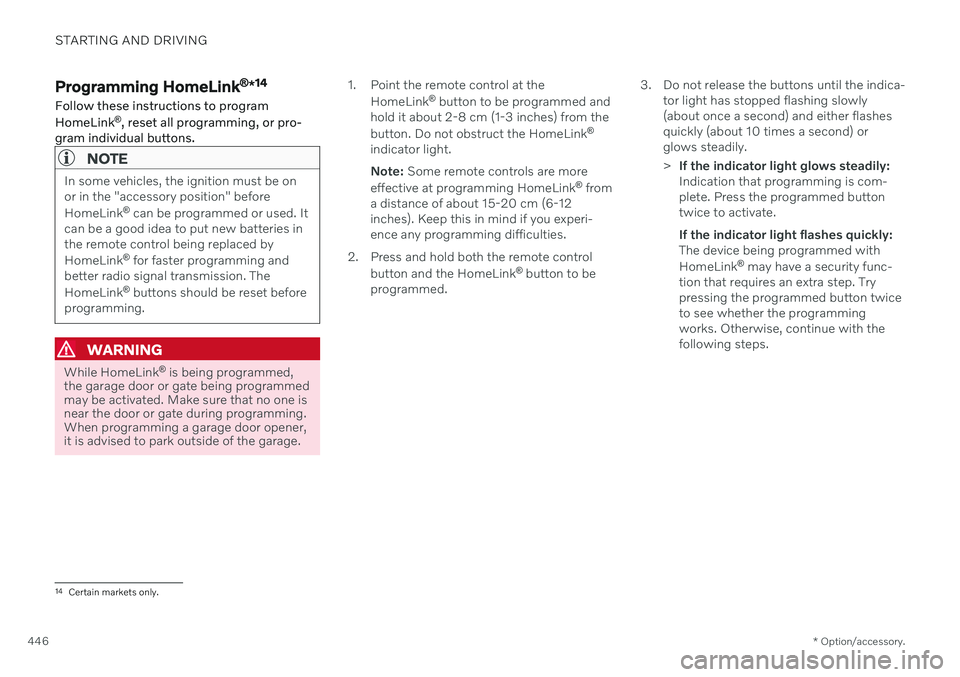
the garage door or gate being programmed may be activated. Make sure that no one isnear the door or gate during programming.When programming a garage door opener,it is advised to park outside of the garage. 1. Point the remote control at the
HomeLink ®
button to be programmed and
hold it about 2-8 cm (1-3 inches) from the button. Do not obstruct the HomeLink ®
indicator light. Note: Some remote controls are more
effective at programming HomeLink ®
from
a distance of about 15-20 cm (6-12 inches). Keep this in mind if you experi-ence any programming difficulties.
2. Press and hold both the remote control button and the HomeLink ®
button to be
programmed. 3. Do not release the buttons until the indica-
tor light has stopped flashing slowly(about once a second) and either flashesquickly (about 10 times a second) orglows steadily. >If the indicator light glows steadily: Indication that programming is com-plete. Press the programmed buttontwice to activate. If the indicator light flashes quickly: The device being programmed with HomeLink ®
may have a security func-
tion that requires an extra step. Try pressing the programmed button twiceto see whether the programmingworks. Otherwise, continue with thefollowing steps.
14 Certain markets only.
Page 449 of 655
STARTING AND DRIVING
* Option/accessory.447
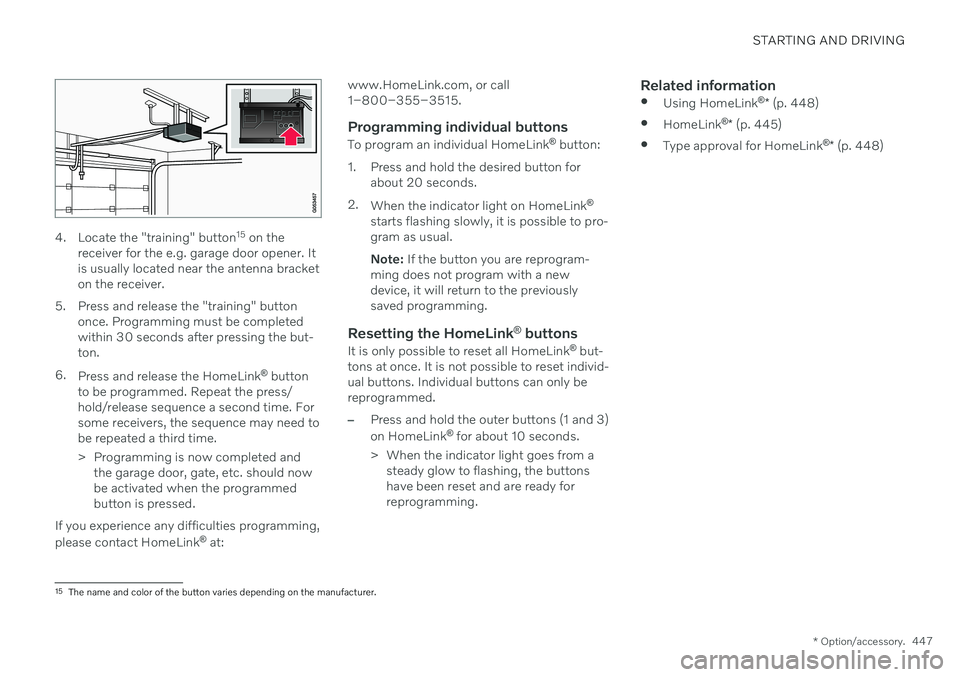
4. Locate the "training" button 15
on the
receiver for the e.g. garage door opener. It is usually located near the antenna bracketon the receiver.
5. Press and release the "training" button once. Programming must be completedwithin 30 seconds after pressing the but-ton.
6. Press and release the HomeLink ®
button
to be programmed. Repeat the press/hold/release sequence a second time. Forsome receivers, the sequence may need tobe repeated a third time.
> Programming is now completed and the garage door, gate, etc. should now be activated when the programmedbutton is pressed.
If you experience any difficulties programming, please contact HomeLink ®
at: www.HomeLink.com, or call 1–800–355–3515.
Programming individual buttons
To program an individual HomeLink
®
button:
1. Press and hold the desired button for about 20 seconds.
2. When the indicator light on HomeLink ®
starts flashing slowly, it is possible to pro-gram as usual. Note: If the button you are reprogram-
ming does not program with a new device, it will return to the previouslysaved programming.
Resetting the HomeLink ®
buttons
It is only possible to reset all HomeLink ®
but-
tons at once. It is not possible to reset individ-ual buttons. Individual buttons can only bereprogrammed.
–Press and hold the outer buttons (1 and 3) on HomeLink ®
for about 10 seconds.
> When the indicator light goes from a steady glow to flashing, the buttons have been reset and are ready forreprogramming.
Related information
Using HomeLink ®
* (p. 448)
HomeLink ®
* (p. 445)
Type approval for HomeLink ®
* (p. 448)
15
The name and color of the button varies depending on the manufacturer.
Page 450 of 655

STARTING AND DRIVING
* Option/accessory.
448
Using HomeLink ®
*16
Once HomeLink ®
is programmed, it can be
used instead of the separate remote controls.
Press and hold the programming button. The garage door, gate, alarm system, etc. will beactivated (this may take several seconds). Ifthe button is held down for more than 20 sec-onds, reprogramming will begin. The indicatorlight will glow steadily or flash when the but-ton has been pressed. The original remotecontrols may be used concurrently with HomeLink ®
if desired.
NOTE
When the ignition is switched off, HomeLink ®
will be active for at least
7 minutes.
NOTE
HomeLink ®
cannot be used if the vehicle is
locked and the alarm is armed * from the
outside.
WARNING
If you use HomeLink ®
to open a garage
door or gate, be sure no one is near the gate or door while it is in motion.
Do not use HomeLink ®
with any
garage door opener that lacks safetystop and reverse features as requiredby US federal safety standards (thisincludes any garage door opener modelmanufactured before April 1, 1982). Agarage door that cannot detect anobject - signaling the door to stop andreverse - does not meet current U.S.federal safety standards. For moreinformation, contact HomeLink at:www.homelink.com.
Related information
HomeLink ®
* (p. 445)
Programming HomeLink ®
* (p. 446)
Type approval for HomeLink ®
* (p. 448)
Type approval for HomeLink ®
*17
FCC (USA) and IC (Canada)This device complies with FCC rules part 15 and Industry Canada RSS-210. Operation issubject to the following two conditions: (1)This device may not cause harmful interfer-ence, and (2) This device must accept anyinterference that may be received includinginterference that may cause undesired opera-tion.
WARNING
The transmitter has been tested and com- plies with FCC and IC rules. Changes ormodifications not expressly approved bythe party responsible for compliance couldvoid the user's authority to operate the device.
18
Type approval for EUGentex Corporation hereby declares that HomeLink
®
Model UAHL5 complies with the
Radio equipment directive 2014/53/EU. Wavelengths within which the radio equip- ment operates:
433.05MHz-434.79MHz <10mW E.R.P.
868.00MHz-868.60MHz <25mW E.R.P.
16
Certain markets only.
17 Certain markets only.
18 The term "IC:" before the certification/registration number only signifies that Industry Canada technical specifications were met.
Page 451 of 655

STARTING AND DRIVING
* Option/accessory.449
868.70MHz-868.20MHz <25mW E.R.P.
869.40MHz-869.65MHz <25mW E.R.P.
869.70MHz-870.00MHz <25mW E.R.P.
Certificate holder address: Gentex Corpora- tion, 600 North Centennial Street, Zeeland MI49464, USA For further details, search for support informa- tion on type approval at www.volvocars.com.
Related information
HomeLink ®
* (p. 445)
Compass *
An integrated compass 19
in the upper right
corner of the rearview mirror shows the direction the vehicle is traveling.
Rearview mirror with compass.
Eight different compass directions are shown with the abbreviations: N (north), NE (north-
east), E (east), SE (southeast), S (south), SW(southwest), W (west) and NW (northwest).
Related information
Activating and deactivating the compass
*
(p. 449)
Calibrating the compass
* (p. 450)
Activating and deactivating the compass *
An integrated compass 20
in the upper right
corner of the rearview mirror shows the direction the vehicle is traveling.
The compass is automatically activated when the vehicle is started. To deactivate/activate the compass manually:
–Use a paper clip or similar object to press the button on the bottom of the mirror.
> If the compass is deactivated when the vehicle is switched off, it will not be activated the next time the vehicle isstarted. The compass will then need tobe activated manually.
Related information
Compass
* (p. 449)
Calibrating the compass
* (p. 450)
19
Rearview mirror with compass is available as an option only on certain markets and models.
20 Rearview mirror with compass is available as an option only on certain markets and models.
Page 642 of 655

INDEX
640Fuel filling 435
Fuel gauge 83
Fuel requirements 436, 437Fuel tank
volume 633
Fuse box 585
Fuses 585 below the glove compartment 594
in engine compartment 587
in trunk 600
replacing 585
G
Gasoline grade 436 Gaugefuel gauge 83
hybrid battery 84
Gear selector positions automatic transmission 413
Glass, laminated/reinforced 164
Glove compartment 555 Gracenote ®
477
Grocery bag holders 560
Gross vehicle weight 629
H
Handbrake 406
Hand wash 611Hard disk space 506
Hazard warning flashers 158
HD radio 461
Head-up display 139 activating/deactivating 141
cleaning 606
Distance Alert 273
replacing windshield 571
settings 141
store position 141, 186, 187
Heated washer nozzles 178
Heater 231 auxiliary heater 231
parking heater 231
Heating Seats 211, 212
steering wheel 214, 215
windows 218
high beams 154, 155
High engine temperature 439
Hill Start Assist 411 Hill Start Assist (HSA) 411
Hoisting the vehicle 569 Hold
vehicle function 431
HomeLink ® 445
programming 446
type approval 448
use 448
HomeLink ® remote control
programmable 445
Home safe lighting, Homesafe Lighting,Follow me home lighting, follow-me-
home lighting 159
Honk 194
Hood, opening 571
Horn 194
Hybrid battery 583 Charging 381
Hybrid battery gauge 84
Hybrid gauge 83
Hybrid mode 419, 424
I
IAQS (Interior Air Quality System) 202
IC (Inflatable Curtain) 61
ID, Volvo 26
Page 650 of 655

INDEX
648Troubleshooting
Adaptive Cruise Control 283
Camera unit 309
City Safety 324
Radar unit 309
Trunk electrical outlet 554
Lighting 160
Trunk lid emergency opening 256
locking/unlocking 253
open/close with foot movement 261
power-operated 258
unlocking from inside 255
Tunnel detection 153
Turn off engine 400
Turn signals 156Twin Engine general 380
Type approval HomeLink ® 448
radar system 306
U
Uniform Tire Quality Grading 526
Units 129
Unlocking settings 239
with key blade 247
USB socket for connecting media 480
V
Vehicle care 610, 611, 613, 614, 615, 616leather upholstery 608
Vehicle Event Data 33 Vehicle functions in the center display 119
Vehicle key bat. low 240Vehicle modem connecting vehicle to Internet 500
settings 501
Vehicle recovery 444
Vehicle status 567 inflation pressure 532
Vehicle upholstery 605, 607, 608, 609
Vehicle weight 629
Ventilation 203, 204 Seats 213
Video 478, 480 settings 479
Voice control 142
climate 199
phone 145
radio and media 146
settings 147
VOL mark 520
Volvo ID 26 create and register 27
W
Warning lightsAdaptive Cruise Control 296
airbags SRS 94
alternator does not charge 94
brake system error 94
low oil pressure 94
parking brake applied 94
Pilot Assist 296
seat belt reminder 94
stability and traction control system 269
starter battery not charging 94
system error 94
WARNING 94
Warning sound parking brake 409
warning symbols 94