trunk VOLVO S90 TWIN ENGINE 2020 Owners Manual
[x] Cancel search | Manufacturer: VOLVO, Model Year: 2020, Model line: S90 TWIN ENGINE, Model: VOLVO S90 TWIN ENGINE 2020Pages: 655, PDF Size: 12.54 MB
Page 8 of 655
6
Activating and deactivating the ventilated rear seats* 213
Activating and deactivating theheated steering wheel *214
Activating and deactivating auto-matic steering wheel heating *215
Activating auto climate control 215
Activating and deactivating recir- culation 216
Activating and deactivating therecirculation timer setting 216
Activating and deactivating maxdefroster 217
Activating and deactivating theheated rear window and door mirrors 218
Automatically activating and deac-tivating the heated rear windowand door mirrors 218
Setting the blower speed for thefront seats 219
Setting the blower speed for therear seats 219
Setting the temperature for thefront seats 221
Setting the temperature for therear seats 221
Synchronize temperature 223
Activating and deactivating airconditioning 223
Parking climate
224
Preconditioning 224
Starting and stopping preconditioning 225
Preconditioning timer 226
Adding and editing timer settings for preconditioning 226
Activating and deactivating pre-conditioning timer 227
Deleting preconditioning timersettings 228
Climate comfort retaining function 229
Starting and switching off the cli-mate retaining function when parking 229
Parking climate symbols and mes-sages 230
Heater 231
Parking heater 231
Additional heater 231
Activating and deactivating theauxiliary heater 232
KEY, LOCKS AND ALARM
Lock indication
234
Lock confirmation settings 235
Remote key 236
Locking and unlocking using the remote key 238
Settings for remote and insidedoor unlock 239
Remote key range 239
Replacing the remote key's battery 240
Ordering additional remote keys 243
Red Key - restricted remote key *
244
Settings for Red Key *
245
Detachable key blade 246
Locking and unlocking withdetachable key blade 247
Electronic immobilizer 248
Start and lock system type desig-nations 249
Keyless and touch-sensitive surfaces *
250
Keyless locking and unlocking *
251
Keyless unlock settings *
252
Keyless trunk lid unlock *
253
Antenna locations for the startand lock system 253
Locking and unlocking from insidethe vehicle 254
Page 9 of 655
7
Unlocking the trunk lid from inside the vehicle255
Opening the trunk lid from insidethe trunk 256
Activating and deactivating childsafety locks 256
Automatic locking when driving 258
Opening and closing the power trunk lid * 258
Opening and closing the trunk lidwith foot movement * 261
Private Locking 262
Activating and deactivating pri- vate locking 262
Alarm 263
Arming and disarming the alarm 264
DRIVER SUPPORT
Driver support systems268
Speed-dependent steering wheel resistance 268
Electronic Stability Control 269
Electronic Stability Control insport mode 270
Activating or deactivating Sportmode for Electronic Stability Control 270
Electronic Stability Control sym-bols and messages 272
Distance Alert *
273
Activating or deactivating Dis-tance Alert 274
Distance Alert limitations 274
Cruise control 275
Selecting and activating cruise control 276
Deactivating cruise control 277
Cruise control standby mode 277
Adaptive Cruise Control *
278
Adaptive Cruise Control * controls
and display 279
Selecting and activating Adaptive Cruise Control * 280
Deactivating Adaptive Cruise Control *
281
Adaptive Cruise Control * standby
mode 282
Adaptive Cruise Control * limitations
283
Switching between cruise control and Adaptive Cruise Control * in
the center display 284
Symbols and messages for Adap-tive Cruise Control * 285
Pilot Assist *
287
Pilot Assist * controls and display
289
Selecting and activating Pilot Assist *
290
Deactivating Pilot Assist *
291
Pilot Assist * standby mode
292
Temporarily deactivating steeringassistance with Pilot Assist *293
Pilot Assist * limitations
293
Pilot Assist * symbols and messages
295
Collision risk warning from driver support 296
Switching target vehicles withdriver support 297
Adjusting set speed for driver support 298
Setting time interval to the vehicleahead 299
Auto-hold braking with driver support 300
Drive mode for driver support 301
Curve Speed Assist (CSA) *
302
Activating or deactivating Curve Speed Assist (CSA) * 303
Curve Speed Assist (CSA) * limitations
303
Page 15 of 655

13
LOADING, STORAGE AND PASSENGER COMPARTMENT
Passenger compartment interior552
Tunnel console 553
Electrical outlets 554
Using the electrical outlets 554
Using the glove compartment 555
Sun visors 557
Folding down the armrest in the rear seat * 557
Cargo compartment 558
Loading recommendations 558
Roof loads and load carriers 559
Grocery bag holders 560
Load anchoring eyelets 560
Rear seat ski hatch *
560
MAINTENANCE AND SERVICE
Volvo's service program
562
Data transfer between vehicle and workshop over Wi-Fi 565
Download Center 565
Handling system updates viaDownload Center 566
Vehicle status 567
Scheduling service and repairs 567
Sending vehicle information to theworkshop 568
Hoisting the vehicle 569
Climate control system service 571
Replacing a windshield with head- up display * 571
Opening and closing the hood 571
Engine compartment overview 573
Engine oil 574
Checking and filling engine oil 575
Refilling coolant 576
Replacing bulbs 578
Start battery 579
Hybrid battery 583
Battery symbols 584
Battery recycling 584
Fuses and fuseboxes 585
Replacing fuses 585
Fuses in the engine compartment 587
Fuses under the glove compartment 594
Fuses in the trunk 600
Cleaning the interior 605
Cleaning the center display 605
Cleaning the head-up display *
606
Cleaning fabric upholstery and ceiling liner 607
Cleaning the seat belt 607
Cleaning floor mats and inlay mats 607
Cleaning leather upholstery *
608
Cleaning the leather steering wheel 609
Cleaning interior plastic, metal andwood surfaces 609
Cleaning the exterior 610
Polishing and waxing 610
Hand washing 611
Automatic car washes 613
High-pressure washing 614
Cleaning the wiper blades 614
Cleaning exterior plastic, rubberand trim components 615
Cleaning rims 616
Corrosion protection 616
Paintwork 617
Page 53 of 655
SAFETY
}}
* Option/accessory.51
and improves the effect of other safety sys- tems such as the airbags. When a critical situation has passed, the seat belt and the electric seat belt tensioner arereset automatically. However, they can also bereset manually.
WARNING
Never attempt to alter or repair the seat belt on your own. Volvo recommends con-tacting an authorized Volvo workshop. If the seat belt has been exposed to extreme forces, e.g. in conjunction with acollision, the entire seat belt must bereplaced. Even if the seat belt appearsundamaged, some of its protective proper-ties may have been lost. Also replace theseat belt if it is worn or damaged. The newseat belt must be type approved andintended for the same seating position asthe replaced seat belt.
Related information
Seat belts (p. 47)
Buckling and unbuckling seat belts (p. 48)
Resetting the electric seat belt tensioners (p. 51)
City Safety
™ (p. 314)
Rear Collision Warning
* (p. 328)
Resetting the electric seat belt tensioners
The electric seat belt tensioners are designed to be reset automatically, but if the seat beltremains taut it can be reset manually.
1. Stop the vehicle in a safe location.
2. Unbuckle the seat belt and then rebuckle it.
> The seat belt and the electric seat belttensioner will be reset.
WARNING
Never attempt to alter or repair the seat belt on your own. Volvo recommends con-tacting an authorized Volvo workshop. If the seat belt has been exposed to extreme forces, e.g. in conjunction with acollision, the entire seat belt must bereplaced. Even if the seat belt appearsundamaged, some of its protective proper-ties may have been lost. Also replace theseat belt if it is worn or damaged. The newseat belt must be type approved andintended for the same seating position asthe replaced seat belt.
Related information
Seat belt tensioners (p. 50)
Seat belts (p. 47)
Door and seat belt reminders
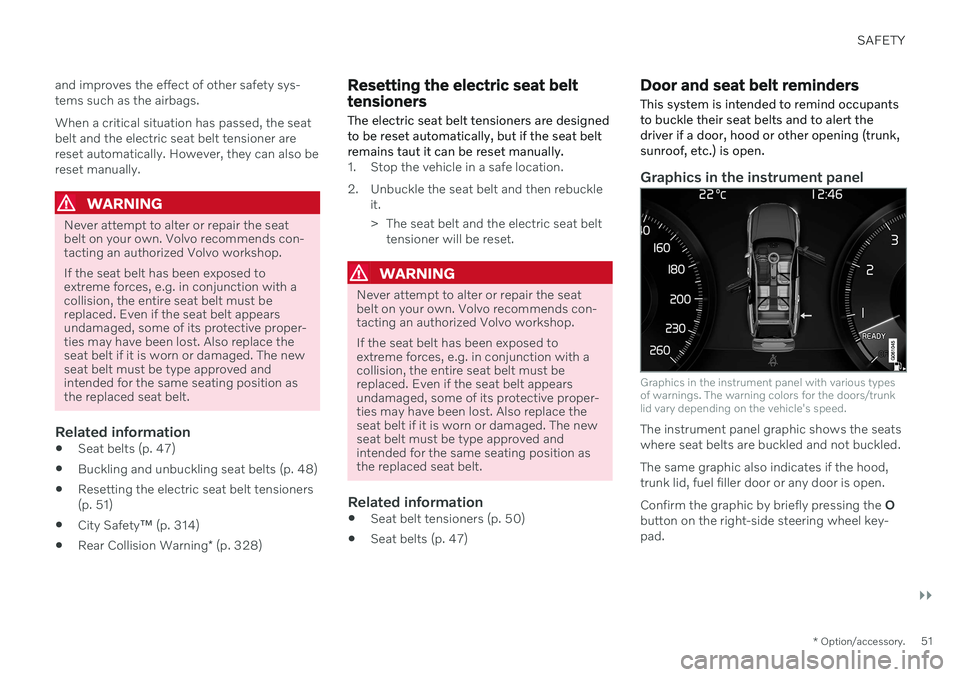
This system is intended to remind occupants to buckle their seat belts and to alert thedriver if a door, hood or other opening (trunk,sunroof, etc.) is open.
Graphics in the instrument panel
Graphics in the instrument panel with various types of warnings. The warning colors for the doors/trunklid vary depending on the vehicle's speed.
The instrument panel graphic shows the seats where seat belts are buckled and not buckled. The same graphic also indicates if the hood, trunk lid, fuel filler door or any door is open. Confirm the graphic by briefly pressing the O
button on the right-side steering wheel key- pad.
Page 54 of 655

||
SAFETY
52
Seat belt reminder
Reminder light in ceiling console.
A seat belt reminder light illuminates in the ceiling console and a warning symbol is dis-played in the instrument panel. The audible reminder varies depending on the vehicle's speed, driving time and distancedriven. A seat belt status graphic in the instrument panel indicates when the driver's or a pas-senger's seat belt is buckled or unbuckled. Child seats are not included in the seat belt reminder system.
Front seats
An audible signal and an indicator light remind unbuckled occupants to fasten their seatbelts.
Rear seat
The rear seat belt reminder has two functions:
To indicate which seat belts are buckled in the rear seats. This will also be displayedin an instrument panel graphic.
To provide audio and visual reminders ifany seat belt in the rear seat is removedwhile the vehicle is in motion. Thereminder will stop when the seat belt hasbeen rebuckled.
An audible signal and an indicator light whenthe rear door is closed remind unbuckledoccupants behind the vehicle's Lounge Console 1
to fasten their seat belts.
Door/hood/trunk lid and fuel filler door
reminder
If the hood, trunk lid, fuel filler door or any door is not properly closed, this will be indi-cated by a graphic in the instrument panel.Stop the vehicle safely and close the opendoor, hood, etc.
If the vehicle is moving at a speedunder approx. 10 km/h (6 mph), theinformation symbol will illuminate inthe instrument panel.
If the vehicle is moving at a speed above approx. 10 km/h (6 mph), thewarning symbol will illuminate in theinstrument panel.
Related information
Seat belts (p. 47)
Buckling and unbuckling seat belts (p. 48)
1
S90 Excellence Lounge only.
Page 66 of 655

||
SAFETY
64ejected from the vehicle during a sudden maneuver or impact. The same can also hap-pen if the infant or child rides unrestrained onthe seat. Other occupants should also beproperly restrained to help reduce the chanceof injuring or increasing the injury of a child. All states and provinces have legislation gov- erning how and where children should be car-ried in a vehicle. Find out the regulations exist-ing in your state or province. Recent accidentstatistics have shown that children are safer inrear seating positions than front seating posi-tions when properly restrained. A childrestraint system can help protect a child in avehicle. Here's what to look for when selectinga child restraint system: It should have a label certifying that it meets applicable Federal Motor Vehicle SafetyStandards (FMVSS 213) - or in Canada,CMVSS 213. Make sure the child restraint system is approved for the child's height, weight anddevelopment - the label required by the stand-ard or regulation, or instructions for infantrestraints, typically provide this information. In using any child restraint system, we urge you to carefully look over the instructions thatare provided with the restraint. Be sure youunderstand them and can use the device prop-erly and safely in this vehicle. A misused childrestraint system can result in increased inju-
ries for both the infant or child and other occu-pants in the vehicle. When a child has outgrown the child safety seat, you should use the rear seat with thestandard seat belt fastened. The best way tohelp protect the child here is to place the childon a cushion so that the seat belt is properlylocated on the hips. Legislation in your state orprovince may mandate the use of a child seator cushion in combination with the seat belt,depending on the child's age and/or size.Please check local regulations. A specially designed and tested booster cush- ion and backrest can be obtained from yourVolvo retailer. See also the article "Integratedbooster cushion."
WARNING
Do not use child safety seats or child booster cushions/backrests in the frontpassenger's seat. We also recommendthat children under 140 cm (4 feet7 inches) in height who have outgrownthese devices sit in the rear seat withthe seat belt fastened.
Sedan models: Keep vehicle doors andtrunk locked and keep remote controlsout of a child's reach. Unsupervisedchildren could lock themselves in anopen trunk and risk injury. Childrenshould be taught not to play in vehi-cles.
On hot days, the temperature in thevehicle interior can rise very quickly.Exposure to these high temperaturesfor even a short period of time cancause heat-related injury or death.Small children are particularly at risk.Never leave children unattended in avehicle.
Child seats should always be registered.
Volvo's recommendationsWhy does Volvo believe that no child shouldsit in the front seat of a vehicle? It's quite sim-ple really. A front airbag is a very powerful
Page 80 of 655
DISPLAYS AND VOICE CONTROL
* Option/accessory.
78
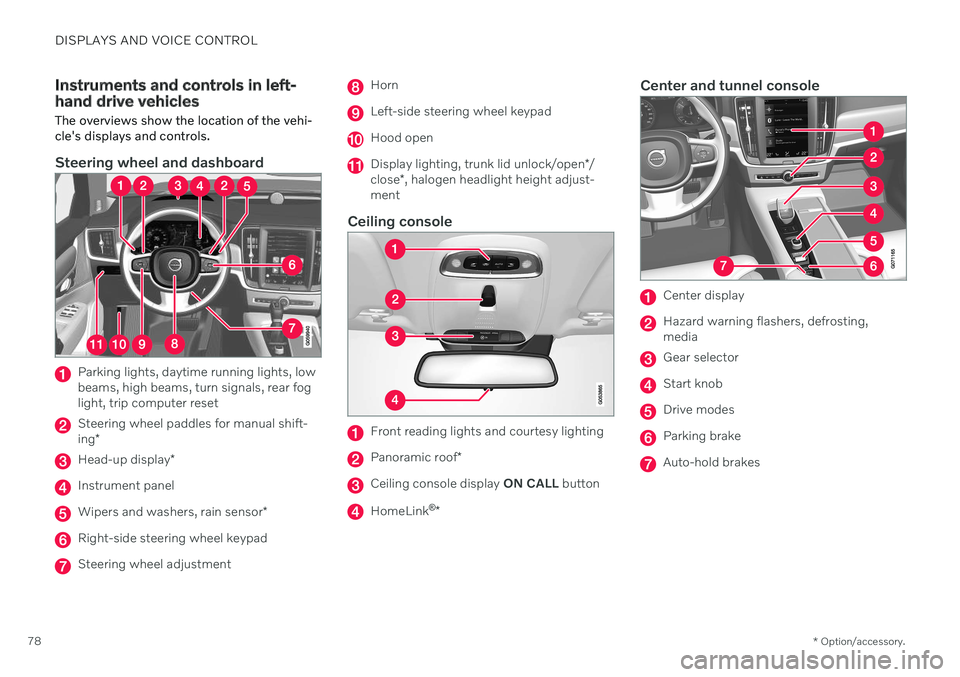
Instruments and controls in left- hand drive vehicles The overviews show the location of the vehi- cle's displays and controls.
Steering wheel and dashboard
Parking lights, daytime running lights, low beams, high beams, turn signals, rear foglight, trip computer reset
Steering wheel paddles for manual shift- ing *
Head-up display *
Instrument panel
Wipers and washers, rain sensor *
Right-side steering wheel keypad
Steering wheel adjustment
Horn
Left-side steering wheel keypad
Hood open
Display lighting, trunk lid unlock/open */
close *, halogen headlight height adjust-
ment
Ceiling console
Front reading lights and courtesy lighting
Panoramic roof *
Ceiling console display ON CALL button
HomeLink ®
*
Center and tunnel console
Center display
Hazard warning flashers, defrosting, media
Gear selector
Start knob
Drive modes
Parking brake
Auto-hold brakes
Page 154 of 655

LIGHTING
* Option/accessory.
152
Parking lights
The parking lights can be used to help other road users see the vehicle if it is stopped orparked. Use the lighting ring on the steeringwheel lever to turn on the parking lights.
Lighting ring in the parking light position.
Turn the lighting ring to the position to
turn on the parking lights (the license plate lighting will also illuminate). Canadian models: If the ignition is in the II
position, the daytime running lights will illumi- nate instead of the front parking lights. Withthe lighting ring in this position, the parkinglights will remain on regardless of what posi-tion the ignition is in. US models: When
mode is selected,
the daytime running lights can be deactivated in the center display. The parking lights willalso be deactivated. In weak daylight or dark conditions, the parking lights and low beamswill be illuminated. In dark conditions, the rear parking lights also illuminate when the trunk lid is opened to alertfollowing traffic. This happens regardless ofwhat position the lighting ring or ignition is in.
Related information
Lighting control and panel (p. 150)
Ignition modes (p. 401)
Daytime running lights
The vehicle has sensors that detect ambient lighting conditions. With the lighting ring in the
position, the daytime running lights
will always be activated when the ignition is in mode II. In weak daylight or dark condi-
tions, the headlights automatically switch tolow beams.
Lighting ring in AUTO position.
With the steering wheel lever's lighting ring in the
position, the daytime running lights
(DRL 1
) will illuminate when the vehicle is
driven in daylight conditions. The headlights will switch automatically from daytime run-ning lights to low beams in weak daylight ordark conditions. The headlights will also switch to low beams if the front fog lights *
and/or rear fog light are activated.
Page 161 of 655

LIGHTING
}}
* Option/accessory.159
Using home safe lighting
Some of the exterior lights remain on to illu- minate the area around the vehicle. This iscalled home safe lighting.
To activate home safe lighting:
1. Switch off the ignition.
2. Push the left-side steering wheel lever toward the dashboard and release.
3. Exit the vehicle and lock the doors. > A symbol in the instrument panel illumi-nates to indicate that the function is activated and exterior lighting switcheson: Parking lights, headlights, licenseplate lighting and outer door handle lighting *.
The length of time home safe lighting remains illuminated can be set in the center display.
Related information
Adjusting light functions via the centerdisplay (p. 151)
Welcome Light (p. 159)
Welcome Light
Approach lighting is activated when the vehi- cle is unlocked and can be used to providelight as you walk toward the vehicle.
The function is activated when the remote key is used for unlocking. The parking lights, ceil-ing lights, footwell lights and trunk/cargocompartment lights are activated in daylightconditions. In weak daylight or dark condi-tions, the license plate lighting and outer door handle lighting * will also be activated, with the
light directed toward the ground. If no door is opened, the lights will remain illu- minated for approx. 2 minutes. If a door isopened while the function is activated, the interior lighting and outer door handle lighting *
will remain on for a longer period of time. This function can be activated and deactivated in the center display.
Related information
Adjusting light functions via the centerdisplay (p. 151)
Using home safe lighting (p. 159)
Remote key (p. 236)
Interior Lighting
The passenger compartment is equipped with several different types of lighting, e.g.general lighting, adjustable ambient lightingand reading lights.
All lighting in the passenger compartment can be turned on and off manually within5 minutes after:
the engine has been switched off and theignition is in mode
0.
the vehicle is unlocked but has not yetbeen started.
Front ceiling lighting
The controls in the ceiling console for the front read- ing lights and courtesy lighting.
Reading light left side
Passenger compartment lighting
Page 162 of 655
||
LIGHTING
* Option/accessory.
160
Courtesy lighting auto switch
Reading light right side
Reading lights
The reading lights on the right and left sides are switched on and off by briefly pressing thebuttons in the ceiling console. To adjust thebrightness, press and hold the button.
Passenger compartment lighting
Briefly press the button in the ceiling console to switch on or off the footwell lighting andceiling lighting.
Courtesy lighting auto switch
Activate the auto switch by briefly pressing the AUTO button in the ceiling console. With
Auto activated, the indicator light in the buttonand the courtesy lighting come on and areturned off as follows. Courtesy lighting is switched on when:
The vehicle is unlocked
The vehicle is switched off
A side door is opened.
Courtesy lighting is switched off when: The vehicle is locked
The engine is started
A side door is closed
A side door has been open for approx. 2 minutes.
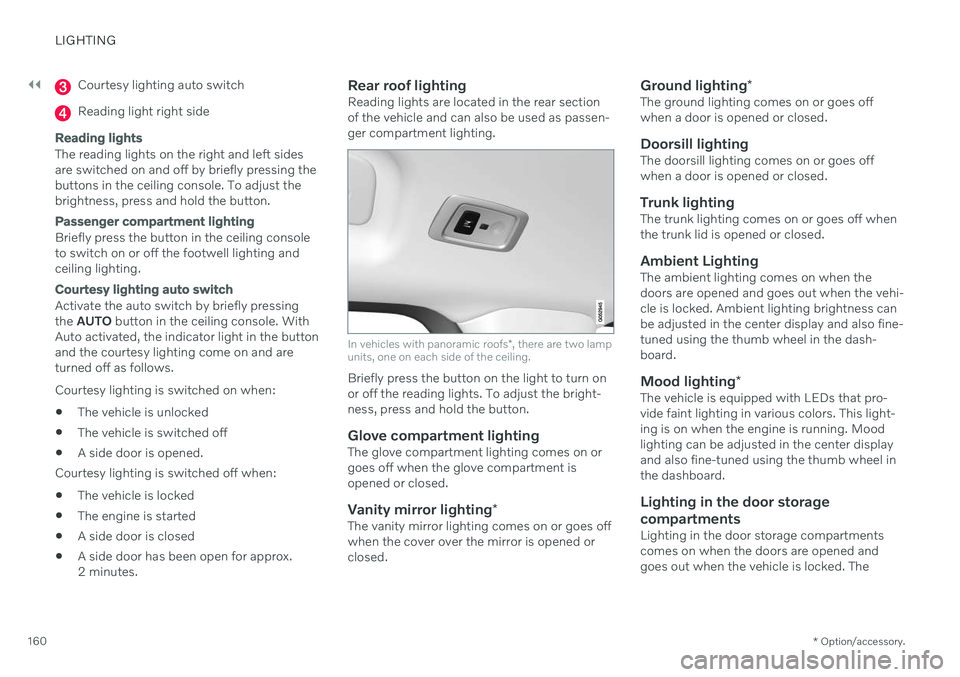
Rear roof lightingReading lights are located in the rear sectionof the vehicle and can also be used as passen-ger compartment lighting.
In vehicles with panoramic roofs
*, there are two lamp
units, one on each side of the ceiling.
Briefly press the button on the light to turn on or off the reading lights. To adjust the bright-ness, press and hold the button.
Glove compartment lightingThe glove compartment lighting comes on orgoes off when the glove compartment isopened or closed.
Vanity mirror lighting *The vanity mirror lighting comes on or goes offwhen the cover over the mirror is opened orclosed.
Ground lighting*The ground lighting comes on or goes offwhen a door is opened or closed.
Doorsill lightingThe doorsill lighting comes on or goes offwhen a door is opened or closed.
Trunk lightingThe trunk lighting comes on or goes off whenthe trunk lid is opened or closed.
Ambient LightingThe ambient lighting comes on when thedoors are opened and goes out when the vehi-cle is locked. Ambient lighting brightness canbe adjusted in the center display and also fine-tuned using the thumb wheel in the dash-board.
Mood lighting*The vehicle is equipped with LEDs that pro-vide faint lighting in various colors. This light-ing is on when the engine is running. Moodlighting can be adjusted in the center displayand also fine-tuned using the thumb wheel inthe dashboard.
Lighting in the door storage compartments
Lighting in the door storage compartments comes on when the doors are opened andgoes out when the vehicle is locked. The