radio VOLVO V4 2004 User Guide
[x] Cancel search | Manufacturer: VOLVO, Model Year: 2004, Model line: V4, Model: VOLVO V4 2004Pages: 89, PDF Size: 2.05 MB
Page 75 of 89

When the TP button is pressed while a TP, News or Alarm bulletin is being received, the bulletin will be cancelled and
radio will go back to the audio source that was in use before the TP, News or Alarm interruption.
TP Search (12, 15)
When this function is activated the radio will search and tune to a station with Traffic Program.
Select TP by a short press on the TP button (12)
Turn the menu knob (15) to select OTHER Settings.
Press (15) to select. Turn menu knob (13) to select Settings menu.
Press (15) to select. Turn menu knob to TP SEARCH.
Press (15) to select TP SEARCH ON.
Turn (15) to select BACK and SAVE.
Press (15) to exit Settings menu.
Turn (15) to Exit, push (15) to return to normal mode.
The radio will now search and tune to a station with Traffic information program.
* If you adjust the volume during a Traffic, News or Alarm bulletin, the same volume will be used for the next
bulletin.
pg. 138 CD player
CD player - On (3)
Insert a CD. If a disc has already been inserted, you can begin playing it by pressing the CD button (3).
CD eject (9)
Press button (9) to stop CD play and eject the disc.
Fast forward/backward (10, 11)
Hold down the button to seek within a track.
Skipping or selecting a track
(10, 11)
Press button (10) to restart the current track.
If the elapsed time of this track is less than 1 second, the previous track will be selected.
Press button (11) to skip the current track and go to the next one.
The track number is shown in the display.
Random track (6)
Press RND to activate the random function. The unit plays tracks from the disc in random order.
ProCarManuals.com
Page 76 of 89

RANDOM is displayed for as long as the function is activated.
CAUTION: Never put tape or a label on the disc itself _ it might come off inside the CD player and cause damage.
pg. 139 CD changer
CD changer _ On (3)
Press button (3) to activate CD changer mode. The CD changer will resume playing the disc and track that were most
recently played.
If the CD changer magazine is empty
LOAD& CARTRIDGE will be displayed.
Internal/external CD (3)
To toggle between external CD changer and the radio's internal CD player; press button (3).
Selecting a disc (14)
Turn the PRESET knob. The disc number and track is displayed.
Fast forward/backward (10, 11)
Press and hold down buttons (10) or (11) to seek within a track. The seek function will stop when the button is
released.
Skipping or selecting a track (10, 11)
Press button (10) to restart the current track.
If the elapsed time for the current track is less than 1 second, previous track will be chosen.
Press button (11) to skip the current track and go to the next one.
The track number will be shown in the display.
Random track (6)
Press RND to activate the random function. The unit plays tracks from the magazine in random order.
RANDOM is displayed for as long as the function is activated.
pg. 140 Menu structure
ProCarManuals.com
Page 77 of 89
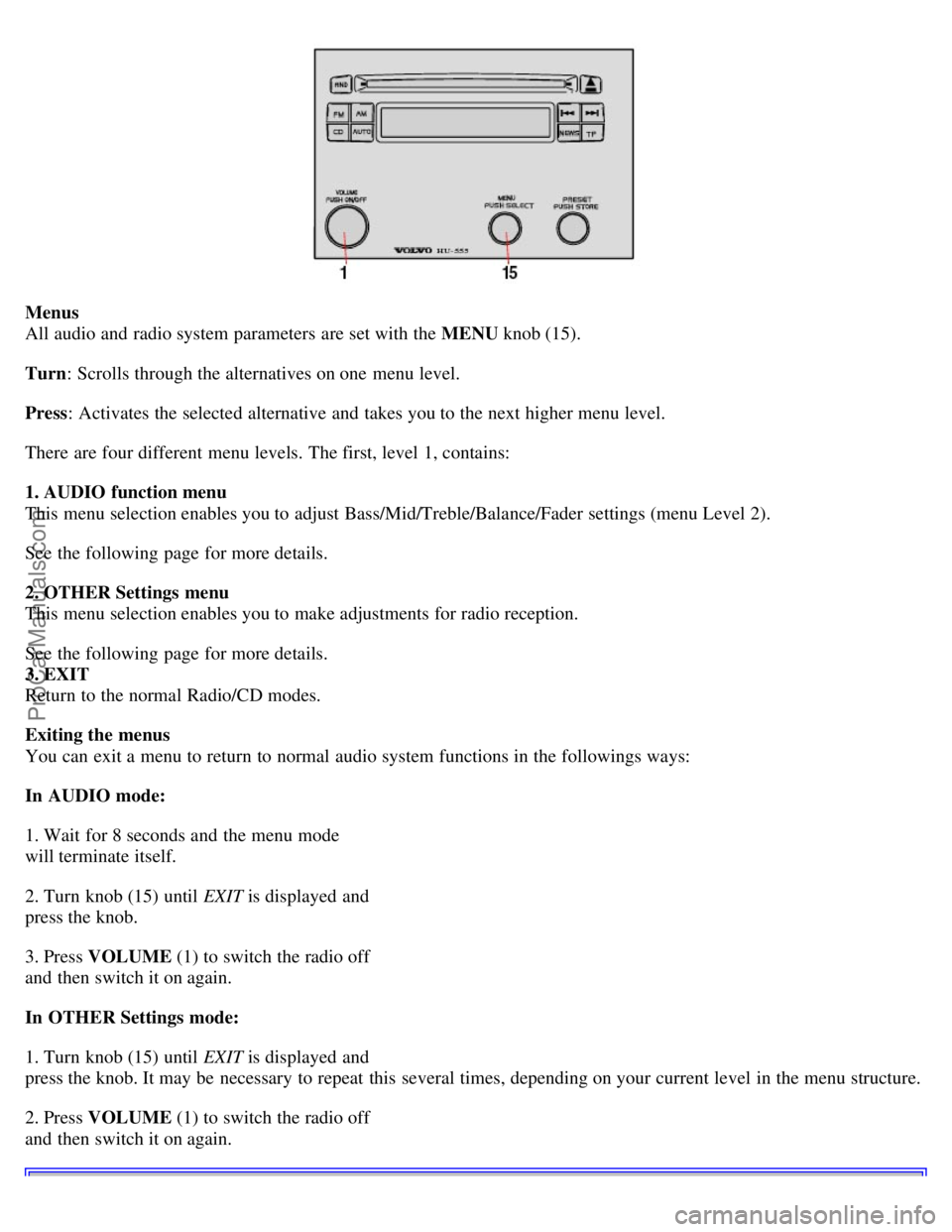
Menus
All audio and radio system parameters are set with the MENU knob (15).
Turn : Scrolls through the alternatives on one menu level.
Press : Activates the selected alternative and takes you to the next higher menu level.
There are four different menu levels. The first, level 1, contains:
1. AUDIO function menu
This menu selection enables you to adjust Bass/Mid/Treble/Balance/Fader settings (menu Level 2).
See the following page for more details.
2. OTHER Settings menu
This menu selection enables you to make adjustments for radio reception.
See the following page for more details.
3. EXIT
Return to the normal Radio/CD modes.
Exiting the menus
You can exit a menu to return to normal audio system functions in the followings ways:
In AUDIO mode:
1. Wait for 8 seconds and the menu mode
will terminate itself.
2. Turn knob (15) until EXIT is displayed and
press the knob.
3. Press VOLUME (1) to switch the radio off
and then switch it on again.
In OTHER Settings mode:
1. Turn knob (15) until EXIT is displayed and
press the knob. It may be necessary to repeat this several times, depending on your current level in the menu structure.
2. Press VOLUME (1) to switch the radio off
and then switch it on again.
ProCarManuals.com
Page 78 of 89

pg. 141 Menu structure
Factory settings
All MENU functions that can be changed can also be returned to the original factory settings.
To reset Audio settings, use SET TO ALL "0".
To reset Radio settings, use SET TO DEFAULT.
Save OTHER settings
To save changes and revert to normal mode:
1. Turn the MENU knob in the OTHER
Settings menu until SETTINGS Menu is
displayed
2. Press the knob
3. Turn the knob until BACK and SAVE is
displayed
4. Press the knob again.
Back without saving OTHER settings
To revert to normal audio listening mode without saving the changes:
1. Turn the MENU knob in the OTHER
Settings menu until SETTINGS Menu is displayed
2. Press the knob
3. Turn the knob until BACK without SAVE is
displayed
4. Press the knob again.
MENU functions - brief overview
The following settings can be adjusted in the
AUDIO MENU :
BASS - Choose a setting between -6 and +6
MID - Choose a setting between -6 and +6
TREBLE - Choose a setting between -6 and +6
BALANCE - speakers right/left
Choose a setting between left 12 and right 12
FADER - speakers front/rear
Choose a setting between front 12 and rear 12
SET TO ALL "0" - sets all values for
AUDIO alternatives to zero.
The following settings can be adjusted under OTHER Settings (default settings are underlined):
NEWS - ON/OFF
PTY - ON/OFF
PTY Settings (only when PTY is ON)
1. Choose among the alternatives displayed.
2. BACK: exits the OTHER Settings menu and saves settings that have been made.
TP Station - push the menu knob to set the current station as favorite TP station.
NOTE: If no stations are available, this menu alternative will be skipped.
ProCarManuals.com
Page 79 of 89

NEWS Station - press the menu knob to set the current station as the selected NEWS station.
SETTINGS - the following 10 settings can be made (default settings are underlined):
1. AF ON
/OFF (Automatic Frequency update) - the AF function ensures that the strongest available transmitter for a
program is selected.
2. REG LOCK/ SWITCH
(Regional radio program) - a local radio station can broadcast on several frequencies and it
can broadcast the same or different programs at the same time on different frequencies. If the same program is
transmitted, then the SWITCH setting is preferable for the best reception while driving. If each frequency (of the same
local radio station) has its own program then the LOCK setting is preferable to enable the radio lock on the current
frequency. In this situation, if SWITCH is selected, the radio will select the frequency with the best audio sound,
which results in the radio switching between different local programs.
3. ASC ON
/OFF (Active Sound Control) - the ASC function automatically adjusts the volume to the speed of the car.
4. ASC LOW/ MID
/HIGH
5. SRC ON/ OFF
(Signal Reception
Control) - use this function to activate/deactivate the function that reduces the noise in poor reception conditions. The
function is most effective when the radio is in FM mode.
6. SRC LOW/ MID
/HIGH
7. PTY LANGUAGE - choose the language to be used in the display: English
/German/Swedish/French.
8. TP SEARCH ON/ OFF
- When this function is activated together with TP, the radio will search and tune to any
station with Traffic Program.
9. BACK and SAVE - saves settings that have been made and exits to the SETTINGS menu, Level 2.
10. BACK without SAVE - exits to the SETTINGS menu, Level 2.
SET TO DEFAULT - this alternative sets all RADIO settings to their default values.
pg. 142 RDS
Radio Data System
The Volvo HU -555 is designed for the digital information system RDS (Radio Data System).
RDS features automatic programming and instant traffic information and it broadens the possibilities for program
choices. The transmitter broadcasts information about the program. This information is represented by a data code,
which identifies the program, irrespective of which frequency the information is transmitted.
This means that the driver does not have to change the frequency if he wants to continue listening to the same
program. Every station/program has a specific identification which the radio searches for.
The RDS radio can also receive traffic information. This is transmitted with a special signal which cuts through any
normal radio transmission, or CD play back and is always heard at its own adjustable volume.
PTY (Program Type) information, which is an extension of the RDS system, is also transmitted in certain areas.
There are a number of other features in the RDS -system, such as time control signals, alarms etc.
pg. 143 Compact disc care
ProCarManuals.com
Page 80 of 89

Compact disc care
Before using a new disc for the first time, remove any burrs in the center/outer edge by running the stem of a pen or
similar object around the hole/edge of the disc.
Use high quality discs only.
Keep the discs clean. Wipe them with a soft, clean, lint-free cloth, working from the center outwards. If necessary,
dampen the cloth with a neutral soap solution. Dry thoroughly before using.
Never use cleaning spray or anti-static liquid. Use only cleaners specifically made for CD's.
Use discs of the correct size only
NOTE: Never use 3.5" discs.
Do not put tape or labels on the disc itself.
Volvo does not recommend the use of plastic outer rings on the disc.
Condensation may occur on discs/optical components of the changer in cold winter weather. The disc can be dried
with a clean, lint-free cloth. Optical components in the CD changer may, however, take up to one hour to dry off.
Never attempt to play a disc which is damaged in any way.
When not in use, the discs should be stored in their covers. Avoid storing discs in excessive heat, direct sunlight or
dusty locations.
pg. 144 Technical data
Radio
Frequency: AM 530 - 1710 kHz
FM 87.7 - 107.9 MHz
General
Connections: CD-changer, external amplifier
Output: 4 x 25 W
Impedance: 4 Ohm.
Voltage required: 12 V, negative ground
Speaker options
Level 1, S 40: Base performance: 4 speakers in front only
V 40: Base performance: 4 speakers in front only
Level 2, S 40: Base performance: 6 speakers
V 40: Base performance: 7 speakers
Level 3, S 40: High performance: 6 speakers and external amplifier
V 40: High performance: 7 speakers and external amplifier
Contents | Top of Page
ProCarManuals.com
Page 84 of 89

Lubrication113
Luggage strap (V40)56
Lumbar support47,48
M
Maintenance service109
Malfunction indicator lamp23
Manual transmission fluid122
Manually closing the moonroof100
Mirrors - rear/side view50
Moonroof52
O
Occupant safety16
Octane rating63
Oil - engine115
Oil pressure warning light22
Opening the trunk from the inside - S4046
P
Paint touch-up102
Parking brake32
Parking brake reminder light22
PCV system110
Polishing104
Power moonroof52
Power seats48
Power steering fluid116,122
PROPOSITION 65 WARNING72,119
R
Radio - Anti-theft code131
Radio - HU -555130
Radio - menu structure140
Radio Data System142
Rear fog light24
Rear suspension124
Rear waste bin34
Refueling63
Remote control (central locking system)41
Remote keyless entry system41
Replacing bulbs90, 92, 93, 94
Replacing fuses95
Replacing license plate lighting - V4094
Reporting safety defects16
Road assistance128
Roadholding59
Roof rails/racks59
ProCarManuals.com
Page 87 of 89

2 0 0 4
VOLVO
S40 & V40
Back Cover
Back Cover
Accessory Installation - Important Warning
We strongly recommend that Volvo owners install only genuine, Volvo-approved accessories, and that accessory
installations be performed only by the factory-trained technicians at your authorized Volvo retailer.
Genuine Volvo accessories are tested to ensure compatibility with the performance, safety, and emission systems in
your car. Additionally, your authorized Volvo retailer knows where accessories may and may not be safely installed in
your Volvo. In all cases, please consult your authorized Volvo retailer before installing any accessory in or on your
car.
Accessories that have not been approved by Volvo may or may not be specifically tested for compatibility with your
car. Additionally, an inexperienced installer may not be familiar with some of your car's systems.
Any of your car's performance and safety systems could be adversely affected if you install accessories that Volvo
has not tested, or if you allow accessories to be installed by someone unfamiliar with your car.
Damage caused by unapproved or improperly installed accessories may not be covered by your new car warranty.
See your Warranty and Service Records Information booklet for more warranty information. Volvo assumes no
responsibility for death, injury, or expenses that may result from the installation of non-genuine accessories.
Driver Distraction
Driver distraction results from driver activities that are not directly related to controlling the car in the driving
environment. Your new Volvo is, or can be, equipped with many feature-rich entertainment and communication
systems. These include hands-free cellular telephones, navigation systems, and multipurpose audio systems. You may
also own other portable electronic devices for your own convenience. When used properly and safely, they enrich the
driving experience. Improperly used, any of these could cause a distraction.
For all of these systems, we want to provide the following warning that reflects the strong Volvo concern for your
safety:
Never use these devices or any feature of your vehicle in a way that distracts you from the task of driving safely.
Distraction can lead to a serious accident.
In addition to this general warning, we offer the following guidance regarding specific newer features that may be
found in your vehicles:
Never use a hand -held cellular telephone while driving. Some jurisdictions prohibit cellular telephone use by a
driver while the vehicle is moving.
If your car is equipped with a navigation system, set and make changes to your travel itinerary only with the vehicle
parked.
Never program your audio system while the vehicle is moving. Program radio presets with the vehicle parked, and
use your programmed presets to make radio use quicker and simpler.
Never use portable computers or personal digital assistants while the vehicle is moving.
A driver has a responsibility to do everything possible to ensure his or her own safety and the safety of passengers in
ProCarManuals.com