alarm VOLVO V4 2004 Owners Manual
[x] Cancel search | Manufacturer: VOLVO, Model Year: 2004, Model line: V4, Model: VOLVO V4 2004Pages: 89, PDF Size: 2.05 MB
Page 16 of 89
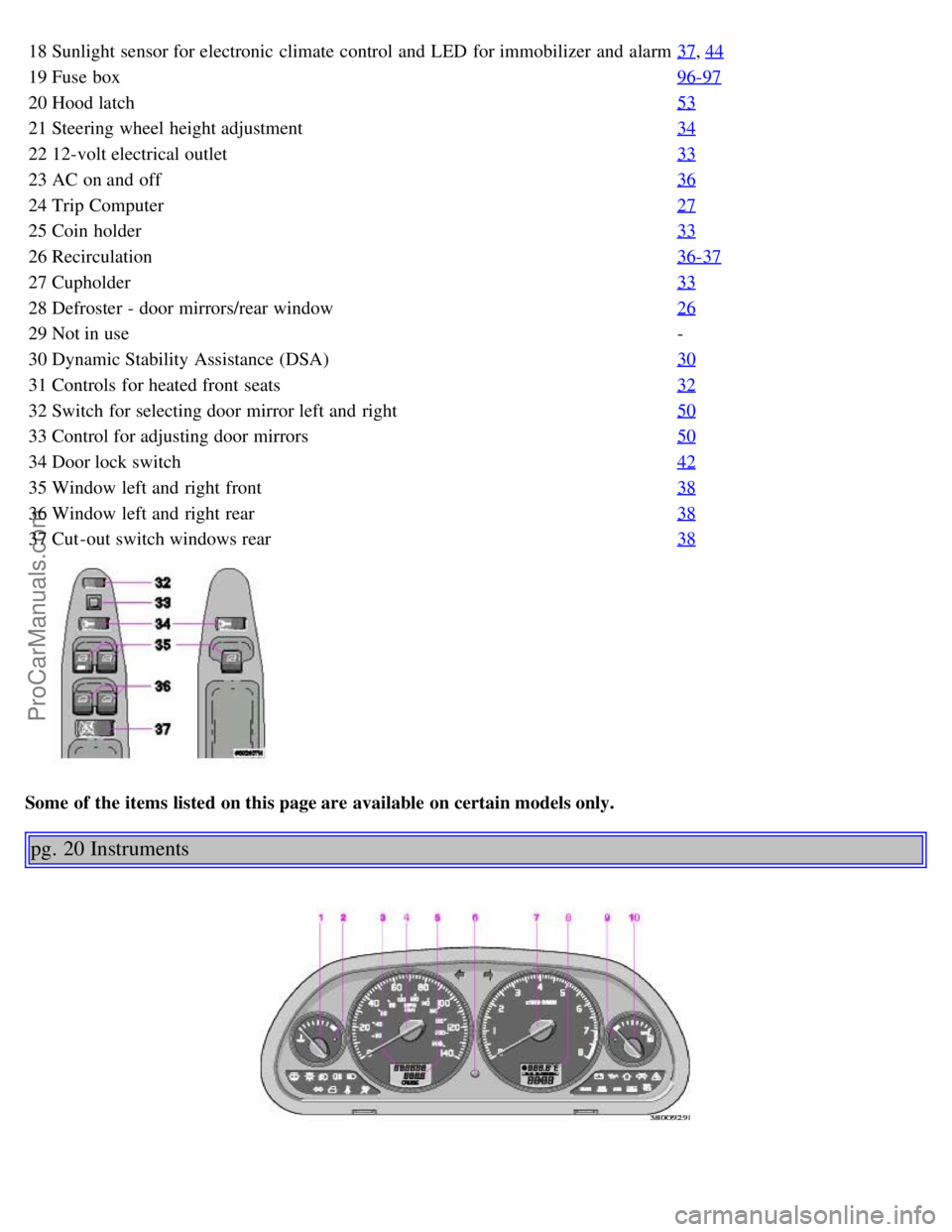
18Sunlight sensor for electronic climate control and LED for immobilizer and alarm 37, 44
19Fuse box 96-97
20Hood latch 53
21Steering wheel height adjustment 34
2212-volt electrical outlet 33
23AC on and off 36
24Trip Computer 27
25Coin holder 33
26Recirculation 36-37
27Cupholder 33
28Defroster - door mirrors/rear window 26
29Not in use -
30 Dynamic Stability Assistance (DSA) 30
31Controls for heated front seats 32
32Switch for selecting door mirror left and right 50
33Control for adjusting door mirrors 50
34Door lock switch 42
35Window left and right front 38
36Window left and right rear 38
37Cut -out switch windows rear 38
Some of the items listed on this page are available on certain models only.
pg. 20 Instruments
ProCarManuals.com
Page 24 of 89
2 0 0 4
VOLVO
S40 & V40
Chapter 3 - Body and interior
pg. 39 Body and interior
Body and interior
The seats, moonroof, mirrors, etc. are described on the following pages. Keys
40
Remote keyless entry system41
Doors and locks42
Alarm43
Trunk/Tailgate/Glove compartment45
Opening the trunk from the inside (S40)46
Front seats47
Child safety locks49
Rear/side view mirrors/Vanity mirrors50
Interior lights51
Power moonroof52
Hood/Luggage cover53
Storage compartments54
Folding rear seat55
Securing cargo56
Cargo space/Trunk light, Spare tire, jack57
Side cargo net, Cargo net58
Weight distribution, Handling, Roadholding, Roof rack59
pg. 40 Keys
ProCarManuals.com
Page 26 of 89
"keyless" entry into the passenger compartment or the trunk. You will be supplied with two coded key ring
transmitters, which will enable you to lock/unlock all doors and the trunk/tailgate and fuel filler door from a distance
of 10-15 feet (3-5 meters).
The Remote also activates/deactivates the alarm system that comes standard with this car.
The car can also be locked/unlocked with the key.
This device complies with part 15 of the FCC rules. Operation is subject to the following condition: (1) This device
may not cause harmful interference, and (2) this device must accept any interference received, including interference
that may cause undesired operation.
Using the remote control
Press the LOCK button once to lock all doors and trunk/tailgate.
Press the UNLOCK button once to unlock the driver's door and the fuel filler door only. Wait at least 1 second and
press this button again (within 10 seconds) to unlock other doors, trunk/tailgate.
Press the OPEN TRUNK/TAILGATE button to unlock the tailgate/trunk.
NOTE : If only the driver's door is unlocked, the lock will automatically reengage (re-lock) and the alarm will be set
after 2 minutes unless the door has been opened.
The lock/unlock and alarm features can also be utilized by using the keys. See the following page.
Remote control not functioning.
If the remote control is not functioning, the car can be opened using the master or service key in the driver's door.
NOTE: The remote control will not function if a key is left in the ignition switch.
WARNING!
Volvo does not recommend using the transmitter to lock the doors from inside the car. The alarm would be activated
and would sound when one of the doors is opened. The doors must not be locked using the remote transmitter while
the vehicle is occupied. In case of an accident, this may hinder rapid access to the occupants of the vehicle.
*Panic function
In an emergency situation, this feature can be used to attract attention, if you are within 10-15 feet (3-5) meters of the
car.
Activate the "panic" function by pressing the red panic button on the remote control for at least 3 seconds or by
pressing this button twice within 3 seconds. The turn signals will flash, the interior lights will go on and the alarm will
sound.
The "panic" alarm can be turned off after 5 seconds by pressing any of the buttons on the remote control or it
will stop automatically after 25 seconds.
NOTE: The panic button will NOT unlock the car.
pg. 42 Doors and locks
Doors and locks
Your car is equipped with a central locking system.
The key (used on the driver's door) the remote control, or central locking button, will lock/unlock all doors,
trunk/tailgate.
Turn the key once to unlock the driver's door and the fuel filler door.
ProCarManuals.com
Page 27 of 89

Turn the key again within 10 seconds to unlock other doors, trunk/tailgate.
One turn with the key towards "lock" in the driver's door locks all doors, trunk/tailgate and fuel filler door with a 10
minutes delay in the fuel filler door.
WARNING!
If the doors are locked while driving, this may hinder rapid access to the occupants of the car in the event of an
accident. (Also see information on "Child safety locks").
Central locking button
Central locking switch
You can use the button to lock or unlock all doors (unlock only for 25 seconds after locking by remote).
LEFT side of button: lock
RIGHT side of button: unlock
NOTE: If the key is in the ignition switch and you close the driver's door, the driver's door will be immediately
unlocked again in order to prevent accidentally locking the car with the keys left inside the car.
pg. 43 Alarm
Alarm
The radio signal emitted from the remote control, which is used to set/unset the alarm, is a "rolling code" signal. This
means that the signal is changed randomly for each transmission and is intended to help prevent unauthorized
recording of the code.
When armed (set), the alarm continuously monitors a number of points on the car. The following conditions will set off
the alarm:
The hood is opened
The trunk/tailgate is opened
A door is opened
The ignition switch is tampered with
The alarm will sound for 30 second intervals, with a 10 second pause between intervals. This function cannot be
interrupted.
If the battery or the siren are disconnected, the alarm will sound for five minutes
Arming (setting) the alarm
The alarm can be armed in the following ways:
Press the LOCK button on the remote control (the turn signals will flash to confirm that the car is locked and the
alarm is armed)
ProCarManuals.com
Page 28 of 89

Lock the car using the key in the driver's door (the LED on the dashboard will blink to indicate that the alarm is
armed)
Disarming the alarm
Press the UNLOCK button on the remote control or unlock the driver's door with the key.
Turning off (stopping) the alarm
If the alarm is sounding, it can be stopped by pressing the UNLOCK button on the remote control or by unlocking the
driver's door with the key.
Visual alarm signal
If the alarm is set off, a visual alarm signal is given by flashing all turn signals and turning on the interior lighting for
approximately 5 minutes.
Audible alarm signal
If the alarm is set off, an audible alarm signal is given by the backup siren. One alarm cycle lasts for 30 seconds.
pg. 44 Alarm
LED alarm status signals
The status of the alarm system is indicated by the red LED at the right side of the dash:
LED off - the alarm is not armed (set)
LED flashes once per second - the alarm is armed (set)
LED flashes rapidly before the ignition is switched on - the alarm has been triggered
LED flashes rapidly for 15 seconds after the ignition has been switched on - a fault has been detected in the alarm
system. Contact a Volvo retailer.
Automatic relock
If only the driver's door is unlocked with the remote control, the lock will automatically reengage (re-lock) and the
alarm will be set after 2 minutes unless the door has been opened.
CAUTION: Do not attempt to service or repair any components of the alarm system yourself. This should only be
done by an authorized Volvo retailer.
Batteries
Each remote control is powered by two three-volt batteries, type CR 2025. If the range of the transmitter is noticeably
reduced, this indicates that the battery is weak and should be replaced.
Replacing the battery
1. Open the remote control by twisting a coin in the ring between the front and rear sections (leave the ring in place).
ProCarManuals.com
Page 70 of 89

Switch On/Off (1)
Press VOLUME to switch the unit on or off.
Volume control (1)
Turn VOLUME clockwise to increase volume.
NOTE: When listening to TP, NEWS or ALARM, the radio stores the most recently used volume level in these
modes.
Bass/Mid/Treble and
Balance/Fader (15)
Turn the MENU knob to enter the Main menu
Turn the knob again to choose Bass/Mid/Treble/Balance or Fader settings menu
Press to select an alternative
Adjust by turning the knob clockwise or anti-clockwise.
NOTE: If no other selection is made within 8 seconds, the radio will return to its normal mode and retain the new
setting.
If you would like to exit the menus manually or make a new adjustment:
Press again to return to the Bass/Mid/Treble/Balance or Fader settings
Turn to make a new choice from Bass/Mid/Treble/Balance or Fader settings, or select the factory settings by
choosing SET TO ALL "0"
Press again to confirm or select EXIT and press to exit the menus.
pg. 133 Radio - general functions
Select radio band (4, 5)
Press button (4) to select FM or (5) to select AM. The station and band are displayed.
Select a radio station (10, 11, 14)
There are four ways to select a radio station:
Select preset stations with the PRESET knob.
• Select among the AUTO tuned stations with the PRESET knob after using the AUTO function.
• Use buttons (10) or (11) in SEEK mode.
ProCarManuals.com
Page 73 of 89

be used to find the next station(s) broadcasting the selected program type.
pg. 136 Program type
Program typeIn display
0. No program type -
1. News NEWS
2. Information INFO
3. Sports SPORT
4. Talk TALK
5. Rock ROCK-M
6. Classic rock CLS-ROCK
7. Adult hits ADLT-HIT
8. Soft rock SOFT -RCK
9. Top 40 TOP-40
10. Country music COUNTRY
11. Oldies OLDIES
12. Soft SOFT
13. Nostalgia NOSTALGIA
14. Jazz JAZZ
15. Classical CLASSICL
16. R & B R AND B
17. Soft R & B SOFT R B
18. Language LANGUAGE
19. Religious music REL-MUSC
20. Religious talk REL-TALK
21. Personality PERSNLTY
22. Public PUBLIC
23. College COLLEGE
24. - -
25. - -
26. - -
27. - -
28. - -
29. Weather WEATHER
30. Emergency test TEST
31. Emergency alert ALERT!
Alarm
ALARM! is displayed when an alarm message is broadcast.
The function is used to warn the driver of serious accidents or catastrophes, collapsed bridges, earthquakes or nuclear
accidents for example.
NOTE: If you adjust the volume during an Alarm bulletin, this will be the set volume for the next Alarm message.
News
ProCarManuals.com
Page 74 of 89

As soon as a News broadcast begins, the CD or CD changer is interrupted and the news can be heard.
If you would like to activate the News function, go to the Menu and choose NEWS ON.
Choose NEWS OFF to deactivate. See page 141
.
News On/Off (13)
During an ongoing TP, News or Alarm bulletin, the bulletin can be muted by pressing the TP button (12) or NEWS
button (13). See the illustration on the next page.
pg. 137 Radio - Traffic information
TP - Traffic information (12)
A short press on the TP button (12) provides Traffic information from RDS stations.
TP is displayed when the function is switched on with the TP button.
When the unit is in CD mode, the radio automatically seeks an FM station in the background, with a strong signal that
is broadcasting traffic information.
If a CD is playing when the radio receives a traffic bulletin, it is interrupted and the bulletin is broadcast at the volume
selected* for traffic information.
When the bulletin is finished the unit immediately returns to the previously set volume and continues playing the CD.
Traffic information can only be heard when the symbol TP is displayed.
The symbol is displayed if the currently tuned station can transmit traffic information.
If you do not wish to listen to an ongoing traffic bulletin, press the TP button. The TP function will remain engaged
and the radio waits for the next traffic bulletin.
If you would like to disable the TP function:
- Press the TP button when no traffic bulletin is being broadcast
- Press the TP button twice during a traffic bulletin (once to cancel the bulletin and the second time to disable the TP
function)
- see section Menu structure.
TP button (12)
When TP button is pressed while no TP, News or Alarm is being received, the TP function is activated.
ProCarManuals.com
Page 75 of 89

When the TP button is pressed while a TP, News or Alarm bulletin is being received, the bulletin will be cancelled and
radio will go back to the audio source that was in use before the TP, News or Alarm interruption.
TP Search (12, 15)
When this function is activated the radio will search and tune to a station with Traffic Program.
Select TP by a short press on the TP button (12)
Turn the menu knob (15) to select OTHER Settings.
Press (15) to select. Turn menu knob (13) to select Settings menu.
Press (15) to select. Turn menu knob to TP SEARCH.
Press (15) to select TP SEARCH ON.
Turn (15) to select BACK and SAVE.
Press (15) to exit Settings menu.
Turn (15) to Exit, push (15) to return to normal mode.
The radio will now search and tune to a station with Traffic information program.
* If you adjust the volume during a Traffic, News or Alarm bulletin, the same volume will be used for the next
bulletin.
pg. 138 CD player
CD player - On (3)
Insert a CD. If a disc has already been inserted, you can begin playing it by pressing the CD button (3).
CD eject (9)
Press button (9) to stop CD play and eject the disc.
Fast forward/backward (10, 11)
Hold down the button to seek within a track.
Skipping or selecting a track
(10, 11)
Press button (10) to restart the current track.
If the elapsed time of this track is less than 1 second, the previous track will be selected.
Press button (11) to skip the current track and go to the next one.
The track number is shown in the display.
Random track (6)
Press RND to activate the random function. The unit plays tracks from the disc in random order.
ProCarManuals.com
Page 79 of 89

NEWS Station - press the menu knob to set the current station as the selected NEWS station.
SETTINGS - the following 10 settings can be made (default settings are underlined):
1. AF ON
/OFF (Automatic Frequency update) - the AF function ensures that the strongest available transmitter for a
program is selected.
2. REG LOCK/ SWITCH
(Regional radio program) - a local radio station can broadcast on several frequencies and it
can broadcast the same or different programs at the same time on different frequencies. If the same program is
transmitted, then the SWITCH setting is preferable for the best reception while driving. If each frequency (of the same
local radio station) has its own program then the LOCK setting is preferable to enable the radio lock on the current
frequency. In this situation, if SWITCH is selected, the radio will select the frequency with the best audio sound,
which results in the radio switching between different local programs.
3. ASC ON
/OFF (Active Sound Control) - the ASC function automatically adjusts the volume to the speed of the car.
4. ASC LOW/ MID
/HIGH
5. SRC ON/ OFF
(Signal Reception
Control) - use this function to activate/deactivate the function that reduces the noise in poor reception conditions. The
function is most effective when the radio is in FM mode.
6. SRC LOW/ MID
/HIGH
7. PTY LANGUAGE - choose the language to be used in the display: English
/German/Swedish/French.
8. TP SEARCH ON/ OFF
- When this function is activated together with TP, the radio will search and tune to any
station with Traffic Program.
9. BACK and SAVE - saves settings that have been made and exits to the SETTINGS menu, Level 2.
10. BACK without SAVE - exits to the SETTINGS menu, Level 2.
SET TO DEFAULT - this alternative sets all RADIO settings to their default values.
pg. 142 RDS
Radio Data System
The Volvo HU -555 is designed for the digital information system RDS (Radio Data System).
RDS features automatic programming and instant traffic information and it broadens the possibilities for program
choices. The transmitter broadcasts information about the program. This information is represented by a data code,
which identifies the program, irrespective of which frequency the information is transmitted.
This means that the driver does not have to change the frequency if he wants to continue listening to the same
program. Every station/program has a specific identification which the radio searches for.
The RDS radio can also receive traffic information. This is transmitted with a special signal which cuts through any
normal radio transmission, or CD play back and is always heard at its own adjustable volume.
PTY (Program Type) information, which is an extension of the RDS system, is also transmitted in certain areas.
There are a number of other features in the RDS -system, such as time control signals, alarms etc.
pg. 143 Compact disc care
ProCarManuals.com