seats VOLVO V50 2009 Owner´s Manual
[x] Cancel search | Manufacturer: VOLVO, Model Year: 2009, Model line: V50, Model: VOLVO V50 2009Pages: 286, PDF Size: 7.12 MB
Page 42 of 286
01 SafetyISOFIX lower anchors
0142
Using the ISOFIX lower child seat
anchors
G015268
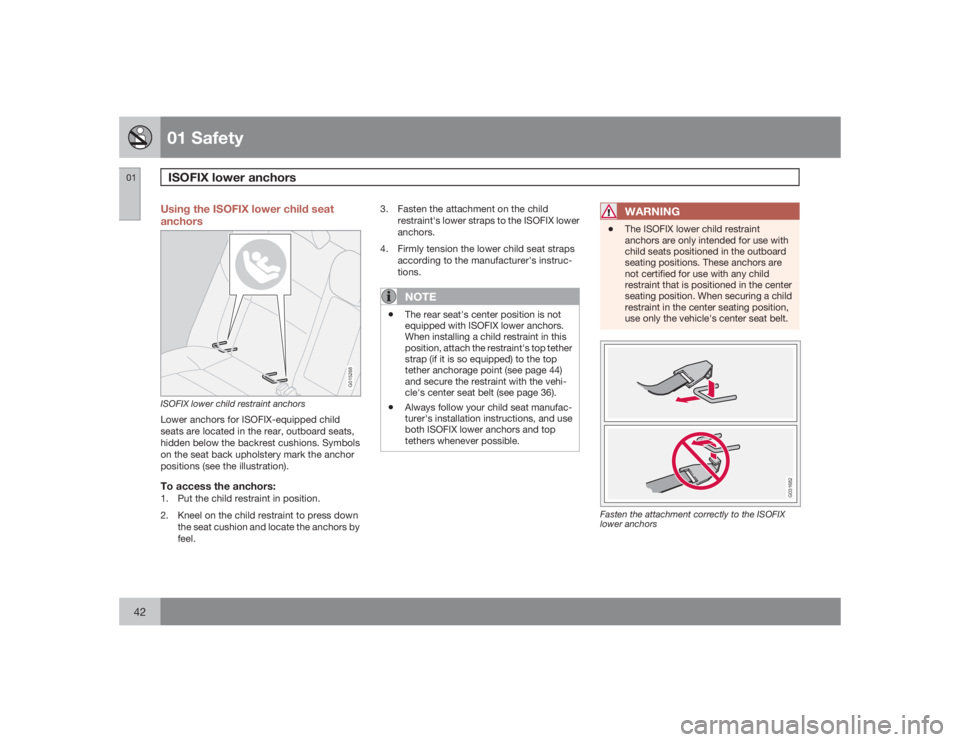
ISOFIX lower child restraint anchorsLower anchors for ISOFIX-equipped child
seats are located in the rear, outboard seats,
hidden below the backrest cushions. Symbols
on the seat back upholstery mark the anchor
positions (see the illustration).To access the anchors:1. Put the child restraint in position.
2. Kneel on the child restraint to press down
the seat cushion and locate the anchors by
feel.3. Fasten the attachment on the child
restraint's lower straps to the ISOFIX lower
anchors.
4. Firmly tension the lower child seat straps
according to the manufacturer's instruc-
tions.
NOTE
•
The rear seat's center position is not
equipped with ISOFIX lower anchors.
When installing a child restraint in this
position, attach the restraint's top tether
strap (if it is so equipped) to the top
tether anchorage point (see page 44)
and secure the restraint with the vehi-
cle's center seat belt (see page 36).
•
Always follow your child seat manufac-
turer's installation instructions, and use
both ISOFIX lower anchors and top
tethers whenever possible.
WARNING
•
The ISOFIX lower child restraint
anchors are only intended for use with
child seats positioned in the outboard
seating positions. These anchors are
not certified for use with any child
restraint that is positioned in the center
seating position. When securing a child
restraint in the center seating position,
use only the vehicle's center seat belt.
G031682
Fasten the attachment correctly to the ISOFIX
lower anchors
Page 56 of 286

02 Instruments and controlsSymbols – instrument panel
0256
Symbols – right side
G026438
1. Turn signal indicator for trailer (certain
markets only)
If you are towing a trailer, this light
will flash simultaneously with the
turn signals on the trailer. If the
light does not flash when signaling,
one of the turn signals on the trailer
or on the car are not functioning properly.
2. Parking brake applied
This light is on when the parking
brake (hand brake) is applied. The
parking brake lever is situated
between the front seats, see
page 74 for more information.
NOTE
Canadian models are equipped with the
second symbol.3. SRS system warning light
If this light comes on while the car
is being driven, or remains on for
longer than approximately 10 sec-
onds after the car has been
started, the SRS system's diag-
nostic functions have detected a fault in a seat
belt lock or pretensioner, a front airbag, side
impact airbag, and/or an inflatable curtain.
Have the system(s) inspected by a trained and
qualified Volvo service technician as soon as
possible.
4. Oil pressure warning light
1
If the light comes on while driving,
the car, stop the engine immedi-
ately, and check the engine oil
level. If the oil level is normal and
the light stays on after restart, have
the car towed to the nearest trained and quali-
fied Volvo service technician. After hard driv-
ing, the light may come on occasionally when
the engine is idling. This is normal, provided it
goes off when the engine speed is increased.
5. Seat belt reminder
This symbol (and the seat belt
reminder light above the rear view
mirror) will light up if either front
seat occupant has not buckled his/
her seat belt. If the car is not mov-
ing, the symbols will go out after approximately
6 seconds.
6. Generator warning light
If the light comes on while the
engine is running, have the charg-
ing system checked by an author-
ized Volvo workshop.
1On certain engines, this symbol is not used to indicate low oil pressure. Instead, a text warning is provided in the information display, see also page 216.
Page 74 of 286
02 Instruments and controlsParking brake
0274
Parking brake (hand brake)
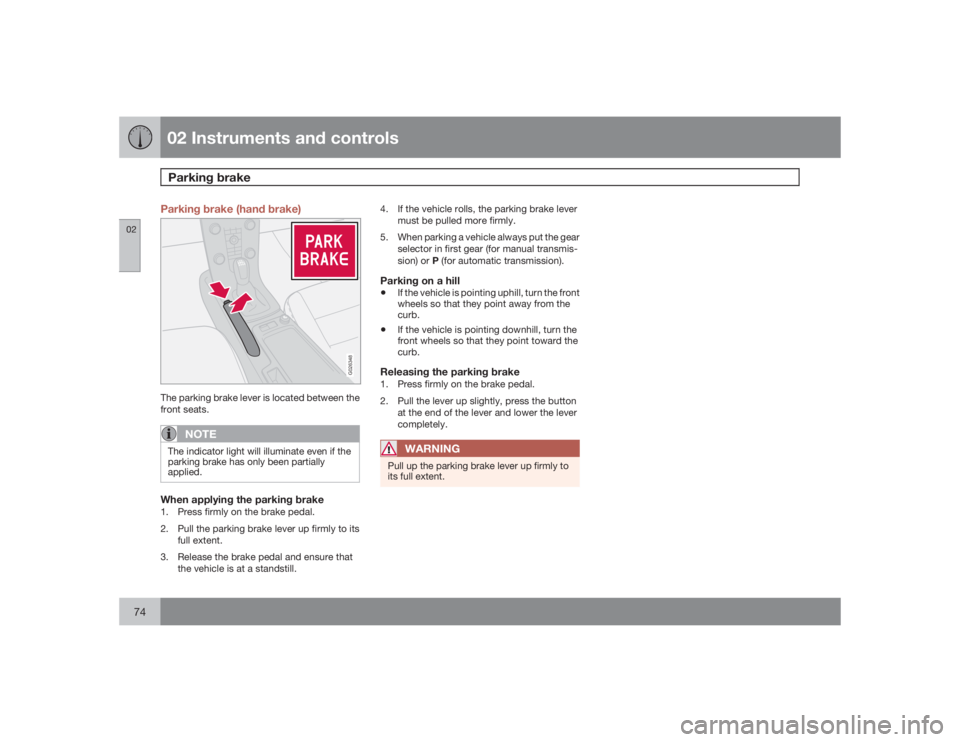
G026348
The parking brake lever is located between the
front seats.
NOTE
The indicator light will illuminate even if the
parking brake has only been partially
applied.When applying the parking brake1. Press firmly on the brake pedal.
2. Pull the parking brake lever up firmly to its
full extent.
3. Release the brake pedal and ensure that
the vehicle is at a standstill.4. If the vehicle rolls, the parking brake lever
must be pulled more firmly.
5. When parking a vehicle always put the gear
selector in first gear (for manual transmis-
sion) or P (for automatic transmission).
Parking on a hill•
If the vehicle is pointing uphill, turn the front
wheels so that they point away from the
curb.
•
If the vehicle is pointing downhill, turn the
front wheels so that they point toward the
curb.
Releasing the parking brake1. Press firmly on the brake pedal.
2. Pull the lever up slightly, press the button
at the end of the lever and lower the lever
completely.
WARNING
Pull up the parking brake lever up firmly to
its full extent.
Page 94 of 286
03 ClimateManual climate control
0394
TimerThe timer function minimizes the risk of mist-
ing, or stale air when the recirculation function
is selected, see page 82 for information on set-
ting the recirculation timer. Recirculation is
always disengaged when you select Defroster
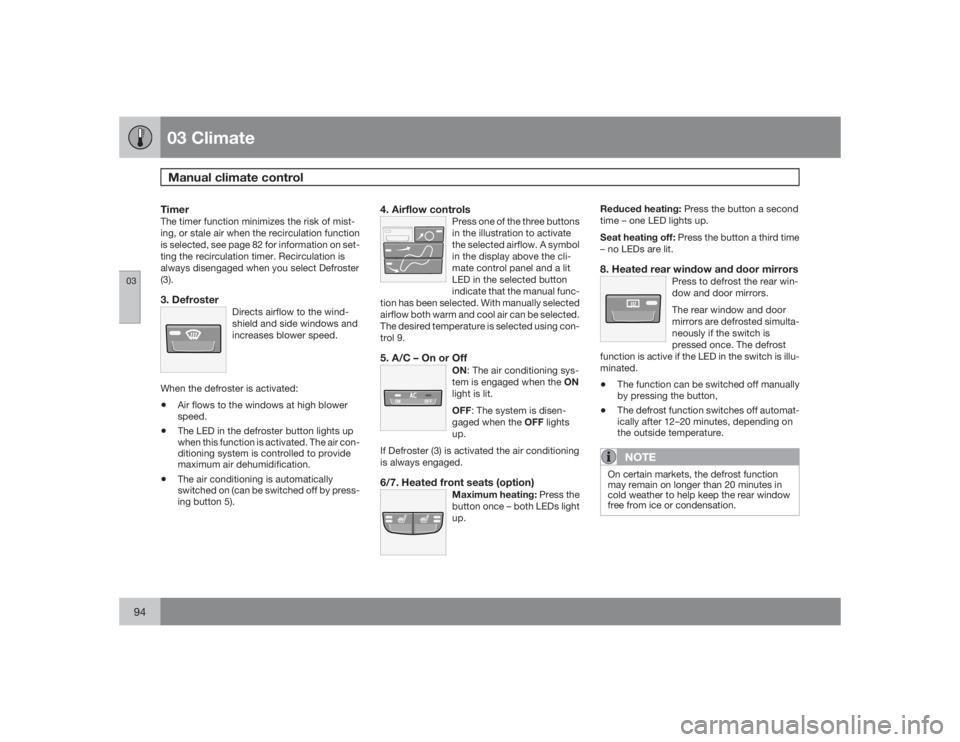
(3).3. Defroster
Directs airflow to the wind-
shield and side windows and
increases blower speed.
When the defroster is activated:•
Air flows to the windows at high blower
speed.
•
The LED in the defroster button lights up
when this function is activated. The air con-
ditioning system is controlled to provide
maximum air dehumidification.
•
The air conditioning is automatically
switched on (can be switched off by press-
ing button 5).
4. Airflow controls
Press one of the three buttons
in the illustration to activate
the selected airflow. A symbol
in the display above the cli-
mate control panel and a lit
LED in the selected button
indicate that the manual func-
tion has been selected. With manually selected
airflow both warm and cool air can be selected.
The desired temperature is selected using con-
trol 9.
5. A/C – On or Off
ON: The air conditioning sys-
tem is engaged when the ON
light is lit.
OFF: The system is disen-
gaged when the OFF lights
up.
If Defroster (3) is activated the air conditioning
is always engaged.6/7. Heated front seats (option)
Maximum heating: Press the
button once – both LEDs light
up.
Reduced heating: Press the button a second
time – one LED lights up.
Seat heating off: Press the button a third time
– no LEDs are lit.8. Heated rear window and door mirrors
Press to defrost the rear win-
dow and door mirrors.
The rear window and door
mirrors are defrosted simulta-
neously if the switch is
pressed once. The defrost
function is active if the LED in the switch is illu-
minated.
•
The function can be switched off manually
by pressing the button,
•
The defrost function switches off automat-
ically after 12–20 minutes, depending on
the outside temperature.NOTE
On certain markets, the defrost function
may remain on longer than 20 minutes in
cold weather to help keep the rear window
free from ice or condensation.
Page 97 of 286
03 Climate
Electronic Climate Control (ECC) – option
03``97
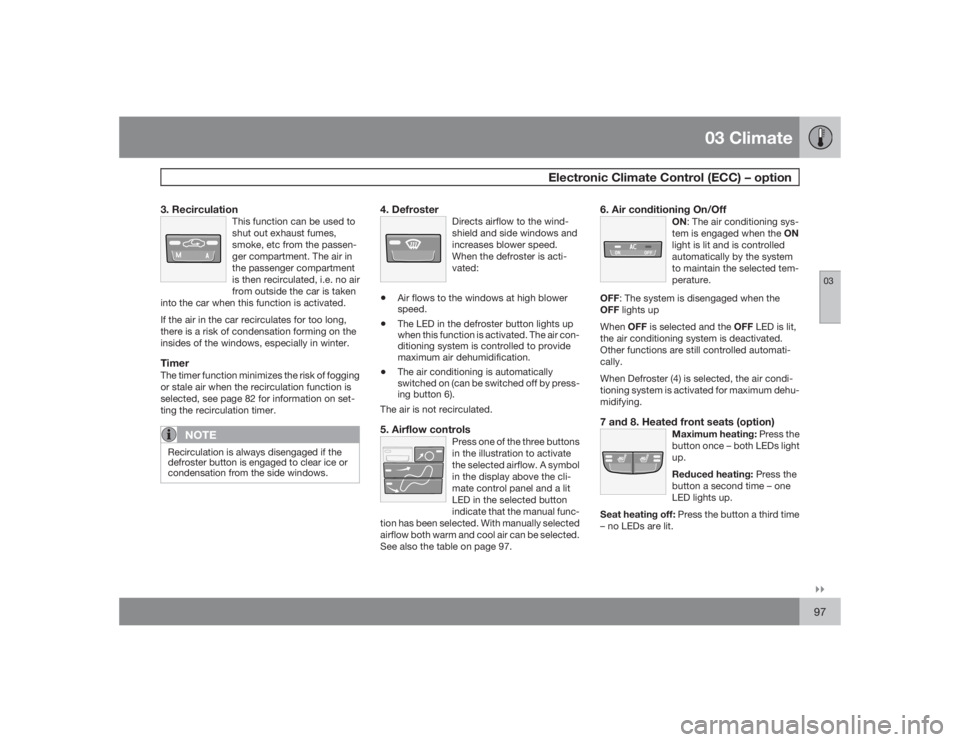
3. Recirculation
This function can be used to
shut out exhaust fumes,
smoke, etc from the passen-
ger compartment. The air in
the passenger compartment
is then recirculated, i.e. no air
from outside the car is taken
into the car when this function is activated.
If the air in the car recirculates for too long,
there is a risk of condensation forming on the
insides of the windows, especially in winter.TimerThe timer function minimizes the risk of fogging
or stale air when the recirculation function is
selected, see page 82 for information on set-
ting the recirculation timer.
NOTE
Recirculation is always disengaged if the
defroster button is engaged to clear ice or
condensation from the side windows.
4. Defroster
Directs airflow to the wind-
shield and side windows and
increases blower speed.
When the defroster is acti-
vated:
•
Air flows to the windows at high blower
speed.
•
The LED in the defroster button lights up
when this function is activated. The air con-
ditioning system is controlled to provide
maximum air dehumidification.
•
The air conditioning is automatically
switched on (can be switched off by press-
ing button 6).
The air is not recirculated.
5. Airflow controls
Press one of the three buttons
in the illustration to activate
the selected airflow. A symbol
in the display above the cli-
mate control panel and a lit
LED in the selected button
indicate that the manual func-
tion has been selected. With manually selected
airflow both warm and cool air can be selected.
See also the table on page 97.
6. Air conditioning On/Off
ON: The air conditioning sys-
tem is engaged when the ON
light is lit and is controlled
automatically by the system
to maintain the selected tem-
perature.
OFF: The system is disengaged when the
OFF lights up
WhenOFF is selected and the OFF LED is lit,
the air conditioning system is deactivated.
Other functions are still controlled automati-
cally.
When Defroster (4) is selected, the air condi-
tioning system is activated for maximum dehu-
midifying.7 and 8. Heated front seats (option)
Maximum heating: Press the
button once – both LEDs light
up.
Reduced heating: Press the
button a second time – one
LED lights up.
Seat heating off: Press the button a third time
– no LEDs are lit.
Page 100 of 286
G020908
100
Front seats............................................................................................ 102
Interior lighting...................................................................................... 105
Storage compartments......................................................................... 107
Rear seat............................................................................................... 111
Cargo area............................................................................................ 113
Page 102 of 286
04 InteriorFront seats
04102
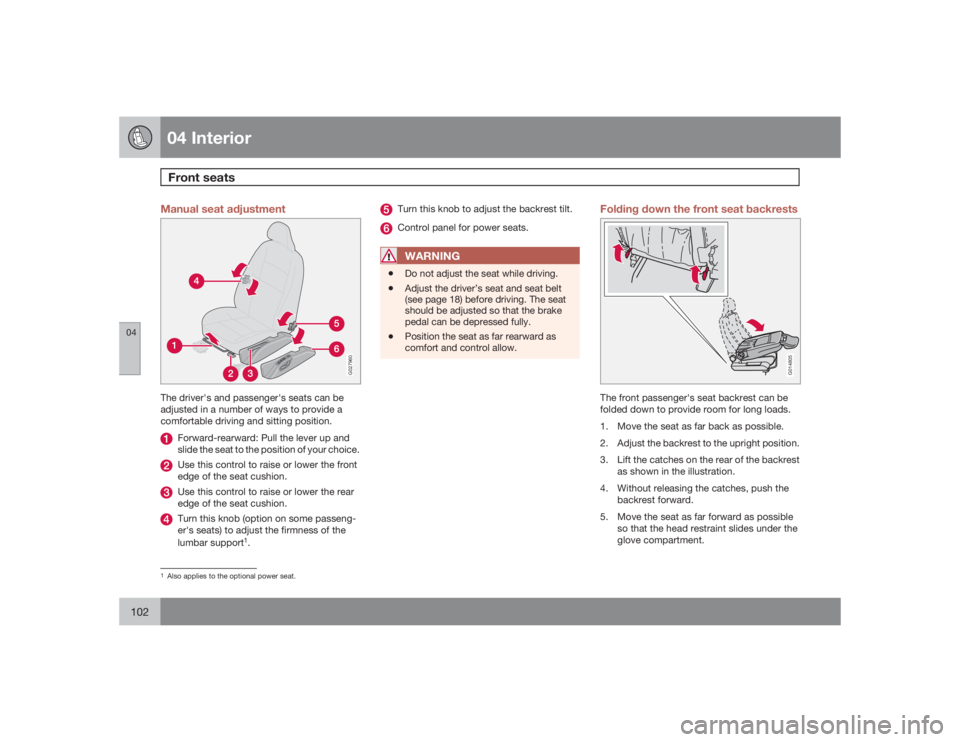
Manual seat adjustment
G027960
The driver's and passenger's seats can be
adjusted in a number of ways to provide a
comfortable driving and sitting position.
Forward-rearward: Pull the lever up and
slide the seat to the position of your choice.Use this control to raise or lower the front
edge of the seat cushion.Use this control to raise or lower the rear
edge of the seat cushion.Turn this knob (option on some passeng-
er's seats) to adjust the firmness of the
lumbar support
1.
Turn this knob to adjust the backrest tilt.Control panel for power seats.WARNING
•
Do not adjust the seat while driving.
•
Adjust the driver’s seat and seat belt
(see page 18) before driving. The seat
should be adjusted so that the brake
pedal can be depressed fully.
•
Position the seat as far rearward as
comfort and control allow.
Folding down the front seat backrests
G014805
The front passenger's seat backrest can be
folded down to provide room for long loads.
1. Move the seat as far back as possible.
2. Adjust the backrest to the upright position.
3. Lift the catches on the rear of the backrest
as shown in the illustration.
4. Without releasing the catches, push the
backrest forward.
5. Move the seat as far forward as possible
so that the head restraint slides under the
glove compartment.
1Also applies to the optional power seat.
Page 103 of 286
04 Interior
Front seats
04``103
WARNING
Cover sharp edges on the load to help pre-
vent injury to occupants. Secure the load to
help prevent shifting during sudden stops.Power seats (option)The power driver's seat can be adjusted:•
If the ignition key is in position I or II.
•
During a 10 minute period after the doors
have been unlocked if the door remains
open.
•
If the door is closed and the ignition key is
not yet in the ignition, or if the key is in
position0, the seat can be adjusted or dur-
ing a period of 40 seconds. The power
passenger's seat can only be adjusted if
the ignition key is in position I or II, or if the
engine is running.
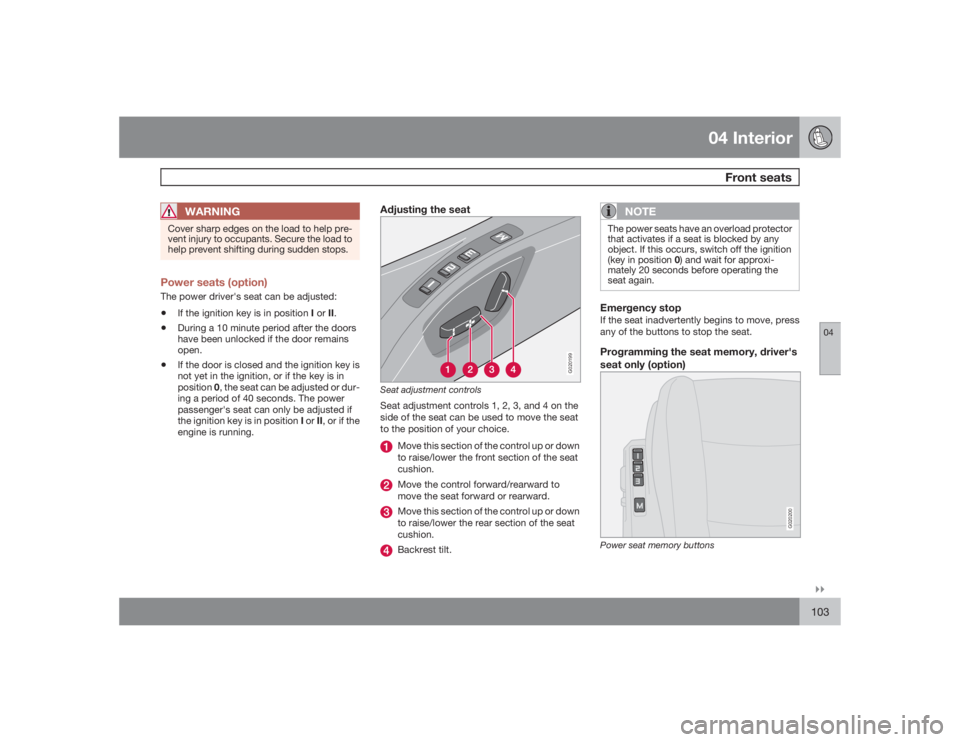
Adjusting the seat
G020199
Seat adjustment controlsSeat adjustment controls 1, 2, 3, and 4 on the
side of the seat can be used to move the seat
to the position of your choice.
Move this section of the control up or down
to raise/lower the front section of the seat
cushion.Move the control forward/rearward to
move the seat forward or rearward.Move this section of the control up or down
to raise/lower the rear section of the seat
cushion.Backrest tilt.
NOTE
The power seats have an overload protector
that activates if a seat is blocked by any
object. If this occurs, switch off the ignition
(key in position 0) and wait for approxi-
mately 20 seconds before operating the
seat again.Emergency stopIf the seat inadvertently begins to move, press
any of the buttons to stop the seat.Programming the seat memory, driver's
seat only (option)
G020200
Power seat memory buttons
Page 104 of 286
04 InteriorFront seats
04104
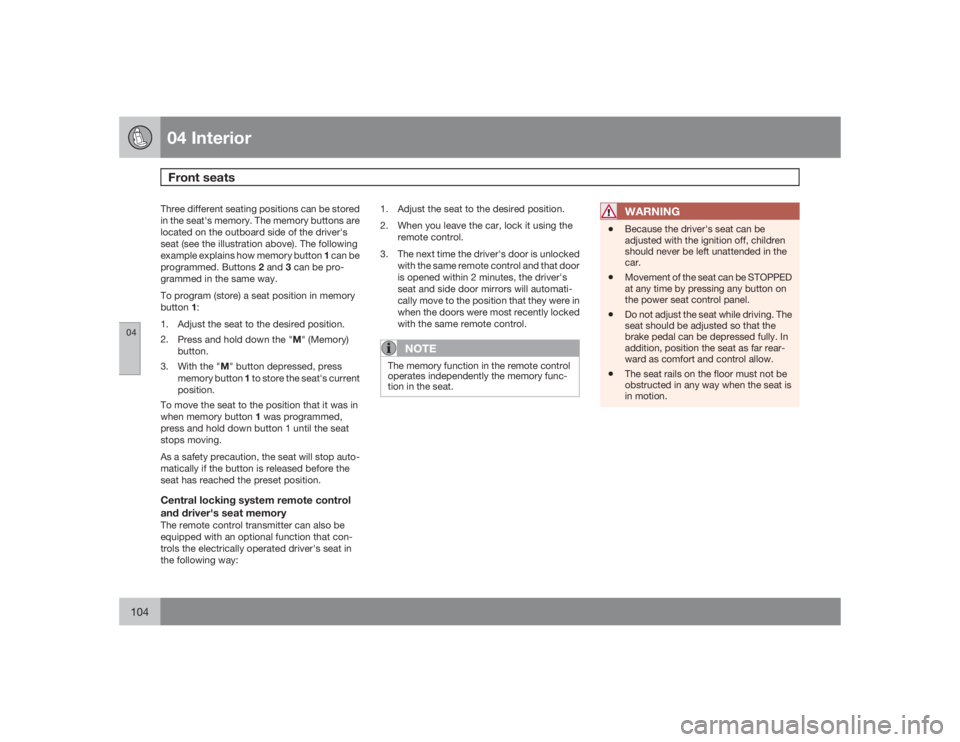
Three different seating positions can be stored
in the seat's memory. The memory buttons are
located on the outboard side of the driver's
seat (see the illustration above). The following
example explains how memory button 1 can be
programmed. Buttons 2 and 3 can be pro-
grammed in the same way.
To program (store) a seat position in memory
button1:
1. Adjust the seat to the desired position.
2.
Press and hold down the "M" (Memory)
button.
3.
With the "M" button depressed, press
memory button 1 to store the seat's current
position.
To move the seat to the position that it was in
when memory button 1 was programmed,
press and hold down button 1 until the seat
stops moving.
As a safety precaution, the seat will stop auto-
matically if the button is released before the
seat has reached the preset position.Central locking system remote control
and driver's seat memoryThe remote control transmitter can also be
equipped with an optional function that con-
trols the electrically operated driver's seat in
the following way:1. Adjust the seat to the desired position.
2. When you leave the car, lock it using the
remote control.
3. The next time the driver's door is unlocked
with the same remote control and that door
is opened within 2 minutes, the driver's
seat and side door mirrors will automati-
cally move to the position that they were in
when the doors were most recently locked
with the same remote control.
NOTE
The memory function in the remote control
operates independently the memory func-
tion in the seat.
WARNING
•
Because the driver's seat can be
adjusted with the ignition off, children
should never be left unattended in the
car.
•
Movement of the seat can be STOPPED
at any time by pressing any button on
the power seat control panel.
•
Do not adjust the seat while driving. The
seat should be adjusted so that the
brake pedal can be depressed fully. In
addition, position the seat as far rear-
ward as comfort and control allow.
•
The seat rails on the floor must not be
obstructed in any way when the seat is
in motion.
Page 108 of 286
04 InteriorStorage compartments
04108
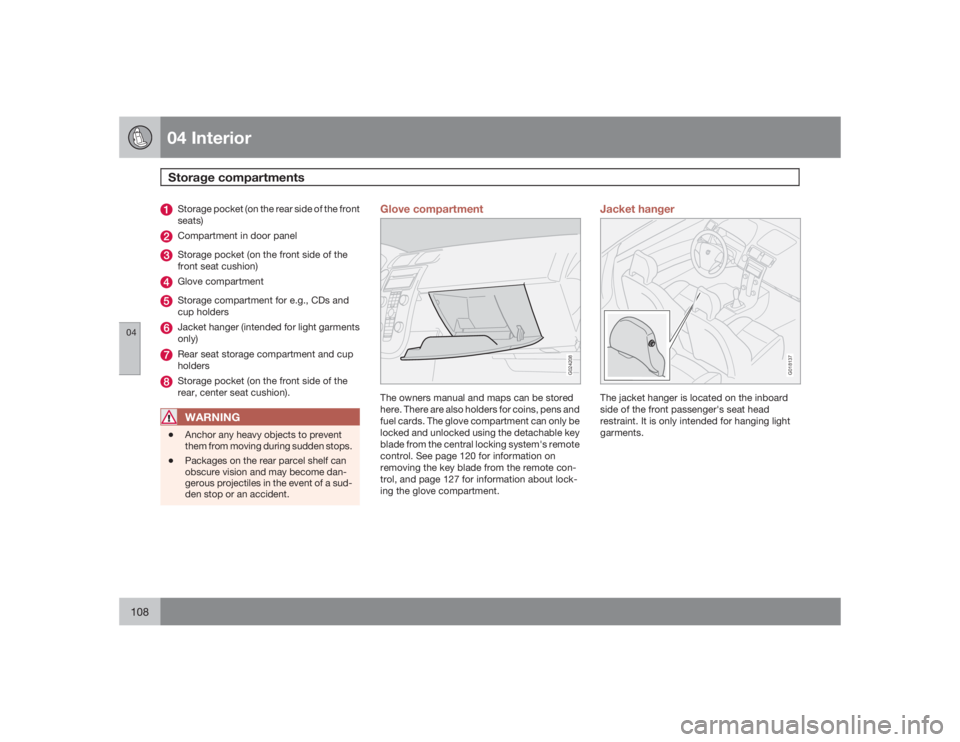
Storage pocket (on the rear side of the front
seats)Compartment in door panelStorage pocket (on the front side of the
front seat cushion)Glove compartmentStorage compartment for e.g., CDs and
cup holdersJacket hanger (intended for light garments
only)Rear seat storage compartment and cup
holdersStorage pocket (on the front side of the
rear, center seat cushion).WARNING
•
Anchor any heavy objects to prevent
them from moving during sudden stops.
•
Packages on the rear parcel shelf can
obscure vision and may become dan-
gerous projectiles in the event of a sud-
den stop or an accident.
Glove compartment
G024208
The owners manual and maps can be stored
here. There are also holders for coins, pens and
fuel cards. The glove compartment can only be
locked and unlocked using the detachable key
blade from the central locking system's remote
control. See page 120 for information on
removing the key blade from the remote con-
trol, and page 127 for information about lock-
ing the glove compartment.
Jacket hanger
G018137
The jacket hanger is located on the inboard
side of the front passenger's seat head
restraint. It is only intended for hanging light
garments.