service VOLVO V50 2009 Owner´s Manual
[x] Cancel search | Manufacturer: VOLVO, Model Year: 2009, Model line: V50, Model: VOLVO V50 2009Pages: 286, PDF Size: 7.12 MB
Page 154 of 286
06 Starting and drivingBrake system
06154
For optimal ABS braking effect:1. Press down on the brake pedal with full
force. The pedal will pulsate.
2. Steer the vehicle in the direction of travel
and keep the brake pedal depressed.Electronic Brake Force Distribution
(EBD)EBD is an integrated part of the ABS system.
EBD regulates the hydraulic pressure to the
rear brakes to help provide optimal braking
capacity.
The switching of the ABS modulator will be
audible and the brake pedal will pulsate during
braking. Please be aware that ABS does not
increase the absolute braking potential of the
vehicle. While control will be enhanced, ABS
will not shorten stopping distances on slippery
surfaces.
If the warning lamp lights up there is a mal-
function of the ABS system (the standard brak-
ing system will still function) and the vehicle
should be driven cautiously to a trained and
qualified Volvo service technicianfor inspec-
tion.
WARNING
If the BRAKES and ABS warning symbols
light at the same time, there may be a prob-
lem in the brake system. If the brake fluid
level is normal in these circumstances, drive
carefully to a trained and qualified Volvo
service technician to have the brake system
checked.Emergency Brake Assistance – EBAEBA is designed to provide full brake effect
immediately in the event of sudden, hard brak-
ing. The system is activated by the speed with
which the brake pedal is depressed.
When the EBA system is activated, the brake
pedal will go down and pressure in the brake
system immediately increases to the maximum
level. Maintain full pressure on the brake pedal
in order to utilize the system completely. EBA
is automatically deactivated when the brake
pedal is released.
NOTE
•
When the EBA system is activated, the
brake pedal will go down and pressure
in the brake system immediately increa-
ses to the maximum level. You must
maintain full pressure on the brake
pedal in order to utilize the system com-
pletely. There will be no braking effect if
the pedal is released. EBA is automati-
cally deactivated when the brake pedal
is released.
•
When the vehicle has been parked for
some time, the brake pedal may sink
more than usual when the engine is
started. This is normal and the pedal will
return to its usual position when it is
released.
Page 156 of 286
06 Starting and drivingStability system
06156
This is one of the stability system's permanent
functions and cannot be switched off.
WARNING
The car's handling and stability characteris-
tics will be altered if the STC/DSTC system
functions have been disabled.STC/DSTC-related messages in the text
window•
"TRACTION CONTROL TEMPORARILY
OFF
" – The system has been temporarily
switched off due to high brake temperature
and will automatically switch on again
when the brakes have cooled.
•
"ANTI SKID SERVICE REQUIRED
" – the
system has been automatically disen-
gaged due to a fault. A trained and qualified
Volvo service technician should check the
system.
Symbols used by the stability system
Stability system indicator light
Information symbol
If the
and
symbols light up at the same
time, read the message in the display.
If only the symbol lights up, this indicates
one of the following situations:
•
The light illuminates for approximately
2 seconds to indicate that the system is
performing a self-diagnostic test when the
engine is started.
•
If the light flashes while driving, this indi-
cates that the stability system is actively
functioning to help counteract wheel spin
and/or a skid.
•
If this light stays on after the engine has
started or comes on while driving, there
may be a fault in the stability system. Con-
sult a trained and qualified Volvo service
technician.
•
If Spin control has been intentionally
switched off, a message is displayed and
the light will stay on as a reminder that this
function has been disabled by the driver.
WARNING
The stability system is intended to help
improve driving safety. It supplements, but
can never replace, the driver's judgement
and responsibility when operating the vehi-
cle. Speed and driving style should always
be adapted to traffic and road conditions.
Page 160 of 286
06 Starting and drivingTowing a trailer
06160
General information•
Volvo recommends the use of Volvo trailer
hitches that are specially designed for the
vehicle.CAUTION
Models equipped with the B5244S7 engine
(engine code 39 , which is the 6th and
7th digits from the left in your vehicle's VIN
number, see page 262 for the location of
the VIN plate), may not be used to tow trail-
ers or vehicles of any kind. This could cause
damage to the vehicle's emission control
systems.Maximum trailer weights recommended by
Volvo are:•
Trailers without brakes: 1,540 lbs
(700 kg).
•
Trailers with brakes: 2,000 lbs (900 kg)
Observe the legal requirements of the
state/province in which the vehicles are
registered.
•
The maximum recommended hitch
tongue load is 165 lbs (75 kg).
•
All Volvo models are equipped with
energy-absorbing shock-mounted bump-
ers. Trailer hitch installation should not
interfere with the proper operation of this
bumper system.Trailer towing does not normally present any
particular problems, but take into considera-
tion:
•
Increase tire pressure to recommended
full. See the chapter "Wheels and tires."
•
When your vehicle is new, avoid towing
heavy trailers during the first 620 miles
(1,000 km).
•
Maximum speed when towing a trailer:
50 mph (80 km/h).
•
Engine and transmission are subject to
increased loads. Therefore, engine coolant
temperature should be closely watched
when driving in hot climates or hilly terrain.
Use a lower gear and turn off the air con-
ditioner if the temperature gauge needle
enters the red range.
•
If the automatic transmission begins to
overheat, a message will be displayed in
the information display.
•
Avoid overload and other abusive opera-
tion.
•
Hauling a trailer affects handling, durabil-
ity, and economy.
•
It is necessary to balance trailer brakes
with the towing vehicle brakes to provide a
safe stop (check and observe state/local
regulations).
•
Do not connect the trailer's brake system
directly to the vehicle's brake system.
•
More frequent vehicle maintenance is
required.
•
Remove the ball and drawbar assembly
when the hitch is not being used.
•
Volvo recommends the use of synthetic
engine oil when towing a trailer over long
distances or in mountainous areas.WARNING
•
Bumper-attached trailer hitches must
not be used on Volvos, nor should
safety chains be attached to the
bumper.
•
Trailer hitches attaching to the vehicle's
rear axle must not be used.
•
Never connect a trailer's hydraulic
brake system directly to the vehicle
brake system, nor a trailer's lighting
system directly to the vehicle lighting
system. Consult your nearest trained
and qualified Volvo service technician
for correct installation.
•
When towing a trailer, the trailer's safety
wire must be correctly fastened to the
hole or hook provided in the trailer hitch
on the vehicle. The safety wire should
never be fastened to or wound around
the drawbar ball.
Page 164 of 286
06 Starting and drivingBlind Spot Information System (BLIS)–option
06164
Introduction
G020295
BLIS cameraIndicator lightBLIS symbol
The Blind Spot Information System (BLIS) is an
information system that indicates the presence
of another vehicle moving in the same direction
as your vehicle in the side-view mirror's "blind
area".CAUTION
The BLIS system should only be repaired by
a trained and qualified Volvo service tech-
nician.
WARNING
•
BLIS is an information system, NOT a
warning or safety system.
•
BLIS does not eliminate the need for
you to visually confirm the conditions
around you, and the need for you to turn
your head and shoulders to make sure
that you can safely change lanes.
•
As the driver, you have full responsibility
for changing lanes in a safe manner.
The system is based on digital camera tech-
nology. The cameras (1) are located beneath
the side-view mirrors.
When one (or both) of the cameras have
detected a vehicle in the blind area (up to
approximately 10 ft. (3 meters) from the side of
your vehicle, and up to approximately 31 ft.
(9.5 meters) behind the side-view mirror), the
indicator light in the door panel (2) illuminates.
The light will glow continuously to alert the
driver of the vehicle in the blind area.
NOTE
The door panel indicator light illuminates on
the side of the vehicle where the system has
detected another vehicle. If your vehicle is
passed on both sides at the same time, both
lights will illuminate.
A B
G020296
A = approx. 10 ft. (3 meters), B = approx. 31 ft.
(9.5 meters)BLIS has an integrated function that alerts the
driver if a fault should occur with the system.
For example, if one or both of the system's
cameras are obscured, a message (see the
table on page 167) will appear in the informa-
tion display in the instrument panel. If this
occurs, clean the camera lenses. If necessary,
the system can be temporarily switched off (for
instructions see page 166).
Page 166 of 286
06 Starting and drivingBlind Spot Information System (BLIS)–option
06166
LimitationsIn certain situations, the BLIS indicator light(s)
may illuminate even when there are no other
vehicles in the area monitored by the system.
NOTE
If the BLIS indicator lights illuminate occa-
sionally even when there are no other vehi-
cles in the blind area, this does not indicate
a fault in the system.
In the event of a fault,
Blind spot syst.
service required
will be displayed.
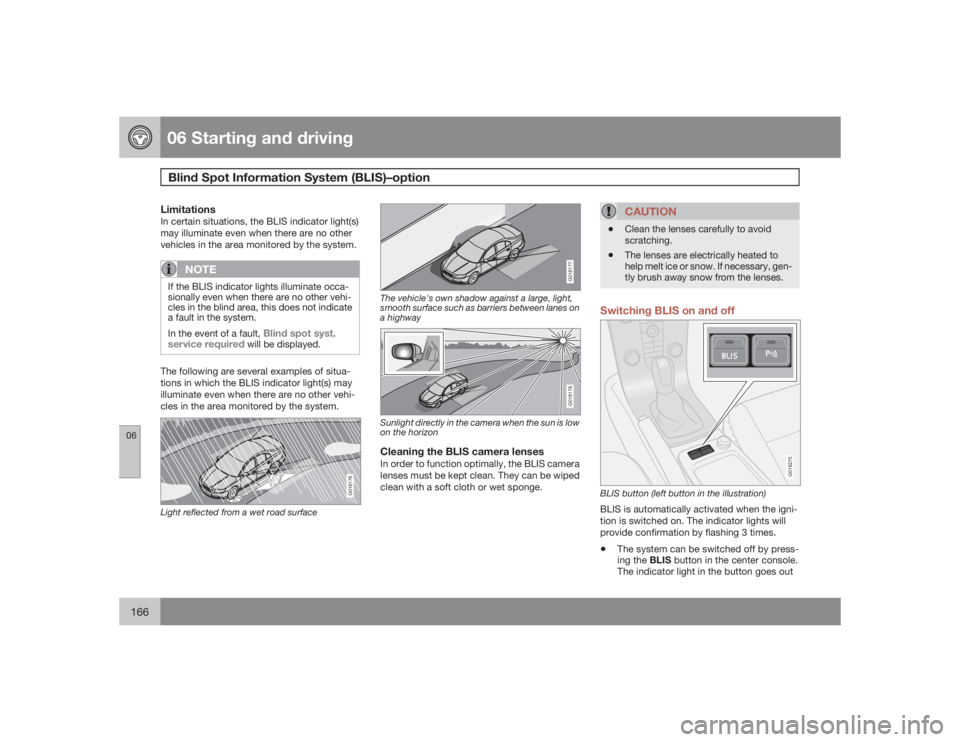
The following are several examples of situa-
tions in which the BLIS indicator light(s) may
illuminate even when there are no other vehi-
cles in the area monitored by the system.
G018176
Light reflected from a wet road surface
G018177
The vehicle's own shadow against a large, light,
smooth surface such as barriers between lanes on
a highway
G018178
Sunlight directly in the camera when the sun is low
on the horizonCleaning the BLIS camera lensesIn order to function optimally, the BLIS camera
lenses must be kept clean. They can be wiped
clean with a soft cloth or wet sponge.
CAUTION
•
Clean the lenses carefully to avoid
scratching.
•
The lenses are electrically heated to
help melt ice or snow. If necessary, gen-
tly brush away snow from the lenses.
Switching BLIS on and off
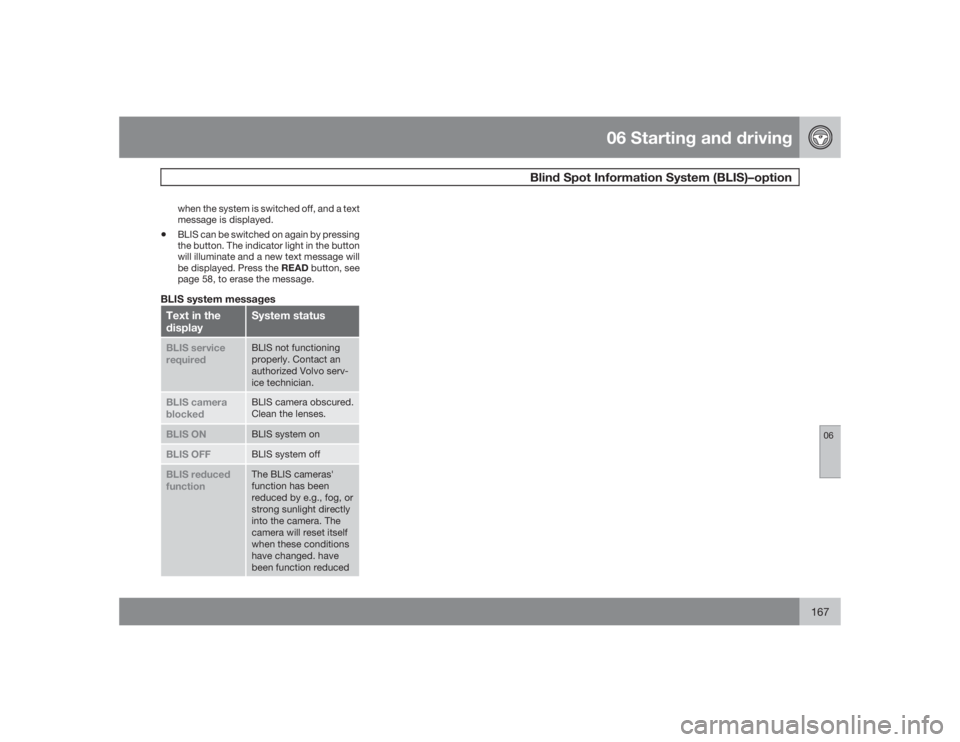
G018270
BLIS button (left button in the illustration)BLIS is automatically activated when the igni-
tion is switched on. The indicator lights will
provide confirmation by flashing 3 times.•
The system can be switched off by press-
ing the BLIS button in the center console.
The indicator light in the button goes out
Page 167 of 286
06 Starting and driving
Blind Spot Information System (BLIS)–option
06
167
when the system is switched off, and a text
message is displayed.
•
BLIS can be switched on again by pressing
the button. The indicator light in the button
will illuminate and a new text message will
be displayed. Press the READ button, see
page 58, to erase the message.
BLIS system messagesText in the
display
System status
BLIS service
required
BLIS not functioning
properly. Contact an
authorized Volvo serv-
ice technician.
BLIS camera
blocked
BLIS camera obscured.
Clean the lenses.
BLIS ON
BLIS system on
BLIS OFF
BLIS system off
BLIS reduced
function
The BLIS cameras'
function has been
reduced by e.g., fog, or
strong sunlight directly
into the camera. The
camera will reset itself
when these conditions
have changed. have
been function reduced
Page 169 of 286
06 Starting and drivingPark assist (Option/accessory)
06``169 Activating/deactivating park assist
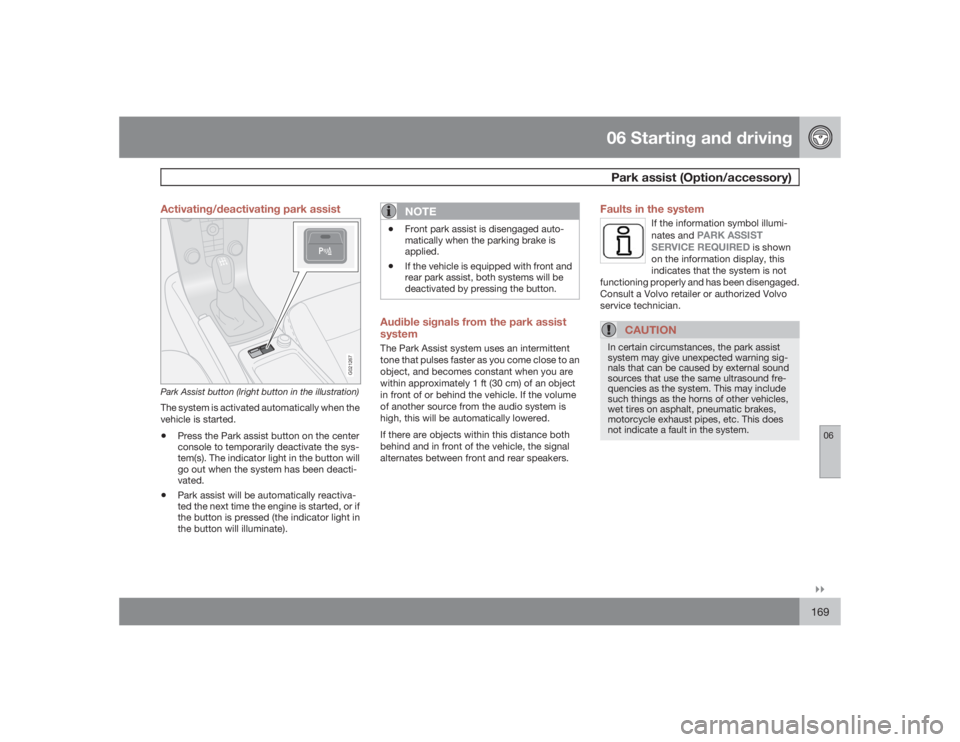
G021267
Park Assist button (lright button in the illustration)The system is activated automatically when the
vehicle is started.•
Press the Park assist button on the center
console to temporarily deactivate the sys-
tem(s). The indicator light in the button will
go out when the system has been deacti-
vated.
•
Park assist will be automatically reactiva-
ted the next time the engine is started, or if
the button is pressed (the indicator light in
the button will illuminate).
NOTE
•
Front park assist is disengaged auto-
matically when the parking brake is
applied.
•
If the vehicle is equipped with front and
rear park assist, both systems will be
deactivated by pressing the button.
Audible signals from the park assist
systemThe Park Assist system uses an intermittent
tone that pulses faster as you come close to an
object, and becomes constant when you are
within approximately 1 ft (30 cm) of an object
in front of or behind the vehicle. If the volume
of another source from the audio system is
high, this will be automatically lowered.
If there are objects within this distance both
behind and in front of the vehicle, the signal
alternates between front and rear speakers.
Faults in the system
If the information symbol illumi-
nates and
PARK ASSIST
SERVICE REQUIRED
is shown
on the information display, this
indicates that the system is not
functioning properly and has been disengaged.
Consult a Volvo retailer or authorized Volvo
service technician.
CAUTION
In certain circumstances, the park assist
system may give unexpected warning sig-
nals that can be caused by external sound
sources that use the same ultrasound fre-
quencies as the system. This may include
such things as the horns of other vehicles,
wet tires on asphalt, pneumatic brakes,
motorcycle exhaust pipes, etc. This does
not indicate a fault in the system.
Page 175 of 286
07 Wheels and tires
General information
07
175 Tread wear indicator
G020323
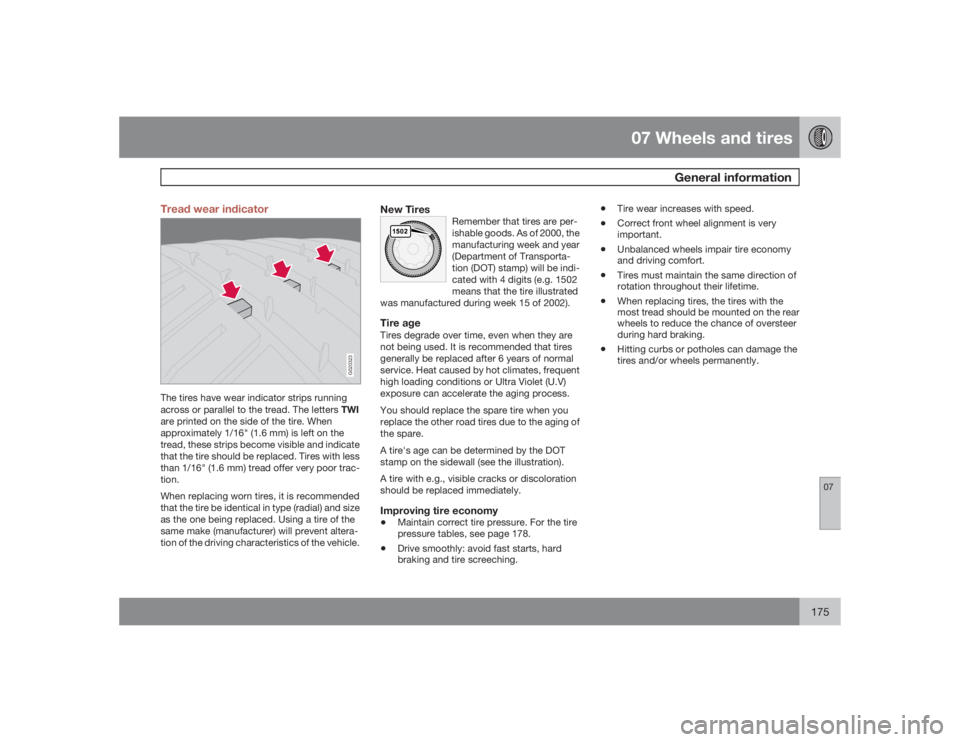
The tires have wear indicator strips running
across or parallel to the tread. The letters TWI
are printed on the side of the tire. When
approximately 1/16" (1.6 mm) is left on the
tread, these strips become visible and indicate
that the tire should be replaced. Tires with less
than 1/16" (1.6 mm) tread offer very poor trac-
tion.
When replacing worn tires, it is recommended
that the tire be identical in type (radial) and size
as the one being replaced. Using a tire of the
same make (manufacturer) will prevent altera-
tion of the driving characteristics of the vehicle.
New Tires
Remember that tires are per-
ishable goods. As of 2000, the
manufacturing week and year
(Department of Transporta-
tion (DOT) stamp) will be indi-
cated with 4 digits (e.g. 1502
means that the tire illustrated
was manufactured during week 15 of 2002).
Tire ageTires degrade over time, even when they are
not being used. It is recommended that tires
generally be replaced after 6 years of normal
service. Heat caused by hot climates, frequent
high loading conditions or Ultra Violet (U.V)
exposure can accelerate the aging process.
You should replace the spare tire when you
replace the other road tires due to the aging of
the spare.
A tire's age can be determined by the DOT
stamp on the sidewall (see the illustration).
A tire with e.g., visible cracks or discoloration
should be replaced immediately.Improving tire economy•
Maintain correct tire pressure. For the tire
pressure tables, see page 178.
•
Drive smoothly: avoid fast starts, hard
braking and tire screeching.
•
Tire wear increases with speed.
•
Correct front wheel alignment is very
important.
•
Unbalanced wheels impair tire economy
and driving comfort.
•
Tires must maintain the same direction of
rotation throughout their lifetime.
•
When replacing tires, the tires with the
most tread should be mounted on the rear
wheels to reduce the chance of oversteer
during hard braking.
•
Hitting curbs or potholes can damage the
tires and/or wheels permanently.
Page 176 of 286
07 Wheels and tiresTire inflation
07176
Inflation labels
G032513
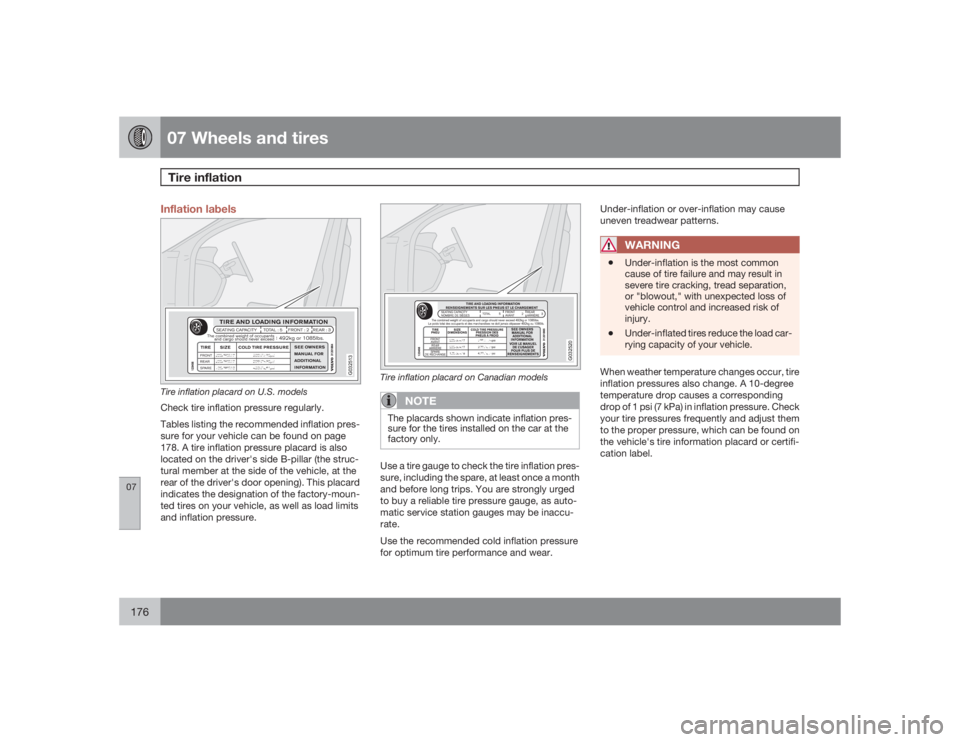
Tire inflation placard on U.S. modelsCheck tire inflation pressure regularly.
Tables listing the recommended inflation pres-
sure for your vehicle can be found on page
178. A tire inflation pressure placard is also
located on the driver's side B-pillar (the struc-
tural member at the side of the vehicle, at the
rear of the driver's door opening). This placard
indicates the designation of the factory-moun-
ted tires on your vehicle, as well as load limits
and inflation pressure.
G032520
Tire inflation placard on Canadian models
NOTE
The placards shown indicate inflation pres-
sure for the tires installed on the car at the
factory only.Use a tire gauge to check the tire inflation pres-
sure, including the spare, at least once a month
and before long trips. You are strongly urged
to buy a reliable tire pressure gauge, as auto-
matic service station gauges may be inaccu-
rate.
Use the recommended cold inflation pressure
for optimum tire performance and wear.Under-inflation or over-inflation may cause
uneven treadwear patterns.
WARNING
•
Under-inflation is the most common
cause of tire failure and may result in
severe tire cracking, tread separation,
or "blowout," with unexpected loss of
vehicle control and increased risk of
injury.
•
Under-inflated tires reduce the load car-
rying capacity of your vehicle.
When weather temperature changes occur, tire
inflation pressures also change. A 10-degree
temperature drop causes a corresponding
drop of 1 psi (7 kPa) in inflation pressure. Check
your tire pressures frequently and adjust them
to the proper pressure, which can be found on
the vehicle's tire information placard or certifi-
cation label.
Page 192 of 286
07 Wheels and tiresTire Sealing System
07192
IntroductionCertain models are equipped with a tire sealing
system that enables you to temporarily seal a
hole in the tread surface and re-inflate a flat tire,
or to adjust a tire’s inflation pressure.
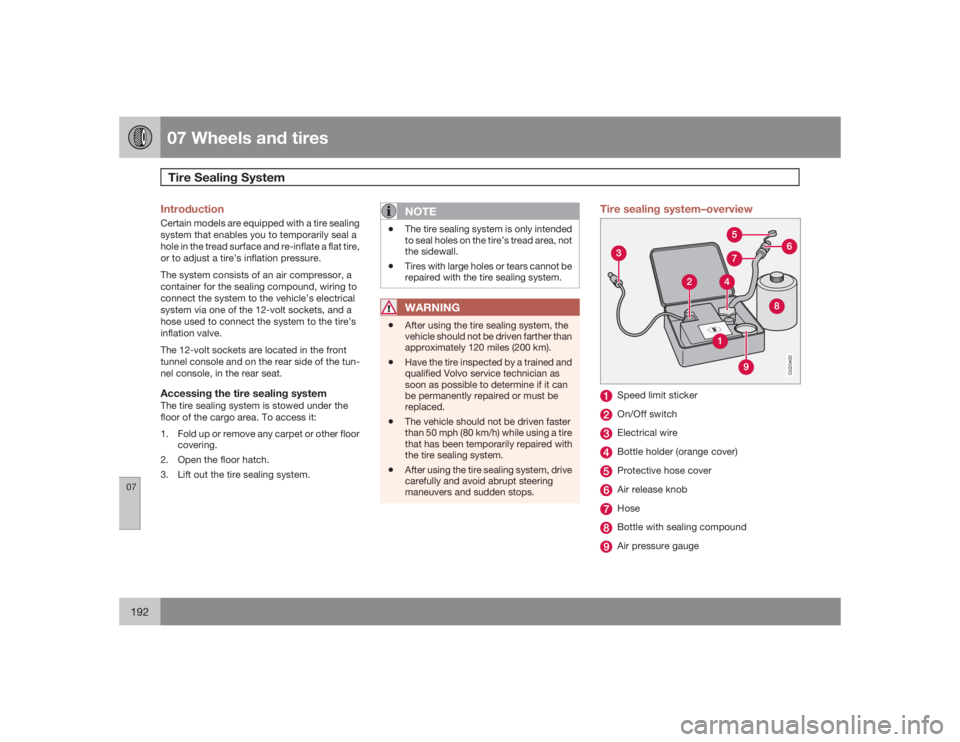
The system consists of an air compressor, a
container for the sealing compound, wiring to
connect the system to the vehicle’s electrical
system via one of the 12-volt sockets, and a
hose used to connect the system to the tire’s
inflation valve.
The 12-volt sockets are located in the front
tunnel console and on the rear side of the tun-
nel console, in the rear seat.Accessing the tire sealing systemThe tire sealing system is stowed under the
floor of the cargo area. To access it:
1. Fold up or remove any carpet or other floor
covering.
2. Open the floor hatch.
3. Lift out the tire sealing system.
NOTE
•
The tire sealing system is only intended
to seal holes on the tire’s tread area, not
the sidewall.
•
Tires with large holes or tears cannot be
repaired with the tire sealing system.WARNING
•
After using the tire sealing system, the
vehicle should not be driven farther than
approximately 120 miles (200 km).
•
Have the tire inspected by a trained and
qualified Volvo service technician as
soon as possible to determine if it can
be permanently repaired or must be
replaced.
•
The vehicle should not be driven faster
than 50 mph (80 km/h) while using a tire
that has been temporarily repaired with
the tire sealing system.
•
After using the tire sealing system, drive
carefully and avoid abrupt steering
maneuvers and sudden stops.
Tire sealing system–overview
G020400
Speed limit stickerOn/Off switchElectrical wireBottle holder (orange cover)Protective hose coverAir release knobHoseBottle with sealing compoundAir pressure gauge