mirror controls VOLVO V50 2010 Owner´s Manual
[x] Cancel search | Manufacturer: VOLVO, Model Year: 2010, Model line: V50, Model: VOLVO V50 2010Pages: 292, PDF Size: 6.8 MB
Page 98 of 292
03 Climate
Electronic Climate Control (ECC)*
03
98* Option/accessory, for more information, see Introduction.
G019518
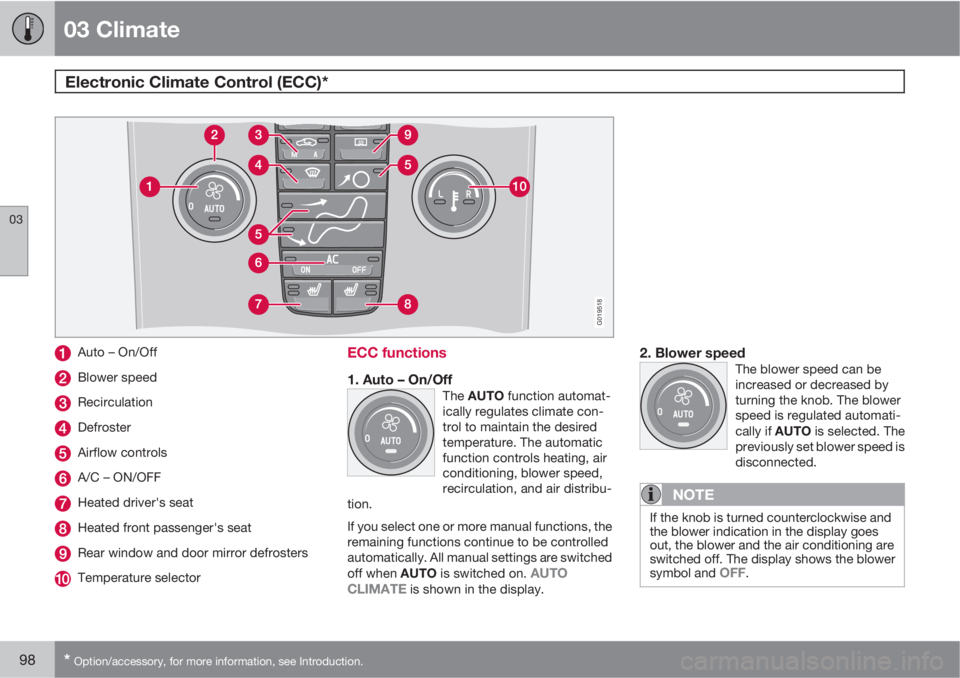
Auto – On/Off
Blower speed
Recirculation
Defroster
Airflow controls
A/C – ON/OFF
Heated driver's seat
Heated front passenger's seat
Rear window and door mirror defrosters
Temperature selector
ECC functions
1. Auto – On/OffThe AUTO function automat-
ically regulates climate con-
trol to maintain the desired
temperature. The automatic
function controls heating, air
conditioning, blower speed,
recirculation, and air distribu-
tion.
If you select one or more manual functions, the
remaining functions continue to be controlled
automatically. All manual settings are switched
off when AUTO is switched on.
AUTO
CLIMATE is shown in the display.
2. Blower speedThe blower speed can be
increased or decreased by
turning the knob. The blower
speed is regulated automati-
cally if AUTO is selected. The
previously set blower speed is
disconnected.
NOTE
If the knob is turned counterclockwise and
the blower indication in the display goes
out, the blower and the air conditioning are
switched off. The display shows the blower
symbol and
OFF.
Page 106 of 292
04 Interior
Front seats
04
106* Option/accessory, for more information, see Introduction.
Programming the seat memory, driver's
seat only*
G020200
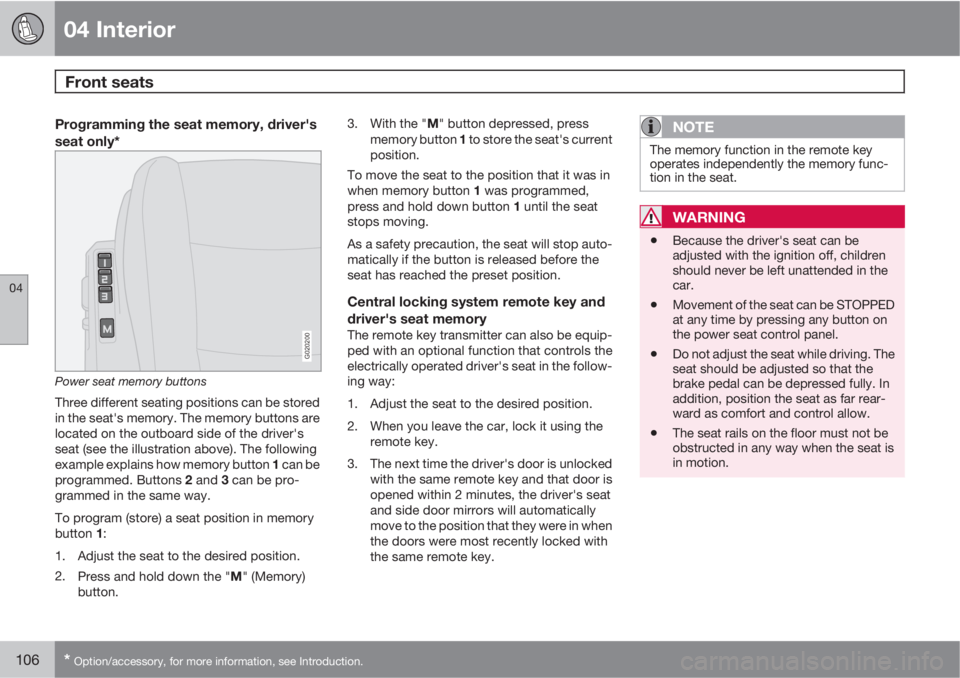
Power seat memory buttons
Three different seating positions can be stored
in the seat's memory. The memory buttons are
located on the outboard side of the driver's
seat (see the illustration above). The following
example explains how memory button 1 can be
programmed. Buttons 2 and 3 can be pro-
grammed in the same way.
To program (store) a seat position in memory
button 1:
1. Adjust the seat to the desired position.
2.
Press and hold down the "M" (Memory)
button.3.
With the "M" button depressed, press
memory button 1 to store the seat's current
position.
To move the seat to the position that it was in
when memory button 1 was programmed,
press and hold down button 1 until the seat
stops moving.
As a safety precaution, the seat will stop auto-
matically if the button is released before the
seat has reached the preset position.
Central locking system remote key and
driver's seat memory
The remote key transmitter can also be equip-
ped with an optional function that controls the
electrically operated driver's seat in the follow-
ing way:
1. Adjust the seat to the desired position.
2. When you leave the car, lock it using the
remote key.
3. The next time the driver's door is unlocked
with the same remote key and that door is
opened within 2 minutes, the driver's seat
and side door mirrors will automatically
move to the position that they were in when
the doors were most recently locked with
the same remote key.
NOTE
The memory function in the remote key
operates independently the memory func-
tion in the seat.
WARNING
•Because the driver's seat can be
adjusted with the ignition off, children
should never be left unattended in the
car.
•Movement of the seat can be STOPPED
at any time by pressing any button on
the power seat control panel.
•Do not adjust the seat while driving. The
seat should be adjusted so that the
brake pedal can be depressed fully. In
addition, position the seat as far rear-
ward as comfort and control allow.
•The seat rails on the floor must not be
obstructed in any way when the seat is
in motion.