start stop button VOLVO V60 2012 User Guide
[x] Cancel search | Manufacturer: VOLVO, Model Year: 2012, Model line: V60, Model: VOLVO V60 2012Pages: 400, PDF Size: 9.28 MB
Page 129 of 400
03 Your driving environment
Eco Start/Stop DRIVe*
03
* Option/accessory, for more information, see Introduction.127
WARNING
Do not open the bonnet when the engine
has stopped automatically - the engine may
suddenly start automatically. First switch off
the engine as normal using the START/
STOP ENGINE button before opening the
bonnet.
The engine does not auto-start2
In the following cases the engine does not
auto-start after having auto-stopped:
Conditions
A gear is engaged without declutching - a
display text prompts the driver to set the
gear lever in neutral position in order to ena-
ble automatic starting.
Involuntary engine stop2
In the event that a start-up fails and the engine
stops, proceed as follows:1. Depress the clutch pedal again - the engine
starts automatically after the gear lever has
been set in neutral position. Prior to this the
information display showed the text
Put
gear in neutral.
Trailer
•The Start/Stop function is deactivated if a
trailer is electrically connected to the car's
electrical system.
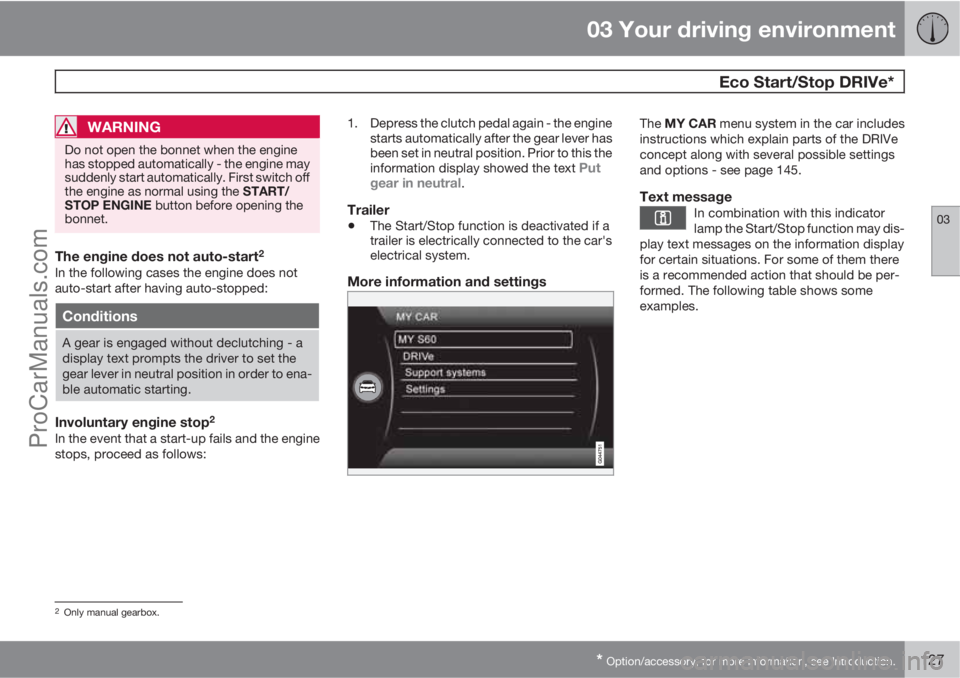
More information and settings
The MY CAR menu system in the car includes
instructions which explain parts of the DRIVe
concept along with several possible settings
and options - see page 145.
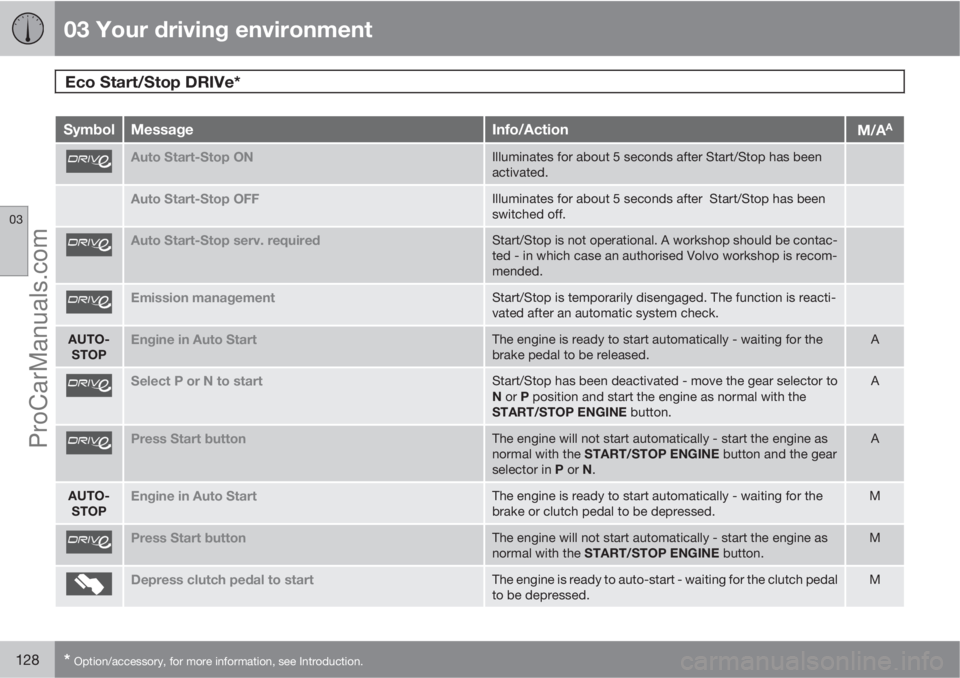
Text messageIn combination with this indicator
lamp the Start/Stop function may dis-
play text messages on the information display
for certain situations. For some of them there
is a recommended action that should be per-
formed. The following table shows some
examples.
2Only manual gearbox.
ProCarManuals.com
Page 130 of 400
03 Your driving environment
Eco Start/Stop DRIVe*
03
128* Option/accessory, for more information, see Introduction.
SymbolMessageInfo/ActionM/AA
Auto Start-Stop ONIlluminates for about 5 seconds after Start/Stop has been
activated.
Auto Start-Stop OFFIlluminates for about 5 seconds after Start/Stop has been
switched off.
Auto Start-Stop serv. requiredStart/Stop is not operational. A workshop should be contac-
ted - in which case an authorised Volvo workshop is recom-
mended.
Emission managementStart/Stop is temporarily disengaged. The function is reacti-
vated after an automatic system check.
AUTO-
STOPEngine in Auto StartThe engine is ready to start automatically - waiting for the
brake pedal to be released.A
Select P or N to startStart/Stop has been deactivated - move the gear selector to
N or P position and start the engine as normal with the
START/STOP ENGINE button.A
Press Start buttonThe engine will not start automatically - start the engine as
normal with the START/STOP ENGINE button and the gear
selector in P or N.A
AUTO-
STOPEngine in Auto StartThe engine is ready to start automatically - waiting for the
brake or clutch pedal to be depressed.M
Press Start buttonThe engine will not start automatically - start the engine as
normal with the START/STOP ENGINE button.M
Depress clutch pedal to startThe engine is ready to auto-start - waiting for the clutch pedal
to be depressed.M
ProCarManuals.com
Page 139 of 400
03 Your driving environment
HomeLinkŸŸ *
03
* Option/accessory, for more information, see Introduction.137 General
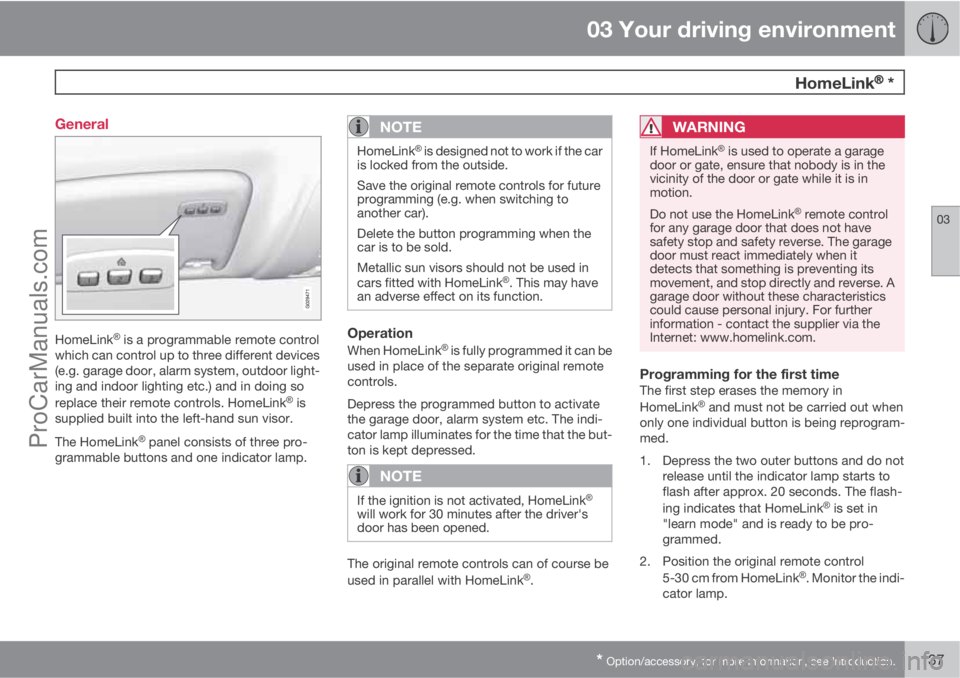
HomeLinkŸ is a programmable remote control
which can control up to three different devices
(e.g. garage door, alarm system, outdoor light-
ing and indoor lighting etc.) and in doing so
replace their remote controls. HomeLink
Ÿ is
supplied built into the left-hand sun visor.
The HomeLink
Ÿ panel consists of three pro-
grammable buttons and one indicator lamp.
NOTE
HomeLinkŸ is designed not to work if the car
is locked from the outside.
Save the original remote controls for future
programming (e.g. when switching to
another car).
Delete the button programming when the
car is to be sold.
Metallic sun visors should not be used in
cars fitted with HomeLink
Ÿ. This may have
an adverse effect on its function.
Operation
When HomeLinkŸ is fully programmed it can be
used in place of the separate original remote
controls.
Depress the programmed button to activate
the garage door, alarm system etc. The indi-
cator lamp illuminates for the time that the but-
ton is kept depressed.
NOTE
If the ignition is not activated, HomeLinkŸ
will work for 30 minutes after the driver's
door has been opened.
The original remote controls can of course be
used in parallel with HomeLinkŸ.
WARNING
If HomeLinkŸ is used to operate a garage
door or gate, ensure that nobody is in the
vicinity of the door or gate while it is in
motion.
Do not use the HomeLink
Ÿ remote control
for any garage door that does not have
safety stop and safety reverse. The garage
door must react immediately when it
detects that something is preventing its
movement, and stop directly and reverse. A
garage door without these characteristics
could cause personal injury. For further
information - contact the supplier via the
Internet: www.homelink.com.
Programming for the first timeThe first step erases the memory in
HomeLinkŸ and must not be carried out when
only one individual button is being reprogram-
med.
1. Depress the two outer buttons and do not
release until the indicator lamp starts to
flash after approx. 20 seconds. The flash-
ing indicates that HomeLink
Ÿ is set in
"learn mode" and is ready to be pro-
grammed.
2. Position the original remote control
5-30 cm from HomeLink
Ÿ. Monitor the indi-
cator lamp.
ProCarManuals.com
Page 165 of 400
04 Comfort and driving pleasure
Fuel-driven engine block heater and passenger compartment heater*
04
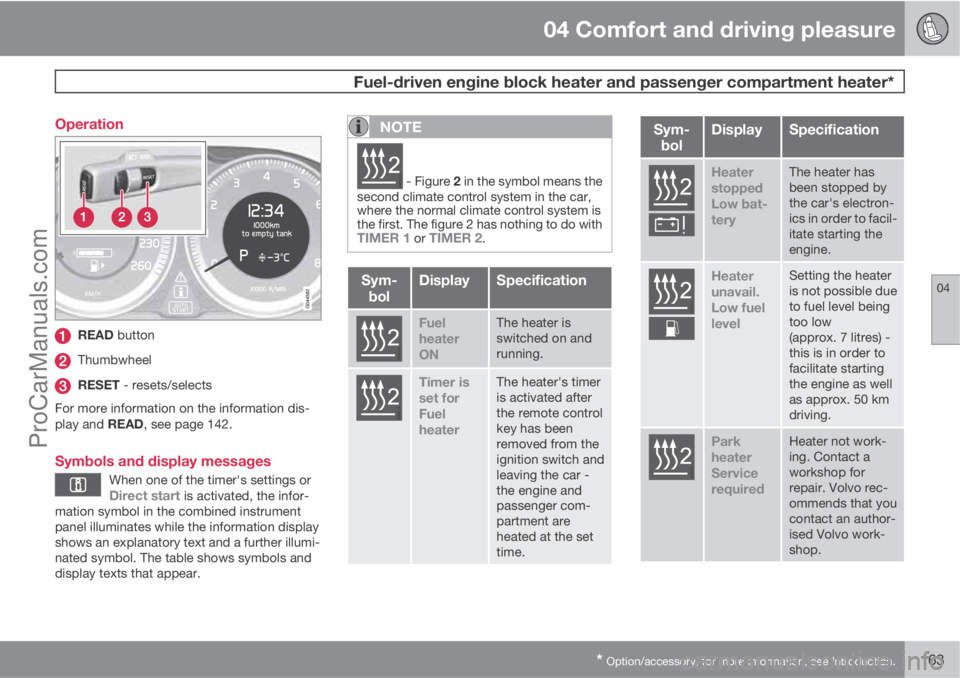
* Option/accessory, for more information, see Introduction.163 Operation
READ button
Thumbwheel
RESET - resets/selects
For more information on the information dis-
play and READ, see page 142.
Symbols and display messages
When one of the timer's settings orDirect start is activated, the infor-
mation symbol in the combined instrument
panel illuminates while the information display
shows an explanatory text and a further illumi-
nated symbol. The table shows symbols and
display texts that appear.
NOTE
G02510
2 - Figure 2 in the symbol means the
second climate control system in the car,
where the normal climate control system is
the first. The figure 2 has nothing to do with
TIMER 1 or TIMER 2.
Sym-
bolDisplaySpecification
G02510
2
Fuel
heater
ONThe heater is
switched on and
running.
G02510
2
Timer is
set for
Fuel
heaterThe heater's timer
is activated after
the remote control
key has been
removed from the
ignition switch and
leaving the car -
the engine and
passenger com-
partment are
heated at the set
time.
Sym-
bolDisplaySpecification
G025102
Heater
stopped
Low bat-
teryThe heater has
been stopped by
the car's electron-
ics in order to facil-
itate starting the
engine.
G025102
Heater
unavail.
Low fuel
levelSetting the heater
is not possible due
to fuel level being
too low
(approx. 7 litres) -
this is in order to
facilitate starting
the engine as well
as approx. 50 km
driving.
G025102
Park
heater
Service
requiredHeater not work-
ing. Contact a
workshop for
repair. Volvo rec-
ommends that you
contact an author-
ised Volvo work-
shop.
ProCarManuals.com
Page 166 of 400
04 Comfort and driving pleasure
Fuel-driven engine block heater and passenger compartment heater*
04
164* Option/accessory, for more information, see Introduction.
A display text clears automatically after a time
or after one press on the indicator stalk
READ button.
Direct start and immediate stop
1.
Scroll with the thumbwheel to Direct start
Park heat.
2.
Press RESET to select between
ON andOFF.
ON: Parking heater switched on manually or
with programmed timer.
OFF: Parking heater switched off.
Following the direct start of the heater it will be
activated for 50 minutes.
Heating of the passenger compartment will
begin as soon as the engine coolant has
reached the correct temperature.
NOTE
The car can be started and driven while the
parking heater is running.
Setting the timer
The time when the car shall be used and heated
is specified with the timer.
Select between
TIMER 1 and TIMER 2.
NOTE
The timer can only be programmed when
the remote control key is in key position I,
see page 80 - programming must therefore
be carried out before starting the engine.
1.
Scroll with the thumbwheel to Park heat
timer 1.
2.
Briefly press RESET to move to the flash-
ing hours setting.
3. Select the required hour using the thumb-
wheel.
4.
Briefly press RESET to move to the flash-
ing minutes setting.
5. Select the required minute using the
thumbwheel.
6.
Briefly press RESET to confirm the setting.
7.
Press RESET to activate the timer.
After setting
Park heat timer 1 a second start
time can be programmed with Park heat timer
2 by scrolling to it with the thumbwheel.Set the alternative time in the same way as
Park heat timer 1.
Deactivating a timer-started heaterA timer-started heater can be switched off
manually before the set time has elapsed. Pro-
ceed as follows:
1.
Press READ.
2. Use the thumbwheel to scroll to the text
Park heat timer 1 or 2.
>
The text
ON flashes on the display.
3.
Press RESET.
>
The text
OFF is shown with a constant
glow and the heater is switched OFF.
A timer-started heater can be switched off in
accordance with the instructions in the section
"Direct start and immediate stop", see
page 164.
Clock/timerThe heater's time is connected to the car's
clock.
NOTE
All timer programming will be cleared if the
car's clock is reset.
ProCarManuals.com
Page 170 of 400
04 Comfort and driving pleasure
DSTC – Stability and traction control system
04
168* Option/accessory, for more information, see Introduction.
General information on DSTC
The stability and traction control system, DSTC
(Dynamic Stability & Traction Control) helps the
driver to avoid skidding and improves the car's
traction.
The activation of the system during braking
may be noticed as a throbbing sound. The car
may accelerate slower than expected when the
accelerator pedal is depressed.
Active Yaw ControlThe function limits the driving and brake force
of the wheels individually in order to stabilise
the car.
Spin ControlThe function prevents the driving wheels from
spinning against the road surface during accel-
eration.
Traction control systemThe function is active at low speed and trans-
fers power from the driving wheel that is spin-
ning to the one that is not.
Engine drag control - EDCEDC (Engine Drag Control) prevents involun-
tary wheel locking, e.g. after shifting down or
engine braking when driving in low gears on
slippery road surfaces.Involuntary wheel locking while driving can,
amongst other things, impair the driver's ability
to steer the car.
Corner Traction Control – CTCCTC compensates for understeer and allows
higher than normal acceleration in a bend with-
out wheelspin on the inner wheel, e.g. on an
arcing motorway entrance road to quickly
reach the prevailing traffic speed.
Trailer Stability Assist* - TSAThe function serves to stabilise the car and
trailer combination if it begins to snake, see
page 288.
NOTE
The function is deactivated if the driver
selects Sport mode.
Operation
Selection of level - Sport modeThe DSTC system is always activated - it can-
not be deactivated.However, the driver can select the Sport mode,
which allows for a more active driving experi-
ence. In Sport mode the system detects
whether the accelerator pedal, steering wheel
movements and cornering are more active than
in normal driving and then allows controlled
skidding with the rear section up to a certain
level before it intervenes and stabilises the car.
If the driver stops a controlled skid by releasing
the accelerator pedal then the DSTC system
intervenes and stabilises the car.
With Sport mode, maximum traction is
obtained if the car has become stuck, or when
driving on a loose surface - e.g. sand or deep
snow.
Proceed as follows to select Sport mode:
1.
Press the centre console button MY CAR
and search in the display screen's menu
system and locate My V60
DSTC. (For
information on the menu system, see
page 144).
2. Uncheck the box and back out of the menu
system with EXIT.
> The system then allows a more sporty
driving style.
The Sport mode is active until the driver dese-
lects it or until the engine is switched off - after
the engine is started the next time the DSTC
system is back in its normal mode again.
ProCarManuals.com
Page 182 of 400
04 Comfort and driving pleasure
Adaptive cruise control*
04
180* Option/accessory, for more information, see Introduction.
NOTE
Activation of the cruise control below
30 km/h requires a vehicle in front within a
reasonable distance.
For shorter stops in connection with inching in
slow traffic or at traffic lights driving is auto-
matically resumed if the stops do not exceed
about 3 seconds - if it takes longer before the
car in front starts moving again then the cruise
control is set in standby mode. The driver must
then re-activate the cruise control in one of the
following ways:
•Press the steering wheel button .
or
•Press the accelerator pedal and accelerate
up to at least about 4 km/h (normal walking
pace).
The cruise control will then resume following
the vehicle in front.
NOTE
The cruise control can hold the car station-
ary for a maximum of 2 minutes - then the
parking brake is applied and the cruise con-
trol is disengaged.
•The driver has to release the parking
brake before the cruise control can be
reactivated.
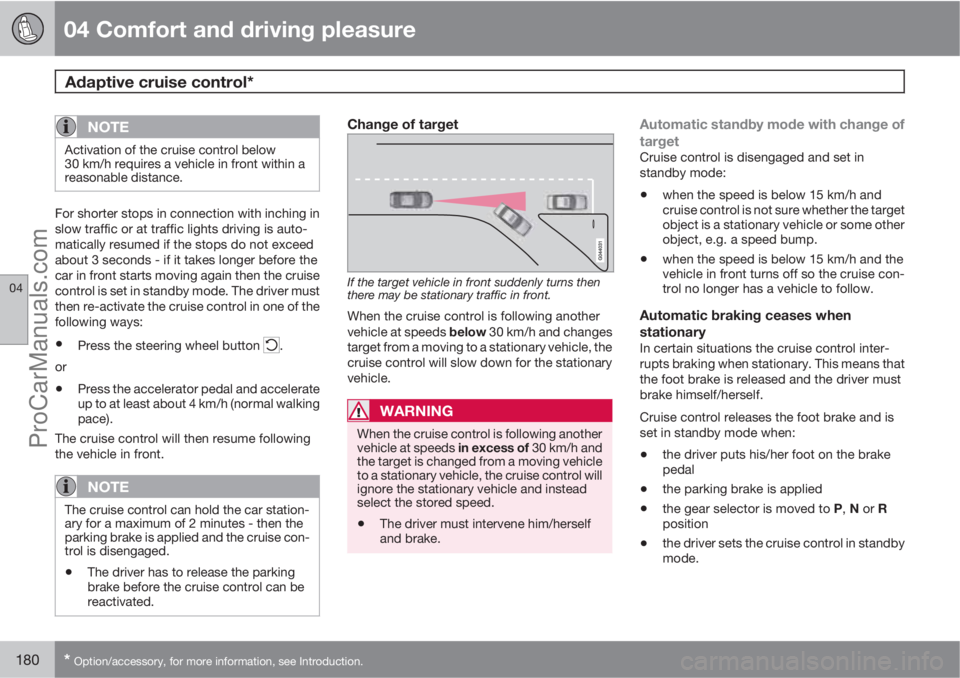
Change of target
If the target vehicle in front suddenly turns then
there may be stationary traffic in front.
When the cruise control is following another
vehicle at speeds below 30 km/h and changes
target from a moving to a stationary vehicle, the
cruise control will slow down for the stationary
vehicle.
WARNING
When the cruise control is following another
vehicle at speeds in excess of 30 km/h and
the target is changed from a moving vehicle
to a stationary vehicle, the cruise control will
ignore the stationary vehicle and instead
select the stored speed.
•The driver must intervene him/herself
and brake.
Automatic standby mode with change of
target
Cruise control is disengaged and set in
standby mode:
•when the speed is below 15 km/h and
cruise control is not sure whether the target
object is a stationary vehicle or some other
object, e.g. a speed bump.
•when the speed is below 15 km/h and the
vehicle in front turns off so the cruise con-
trol no longer has a vehicle to follow.
Automatic braking ceases when
stationary
In certain situations the cruise control inter-
rupts braking when stationary. This means that
the foot brake is released and the driver must
brake himself/herself.
Cruise control releases the foot brake and is
set in standby mode when:
•the driver puts his/her foot on the brake
pedal
•the parking brake is applied
•the gear selector is moved to P, N or R
position
•the driver sets the cruise control in standby
mode.
ProCarManuals.com
Page 233 of 400
05 Infotainment system
Radio
05
231
time and returns when the station is stored.
The preset button can now be used.
A list of pre-selected channels can be shown
2
in the TV screen. The function is activated/
deactivated in FM/AM mode under FM menu
Show presets or AM menuShow
presets.
Scan wavelengthThe function automatically searches the cur-
rent wavelength for strong stations. When a
station is found, it is played for approx. 8 sec-
onds before scanning is resumed. When a sta-
tion is playing back it can be saved as a preset
in the usual way, see the section "Pre-
set" above.
–To start scanning go in FM/AM mode to
FM menu
Scan or AM menuScan.
NOTE
Scanning stops if a station is saved.
RDS functionsRDS (Radio Data System) links FM transmitters
into a network. An FM transmitter in such a
network sends information that gives an RDS
radio the following functions:
•Automatically switches to a stronger trans-
mitter if reception in the area is poor.
•Searches for programme type, such as
traffic information or news.
•Receives text information on current radio
programme.
NOTE
Some radio stations do not use RDS or only
some if its functionality.
If a required programme type is located the
radio can switch stations interrupting the audio
source currently in use. For example, if the CD
player is in use, it is paused. The interrupting
transmission is played at a preset volume, see
page 233. The radio returns to the previous
audio source and volume when the set pro-
gramme type is no longer broadcast.
The programme functions alarm (
ALARM!),
traffic information (TP), news (NEWS), and pro-
gramme types (PTY) interrupt one another in
order of priority, where alarm has the highest
priority and programme types has the lowest.
For additional settings of programming inter-
ruptions (
EON Distant and EON Local), see
the section "Enhanced Other Networks –
EON" below. Press EXIT to return to the inter-rupted audio source, press the OK/MENU to
clear the message.
AlarmThis function is used to warn of serious acci-
dents and catastrophes. The alarm cannot be
temporarily interrupted or deactivated. The
message
ALARM! appears on the TV screen
when an alarm message is transmitted.
Traffic information – TPThis function allows traffic information sent
within a set station's RDS network to break
through. The
TP symbol indicates that the
function is activated. If the preset station can
send traffic information then this is shown by
TP glowing brightly in the TV screen, otherwiseTP will be grey.
–
Activate/deactivate in FM mode under FM
menu
TP.
Enhanced Other Networks – EONThis function is useful in urban areas with many
regional radio stations. It allows the distance
between the car and the radio station trans-
mitter to determine when programme functions
should interrupt the current audio source.
2Only applies to High Performance Multimedia and Premium Sound Multimedia.
ProCarManuals.com
Page 236 of 400
05 Infotainment system
Radio
05
234
Navigation in channel group list
(Ensemble)
To navigate in and access the channel group
list turn TUNE. The name of the Ensemble is
shown in the upper part of the TV screen. When
scrolling to the new Ensemble the name
changes to the new one. A thick grey line sep-
arates the two channel groups from each other.
•Service - Shows channels irrespective of
the channel group to which they are allo-
cated. The list can also be filtered using the
selection of programme type (
PTY
filtering), see below.
ScanningThe function automatically searches the cur-
rent wavelength for strong stations. When a
station is found, it is played for approx. 8 sec-
onds before scanning is resumed. When a sta-
tion is playing back it is saved as a preset in the
usual way. For more information on presets,
see "Preset" below.
–
Go in DAB mode to DAB menu
Scan to
start scanning.
NOTE
Scanning stops if a station is saved.
Scanning can also be selected in DAB-PTY
mode. In which case only channels of the pre-
selected programme type are played.
Programme type (PTY)Various types of radio programmes can be
selected using the programme type function.
There are a number of different programme
types which also include different programme
categories. After selecting a programme type,
navigation only takes place within the channels
that are broadcasting that type.
Programme type is selected in DAB mode
under DAB menu
PTY filtering. Exit this
mode as follows:
–
Press EXIT.
> An indicator is shown in the TV screen
when PTY is activated.
In certain cases DAB radio will exit PTY mode
when DAB to DAB linking (see below) is imple-
mented.
Preset10 station presets can be stored per wave-
length. DAB has 2 memories for presets:
DAB1 and DAB2. Storing of presets is per-
formed in the usual way, for more information
see page 230. The stored presets are selected
using the preset buttons.A preset contains one channel but no sub-
channels. If a subchannel is being played and
a preset is saved then only the main channel is
registered. This is because subchannels are
temporary. At the next attempt to retrieve the
preset, the channel which contained the sub-
channel will be played. The preset is not
dependent on the channel list.
A list of pre-selected channels can be shown
4
in the TV screen. The function is activated/
deactivated in DAB mode under DAB menu
Show presets.
NOTE
The audio system's DAB system does not
support all functions available in the DAB
standard.
Radio textSome radio stations transmit information on
programme content, artists, etc. This informa-
tion is shown on the TV screen.
The function is deactivated/activated in DAB
mode under DAB menu
Show radio text.
4Only applies to High Performance Multimedia and Premium Sound Multimedia
ProCarManuals.com
Page 239 of 400
05 Infotainment system
Media player
05
* Option/accessory, for more information, see Introduction.237
back. Press EXIT to cancel and exit the playlist.
A long press on EXIT leads to the playlist's root
level.
Disc tracks can also be changed by pressing
on
/ on the centre console or the
steering wheel keypad*.
Burned discs audio/video files1
Turn TUNE to access the disc's playlist/folder
structure and navigate in the list/structure. Use
OK/MENU to confirm either selection of sub-
folder or start of playback of the selected
audio/video file. Press EXIT to either stop and
exit the playlist or go up (back) in the folder
structure. A long press on EXIT leads to the
playlist's root level.
Audio/video files can also be changed by
pressing
/ on the centre console or the
steering wheel keypad*.
Audio files have the symbol
, video files1
have the symbol and folders have the
symbol
.
When playback of a file is complete the play-
back of the other files (of the same type) in that
particular folder continues. Change
3 of folder
takes place automatically when all the files inthe current folder have been played back. The
system automatically detects and changes
setting when a disc containing only audio files
or only video files is loaded into the media
player and then plays back these files. How-
ever, the system does not change setting if a
disc containing a mixture of audio and video
files is loaded into the media player, but instead
the player continues to play back the previous
file type.
NOTE
A video film is only shown when the car is
stationary. When the car is moving at a
speed of over about 8 km/h no picture is
shown and
No visual media available
during driving appears on the display
screen, although the audio is heard during
this time. The picture is shown again as
soon as the car's speed falls below about 6
km/h.
NOTE
Some audio files that are copy-protected by
record companies or privately copied audio
files cannot be loaded by the player.
DVD video discs1
For playback of DVD video discs, see
page 238.
Fast forward/reverse
Hold in the buttons / to fast forward/
rewind. Audio files are fast forwarded/rewound
at one speed, while video files are fast forwar-
ded/rewound at several speeds. Repeatedly
press the buttons
/ to increase the fast
forward/rewind speed for video files. Release
the button to return to viewing at normal speed.
Music recognition, GracenoteŸ
If the car is equipped with navigation* then
there is a hard drive in the car that contains a
database for music recognition of CD audio
discs. The database contains the most popular
songs at the moment. If the media player gets
a hit in the database then the album title and
artist name for the media are displayed, and
each track shows track title, artist and album.
If the current CD audio disc is not found in the
database then the CD text from the disc is
used. If there is no CD text on the disc then only
Track 1, Track 2 etc. is displayed.
1Only applies to High Performance Multimedia and Premium Sound Multimedia.3If Repeat folder is activated then this does not take place.
ProCarManuals.com