service VOLVO V60 2012 Owner's Manual
[x] Cancel search | Manufacturer: VOLVO, Model Year: 2012, Model line: V60, Model: VOLVO V60 2012Pages: 400, PDF Size: 9.28 MB
Page 206 of 400
04 Comfort and driving pleasure
Driver Alert System - LDW*
04
204* Option/accessory, for more information, see Introduction.
SymbolMessageSpecification
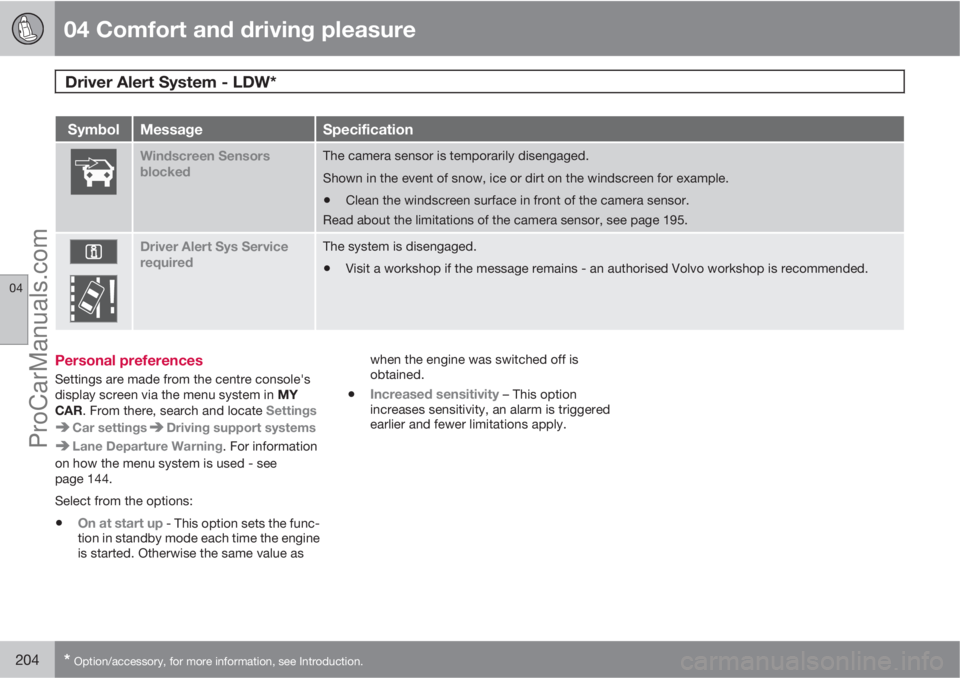
Windscreen Sensors
blockedThe camera sensor is temporarily disengaged.
Shown in the event of snow, ice or dirt on the windscreen for example.
•Clean the windscreen surface in front of the camera sensor.
Read about the limitations of the camera sensor, see page 195.
Driver Alert Sys Service
requiredThe system is disengaged.
•Visit a workshop if the message remains - an authorised Volvo workshop is recommended.
Personal preferences
Settings are made from the centre console's
display screen via the menu system in MY
CAR. From there, search and locate Settings
Car settingsDriving support systems
Lane Departure Warning. For information
on how the menu system is used - see
page 144.
Select from the options:
•On at start up - This option sets the func-
tion in standby mode each time the engine
is started. Otherwise the same value aswhen the engine was switched off is
obtained.
•Increased sensitivity – This option
increases sensitivity, an alarm is triggered
earlier and fewer limitations apply.
ProCarManuals.com
Page 209 of 400
04 Comfort and driving pleasure
Park assist syst*
04
* Option/accessory, for more information, see Introduction.207
IMPORTANT
When fitting auxiliary lamps: Remember that
they must not obscure the sensors – the
auxiliary lamps could then be detected as
obstacles.
Fault indicator
If the information symbol illuminates
with constant glow and the informa-
tion display shows
Park assist syst Service
required then parking assistance is disen-
gaged.
IMPORTANT
In certain conditions the parking assistance
system may produce incorrect warning sig-
nals that are caused by external audio
sources that emit the same ultrasonic fre-
quencies that the system works with.
Examples of such sources include horns,
wet tyres on asphalt, pneumatic brakes and
exhaust noises from motorcycles etc.
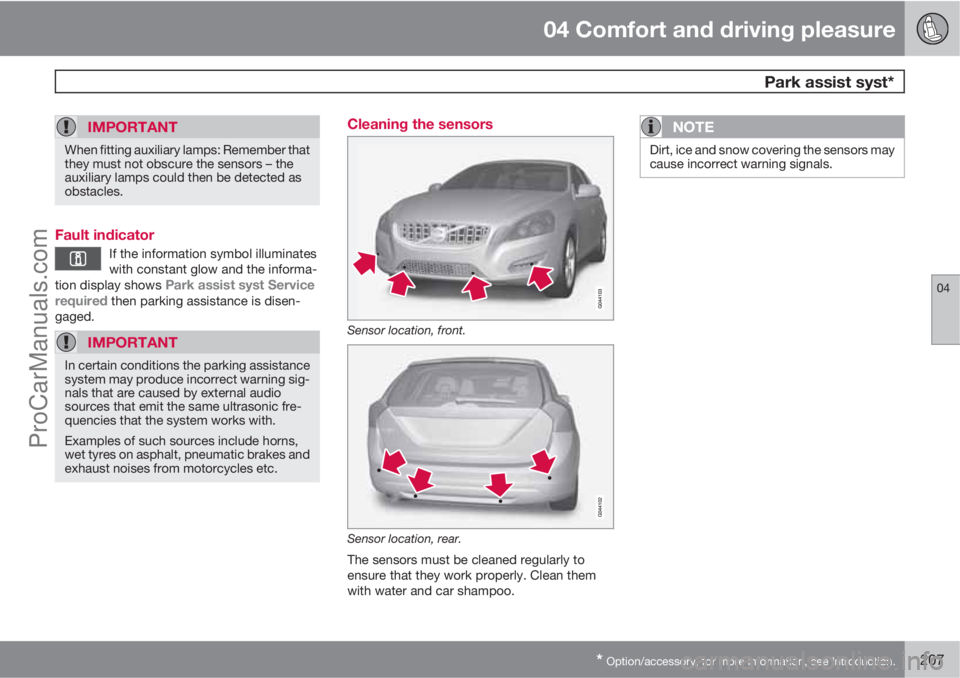
Cleaning the sensors
Sensor location, front.
Sensor location, rear.
The sensors must be cleaned regularly to
ensure that they work properly. Clean them
with water and car shampoo.
NOTE
Dirt, ice and snow covering the sensors may
cause incorrect warning signals.
ProCarManuals.com
Page 215 of 400
04 Comfort and driving pleasure
BLIS* – Blind Spot Information System
04
* Option/accessory, for more information, see Introduction.213 Cleaning
In order to work most effectively the BLIS cam-
era lenses must be clean. The lenses can be
cleaned with a soft cloth or damp sponge.
Clean the lenses carefully so that they are not
scratched.
IMPORTANT
The lenses are electrically heated to melt ice
or snow. If necessary, brush snow away
from the lenses.
Messages on the display
MessageSpecification
Blind-spot info
system ONThe BLIS system is
activated.
Blind spot syst.
Service requiredBlind spot syst. dis-
engaged - contact a
workshop.
Blind spot syst.
Camera blockedThe BLIS camera is
blocked by dirt,
snow or ice - clean
the lenses.
MessageSpecification
Blind spot syst.
Reduced functionReduced function in
the data transmis-
sion between the
BLIS system's cam-
era and the car's
electrical system.
The camera resets
itself when the data
transmission
between the BLIS
system's camera
and the car's electri-
cal system returns to
normal.
Blind-spot info
system OFFThe BLIS system is
deactivated.
IMPORTANT
Repair of the BLIS system components
must only be performed by a workshop - an
authorised Volvo workshop is recom-
mended.
Limitations
In some situations the BLIS indicator lamp may
illuminate despite there being no other vehicle
within the blind spot.
NOTE
If the BLIS indicator lamp illuminates on iso-
lated occasions despite there being no
other vehicle within the blind spot then this
does not mean that a fault has arisen in the
system.
In the event of a fault in the BLIS system the
display shows the text
Blind spot syst.
Service required.
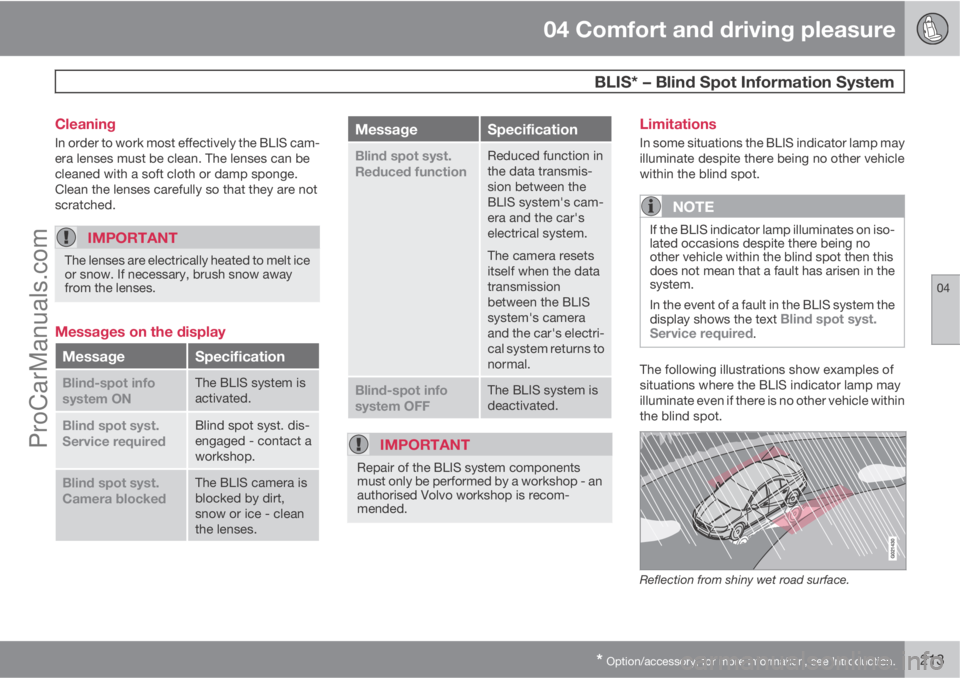
The following illustrations show examples of
situations where the BLIS indicator lamp may
illuminate even if there is no other vehicle within
the blind spot.
Reflection from shiny wet road surface.
ProCarManuals.com
Page 235 of 400
05 Infotainment system
Radio
05
* Option/accessory, for more information, see Introduction.233
Radio textSome RDS stations transmit information on
programme content, artists, etc. This informa-
tion can be shown on the TV screen.
–
Activate/deactivate in FM mode under FM
menu
Show radio text.
Automatic frequency update – AFThe function selects the strongest transmitter
for the set station. In order to find a strong
transmitter the function may, in exceptional
cases, need to search the entire FM wave-
length.
–
Activate/deactivate in FM mode under FM
menu
Advanced settings
Alternative frequency.
Regional radio programmes – REGThis function causes the radio to continue with
a regional transmitter even if its signal strength
is low. The symbol
REG shows that the func-
tion is active.
–
Activate/deactivate in FM mode under FM
menu
Advanced settingsREG.
Resetting RDS functionsAll radio settings can be reset to the original
factory settings.–The reset is carried out in FM mode under
FM menu
Advanced settings
Reset all FM settings.
Volume control, programme typesThe interrupting programme types, e.g.NEWS or TP, are heard at the volume selected
for each respective programme type. If the vol-
ume level is adjusted during the programme
interruption, the new level is saved until the
next programme interruption.
Radio system - DAB*
GeneralDAB (Digital Audio Broadcasting) is a digital
broadcasting system for radio.
NOTE
This system does not support DAB+.
NOTE
Coverage for DAB is not available in all loca-
tions. If there is no coverage then the mes-
sage
No reception is shown in the display
screen.
Service and Ensemble
•Service - Channel, radio channel (only
audio services are supported by the sys-
tem).
•Ensemble - A collection of radio channels
on the same frequency.
Storing channel groups (Ensemble learn)When the vehicle is moved to a new broad-
casting area, programming of existing channel
groups in the area may be necessary.
Programming of channel groups creates an
updated list of all available channel groups.
The list is not updated automatically.
Programming is carried out in the menu system
in DAB mode under DAB menu
Ensemble
learn. Programming can also take place as fol-
lows:
1.
Turn TUNE one step in either direction.
>
Ensemble learn is shown in the list of
available channel groups.
2.
Press OK/MENU.
> New programming is started.
Programming can be cancelled with EXIT.
If can take up to a minute to program a channel
group if both
Band III and LBand are selected.
For more information on wavelength, see
page 235.
ProCarManuals.com
Page 236 of 400
05 Infotainment system
Radio
05
234
Navigation in channel group list
(Ensemble)
To navigate in and access the channel group
list turn TUNE. The name of the Ensemble is
shown in the upper part of the TV screen. When
scrolling to the new Ensemble the name
changes to the new one. A thick grey line sep-
arates the two channel groups from each other.
•Service - Shows channels irrespective of
the channel group to which they are allo-
cated. The list can also be filtered using the
selection of programme type (
PTY
filtering), see below.
ScanningThe function automatically searches the cur-
rent wavelength for strong stations. When a
station is found, it is played for approx. 8 sec-
onds before scanning is resumed. When a sta-
tion is playing back it is saved as a preset in the
usual way. For more information on presets,
see "Preset" below.
–
Go in DAB mode to DAB menu
Scan to
start scanning.
NOTE
Scanning stops if a station is saved.
Scanning can also be selected in DAB-PTY
mode. In which case only channels of the pre-
selected programme type are played.
Programme type (PTY)Various types of radio programmes can be
selected using the programme type function.
There are a number of different programme
types which also include different programme
categories. After selecting a programme type,
navigation only takes place within the channels
that are broadcasting that type.
Programme type is selected in DAB mode
under DAB menu
PTY filtering. Exit this
mode as follows:
–
Press EXIT.
> An indicator is shown in the TV screen
when PTY is activated.
In certain cases DAB radio will exit PTY mode
when DAB to DAB linking (see below) is imple-
mented.
Preset10 station presets can be stored per wave-
length. DAB has 2 memories for presets:
DAB1 and DAB2. Storing of presets is per-
formed in the usual way, for more information
see page 230. The stored presets are selected
using the preset buttons.A preset contains one channel but no sub-
channels. If a subchannel is being played and
a preset is saved then only the main channel is
registered. This is because subchannels are
temporary. At the next attempt to retrieve the
preset, the channel which contained the sub-
channel will be played. The preset is not
dependent on the channel list.
A list of pre-selected channels can be shown
4
in the TV screen. The function is activated/
deactivated in DAB mode under DAB menu
Show presets.
NOTE
The audio system's DAB system does not
support all functions available in the DAB
standard.
Radio textSome radio stations transmit information on
programme content, artists, etc. This informa-
tion is shown on the TV screen.
The function is deactivated/activated in DAB
mode under DAB menu
Show radio text.
4Only applies to High Performance Multimedia and Premium Sound Multimedia
ProCarManuals.com
Page 272 of 400
06 During your journey
Recommendations during driving
06
270
General
Economical drivingDriving economically means driving smoothly
while thinking ahead and adjusting your driving
style and speed to the prevailing conditions.
•Drive in the highest gear possible, adapted
to the current traffic situation and road -
lower engine speeds result in lower fuel
consumption.
•Avoid driving with open windows.
•Avoid sudden unnecessary acceleration
and heavy braking.
•Remove unnecessary items from the car -
the greater the load the higher the fuel con-
sumption.
•Use engine braking to slow down, when it
can take place without risk to other road
users.
•A roof load and ski box increase air resis-
tance, leading to higher fuel consumption
- remove the load carriers when not in use.
•Do not run the engine to operating tem-
perature at idling speed, but rather drive
with a light load as soon as possible - a
cold engine consumes more fuel than a
warm one.
•Cars with the D5 engine and 6-speed man-
ual transmission or DRIVe engine and 6-
speed manual transmission are started in2nd gear under normal conditions on level
ground.
For more information and further advice, see
the pages 12 and 363.
WARNING
Never switch off the engine while moving,
such as downhill, this deactivates important
systems such as the power steering and
brake servo.
Driving in waterThe car can be driven through water at a maxi-
mum depth of 25 cm at a maximum speed of
10 km/h. Extra caution should be exercised
when passing through flowing water.
During driving in water, maintain a low speed
and do not stop the car. When the water has
been passed, depress the brake pedal lightly
and check that full brake function is achieved.
Water and mud for example can make the
brake linings wet resulting in delayed brake
function.
•Clean the electric contacts of the electric
engine block heater and trailer coupling
after driving in water and mud.
•Do not let the car stand with water over the
sills for any long period of time - this could
cause electrical malfunctions.
IMPORTANT
Engine damage can occur if water enters
the air filter.
In depths greater than 25 cm, water could
enter the transmission. This reduces the
lubricating ability of the oils and shortens
the service life of these systems.
In the event of the engine stalling in water,
do not try restart - tow the car from the water
to a workshop - an authorised Volvo work-
shop is recommended. Risk of engine
breakdown.
Engine, gearbox and cooling systemUnder special conditions, for example hard
driving in hilly terrain and hot climate, there is
a risk that the engine and drive system may
overheat - in particular with a heavy load.
For information about overheating when driv-
ing with a trailer, see page 283.
•Remove any auxiliary lamps from in front
of the grille when driving in hot climates.
•If the temperature in the engine's cooling
system is too high the instrument panel's
warning symbol is illuminated and there is
a text message displayed there
High
engine temp Stop safely - stop the car in
a safe way and allow the engine to run at
idling speed for several minutes to cool
down.
ProCarManuals.com
Page 276 of 400
06 During your journey
Fuel
06
274
General information on fuel
Fuel of a lower quality than that recommended
by Volvo must not be used as engine power
and fuel consumption is negatively affected.
WARNING
Always avoid inhaling fuel vapour and get-
ting fuel splashes in the eyes.
In the event of fuel in the eyes, remove any
contact lenses and rinse the eyes in plenty
of water for at least 15 minutes and seek
medical attention.
Never swallow fuel. Fuels such as petrol,
bioethanol and mixtures of them and diesel
are highly toxic and could cause permanent
injury or be fatal if swallowed. Seek medical
attention immediately if fuel has been swal-
lowed.
WARNING
Fuel which spills onto the ground can be
ignited.
Switch off the fuel-driven heater before star-
ting to refuel.
Never carry an activated mobile phone
when refuelling. The ring signal could cause
spark build-up and ignite petrol fumes,
leading to fire and injury.
IMPORTANT
Mixing different types of fuel or the use of
fuel not recommended invalidates Volvo's
guarantees, and any associated service
agreement. This applies to all engines.
NOTE: It does not apply to cars with engines
that are adapted to run on ethanol fuel (E85).
NOTE
Extreme weather conditions, driving with a
trailer or driving at high altitudes in combi-
nation with fuel grade are factors that could
affect the car's performance.
Catalytic convertersThe purpose of the catalytic converters is to
purify exhaust gases. They are located close to
the engine so that operating temperature is
reached quickly.
The catalytic converters consist of a monolith
(ceramic or metal) with channels. The channel
walls are lined with a thin layer of platinum/rho-
dium/palladium. These metals act as catalysts,
i.e. they participate in and accelerate a chem-
ical reaction without being used up them-
selves.
Lambda-sondTM oxygen sensorThe Lambda-sond is part of a control system
intended to reduce emissions and improve fuel
economy.
An oxygen sensor monitors the oxygen content
of the exhaust gases leaving the engine. This
value is fed into an electronic system that con-
tinuously controls the injectors. The ratio of fuel
to air directed to the engine is continuously
adjusted. These adjustments create optimal
conditions for efficient combustion, and
together with the three-way catalytic converter
reduce harmful emissions (hydrocarbons, car-
bon monoxide and nitrous oxides).
Petrol
Petrol must fulfil the EN 228 standard. Most
engines can be run with octane ratings of 95
and 98 RON. Only in exceptional cases should
91 RON be used.
•95 RON can be used for normal driving.
•98 RON is recommended for optimum per-
formance and minimum fuel consumption.
When driving in temperatures above +38 °C,
fuel with the highest possible octane rating is
recommended for optimum performance and
fuel economy.
ProCarManuals.com
Page 278 of 400
06 During your journey
Fuel
06
276* Option/accessory, for more information, see Introduction.
tank may need to be vented in the workshop in
order to restart the engine after fuelling.
Once the engine has stopped due to fuel star-
vation, the fuel system needs a few moments
to carry out a check. Do this before starting the
engine, once the fuel tank has been filled with
diesel:
1. Insert the remote control key in the ignition
switch and push it in to the end position
(see page 80).
2.
Press the START button without depress-
ing the brake and/or clutch pedal.
3. Wait approx. 1 minute.
4. To start the engine: Depress the brake and/
or clutch pedal and then press the
START button again.
NOTE
Before filling with fuel in the event of fuel
shortage:
•Stop the car on as flat/level ground as
possible - if the car is tilting there is a
risk of air pockets in the fuel supply.
Draining condensation from the fuel filterThe fuel filter separates condensation from the
fuel. Condensation can disrupt engine opera-
tion.The fuel filter must be drained at the intervals
specified in the Service and Warranty Booklet
or if you suspect that the car has been filled
with contaminated fuel.
IMPORTANT
Certain special additives remove the water
separation in the fuel filter.
Diesel particle filter (DPF)Diesel cars are equipped with a particle filter,
which results in more efficient emission con-
trol. The particles in the exhaust gases are col-
lected in the filter during normal driving. So-
called "regeneration" is started in order to burn
away the particles and empty the filter. This
requires the engine to have reached normal
operating temperature.
Regeneration of the filter is automatic and nor-
mally takes 10-20 minutes. It may take a little
longer at a low average speed. Fuel consump-
tion may increase slightly during regeneration.
Regeneration in cold weatherIf the car is frequently driven short distances in
cold weather then the engine does not reach
normal operating temperature. This means that
regeneration of the diesel particle filter does
not take place and the filter is not emptied.When the filter has become approximately
80% full of particles, a warning triangle on the
instrument panel illuminates, and the message
Soot filter full See manual is shown on the
instrument panel display.
Start regeneration of the filter by driving the car
until the engine reaches normal operating tem-
perature, preferably on a main road or motor-
way. The car should then be driven for approx-
imately 20 minutes more.
NOTE
A smaller reduction of engine power may be
noticed temporarily during regeneration.
When regeneration is complete the warning
text is cleared automatically.
Use the parking heater* in cold weather so that
the engine reaches normal operating tempera-
ture more quickly.
IMPORTANT
If the filter fills up with particles then it can
be difficult to start the engine and the filter
will be incapable of functioning. Then there
is a risk that the filter will have to be
replaced.
ProCarManuals.com
Page 292 of 400
06 During your journey
Towing and recovery
06
290
Jump startingDo not tow the car to bump start the engine.
Use a donor battery if the battery is discharged
and the engine does not start, see page 116.
IMPORTANT
The catalytic converter may be damaged
during attempts to tow-start the engine.
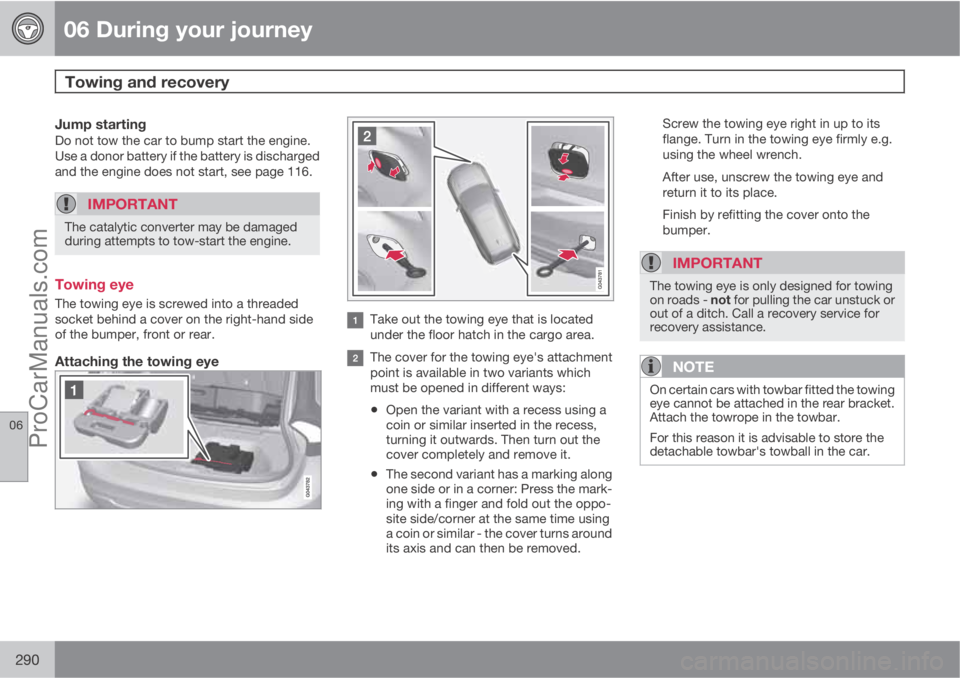
Towing eye
The towing eye is screwed into a threaded
socket behind a cover on the right-hand side
of the bumper, front or rear.
Attaching the towing eye
Take out the towing eye that is located
under the floor hatch in the cargo area.
The cover for the towing eye's attachment
point is available in two variants which
must be opened in different ways:
•Open the variant with a recess using a
coin or similar inserted in the recess,
turning it outwards. Then turn out the
cover completely and remove it.
•The second variant has a marking along
one side or in a corner: Press the mark-
ing with a finger and fold out the oppo-
site side/corner at the same time using
a coin or similar - the cover turns around
its axis and can then be removed.Screw the towing eye right in up to its
flange. Turn in the towing eye firmly e.g.
using the wheel wrench.
After use, unscrew the towing eye and
return it to its place.
Finish by refitting the cover onto the
bumper.
IMPORTANT
The towing eye is only designed for towing
on roads - not for pulling the car unstuck or
out of a ditch. Call a recovery service for
recovery assistance.
NOTE
On certain cars with towbar fitted the towing
eye cannot be attached in the rear bracket.
Attach the towrope in the towbar.
For this reason it is advisable to store the
detachable towbar's towball in the car.
ProCarManuals.com
Page 293 of 400
06 During your journey
Towing and recovery
06
291 Recovery
Call a recovery service for recovery assistance.
IMPORTANT
Note that the car must always be transpor-
ted with the wheels rolling forward.
•An All Wheel Drive car (AWD) with raised
front suspension must not be towed at
speeds above 70 km/h. It should not be
towed further than 50 km.
ProCarManuals.com