display VOLVO V60 2012 Manual Online
[x] Cancel search | Manufacturer: VOLVO, Model Year: 2012, Model line: V60, Model: VOLVO V60 2012Pages: 400, PDF Size: 9.28 MB
Page 231 of 400
05 Infotainment system
Radio
05
* Option/accessory, for more information, see Introduction.229 Radio functions, general
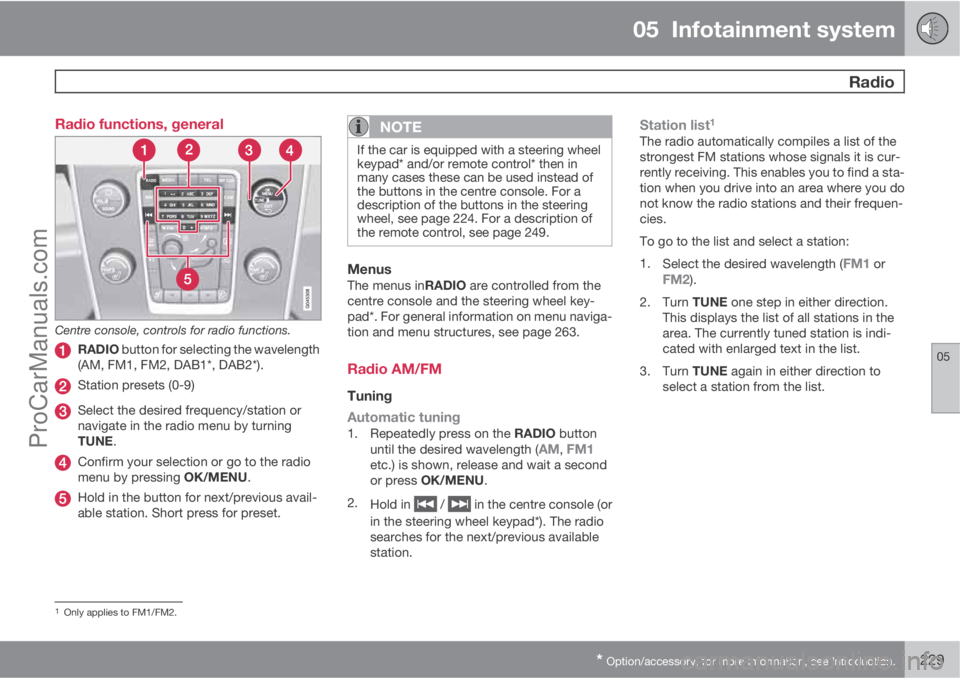
Centre console, controls for radio functions.
RADIO button for selecting the wavelength
(AM, FM1, FM2, DAB1*, DAB2*).
Station presets (0-9)
Select the desired frequency/station or
navigate in the radio menu by turning
TUNE.
Confirm your selection or go to the radio
menu by pressing OK/MENU.
Hold in the button for next/previous avail-
able station. Short press for preset.
NOTE
If the car is equipped with a steering wheel
keypad* and/or remote control* then in
many cases these can be used instead of
the buttons in the centre console. For a
description of the buttons in the steering
wheel, see page 224. For a description of
the remote control, see page 249.
MenusThe menus inRADIO are controlled from the
centre console and the steering wheel key-
pad*. For general information on menu naviga-
tion and menu structures, see page 263.
Radio AM/FM
Tuning
Automatic tuning
1.
Repeatedly press on the RADIO button
until the desired wavelength (AM, FM1etc.) is shown, release and wait a second
or press OK/MENU.
2.
Hold in
/ in the centre console (or
in the steering wheel keypad*). The radio
searches for the next/previous available
station.
Station list1
The radio automatically compiles a list of the
strongest FM stations whose signals it is cur-
rently receiving. This enables you to find a sta-
tion when you drive into an area where you do
not know the radio stations and their frequen-
cies.
To go to the list and select a station:
1.
Select the desired wavelength (
FM1 orFM2).
2.
Turn TUNE one step in either direction.
This displays the list of all stations in the
area. The currently tuned station is indi-
cated with enlarged text in the list.
3.
Turn TUNE again in either direction to
select a station from the list.
1Only applies to FM1/FM2.
ProCarManuals.com
Page 234 of 400
05 Infotainment system
Radio
05
232
–Activate/deactivate in FM mode by select-
ing one of the options under FM menu
Advanced settingsEON:
•Local – interrupts only if the radio station
transmitter is close.
•Distant3 – interrupts if the station trans-
mitter is far away, even if there is a lot of
static.
TP from selected station/all stationsThe radio can only interrupt for traffic informa-
tion from the selected station or all stations
within the RDS network.
–
Go in FM mode to FM menu
Advanced
settings
Set TP favourite to change.
NewsThis function allows news broadcasts sent
within a set station's RDS network to break
through. The
NEWS symbol indicates that the
function is active.
–
Activate/deactivate in FM mode under FM
menu
News settingsNews.
News from selected station/all stationsThe radio can only interrupt for news from the
selected station or all stations in the RDS net-
work.–
Go in FM mode to FM menu
News
settings
Set news favourite to change.
Programme types – PTYThe PTY function can be used to select one or
more programme types, such as pop music
and serious classic. The PTY symbol indicates
that the function is active. This function allows
programme types broadcast within a set sta-
tion's RDS network to break through.
1. Activate in FM mode by first selecting the
programme types under FM menu
Advanced settingsPTY settings
Select PTY.
2. Then the PTY function must be activated
under FM menu
Advanced settings
PTY settingsReceive traffic
bulletins from other networks.
An indicator is shown in the TV screen when
PTY is activated.
Deactivation of the PTY function is performed
in FM mode under FM menu
Advanced
settings
PTY settingsReceive traffic
bulletins from other networks. Selected pro-
gramme types (PTY) are not reset.Resetting and removing PTY are performed
under FM menu
Advanced settings
PTY settingsSelect PTYClear all.
PTY searchThis function searches the entire wavelength
for the selected programme type.
1. In FM mode select one or more PTY under
FM menu
Advanced settingsPTY
settings
Select PTY.
2.
Go to FM menu
Advanced settings
PTY settingsSeek PTY.
To finish searching, press EXIT.
–To continue searching for another broad-
cast of the selected programme types,
press on
or .
Display of programme typeThe programme type of the current station can
be shown on the TV screen.
–
Activate/deactivate in FM mode under FM
menu
Advanced settingsPTY
settings
Show PTY text.
3Factory settings.
ProCarManuals.com
Page 235 of 400
05 Infotainment system
Radio
05
* Option/accessory, for more information, see Introduction.233
Radio textSome RDS stations transmit information on
programme content, artists, etc. This informa-
tion can be shown on the TV screen.
–
Activate/deactivate in FM mode under FM
menu
Show radio text.
Automatic frequency update – AFThe function selects the strongest transmitter
for the set station. In order to find a strong
transmitter the function may, in exceptional
cases, need to search the entire FM wave-
length.
–
Activate/deactivate in FM mode under FM
menu
Advanced settings
Alternative frequency.
Regional radio programmes – REGThis function causes the radio to continue with
a regional transmitter even if its signal strength
is low. The symbol
REG shows that the func-
tion is active.
–
Activate/deactivate in FM mode under FM
menu
Advanced settingsREG.
Resetting RDS functionsAll radio settings can be reset to the original
factory settings.–The reset is carried out in FM mode under
FM menu
Advanced settings
Reset all FM settings.
Volume control, programme typesThe interrupting programme types, e.g.NEWS or TP, are heard at the volume selected
for each respective programme type. If the vol-
ume level is adjusted during the programme
interruption, the new level is saved until the
next programme interruption.
Radio system - DAB*
GeneralDAB (Digital Audio Broadcasting) is a digital
broadcasting system for radio.
NOTE
This system does not support DAB+.
NOTE
Coverage for DAB is not available in all loca-
tions. If there is no coverage then the mes-
sage
No reception is shown in the display
screen.
Service and Ensemble
•Service - Channel, radio channel (only
audio services are supported by the sys-
tem).
•Ensemble - A collection of radio channels
on the same frequency.
Storing channel groups (Ensemble learn)When the vehicle is moved to a new broad-
casting area, programming of existing channel
groups in the area may be necessary.
Programming of channel groups creates an
updated list of all available channel groups.
The list is not updated automatically.
Programming is carried out in the menu system
in DAB mode under DAB menu
Ensemble
learn. Programming can also take place as fol-
lows:
1.
Turn TUNE one step in either direction.
>
Ensemble learn is shown in the list of
available channel groups.
2.
Press OK/MENU.
> New programming is started.
Programming can be cancelled with EXIT.
If can take up to a minute to program a channel
group if both
Band III and LBand are selected.
For more information on wavelength, see
page 235.
ProCarManuals.com
Page 237 of 400
05 Infotainment system
Radio
05
235
NOTE
Only one of the functions "Show radio
text" and "Show presets" can be acti-
vated at a time. If one of them is activated
when the other is already activated, then the
previously activated function is deactivated
automatically. Both functions can be deac-
tivated.
Advanced settings
DAB to DAB link
It is possible to exit a channel with poor or no
reception to the same channel in another chan-
nel group with better reception. There may be
a certain delay when changing channel group.
There may be a period of silence between the
current channel no longer being available to the
new channel becoming available.
The function can be activated/deactivated in
DAB mode under DAB menu
Advanced
settings
DAB linking.
Wavelength
DAB can be transmitted on two5 wavelengths:
•Band III - covers areas outside big cities
•LBand - mainly in large cities
By selecting for example
Band III on its own,
channel programming takes place morequickly than if both
Band III and LBand have
been selected. It is not certain that all channel
groups will be found. Wavelength selection
does not affect the stored memories.
Wavelengths can be deactivated/activated in
DAB mode under DAB menu
Advanced
settings
DAB band.
SubchannelSecondary components are usually named
subchannels. These are temporary and can
contain e.g. translations of the main pro-
gramme into other languages.
If one or more subchannels are broadcast then
the
> symbol is shown to the left of the channel
name in the TV screen. A subchannel is indi-
cated by the
- symbol appearing to the left of
the channel name in the TV screen.
Subchannels can only be accessed on the
selected main channel and not on any other
channel without selecting it.
Display of subchannels can be deactivated/
activated in DAB mode under DAB menu
Advanced settingsSub channels
Programme type textSome radio stations broadcast information
about programme type and programme cate-gory. This information is shown on the TV
screen.
The function is activated/deactivated in DAB
mode under DAB menu
Advanced
settings
Show PTY text.
Resetting the DAB settingsAll DAB settings can be reset to the original
factory settings.
–The reset is carried out in DAB mode under
DAB menu
Advanced settings
Reset all DAB settings.
5Not all areas/countries use both wavelengths.
ProCarManuals.com
Page 239 of 400
05 Infotainment system
Media player
05
* Option/accessory, for more information, see Introduction.237
back. Press EXIT to cancel and exit the playlist.
A long press on EXIT leads to the playlist's root
level.
Disc tracks can also be changed by pressing
on
/ on the centre console or the
steering wheel keypad*.
Burned discs audio/video files1
Turn TUNE to access the disc's playlist/folder
structure and navigate in the list/structure. Use
OK/MENU to confirm either selection of sub-
folder or start of playback of the selected
audio/video file. Press EXIT to either stop and
exit the playlist or go up (back) in the folder
structure. A long press on EXIT leads to the
playlist's root level.
Audio/video files can also be changed by
pressing
/ on the centre console or the
steering wheel keypad*.
Audio files have the symbol
, video files1
have the symbol and folders have the
symbol
.
When playback of a file is complete the play-
back of the other files (of the same type) in that
particular folder continues. Change
3 of folder
takes place automatically when all the files inthe current folder have been played back. The
system automatically detects and changes
setting when a disc containing only audio files
or only video files is loaded into the media
player and then plays back these files. How-
ever, the system does not change setting if a
disc containing a mixture of audio and video
files is loaded into the media player, but instead
the player continues to play back the previous
file type.
NOTE
A video film is only shown when the car is
stationary. When the car is moving at a
speed of over about 8 km/h no picture is
shown and
No visual media available
during driving appears on the display
screen, although the audio is heard during
this time. The picture is shown again as
soon as the car's speed falls below about 6
km/h.
NOTE
Some audio files that are copy-protected by
record companies or privately copied audio
files cannot be loaded by the player.
DVD video discs1
For playback of DVD video discs, see
page 238.
Fast forward/reverse
Hold in the buttons / to fast forward/
rewind. Audio files are fast forwarded/rewound
at one speed, while video files are fast forwar-
ded/rewound at several speeds. Repeatedly
press the buttons
/ to increase the fast
forward/rewind speed for video files. Release
the button to return to viewing at normal speed.
Music recognition, GracenoteŸ
If the car is equipped with navigation* then
there is a hard drive in the car that contains a
database for music recognition of CD audio
discs. The database contains the most popular
songs at the moment. If the media player gets
a hit in the database then the album title and
artist name for the media are displayed, and
each track shows track title, artist and album.
If the current CD audio disc is not found in the
database then the CD text from the disc is
used. If there is no CD text on the disc then only
Track 1, Track 2 etc. is displayed.
1Only applies to High Performance Multimedia and Premium Sound Multimedia.3If Repeat folder is activated then this does not take place.
ProCarManuals.com
Page 240 of 400
05 Infotainment system
Media player
05
238* Option/accessory, for more information, see Introduction.
Scan4
This function plays the first ten seconds of
each disc track/audio file. To scan:
1.
Press OK/MENU
2.
Turn TUNE to
Scan
> The first 10 seconds of each disc track
or audio file are played.
3.
Cancel the scan with EXIT, the disc track
or audio file being played back will con-
tinue playing.
Random4
This function plays the tracks in random order.
To listen to the tracks in random order:
1.
Press OK/MENU
2.
Turn TUNE to
Random
3.
Press OK/MENU to activate/deactivate
the function.
Disc tracks/audio files can be changed by
pressing
/ on the centre console or the
steering wheel keypad*.
Repeat folder5
This function makes it possible to play files in
a folder over and over again. When the last filehas been played out, playback of the first file
starts again.
1.
Press OK/MENU
2.
Turn TUNE to
Repeat folder
3.
Press OK/MENU to activate/deactivate
the function.
Playback of DVD video discs1
PlaybackWhen playing back a DVD video disc a disc
menu may appear on the display screen. The
disc menu gives access to additional functions
and settings, such as selecting subtitles, lan-
guage and scene selection.
NOTE
A video film is only shown when the car is
stationary. When the car is moving at a
speed of over about 8 km/h no picture is
shown and
No visual media available
during driving appears on the display
screen, although the audio is heard during
this time. The picture is shown again as
soon as the car's speed falls below about 6
km/h.
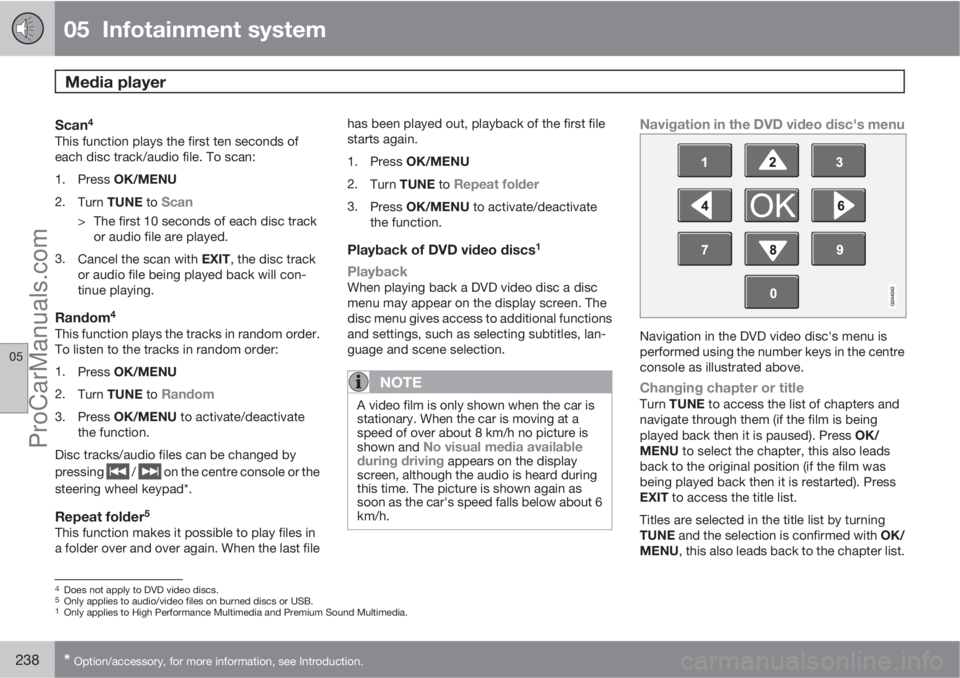
Navigation in the DVD video disc's menu
Navigation in the DVD video disc's menu is
performed using the number keys in the centre
console as illustrated above.
Changing chapter or titleTurn TUNE to access the list of chapters and
navigate through them (if the film is being
played back then it is paused). Press OK/
MENU to select the chapter, this also leads
back to the original position (if the film was
being played back then it is restarted). Press
EXIT to access the title list.
Titles are selected in the title list by turning
TUNE and the selection is confirmed with OK/
MENU, this also leads back to the chapter list.
4Does not apply to DVD video discs.5Only applies to audio/video files on burned discs or USB.1Only applies to High Performance Multimedia and Premium Sound Multimedia.
ProCarManuals.com
Page 248 of 400
05 Infotainment system
TV*
05
246* Option/accessory, for more information, see Introduction.
TV*
General
NOTE
This system only supports TV transmissions
in countries which transmit signals in
mpeg-2 format and follow the DVB-T stand-
ard. The system does not support TV trans-
missions in mpeg-4 format or analogue
transmissions.
NOTE
The TV picture is only shown when the car
is stationary. When the car is moving at a
speed over about 6 km/h the picture disap-
pears,
No visual media available during
driving appears on the display screen,
although the audio is heard during this time.
The picture reappears when the car has
stopped.
NOTE
The reception is dependent both on how
good the signal strength and signal quality
are. The transmission may be disturbed by
various factors such as tall buildings or the
TV transmitter being far away. Coverage
level can also vary depending on where in
the country you are located.
IMPORTANT
A TV licence is required for this product in
some countries.
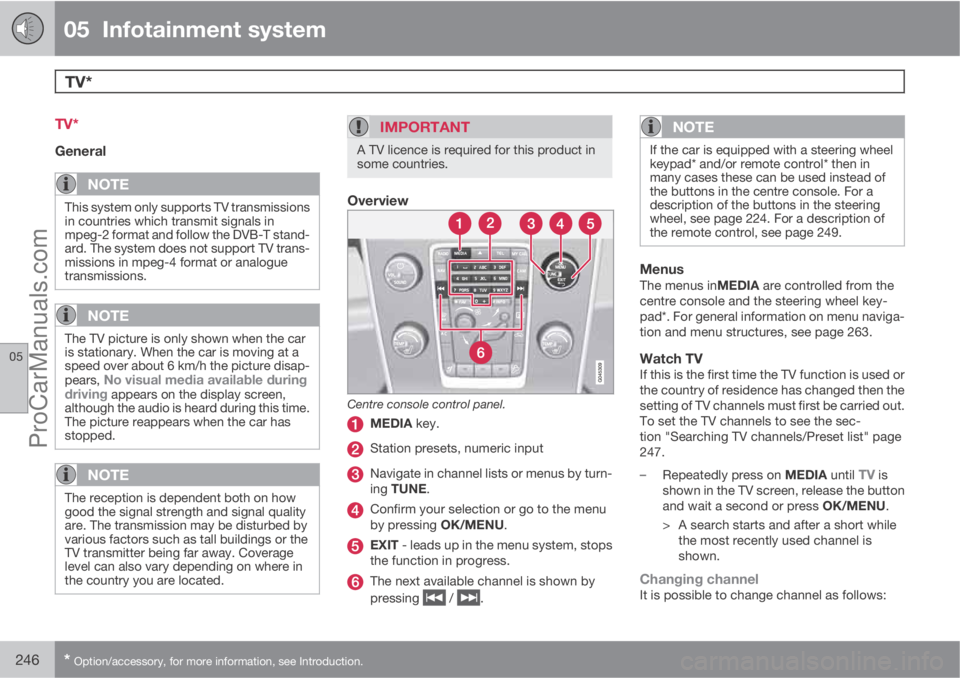
Overview
Centre console control panel.
MEDIA key.
Station presets, numeric input
Navigate in channel lists or menus by turn-
ing TUNE.
Confirm your selection or go to the menu
by pressing OK/MENU.
EXIT - leads up in the menu system, stops
the function in progress.
The next available channel is shown by
pressing
/ .
NOTE
If the car is equipped with a steering wheel
keypad* and/or remote control* then in
many cases these can be used instead of
the buttons in the centre console. For a
description of the buttons in the steering
wheel, see page 224. For a description of
the remote control, see page 249.
MenusThe menus inMEDIA are controlled from the
centre console and the steering wheel key-
pad*. For general information on menu naviga-
tion and menu structures, see page 263.
Watch TVIf this is the first time the TV function is used or
the country of residence has changed then the
setting of TV channels must first be carried out.
To set the TV channels to see the sec-
tion "Searching TV channels/Preset list" page
247.
–
Repeatedly press on MEDIA until
TV is
shown in the TV screen, release the button
and wait a second or press OK/MENU.
> A search starts and after a short while
the most recently used channel is
shown.
Changing channelIt is possible to change channel as follows:
ProCarManuals.com
Page 250 of 400
05 Infotainment system
TV*
05
248* Option/accessory, for more information, see Introduction.
Save the available TV channels as
presets
If the car has been moved within the country,
for example, from one city to another, it is not
certain that the presets are available at the new
location as the frequency range may have
changed. In which case, carry out another scan
and save a new preset list.
1.
Press TV mode on OK/MENU.
2.
Turn TUNE to
TV menu and press OK/
MENU.
3.
Turn TUNE to
Autostore and press OK/
MENU.
> An automatic scan for available TV
channels starts, this scan takes a little
while. During this time the figure for
each channel found and added as a pre-
set is shown. When the scan is com-
plete a message is shown and the pic-
ture is shown. A preset list (max. 30 pre-
sets) has now been created and is avail-
able. To change channel, see
page 246.
Scanning the TV channelsThis function automatically scans through the
frequency range for all channels available in the
area where you are. When a channel is found,
it is shown for approx. 10 seconds before
scanning is resumed. Scanning is stopped withEXIT, then the channel that you just watched
continues to be shown. Scanning does not
affect the preset list.
Activate scanning in TV mode under TV menu
Scan.
TeletextIt is possible to read Teletext. Follow these
steps:
1.
Press the
button on the remote con-
trol.
2. Enter the page number (3 digits) with the
number keys (0-9) to select page.
> The page is shown automatically.
Enter new page number, or press the remote
control buttons
/ to go to the next page.
Return to TV screen with EXIT or by pressing
the
button on the remote control.
It is also possible to control the teletext with the
coloured buttons on the remote control.
Information about the current
programme
Press the INFO button in order to display the
information about the current programme, the
next programme and its start time. If the
INFO button is pressed once more then addi-
tional information on the current programmecan sometimes be displayed, such as start and
end times and a brief description of the current
programme. For more information on the
INFO button, see page 226.
To return to the TV picture, wait several sec-
onds or press EXIT.
Picture settingsThe settings for brightness and contrast can be
adjusted. For more information, see page 239.
The reception is lostIf the reception for the TV channel that is being
shown disappears then the picture will freeze.
Shortly after this a message appears informing
that the reception has been lost for the current
TV channel, and a new search for the channel
continues. When the reception returns the dis-
play of the TV channel starts immediately. It is
possible to change channel at any time when
the message is shown.
If the message
Reception lost, searching is
shown then this is because the system has
detected that there is no reception for all TV
channels. One possible reason may be that a
border has been crossed and that the system
is set to the wrong country. In which case,
change to the right country in accordance
with "Searching TV channels/Preset list", see
page 247.
ProCarManuals.com
Page 257 of 400
05 Infotainment system
BluetoothŸŸ handsfree*
05
* Option/accessory, for more information, see Introduction.255
Version information BluetoothŸ
The car's current BluetoothŸ version can be
seen in phone mode under Phone menu
Phone settingsBluetooth software
version in car.
Phone book
There are two phone books. These are merged
into one in the car and are displayed as a single
phone book in the car.
•The car downloads the mobile phone's
phone book and only displays this phone
book when the mobile phone from which
this phone book was downloaded is con-
nected.
•The car also has a built-in phone book. This
contains all the contacts stored in the car
irrespective of which phone was con-
nected when saving them. These contacts
are visible for all users, regardless of the
mobile phone that is connected to the car.
If a contact is saved in the car then the
symbol
is shown in front of the con-
tact in the phone book.
NOTE
Changes made from the car to a record in
the mobile phone's telephone book will
result in a new record in the car's telephone
book, i.e. changes will not be saved to the
phone. From the car, this will now look like
you have double records, with different
icons. Note also that when a shortcut num-
ber is saved or a change to a contact is
made, this will result in a new record in the
car's phone book.
All use of the phone book requires that the
symbol appears at the top of the TV
screen and that the handsfree function is in
phone mode.
The audio system stores a copy of the phone
book from each paired mobile phone. The
phone book can be copied automatically to the
audio system during each connection.
–Activate/deactivate the function in phone
mode under Phone menu
Phone
settings
Phonebook download.
If the phone book contains a ringing caller's
contact information then this is shown in the TV
screen.
Quick search for contactsIn normal view turn TUNE to the right to obtain
a list of contacts. Turn TUNE to select and
press OK/MENU to call.
Under the name of the contact is the phone
number that is selected by default. If the sym-
bol
appears to the right of the contact then
there are several phone numbers stored for the
contact. Change and dial a different number
than the one that is selected by default by
pressing the button
on the control panel
in the centre console. Then turn TUNE to select
and press OK/MENU to call.
Search in the list of contacts by using the cen-
tre console's keypad to key in the start of the
contact's name (see "Character table keypad
in centre console" for button functions).
The list of contacts can also be accessed from
normal view by pressing and holding the button
on the centre console's keypad with the letter
that the contact searched for starts with. For
example, a long press on the button for 6 gives
instant access to that part of the list where the
contacts with the letter
M are located.
ProCarManuals.com
Page 262 of 400
05 Infotainment system
Voice recognition* mobile phone
05
260* Option/accessory, for more information, see Introduction.
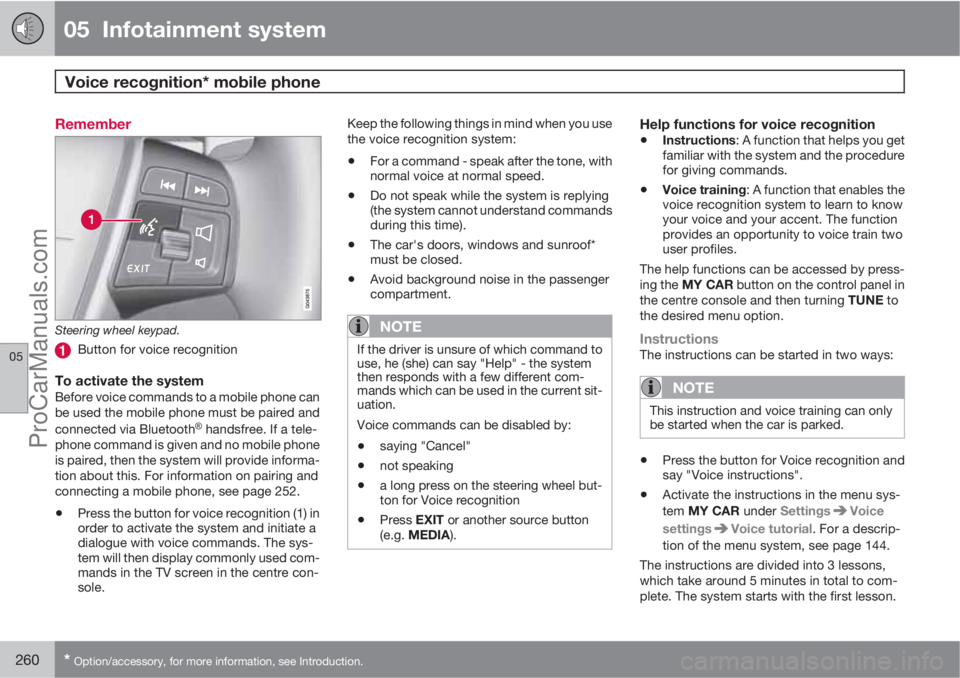
Remember
Steering wheel keypad.
Button for voice recognition
To activate the systemBefore voice commands to a mobile phone can
be used the mobile phone must be paired and
connected via Bluetooth
Ÿ handsfree. If a tele-
phone command is given and no mobile phone
is paired, then the system will provide informa-
tion about this. For information on pairing and
connecting a mobile phone, see page 252.
•Press the button for voice recognition (1) in
order to activate the system and initiate a
dialogue with voice commands. The sys-
tem will then display commonly used com-
mands in the TV screen in the centre con-
sole.Keep the following things in mind when you use
the voice recognition system:
•For a command - speak after the tone, with
normal voice at normal speed.
•Do not speak while the system is replying
(the system cannot understand commands
during this time).
•The car's doors, windows and sunroof*
must be closed.
•Avoid background noise in the passenger
compartment.
NOTE
If the driver is unsure of which command to
use, he (she) can say "Help" - the system
then responds with a few different com-
mands which can be used in the current sit-
uation.
Voice commands can be disabled by:
•saying "Cancel"
•not speaking
•a long press on the steering wheel but-
ton for Voice recognition
•Press EXIT or another source button
(e.g. MEDIA).
Help functions for voice recognition
•Instructions: A function that helps you get
familiar with the system and the procedure
for giving commands.
•Voice training: A function that enables the
voice recognition system to learn to know
your voice and your accent. The function
provides an opportunity to voice train two
user profiles.
The help functions can be accessed by press-
ing the MY CAR button on the control panel in
the centre console and then turning TUNE to
the desired menu option.
InstructionsThe instructions can be started in two ways:
NOTE
This instruction and voice training can only
be started when the car is parked.
•Press the button for Voice recognition and
say "Voice instructions".
•Activate the instructions in the menu sys-
tem MY CAR under Settings
Voice
settings
Voice tutorial. For a descrip-
tion of the menu system, see page 144.
The instructions are divided into 3 lessons,
which take around 5 minutes in total to com-
plete. The system starts with the first lesson.
ProCarManuals.com