battery VOLVO V60 2012 Owners Manual
[x] Cancel search | Manufacturer: VOLVO, Model Year: 2012, Model line: V60, Model: VOLVO V60 2012Pages: 400, PDF Size: 9.28 MB
Page 4 of 400
Table of contents
2* Option/accessory, for more information, see Introduction.
00
00 Introduction
Important information................................. 6
Volvo and the environment....................... 11
01
01 Safety
Seatbelts .................................................. 16
Airbags...................................................... 19
Activating/deactivating the airbag*........... 22
Side airbags (SIPS bags) ......................... 24
Inflatable Curtain (IC) ............................... 26
WHIPS ...................................................... 27
When the systems deploy ........................ 29
Safety mode.............................................. 30
Child safety............................................... 31
02
02 Locks and alarm
Remote control key/key blade.................. 46
Privacy locking*......................................... 51
Battery replacement, remote control key/
PCC*.........................................................53
Keyless drive*............................................ 55
Locking/unlocking..................................... 59
Child safety locks...................................... 64
Alarm*....................................................... 65
ProCarManuals.com
Page 5 of 400
Table of contents
* Option/accessory, for more information, see Introduction.3
03
03 Your driving environment
Instruments and controls.......................... 70
Volvo Sensus ........................................... 79
Key positions............................................ 80
Seats......................................................... 82
Steering wheel.......................................... 87
Lighting..................................................... 88
Wipers and washing.................................. 97
Windows, rearview and door mirrors...... 100
Compass*............................................... 105
Power sunroof*....................................... 106
Alcoguard*.............................................. 108
Starting the engine.................................. 112
Starting the engine – Flexifuel.................114
Starting the engine – external battery..... 116
Gearboxes............................................... 117
Eco Start/Stop DRIVe*............................ 123
All-wheel drive – AWD*...........................130
Foot brake............................................... 131
Parking brake.......................................... 133
HomeLink
Ÿ *............................................ 137
04
04 Comfort and driving pleasure
Menus and messages............................. 142
Menu source MY CAR............................144
Climate control........................................ 152
Fuel-driven engine block heater and pas-
senger compartment heater*.................. 162
Additional heater*.................................... 165
Trip computer......................................... 166
DSTC – Stability and traction control sys-
tem.......................................................... 168
Adapting driving characteristics............. 170
Cruise control*........................................ 171
Speed limiter*.......................................... 173
Adaptive cruise control*.......................... 175
Distance Warning*.................................. 185
City Safety™........................................... 188
Collision Warning with Auto Brake &
Pedestrian Protection*............................ 192
Driver Alert System – DAC*..................... 199
Driver Alert System - LDW*..................... 202
Park assist syst*...................................... 205
Park assist camera*................................ 208
BLIS* – Blind Spot Information System. . 211
Comfort inside the passenger compart-
ment........................................................ 215
05
05 Infotainment system
General information on infotainment...... 220
Quick start............................................... 222
General infotainment functions............... 226
Radio....................................................... 229
Media player........................................... 236
External audio source via AUX/USB*
input........................................................ 240
Media Bluetooth
Ÿ* ................................. 243
TV*........................................................... 246
Remote control* ..................................... 249
Bluetooth
Ÿ handsfree*............................251
Voice recognition* mobile phone............ 259
Menu navigation, Infotainment............... 263
ProCarManuals.com
Page 6 of 400
Table of contents
4* Option/accessory, for more information, see Introduction.
06
06 During your journey
Recommendations during driving........... 270
Refuelling................................................ 273
Fuel.........................................................274
Loading................................................... 278
Cargo area.............................................. 280
Driving with a trailer................................283
Towing and recovery..............................289
07
07 Wheels and tyres
General ................................................... 294
Changing wheels ................................... 298
Tyre pressure ......................................... 301
Warning triangle and first-aid kit*............ 302
Tyre pressure monitoring (TPMS)*.......... 303
Emergency puncture repair (TMK) ......... 305
08
08 Maintenance and service
Engine compartment............................... 312
Lamps.....................................................319
Wiper blades and washer fluid................ 325
Battery..................................................... 327
Fuses...................................................... 333
Car care.................................................. 344
ProCarManuals.com
Page 31 of 400
01 Safety
When the systems deploy01
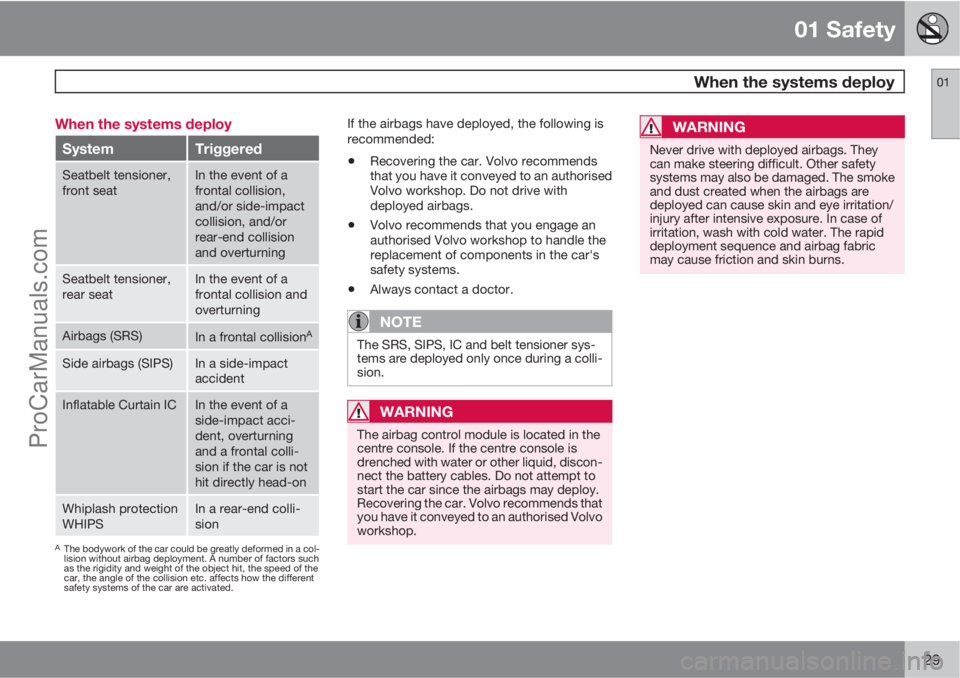
29 When the systems deploy
SystemTriggered
Seatbelt tensioner,
front seatIn the event of a
frontal collision,
and/or side-impact
collision, and/or
rear-end collision
and overturning
Seatbelt tensioner,
rear seatIn the event of a
frontal collision and
overturning
Airbags (SRS)In a frontal collisionA
Side airbags (SIPS)In a side-impact
accident
Inflatable Curtain ICIn the event of a
side-impact acci-
dent, overturning
and a frontal colli-
sion if the car is not
hit directly head-on
Whiplash protection
WHIPSIn a rear-end colli-
sion
AThe bodywork of the car could be greatly deformed in a col-
lision without airbag deployment. A number of factors such
as the rigidity and weight of the object hit, the speed of the
car, the angle of the collision etc. affects how the different
safety systems of the car are activated.
If the airbags have deployed, the following is
recommended:
•Recovering the car. Volvo recommends
that you have it conveyed to an authorised
Volvo workshop. Do not drive with
deployed airbags.
•Volvo recommends that you engage an
authorised Volvo workshop to handle the
replacement of components in the car's
safety systems.
•Always contact a doctor.
NOTE
The SRS, SIPS, IC and belt tensioner sys-
tems are deployed only once during a colli-
sion.
WARNING
The airbag control module is located in the
centre console. If the centre console is
drenched with water or other liquid, discon-
nect the battery cables. Do not attempt to
start the car since the airbags may deploy.
Recovering the car. Volvo recommends that
you have it conveyed to an authorised Volvo
workshop.
WARNING
Never drive with deployed airbags. They
can make steering difficult. Other safety
systems may also be damaged. The smoke
and dust created when the airbags are
deployed can cause skin and eye irritation/
injury after intensive exposure. In case of
irritation, wash with cold water. The rapid
deployment sequence and airbag fabric
may cause friction and skin burns.
ProCarManuals.com
Page 46 of 400
44* Option/accessory, for more information, see Introduction.
Remote control key/key blade................................................................ 46
Privacy locking*....................................................................................... 51
Battery replacement, remote control key/PCC*...................................... 53
Keyless drive*.......................................................................................... 55
Locking/unlocking................................................................................... 59
Child safety locks.................................................................................... 64
Alarm*...................................................................................................... 65
ProCarManuals.com
Page 55 of 400
02 Locks and alarm
Battery replacement, remote control key/PCC*
02
* Option/accessory, for more information, see Introduction.53 Replacing the battery
The batteries should be replaced if:
•the information symbol is illuminated and
the display shows Low battery in remote
control. Please change batteries.
and/or
•the locks repeatedly do not react to signals
from the remote control key within
20 metres from the car.
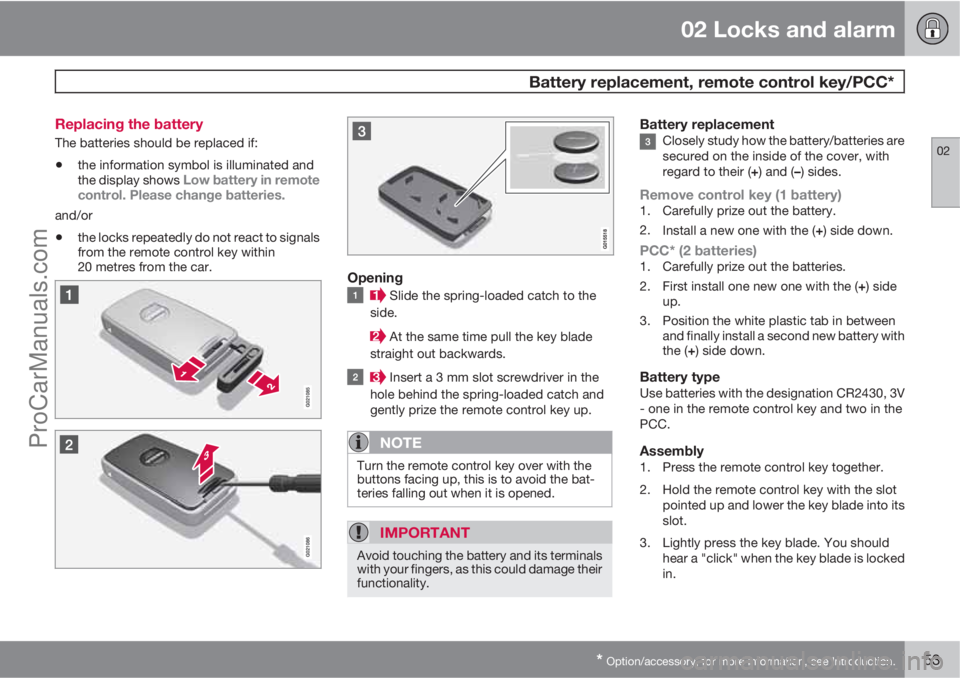
Opening
Slide the spring-loaded catch to the
side.
At the same time pull the key blade
straight out backwards.
Insert a 3 mm slot screwdriver in the
hole behind the spring-loaded catch and
gently prize the remote control key up.
NOTE
Turn the remote control key over with the
buttons facing up, this is to avoid the bat-
teries falling out when it is opened.
IMPORTANT
Avoid touching the battery and its terminals
with your fingers, as this could damage their
functionality.
Battery replacementClosely study how the battery/batteries are
secured on the inside of the cover, with
regard to their (+) and (–) sides.
Remove control key (1 battery)1. Carefully prize out the battery.
2.
Install a new one with the (+) side down.
PCC* (2 batteries)1. Carefully prize out the batteries.
2.
First install one new one with the (+) side
up.
3. Position the white plastic tab in between
and finally install a second new battery with
the (+) side down.
Battery typeUse batteries with the designation CR2430, 3V
- one in the remote control key and two in the
PCC.
Assembly1. Press the remote control key together.
2. Hold the remote control key with the slot
pointed up and lower the key blade into its
slot.
3. Lightly press the key blade. You should
hear a "click" when the key blade is locked
in.
ProCarManuals.com
Page 56 of 400
02 Locks and alarm
Battery replacement, remote control key/PCC*
02
54* Option/accessory, for more information, see Introduction.
IMPORTANT
Make sure that you dispose of old batteries
in an environmentally-friendly way.
ProCarManuals.com
Page 61 of 400
02 Locks and alarm
Locking/unlocking
02
* Option/accessory, for more information, see Introduction.59 From the outside
The remote control key can lock/unlock all
doors and the tailgate simultaneously. Different
sequences for unlocking can be selected, see
"Unlocking with the remote control key" page
48.
In order that the lock sequence can be acti-
vated, the driver's door must be closed - if any
of the other doors or the tailgate is open, then
it/they is/are locked and the alarm is activated
only when it/they are closed. With the Key-
less* system all the doors and tailgate must be
closed.
NOTE
Be aware of the risk of locking the remote
control key in the car.
If it is not possible to lock/unlock with the
remote control key, the battery may be dis-
charged - lock or unlock the left-hand front
door with the detachable key blade, see
page 50.
NOTE
Remember that the alarm is triggered when
the door is opened after being unlocked
with the key blade - the alarm is switched
off when the remote control key is inserted
into the ignition switch.
WARNING
Be aware of the risk of being locked in the
car when it is locked from the outside using
the remote control key - it is then not pos-
sible to open any of the doors from the
inside with the door controls. Read more
about this in the section "Deadlocks" later
on.
Automatic relockingIf none of the doors or the tailgate is opened
within 2 minutes of unlocking, all are locked
again automatically. This function reduces the
risk that the car is left unlocked unintentionally.
(For cars with alarm, see page 65.)
Manual lockingIn certain situations the car must be lockable
manually, e.g. in the event of power failure.
The left-hand front door can be locked with its
lock cylinder and the remote control key's
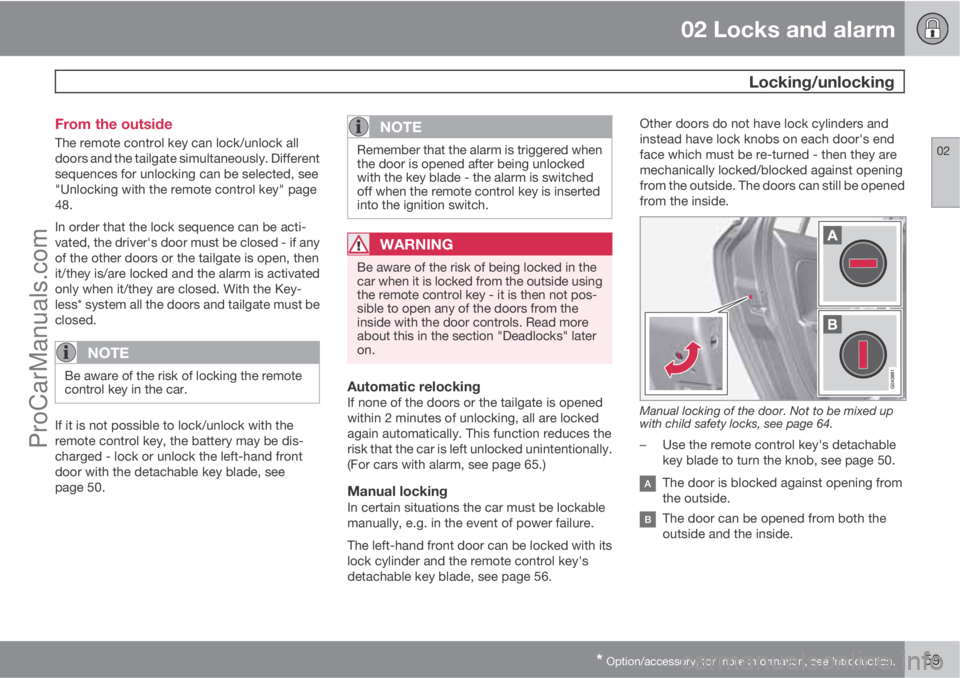
detachable key blade, see page 56.Other doors do not have lock cylinders and
instead have lock knobs on each door's end
face which must be re-turned - then they are
mechanically locked/blocked against opening
from the outside. The doors can still be opened
from the inside.
Manual locking of the door. Not to be mixed up
with child safety locks, see page 64.
–Use the remote control key's detachable
key blade to turn the knob, see page 50.
The door is blocked against opening from
the outside.
The door can be opened from both the
outside and the inside.
ProCarManuals.com
Page 67 of 400
02 Locks and alarm
Alarm*
02
* Option/accessory, for more information, see Introduction.65 General
Activated alarm is triggered if:
•a door, the bonnet or the tailgate is opened
•a movement is detected in the passenger
compartment (if fitted with a movement
detector*)
•the car is raised or towed away (if fitted
with a tilt detector*)
•the battery's cable is disconnected
•the siren is disconnected.
If there is a fault in the alarm system, the infor-
mation display shows a message. In which
case, contact a workshop - an authorised
Volvo workshop is recommended.
NOTE
The movement sensors trigger an alarm in
the event of movement in the passenger
compartment - air currents are also regis-
tered. For this reason the alarm is triggered
if the car is left with a window or the sunroof
open or if the passenger compartment
heater is used.
To avoid this: Close the window/sunroof
when leaving the car. If the car's integrated
passenger compartment heater (or a porta-
ble electric heater) shall be used - direct the
airflow from the air vents so that they are not
pointing upwards in the passenger com-
partment.
NOTE
Do not attempt to repair or modify alarm
system components. All such attempts
could affect the terms of insurance.
Alarm indicator
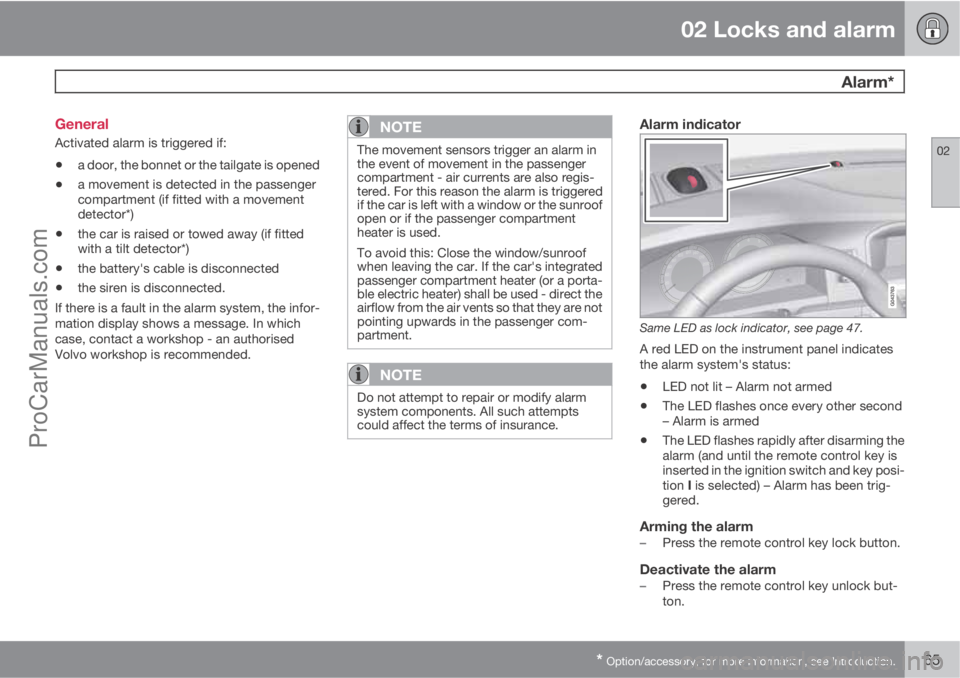
Same LED as lock indicator, see page 47.
A red LED on the instrument panel indicates
the alarm system's status:
•LED not lit – Alarm not armed
•The LED flashes once every other second
– Alarm is armed
•The LED flashes rapidly after disarming the
alarm (and until the remote control key is
inserted in the ignition switch and key posi-
tion I is selected) – Alarm has been trig-
gered.
Arming the alarm–Press the remote control key lock button.
Deactivate the alarm–Press the remote control key unlock but-
ton.
ProCarManuals.com
Page 68 of 400
02 Locks and alarm
Alarm*
02
66* Option/accessory, for more information, see Introduction.
Deactivating a triggered alarm–Press the remote control key unlock button
or insert the remote control key in the igni-
tion switch.
Other alarm functions
Automatic re-arming of the alarmThis function prevents the car being left with
the alarm disarmed unintentionally.
If the car is unlocked with the remote control
key (and the alarm is disarmed) but none of the
doors or the tailgate is opened within 2
minutes, then the alarm is automatically re-
armed. The car is relocked at the same time.
Remote control key not workingIf the alarm cannot be deactivated with the
remote control key, e.g. if the key's battery is
discharged - the car can be unlocked, dis-
armed and the engine started as follows:
1. Open the driver's door with the detachable
key blade - see page 56.
> The alarm is triggered, the alarm indica-
tor flashes rapidly and the siren sounds.
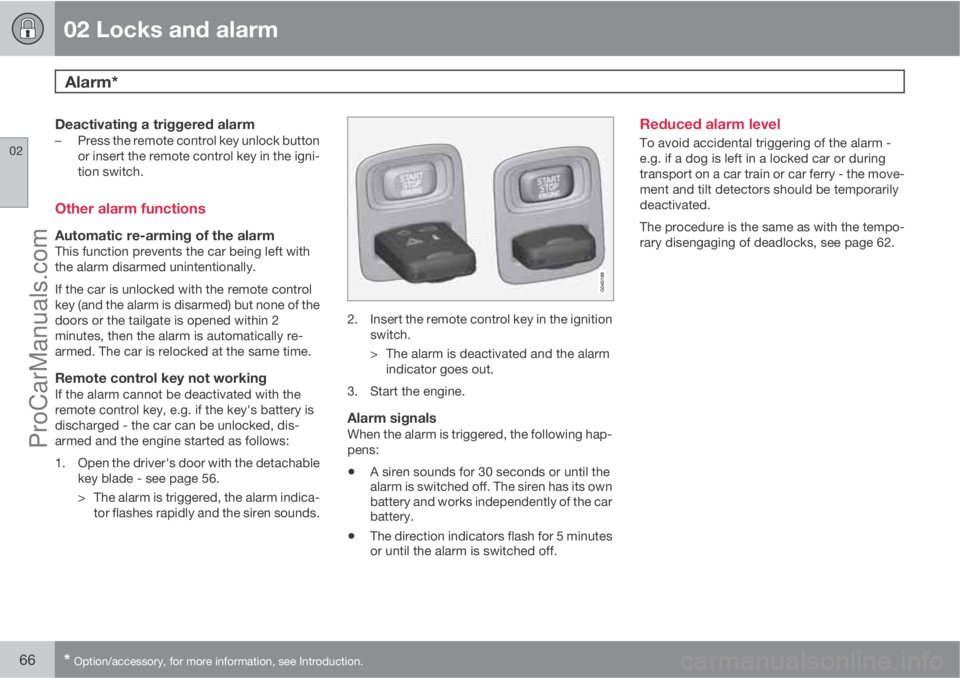
2. Insert the remote control key in the ignition
switch.
> The alarm is deactivated and the alarm
indicator goes out.
3. Start the engine.
Alarm signalsWhen the alarm is triggered, the following hap-
pens:
•A siren sounds for 30 seconds or until the
alarm is switched off. The siren has its own
battery and works independently of the car
battery.
•The direction indicators flash for 5 minutes
or until the alarm is switched off.
Reduced alarm level
To avoid accidental triggering of the alarm -
e.g. if a dog is left in a locked car or during
transport on a car train or car ferry - the move-
ment and tilt detectors should be temporarily
deactivated.
The procedure is the same as with the tempo-
rary disengaging of deadlocks, see page 62.
ProCarManuals.com