sunroof VOLVO V60 2012 Owners Manual
[x] Cancel search | Manufacturer: VOLVO, Model Year: 2012, Model line: V60, Model: VOLVO V60 2012Pages: 400, PDF Size: 9.28 MB
Page 5 of 400
Table of contents
* Option/accessory, for more information, see Introduction.3
03
03 Your driving environment
Instruments and controls.......................... 70
Volvo Sensus ........................................... 79
Key positions............................................ 80
Seats......................................................... 82
Steering wheel.......................................... 87
Lighting..................................................... 88
Wipers and washing.................................. 97
Windows, rearview and door mirrors...... 100
Compass*............................................... 105
Power sunroof*....................................... 106
Alcoguard*.............................................. 108
Starting the engine.................................. 112
Starting the engine – Flexifuel.................114
Starting the engine – external battery..... 116
Gearboxes............................................... 117
Eco Start/Stop DRIVe*............................ 123
All-wheel drive – AWD*...........................130
Foot brake............................................... 131
Parking brake.......................................... 133
HomeLink
Ÿ *............................................ 137
04
04 Comfort and driving pleasure
Menus and messages............................. 142
Menu source MY CAR............................144
Climate control........................................ 152
Fuel-driven engine block heater and pas-
senger compartment heater*.................. 162
Additional heater*.................................... 165
Trip computer......................................... 166
DSTC – Stability and traction control sys-
tem.......................................................... 168
Adapting driving characteristics............. 170
Cruise control*........................................ 171
Speed limiter*.......................................... 173
Adaptive cruise control*.......................... 175
Distance Warning*.................................. 185
City Safety™........................................... 188
Collision Warning with Auto Brake &
Pedestrian Protection*............................ 192
Driver Alert System – DAC*..................... 199
Driver Alert System - LDW*..................... 202
Park assist syst*...................................... 205
Park assist camera*................................ 208
BLIS* – Blind Spot Information System. . 211
Comfort inside the passenger compart-
ment........................................................ 215
05
05 Infotainment system
General information on infotainment...... 220
Quick start............................................... 222
General infotainment functions............... 226
Radio....................................................... 229
Media player........................................... 236
External audio source via AUX/USB*
input........................................................ 240
Media Bluetooth
Ÿ* ................................. 243
TV*........................................................... 246
Remote control* ..................................... 249
Bluetooth
Ÿ handsfree*............................251
Voice recognition* mobile phone............ 259
Menu navigation, Infotainment............... 263
ProCarManuals.com
Page 48 of 400
02 Locks and alarm
Remote control key/key blade
02
46
General
The car is supplied with 2 remote control keys
or PCCs (Personal Car Communicator). They
are used to start the car and for locking and
unlocking.
More remote control keys can be ordered – up
to 6 can be programmed and used for the same
car.
The PCC has increased functionality com-
pared with the remote control key. The contin-
uation of this chapter describes the functions
available in both the PCC and the remote con-
trol key.
WARNING
If there are children in the car:
Always remember to switch off the power
supply to power windows and sunroof by
removing the remote control key if the driver
leaves the car.
Loss of a remote control keyIf you lose a remote control key then new ones
can be ordered at a workshop - an authorised
Volvo workshop is recommended. The remain-
ing remote control keys must then be taken to
the workshop. The code of the missing remotecontrol key must be erased from the system as
a theft prevention measure.
The current number of keys registered to the
car can be checked in the menu system MY
CAR under Information
Number of keys.
For a description of the menu system, see
page 144.
Key memory1 – door mirrors and driver's
seat
The settings are automatically connected to
each respective remote control key, see pages
83 and 102.
The function can be activated/deactivated in
the menu system MY CAR under Settings
Car settingsCar key memory.
For a description of the menu system, see
page 144.
For cars with Keyless drive system, see
page 55.
Indicator for locking/unlockingWhen the car is locked or unlocked using the
remote control key, the direction indicators
confirm that locking/unlocking was correctly
performed.
•Locking - one flash and the door mirrors
are folded2 in.
•Unlocking - two flashes and the door mir-
rors are folded2 out.
After locking the indication is only given if all
locks have been activated once the doors have
been closed.
Selecting the functionDifferent options for indicating locking/unlock-
ing with light can be set in the car's menu sys-
tem, see page 144.
Search in the menu system MY CAR for
Settings
Car settingsLight settings
and select
Lock confirmation light and/orUnlock confirmation light.
1Only in combination with power driver's seat and power mirrors.2Only for cars with retractable power door mirrors.
ProCarManuals.com
Page 50 of 400
02 Locks and alarm
Remote control key/key blade
02
48* Option/accessory, for more information, see Introduction.
G021079
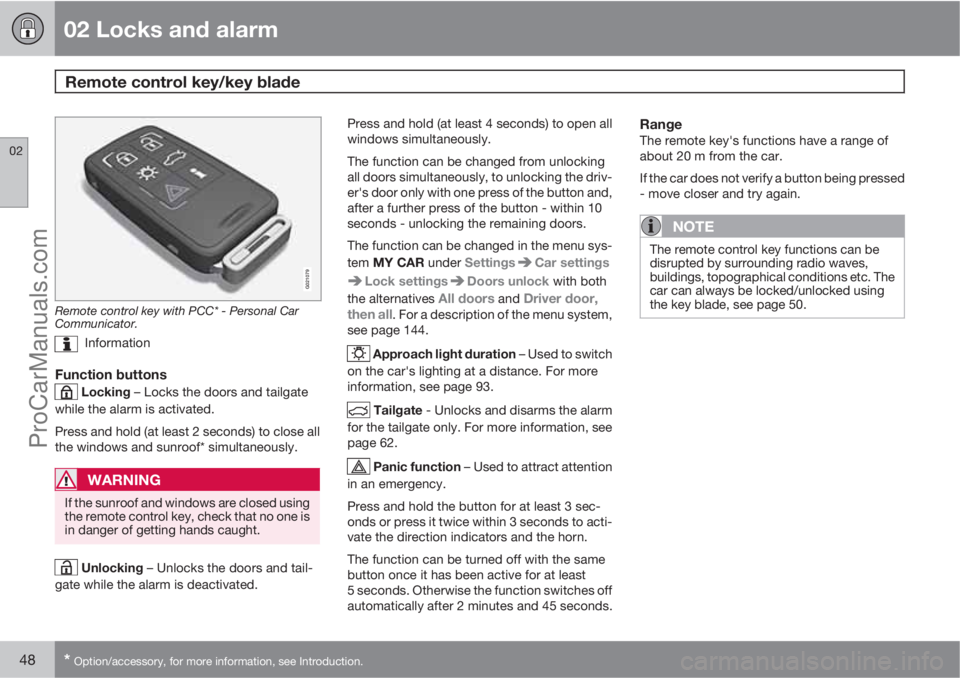
Remote control key with PCC* - Personal Car
Communicator.
Information
Function buttons
Locking – Locks the doors and tailgate
while the alarm is activated.
Press and hold (at least 2 seconds) to close all
the windows and sunroof* simultaneously.
WARNING
If the sunroof and windows are closed using
the remote control key, check that no one is
in danger of getting hands caught.
Unlocking – Unlocks the doors and tail-
gate while the alarm is deactivated.Press and hold (at least 4 seconds) to open all
windows simultaneously.
The function can be changed from unlocking
all doors simultaneously, to unlocking the driv-
er's door only with one press of the button and,
after a further press of the button - within 10
seconds - unlocking the remaining doors.
The function can be changed in the menu sys-
tem MY CAR under Settings
Car settings
Lock settingsDoors unlock with both
the alternatives
All doors and Driver door,
then all. For a description of the menu system,
see page 144.
Approach light duration – Used to switch
on the car's lighting at a distance. For more
information, see page 93.
Tailgate - Unlocks and disarms the alarm
for the tailgate only. For more information, see
page 62.
Panic function – Used to attract attention
in an emergency.
Press and hold the button for at least 3 sec-
onds or press it twice within 3 seconds to acti-
vate the direction indicators and the horn.
The function can be turned off with the same
button once it has been active for at least
5 seconds. Otherwise the function switches off
automatically after 2 minutes and 45 seconds.
RangeThe remote key's functions have a range of
about 20 m from the car.
If the car does not verify a button being pressed
- move closer and try again.
NOTE
The remote control key functions can be
disrupted by surrounding radio waves,
buildings, topographical conditions etc. The
car can always be locked/unlocked using
the key blade, see page 50.
ProCarManuals.com
Page 62 of 400
02 Locks and alarm
Locking/unlocking
02
60* Option/accessory, for more information, see Introduction.
NOTE
•A door's knob control only locks that
particular door - not all doors simulta-
neously.
•A manually locked rear door with an
activated manual child safety lock can-
not be opened from either the outside
or the inside, see page 64. A rear door
that is locked in this way can only be
unlocked with the remote control key or
central locking button.
From the inside
Central locking
Central locking.
All of the doors and the tailgate can be locked
or unlocked simultaneously using the centrallocking button on the driver's door and the
passenger door*.
•Press one side of the button to lock -
the other side
to unlock.
UnlockingA door can be unlocked from the inside in two
different ways:
•Press the central locking button .
Press and hold (at least 4 seconds) to also
open all the side windows* simultaneously.
•Pull the door handle and open the door -
the door is unlocked and opened in one
operation.
Lamp in lock buttonCentral locking is available in two variants - the
lamp in the central locking button for the driv-
er's door has different meanings dependent on
the variant.
With central locking button only in the driver's
door, other doors have no button:
•Illuminated lamp means that all doors are
locked.
With central locking button on both front doors
and electric lock button in each rear door:
•Illuminated lamp means that only that par-
ticular door is locked. When all buttons are
illuminated all doors are locked.
Locking
•Press the central locking button - all
closed doors are locked.
Press and hold (at least 2 seconds) to also
close all the side windows and the sunroof*
simultaneously.
Lock button* rear doors
The button's lamp illuminates when the door is
locked.
The rear door lock buttons only lock their
respective rear door.
To unlock the door:
•Pull the door handle - the door is unlocked
and opened.
Global opening
Press and hold the central locking button
(at least 4 seconds) to also open all the win-
ProCarManuals.com
Page 67 of 400
02 Locks and alarm
Alarm*
02
* Option/accessory, for more information, see Introduction.65 General
Activated alarm is triggered if:
•a door, the bonnet or the tailgate is opened
•a movement is detected in the passenger
compartment (if fitted with a movement
detector*)
•the car is raised or towed away (if fitted
with a tilt detector*)
•the battery's cable is disconnected
•the siren is disconnected.
If there is a fault in the alarm system, the infor-
mation display shows a message. In which
case, contact a workshop - an authorised
Volvo workshop is recommended.
NOTE
The movement sensors trigger an alarm in
the event of movement in the passenger
compartment - air currents are also regis-
tered. For this reason the alarm is triggered
if the car is left with a window or the sunroof
open or if the passenger compartment
heater is used.
To avoid this: Close the window/sunroof
when leaving the car. If the car's integrated
passenger compartment heater (or a porta-
ble electric heater) shall be used - direct the
airflow from the air vents so that they are not
pointing upwards in the passenger com-
partment.
NOTE
Do not attempt to repair or modify alarm
system components. All such attempts
could affect the terms of insurance.
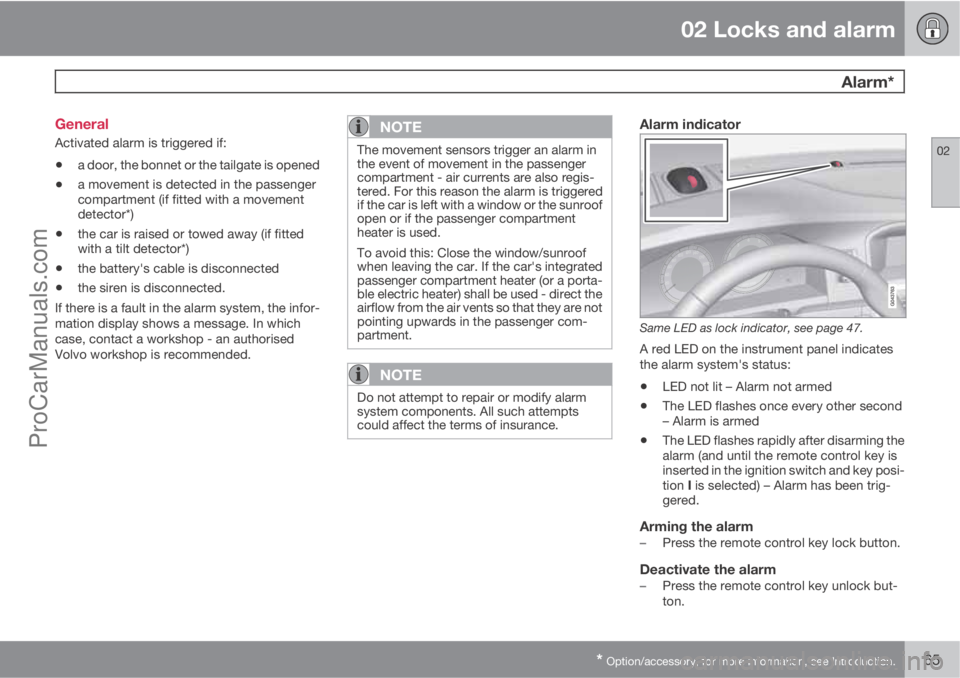
Alarm indicator
Same LED as lock indicator, see page 47.
A red LED on the instrument panel indicates
the alarm system's status:
•LED not lit – Alarm not armed
•The LED flashes once every other second
– Alarm is armed
•The LED flashes rapidly after disarming the
alarm (and until the remote control key is
inserted in the ignition switch and key posi-
tion I is selected) – Alarm has been trig-
gered.
Arming the alarm–Press the remote control key lock button.
Deactivate the alarm–Press the remote control key unlock but-
ton.
ProCarManuals.com
Page 70 of 400
68* Option/accessory, for more information, see Introduction.
Instruments and controls........................................................................ 70
Volvo Sensus ......................................................................................... 79
Key positions.......................................................................................... 80
Seats....................................................................................................... 82
Steering wheel........................................................................................ 87
Lighting................................................................................................... 88
Wipers and washing................................................................................ 97
Windows, rearview and door mirrors....................................................100
Compass*.............................................................................................. 105
Power sunroof*..................................................................................... 106
Alcoguard*............................................................................................ 108
Starting the engine................................................................................ 112
Starting the engine – Flexifuel............................................................... 114
Starting the engine – external battery................................................... 116
Gearboxes............................................................................................. 117
Eco Start/Stop DRIVe*.......................................................................... 123
All-wheel drive – AWD*.........................................................................130
Foot brake............................................................................................. 131
Parking brake........................................................................................ 133
HomeLink
Ÿ *.......................................................................................... 137
ProCarManuals.com
Page 82 of 400
03 Your driving environment
Key positions
03
80* Option/accessory, for more information, see Introduction.
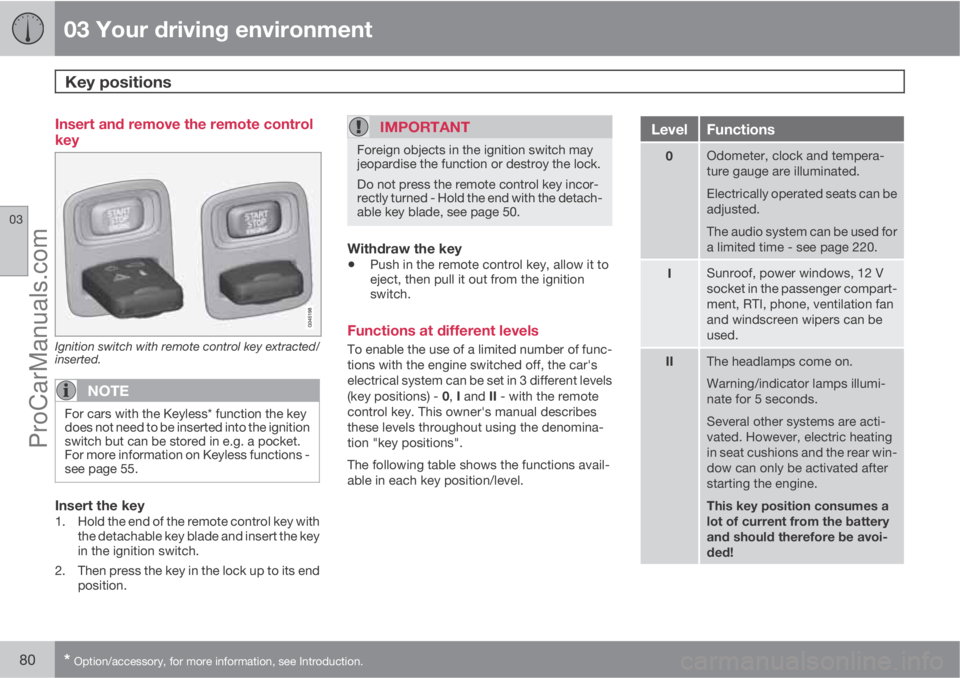
Insert and remove the remote control
key
Ignition switch with remote control key extracted/
inserted.
NOTE
For cars with the Keyless* function the key
does not need to be inserted into the ignition
switch but can be stored in e.g. a pocket.
For more information on Keyless functions -
see page 55.
Insert the key1. Hold the end of the remote control key with
the detachable key blade and insert the key
in the ignition switch.
2. Then press the key in the lock up to its end
position.
IMPORTANT
Foreign objects in the ignition switch may
jeopardise the function or destroy the lock.
Do not press the remote control key incor-
rectly turned - Hold the end with the detach-
able key blade, see page 50.
Withdraw the key
•Push in the remote control key, allow it to
eject, then pull it out from the ignition
switch.
Functions at different levels
To enable the use of a limited number of func-
tions with the engine switched off, the car's
electrical system can be set in 3 different levels
(key positions) - 0, I and II - with the remote
control key. This owner's manual describes
these levels throughout using the denomina-
tion "key positions".
The following table shows the functions avail-
able in each key position/level.
LevelFunctions
0Odometer, clock and tempera-
ture gauge are illuminated.
Electrically operated seats can be
adjusted.
The audio system can be used for
a limited time - see page 220.
ISunroof, power windows, 12 V
socket in the passenger compart-
ment, RTI, phone, ventilation fan
and windscreen wipers can be
used.
IIThe headlamps come on.
Warning/indicator lamps illumi-
nate for 5 seconds.
Several other systems are acti-
vated. However, electric heating
in seat cushions and the rear win-
dow can only be activated after
starting the engine.
This key position consumes a
lot of current from the battery
and should therefore be avoi-
ded!
ProCarManuals.com
Page 108 of 400
03 Your driving environment
Power sunroof*
03
106* Option/accessory, for more information, see Introduction.
General
The sunroof controls are located in the roof
panel. The sunroof can be opened vertically at
the rear edge and horizontally. Key position I or
II is required for the sunroof to be opened.
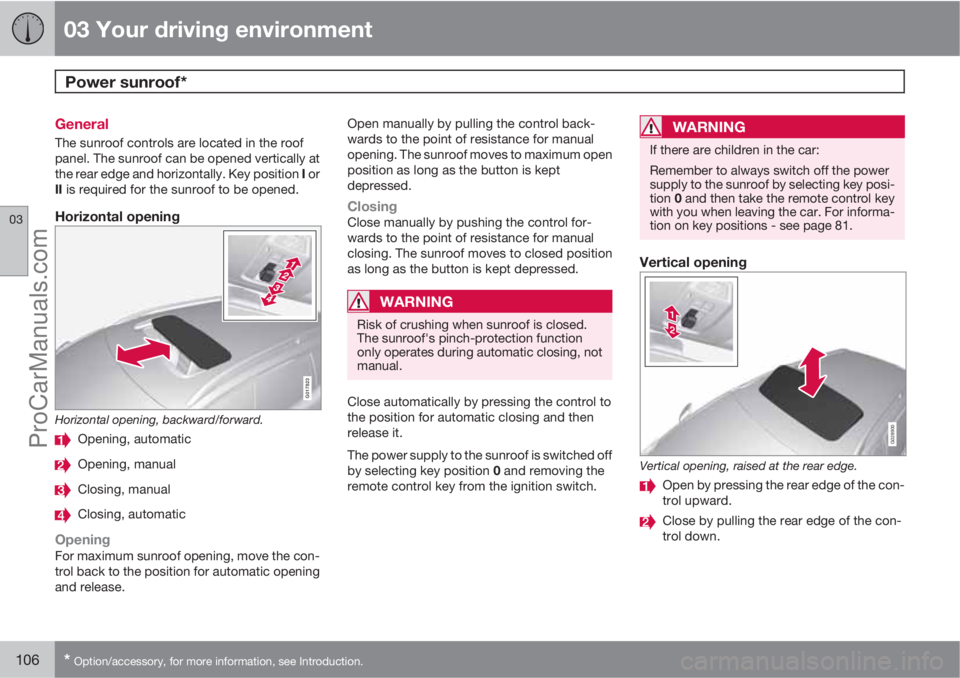
Horizontal opening
G017823
Horizontal opening, backward/forward.
Opening, automatic
Opening, manual
Closing, manual
Closing, automatic
OpeningFor maximum sunroof opening, move the con-
trol back to the position for automatic opening
and release.Open manually by pulling the control back-
wards to the point of resistance for manual
opening. The sunroof moves to maximum open
position as long as the button is kept
depressed.
ClosingClose manually by pushing the control for-
wards to the point of resistance for manual
closing. The sunroof moves to closed position
as long as the button is kept depressed.
WARNING
Risk of crushing when sunroof is closed.
The sunroof's pinch-protection function
only operates during automatic closing, not
manual.
Close automatically by pressing the control to
the position for automatic closing and then
release it.
The power supply to the sunroof is switched off
by selecting key position 0 and removing the
remote control key from the ignition switch.
WARNING
If there are children in the car:
Remember to always switch off the power
supply to the sunroof by selecting key posi-
tion 0 and then take the remote control key
with you when leaving the car. For informa-
tion on key positions - see page 81.
Vertical opening
G028900
Vertical opening, raised at the rear edge.
Open by pressing the rear edge of the con-
trol upward.
Close by pulling the rear edge of the con-
trol down.
ProCarManuals.com
Page 109 of 400
03 Your driving environment
Power sunroof*
03
* Option/accessory, for more information, see Introduction.107
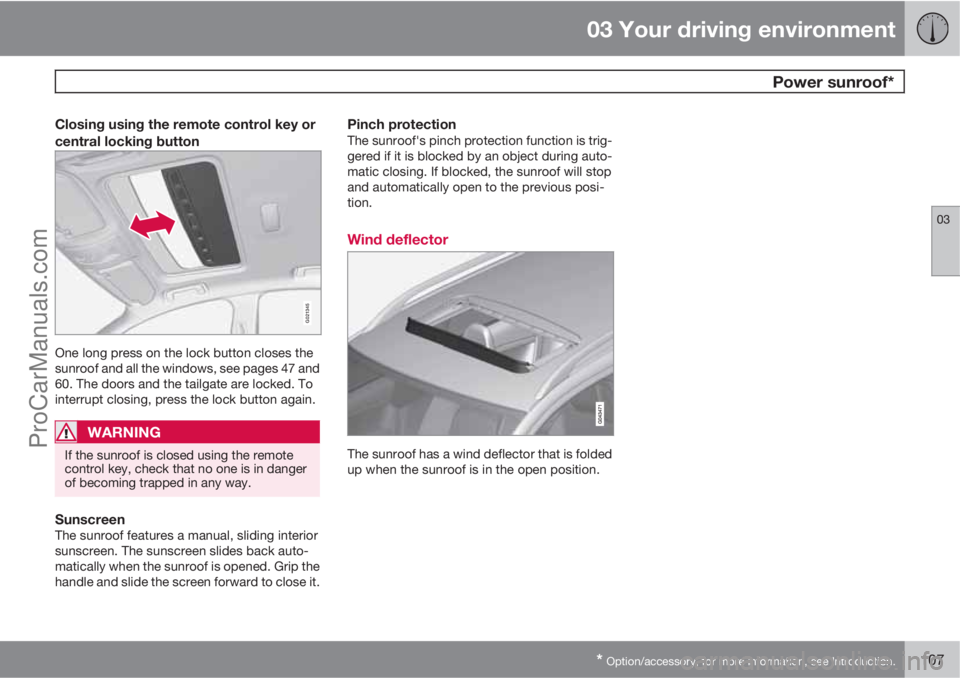
Closing using the remote control key or
central locking button
G021345
One long press on the lock button closes the
sunroof and all the windows, see pages 47 and
60. The doors and the tailgate are locked. To
interrupt closing, press the lock button again.
WARNING
If the sunroof is closed using the remote
control key, check that no one is in danger
of becoming trapped in any way.
SunscreenThe sunroof features a manual, sliding interior
sunscreen. The sunscreen slides back auto-
matically when the sunroof is opened. Grip the
handle and slide the screen forward to close it.
Pinch protectionThe sunroof's pinch protection function is trig-
gered if it is blocked by an object during auto-
matic closing. If blocked, the sunroof will stop
and automatically open to the previous posi-
tion.
Wind deflector
The sunroof has a wind deflector that is folded
up when the sunroof is in the open position.
ProCarManuals.com
Page 154 of 400
04 Comfort and driving pleasure
Climate control
04
152* Option/accessory, for more information, see Introduction.
General
Climate controlThe car is equipped with electronic climate
control. The climate control system cools or
heats as well as dehumidifies the air in the pas-
senger compartment.
NOTE
The air conditioning system (AC) can be
switched off, but to ensure the best possible
climate comfort in the passenger compart-
ment and to prevent the windows from mist-
ing, it should always be on.
Actual temperatureThe temperature you select corresponds to the
physical experience with reference to factors
such as air speed, humidity and solar radiation
etc. in and around the car.
The system includes a sun sensor
1 which
detects on which side the sun is shining into
the passenger compartment. This means that
the temperature can differ between the right
and left-hand air vents despite the controls
being set for the same temperature on both
sides.
Sensor location
•The sun sensor1 is located on the top side
of the dashboard.
•The temperature sensor for the passenger
compartment is located below the climate
control panel.
•The outside temperature sensor is located
on the door mirror.
•The humidity sensor* is located by the inte-
rior rearview mirror.
NOTE
Do not cover or block the sensors with
clothing or other objects.
Side windows and sunroof*To ensure that the air conditioning works opti-
mally, the side windows, and sunroof* if speci-
fied, should be closed.
Misting windowsRemove misting on the insides of the windows
by primarily using the defroster function.
To reduce the risk of misting, keep the win-
dows clean and use window cleaner.
Temporary shut-off of the air
conditioning
When the engine requires full power, e.g. for full
acceleration or driving uphill with a trailer, the
air conditioning can be temporarily switched
off. There may then be a temporary increase in
temperature in the passenger compartment.
CondensationIn warm weather, condensation from the air
conditioning may drip under the car. This is
normal.
Ice and snowRemove ice and snow from the climate control
system air intake (the grille between the bonnet
and the windscreen).
Fault tracing and repairEngage a workshop that has authorisation for
the fault tracing and repair of the climate con-
trol system. Volvo recommends that you con-
tact an authorised Volvo workshop.
RefrigerantThe air conditioning system contains a refrig-
erant. This refrigerant contains no chlorine,
which means that it is harmless to the ozone
layer. Engage a workshop that has authorisa-
tion for filling/changing refrigerant to carry out
1Only applies to ECC.
ProCarManuals.com