change wheel VOLVO V60 2013 User Guide
[x] Cancel search | Manufacturer: VOLVO, Model Year: 2013, Model line: V60, Model: VOLVO V60 2013Pages: 422, PDF Size: 9.59 MB
Page 159 of 422
04 Driver support
Adaptive cruise control*
04
* Option/accessory, for more information, see Introduction.157
Changing the speedTo change the stored speed:
•Adjust with short presses on or -
every press gives +/- 5 km/h. The last
presses made are stored in the memory.
If speed is increased using the accelerator
pedal prior to pressing the
/ button,
then it is the car's current speed when the
button is pressed that is stored in the
cruise control.
•In active mode the button has the same
function as
but results in a lower
increase in speed: + 1 km/h.
NOTE
If any of the Cruise Control buttons are held
down for more than approx. 1 minute, it is
blocked and disabled. To be able to reacti-
vate Cruise Control, the car must be stop-
ped and the engine restarted.
In certain situations, cruise control cannot
be activated. Then the display shows
Cruise control Unavailable, see
page 162.
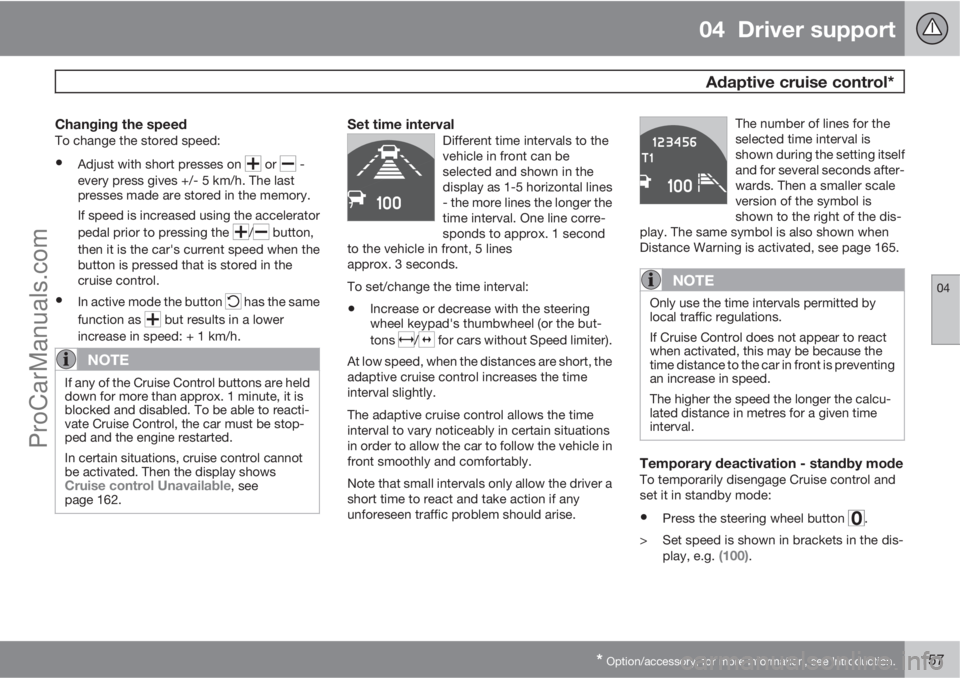
Set time intervalDifferent time intervals to the
vehicle in front can be
selected and shown in the
display as 1-5 horizontal lines
- the more lines the longer the
time interval. One line corre-
sponds to approx. 1 second
to the vehicle in front, 5 lines
approx. 3 seconds.
To set/change the time interval:
•Increase or decrease with the steering
wheel keypad's thumbwheel (or the but-
tons
/ for cars without Speed limiter).
At low speed, when the distances are short, the
adaptive cruise control increases the time
interval slightly.
The adaptive cruise control allows the time
interval to vary noticeably in certain situations
in order to allow the car to follow the vehicle in
front smoothly and comfortably.
Note that small intervals only allow the driver a
short time to react and take action if any
unforeseen traffic problem should arise.The number of lines for the
selected time interval is
shown during the setting itself
and for several seconds after-
wards. Then a smaller scale
version of the symbol is
shown to the right of the dis-
play. The same symbol is also shown when
Distance Warning is activated, see page 165.
NOTE
Only use the time intervals permitted by
local traffic regulations.
If Cruise Control does not appear to react
when activated, this may be because the
time distance to the car in front is preventing
an increase in speed.
The higher the speed the longer the calcu-
lated distance in metres for a given time
interval.
Temporary deactivation - standby modeTo temporarily disengage Cruise control and
set it in standby mode:
•Press the steering wheel button .
> Set speed is shown in brackets in the dis-
play, e.g.
(100).
ProCarManuals.com
Page 160 of 422
04 Driver support
Adaptive cruise control*
04
158* Option/accessory, for more information, see Introduction.
Keypad without Speed limiter*To temporarily disengage Cruise control and
set it in standby mode:
•Press the steering wheel button .
Standby mode due to driver interventionCruise control is temporarily disengaged and
set in standby mode if:
•the foot brake is used
•the clutch pedal is depressed for longer
than 1 minute6
•the gear selector is moved to N position
(automatic gearbox)
•the driver maintains a speed higher than
the set speed for longer than 1 minute.
The driver must then regulate the speed.
A temporary increase in speed with the accel-
erator pedal, e.g. during overtaking, does not
affect the cruise control setting - the car returns
to the last stored speed when the accelerator
pedal is released.
Automatic standby modeThe Adaptive cruise control is dependent on
other systems, e.g.. DSTC (see page 146). Ifany of these systems stop working then cruise
control is automatically deactivated.
In the event of automatic deactivation a signal
will sound and the message
Cruise control
Cancelled is shown in the display. The driver
must then intervene and adapt the speed and
distance to the vehicle ahead.
An automatic deactivation can be due to:
•engine speed is too low/high
•speed falls below 30 km/h7
•wheels lose traction
•brake temperature is high
•the radar sensor is covered e.g. by wet
snow or heavy rain (radar waves blocked).
Resume set speedCruise control in standby mode is re-activated
with one press on the steering wheel button
- the speed is then set to the last stored
speed.
NOTE
A significant increase in speed may arise
after the speed has been resumed with .
Overtaking another vehicleWhen the car is following another vehicle and
the driver indicates an imminent overtake with
the direction indicator
8, the Cruise control
helps to briefly accelerate the car towards the
vehicle in front.
The function is active at speeds
above 70 km/h.
WARNING
Be aware that this function can be activated
in more situations other than during over-
taking, e.g. when a direction indicator is
used to indicate a change of lane or exit to
another road - the car will then accelerate
briefly.
Deactivate
Keypad with Speed limiter
Adaptive cruise control is deactivated with the
steering wheel button
. The set speed is
cleared and cannot be resumed with the
button.
Keypad without Speed limiterWith a short press on the steering wheel button
the cruise control is set in standby mode.
6Disengaging and selecting a higher or lower gear does not involve standby mode.7Does not apply to a car with Queue Assistant - it manages right down to stationary.8On left flash only in left-hand drive car, or right flash in right-hand drive car.
ProCarManuals.com
Page 161 of 422
04 Driver support
Adaptive cruise control*
04
* Option/accessory, for more information, see Introduction.159
With a further short press the cruise control is
deactivated. The set speed is cleared and can-
not be resumed with the
button.
Queue Assistant
In cars with automatic gearbox Adaptive cruise
control is supplemented with the Queue Assis-
tant function (also referred to as "Queue
Assist").
Queue Assistant has the following functions:
•Extended speed range - also below 30 km/
h and at standstill
•Change of target
•Automatic braking ceases when stationary
•Automatic activation parking brake.
Note that the lowest programmable speed for
the cruise control is 30 km/h - even though the
cruise control is capable of following another
vehicle down to a standstill, a lower speed
cannot be selected.
Extended speed range
NOTE
In order to activate the cruise control the
driver's door must be closed and the driver
must be wearing the seatbelt.
With automatic gearbox the cruise control can
follow another vehicle within the range of
0-200 km/h.
NOTE
Activation of the cruise control below
30 km/h requires a vehicle in front within a
reasonable distance.
For shorter stops in connection with inching in
slow traffic or at traffic lights driving is auto-
matically resumed if the stops do not exceed
about 3 seconds - if it takes longer before the
car in front starts moving again then the cruise
control is set in standby mode with automatic
braking. The driver must then re-activate the
cruise control in one of the following ways:
•Press the steering wheel button .
or
•Depress the accelerator pedal.
> The cruise control will then resume follow-
ing the vehicle in front.
NOTE
Queue Assist can hold the car stationary for
a maximum of 4 minutes - then the parking
brake is applied and Cruise Control is dis-
engaged.
•The driver has to release the parking
brake before the cruise control can be
reactivated.
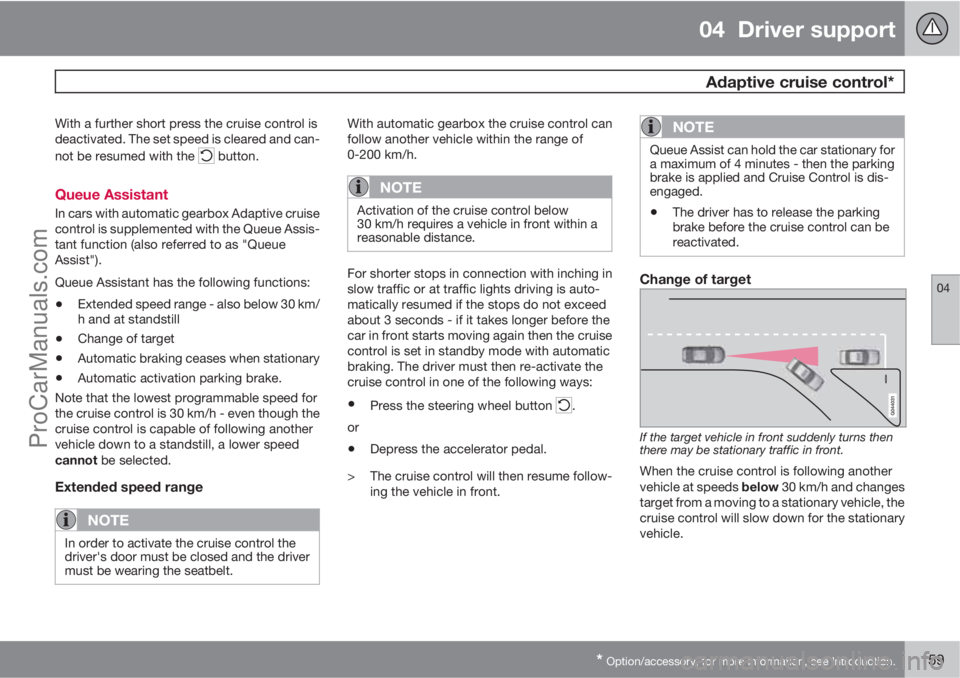
Change of target
If the target vehicle in front suddenly turns then
there may be stationary traffic in front.
When the cruise control is following another
vehicle at speeds below 30 km/h and changes
target from a moving to a stationary vehicle, the
cruise control will slow down for the stationary
vehicle.
ProCarManuals.com
Page 193 of 422
04 Driver support
Park assist camera*
04
* Option/accessory, for more information, see Introduction.191 General
The parking camera is an assist system and is
activated when reverse gear is engaged (can
be changed in the settings menu, see
page 202).
The camera image is shown on the centre con-
sole's screen.
NOTE
When a towbar is configured with the car's
electrical system, the protrusion of the tow-
bar is included when the function measures
the parking space.
WARNING
•The parking camera serves as an aid. It
does not relieve the driver of responsi-
bility when reversing.
•The camera has blind spots, where
obstacles cannot be detected.
•Be aware of people and animals in the
vicinity of the car.
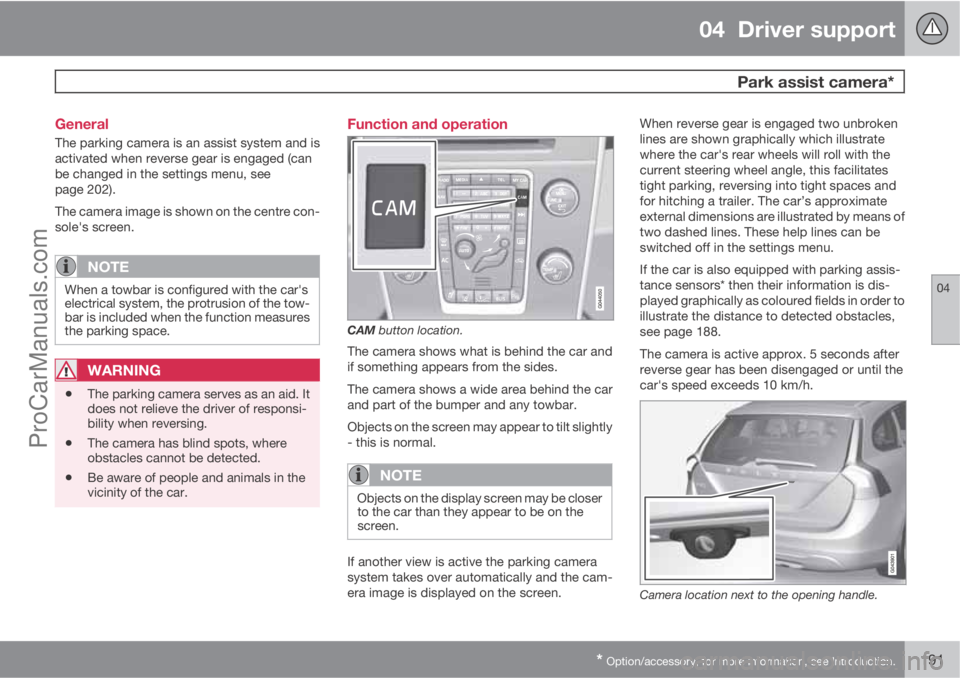
Function and operation
CAM button location.
The camera shows what is behind the car and
if something appears from the sides.
The camera shows a wide area behind the car
and part of the bumper and any towbar.
Objects on the screen may appear to tilt slightly
- this is normal.
NOTE
Objects on the display screen may be closer
to the car than they appear to be on the
screen.
If another view is active the parking camera
system takes over automatically and the cam-
era image is displayed on the screen.When reverse gear is engaged two unbroken
lines are shown graphically which illustrate
where the car's rear wheels will roll with the
current steering wheel angle, this facilitates
tight parking, reversing into tight spaces and
for hitching a trailer. The car’s approximate
external dimensions are illustrated by means of
two dashed lines. These help lines can be
switched off in the settings menu.
If the car is also equipped with parking assis-
tance sensors* then their information is dis-
played graphically as coloured fields in order to
illustrate the distance to detected obstacles,
see page 188.
The camera is active approx. 5 seconds after
reverse gear has been disengaged or until the
car's speed exceeds 10 km/h.
Camera location next to the opening handle.
ProCarManuals.com
Page 226 of 422
05 Comfort and driving pleasure
Trip computer
05
224* Option/accessory, for more information, see Introduction.
General
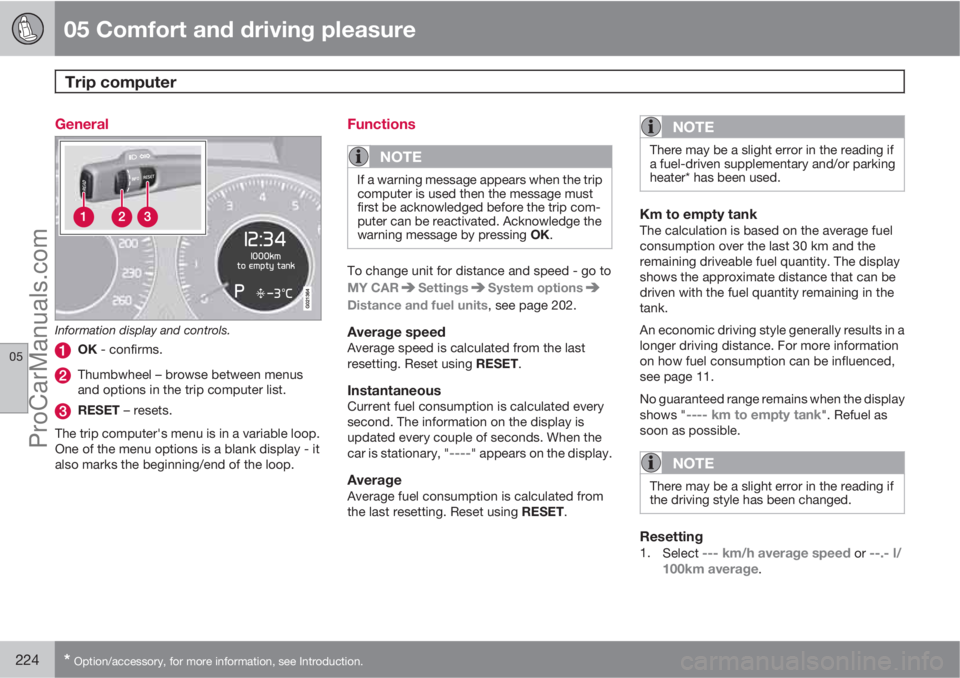
Information display and controls.
OK - confirms.
Thumbwheel – browse between menus
and options in the trip computer list.
RESET – resets.
The trip computer's menu is in a variable loop.
One of the menu options is a blank display - it
also marks the beginning/end of the loop.
Functions
NOTE
If a warning message appears when the trip
computer is used then the message must
first be acknowledged before the trip com-
puter can be reactivated. Acknowledge the
warning message by pressing OK.
To change unit for distance and speed - go to
MY CAR
SettingsSystem options
Distance and fuel units, see page 202.
Average speedAverage speed is calculated from the last
resetting. Reset using RESET.
InstantaneousCurrent fuel consumption is calculated every
second. The information on the display is
updated every couple of seconds. When the
car is stationary, "
----" appears on the display.
AverageAverage fuel consumption is calculated from
the last resetting. Reset using RESET.
NOTE
There may be a slight error in the reading if
a fuel-driven supplementary and/or parking
heater* has been used.
Km to empty tankThe calculation is based on the average fuel
consumption over the last 30 km and the
remaining driveable fuel quantity. The display
shows the approximate distance that can be
driven with the fuel quantity remaining in the
tank.
An economic driving style generally results in a
longer driving distance. For more information
on how fuel consumption can be influenced,
see page 11.
No guaranteed range remains when the display
shows "
---- km to empty tank". Refuel as
soon as possible.
NOTE
There may be a slight error in the reading if
the driving style has been changed.
Resetting1.
Select --- km/h average speed or --.- l/
100km average.
ProCarManuals.com
Page 228 of 422
05 Comfort and driving pleasure
Adapting driving characteristics
05
226* Option/accessory, for more information, see Introduction.
Active chassis - Four-C*
Active chassis, Four-C (Continously Controlled
Chassis Concept), regulates the characteris-
tics of the shock absorbers so that the car's
driving characteristics can be adjusted. There
are three settings: Comfort, Sport and
Advanced.
ComfortThis setting means that the car is perceived as
being more comfortable on rough and uneven
road surfaces. Shock absorption is soft and the
movement of the body is smooth and gentle.
SportThis setting means that the car is perceived as
being more sporty and is recommended for
more active driving. Steering response is faster
than in the Comfort mode. Shock absorption is
harder and the body follows the road in order
to reduce rolling during cornering.
AdvancedThis setting is only recommended on very even
and smooth road surfaces.
The shock absorbers are optimised for maxi-
mum roadholding and rolling in bends is further
minimised.
Operation
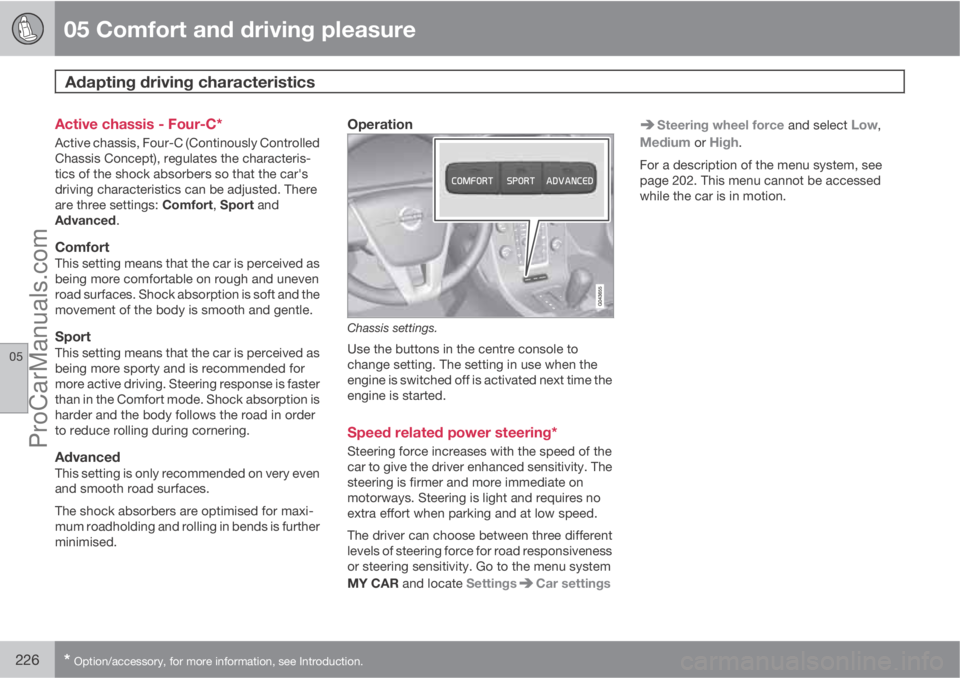
Chassis settings.
Use the buttons in the centre console to
change setting. The setting in use when the
engine is switched off is activated next time the
engine is started.
Speed related power steering*
Steering force increases with the speed of the
car to give the driver enhanced sensitivity. The
steering is firmer and more immediate on
motorways. Steering is light and requires no
extra effort when parking and at low speed.
The driver can choose between three different
levels of steering force for road responsiveness
or steering sensitivity. Go to the menu system
MY CAR and locate Settings
Car settings
Steering wheel force and select Low,
Medium or High.
For a description of the menu system, see
page 202. This menu cannot be accessed
while the car is in motion.
ProCarManuals.com
Page 254 of 422
06 Infotainment system
Media player
06
252* Option/accessory, for more information, see Introduction.
CD/DVD1 functions
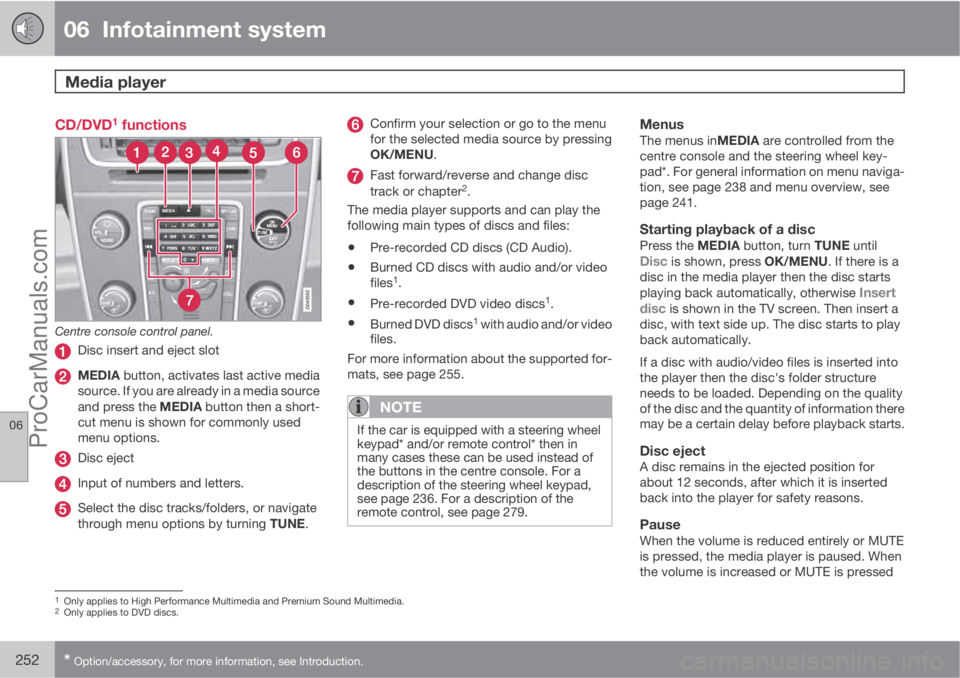
Centre console control panel.
Disc insert and eject slot
MEDIA button, activates last active media
source. If you are already in a media source
and press the MEDIA button then a short-
cut menu is shown for commonly used
menu options.
Disc eject
Input of numbers and letters.
Select the disc tracks/folders, or navigate
through menu options by turning TUNE.
Confirm your selection or go to the menu
for the selected media source by pressing
OK/MENU.
Fast forward/reverse and change disc
track or chapter2.
The media player supports and can play the
following main types of discs and files:
•Pre-recorded CD discs (CD Audio).
•Burned CD discs with audio and/or video
files1.
•Pre-recorded DVD video discs1.
•Burned DVD discs1 with audio and/or video
files.
For more information about the supported for-
mats, see page 255.
NOTE
If the car is equipped with a steering wheel
keypad* and/or remote control* then in
many cases these can be used instead of
the buttons in the centre console. For a
description of the steering wheel keypad,
see page 236. For a description of the
remote control, see page 279.
MenusThe menus inMEDIA are controlled from the
centre console and the steering wheel key-
pad*. For general information on menu naviga-
tion, see page 238 and menu overview, see
page 241.
Starting playback of a discPress the MEDIA button, turn TUNE untilDisc is shown, press OK/MENU. If there is a
disc in the media player then the disc starts
playing back automatically, otherwise
Insert
disc is shown in the TV screen. Then insert a
disc, with text side up. The disc starts to play
back automatically.
If a disc with audio/video files is inserted into
the player then the disc's folder structure
needs to be loaded. Depending on the quality
of the disc and the quantity of information there
may be a certain delay before playback starts.
Disc ejectA disc remains in the ejected position for
about 12 seconds, after which it is inserted
back into the player for safety reasons.
PauseWhen the volume is reduced entirely or MUTE
is pressed, the media player is paused. When
the volume is increased or MUTE is pressed
1Only applies to High Performance Multimedia and Premium Sound Multimedia.2Only applies to DVD discs.
ProCarManuals.com
Page 255 of 422
06 Infotainment system
Media player
06
* Option/accessory, for more information, see Introduction.253
again, the media player starts. It is also possi-
ble to pause via the menu system3, press OK/
MENU, select Play/Pause.
Playback and navigation
CD audio discs
Turn TUNE to access the disc's playlist and
navigate in the list. Use OK/MENU to confirm
the selection of the disc track and start play-
back. Press EXIT to cancel and exit the playlist.
A long press on EXIT leads to the playlist's root
level.
Disc tracks can also be changed by pressing
on
/ on the centre console or the
steering wheel keypad*.
Burned discs audio/video files1
Turn TUNE to access the disc's playlist/folder
structure and navigate in the list/structure. Use
OK/MENU to confirm either selection of sub-
folder or start of playback of the selected
audio/video file. Press EXIT to either stop and
exit the playlist or go up (back) in the folder
structure. A long press on EXIT leads to the
playlist's root level.Audio/video files can also be changed by
pressing
/ on the centre console or the
steering wheel keypad*.
Audio files have the symbol
, video files1
have the symbol and folders have the
symbol
.
When playback of a file is complete the play-
back of the other files (of the same type) in that
particular folder continues. Change
4 of folder
takes place automatically when all the files in
the current folder have been played back. The
system automatically detects and changes
setting when a disc containing only audio files
or only video files is loaded into the media
player and then plays back these files. How-
ever, the system does not change setting if a
disc containing a mixture of audio and video
files is loaded into the media player, but instead
the player continues to play back the previous
file type.
NOTE
A video film is only shown when the car is
stationary. When the car is moving at a
speed of over about 8 km/h no picture is
shown and
No visual media available
while driving appears on the display
screen, although the audio is heard during
this time. The picture is shown again as
soon as the car's speed falls below about 6
km/h.
NOTE
Some audio files that are copy-protected by
record companies or privately copied audio
files cannot be loaded by the player.
DVD video discs1
For playback of DVD video discs, see
page 254.
Fast forward/reverse
Hold in the buttons / to fast forward/
rewind. Audio files are fast forwarded/rewound
at one speed, while video files are fast forwar-
ded/rewound at several speeds. Repeatedly
press the buttons
/ to increase the fast
3Does not apply to CD Audio1Only applies to High Performance Multimedia and Premium Sound Multimedia.4If Repeat folder is activated then this does not take place.
ProCarManuals.com
Page 256 of 422
06 Infotainment system
Media player
06
254* Option/accessory, for more information, see Introduction.
forward/rewind speed for video files. Release
the button to return to viewing at normal speed.
Scan5
This function plays the first ten seconds of
each disc track/audio file. To scan:
1.
Press OK/MENU
2.
Turn TUNE to
Scan
> The first 10 seconds of each disc track
or audio file are played.
3.
Cancel the scan with EXIT, the disc track
or audio file being played back will con-
tinue playing.
Random5
This function plays the tracks in random order.
To listen to the tracks in random order:
1.
Press OK/MENU
2.
Turn TUNE to
Random
3.
Press OK/MENU to activate/deactivate
the function.
Disc tracks/audio files can be changed by
pressing
/ on the centre console or the
steering wheel keypad*.
Repeat folder6
This function makes it possible to play files in
a folder over and over again. When the last file
has been played out, playback of the first file
starts again.
1.
Press OK/MENU
2.
Turn TUNE to
Repeat folder
3.
Press OK/MENU to activate/deactivate
the function.
Playback of DVD video discs1
PlaybackWhen playing back a DVD video disc a disc
menu may appear on the display screen. The
disc menu gives access to additional functions
and settings, such as selecting subtitles, lan-
guage and scene selection.
NOTE
A video film is only shown when the car is
stationary. When the car is moving at a
speed of over about 8 km/h no picture is
shown and
No visual media available
while driving appears on the display
screen, although the audio is heard during
this time. The picture is shown again as
soon as the car's speed falls below about 6
km/h.
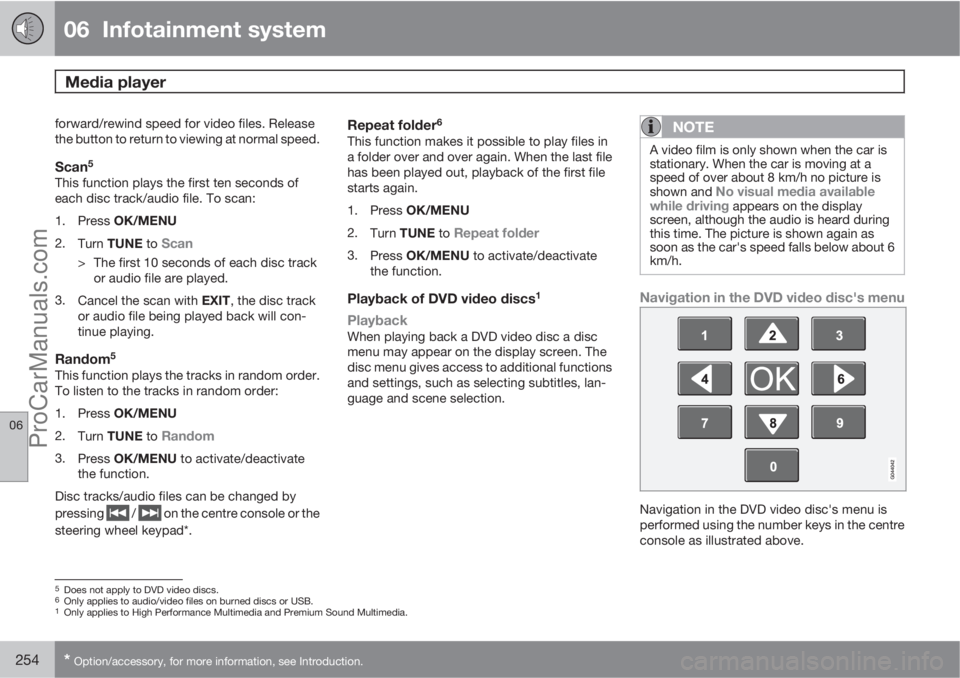
Navigation in the DVD video disc's menu
Navigation in the DVD video disc's menu is
performed using the number keys in the centre
console as illustrated above.
5Does not apply to DVD video discs.6Only applies to audio/video files on burned discs or USB.1Only applies to High Performance Multimedia and Premium Sound Multimedia.
ProCarManuals.com
Page 257 of 422
06 Infotainment system
Media player
06
* Option/accessory, for more information, see Introduction.255
Changing chapter or titleTurn TUNE to access the list of chapters and
navigate through them (if the film is being
played back then it is paused). Press OK/
MENU to select the chapter, this also leads
back to the original position (if the film was
being played back then it is restarted). Press
EXIT to access the title list.
Titles are selected in the title list by turning
TUNE and the selection is confirmed with OK/
MENU, this also leads back to the chapter list.
Press OK/MENU to activate the selection and
return to the start position. Use EXIT to cancel
the selection and this leads back to the original
position (without any selection being made).
The chapter can also be changed by pressing
on
/ on the centre console or the
steering wheel keypad*.
Advanced settings7
AngleIf the DVD video disc supports it, the function
can be used to choose from which camera
position a particular scene should be shown.
Go in disc mode to Disc menu
Advanced
settings
Angle.
DivXŸ Video On DemandThe media player can be registered in order to
play DivX VOD type files from burned discs or
USB. The code for registration can be found in
the menu system MY CAR Settings
InformationDivX® VOD code. For general
information on menus, see under MY CAR, see
page 202.
For more information visit www.divx.com/vod.
Picture settings7
You can adjust the settings (when the car is
stationary) for brightness and contrast.
1.
Press OK/MENU and select
Image
settings, confirm with OK/MENU.
2.
Turn TUNE to the adjustment option and
confirm with OK/MENU.
3.
Adjust the setting by turning TUNE and
confirm with OK/MENU.
To return to the settings list, press the OK/
MENU or EXIT.
The picture settings can be reset to factory
settings with the
Reset option.
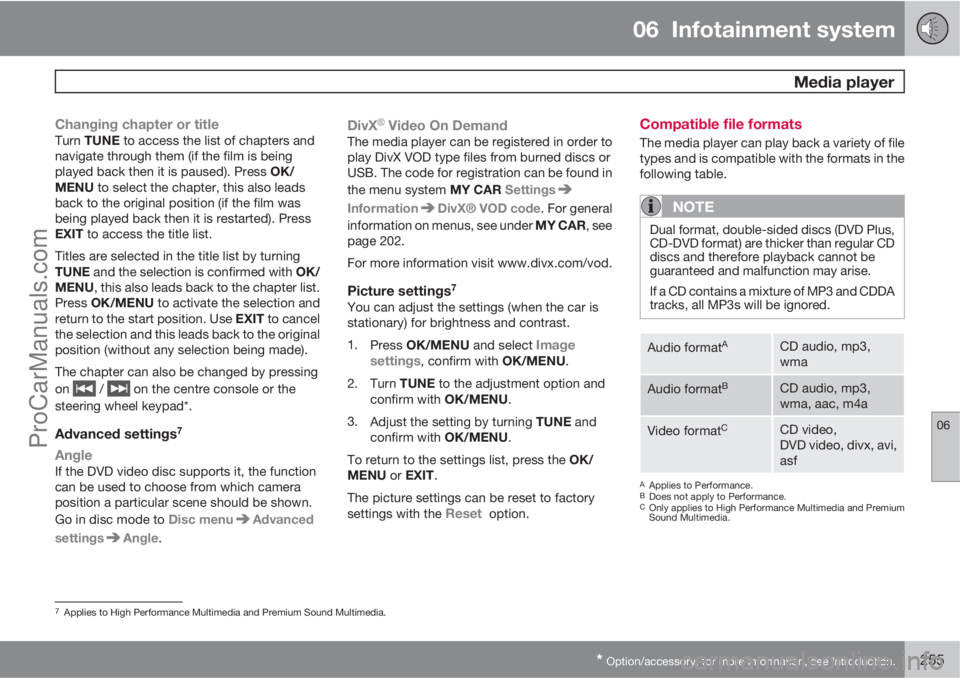
Compatible file formats
The media player can play back a variety of file
types and is compatible with the formats in the
following table.
NOTE
Dual format, double-sided discs (DVD Plus,
CD-DVD format) are thicker than regular CD
discs and therefore playback cannot be
guaranteed and malfunction may arise.
If a CD contains a mixture of MP3 and CDDA
tracks, all MP3s will be ignored.
Audio formatACD audio, mp3,
wma
Audio formatBCD audio, mp3,
wma, aac, m4a
Video formatCCD video,
DVD video, divx, avi,
asf
AApplies to Performance.BDoes not apply to Performance.COnly applies to High Performance Multimedia and Premium
Sound Multimedia.
7Applies to High Performance Multimedia and Premium Sound Multimedia.
ProCarManuals.com