wheel VOLVO V60 2013 User Guide
[x] Cancel search | Manufacturer: VOLVO, Model Year: 2013, Model line: V60, Model: VOLVO V60 2013Pages: 422, PDF Size: 9.59 MB
Page 75 of 422
03 Your driving environment
Instruments and controls
03
* Option/accessory, for more information, see Introduction.73
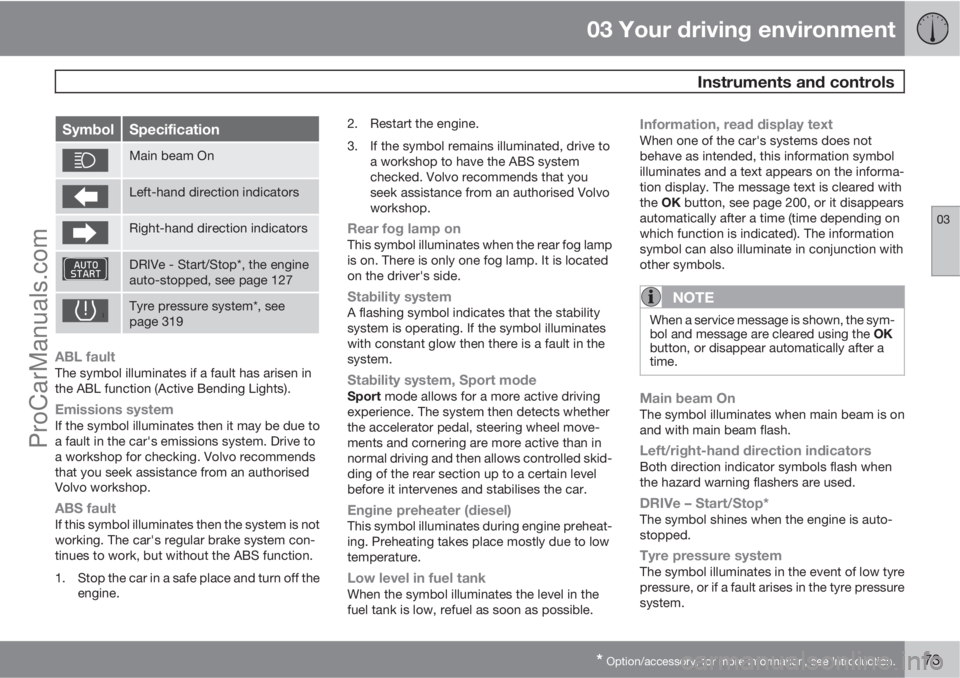
SymbolSpecification
Main beam On
Left-hand direction indicators
Right-hand direction indicators
DRIVe - Start/Stop*, the engine
auto-stopped, see page 127
Tyre pressure system*, see
page 319
ABL faultThe symbol illuminates if a fault has arisen in
the ABL function (Active Bending Lights).
Emissions systemIf the symbol illuminates then it may be due to
a fault in the car's emissions system. Drive to
a workshop for checking. Volvo recommends
that you seek assistance from an authorised
Volvo workshop.
ABS faultIf this symbol illuminates then the system is not
working. The car's regular brake system con-
tinues to work, but without the ABS function.
1. Stop the car in a safe place and turn off the
engine.2. Restart the engine.
3. If the symbol remains illuminated, drive to
a workshop to have the ABS system
checked. Volvo recommends that you
seek assistance from an authorised Volvo
workshop.
Rear fog lamp onThis symbol illuminates when the rear fog lamp
is on. There is only one fog lamp. It is located
on the driver's side.
Stability systemA flashing symbol indicates that the stability
system is operating. If the symbol illuminates
with constant glow then there is a fault in the
system.
Stability system, Sport modeSport mode allows for a more active driving
experience. The system then detects whether
the accelerator pedal, steering wheel move-
ments and cornering are more active than in
normal driving and then allows controlled skid-
ding of the rear section up to a certain level
before it intervenes and stabilises the car.
Engine preheater (diesel)This symbol illuminates during engine preheat-
ing. Preheating takes place mostly due to low
temperature.
Low level in fuel tankWhen the symbol illuminates the level in the
fuel tank is low, refuel as soon as possible.
Information, read display textWhen one of the car's systems does not
behave as intended, this information symbol
illuminates and a text appears on the informa-
tion display. The message text is cleared with
the OK button, see page 200, or it disappears
automatically after a time (time depending on
which function is indicated). The information
symbol can also illuminate in conjunction with
other symbols.
NOTE
When a service message is shown, the sym-
bol and message are cleared using the OK
button, or disappear automatically after a
time.
Main beam OnThe symbol illuminates when main beam is on
and with main beam flash.
Left/right-hand direction indicatorsBoth direction indicator symbols flash when
the hazard warning flashers are used.
DRIVe – Start/Stop*The symbol shines when the engine is auto-
stopped.
Tyre pressure systemThe symbol illuminates in the event of low tyre
pressure, or if a fault arises in the tyre pressure
system.
ProCarManuals.com
Page 79 of 422
03 Your driving environment
Volvo Sensus
03
* Option/accessory, for more information, see Introduction.77 General
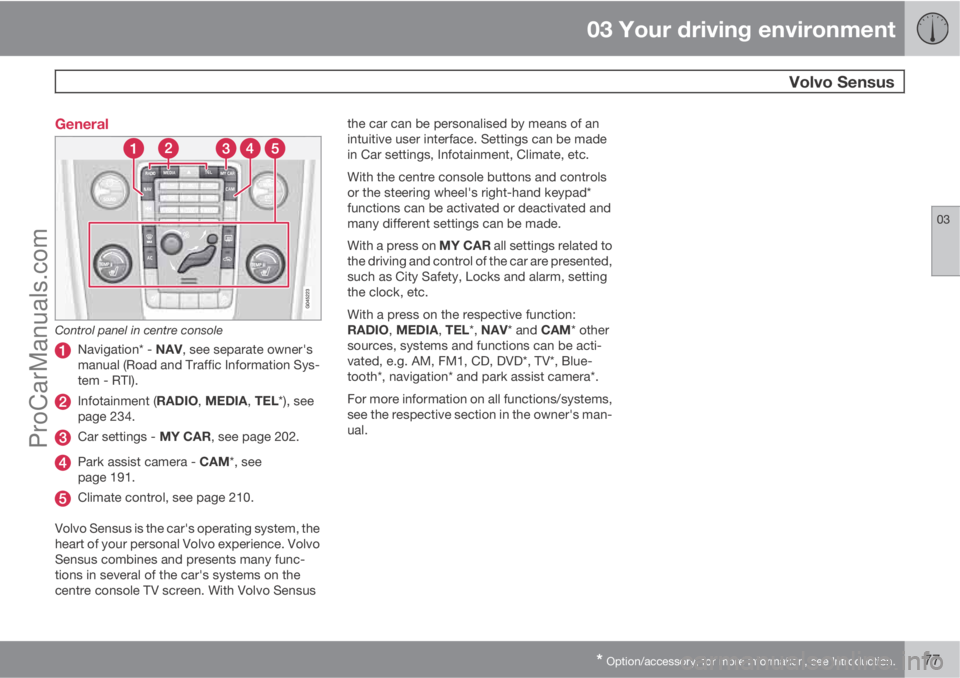
Control panel in centre console
Navigation* - NAV, see separate owner's
manual (Road and Traffic Information Sys-
tem - RTI).
Infotainment (RADIO, MEDIA, TEL*), see
page 234.
Car settings - MY CAR, see page 202.
Park assist camera - CAM*, see
page 191.
Climate control, see page 210.
Volvo Sensus is the car's operating system, the
heart of your personal Volvo experience. Volvo
Sensus combines and presents many func-
tions in several of the car's systems on the
centre console TV screen. With Volvo Sensusthe car can be personalised by means of an
intuitive user interface. Settings can be made
in Car settings, Infotainment, Climate, etc.
With the centre console buttons and controls
or the steering wheel's right-hand keypad*
functions can be activated or deactivated and
many different settings can be made.
With a press on MY CAR all settings related to
the driving and control of the car are presented,
such as City Safety, Locks and alarm, setting
the clock, etc.
With a press on the respective function:
RADIO, MEDIA, TEL*, NAV* and CAM* other
sources, systems and functions can be acti-
vated, e.g. AM, FM1, CD, DVD*, TV*, Blue-
tooth*, navigation* and park assist camera*.
For more information on all functions/systems,
see the respective section in the owner's man-
ual.
ProCarManuals.com
Page 82 of 422
03 Your driving environment
Seats
03
80* Option/accessory, for more information, see Introduction.
Front seats
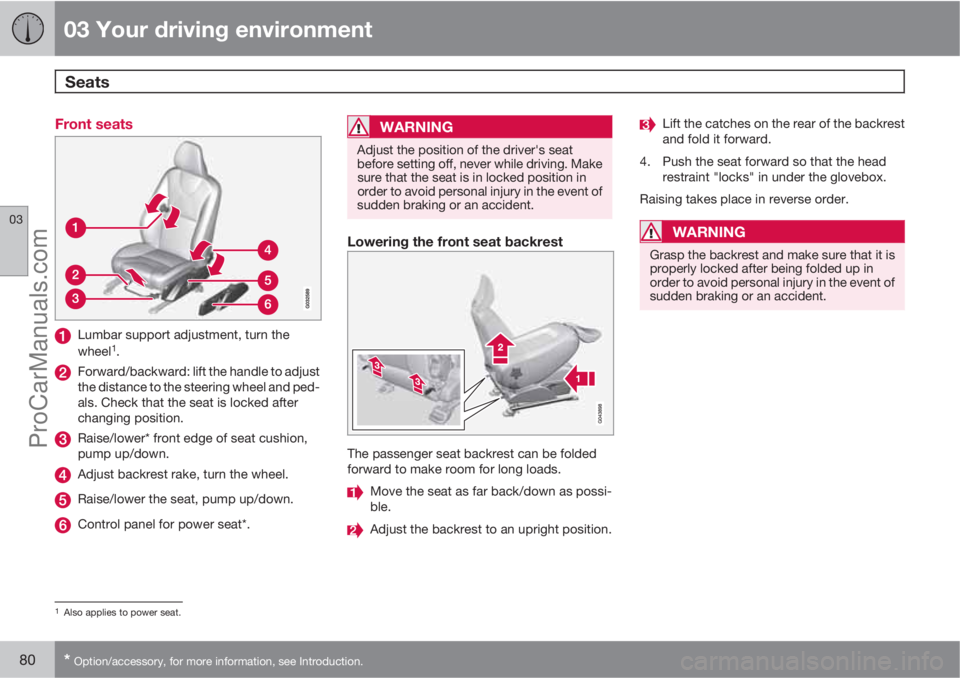
Lumbar support adjustment, turn the
wheel1.
Forward/backward: lift the handle to adjust
the distance to the steering wheel and ped-
als. Check that the seat is locked after
changing position.
Raise/lower* front edge of seat cushion,
pump up/down.
Adjust backrest rake, turn the wheel.
Raise/lower the seat, pump up/down.
Control panel for power seat*.
WARNING
Adjust the position of the driver's seat
before setting off, never while driving. Make
sure that the seat is in locked position in
order to avoid personal injury in the event of
sudden braking or an accident.
Lowering the front seat backrest
The passenger seat backrest can be folded
forward to make room for long loads.
Move the seat as far back/down as possi-
ble.
Adjust the backrest to an upright position.
Lift the catches on the rear of the backrest
and fold it forward.
4. Push the seat forward so that the head
restraint "locks" in under the glovebox.
Raising takes place in reverse order.
WARNING
Grasp the backrest and make sure that it is
properly locked after being folded up in
order to avoid personal injury in the event of
sudden braking or an accident.
1Also applies to power seat.
ProCarManuals.com
Page 87 of 422
03 Your driving environment
Steering wheel
03
* Option/accessory, for more information, see Introduction.85 Adjusting
G021138
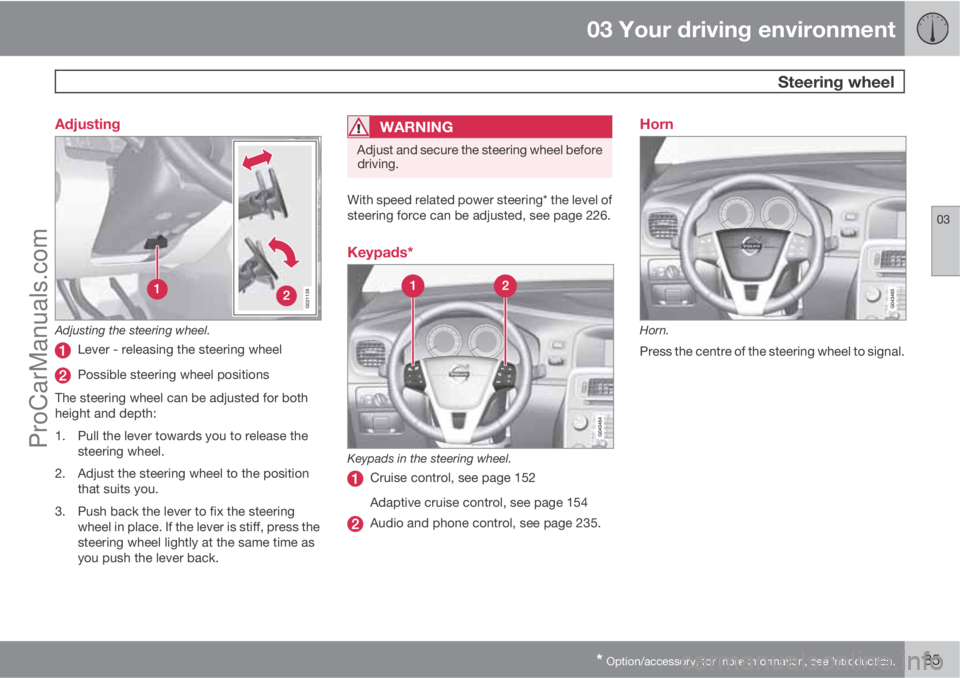
Adjusting the steering wheel.
Lever - releasing the steering wheel
Possible steering wheel positions
The steering wheel can be adjusted for both
height and depth:
1. Pull the lever towards you to release the
steering wheel.
2. Adjust the steering wheel to the position
that suits you.
3. Push back the lever to fix the steering
wheel in place. If the lever is stiff, press the
steering wheel lightly at the same time as
you push the lever back.
WARNING
Adjust and secure the steering wheel before
driving.
With speed related power steering* the level of
steering force can be adjusted, see page 226.
Keypads*
Keypads in the steering wheel.
Cruise control, see page 152
Adaptive cruise control, see page 154
Audio and phone control, see page 235.
Horn
Horn.
Press the centre of the steering wheel to signal.
ProCarManuals.com
Page 88 of 422
03 Your driving environment
Lighting
03
86* Option/accessory, for more information, see Introduction.
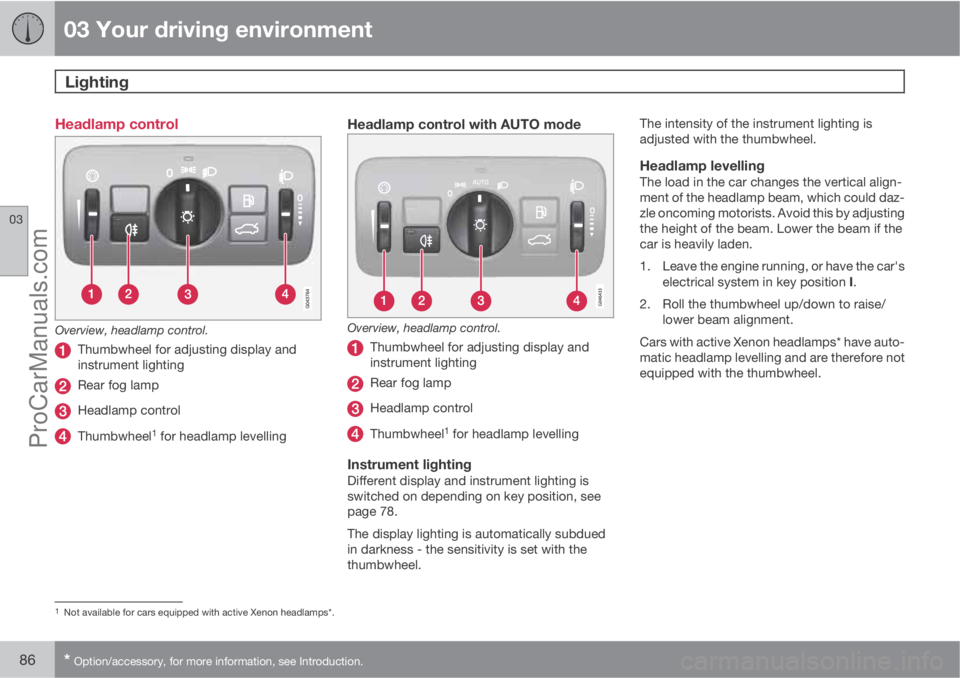
Headlamp control
Overview, headlamp control.
Thumbwheel for adjusting display and
instrument lighting
Rear fog lamp
Headlamp control
Thumbwheel1 for headlamp levelling
Headlamp control with AUTO mode
Overview, headlamp control.
Thumbwheel for adjusting display and
instrument lighting
Rear fog lamp
Headlamp control
Thumbwheel1 for headlamp levelling
Instrument lightingDifferent display and instrument lighting is
switched on depending on key position, see
page 78.
The display lighting is automatically subdued
in darkness - the sensitivity is set with the
thumbwheel.The intensity of the instrument lighting is
adjusted with the thumbwheel.
Headlamp levellingThe load in the car changes the vertical align-
ment of the headlamp beam, which could daz-
zle oncoming motorists. Avoid this by adjusting
the height of the beam. Lower the beam if the
car is heavily laden.
1. Leave the engine running, or have the car's
electrical system in key position I.
2. Roll the thumbwheel up/down to raise/
lower beam alignment.
Cars with active Xenon headlamps* have auto-
matic headlamp levelling and are therefore not
equipped with the thumbwheel.
1Not available for cars equipped with active Xenon headlamps*.
ProCarManuals.com
Page 90 of 422
03 Your driving environment
Lighting
03
88* Option/accessory, for more information, see Introduction.
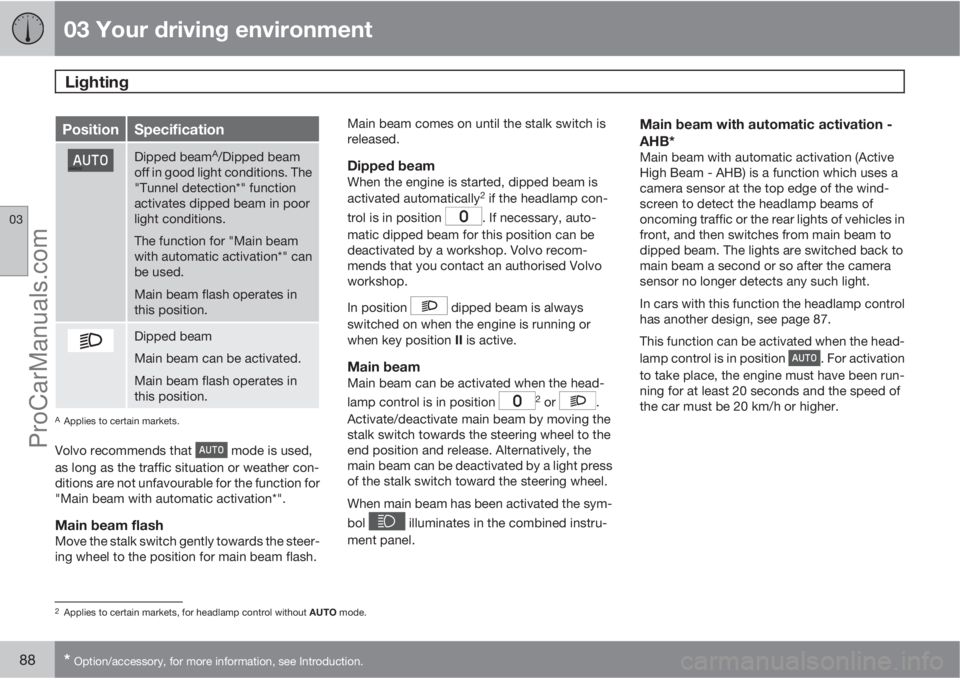
PositionSpecification
Dipped beamA/Dipped beam
off in good light conditions. The
"Tunnel detection*" function
activates dipped beam in poor
light conditions.
The function for "Main beam
with automatic activation*" can
be used.
Main beam flash operates in
this position.
Dipped beam
Main beam can be activated.
Main beam flash operates in
this position.
AApplies to certain markets.
Volvo recommends that mode is used,
as long as the traffic situation or weather con-
ditions are not unfavourable for the function for
"Main beam with automatic activation*".
Main beam flashMove the stalk switch gently towards the steer-
ing wheel to the position for main beam flash.Main beam comes on until the stalk switch is
released.
Dipped beamWhen the engine is started, dipped beam is
activated automatically2 if the headlamp con-
trol is in position
. If necessary, auto-
matic dipped beam for this position can be
deactivated by a workshop. Volvo recom-
mends that you contact an authorised Volvo
workshop.
In position
dipped beam is always
switched on when the engine is running or
when key position II is active.
Main beamMain beam can be activated when the head-
lamp control is in position 2 or .
Activate/deactivate main beam by moving the
stalk switch towards the steering wheel to the
end position and release. Alternatively, the
main beam can be deactivated by a light press
of the stalk switch toward the steering wheel.
When main beam has been activated the sym-
bol
illuminates in the combined instru-
ment panel.
Main beam with automatic activation -
AHB*
Main beam with automatic activation (Active
High Beam - AHB) is a function which uses a
camera sensor at the top edge of the wind-
screen to detect the headlamp beams of
oncoming traffic or the rear lights of vehicles in
front, and then switches from main beam to
dipped beam. The lights are switched back to
main beam a second or so after the camera
sensor no longer detects any such light.
In cars with this function the headlamp control
has another design, see page 87.
This function can be activated when the head-
lamp control is in position
. For activation
to take place, the engine must have been run-
ning for at least 20 seconds and the speed of
the car must be 20 km/h or higher.
2Applies to certain markets, for headlamp control without AUTO mode.
ProCarManuals.com
Page 91 of 422
03 Your driving environment
Lighting
03
89
Light switch in position AUTO.
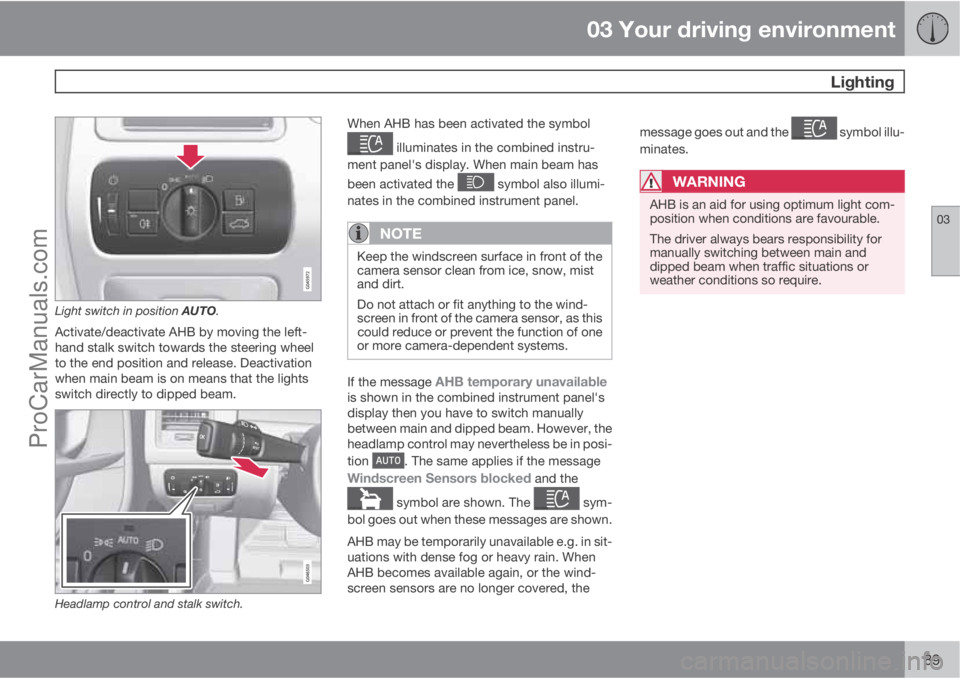
Activate/deactivate AHB by moving the left-
hand stalk switch towards the steering wheel
to the end position and release. Deactivation
when main beam is on means that the lights
switch directly to dipped beam.
Headlamp control and stalk switch.
When AHB has been activated the symbol
illuminates in the combined instru-
ment panel's display. When main beam has
been activated the
symbol also illumi-
nates in the combined instrument panel.
NOTE
Keep the windscreen surface in front of the
camera sensor clean from ice, snow, mist
and dirt.
Do not attach or fit anything to the wind-
screen in front of the camera sensor, as this
could reduce or prevent the function of one
or more camera-dependent systems.
If the message AHB temporary unavailableis shown in the combined instrument panel's
display then you have to switch manually
between main and dipped beam. However, the
headlamp control may nevertheless be in posi-
tion
. The same applies if the message
Windscreen Sensors blocked and the
symbol are shown. The sym-
bol goes out when these messages are shown.
AHB may be temporarily unavailable e.g. in sit-
uations with dense fog or heavy rain. When
AHB becomes available again, or the wind-
screen sensors are no longer covered, themessage goes out and the
symbol illu-
minates.
WARNING
AHB is an aid for using optimum light com-
position when conditions are favourable.
The driver always bears responsibility for
manually switching between main and
dipped beam when traffic situations or
weather conditions so require.
ProCarManuals.com
Page 92 of 422
03 Your driving environment
Lighting
03
90* Option/accessory, for more information, see Introduction.
IMPORTANT
Examples of when manual switching
between main and dipped beam may be
required:
•In heavy rain or dense fog
•In snow flurries or slush
•In moonlight
•When driving in poorly lit built-up areas
•When the traffic ahead has weak light-
ing
•If there are pedestrians on or beside the
road
•If there are highly reflective objects such
as signs in the vicinity of the road
•When the lighting from oncoming traffic
is obscured by e.g. a crash barrier
•When there is traffic on connecting
roads
•On the brow of a hill or in a hollow
•In sharp bends.
For more information on the limitations of the
camera sensor, see page 178.
Tunnel detection*In cars with rain sensor* the rain sensor detects
the changed light conditions when the car ise.g. driven into a tunnel, and dipped beam is
activated within a second in markets without
automatic dipped beam. Dipped beam is deac-
tivated approx. 20 seconds after the car has
been driven out of the tunnel. Note! - The head-
lamp control must be in
position for tun-
nel detection to work.
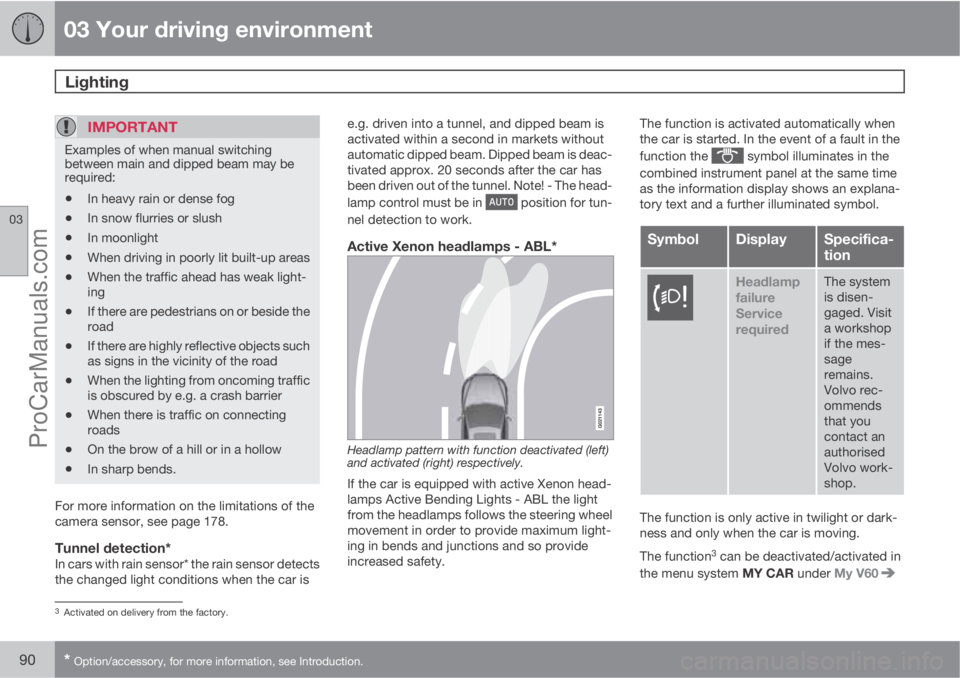
Active Xenon headlamps - ABL*
Headlamp pattern with function deactivated (left)
and activated (right) respectively.
If the car is equipped with active Xenon head-
lamps Active Bending Lights - ABL the light
from the headlamps follows the steering wheel
movement in order to provide maximum light-
ing in bends and junctions and so provide
increased safety.The function is activated automatically when
the car is started. In the event of a fault in the
function the
symbol illuminates in the
combined instrument panel at the same time
as the information display shows an explana-
tory text and a further illuminated symbol.
SymbolDisplaySpecifica-
tion
Headlamp
failure
Service
requiredThe system
is disen-
gaged. Visit
a workshop
if the mes-
sage
remains.
Volvo rec-
ommends
that you
contact an
authorised
Volvo work-
shop.
The function is only active in twilight or dark-
ness and only when the car is moving.
The function
3 can be deactivated/activated in
the menu system MY CAR under My V60
3Activated on delivery from the factory.
ProCarManuals.com
Page 94 of 422
03 Your driving environment
Lighting
03
92
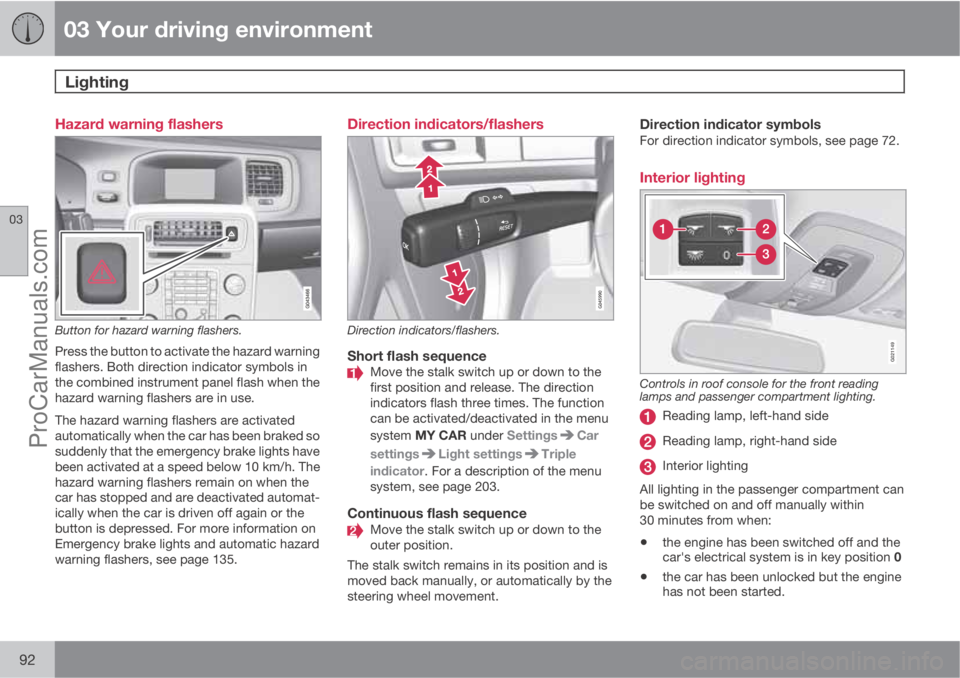
Hazard warning flashers
Button for hazard warning flashers.
Press the button to activate the hazard warning
flashers. Both direction indicator symbols in
the combined instrument panel flash when the
hazard warning flashers are in use.
The hazard warning flashers are activated
automatically when the car has been braked so
suddenly that the emergency brake lights have
been activated at a speed below 10 km/h. The
hazard warning flashers remain on when the
car has stopped and are deactivated automat-
ically when the car is driven off again or the
button is depressed. For more information on
Emergency brake lights and automatic hazard
warning flashers, see page 135.
Direction indicators/flashers
Direction indicators/flashers.
Short flash sequenceMove the stalk switch up or down to the
first position and release. The direction
indicators flash three times. The function
can be activated/deactivated in the menu
system MY CAR under Settings
Car
settings
Light settingsTriple
indicator. For a description of the menu
system, see page 203.
Continuous flash sequenceMove the stalk switch up or down to the
outer position.
The stalk switch remains in its position and is
moved back manually, or automatically by the
steering wheel movement.
Direction indicator symbolsFor direction indicator symbols, see page 72.
Interior lighting
G021149
Controls in roof console for the front reading
lamps and passenger compartment lighting.
Reading lamp, left-hand side
Reading lamp, right-hand side
Interior lighting
All lighting in the passenger compartment can
be switched on and off manually within
30 minutes from when:
•the engine has been switched off and the
car's electrical system is in key position 0
•the car has been unlocked but the engine
has not been started.
ProCarManuals.com
Page 96 of 422
03 Your driving environment
Lighting
03
94* Option/accessory, for more information, see Introduction.
Home safe light duration
Some of the exterior lighting can be kept
switched on to work as home safe lighting after
the car has been locked.
1. Remove the remote control key from the
ignition switch.
2. Move the left-hand stalk switch toward the
steering wheel to the end position and
release it. The function can be activated in
the same way as with main beam flash, see
page 87.
3. Get out of the car and lock the door.
When the function is activated, dipped beam,
parking lamps, door mirror lamps, number
plate lighting, interior roof lamps and courtesy
lighting are switched on.
The length of time for which the home safe
lighting should be kept on can be set in the
menu system MY CAR under Settings
Car
settings
Light settingsHome safe light
duration. For a description of the menu sys-
tem, see page 203.
Approach light duration
Approach lighting is switched on with the
remote control key, see page 45, and is used
to switch on the car's lighting at a distance.
When the function is activated with the remote
control, parking lamps, door mirror lamps,
number plate lighting, interior roof lamps and
courtesy lighting are switched on.
The length of time for which the approach light-
ing should be kept on can be set in the menu
system MY CAR under Settings
Car
settings
Light settingsApproach light
duration. For a description of the menu sys-
tem, see page 203.
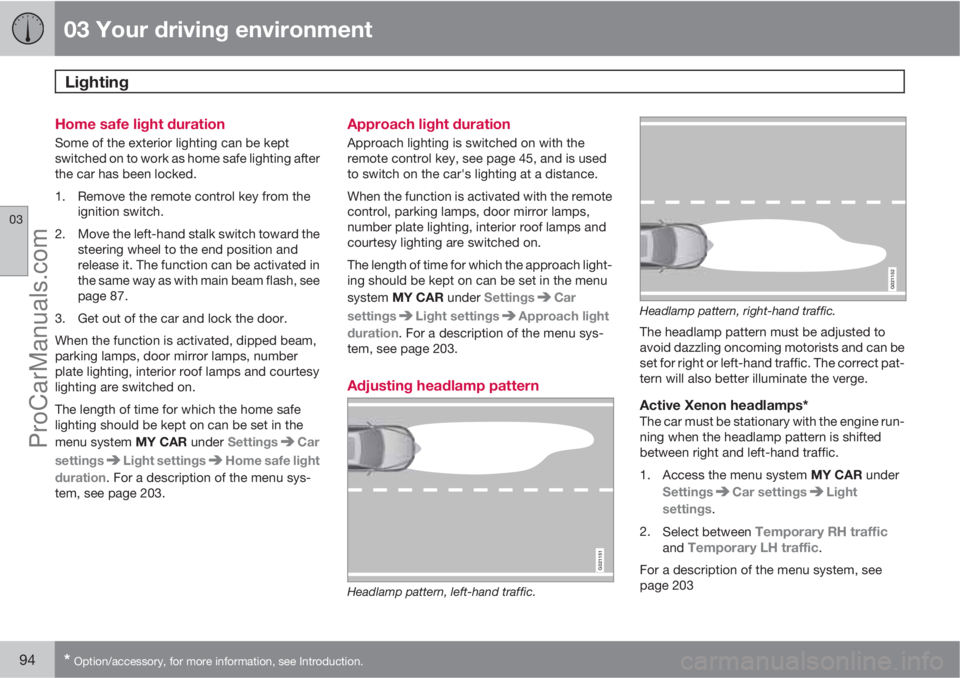
Adjusting headlamp pattern
G021151
Headlamp pattern, left-hand traffic.
G021152
Headlamp pattern, right-hand traffic.
The headlamp pattern must be adjusted to
avoid dazzling oncoming motorists and can be
set for right or left-hand traffic. The correct pat-
tern will also better illuminate the verge.
Active Xenon headlamps*The car must be stationary with the engine run-
ning when the headlamp pattern is shifted
between right and left-hand traffic.
1.
Access the menu system MY CAR under
Settings
Car settingsLight
settings.
2.
Select between
Temporary RH trafficand Temporary LH traffic.
For a description of the menu system, see
page 203
ProCarManuals.com