alarm VOLVO V60 2013 Owner's Manual
[x] Cancel search | Manufacturer: VOLVO, Model Year: 2013, Model line: V60, Model: VOLVO V60 2013Pages: 422, PDF Size: 9.59 MB
Page 63 of 422
02 Locks and alarm
Locking/unlocking
02
* Option/accessory, for more information, see Introduction.61
Temporary deactivation
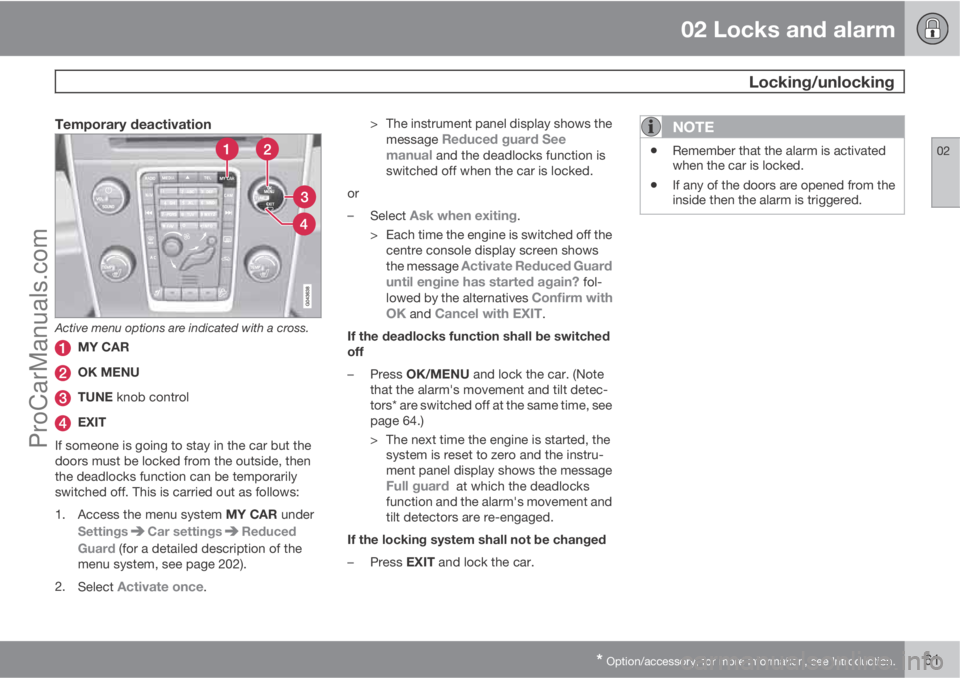
Active menu options are indicated with a cross.
MY CAR
OK MENU
TUNE knob control
EXIT
If someone is going to stay in the car but the
doors must be locked from the outside, then
the deadlocks function can be temporarily
switched off. This is carried out as follows:
1.
Access the menu system MY CAR under
Settings
Car settingsReduced
Guard (for a detailed description of the
menu system, see page 202).
2.
Select
Activate once.> The instrument panel display shows the
message
Reduced guard See
manual and the deadlocks function is
switched off when the car is locked.
or
–
Select
Ask when exiting.
> Each time the engine is switched off the
centre console display screen shows
the message
Activate Reduced Guard
until engine has started again? fol-
lowed by the alternatives Confirm with
OK and Cancel with EXIT.
If the deadlocks function shall be switched
off
–
Press OK/MENU and lock the car. (Note
that the alarm's movement and tilt detec-
tors* are switched off at the same time, see
page 64.)
> The next time the engine is started, the
system is reset to zero and the instru-
ment panel display shows the message
Full guard at which the deadlocks
function and the alarm's movement and
tilt detectors are re-engaged.
If the locking system shall not be changed
–
Press EXIT and lock the car.
NOTE
•Remember that the alarm is activated
when the car is locked.
•If any of the doors are opened from the
inside then the alarm is triggered.
ProCarManuals.com
Page 64 of 422
02 Locks and alarm
Child safety locks
02
62* Option/accessory, for more information, see Introduction.
Manual blocking of the rear doors
The child safety locks prevent children from
opening a rear door from the inside.
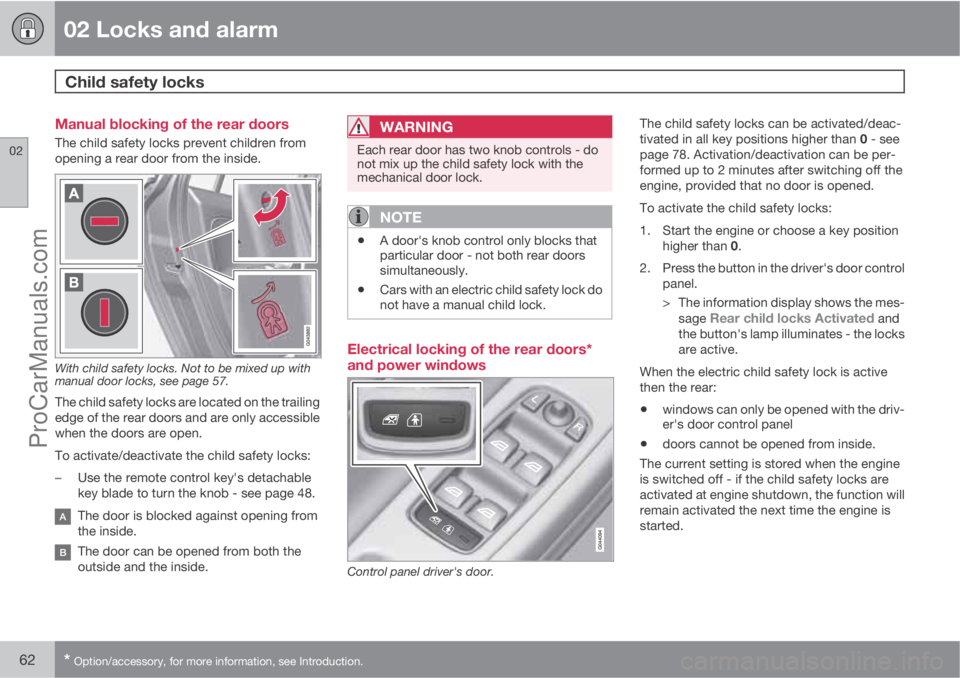
With child safety locks. Not to be mixed up with
manual door locks, see page 57.
The child safety locks are located on the trailing
edge of the rear doors and are only accessible
when the doors are open.
To activate/deactivate the child safety locks:
–Use the remote control key's detachable
key blade to turn the knob - see page 48.
The door is blocked against opening from
the inside.
The door can be opened from both the
outside and the inside.
WARNING
Each rear door has two knob controls - do
not mix up the child safety lock with the
mechanical door lock.
NOTE
•A door's knob control only blocks that
particular door - not both rear doors
simultaneously.
•Cars with an electric child safety lock do
not have a manual child lock.
Electrical locking of the rear doors*
and power windows
Control panel driver's door.
The child safety locks can be activated/deac-
tivated in all key positions higher than 0 - see
page 78. Activation/deactivation can be per-
formed up to 2 minutes after switching off the
engine, provided that no door is opened.
To activate the child safety locks:
1. Start the engine or choose a key position
higher than 0.
2. Press the button in the driver's door control
panel.
> The information display shows the mes-
sage
Rear child locks Activated and
the button's lamp illuminates - the locks
are active.
When the electric child safety lock is active
then the rear:
•windows can only be opened with the driv-
er's door control panel
•doors cannot be opened from inside.
The current setting is stored when the engine
is switched off - if the child safety locks are
activated at engine shutdown, the function will
remain activated the next time the engine is
started.
ProCarManuals.com
Page 65 of 422
02 Locks and alarm
Alarm*
02
* Option/accessory, for more information, see Introduction.63 General
Activated alarm is triggered if:
•a door, the bonnet or the tailgate is opened
•a movement is detected in the passenger
compartment (if fitted with a movement
detector*)
•the car is raised or towed away (if fitted
with a tilt detector*)
•the battery's cable is disconnected
•the siren is disconnected.
If there is a fault in the alarm system, the infor-
mation display shows a message. In which
case, contact a workshop - an authorised
Volvo workshop is recommended.
NOTE
The movement sensors trigger an alarm in
the event of movement in the passenger
compartment - air currents are also regis-
tered. For this reason the alarm is triggered
if the car is left with a window or the sunroof
open or if the passenger compartment
heater is used.
To avoid this: Close the window/sunroof
when leaving the car. If the car's integrated
passenger compartment heater (or a porta-
ble electric heater) shall be used - direct the
airflow from the air vents so that they are not
pointing upwards in the passenger com-
partment.
NOTE
Do not attempt to repair or modify alarm
system components. All such attempts
could affect the terms of insurance.
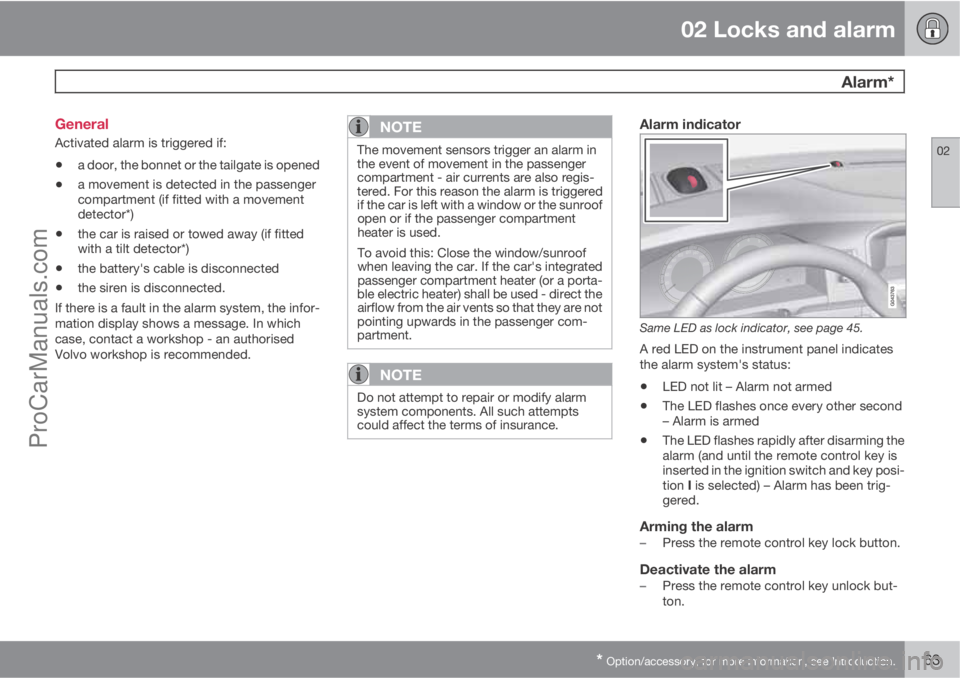
Alarm indicator
Same LED as lock indicator, see page 45.
A red LED on the instrument panel indicates
the alarm system's status:
•LED not lit – Alarm not armed
•The LED flashes once every other second
– Alarm is armed
•The LED flashes rapidly after disarming the
alarm (and until the remote control key is
inserted in the ignition switch and key posi-
tion I is selected) – Alarm has been trig-
gered.
Arming the alarm–Press the remote control key lock button.
Deactivate the alarm–Press the remote control key unlock but-
ton.
ProCarManuals.com
Page 66 of 422
02 Locks and alarm
Alarm*
02
64* Option/accessory, for more information, see Introduction.
Deactivating a triggered alarm–Press the remote control key unlock button
or insert the remote control key in the igni-
tion switch.
Other alarm functions
Automatic re-arming of the alarmThis function prevents the car being left with
the alarm disarmed unintentionally.
If the car is unlocked with the remote control
key (and the alarm is disarmed) but none of the
doors or the tailgate is opened within 2
minutes, then the alarm is automatically re-
armed. The car is relocked at the same time.
Remote control key not workingIf the alarm cannot be deactivated with the
remote control key, e.g. if the key's battery is
discharged - the car can be unlocked, dis-
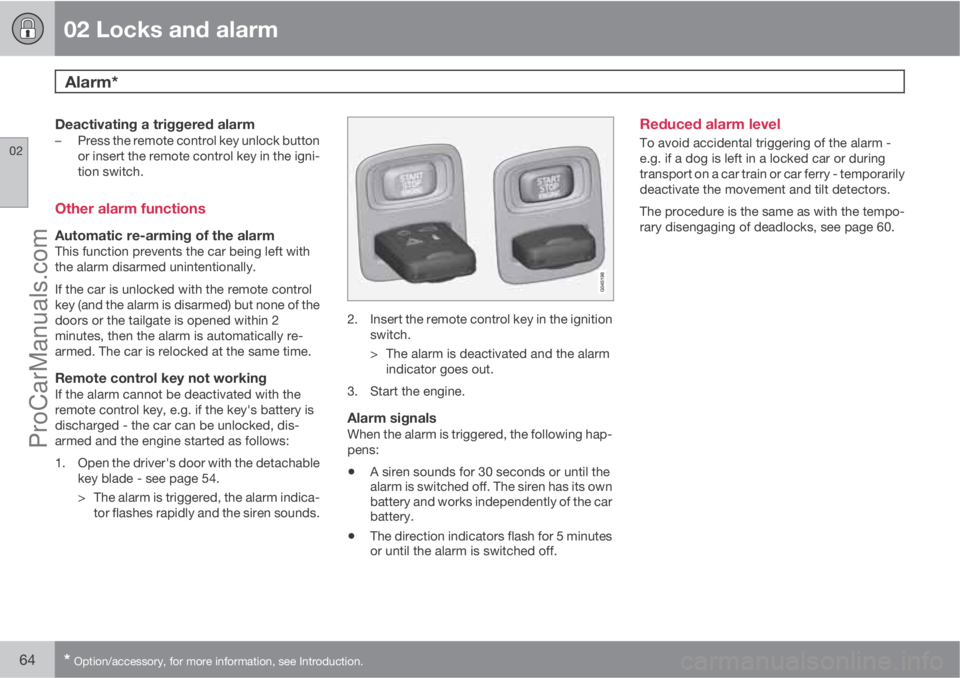
armed and the engine started as follows:
1. Open the driver's door with the detachable
key blade - see page 54.
> The alarm is triggered, the alarm indica-
tor flashes rapidly and the siren sounds.
2. Insert the remote control key in the ignition
switch.
> The alarm is deactivated and the alarm
indicator goes out.
3. Start the engine.
Alarm signalsWhen the alarm is triggered, the following hap-
pens:
•A siren sounds for 30 seconds or until the
alarm is switched off. The siren has its own
battery and works independently of the car
battery.
•The direction indicators flash for 5 minutes
or until the alarm is switched off.
Reduced alarm level
To avoid accidental triggering of the alarm -
e.g. if a dog is left in a locked car or during
transport on a car train or car ferry - temporarily
deactivate the movement and tilt detectors.
The procedure is the same as with the tempo-
rary disengaging of deadlocks, see page 60.
ProCarManuals.com
Page 67 of 422
02 Locks and alarm
02
65ProCarManuals.com
Page 77 of 422
03 Your driving environment
Instruments and controls
03
* Option/accessory, for more information, see Introduction.75
WARNING
If the brake and ABS symbols are illumi-
nated at the same time, there is a risk that
the rear end will skid during heavy braking.
WarningThe red warning symbol illuminates when a
fault has been indicated which could affect the
safety and/or driveability of the car. An explan-
atory text is shown on the information display
at the same time. The symbol remains visible
until the fault has been rectified but the text
message can be cleared with the OK button,
see page 200. The warning symbol can also
illuminate in conjunction with other symbols.
Action:
1. Stop in a safe place. Do not drive the car
further.
2. Read the information on the information
display. Implement the action in accord-
ance with the message in the display. Clear
the message using the OK button.
Reminder – doors not closed
If one of the doors, the bonnet2 or tailgate is not
closed properly then the information or warn-
ing symbol illuminates together with an explan-
atory text message in the combined instrumentpanel. Stop the car in a safe place as soon as
possible and close the door, bonnet or boot lid,
whichever is open.
If the car is driven at a speed lower than
approx. 7 km/h then the information
symbol illuminates.
If the car is driven at a speed higher
than approx. 7 km/h then the warning
symbol illuminates.
Trip meter
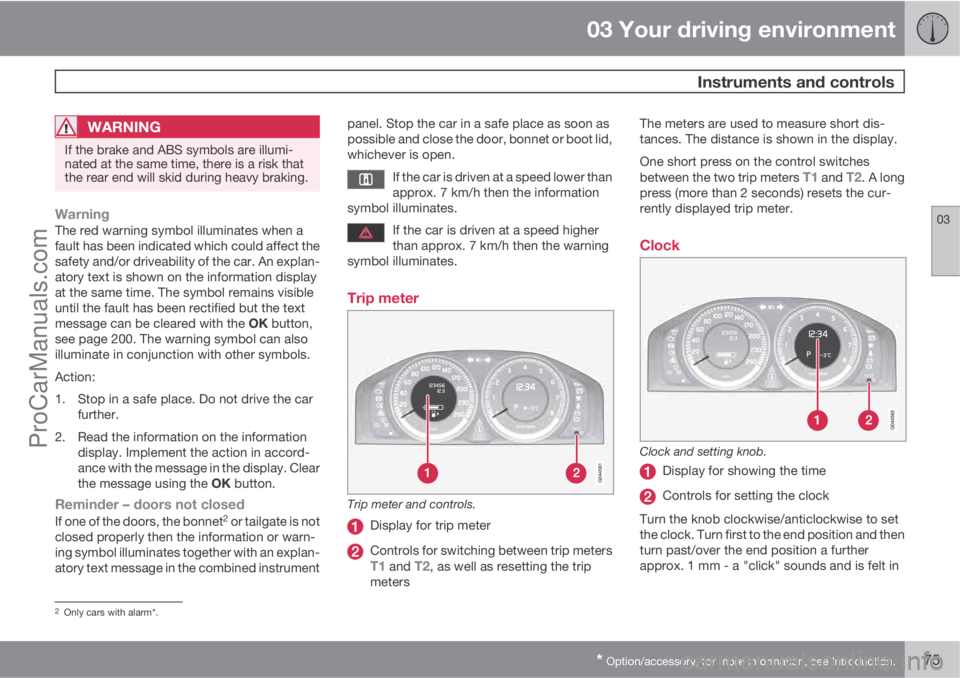
Trip meter and controls.
Display for trip meter
Controls for switching between trip metersT1 and T2, as well as resetting the trip
metersThe meters are used to measure short dis-
tances. The distance is shown in the display.
One short press on the control switches
between the two trip meters
T1 and T2. A long
press (more than 2 seconds) resets the cur-
rently displayed trip meter.
Clock
Clock and setting knob.
Display for showing the time
Controls for setting the clock
Turn the knob clockwise/anticlockwise to set
the clock. Turn first to the end position and then
turn past/over the end position a further
approx. 1 mm - a "click" sounds and is felt in
2Only cars with alarm*.
ProCarManuals.com
Page 79 of 422
03 Your driving environment
Volvo Sensus
03
* Option/accessory, for more information, see Introduction.77 General
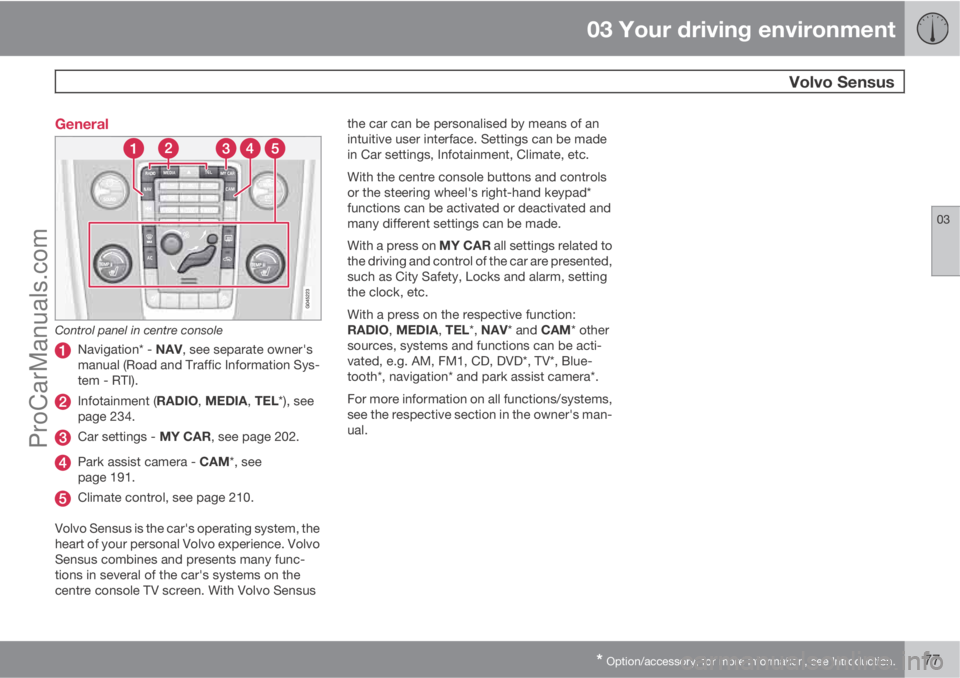
Control panel in centre console
Navigation* - NAV, see separate owner's
manual (Road and Traffic Information Sys-
tem - RTI).
Infotainment (RADIO, MEDIA, TEL*), see
page 234.
Car settings - MY CAR, see page 202.
Park assist camera - CAM*, see
page 191.
Climate control, see page 210.
Volvo Sensus is the car's operating system, the
heart of your personal Volvo experience. Volvo
Sensus combines and presents many func-
tions in several of the car's systems on the
centre console TV screen. With Volvo Sensusthe car can be personalised by means of an
intuitive user interface. Settings can be made
in Car settings, Infotainment, Climate, etc.
With the centre console buttons and controls
or the steering wheel's right-hand keypad*
functions can be activated or deactivated and
many different settings can be made.
With a press on MY CAR all settings related to
the driving and control of the car are presented,
such as City Safety, Locks and alarm, setting
the clock, etc.
With a press on the respective function:
RADIO, MEDIA, TEL*, NAV* and CAM* other
sources, systems and functions can be acti-
vated, e.g. AM, FM1, CD, DVD*, TV*, Blue-
tooth*, navigation* and park assist camera*.
For more information on all functions/systems,
see the respective section in the owner's man-
ual.
ProCarManuals.com
Page 117 of 422
03 Your driving environment
Starting the engine
03
115
Operation
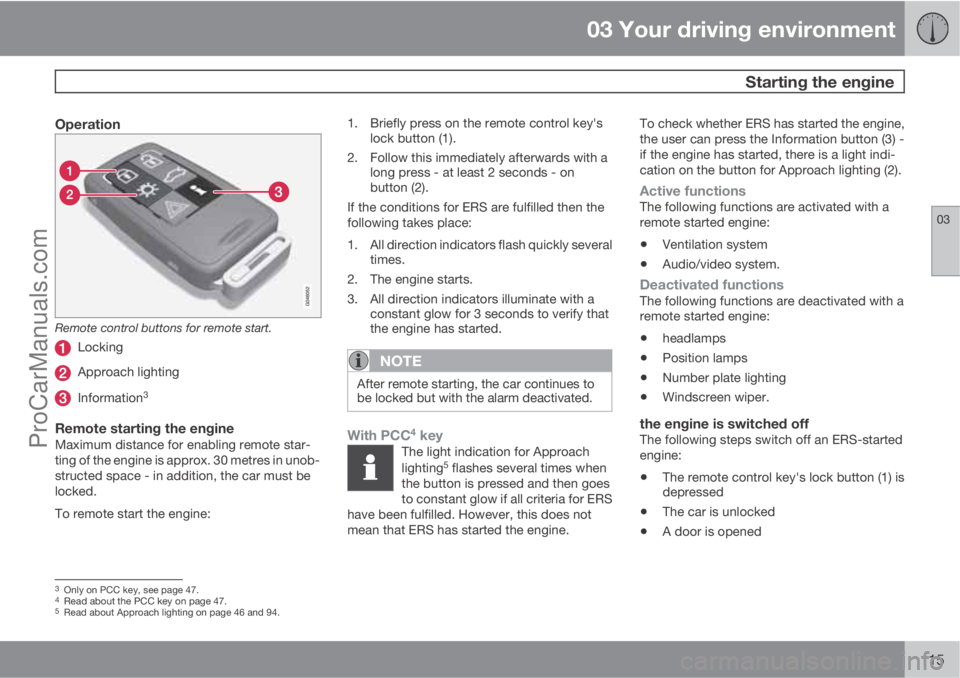
Remote control buttons for remote start.
Locking
Approach lighting
Information3
Remote starting the engineMaximum distance for enabling remote star-
ting of the engine is approx. 30 metres in unob-
structed space - in addition, the car must be
locked.
To remote start the engine:1. Briefly press on the remote control key's
lock button (1).
2. Follow this immediately afterwards with a
long press - at least 2 seconds - on
button (2).
If the conditions for ERS are fulfilled then the
following takes place:
1. All direction indicators flash quickly several
times.
2. The engine starts.
3. All direction indicators illuminate with a
constant glow for 3 seconds to verify that
the engine has started.
NOTE
After remote starting, the car continues to
be locked but with the alarm deactivated.
With PCC4 keyThe light indication for Approach
lighting5 flashes several times when
the button is pressed and then goes
to constant glow if all criteria for ERS
have been fulfilled. However, this does not
mean that ERS has started the engine.
To check whether ERS has started the engine,
the user can press the Information button (3) -
if the engine has started, there is a light indi-
cation on the button for Approach lighting (2).
Active functionsThe following functions are activated with a
remote started engine:
•Ventilation system
•Audio/video system.
Deactivated functionsThe following functions are deactivated with a
remote started engine:
•headlamps
•Position lamps
•Number plate lighting
•Windscreen wiper.
the engine is switched offThe following steps switch off an ERS-started
engine:
•The remote control key's lock button (1) is
depressed
•The car is unlocked
•A door is opened
3Only on PCC key, see page 47.4Read about the PCC key on page 47.5Read about Approach lighting on page 46 and 94.
ProCarManuals.com
Page 124 of 422
03 Your driving environment
Gearboxes
03
122* Option/accessory, for more information, see Introduction.
Reverse gear inhibitorThe reverse gear inhibitor hinders the possibil-
ity of mistakenly attempting to engage reverse
gear during normal forward travel.
•Follow the gearing pattern printed on the
gear lever and start from neutral position,
N before moving it to R position.
•Only engage reverse gear when the car is
stationary.
NOTE
With the upper variant of the shifting pattern
for 6-speed gearbox (see previous illustra-
tion) - first press down the gear lever in the
N position in order to engage reverse gear.
Automatic gearbox Geartronic*
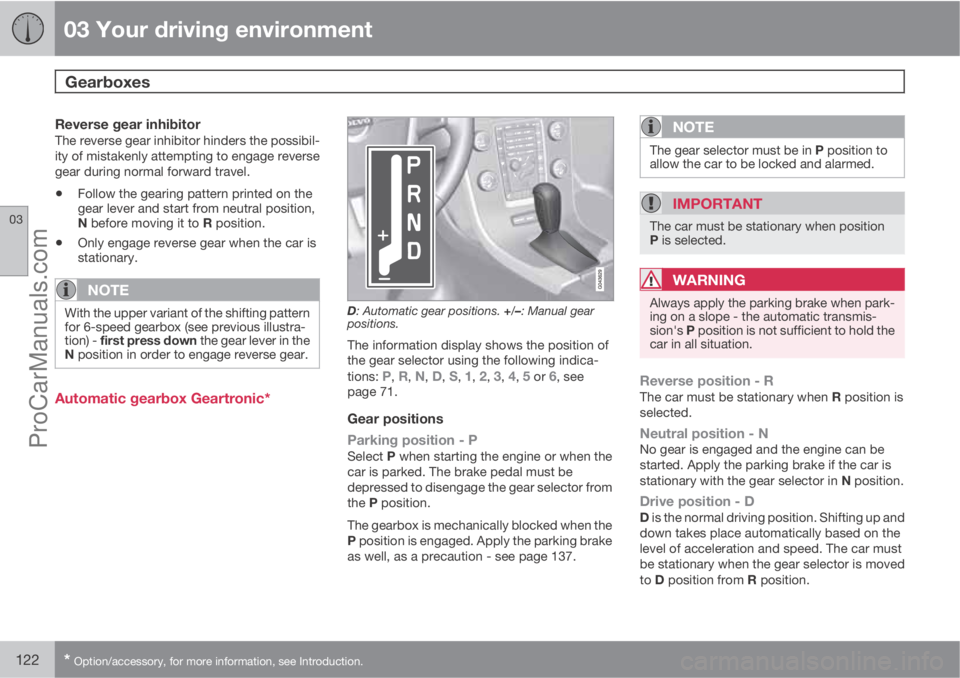
D: Automatic gear positions. +/–: Manual gear
positions.
The information display shows the position of
the gear selector using the following indica-
tions:
P, R, N, D, S, 1, 2, 3, 4, 5 or 6, see
page 71.
Gear positions
Parking position - P
Select P when starting the engine or when the
car is parked. The brake pedal must be
depressed to disengage the gear selector from
the P position.
The gearbox is mechanically blocked when the
P position is engaged. Apply the parking brake
as well, as a precaution - see page 137.
NOTE
The gear selector must be in P position to
allow the car to be locked and alarmed.
IMPORTANT
The car must be stationary when position
P is selected.
WARNING
Always apply the parking brake when park-
ing on a slope - the automatic transmis-
sion's P position is not sufficient to hold the
car in all situation.
Reverse position - RThe car must be stationary when R position is
selected.
Neutral position - NNo gear is engaged and the engine can be
started. Apply the parking brake if the car is
stationary with the gear selector in N position.
Drive position - DD is the normal driving position. Shifting up and
down takes place automatically based on the
level of acceleration and speed. The car must
be stationary when the gear selector is moved
to D position from R position.
ProCarManuals.com
Page 143 of 422
03 Your driving environment
HomeLinkŸŸ *
03
* Option/accessory, for more information, see Introduction.141 General
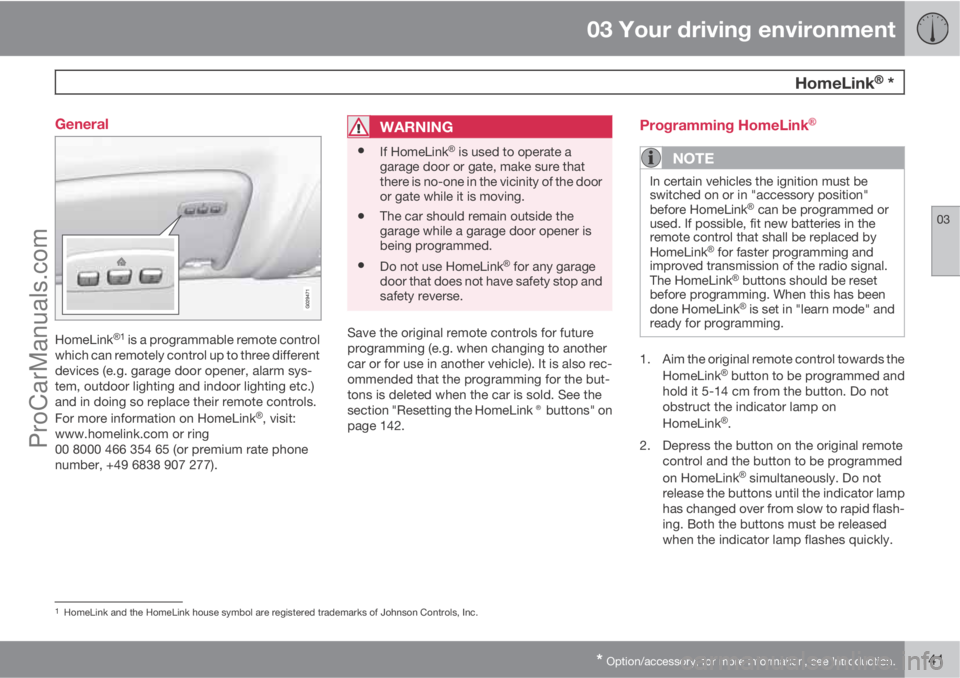
HomeLinkŸ1 is a programmable remote control
which can remotely control up to three different
devices (e.g. garage door opener, alarm sys-
tem, outdoor lighting and indoor lighting etc.)
and in doing so replace their remote controls.
For more information on HomeLink
Ÿ, visit:
www.homelink.com or ring
00 8000 466 354 65 (or premium rate phone
number, +49 6838 907 277).
WARNING
•If HomeLinkŸ is used to operate a
garage door or gate, make sure that
there is no-one in the vicinity of the door
or gate while it is moving.
•The car should remain outside the
garage while a garage door opener is
being programmed.
•Do not use HomeLinkŸ for any garage
door that does not have safety stop and
safety reverse.
Save the original remote controls for future
programming (e.g. when changing to another
car or for use in another vehicle). It is also rec-
ommended that the programming for the but-
tons is deleted when the car is sold. See the
section "Resetting the HomeLink® buttons" on
page 142.
Programming HomeLinkŸ
NOTE
In certain vehicles the ignition must be
switched on or in "accessory position"
before HomeLink
Ÿ can be programmed or
used. If possible, fit new batteries in the
remote control that shall be replaced by
HomeLink
Ÿ for faster programming and
improved transmission of the radio signal.
The HomeLink
Ÿ buttons should be reset
before programming. When this has been
done HomeLink
Ÿ is set in "learn mode" and
ready for programming.
1. Aim the original remote control towards the
HomeLinkŸ button to be programmed and
hold it 5-14 cm from the button. Do not
obstruct the indicator lamp on
HomeLink
Ÿ.
2. Depress the button on the original remote
control and the button to be programmed
on HomeLink
Ÿ simultaneously. Do not
release the buttons until the indicator lamp
has changed over from slow to rapid flash-
ing. Both the buttons must be released
when the indicator lamp flashes quickly.
1HomeLink and the HomeLink house symbol are registered trademarks of Johnson Controls, Inc.
ProCarManuals.com