lock VOLVO V60 2013 Repair Manual
[x] Cancel search | Manufacturer: VOLVO, Model Year: 2013, Model line: V60, Model: VOLVO V60 2013Pages: 422, PDF Size: 9.59 MB
Page 124 of 422
03 Your driving environment
Gearboxes
03
122* Option/accessory, for more information, see Introduction.
Reverse gear inhibitorThe reverse gear inhibitor hinders the possibil-
ity of mistakenly attempting to engage reverse
gear during normal forward travel.
•Follow the gearing pattern printed on the
gear lever and start from neutral position,
N before moving it to R position.
•Only engage reverse gear when the car is
stationary.
NOTE
With the upper variant of the shifting pattern
for 6-speed gearbox (see previous illustra-
tion) - first press down the gear lever in the
N position in order to engage reverse gear.
Automatic gearbox Geartronic*
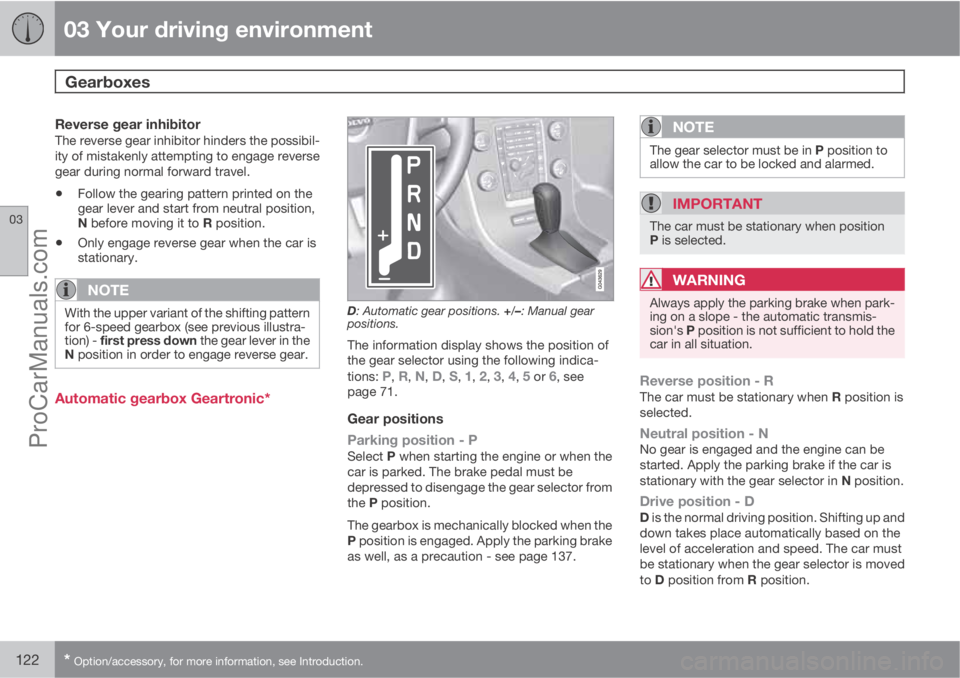
D: Automatic gear positions. +/–: Manual gear
positions.
The information display shows the position of
the gear selector using the following indica-
tions:
P, R, N, D, S, 1, 2, 3, 4, 5 or 6, see
page 71.
Gear positions
Parking position - P
Select P when starting the engine or when the
car is parked. The brake pedal must be
depressed to disengage the gear selector from
the P position.
The gearbox is mechanically blocked when the
P position is engaged. Apply the parking brake
as well, as a precaution - see page 137.
NOTE
The gear selector must be in P position to
allow the car to be locked and alarmed.
IMPORTANT
The car must be stationary when position
P is selected.
WARNING
Always apply the parking brake when park-
ing on a slope - the automatic transmis-
sion's P position is not sufficient to hold the
car in all situation.
Reverse position - RThe car must be stationary when R position is
selected.
Neutral position - NNo gear is engaged and the engine can be
started. Apply the parking brake if the car is
stationary with the gear selector in N position.
Drive position - DD is the normal driving position. Shifting up and
down takes place automatically based on the
level of acceleration and speed. The car must
be stationary when the gear selector is moved
to D position from R position.
ProCarManuals.com
Page 126 of 422
03 Your driving environment
Gearboxes
03
124
Geartronic does not permit downshifting/kick-
down which would result in an engine speed
high enough to damage the engine. Nothing
happens if the driver still tries to shift down in
this way at high engine speed – the original
gear remains engaged.
When kick-down is activated the car can
change one or more gears at a time depending
on engine speed. The car changes up when the
engine reaches its maximum speed in order to
prevent damage to the engine.
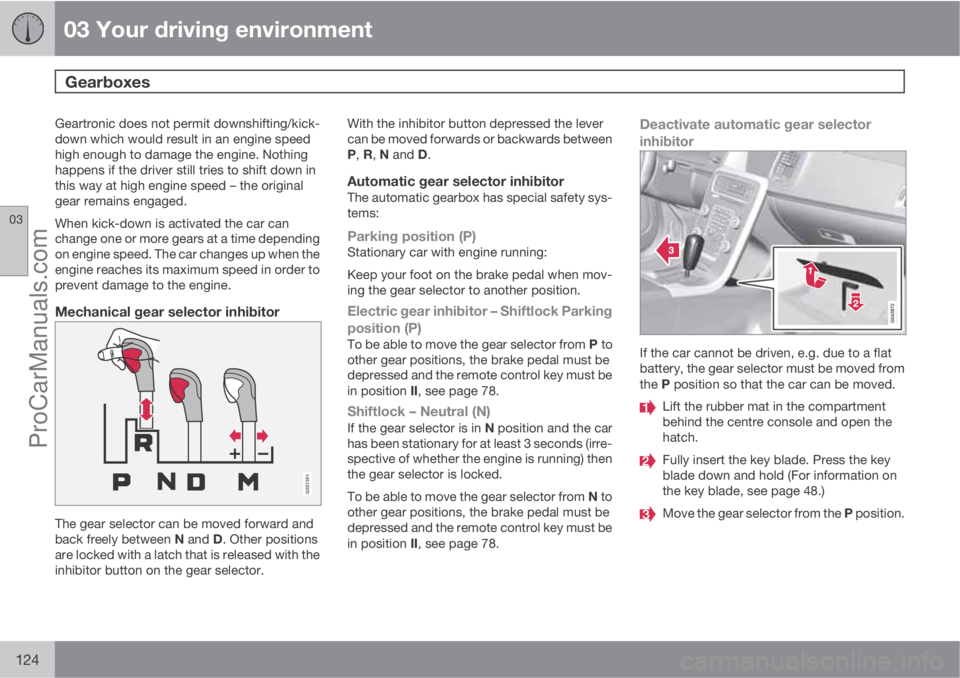
Mechanical gear selector inhibitor
G021351
The gear selector can be moved forward and
back freely between N and D. Other positions
are locked with a latch that is released with the
inhibitor button on the gear selector.With the inhibitor button depressed the lever
can be moved forwards or backwards between
P, R, N and D.
Automatic gear selector inhibitorThe automatic gearbox has special safety sys-
tems:
Parking position (P)Stationary car with engine running:
Keep your foot on the brake pedal when mov-
ing the gear selector to another position.
Electric gear inhibitor – Shiftlock Parking
position (P)
To be able to move the gear selector from P to
other gear positions, the brake pedal must be
depressed and the remote control key must be
in position II, see page 78.
Shiftlock – Neutral (N)If the gear selector is in N position and the car
has been stationary for at least 3 seconds (irre-
spective of whether the engine is running) then
the gear selector is locked.
To be able to move the gear selector from N to
other gear positions, the brake pedal must be
depressed and the remote control key must be
in position II, see page 78.
Deactivate automatic gear selector
inhibitor
If the car cannot be driven, e.g. due to a flat
battery, the gear selector must be moved from
the P position so that the car can be moved.
Lift the rubber mat in the compartment
behind the centre console and open the
hatch.
Fully insert the key blade. Press the key
blade down and hold (For information on
the key blade, see page 48.)
Move the gear selector from the P position.
ProCarManuals.com
Page 132 of 422
03 Your driving environment
DRIVe Start/Stop*
03
130* Option/accessory, for more information, see Introduction.
ConditionsM/AA
There is a temporarily high cur-
rent take-off or battery capacity
drops below the lowest permissi-
ble level.M + A
Repeated pumping of the brake
pedal.M + A
The car starts to roll - faster than
the equivalent normal walking
pace.M
The driver's belt lock is opened
with the gear selector in D or N
position.A
Steering wheel movements.A
The gear selector is moved from
the D position to "+/-" or R.A
The driver's door is opened with
the gear selector in D position - a
"ping" sound and text message
inform that the Start/Stop func-
tion is active.A
AM = Manual gearbox, A = Automatic gearbox.
WARNING
Do not open the bonnet when the engine
has stopped automatically - the engine may
suddenly start automatically. First switch off
the engine as normal using the START/
STOP ENGINE button before opening the
bonnet.
The engine does not auto-startIn the following cases the engine does not
auto-start after having auto-stopped:
ConditionsM/AA
A gear is engaged without
declutching - a display text
prompts the driver to set the gear
lever in neutral position in order to
enable automatic starting.M
The driver is unrestrained, the
gear selector is in P position and
the driver’s door is open - a nor-
mal engine start must take place.A
The gear selector is moved to P
position - press the START/
STOP ENGINE button to restart
the engine.
If the driver's door is opened
before starting the engine with
the START/STOP ENGINE but-
ton, the Start/Stop function is
switched off.A
AM = Manual gearbox, A = Automatic gearbox.
Involuntary engine stop with manual
gearbox
In the event that a start-up fails and the engine
stops, proceed as follows:
ProCarManuals.com
Page 137 of 422
03 Your driving environment
Foot brake
03
135 General
The car is equipped with two brake circuits. If
one brake circuit is damaged then this will
mean that the brakes engage at a deeper level
and harder pressure on the pedal is needed to
produce the normal braking effect.
The driver's brake pedal pressure is assisted
by a brake servo.
WARNING
The brake servo only works when the engine
is running.
If the brake is used when the engine is switched
off then the pedal will feel stiff and more force
must be used to brake the car.
In very hilly terrain or when driving with a heavy
load the brakes can be relieved by using engine
braking. Engine braking is most efficiently used
if the same gear is used downhill as up.
For more general information on heavy loads
on the car, see page 378.
Anti-lock braking systemThe car is equipped with ABS (Anti-lock
Braking System) which prevents the wheels
from locking during braking. This means the
ability to steer is maintained and it is easier to
swerve to avoid a hazard for example. Vibrationmay be felt in the brake pedal when this is
engaged and this is normal.
A short test of the ABS system is made auto-
matically after the engine has been started
when the driver releases the brake pedal. A
further automatic test of the ABS system may
be made when the car reaches 10 km/h. The
test may be experienced as pulses in the brake
pedal.
Emergency brake lights and automatic
hazard warning flashers
Emergency brake lights are activated to alert
vehicles behind about sudden braking. The
function means that the brake light flashes
instead of - as in normal braking - shining with
a constant glow.
Emergency brake lights are activated at
speeds above 50 km/h if the ABS system is
working and/or in the event of sudden braking.
After the car's speed has been slowed below
10 km/h the brake light returns from flashing to
the normal constant glow - while at the same
time the hazard warning flashers are activated,
and they flash until the driver changes engine
speed with the accelerator pedal or they are
deactivated with their button, see page 92.
Cleaning the brake discsCoatings of dirt and water on the brake discs
may result in delayed brake function. This delay
is minimised by cleaning the brake linings.
Manual cleaning is advisable with wet road sur-
faces, prior to long-stay parking and after the
car has been washed. Carry this out by braking
gently during a short period while en route.
Emergency Brake AssistanceEmergency Brake Assistance EBA (Emergency
Brake Assist) helps to increase brake force and
so reduce braking distance. EBA detects the
driver's braking style and increases brake force
as necessary. The brake force can be rein-
forced up to the level when the ABS system is
engaged. The EBA function is interrupted when
the pressure on the brake pedal is reduced.
NOTE
When EBA is activated the brake pedal low-
ers slightly more than usual, depress (hold)
the brake pedal as long as necessary. If the
brake pedal is released then all braking
ceases.
MaintenanceTo keep the car as safe and reliable as possi-
ble, follow the Volvo service intervals as speci-
ProCarManuals.com
Page 148 of 422
04 Driver support
DSTC – Stability and traction control system
04
146* Option/accessory, for more information, see Introduction.
General information on DSTC
The stability and traction control system, DSTC
(Dynamic Stability & Traction Control) helps the
driver to avoid skidding and improves the car's
traction.
The activation of the system during braking
may be noticed as a throbbing sound. The car
may accelerate slower than expected when the
accelerator pedal is depressed.
Active Yaw ControlThe function limits the driving and brake force
of the wheels individually in order to stabilise
the car.
Spin ControlThe function prevents the driving wheels from
spinning against the road surface during accel-
eration.
Traction control systemThe function is active at low speed and trans-
fers power from the driving wheel that is spin-
ning to the one that is not.
Engine drag control - EDCEDC (Engine Drag Control) prevents involun-
tary wheel locking, e.g. after shifting down or
engine braking when driving in low gears on
slippery road surfaces.Involuntary wheel locking while driving can,
amongst other things, impair the driver's ability
to steer the car.
Corner Traction Control – CTCCTC compensates for understeer and allows
higher than normal acceleration in a bend with-
out wheelspin on the inner wheel, e.g. on an
arcing motorway entrance road to quickly
reach the prevailing traffic speed.
Trailer Stability Assist* - TSAThe function serves to stabilise the car and
trailer combination if it begins to snake, see
page 303.
NOTE
The function is deactivated if the driver
selects Sport mode.
Operation
Selection of level - Sport modeThe DSTC system is always activated - it can-
not be deactivated.
However, the driver can select the Sport mode,
which allows for a more active driving experi-
ence. In Sport mode the system detects
whether the accelerator pedal, steering wheel
movements and cornering are more active thanin normal driving and then allows controlled
skidding with the rear section up to a certain
level before it intervenes and stabilises the car.
If the driver stops a controlled skid by releasing
the accelerator pedal then the DSTC system
intervenes and stabilises the car.
With Sport mode, maximum traction is
obtained if the car has become stuck, or when
driving on a loose surface - e.g. sand or deep
snow.
Proceed as follows to select Sport mode:
1.
Press the centre console button MY CAR
and search in the display screen's menu
system and locate My V60
DSTC. (For
information on the menu system, see
page 202).
2. Uncheck the box and back out of the menu
system with EXIT.
> The system then allows a more sporty
driving style.
The Sport mode is active until the driver dese-
lects it or until the engine is switched off - after
the engine is started the next time the DSTC
system is back in its normal mode again.
ProCarManuals.com
Page 155 of 422
04 Driver support
Cruise control*
04
* Option/accessory, for more information, see Introduction.153
>
The symbol illuminates in the display (5)
and the brackets around
(---) km/h show
that cruise control is set in standby mode.
To activate cruise control:
•At the required speed - press the steering
wheel button
or .
> Current speed is stored in the memory - the
display text
(---) km/h changes to show
the selected speed, e.g. 100 km/h, without
brackets.
NOTE
Cruise control cannot be engaged at
speeds below 30 km/h.
Changing the speedTo change the stored speed:
•Press briefly on the steering wheel button,
or - most recent presses are stored
in memory.
A temporary increase in speed with the accel-
erator pedal, e.g. during overtaking, does not
affect the cruise control setting - the car returns
to the set speed when the accelerator pedal is
released.
NOTE
If any of the Cruise Control buttons are held
down for more than approx. 1 minute, it is
blocked and disabled. To be able to reacti-
vate Cruise Control, the car must be stop-
ped and the engine restarted.
Temporary deactivation - standby modeTo temporarily disengage cruise control and
set it in standby mode:
•Press the steering wheel button .
> Set speed is shown in brackets in the dis-
play (5), e.g.
(100) km/h.
Automatic standby modeCruise control is temporarily disengaged and
set in standby mode if:
•wheels lose traction
•the foot brake is used
•speed falls below approx. 30 km/h
•the clutch pedal is depressed
•the gear selector is moved to neutral posi-
tion (automatic gearbox)
•the driver maintains a speed higher than
the set speed for longer than 1 minute.
The driver must then regulate the speed.
Resume set speedCruise control in standby mode is re-activated
with one press on the steering wheel button
- the speed is then set to the last stored
speed.
NOTE
A significant increase in speed may arise
after the speed has been resumed with .
DeactivateThe cruise control is switched off with the
steering wheel button (1) or by switching off the
engine - the set speed is deleted from the
memory and cannot be resumed with the
button.
ProCarManuals.com
Page 159 of 422
04 Driver support
Adaptive cruise control*
04
* Option/accessory, for more information, see Introduction.157
Changing the speedTo change the stored speed:
•Adjust with short presses on or -
every press gives +/- 5 km/h. The last
presses made are stored in the memory.
If speed is increased using the accelerator
pedal prior to pressing the
/ button,
then it is the car's current speed when the
button is pressed that is stored in the
cruise control.
•In active mode the button has the same
function as
but results in a lower
increase in speed: + 1 km/h.
NOTE
If any of the Cruise Control buttons are held
down for more than approx. 1 minute, it is
blocked and disabled. To be able to reacti-
vate Cruise Control, the car must be stop-
ped and the engine restarted.
In certain situations, cruise control cannot
be activated. Then the display shows
Cruise control Unavailable, see
page 162.
Set time intervalDifferent time intervals to the
vehicle in front can be
selected and shown in the
display as 1-5 horizontal lines
- the more lines the longer the
time interval. One line corre-
sponds to approx. 1 second
to the vehicle in front, 5 lines
approx. 3 seconds.
To set/change the time interval:
•Increase or decrease with the steering
wheel keypad's thumbwheel (or the but-
tons
/ for cars without Speed limiter).
At low speed, when the distances are short, the
adaptive cruise control increases the time
interval slightly.
The adaptive cruise control allows the time
interval to vary noticeably in certain situations
in order to allow the car to follow the vehicle in
front smoothly and comfortably.
Note that small intervals only allow the driver a
short time to react and take action if any
unforeseen traffic problem should arise.The number of lines for the
selected time interval is
shown during the setting itself
and for several seconds after-
wards. Then a smaller scale
version of the symbol is
shown to the right of the dis-
play. The same symbol is also shown when
Distance Warning is activated, see page 165.
NOTE
Only use the time intervals permitted by
local traffic regulations.
If Cruise Control does not appear to react
when activated, this may be because the
time distance to the car in front is preventing
an increase in speed.
The higher the speed the longer the calcu-
lated distance in metres for a given time
interval.
Temporary deactivation - standby modeTo temporarily disengage Cruise control and
set it in standby mode:
•Press the steering wheel button .
> Set speed is shown in brackets in the dis-
play, e.g.
(100).
ProCarManuals.com
Page 160 of 422
04 Driver support
Adaptive cruise control*
04
158* Option/accessory, for more information, see Introduction.
Keypad without Speed limiter*To temporarily disengage Cruise control and
set it in standby mode:
•Press the steering wheel button .
Standby mode due to driver interventionCruise control is temporarily disengaged and
set in standby mode if:
•the foot brake is used
•the clutch pedal is depressed for longer
than 1 minute6
•the gear selector is moved to N position
(automatic gearbox)
•the driver maintains a speed higher than
the set speed for longer than 1 minute.
The driver must then regulate the speed.
A temporary increase in speed with the accel-
erator pedal, e.g. during overtaking, does not
affect the cruise control setting - the car returns
to the last stored speed when the accelerator
pedal is released.
Automatic standby modeThe Adaptive cruise control is dependent on
other systems, e.g.. DSTC (see page 146). Ifany of these systems stop working then cruise
control is automatically deactivated.
In the event of automatic deactivation a signal
will sound and the message
Cruise control
Cancelled is shown in the display. The driver
must then intervene and adapt the speed and
distance to the vehicle ahead.
An automatic deactivation can be due to:
•engine speed is too low/high
•speed falls below 30 km/h7
•wheels lose traction
•brake temperature is high
•the radar sensor is covered e.g. by wet
snow or heavy rain (radar waves blocked).
Resume set speedCruise control in standby mode is re-activated
with one press on the steering wheel button
- the speed is then set to the last stored
speed.
NOTE
A significant increase in speed may arise
after the speed has been resumed with .
Overtaking another vehicleWhen the car is following another vehicle and
the driver indicates an imminent overtake with
the direction indicator
8, the Cruise control
helps to briefly accelerate the car towards the
vehicle in front.
The function is active at speeds
above 70 km/h.
WARNING
Be aware that this function can be activated
in more situations other than during over-
taking, e.g. when a direction indicator is
used to indicate a change of lane or exit to
another road - the car will then accelerate
briefly.
Deactivate
Keypad with Speed limiter
Adaptive cruise control is deactivated with the
steering wheel button
. The set speed is
cleared and cannot be resumed with the
button.
Keypad without Speed limiterWith a short press on the steering wheel button
the cruise control is set in standby mode.
6Disengaging and selecting a higher or lower gear does not involve standby mode.7Does not apply to a car with Queue Assistant - it manages right down to stationary.8On left flash only in left-hand drive car, or right flash in right-hand drive car.
ProCarManuals.com
Page 163 of 422
04 Driver support
Adaptive cruise control*
04
* Option/accessory, for more information, see Introduction.161
WARNING
The driver must always be observant with
regard to the traffic conditions and intervene
when the adaptive cruise control is not
maintaining a suitable speed or suitable dis-
tance.
The adaptive cruise control cannot handle
all traffic, weather and road conditions.
Read the whole of this section for informa-
tion on the limitations of the adaptive cruise
control. The driver must be familiar with this
information before using the adaptive cruise
control.
The driver always bears responsibility for
maintaining the correct distance and speed,
even when the adaptive cruise control is
being used.
WARNING
Accessories or other objects such as auxil-
iary lamps must not be installed in front of
the grille.
WARNING
Adaptive cruise control is not a collision
avoidance system. The driver must inter-
vene if the system does not detect a vehicle
in front.
The adaptive cruise control does not brake
for humans or animals, and not for small
vehicles such as bicycles and motorcycles.
Nor for oncoming, slow or stationary vehi-
cles and objects.
Do not use the adaptive cruise control, for
example, in city traffic, in dense traffic, at
junctions, on slippery surfaces, with a lot of
water or slush on the road, in heavy rain/
snow, in poor visibility, on winding roads or
on slip roads.
The capacity of the radar sensor to detect vehi-
cles in front is reduced significantly:
•if the radar sensor becomes blocked and
cannot detect other vehicles e.g. in heavy
rain or slush, or if other objects have col-
lected in front of the radar sensor.
NOTE
Keep the area in front of the radar sensor
clean - see "Maintenance" on page 176.
•if the speed of vehicles in front is signifi-
cantly different from your own speed.
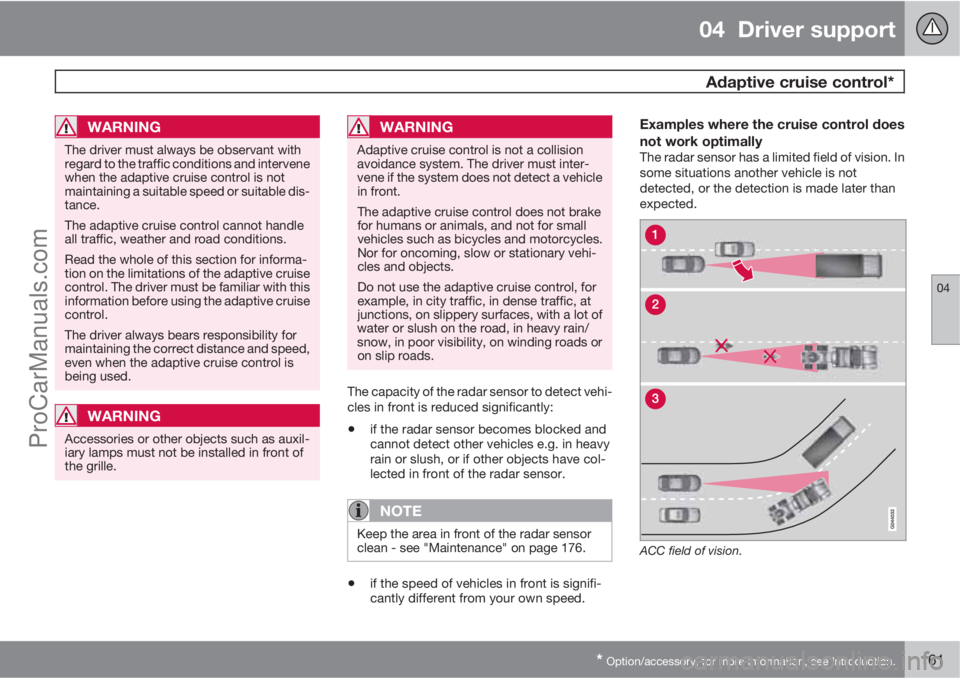
Examples where the cruise control does
not work optimally
The radar sensor has a limited field of vision. In
some situations another vehicle is not
detected, or the detection is made later than
expected.
ACC field of vision.
ProCarManuals.com
Page 164 of 422
04 Driver support
Adaptive cruise control*
04
162* Option/accessory, for more information, see Introduction.
Sometimes the radar sensor is late at
detecting vehicles at close distances, e.g.
a vehicle that drives in between the car and
vehicles in front.
Small vehicles, such as motorcycles, or
vehicles not driving in the centre of the lane
can remain undetected.
In bends the radar sensor may detect the
wrong vehicle or lose a detected vehicle
from view.
Fault tracing and action
If the display shows the message Radar
blocked See manual this means that the
radar signals from the radar sensor are blocked
and that vehicles in front of the car could not
be detected.
This means that in addition to the Adaptive
Cruise Control, Distance Warning and CollisionWarning with Auto Brake functions are not
operating either.
The following table presents possible causes
for a message being shown along with the
appropriate action.
CauseAction
The radar surface in the grille is dirty or covered with ice or snow.Clean the radar surface in the grille from dirt, ice and snow.
Heavy rain or snow blocking the radar signals.No action. Sometimes the radar does not work during heavy rain or
snowfall.
Water or snow from the road surface swirls up and blocks the radar sig-
nals.No action. Sometimes the radar does not work on a very wet or snowy
road surface.
The radar surface has been cleaned but the message remains.Wait. It could take several minutes for the radar to sense that it is no
longer blocked.
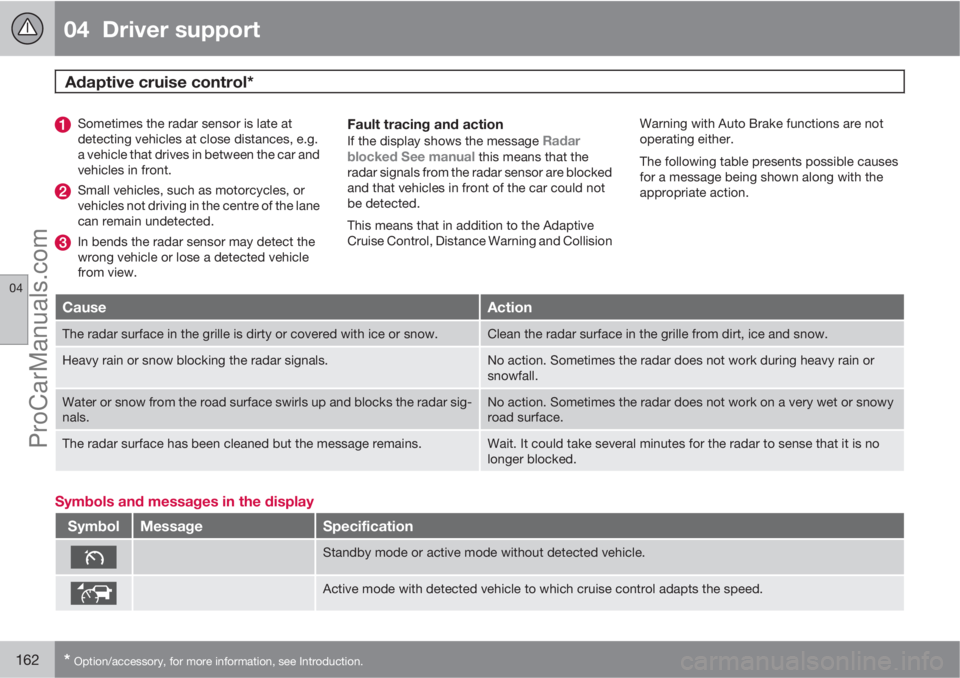
Symbols and messages in the display
SymbolMessageSpecification
Standby mode or active mode without detected vehicle.
Active mode with detected vehicle to which cruise control adapts the speed.
ProCarManuals.com