fuel VOLVO V60 2014 User Guide
[x] Cancel search | Manufacturer: VOLVO, Model Year: 2014, Model line: V60, Model: VOLVO V60 2014Pages: 442, PDF Size: 13.85 MB
Page 61 of 442
03 Instruments and controls
03
59
Combined instrument panel
The combined instrument panel's information display shows information on some of thecar's functions, as well as messages.• Analogue combined instrument panel - overview (p. 59)
• Digital combined instrument panel - over-view (p. 60)
• Combined instrument panel - meaning ofindicator symbols (p. 64)
• Combined instrument cluster - meaningof warning symbols (p. 65)
Analogue combined instrument panel - overview
The combined instrument panel's information display shows information on some of thecar's functions, e.g. cruise control and tripcomputer, as well as messages. The informa-tion is shown with symbols and text.
Information display
Information display, analogue instrument panel.
The combined instrument panel's information display shows information on some of thecar's functions, e.g. cruise control and tripcomputer, as well as messages. The informa-tion is shown with symbols and text. Thereare further descriptions under the functionsthat use the display.
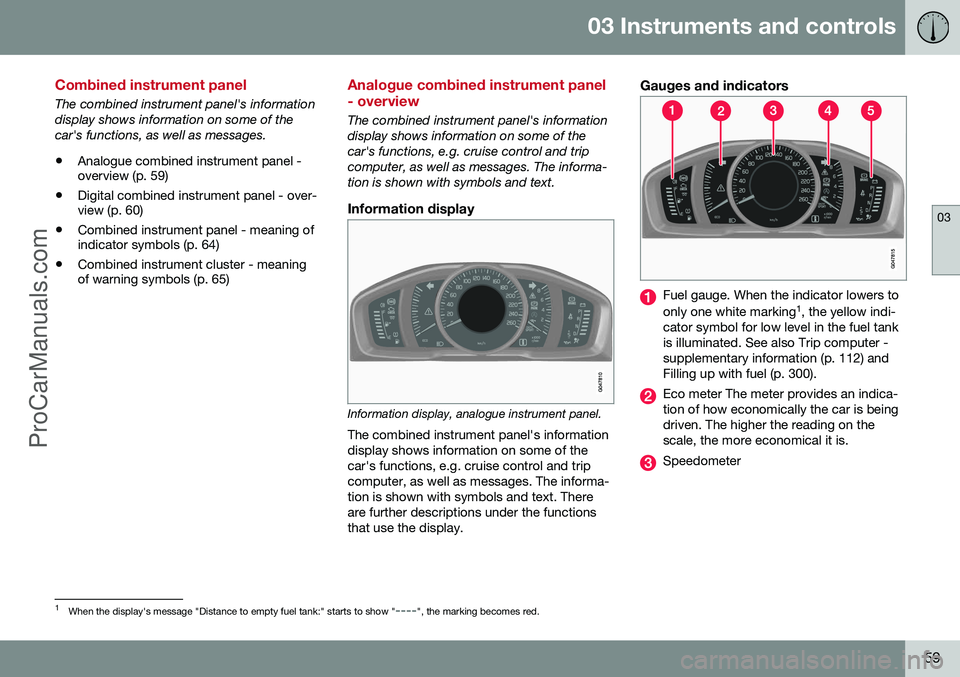
Gauges and indicators
Fuel gauge. When the indicator lowers to only one white marking 1
, the yellow indi-
cator symbol for low level in the fuel tank is illuminated. See also Trip computer -supplementary information (p. 112) andFilling up with fuel (p. 300).
Eco meter The meter provides an indica- tion of how economically the car is beingdriven. The higher the reading on thescale, the more economical it is.
Speedometer
1 When the display's message "Distance to empty fuel tank:" starts to show "----", the marking becomes red.
ProCarManuals.co’
Page 63 of 442
03 Instruments and controls
03
}}
* Option/accessory, for more information, see Introduction.61
Gauges and indicators, digital instrument panel
Alternative themes can be selected for the digital combined instrument panel. Possiblethemes are "Elegance", "Eco" and"Performance". The setting for the theme canbe stored in the remote control key's memorywhen locking the car; see pages Remote con-trol key with key blade (p. 149) and MY CAR(p. 103). A theme can only be selected when the engine is running. To select the theme, press the left-hand stalk switch's OK button and then select the
Themes menu option by turning the thumb-
wheel on the lever. Confirm your choice by pressing the OK button. For more information
on menus, see Menu navigation - combinedinstrument panel (p. 100). The appearance of the centre console's screen follows the combined instrument pan-el's theme setting on certain model variants.
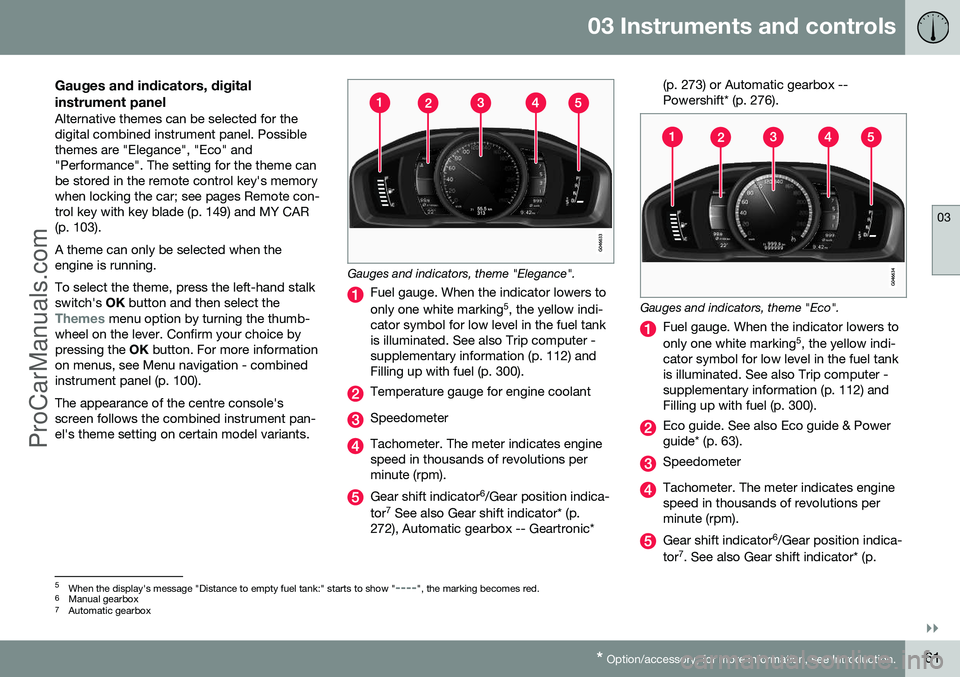
Gauges and indicators, theme "Elegance".
Fuel gauge. When the indicator lowers to only one white marking 5
, the yellow indi-
cator symbol for low level in the fuel tank is illuminated. See also Trip computer -supplementary information (p. 112) andFilling up with fuel (p. 300).
Temperature gauge for engine coolant
Speedometer
Tachometer. The meter indicates engine speed in thousands of revolutions perminute (rpm).
Gear shift indicator 6
/Gear position indica-
tor 7
See also Gear shift indicator* (p.
272), Automatic gearbox -- Geartronic* (p. 273) or Automatic gearbox -- Powershift* (p. 276).
Gauges and indicators, theme "Eco".
Fuel gauge. When the indicator lowers to only one white marking
5
, the yellow indi-
cator symbol for low level in the fuel tank is illuminated. See also Trip computer -supplementary information (p. 112) andFilling up with fuel (p. 300).
Eco guide. See also Eco guide & Power guide* (p. 63).
Speedometer
Tachometer. The meter indicates engine speed in thousands of revolutions perminute (rpm).
Gear shift indicator 6
/Gear position indica-
tor 7
. See also Gear shift indicator* (p.
5 When the display's message "Distance to empty fuel tank:" starts to show "----", the marking becomes red.
6 Manual gearbox
7 Automatic gearbox
ProCarManuals.co’
Page 64 of 442
||
03 Instruments and controls
03
62* Option/accessory, for more information, see Introduction.
272), Automatic gearbox -- Geartronic* (p. 273) or Automatic gearbox --Powershift* (p. 276).
Gauges and indicators, theme "Performance".
Fuel gauge. When the indicator lowers to only one white marking 5
, the yellow indi-
cator symbol for low level in the fuel tank is illuminated. See also Trip computer -supplementary information (p. 112) andFilling up with fuel (p. 300).
Temperature gauge for engine coolant
Speedometer
Tachometer. The meter indicates engine speed in thousands of revolutions perminute (rpm).
Power guide. See also Eco guide & Power guide* (p. 63).
Gear shift indicator 6
/Gear position indica-
tor 7
. See also Gear shift indicator* (p.
272), Automatic gearbox -- Geartronic* (p. 273) or Automatic gearbox --Powershift* (p. 276).
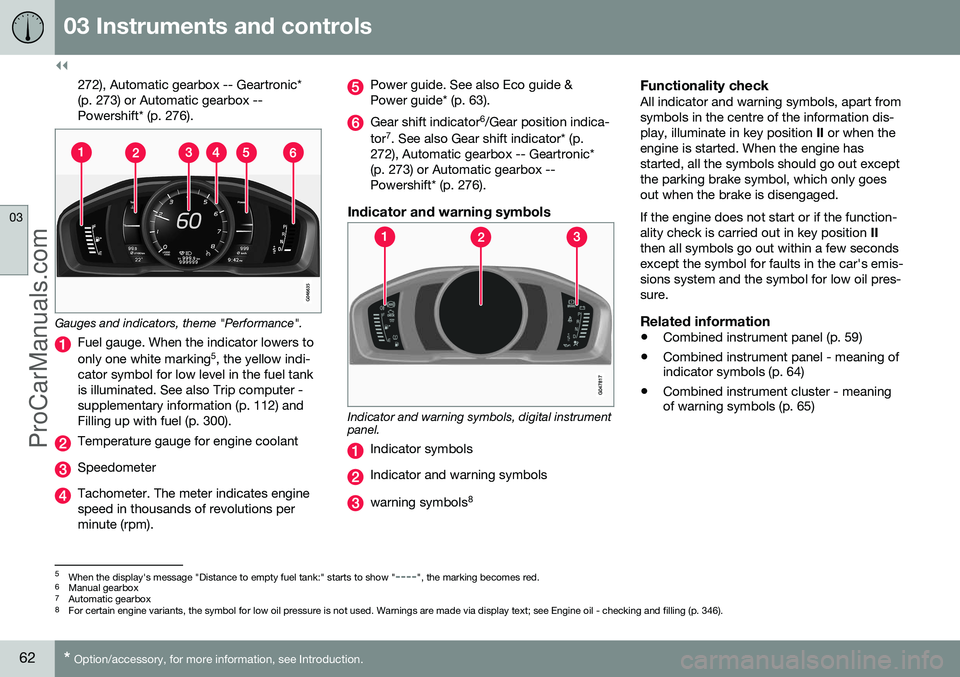
Indicator and warning symbols
Indicator and warning symbols, digital instrument panel.
Indicator symbols
Indicator and warning symbols
warning symbols 8
Functionality checkAll indicator and warning symbols, apart from symbols in the centre of the information dis-play, illuminate in key position
II or when the
engine is started. When the engine hasstarted, all the symbols should go out exceptthe parking brake symbol, which only goesout when the brake is disengaged. If the engine does not start or if the function- ality check is carried out in key position II
then all symbols go out within a few secondsexcept the symbol for faults in the car's emis-sions system and the symbol for low oil pres-sure.
Related information
• Combined instrument panel (p. 59)
• Combined instrument panel - meaning of indicator symbols (p. 64)
• Combined instrument cluster - meaningof warning symbols (p. 65)
5
When the display's message "Distance to empty fuel tank:" starts to show "----", the marking becomes red.
6 Manual gearbox
7 Automatic gearbox
8 For certain engine variants, the symbol for low oil pressure is not used. Warnings are made via display text; see Engine oil - checking and filling (p. 346).
ProCarManuals.co’
Page 66 of 442
03 Instruments and controls
03
64* Option/accessory, for more information, see Introduction.
Combined instrument panel - meaning of indicator symbols
The indicator symbols alert the driver that a function is activated, that the system is oper-ating, or that an error or failure has occurred.
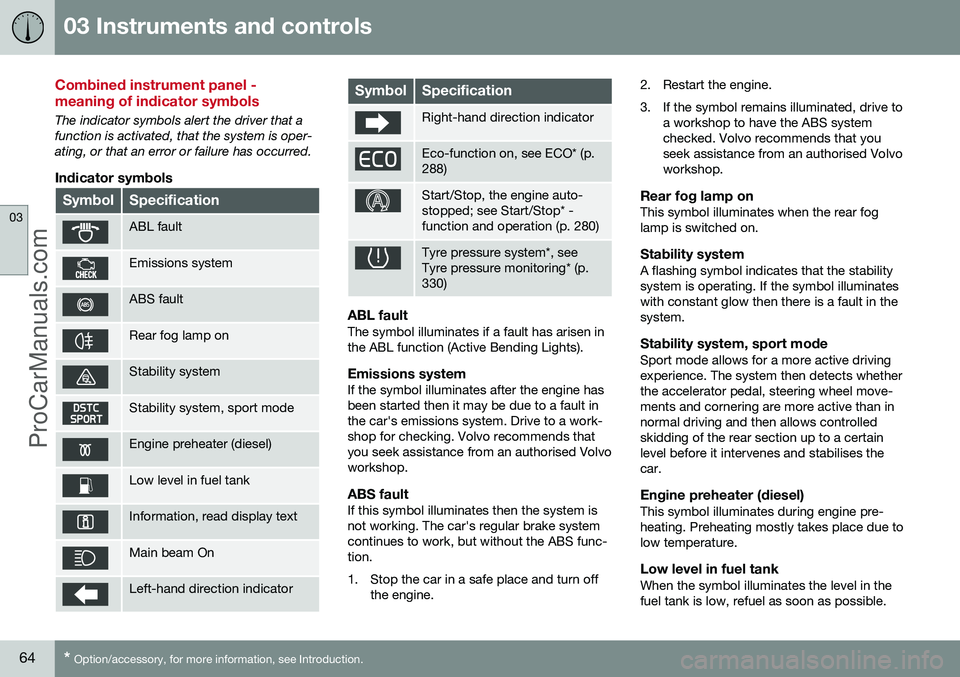
Indicator symbols
SymbolSpecification
ABL fault
Emissions system
ABS fault
Rear fog lamp on
Stability system
Stability system, sport mode
Engine preheater (diesel)
Low level in fuel tank
Information, read display text
Main beam On
Left-hand direction indicator
SymbolSpecification
Right-hand direction indicator
Eco-function on, see ECO* (p. 288)
Start/Stop, the engine auto- stopped; see Start/Stop* -function and operation (p. 280)
Tyre pressure system*, see Tyre pressure monitoring* (p.330)
ABL faultThe symbol illuminates if a fault has arisen in the ABL function (Active Bending Lights).
Emissions systemIf the symbol illuminates after the engine hasbeen started then it may be due to a fault inthe car's emissions system. Drive to a work-shop for checking. Volvo recommends thatyou seek assistance from an authorised Volvoworkshop.
ABS faultIf this symbol illuminates then the system isnot working. The car's regular brake systemcontinues to work, but without the ABS func-tion.
1. Stop the car in a safe place and turn off
the engine. 2. Restart the engine.
3. If the symbol remains illuminated, drive to
a workshop to have the ABS system checked. Volvo recommends that youseek assistance from an authorised Volvoworkshop.
Rear fog lamp onThis symbol illuminates when the rear foglamp is switched on.
Stability systemA flashing symbol indicates that the stabilitysystem is operating. If the symbol illuminateswith constant glow then there is a fault in thesystem.
Stability system, sport modeSport mode allows for a more active drivingexperience. The system then detects whetherthe accelerator pedal, steering wheel move-ments and cornering are more active than innormal driving and then allows controlledskidding of the rear section up to a certainlevel before it intervenes and stabilises thecar.
Engine preheater (diesel)This symbol illuminates during engine pre-heating. Preheating mostly takes place due tolow temperature.
Low level in fuel tankWhen the symbol illuminates the level in thefuel tank is low, refuel as soon as possible.
ProCarManuals.co’
Page 108 of 442
||
03 Instruments and controls
03
106* Option/accessory, for more information, see Introduction.
FunctionsInformation
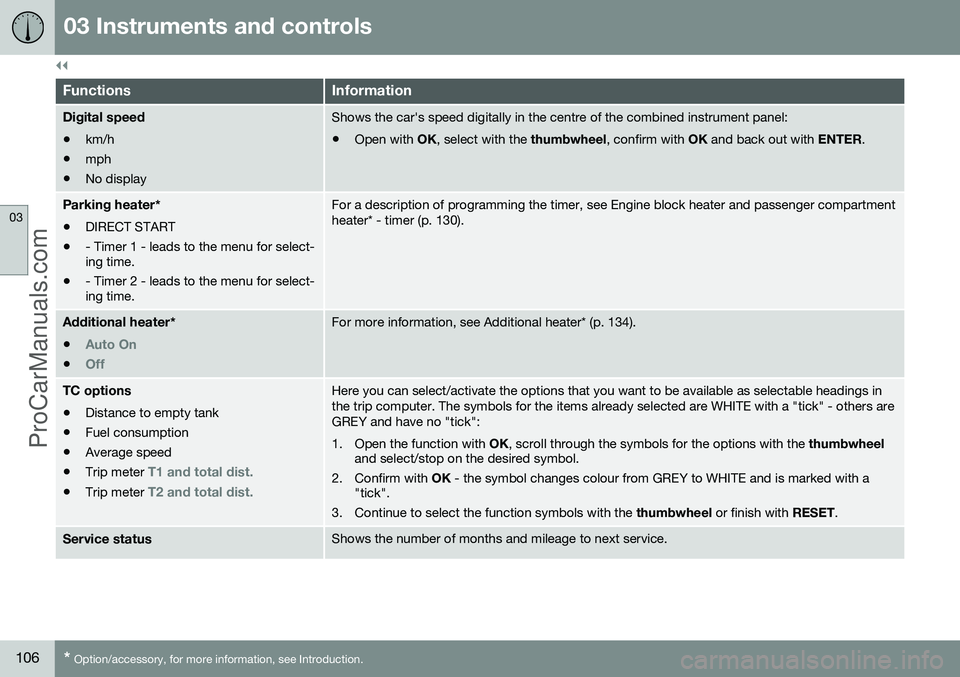
Digital speed
• km/h
• mph
• No displayShows the car's speed digitally in the centre of the combined instrument panel:
• Open with
OK, select with the thumbwheel, confirm with OK and back out with ENTER.
Parking heater *
• DIRECT START
• - Timer 1 - leads to the menu for select- ing time.
• - Timer 2 - leads to the menu for select-ing time.For a description of programming the timer, see Engine block heater and passenger compartment heater* - timer (p. 130).
Additional heater
*
•
Auto On
•Off
For more information, see Additional heater* (p. 134).
TC options • Distance to empty tank
• Fuel consumption
• Average speed
• Trip meter
T1 and total dist.
•Trip meter T2 and total dist.
Here you can select/activate the options that you want to be available as selectable headings in the trip computer. The symbols for the items already selected are WHITE with a "tick" - others areGREY and have no "tick":
1. Open the function with
OK, scroll through the symbols for the options with the thumbwheel
and select/stop on the desired symbol.
2. Confirm with OK - the symbol changes colour from GREY to WHITE and is marked with a
"tick".
3. Continue to select the function symbols with the thumbwheel or finish with RESET.
Service statusShows the number of months and mileage to next service.
ProCarManuals.co’
Page 109 of 442
03 Instruments and controls
03
}}
107
FunctionsInformation
Oil levelAFor more information, see Engine oil - checking and filling (p. 346).
Messages (##)For more information, see Messages - handling (p. 102).
A
Certain engines.
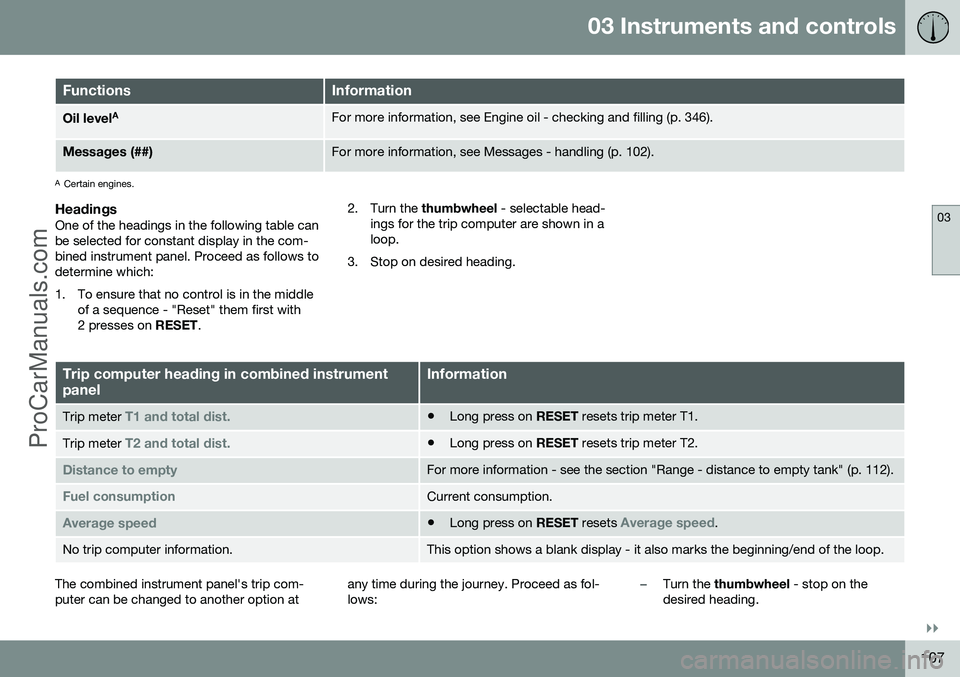
HeadingsOne of the headings in the following table can be selected for constant display in the com-bined instrument panel. Proceed as follows todetermine which:
1. To ensure that no control is in the middle
of a sequence - "Reset" them first with 2 presses on RESET. 2. Turn the
thumbwheel - selectable head-
ings for the trip computer are shown in aloop.
3. Stop on desired heading.
Trip computer heading in combined instrument panelInformation
Trip meter T1 and total dist.• Long press on
RESET resets trip meter T1.
Trip meter T2 and total dist.•Long press on
RESET resets trip meter T2.
Distance to emptyFor more information - see the section "Range - distance to empty tank" (p. 112).
Fuel consumptionCurrent consumption.
Average speed•Long press on
RESET resets Average speed.
No trip computer information.This option shows a blank display - it also marks the beginning/end of the loop.
The combined instrument panel's trip com- puter can be changed to another option at any time during the journey. Proceed as fol-lows:–Turn the
thumbwheel - stop on the
desired heading.
ProCarManuals.co’
Page 114 of 442
03 Instruments and controls
03
112* Option/accessory, for more information, see Introduction.
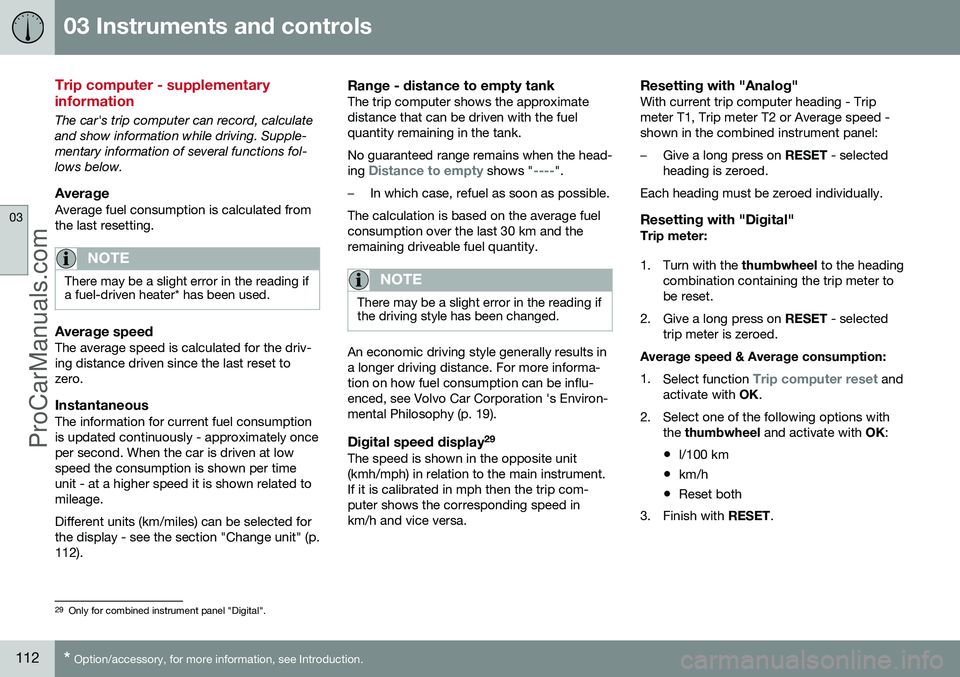
Trip computer - supplementary information
The car's trip computer can record, calculate and show information while driving. Supple-mentary information of several functions fol-lows below.
AverageAverage fuel consumption is calculated fromthe last resetting.
NOTE
There may be a slight error in the reading if a fuel-driven heater* has been used.
Average speedThe average speed is calculated for the driv- ing distance driven since the last reset tozero.
InstantaneousThe information for current fuel consumptionis updated continuously - approximately onceper second. When the car is driven at lowspeed the consumption is shown per timeunit - at a higher speed it is shown related tomileage. Different units (km/miles) can be selected for the display - see the section "Change unit" (p.112).
Range - distance to empty tankThe trip computer shows the approximatedistance that can be driven with the fuelquantity remaining in the tank. No guaranteed range remains when the head- ing
Distance to empty shows "----".
–In which case, refuel as soon as possible.
The calculation is based on the average fuel consumption over the last 30 km and theremaining driveable fuel quantity.
NOTE
There may be a slight error in the reading if the driving style has been changed.
An economic driving style generally results in a longer driving distance. For more informa-tion on how fuel consumption can be influ-enced, see Volvo Car Corporation 's Environ-mental Philosophy (p. 19).
Digital speed display 29The speed is shown in the opposite unit(kmh/mph) in relation to the main instrument.If it is calibrated in mph then the trip com-puter shows the corresponding speed inkm/h and vice versa.
Resetting with "Analog"With current trip computer heading - Tripmeter T1, Trip meter T2 or Average speed -shown in the combined instrument panel:
–Give a long press on
RESET - selected
heading is zeroed.
Each heading must be zeroed individually.
Resetting with "Digital"Trip meter:
1. Turn with the thumbwheel to the heading
combination containing the trip meter to be reset.
2. Give a long press on RESET - selected
trip meter is zeroed.
Average speed & Average consumption: 1. Select function
Trip computer reset and
activate with OK.
2. Select one of the following options with the thumbwheel and activate with OK:
• l/100 km
• km/h
• Reset both
3. Finish with RESET.
29
Only for combined instrument panel "Digital".
ProCarManuals.co’
Page 115 of 442
03 Instruments and controls
03
* Option/accessory, for more information, see Introduction.113
Change unitYou can change unit (km/miles) for distance and speed in the menu system My Car, seeMY CAR (p. 103).
NOTE
In addition to in the trip computer, these units are also changed in Volvo's naviga-tion system*.
Related information
• Trip computer - trip statistics* (p. 113)
Trip computer - trip statistics*
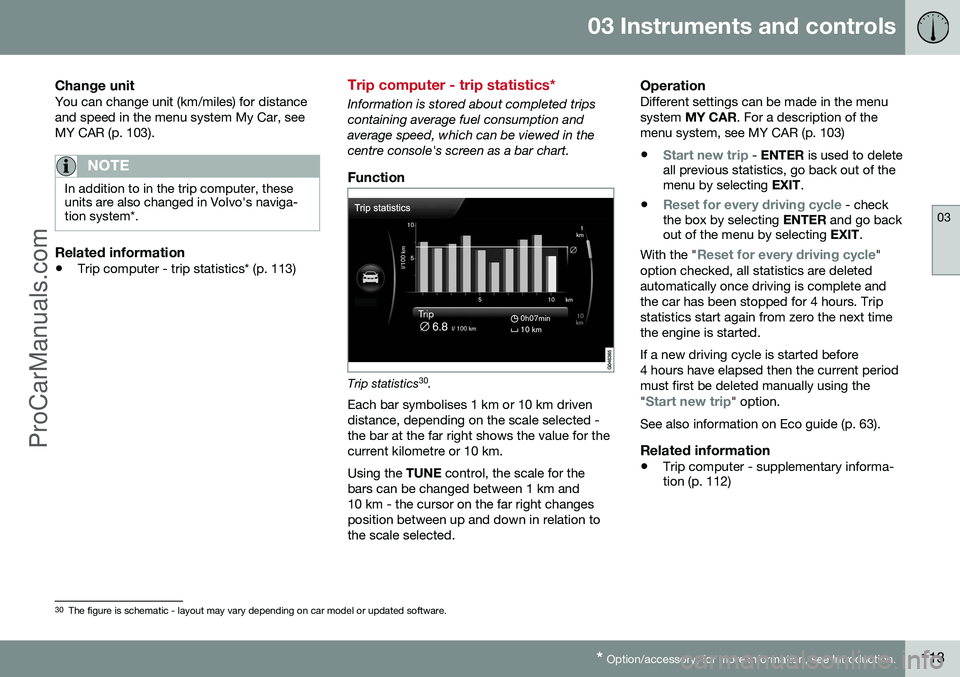
Information is stored about completed trips containing average fuel consumption andaverage speed, which can be viewed in thecentre console's screen as a bar chart.
Function
Trip statistics 30
.
Each bar symbolises 1 km or 10 km driven distance, depending on the scale selected -the bar at the far right shows the value for thecurrent kilometre or 10 km. Using the TUNE control, the scale for the
bars can be changed between 1 km and 10 km - the cursor on the far right changesposition between up and down in relation tothe scale selected.
OperationDifferent settings can be made in the menusystem MY CAR . For a description of the
menu system, see MY CAR (p. 103)
•
Start new trip - ENTER is used to delete
all previous statistics, go back out of the menu by selecting EXIT.
•
Reset for every driving cycle - check
the box by selecting ENTER and go back
out of the menu by selecting EXIT.
With the "
Reset for every driving cycle"
option checked, all statistics are deleted automatically once driving is complete andthe car has been stopped for 4 hours. Tripstatistics start again from zero the next timethe engine is started. If a new driving cycle is started before 4 hours have elapsed then the current periodmust first be deleted manually using the "
Start new trip" option.
See also information on Eco guide (p. 63).
Related information
• Trip computer - supplementary informa- tion (p. 112)
30
The figure is schematic - layout may vary depending on car model or updated software.
ProCarManuals.co’
Page 131 of 442
04 Climate control
04
* Option/accessory, for more information, see Introduction.129
Engine and passenger compartment heater*
Preconditioning prepares the car's heater, engine and passenger compartment beforedeparture so that both wear and energyneeds during the journey are reduced. The heater can be started directly (p. 130) or with a timer (p. 130). The heater cannot start if the outside tem- perature exceeds 15 °C. At –5 °C or lower themaximum running time of the heater is 50minutes.
WARNING
Do not use the fuel-driven heater indoors. Exhaust gases are secreted.
NOTE
When the fuel-driven auxiliary heater is active there may be smoke from the right-hand wheel housing, which is perfectlynormal.
Refuelling
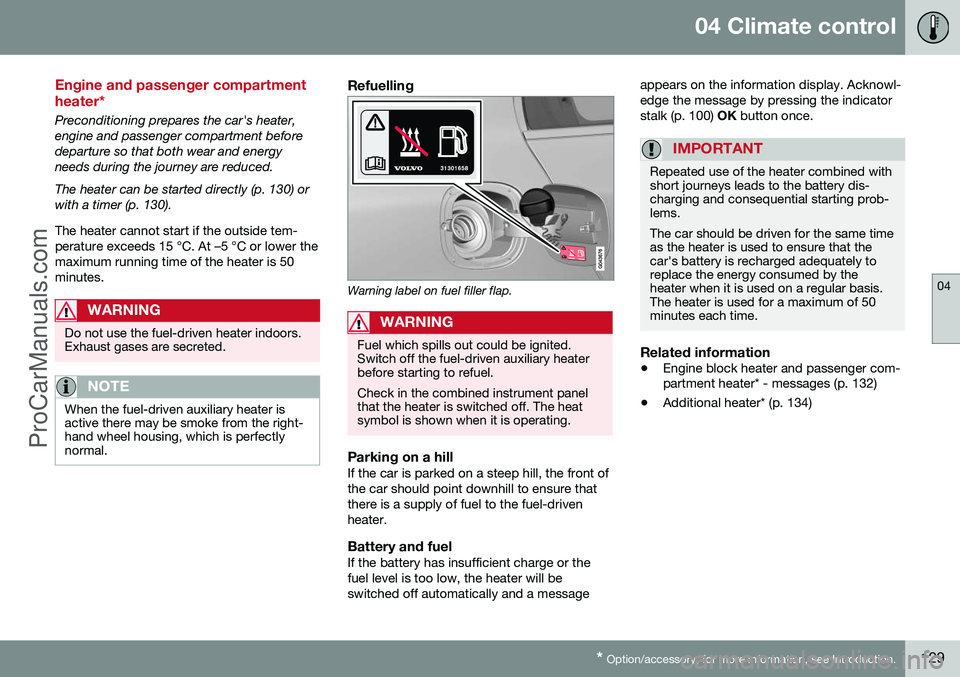
Warning label on fuel filler flap.
WARNING
Fuel which spills out could be ignited. Switch off the fuel-driven auxiliary heaterbefore starting to refuel. Check in the combined instrument panel that the heater is switched off. The heatsymbol is shown when it is operating.
Parking on a hillIf the car is parked on a steep hill, the front of the car should point downhill to ensure thatthere is a supply of fuel to the fuel-drivenheater.
Battery and fuelIf the battery has insufficient charge or thefuel level is too low, the heater will beswitched off automatically and a message appears on the information display. Acknowl-edge the message by pressing the indicatorstalk (p. 100)
OK button once.
IMPORTANT
Repeated use of the heater combined with short journeys leads to the battery dis-charging and consequential starting prob-lems. The car should be driven for the same time as the heater is used to ensure that thecar's battery is recharged adequately toreplace the energy consumed by theheater when it is used on a regular basis.The heater is used for a maximum of 50minutes each time.
Related information
• Engine block heater and passenger com- partment heater* - messages (p. 132)
• Additional heater* (p. 134)
ProCarManuals.co’
Page 132 of 442
04 Climate control
04
130* Option/accessory, for more information, see Introduction.
Engine block heater and passenger compartment heater* - direct start/immediate stop
Upon direct start of the engine block and pas- senger compartment heater (p. 129), it will runfor 50 minutes. Heating of the passenger compartment will begin as soon as the engine coolant hasreached the correct temperature.
NOTE
The car can be started and driven while the fuel-driven auxiliary heater is running.
1. Press OK to access the menu.
2. Scroll with the thumbwheel to
Parking
heater and select with OK.
3. Scroll forward in the next menu to
Direct
start/Stop in order to activate/deactivate
the heater and select with OK.
4. Exit the menu with RESET.
Related information
•Engine block heater and passenger com- partment heater* - timer (p. 130)
• Engine block heater and passenger com-partment heater* - messages (p. 132)
Engine block heater and passenger compartment heater* - timer
The timer of the engine block and passenger compartment heater (p. 129) is connected tothe car's clock. Two different times can be selected using the timer. Here, time refers to the time when thecar is heated and ready. The car's electronicsystem calculates when heating should bestarted based on the outside temperature.
NOTE
All timer programming will be cleared if the car's clock is reset.
Adjusting 31. Press
OK to access the menu.
2. Use the thumbwheel (p. 100) to scroll to one of the timers
Parking heater and
select with OK.
3. Select one of the two timers using the thumbwheel and confirm with OK.
4. Briefly press OK to move to the lit hours
setting.
5. Select the required hour using the thumb- wheel. 6. Briefly press
OK to move to the flashing
minutes setting.
7. Select the required minute using the thumbwheel.
8. Press OK4
to confirm the setting.
9. Go back in the menu structure using RESET .
10. Select the other time (continue from step 2) or exit the menu with RESET.
Starting1. Press OK to access the menu.
2. Scroll with the thumbwheel to
Parking
heater and select with OK.
3. Select one of the two timers using the thumbwheel and activate with OK.
4. Exit the menu with RESET.
Switching offA timer-started heater can be switched off manually before the set time has elapsed.Proceed as follows:
1. Press OK to access the menu.
3
Setting the timer is only possible with the engine switched off.4
Press OK again to activate the timer.
ProCarManuals.co’