lock VOLVO V60 2014 User Guide
[x] Cancel search | Manufacturer: VOLVO, Model Year: 2014, Model line: V60, Model: VOLVO V60 2014Pages: 442, PDF Size: 13.85 MB
Page 57 of 442
03 Instruments and controls
03
* Option/accessory, for more information, see Introduction.55
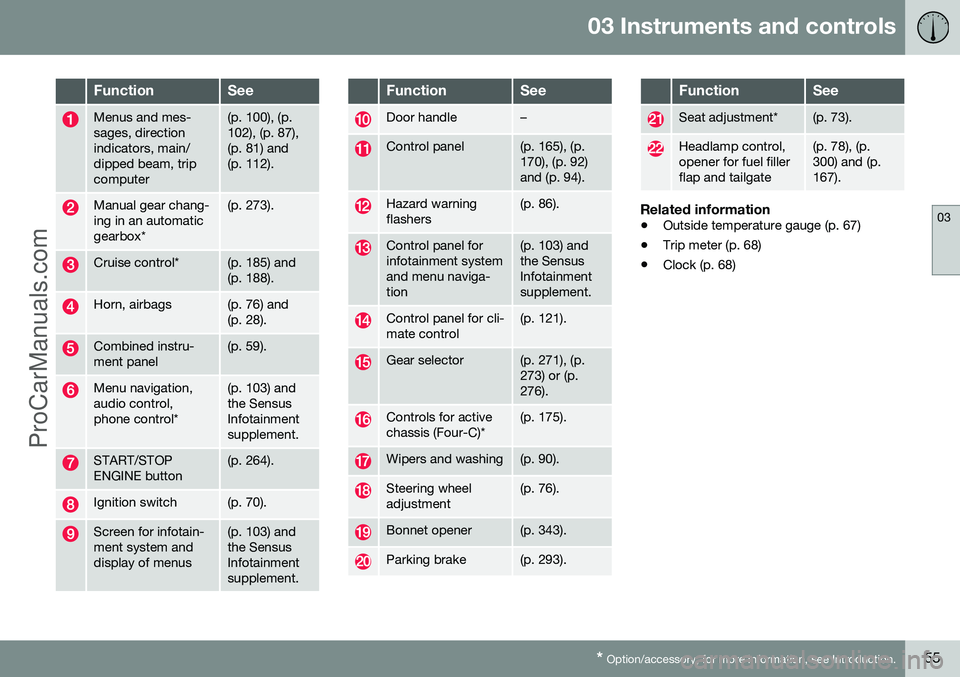
FunctionSee
Menus and mes- sages, directionindicators, main/dipped beam, tripcomputer(p. 100), (p. 102), (p. 87),(p. 81) and(p. 112).
Manual gear chang- ing in an automaticgearbox*(p. 273).
Cruise control*(p. 185) and (p. 188).
Horn, airbags(p. 76) and (p. 28).
Combined instru- ment panel(p. 59).
Menu navigation, audio control,phone control*(p. 103) and the SensusInfotainmentsupplement.
START/STOP ENGINE button(p. 264).
Ignition switch(p. 70).
Screen for infotain- ment system anddisplay of menus(p. 103) and the SensusInfotainmentsupplement.
FunctionSee
Door handle–
Control panel(p. 165), (p. 170), (p. 92)and (p. 94).
Hazard warning flashers(p. 86).
Control panel for infotainment systemand menu naviga-tion(p. 103) and the SensusInfotainmentsupplement.
Control panel for cli- mate control(p. 121).
Gear selector(p. 271), (p. 273) or (p.276).
Controls for active chassis (Four-C)*(p. 175).
Wipers and washing(p. 90).
Steering wheel adjustment(p. 76).
Bonnet opener(p. 343).
Parking brake(p. 293).
FunctionSee
Seat adjustment*(p. 73).
Headlamp control, opener for fuel fillerflap and tailgate(p. 78), (p. 300) and (p.167).
Related information
• Outside temperature gauge (p. 67)
• Trip meter (p. 68)
• Clock (p. 68)
ProCarManuals.co’
Page 60 of 442
||
03 Instruments and controls
03
58* Option/accessory, for more information, see Introduction.
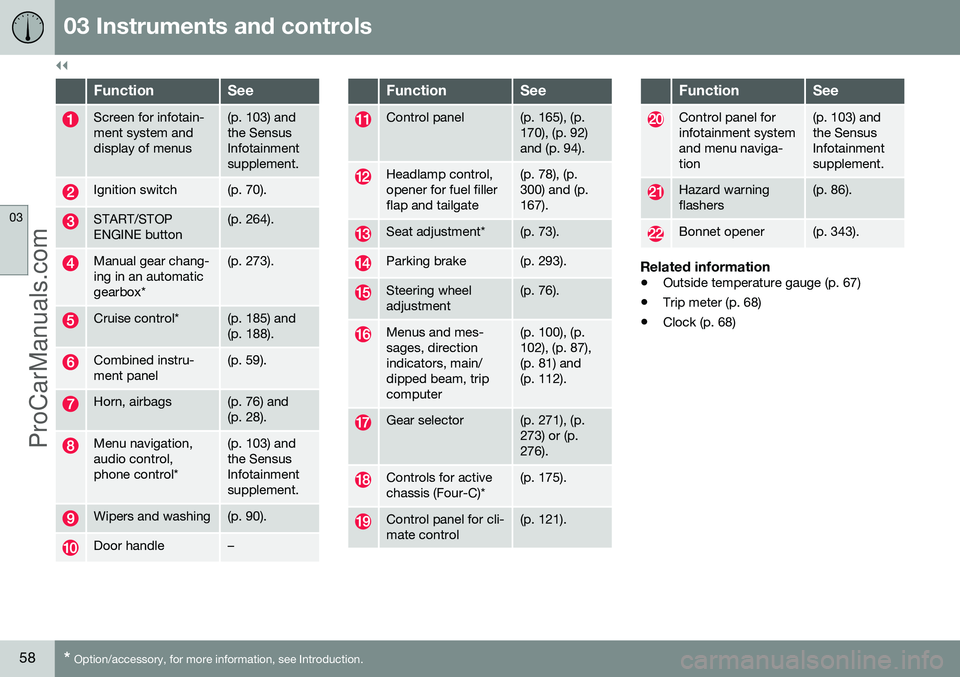
FunctionSee
Screen for infotain- ment system anddisplay of menus(p. 103) and the SensusInfotainmentsupplement.
Ignition switch(p. 70).
START/STOP ENGINE button(p. 264).
Manual gear chang- ing in an automaticgearbox*(p. 273).
Cruise control*(p. 185) and (p. 188).
Combined instru- ment panel(p. 59).
Horn, airbags(p. 76) and (p. 28).
Menu navigation, audio control,phone control*(p. 103) and the SensusInfotainmentsupplement.
Wipers and washing(p. 90).
Door handle–
FunctionSee
Control panel(p. 165), (p. 170), (p. 92)and (p. 94).
Headlamp control, opener for fuel fillerflap and tailgate(p. 78), (p. 300) and (p.167).
Seat adjustment*(p. 73).
Parking brake(p. 293).
Steering wheel adjustment(p. 76).
Menus and mes- sages, directionindicators, main/dipped beam, tripcomputer(p. 100), (p. 102), (p. 87),(p. 81) and(p. 112).
Gear selector(p. 271), (p. 273) or (p.276).
Controls for active chassis (Four-C)*(p. 175).
Control panel for cli- mate control(p. 121).
FunctionSee
Control panel for infotainment systemand menu naviga-tion(p. 103) and the SensusInfotainmentsupplement.
Hazard warning flashers(p. 86).
Bonnet opener(p. 343).
Related information
• Outside temperature gauge (p. 67)
• Trip meter (p. 68)
• Clock (p. 68)
ProCarManuals.co’
Page 63 of 442
03 Instruments and controls
03
}}
* Option/accessory, for more information, see Introduction.61
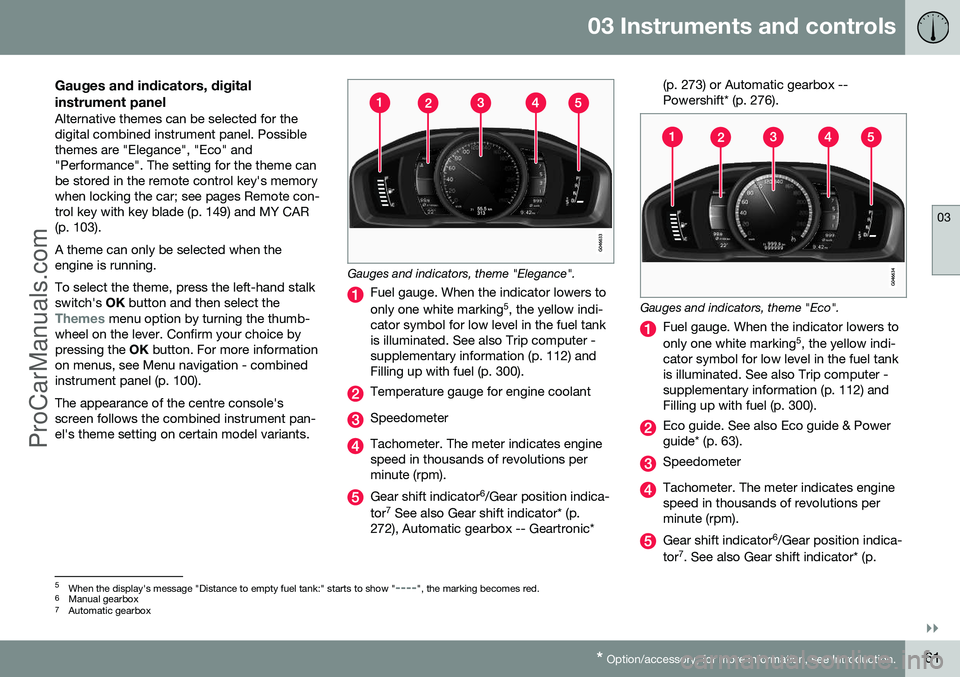
Gauges and indicators, digital instrument panel
Alternative themes can be selected for the digital combined instrument panel. Possiblethemes are "Elegance", "Eco" and"Performance". The setting for the theme canbe stored in the remote control key's memorywhen locking the car; see pages Remote con-trol key with key blade (p. 149) and MY CAR(p. 103). A theme can only be selected when the engine is running. To select the theme, press the left-hand stalk switch's OK button and then select the
Themes menu option by turning the thumb-
wheel on the lever. Confirm your choice by pressing the OK button. For more information
on menus, see Menu navigation - combinedinstrument panel (p. 100). The appearance of the centre console's screen follows the combined instrument pan-el's theme setting on certain model variants.
Gauges and indicators, theme "Elegance".
Fuel gauge. When the indicator lowers to only one white marking 5
, the yellow indi-
cator symbol for low level in the fuel tank is illuminated. See also Trip computer -supplementary information (p. 112) andFilling up with fuel (p. 300).
Temperature gauge for engine coolant
Speedometer
Tachometer. The meter indicates engine speed in thousands of revolutions perminute (rpm).
Gear shift indicator 6
/Gear position indica-
tor 7
See also Gear shift indicator* (p.
272), Automatic gearbox -- Geartronic* (p. 273) or Automatic gearbox -- Powershift* (p. 276).
Gauges and indicators, theme "Eco".
Fuel gauge. When the indicator lowers to only one white marking
5
, the yellow indi-
cator symbol for low level in the fuel tank is illuminated. See also Trip computer -supplementary information (p. 112) andFilling up with fuel (p. 300).
Eco guide. See also Eco guide & Power guide* (p. 63).
Speedometer
Tachometer. The meter indicates engine speed in thousands of revolutions perminute (rpm).
Gear shift indicator 6
/Gear position indica-
tor 7
. See also Gear shift indicator* (p.
5 When the display's message "Distance to empty fuel tank:" starts to show "----", the marking becomes red.
6 Manual gearbox
7 Automatic gearbox
ProCarManuals.co’
Page 65 of 442
03 Instruments and controls
03
* Option/accessory, for more information, see Introduction.63
Eco guide & Power guide*
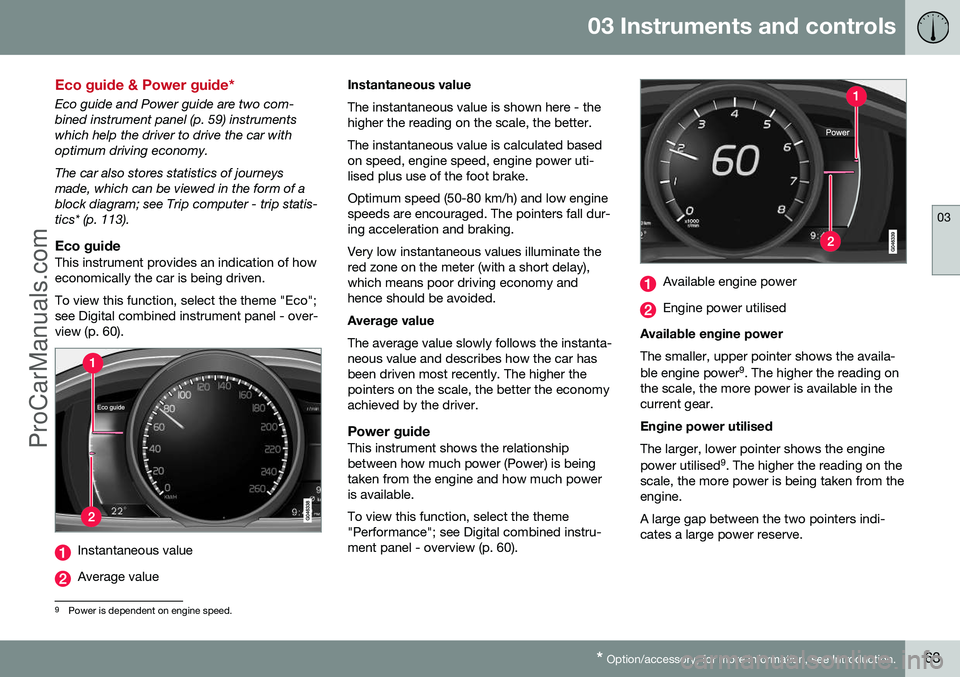
Eco guide and Power guide are two com- bined instrument panel (p. 59) instrumentswhich help the driver to drive the car withoptimum driving economy. The car also stores statistics of journeys made, which can be viewed in the form of ablock diagram; see Trip computer - trip statis-tics* (p. 113).
Eco guideThis instrument provides an indication of howeconomically the car is being driven. To view this function, select the theme "Eco"; see Digital combined instrument panel - over-view (p. 60).
Instantaneous value
Average value Instantaneous value The instantaneous value is shown here - the higher the reading on the scale, the better. The instantaneous value is calculated based on speed, engine speed, engine power uti-lised plus use of the foot brake. Optimum speed (50-80 km/h) and low engine speeds are encouraged. The pointers fall dur-ing acceleration and braking. Very low instantaneous values illuminate the red zone on the meter (with a short delay),which means poor driving economy andhence should be avoided. Average value The average value slowly follows the instanta- neous value and describes how the car hasbeen driven most recently. The higher thepointers on the scale, the better the economyachieved by the driver.
Power guideThis instrument shows the relationshipbetween how much power (Power) is beingtaken from the engine and how much poweris available. To view this function, select the theme "Performance"; see Digital combined instru-ment panel - overview (p. 60).
Available engine power
Engine power utilised
Available engine power The smaller, upper pointer shows the availa- ble engine power 9
. The higher the reading on
the scale, the more power is available in the current gear. Engine power utilised The larger, lower pointer shows the engine power utilised 9
. The higher the reading on the
scale, the more power is being taken from the engine. A large gap between the two pointers indi- cates a large power reserve.
9 Power is dependent on engine speed.
ProCarManuals.co’
Page 70 of 442
03 Instruments and controls
03
68* Option/accessory, for more information, see Introduction.
Trip meter
The trip meter display appears in the com- bined instrument panel.
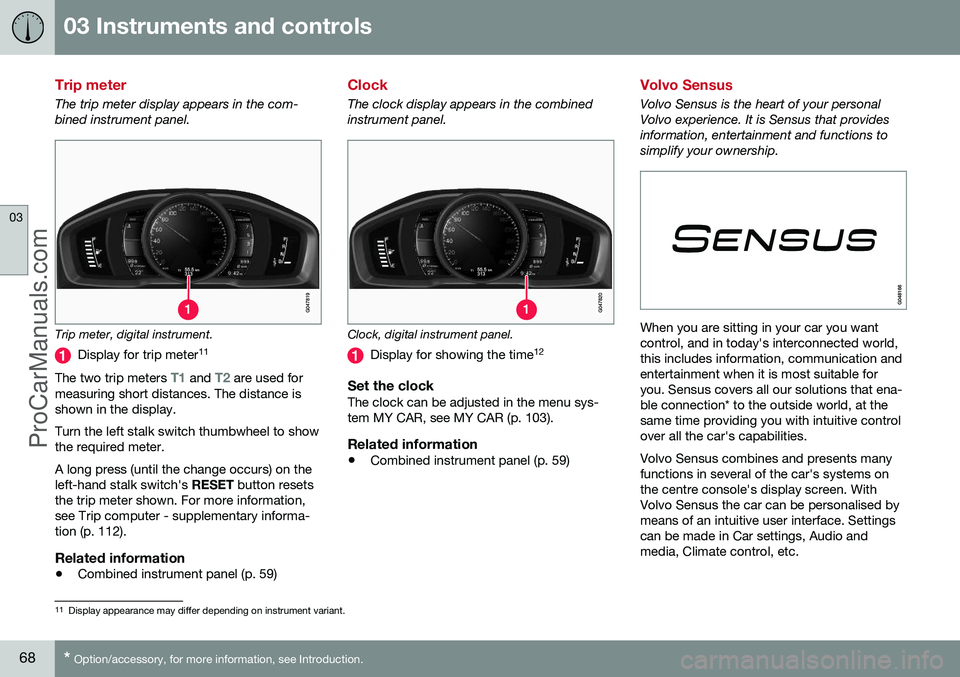
Trip meter, digital instrument.
Display for trip meter 11
The two trip meters
T1 and T2 are used for
measuring short distances. The distance is shown in the display. Turn the left stalk switch thumbwheel to show the required meter. A long press (until the change occurs) on the left-hand stalk switch's RESET button resets
the trip meter shown. For more information,see Trip computer - supplementary informa-tion (p. 112).
Related information
• Combined instrument panel (p. 59)
Clock
The clock display appears in the combined instrument panel.
Clock, digital instrument panel.
Display for showing the time 12
Set the clockThe clock can be adjusted in the menu sys- tem MY CAR, see MY CAR (p. 103).
Related information
•
Combined instrument panel (p. 59)
Volvo Sensus
Volvo Sensus is the heart of your personal Volvo experience. It is Sensus that providesinformation, entertainment and functions tosimplify your ownership.
When you are sitting in your car you want control, and in today's interconnected world,this includes information, communication andentertainment when it is most suitable foryou. Sensus covers all our solutions that ena-ble connection* to the outside world, at thesame time providing you with intuitive controlover all the car's capabilities. Volvo Sensus combines and presents many functions in several of the car's systems onthe centre console's display screen. WithVolvo Sensus the car can be personalised bymeans of an intuitive user interface. Settingscan be made in Car settings, Audio andmedia, Climate control, etc.
11
Display appearance may differ depending on instrument variant.
ProCarManuals.co’
Page 71 of 442
03 Instruments and controls
03
* Option/accessory, for more information, see Introduction.69
With the centre console buttons and controls or the steering wheel's right-hand keypad*functions can be activated or deactivated andmany different settings can be made. With a press on
MY CAR all settings related
to the driving and control of the car are pre- sented, such as City Safety, locks and alarm,automatic fan speed, setting the clock, etc. With a press on the respective function RADIO , MEDIA , TEL *,
*, NAV * and CAM*
other sources, systems and functions can be activated, e.g. AM, FM, CD, DVD*, TV*, Blue-tooth*, navigation* and park assist camera*. For more information about all functions/ systems, see the relevant section in theowner's manual or its supplement.
Overview
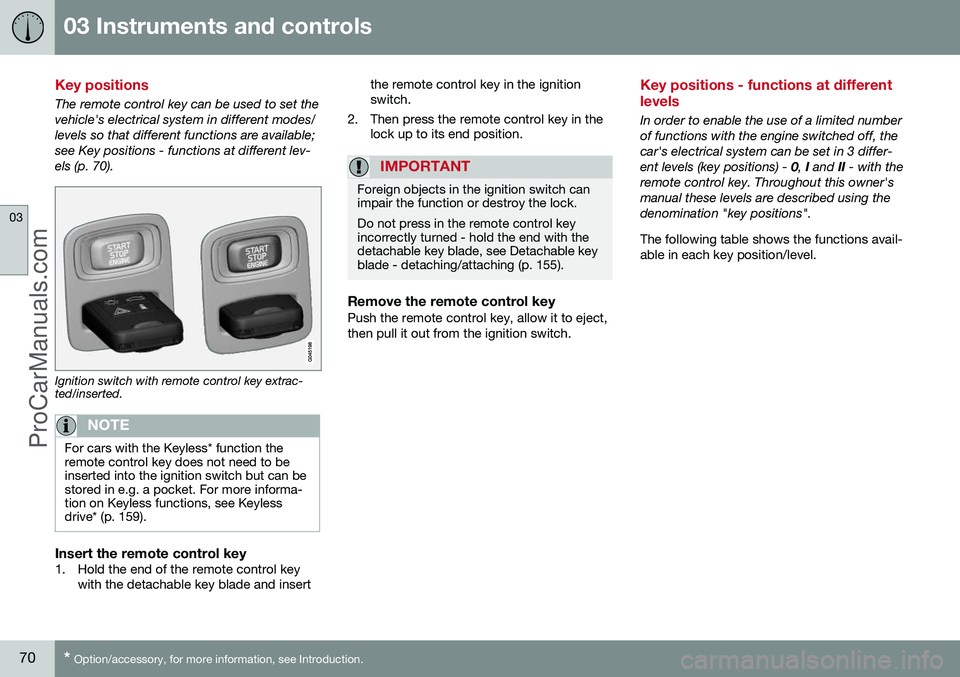
Centre console control panel. The figure is sche- matic - the number of functions and layout of thebuttons both vary, depending on the equipmentselected and the market.
Navigation* - NAV, see separate supple-
ment.
Audio and media - RADIO, MEDIA , TEL *,
see separate supplement (Sensus Info- tainment).
Car settings - MY CAR, see MY CAR (p.
103).
Internet-connected car - *, see sepa-
rate supplement (Sensus Infotainment).
Climate control system (p. 115).
Park assist camera (p. 244) – CAM*.
Related information
•Licenses (p. 422)
12
The time is shown in the centre of an analogue instrument panel.
ProCarManuals.co’
Page 72 of 442
03 Instruments and controls
03
70* Option/accessory, for more information, see Introduction.
Key positions
The remote control key can be used to set the vehicle's electrical system in different modes/levels so that different functions are available;see Key positions - functions at different lev-els (p. 70).
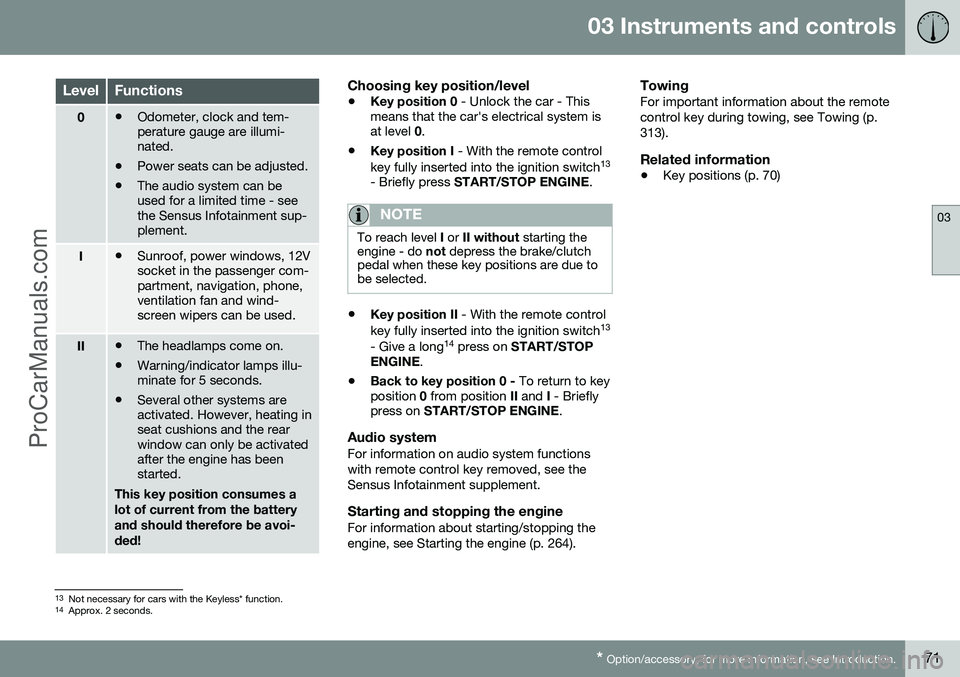
Ignition switch with remote control key extrac- ted/inserted.
NOTE
For cars with the Keyless* function the remote control key does not need to beinserted into the ignition switch but can bestored in e.g. a pocket. For more informa-tion on Keyless functions, see Keylessdrive* (p. 159).
Insert the remote control key1. Hold the end of the remote control key
with the detachable key blade and insert the remote control key in the ignition switch.
2. Then press the remote control key in the lock up to its end position.
IMPORTANT
Foreign objects in the ignition switch can impair the function or destroy the lock. Do not press in the remote control key incorrectly turned - hold the end with thedetachable key blade, see Detachable keyblade - detaching/attaching (p. 155).
Remove the remote control keyPush the remote control key, allow it to eject, then pull it out from the ignition switch.
Key positions - functions at different levels
In order to enable the use of a limited number of functions with the engine switched off, thecar's electrical system can be set in 3 differ-ent levels (key positions) - 0, I and II - with the
remote control key. Throughout this owner'smanual these levels are described using thedenomination "key positions". The following table shows the functions avail- able in each key position/level.
ProCarManuals.co’
Page 73 of 442
03 Instruments and controls
03
* Option/accessory, for more information, see Introduction.71
LevelFunctions
0• Odometer, clock and tem- perature gauge are illumi-nated.
• Power seats can be adjusted.
• The audio system can beused for a limited time - seethe Sensus Infotainment sup-plement.
I•Sunroof, power windows, 12V socket in the passenger com-partment, navigation, phone,ventilation fan and wind-screen wipers can be used.
II•The headlamps come on.
• Warning/indicator lamps illu- minate for 5 seconds.
• Several other systems areactivated. However, heating inseat cushions and the rearwindow can only be activatedafter the engine has beenstarted.
This key position consumes a lot of current from the batteryand should therefore be avoi-ded!
Choosing key position/level
• Key position 0
- Unlock the car - This
means that the car's electrical system is at level 0.
• Key position I
- With the remote control
key fully inserted into the ignition switch 13
- Briefly press START/STOP ENGINE .
NOTE
To reach level I or II without starting the
engine - do not depress the brake/clutch
pedal when these key positions are due to be selected.
• Key position II
- With the remote control
key fully inserted into the ignition switch 13
- Give a long 14
press on START/STOP
ENGINE .
• Back to key position 0 -
To return to key
position 0 from position II and I - Briefly
press on START/STOP ENGINE .
Audio systemFor information on audio system functions with remote control key removed, see theSensus Infotainment supplement.
Starting and stopping the engineFor information about starting/stopping theengine, see Starting the engine (p. 264).
TowingFor important information about the remotecontrol key during towing, see Towing (p.313).
Related information
•Key positions (p. 70)
13
Not necessary for cars with the Keyless* function.
14 Approx. 2 seconds.
ProCarManuals.co’
Page 74 of 442
03 Instruments and controls
03
72* Option/accessory, for more information, see Introduction.
Seats, front
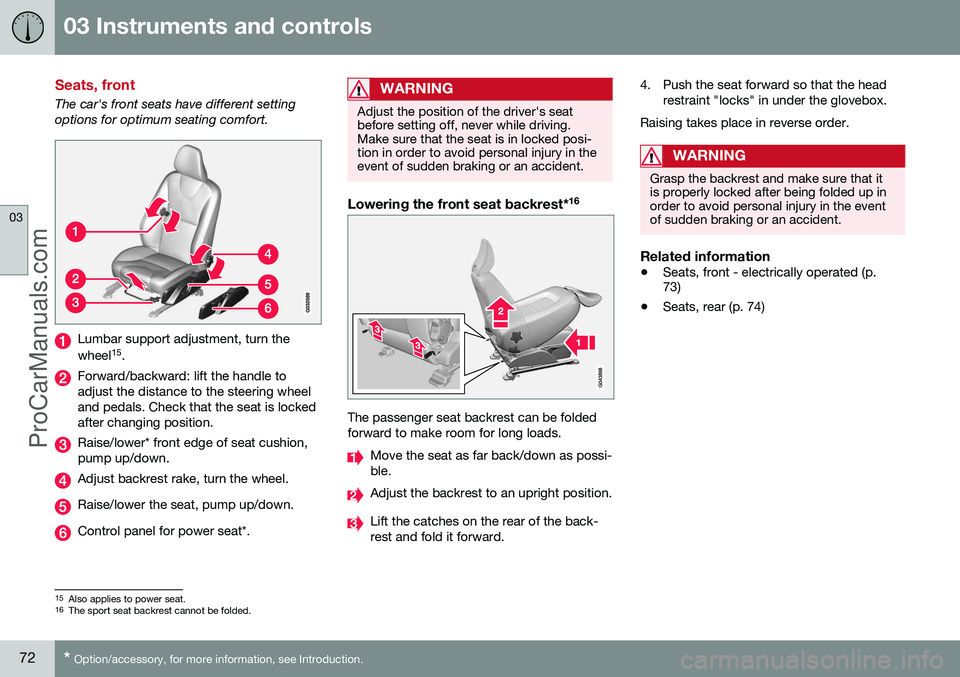
The car's front seats have different setting options for optimum seating comfort.
Lumbar support adjustment, turn the wheel 15
.
Forward/backward: lift the handle to adjust the distance to the steering wheeland pedals. Check that the seat is lockedafter changing position.
Raise/lower* front edge of seat cushion, pump up/down.
Adjust backrest rake, turn the wheel.
Raise/lower the seat, pump up/down.
Control panel for power seat*.
WARNING
Adjust the position of the driver's seat before setting off, never while driving.Make sure that the seat is in locked posi-tion in order to avoid personal injury in theevent of sudden braking or an accident.
Lowering the front seat backrest* 16
The passenger seat backrest can be folded forward to make room for long loads.
Move the seat as far back/down as possi- ble.
Adjust the backrest to an upright position.
Lift the catches on the rear of the back- rest and fold it forward. 4. Push the seat forward so that the head
restraint "locks" in under the glovebox.
Raising takes place in reverse order.
WARNING
Grasp the backrest and make sure that it is properly locked after being folded up inorder to avoid personal injury in the eventof sudden braking or an accident.
Related information
• Seats, front - electrically operated (p. 73)
• Seats, rear (p. 74)
15
Also applies to power seat.16
The sport seat backrest cannot be folded.
ProCarManuals.co’
Page 75 of 442

03 Instruments and controls
03
* Option/accessory, for more information, see Introduction.73
Seats, front - electrically operated
The car's front seats have different setting options for optimum seating comfort. Thepower seat can be moved forward/backwardand up/down. The front edge of the seatcushion can be raised/lowered. The backrestangle can be changed.
Power seat*
Front edge of seat cushion up/down
Seat forward/backward and up/down
Backrest rake
The power front seats have overload protec- tion which is tripped if a seat is blocked by anobject. If this happens, go to key position I or
0 and wait a short time before adjusting the
seat again. Only one movement (forward/back/up/down) can be made at a time.
PreparationsThe seats can be adjusted for a certain timeafter unlocking the door with the remote con-trol key without the key in the ignition switch.Seat adjustment is normally made in keyposition I and can always be made when the
engine is running.
Seat with memory function*
The memory function stores settings for the seat and the door mirrors.
Store settingMemory button
Memory button
Memory button
Button for storing settings
1. Adjust the seat and the door mirrors. 2. Hold the button depressed to store set-
tings while depressing one of the memory buttons.
Using a stored settingHold one of the memory buttons depresseduntil the seat and the door mirrors stop. If yourelease the button then the movement of theseat will stop.
Heated seatsFor heated seats, see Heated front seats* (p.122) and Heated rear seat* (p. 122).
Related information
• Seats, front (p. 72)
• Seats, rear (p. 74)
ProCarManuals.co’