start stop button VOLVO V60 2014 User Guide
[x] Cancel search | Manufacturer: VOLVO, Model Year: 2014, Model line: V60, Model: VOLVO V60 2014Pages: 442, PDF Size: 13.85 MB
Page 194 of 442
||
07 Driver support
07
192* Option/accessory, for more information, see Introduction.
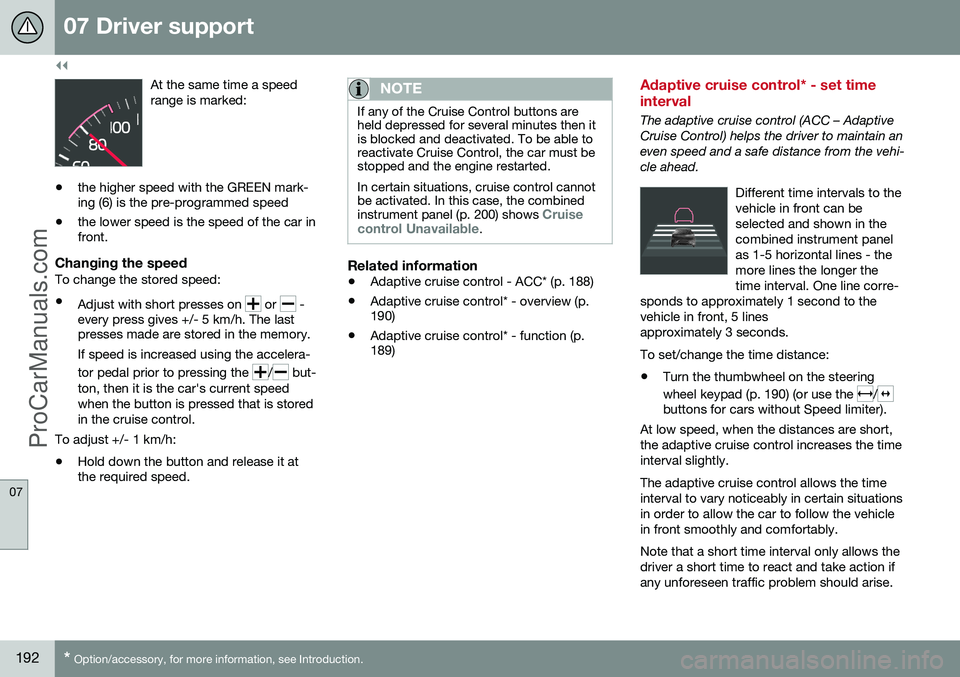
At the same time a speed range is marked:
• the higher speed with the GREEN mark- ing (6) is the pre-programmed speed
• the lower speed is the speed of the car infront.
Changing the speedTo change the stored speed: •
Adjust with short presses on
or -
every press gives +/- 5 km/h. The last presses made are stored in the memory.
If speed is increased using the accelera- tor pedal prior to pressing the
/ but-
ton, then it is the car's current speed when the button is pressed that is storedin the cruise control.
To adjust +/- 1 km/h: • Hold down the button and release it at the required speed.
NOTE
If any of the Cruise Control buttons are held depressed for several minutes then itis blocked and deactivated. To be able toreactivate Cruise Control, the car must bestopped and the engine restarted. In certain situations, cruise control cannot be activated. In this case, the combined instrument panel (p. 200) shows
Cruise
control Unavailable.
Related information
• Adaptive cruise control - ACC* (p. 188)
• Adaptive cruise control* - overview (p. 190)
• Adaptive cruise control* - function (p.189)
Adaptive cruise control* - set time interval
The adaptive cruise control (ACC – Adaptive Cruise Control) helps the driver to maintain aneven speed and a safe distance from the vehi-cle ahead.
Different time intervals to thevehicle in front can beselected and shown in thecombined instrument panelas 1-5 horizontal lines - themore lines the longer thetime interval. One line corre-
sponds to approximately 1 second to thevehicle in front, 5 linesapproximately 3 seconds.
To set/change the time distance:
• Turn the thumbwheel on the steering wheel keypad (p. 190) (or use the
/buttons for cars without Speed limiter).
At low speed, when the distances are short, the adaptive cruise control increases the timeinterval slightly. The adaptive cruise control allows the time interval to vary noticeably in certain situationsin order to allow the car to follow the vehiclein front smoothly and comfortably. Note that a short time interval only allows the driver a short time to react and take action ifany unforeseen traffic problem should arise.
ProCarManuals.co’
Page 197 of 442
07 Driver support
07
}}
* Option/accessory, for more information, see Introduction.195
Adaptive Cruise Control* - Queue Assist
The adaptive cruise control (ACC – Adaptive Cruise Control) helps the driver to maintain aneven speed and a safe distance from the vehi-cle ahead. Queue Assist also provides theAdaptive Cruise Control with enhanced func-tionality at speeds below 30 km/h.. In cars with automatic gearbox the adaptive cruise control is supplemented with theQueue Assist function (also referred to as"Queue Assist"). Queue Assistant has the following functions:
• Extended speed range - also below 30 km/h and when stationary
• Change of target
• Automatic braking ceases when station-ary
• Automatic activation parking brake.
Note that the lowest programmable speed for the adaptive cruise control is 30 km/h - eventhough it is capable of following another vehi-cle down to a standstill, a lower speed can-
not be selected.
Extended speed range
NOTE
In order to activate the cruise control the driver's door must be closed and the drivermust be wearing the seatbelt.
With an automatic gearbox, the adaptive cruise control can follow another vehiclewithin the range 0-200 km/h.
NOTE
Activation of the cruise control below 30 km/h requires a vehicle in front within areasonable distance.
For shorter stops in connection with inching in slow traffic or at traffic lights driving isautomatically resumed if the stops do notexceed about 3 seconds - if it takes longerbefore the car in front starts moving againthen the Adaptive cruise control is set instandby mode with automatic braking. Thedriver must then reactivate it in one of the fol-lowing ways:
• Press the steering wheel button
.
or
• Depress the accelerator pedal.
> The cruise control will then resume fol- lowing the vehicle in front.
NOTE
Queue Assist can hold the car stationary for a maximum of 4 minutes - then theparking brake is applied and Cruise Con-trol is disengaged.
• The driver has to release the parking brake before the cruise control can bereactivated.
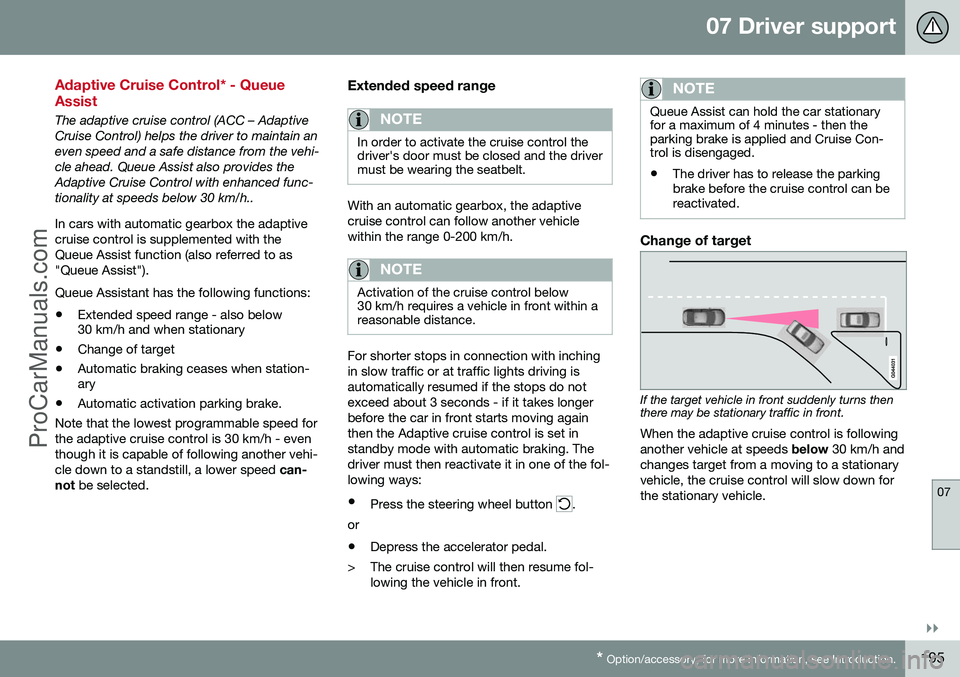
Change of target
If the target vehicle in front suddenly turns then there may be stationary traffic in front.
When the adaptive cruise control is following another vehicle at speeds below 30 km/h and
changes target from a moving to a stationaryvehicle, the cruise control will slow down forthe stationary vehicle.
ProCarManuals.co’
Page 198 of 442
||
07 Driver support
07
196* Option/accessory, for more information, see Introduction.
WARNING
When the cruise control is following another vehicle at speeds in excess of
30 km/h and the target is changed from amoving vehicle to a stationary vehicle, thecruise control will ignore the stationaryvehicle and instead select the storedspeed. • The driver must intervene him/herself and brake.
Automatic standby mode with change of target
The adaptive cruise control is disengaged and set in standby mode:
• when the speed is below 5 km/h and cruise control is not sure whether the tar-get object is a stationary vehicle or someother object, e.g. a speed bump.
• when the speed is below 5 km/h and thevehicle in front turns off so the cruisecontrol no longer has a vehicle to follow.
Termination of automatic braking at a
standstill
In certain situations, Queue Assist stops automatic braking at a standstill. This meansthat the brakes are released and the car maystart to roll - the driver must therefore inter-vene and brake the car himself/herself inorder to maintain its position. Queue Assist releases the foot brake and setsthe adaptive cruise control in standby modein the following situations:
• the driver puts his/her foot on the brake pedal
• the parking brake is applied
• the gear selector is moved to
P, N or R
position
• the driver sets the cruise control instandby mode.
Automatic activation parking brakeIn certain situations Queue Assist applies the parking brake in order to keep the car remain-ing stationary. This takes place if:
• the driver opens the door or takes off his/her seatbelt
• DSTC is changed from
Normal to Sport
mode
• Queue Assist has held the car stationaryfor more than 4 minutes
• the engine is switched off
• the brakes have overheated.
Related information
•Adaptive cruise control - ACC* (p. 188)
• Adaptive cruise control* - overview (p.190)
• Adaptive cruise control* - function (p.189)
Adaptive cruise control* - switch cruise control functionality
The adaptive cruise control (ACC – Adaptive Cruise Control) helps the driver maintain asafe distance from the vehicle ahead.
Changing from ACC to CCWith one press of the button the adaptivepart (spacing system) in the cruise control isdeactivated, at which point the car just fol-lows the set speed.
• Give a
long press on the steering wheel
button
- the combined instrument
panel's symbol changes from
to .
> By these means the standard cruise con- trol (p. 185) CC (Cruise Control) is activated.
WARNING
The car no longer brakes automatically after switching from ACC to CC - it merelyfollows the set speed.
Changing back from CC to ACCSwitch off cruise control with 1-2 presses on
in accordance with the deactivation
instructions (p. 194). The next time the sys- tem is switched on it is the Adaptive cruisecontrol that is activated.
ProCarManuals.co’
Page 266 of 442
08 Starting and driving
08
264* Option/accessory, for more information, see Introduction.
Starting the engine
The engine is started and switched off using the remote control key and the START/STOP
ENGINE button.
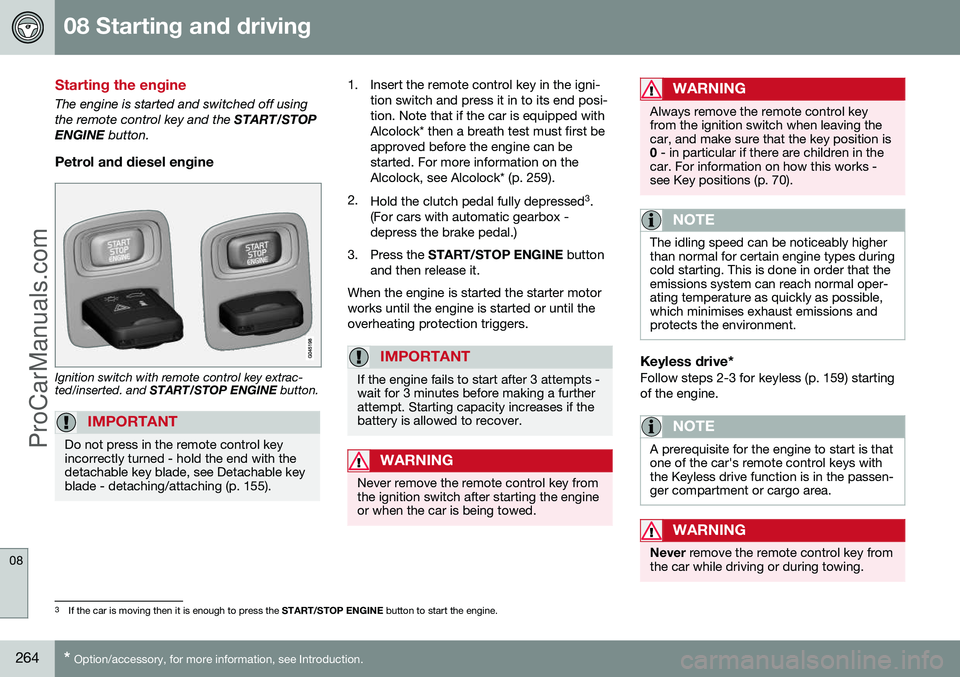
Petrol and diesel engine
Ignition switch with remote control key extrac- ted/inserted. and START/STOP ENGINE button.
IMPORTANT
Do not press in the remote control key incorrectly turned - hold the end with thedetachable key blade, see Detachable keyblade - detaching/attaching (p. 155).
1. Insert the remote control key in the igni-
tion switch and press it in to its end posi- tion. Note that if the car is equipped withAlcolock* then a breath test must first beapproved before the engine can bestarted. For more information on theAlcolock, see Alcolock* (p. 259).
2. Hold the clutch pedal fully depressed 3
.
(For cars with automatic gearbox -depress the brake pedal.)
3. Press the START/STOP ENGINE button
and then release it.
When the engine is started the starter motorworks until the engine is started or until theoverheating protection triggers.
IMPORTANT
If the engine fails to start after 3 attempts - wait for 3 minutes before making a furtherattempt. Starting capacity increases if thebattery is allowed to recover.
WARNING
Never remove the remote control key from the ignition switch after starting the engineor when the car is being towed.
WARNING
Always remove the remote control key from the ignition switch when leaving thecar, and make sure that the key position is0 - in particular if there are children in the
car. For information on how this works -see Key positions (p. 70).
NOTE
The idling speed can be noticeably higher than normal for certain engine types duringcold starting. This is done in order that theemissions system can reach normal oper-ating temperature as quickly as possible,which minimises exhaust emissions andprotects the environment.
Keyless drive*Follow steps 2-3 for keyless (p. 159) starting of the engine.
NOTE
A prerequisite for the engine to start is that one of the car's remote control keys withthe Keyless drive function is in the passen-ger compartment or cargo area.
WARNING
Never remove the remote control key from
the car while driving or during towing.
3 If the car is moving then it is enough to press the START/STOP ENGINE button to start the engine.
ProCarManuals.co’
Page 267 of 442
08 Starting and driving
08
265
Related information
•Switching off the engine (p. 265)
Switching off the engine
The engine is switched off using the
START/
STOP ENGINE button.
To stop the engine:
• Press
START/STOP ENGINE - the
engine stops.
If the gear selector is not in P position or if
the car is moving:
• Press twice on
START/STOP ENGINE or
hold the button depressed until the engine stops.
Related information
• Key positions (p. 70)
Steering lock
The steering lock makes steering difficult if the car is e.g. taken unlawfully.
Function
•
The steering lock unlocks when the remote control key is in the ignition switch 4
and the START/STOP ENGINE
button is depressed.
• The steering lock locks when the driver's door is opened after the engine has beenswitched off.
A mechanical noise can be perceived when the steering lock unlocks or locks.
Related information
• Starting the engine (p. 264)
• Key positions (p. 70)
• Steering wheel (p. 76)
4
Cars with Keyless drive must have a remote control key inside the passenger compartment.
ProCarManuals.co’
Page 271 of 442
08 Starting and driving
08
}}
* Option/accessory, for more information, see Introduction.269
Starting the engine – Flexifuel
Flexifuel engines can be driven on 95 octane unleaded petrol and bioethanol E85. Theengine is started in the same way as in a pet-rol-driven car.
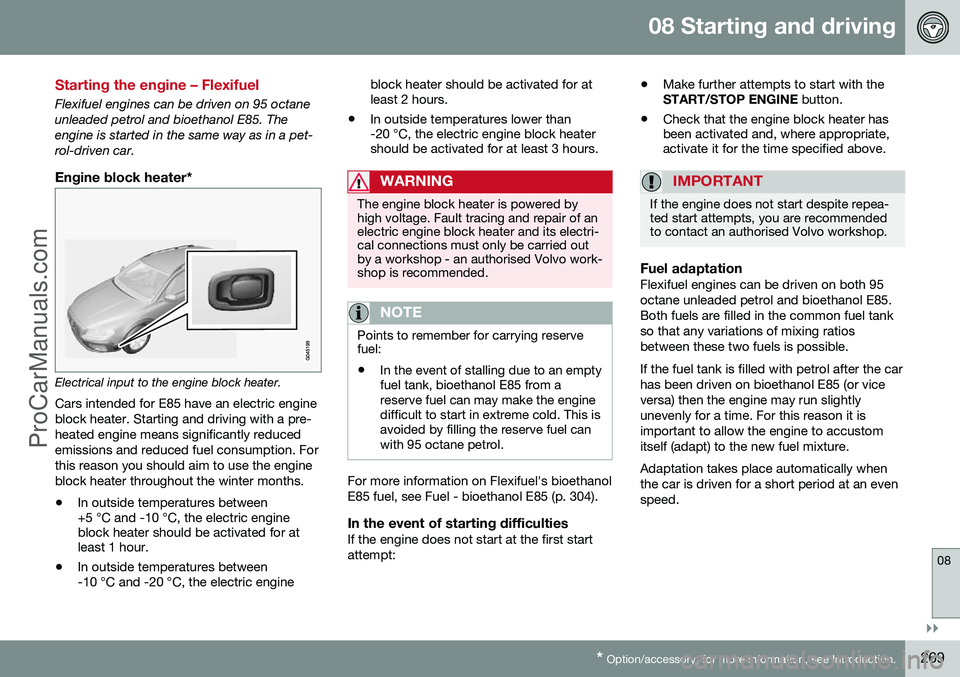
Engine block heater*
Electrical input to the engine block heater.
Cars intended for E85 have an electric engine block heater. Starting and driving with a pre-heated engine means significantly reducedemissions and reduced fuel consumption. Forthis reason you should aim to use the engineblock heater throughout the winter months. • In outside temperatures between +5 °C and -10 °C, the electric engineblock heater should be activated for atleast 1 hour.
• In outside temperatures between-10 °C and -20 °C, the electric engine block heater should be activated for atleast 2 hours.
• In outside temperatures lower than-20 °C, the electric engine block heatershould be activated for at least 3 hours.
WARNING
The engine block heater is powered by high voltage. Fault tracing and repair of anelectric engine block heater and its electri-cal connections must only be carried outby a workshop - an authorised Volvo work-shop is recommended.
NOTE
Points to remember for carrying reserve fuel:
• In the event of stalling due to an empty fuel tank, bioethanol E85 from areserve fuel can may make the enginedifficult to start in extreme cold. This isavoided by filling the reserve fuel canwith 95 octane petrol.
For more information on Flexifuel's bioethanol E85 fuel, see Fuel - bioethanol E85 (p. 304).
In the event of starting difficultiesIf the engine does not start at the first startattempt: •
Make further attempts to start with the START/STOP ENGINE
button.
• Check that the engine block heater hasbeen activated and, where appropriate,activate it for the time specified above.
IMPORTANT
If the engine does not start despite repea- ted start attempts, you are recommendedto contact an authorised Volvo workshop.
Fuel adaptationFlexifuel engines can be driven on both 95 octane unleaded petrol and bioethanol E85.Both fuels are filled in the common fuel tankso that any variations of mixing ratiosbetween these two fuels is possible. If the fuel tank is filled with petrol after the car has been driven on bioethanol E85 (or viceversa) then the engine may run slightlyunevenly for a time. For this reason it isimportant to allow the engine to accustomitself (adapt) to the new fuel mixture. Adaptation takes place automatically when the car is driven for a short period at an evenspeed.
ProCarManuals.co’
Page 282 of 442
||
08 Starting and driving
08
280* Option/accessory, for more information, see Introduction.
The Start/Stop function gives the driver the opportunity for a more active environmentallyconscious way of driving the car by means ofbeing able to allow the engine to stop auto-matically, whenever appropriate. Manual or Automatic Note that there are differences in the Start/Stop function depending on whether thegearbox is manual or automatic.
Related information
• Start/Stop* - function and operation (p. 280)
• Starting the engine (p. 264)
• Start/Stop* - settings (p. 285)
• Start/Stop* - the engine does not auto-start (p. 284)
• Start/Stop* - the engine auto-starts (p.283)
• Start/Stop* - the engine does not stop (p.282)
• Start/Stop* - involuntary engine stoppagemanual gearbox (p. 284)
• Start/Stop* - symbols and messages (p.286)
• Battery - Start/Stop (p. 365)
Start/Stop* - function and operation
Some engine and gearbox combinations are equipped with a Start/Stop function whichengages in the event of e.g. stationary trafficor waiting at traffic lights. The Start/Stopfunction is activated automatically when theengine is started with the key.
The Start/Stop function isactivated automatically whenthe engine is started with thekey. The driver is madeaware of this by the func-tion's symbol illuminating inthe combined instrumentpanel and the On/Off buttonlamp illuminating. All of the car's normal sys-
tems such as lighting, radio, etc. work as nor- mal even with an engine that has stoppedautomatically, except that some equipmentmay have the function temporarily reduced,e.g. the climate control system's fan speed orextremely high volume on the audio system.
Engine auto-stopThe following is required for the engine to auto-stop:
ConditionsM/A A
Declutch, set the gear lever in neu- tral position and release the clutchpedal - the engine stops automati-cally.M
Stop the car with the foot brake, and then keep your foot on thepedal - the engine auto-stops.A
AM = Manual gearbox, A = Automatic gearbox.
If the ECO function is acti- vated then the engine mayauto-stop before the car iscompletely stationary.
As verification and reminder that the engine is auto-stopped the com-bined instrument panel's symbol forthe Start/Stop function illuminates.
ProCarManuals.co’
Page 283 of 442
08 Starting and driving
08
* Option/accessory, for more information, see Introduction.281
Engine auto-start
ConditionsM/
A A
With the gear lever in neutral posi- tion:
1. Depress the clutch pedal or
press the accelerator pedal - the engine starts.
2. Engage a suitable gear and drive.M
Release the foot pressure on the foot brake - the engine auto-startsand the journey can continue.A
Maintain foot pressure on the foot brake and depress the acceleratorpedal - the engine auto-starts.A
The following option is also availa- ble on a downhill gradient: Release the foot brake and let the car move off - the engine startsautomatically when the speedexceeds normal walking pace.M +
A
A M = Manual gearbox, A = Automatic gearbox.
Deactivate the Start/Stop functionIn certain situations, it may advisable to temporarilyswitch off the automaticStart/Stop function - this iscarried out with a push ofthis button.
Disengaged function is indicated by the combined instrument panel'sStart/Stop symbol and the On/Offbutton's lamp extinguishing.
The Start/Stop function is disengaged until it is reactivated with the button or until the nexttime the engine is started with the key.
Start assistance HSAThe foot brake can also be released on anuphill slope to auto-start the engine - the HSA(p. 279) (Hill Start Assist) function preventsthe car from rolling backwards. HSA means that the pressure in the brake system remains temporarily available whilethe driver moves his/her foot from the brakepedal to the accelerator pedal for driving offwith the engine having stopped automatically.The temporary braking effect releases after afew seconds or when the driver depressesthe accelerator pedal.
Related information
• Start/Stop* (p. 279)
• Starting the engine (p. 264) •
Start/Stop* - settings (p. 285)
• Start/Stop* - the engine does not auto- start (p. 284)
• Start/Stop* - the engine auto-starts (p.283)
• Start/Stop* - the engine does not stop (p.282)
• Start/Stop* - involuntary engine stoppagemanual gearbox (p. 284)
• Start/Stop* - symbols and messages (p.286)
• Battery - Start/Stop (p. 365)
ProCarManuals.co’
Page 285 of 442
08 Starting and driving
08
* Option/accessory, for more information, see Introduction.283
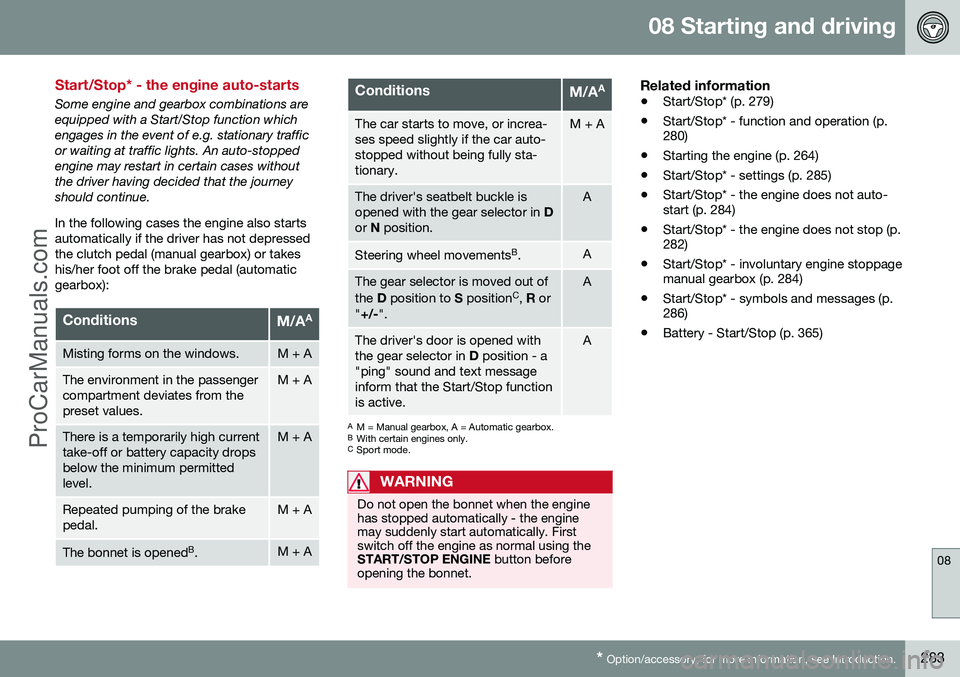
Start/Stop* - the engine auto-starts
Some engine and gearbox combinations are equipped with a Start/Stop function whichengages in the event of e.g. stationary trafficor waiting at traffic lights. An auto-stoppedengine may restart in certain cases withoutthe driver having decided that the journeyshould continue. In the following cases the engine also starts automatically if the driver has not depressedthe clutch pedal (manual gearbox) or takeshis/her foot off the brake pedal (automaticgearbox):
ConditionsM/A A
Misting forms on the windows.M + A
The environment in the passenger compartment deviates from thepreset values.M + A
There is a temporarily high current take-off or battery capacity dropsbelow the minimum permittedlevel.M + A
Repeated pumping of the brake pedal.M + A
The bonnet is opened
B
.M + A
ConditionsM/A A
The car starts to move, or increa- ses speed slightly if the car auto-stopped without being fully sta-tionary.M + A
The driver's seatbelt buckle is opened with the gear selector in
D
or N position.A
Steering wheel movements B
.A
The gear selector is moved out of the D position to S position C
, R or
" +/- ".A
The driver's door is opened with the gear selector in D position - a
"ping" sound and text messageinform that the Start/Stop functionis active.A
A M = Manual gearbox, A = Automatic gearbox.
B With certain engines only.
C Sport mode.
WARNING
Do not open the bonnet when the engine has stopped automatically - the enginemay suddenly start automatically. Firstswitch off the engine as normal using theSTART/STOP ENGINE button before
opening the bonnet.
Related information
• Start/Stop* (p. 279)
• Start/Stop* - function and operation (p. 280)
• Starting the engine (p. 264)
• Start/Stop* - settings (p. 285)
• Start/Stop* - the engine does not auto-start (p. 284)
• Start/Stop* - the engine does not stop (p.282)
• Start/Stop* - involuntary engine stoppagemanual gearbox (p. 284)
• Start/Stop* - symbols and messages (p.286)
• Battery - Start/Stop (p. 365)
ProCarManuals.co’
Page 288 of 442
08 Starting and driving
08
286* Option/accessory, for more information, see Introduction.
Start/Stop* - symbols and messages
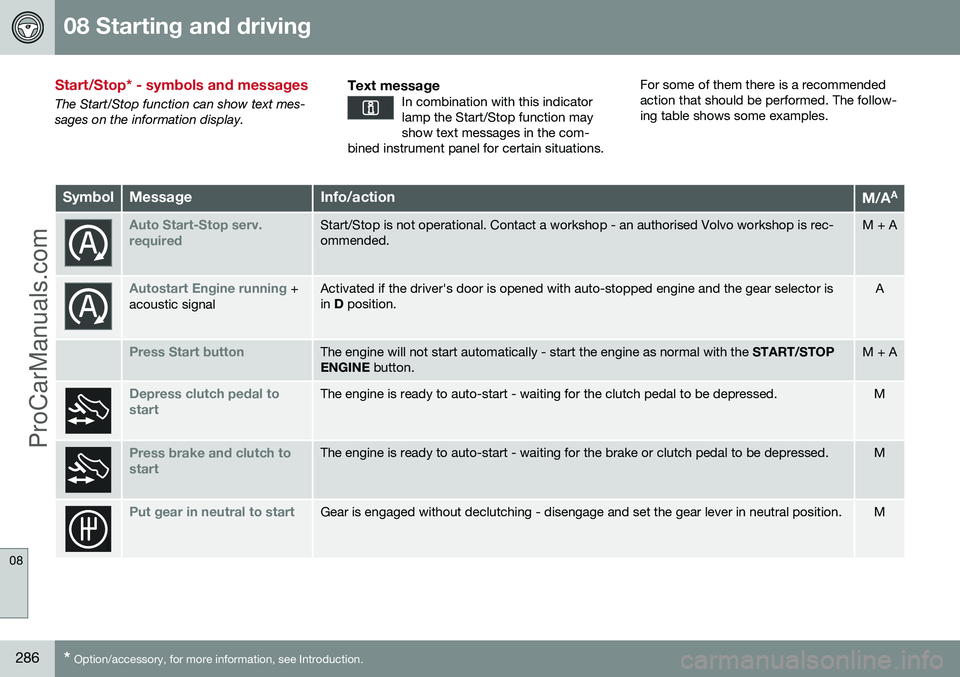
The Start/Stop function can show text mes- sages on the information display.
Text messageIn combination with this indicatorlamp the Start/Stop function mayshow text messages in the com-
bined instrument panel for certain situations.
For some of them there is a recommended action that should be performed. The follow-ing table shows some examples.
SymbolMessageInfo/actionM/A A
Auto Start-Stop serv. requiredStart/Stop is not operational. Contact a workshop - an authorised Volvo workshop is rec- ommended.M + A
Autostart Engine running +
acoustic signalActivated if the driver's door is opened with auto-stopped engine and the gear selector is in D position.A
Press Start buttonThe engine will not start automatically - start the engine as normal with the START/STOP
ENGINE button.M + A
Depress clutch pedal to startThe engine is ready to auto-start - waiting for the clutch pedal to be depressed.M
Press brake and clutch to startThe engine is ready to auto-start - waiting for the brake or clutch pedal to be depressed.M
Put gear in neutral to startGear is engaged without declutching - disengage and set the gear lever in neutral position.M
ProCarManuals.co’